


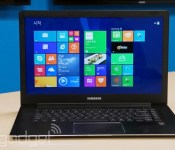
Samsung updates its 15-inch ATIV Book 9 Ultrabook with touch, a higher-res screen and lossless audio

Samsung launched its 13-inch ATIV Book 9 Plus Ultrabook with so much fanfare that it was easy to overlook the not-so-good news: The 15-inch Series 9 wasn’t getting any updates. In fact, you can still buy it today, but with last year’s Ivy Bridge chip and a 1,600 x 900 screen that doesn’t support touch. Great deal, right? Finally, though, Samsung is catching up: The company just announced a new version, the ATIV Book 9 2014 Edition, which ushers in an updated design and more current specs. Of note, Samsung made the screen slightly bigger, stretching it from 15 inches to 15.6, and boosted the resolution to 1,920 x 1,080. That might come as a bit of a disappointment to some, given that the 13-inch version has a 3,200 x 1,800 screen, but Samsung notes that ultra-high-res screens in larger sizes aren’t exactly easy to come by. So maybe you’ll see that in the next-next-gen version.
For now, at least, the screen is a bit brighter (300 nits vs. 250 in last year’s model) and you also get a regular HDMI port this time, as opposed to a micro-sized one. As you can imagine, the addition of the touchscreen, plus that slightly larger footprint, means the ATIV Book 9 is a good deal heavier — four pounds and 0.63 inch thick, versus 3.5 pounds/0.58 inch on last year’s model. The battery size is the same as ever, but thanks to Intel’s newfangled Haswell processors, runtime is now rated at 14 hours, up from 10. Samsung hasn’t revealed pricing yet, but we do know there will be at least two configurations: a Core i5 model with a 128GB SSD, and a Core i7 version with 256GB of storage.
In addition to refreshing the specs, though, Samsung also made some design changes that hint at what the 13-inch model might look like when it eventually receives another update. For starters, it has an aluminum chassis, rather than a magnesium one, and is devoid of all the garish logos we complained about on the ATIV Book 9 Plus. Samsung also retooled the keyboard, adding subtly contoured keycaps with a tactile, rubbery finish and a quieter sound. In our brief hands-on, we were indeed impressed with the feel of the keys, and the backlighting also seems brighter than it used to be. That said, it’s still a flat keyboard; there’s only so much travel you can get on a machine this thin.
There’s one more change you won’t see, but you’ll definitely hear: Samsung added lossless audio support so that if you’re listening to music using headphones or a compatible speaker, you’ll enjoy richer, clearer sound with shockingly little distortion. (You won’t get lossless quality on the notebook’s built-in speakers, though Samsung said it made some improvements there too.) Though this might seem like an obscure spec, given how relatively few of us are audiophiles, a Samsung rep told us that as more streaming services start supporting lossless, it wants to be ready with laptops that can handle it.
Finally, Samsung also refreshed its ATIV One 7 all-in-one, moving from a 23-inch screen to a 24-inch one. Other key specs include 1TB of storage, a Core i5 Haswell processor, dual 7-watt speakers, a tweeter, HDMI in/out ports and the ability to stream music over Bluetooth even when the system is powered down. No word on how much it’ll cost, but Samsung says it will reach the US sometime in the first half of this year. For now, stay tuned for some hands-on pics — and enjoy the photos we already took of the new ATIV Book 9.

Samsung CES 2014 press event liveblog

Based on what Samsung announced at CES 2013, we have a pretty good idea of what to expect at this year’s show. Namely, some mammoth (and ultra-expensive) UHD TVs, with a few high-end laptops thrown in for good measure. Needless to say, there will be big news, and we will be there taking it all in. Join us for the live play-by-play!


Filed under: Announcements, Home Entertainment, Samsung
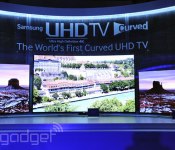
Samsung announces its curved 78-inch UHD TV: runs faster, works smarter

Samsung’s new curved UHD TV spans 78 inches and will be one of 10 new 4K sets hoping to convince you to make the upgrade. It’ll be joined by both the 55- and 65-inch models revealed at IFA last year, but thankfully we’ve now got a lot more details on what’s going on underneath those pixels and curves. The 78-inch U9000 model is just 1.2 inches deep, but gets a quad-core processor for all the heavy visual lifting. Samsung’s trying to appeal to those of you that like to use your tablets while watching TV too, with a new Multi-Link mode that will share the screen up to four ways, with the ability to use the built-in web browser or even watch related YouTube videos.
Upgrading the processor from previous models now means that the Smart TV gets to work from 1.8 seconds. Big deal? Well, when it took Samsung’s older models more than five seconds to warm up, it’s a pretty impressive improvement. There’s also those previously teased gesture upgrades, offering up the ability to switch channels and adjust volume with a finger — we didn’t get to test this out at Samsung’s fancy Vegas launch party, but we’ll definitely be running through all those features in the coming days. Following standard CES tradition, the company unfortunately wasn’t sharing pricing or availability details on these UHD TVs, but we’d hazard a guess that we’ll be hearing more in the next few months.
Filed under: Displays, Home Entertainment, HD, Samsung

We just got to watch Samsung’s big-ass 105-inch curved TV

Admit it: if you had the means (and the space) you’d absolutely want to own Samsung’s 105-inch curved 4K television set. Unfortunately, the vast majority of our readers can meet neither of the aforementioned criteria, which is why you must live vicariously through us. We’re happy to provide this much-needed public service. You’re welcome.
What’s it like? Well, the mammoth set is impressive to behold, and as you would expect, it delivers Samsung’s hallmark saturated colors and crisp picture… for the most part. Unfortunately, during our brief time watching the set, it looked like the TV or video feed was malfunctioning, as we saw some occasional pixelation and a single line flash on screen once or twice. Regardless, that 5,120 x 2,160 resolution is truly stunning, even if its 21:9 aspect ratio makes it a bit of an oddball — which is why we only got to see panoramic shots of cities and landscapes instead of regular movie or TV programming. Still, after this, going home to our meager 50-inch set will be tough.
Filed under: Home Entertainment, HD

Samsung shows off its 85-inch curved TV that bends with the touch of a button (video)

Somewhere to the right of Samsung’s huge 105-inch UHD TV, there was something even more curious. The TV was initially switched off, but otherwise plainly labelled for all to see: “85-inch bending TV.” We stuck around to see it in action — check it out after the break. Many will say why. Others, simply, why not?
Todd Thoenig contributed to this report.
Filed under: Displays, Home Entertainment, HD, Samsung
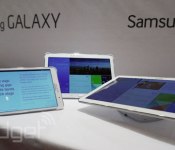
Samsung’s new Galaxy Tab Pro series comes in 12-, 10- and 8-inch sizes, but looks a little too familiar (hands-on)

Not stopping with its new productivity-centered Galaxy Note Pro, Samsung has three more tablets to launch this year. Say hello to the Galaxy Tab Pro, in 12.2-, 10.1- and 8.4-inch screen sizes. Curiously, the resolution is actually uniform across the three differently sized tablets: 2,560 x 1,600, with LTE and HSPA radios all baked in for good measure. If you’ve seen a Samsung Galaxy Tab over the last few years, then you’ll find the new range very familiar. If you liked those relatively clean lines and grippable bezels, then you’re going to like Samsung’s 2014. On the back, each tablet also borrows the leathery finish found on both the Note 3 and the most recent Note 10.1 iteration, which means it’s not difficult to grip and felt much better than just a glossy plastic surface.
We’ve got shots of the whole family below, while if you like your tablets in moving image, there’s a quick tour after the break.
The biggest Galaxy Tab Pro will come with 3GB of built-in RAM, versus just 2GB in its smaller siblings, but otherwise the devices share the spec sheet. From cameras (8MP on the rear, 2MP up front) to the launch OS (Android KitKat, thank you), troubled tablet buyers really just have to plump for their favorite size. It’s also worth mentioning that the 8-inch Tab Pro is vertically oriented, which makes sense — it felt more comfortable holding it that way. This smaller screen, with the same resolution as the others, meant it was pin sharp and helped make it our early favorite of the trio.
The whole range is less than 8mm thick, which (again) is just like the 2014 edition Note 10.1 — in fact, the 10.1-inch middle model is all but identical, aside from the lack of an S Pen and a drop down to two gigs of RAM. The Galaxy Tab Pro (12.2), however, seems like a harder sell. It’s just big. It’s not thick or unattractive, just big. However, it’s only this Galaxy Tab Pro that comes with the same $700 bounty of built-in software and services found on the Galaxy Note Pro. We’ve added the full breakdown below, but it includes 50GB of Dropbox storage as well as Bloomberg Businessweek and NY Times subscriptions. All three tablets are set to launch later this quarter.

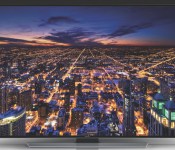
Samsung’s Ultra HD TVs will stream 4K video from Amazon, Comcast, DirecTV, Netflix and more

Samsung’s Ultra HD TVs won’t sell themselves — they need the content to justify all those extra pixels. To that end, the Korean tech giant has just announced partnerships with companies that will deliver 4K to the masses. Amazon, Comcast/Xfinity, DirecTV, M-Go and Netflix are all working with Samsung to stream the higher-resolution video format through their native Smart Hub apps. You won’t necessarily have to subscribe to a service to get extra-sharp media, though. Samsung is going to sell a UHD Video Pack that stuffs a hard drive full of 4K documentaries and movies, and it will offer downloads of additional shows throughout the year (for a total of 50), similar to the service Sony launched last year. Ultra HD content still won’t be ubiquitous in the wake of the deals, but they might give you a good excuse to buy your dream TV a little early.
Filed under: Home Entertainment, HD, Samsung, Amazon
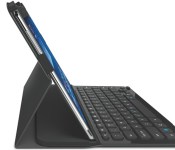
Logitech rolls out full-size keyboard case for Samsung’s Galaxy Note Pro and Tab Pro

Are you already planning to buy a Samsung Galaxy Note Pro or Tab Pro, but are worried that your mammoth tablet might go unprotected? Never fear, as Logitech has just unveiled a new Pro keyboard case that will shelter the 12.2-inch versions of both slates. While the design will look familiar to anyone who has seen one of Logitech’s earlier folios, the Pro’s extra space allows for a full, laptop-sized keyboard with a dedicated row of app shortcut keys. You will be paying a premium for going big, though, as the case will sell for $130 when it ships to the US in February.
Filed under: Peripherals, Tablets, Samsung
Source: Logitech
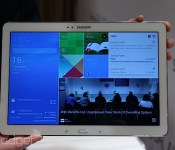
Samsung’s Galaxy Note Pro 12.2 is a gigantic tablet that promises extensive productivity (hands-on)

In much the same way that smartphones are trending towards larger screens, it appears that manufacturers like Samsung are experimenting with the same concept in the tablet realm. The company has just introduced its latest (and largest) Android-running Galaxy Note device called the Note Pro 12.2. Announced alongside the Tab Pro 12.2 at CES, the Note Pro offers the same S Pen functionality we’ve enjoyed on previous devices like the Note 3 and Note 10.1 2014 edition, and as usual, you’re going to see some refinements in Samsung’s firmware and user experience as well. The device will be available in LTE, 3G and WiFi flavors and is expected to launch sometime this quarter in various parts of the world.
As soon as we tried out the new Note Pro, we immediately noticed the size and weight difference compared to Samsung’s 10.1-inch offerings. Regardless of how much you trim its bezel, a 12.2-inch tablet simply isn’t designed for optimal portability, which means we’re more likely to use it as a coffee table device, special projects or conferences in the office. It’s just a little too awkward to hold for long periods of time. Aside from that and a glaring weight difference — 753g (1.66 lbs) on the 12.2, versus 547g (1.21 lbs) on the 10.1 — we were hard-pressed to find any variation between the 12.2-incher and the Note 10.1 2014 edition; it features the same design, button layout, “leather-like” back and display resolution (2560×1600, for a pixel density of 247 ppi). Other than that, what stands out on the 12.2, which runs Android 4.4 KitKat, is a few key new firmware features like Remote PC and Magazine UX. Continue reading below the gallery and our hands-on video to get more of our impressions.
First, let’s discuss the key specs. With a larger Note comes an even larger 9,500mAh battery, an 8MP rear camera paired with a 2MP front camera, “super clear” WQXGA LCD panel, IR support, dual-band WiFi 802.11 a/b/g/n/ac MIMO, USB 3.0 and Bluetooth 4.0. The LTE model promises support for 800/900/1800/2100/2600+850, while you’ll get quad-band HSPA+ (with a max of 21Mbps).
The Note Pro 12.2 runs Android 4.4 KitKat, but the user experience is drastically different than any Note we’ve played with before. Instead of being graced with a standard Android/TouchWiz home screen panel when pressing the home hardware button, you get whisked away to a new interface lovingly called Magazine UX. This experience consists of three separate customizeable screen panels: one for your office/workspace, another for personal use and a last one that handles your social networks and media. It’s much like My Magazine on the Note 10.1 2014 edition, but Samsung has streamlined the number of screens and assigned one of them as the default screen that pops up when you press the home button. So far, we haven’t found a way to opt out of that default, and Samsung confirmed to us that it is, in fact, stuck. You can still access the notification menu and status bar on the top, as well as the app tray in the lower right corner, but if you want the standard home screen, you’ll need to swipe to the right to bring it up.

The Multi-Window feature is also here, and Samsung is making good use of the extra screen space. Instead of two windows to manage simultaneous tasks, you can have up to four — and that’s not counting the ability to add pop-up windows on top of that. There are now two ways to access the menu, too: there’s the standard method of long-pressing the back button, but you can also swipe in from the right bezel to pull up the list of compatible apps. Tapping on those apps will make them float above the screen as a pop-up window, and minimalizing each one turns them into small circular icons a la Facebook’s Chat Heads. If you want the four-screen setup, you’ll need to drag-and-drop the app into its rightful place.
The last major firmware enhancement Samsung boasts is its Remote PC setup. We weren’t able to demo these features in our hands-on, but they certainly sound promising enough. Granted, the idea of accessing your PC or Mac remotely isn’t anything new by a long shot, but we can’t complain about having the feature baked into the device without needing third-party assistance. In fact, Samsung has built in a UI that allows you to drag and drop files between your PC and Note Pro, which would be a huge asset to our productivity when we’re away from our computer. The ability to edit and save files is also included, as well as support for Cisco WebEx Meetings.

In terms of performance, we didn’t see much of a difference between this and the Note 10.1 2014, which is likely because Samsung opted to use the same silicon inside: the LTE version of the Note Pro comes with a 2.3GHz quad-core Snapdragon 800, while the 3G and WiFi-only options are fitted with the same Exynos octa-core processor as the Note 10.1 unit we reviewed a few months ago; each version comes with 3GB RAM. As luck would have it, the models on-hand were Exynos-powered, and unfortunately we saw all-too-familiar signs of stutter and lag in even the most basic of tasks. Since we didn’t get a chance to see final production firmware or hardware (although we suspect it’s pretty close to final at this point), we don’t want to come to final conclusions on the tablet’s performance until we get a chance to put it through the paces in our full review when it officially launches.
And for those of you wondering: no, we didn’t try to put it up to our ears like a phone.
Ben Harrison and Mat Smith contributed to this behemoth post.

Michael Bay makes a brief, awkward appearance at Samsung’s CES press conference

Michael Bay just came onstage during Samsung’s big Ultra HD showcase, but abruptly left the stage without announcing anything. Apparently tripped up by a balky teleprompter, the director of the Transformer movies said he’d try to wing it before giving up in apparent frustration.
Filed under: Home Entertainment, HD

