


Old dogs can learn new tricks: Samsung Galaxy Gear gets an update to Tizen
 The Samsung Galaxy Gear, in hindsight, was a leap of faith for Samsung. Releasing the most powerful smartwatch onto the market would have seemed logical and putting Android on it would have seemed equally logical. The success, however, never eventuated and the Galaxy Gear ended up being plagued with poor battery life and garnered its fair share of criticism. The release of the Samsung Gear 2 and Gear 2 Neo signalled a change in strategy for Samsung, entrusting their smartwatches with the Tizen OS. However, it looks like they might be giving its predecessor one last hurrah as the Samsung Galaxy Gear gets an update to Tizen.
Overall, although the device is essentially wiped and a new OS put on, the Tizen Galaxy Gear will vary very little visually. The improvements, however, mostly lie beneath the surface with improvements to performance and battery life as well as several new features like a music player, voice control for the camera and customizable shortcuts. All of these can be found on the Gear 2 and Gear 2 Neo, but it’s nice to see that Samsung cares enough to give the Galaxy Gear a second lease on life. Currently, the update is only officially available through Samsung Kies, otherwise you’ll have to manually install it; as this is an effective wipe of data, be sure to back up anything before updating.
With prices of the Galaxy Gear falling quickly, this might be a good chance for Samsung devices owners to cheaply get in on the Tizen smartwatch bandwagon. What do you think about Samsung putting Tizen on the Galaxy Gear? Let us know your thoughts below.
Source: SamMobile via Phandroid
//<![CDATA[
ord = window.ord || Math.floor(Math.random()*1E16);
document.write('’);
//]]>

Engadget Daily: Apple’s dev conference, Samsung’s VR headset and more!

Today, we watched Samsung announce it’s building a VR headset with Oculus VR, dissected rumors surrounding WWDC 2014, took Samsung’s Chromebook 2 for a test run and investigated the technology behind holograms. Read on for Engadget’s news highlights from the last 24 hours.

Samsung is working with Oculus on a media-focused VR headset
Yep, Samsung’s building its own VR headset, and with a little help from Oculus VR. But rather than have its own screen, Sammy’s device will use your smartphone as the display instead, commandeering the handset’s processor for tracking functionality.

What’s on tap for Apple at WWDC 2014
WWDC 2014, Apple’s yearly developer conference is right around the corner and the speculation is heating up, especially regarding Apple’s supposed entry into home automation. Lucky for you, we’ve put together a handy collection of our own expectations for the June 2nd event. Enjoy!

Samsung Chromebook 2 review: A $400 laptop never looked so good
Chromebooks are gaining steam, and the Samsung Chromebook 2 is no exception. Sure, it’s got a bit of Sammy’s pseudo-leather on top, but don’t let that fool you. Between its fantastic trackpad, HD display and sturdy keyboard, the Chromebook 2 packs the best Chrome OS experience on the market.

What you need to know about hologram people
Michael Jackson’s recent posthumous performance didn’t cease to amaze, but you might be surprised to know that it wasn’t a true hologram, it was an age-old illusion. Read on as our own Timothy Seppala investigates modern holographic techniques and how to tell the difference.
You also might like:
Filed under: Misc
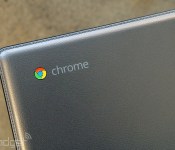
Samsung Chromebook 2 review: A $400 laptop never looked so good

Chromebooks seem to be having a moment. Which is odd, because for a while there, nobody seemed to be giving them a chance. Since the first Chromebook came out, about three years ago, Chrome OS devices have gotten flak for not being able to do as much as Windows machines. And to be fair, they couldn’t, especially in the beginning. Manufacturers responded by slashing prices, but that led to a whole other problem: endless netbook comparisons. Indeed, many Chromebooks until now have been small, dirt-cheap and woefully low-end. To be avoided, mostly.
Lately, though, the tides have been changing. Nearly every PC maker is making a Chromebook, if not several, and many will soon be upgrading their models with heavier-duty Intel Core i3 CPUs — processors so powerful you might actually consider a Chromebook for your next laptop. Samsung, meanwhile, is taking a different approach: It’s decked out its new 11- and 13-inch Chromebook 2 laptops with a stylish faux-leather lid, similar to what it did on the high-end Galaxy Note 3 and Galaxy Note Pro. Samsung also went with a full HD screen on the 13-inch model, making it the only notebook I know that’s this cheap with this nice a display. With a starting price of $320 ($400 for the 13-incher), the Chromebook 2 is on the pricey side, but then again, you’re paying for better quality. So is it worth it?
Hardware
It’s easy to make fun of Samsung for its apparent leather fetish. I mean, if I wore pleather with everything, you’d laugh at me, too. But, as they say, don’t knock it till you try it. Aside from the corny “stitches” lining the perimeter of the lid, the fake leather (available in gray only on the 13-inch model) actually gives the device a premium feel. That’s partly because of the resemblance to real leather, but there’s something else at work, too: The textured material does a good job masking fingerprints. Scratches, too. Even now that I’ve been using it a week, the machine still looks fresh. Not bad for a laptop that only costs $320.
Of course, your opinion might change once you flip the machine over. Whereas the lid has been done up to look like a car seat, the bottom is made of plain gray plastic. Not that there’s anything wrong with that; plenty of pricier PCs are made of this stuff. It’s just that the pleather and plastic look mismatched, especially since the underside is more prone to picking up finger grease. Oh well. Not a big deal — it’s not like you have to look at the bottom that often, right?
Lift the lid and the Chromebook 2 looks like other recent Samsung laptops — save for the Chrome OS hotkeys, of course. That same gray plastic clothes the palm rest, keyboard deck and bezels, with few embellishments, except for some subtle chrome trim around the trackpad. It’s not fancy, but it doesn’t look cheap, either. That’s the most you can ask for at this price, really.

In-hand, the Chromebook 2 is about as heavy as a 13-inch Ultrabook, which is to say it weighs around three pounds (3.06, to be precise). As a bonus, it’s noticeably thinner and lighter than the Toshiba CB30 Chromebook, one of the only other 13-inch Chrome OS devices available right now. That guy comes in at 3.3 pounds and 0.8 inch thick, compared with 0.65 inch for Samsung’s model.
Sometimes, though, the Chromebook 2 feels heavy for what it is: a laptop with a browser for an OS. If it can’t do as much as a proper Ultrabook, it probably shouldn’t weigh as much, right? The thing is, that’s not really a fair comparison. For one, 13-inch Ultrabooks cost way more. In fact, you’ll be hard-pressed to find a Windows laptop at this size and this price that’s this well-made (or has this nice a screen). And while a tablet would weigh less, you’d be stuck with an inferior typing experience (because let’s not pretend keyboard cases are the real thing). It’s all about your priorities, I suppose. That said, if you’re bothered by the weight here, you should look into the 11-inch Chromebook 2; that weighs 2.65 pounds.
Whichever version you get — the 11- or 13-incher — the selection of ports will be the same. On board, there are two USB connections (one 3.0, the other 2.0), a full-sized HDMI socket, a headphone jack, a standard lock slot and a microSD reader to complement the industry-standard 16GB of storage. Like all Chromebooks, this one comes with 100GB of Google Drive space, so perhaps local storage will be a moot point. That said, the microSD slot thing is a bit of a shame, because it means you can’t insert the full-sized memory card you might be using in your standalone camera. If you’ve gotten used to taking shots on a phone or tablet, though, being able to swap in a microSD card could actually be a convenient setup.
Display

I’ve got some good news and bad news. On one hand, the Samsung Chromebook 2 has a full HD, 1,920 x 1,080 display, making it sharper than most other Chrome OS devices (not to mention my aging MacBook Air). And that’s not just me reciting the spec sheet: The screen is noticeably sharper than other 13-inch laptops, especially those you’re likely to find in this price range. It’s great if you’re streaming movies; it’s great if you want to browse photos; it’s great if you want to see more of your Gmail inbox on the screen at one time. Basically, it’s great all the time.
The problem is that while the pixel count has improved, the quality of the screen still has a ways to go. The LED panel doesn’t make use of any wide-angle viewing technology, which means you’ll have to fiddle with the screen position to get the white balance right. Tilt the display forward even a little and the colors will start to wash out, making on-screen text harder to read. (This can be an especially big challenge if you’re typing with the machine in your lap.) Thankfully, viewing angles are a bit better from the sides, so you could, if you wanted, have a Netflix-viewing party with a couple friends. In any case, the viewing angles aren’t much better on competing devices, so perhaps this is all a moot point.
On a positive note, the screen is brighter than on the last-gen model: 250 nits, up from 200. As it is, the screen has a near-matte, anti-glare finish that cuts down on reflections, but you’ll notice even fewer artifacts if you bump up the brightness. For me, this came in handy when I was working near a window, with lots of natural light pouring in; in situations like that, I needed all the backlight I could get. Same goes if you find yourself working outside on a patio (lucky you!). My only warning — and this goes without saying — is that the higher brightness setting drains the battery faster. At max brightness, for instance, the battery-life tray said I had 88 percent, or three and a half hours, left. With more moderate brightness settings, an 88 percent charge would actually mean I had nearly seven hours remaining.
Keyboard and trackpad

Yes, 13-inch Chromebooks might be heavier than their smaller counterparts, but they also have the best keyboards: well-spaced and never too cramped. And of the bunch, Samsung’s might actually be best in class. The chiclet-style buttons here are well-laid-out and amply sized — none of the major keys (Shift, Ctrl, et cetera) have been cut down. They also have a surprising amount of travel; they’re cushier than the Toshiba Chromebook’s, for instance. Underneath it all is a sturdy panel that holds up well against furious typing. All told, then, it’s just as good as any keyboard you’d find on a more expensive laptop. And, it goes against the stereotype that Chromebooks are the new netbooks.
Like most Chromebooks, this one does not have a touchscreen. That can be a shame at times, especially if you’ve gotten used to swiping and tapping in Windows 8. Fortunately, though, what the Chromebook 2 lacks in touch input, it makes up for with a fantastic trackpad. It’s large, with plenty of space for your fingers, and it responds smoothly to multi-touch gestures, like two-finger scrolling. Single-finger navigation is also precise. Why can’t all touchpads be this fine-tuned?
Performance, battery life and software

Chrome OS hasn’t changed much since our last Chromebook review, late last year. After three years of incremental improvements, the operating system is finally in a place where you can multitask, as well as do a decent amount of work offline, without the aid of an internet connection. It helps to be able to resize, minimize and move windows, as well as pin apps to the desktop and swipe upward on the touchpad to see all open apps. Gmail and Google Drive support offline access, as do many third-party apps available in the Chrome App Store. Just remember to go through the syncing process while you still have a WiFi signal. Google’s G+ Photos app works offline as well, though the editing tools are crude compared to what you’d enjoy on a full editing suite like Photoshop. You can print, too, through Google Cloud Print; keep in mind, though, that not all printers are compatible. Lastly, Chrome OS was recently updated with improved folder organization, along with support for voice commands (so long as they’re in English).
As limited as Chromebooks might still seem, they’ll still be enough for some people, whether it be children, young’uns used to doing everything online or folks who need a lightweight, secondary laptop to use on trips. You might miss certain major apps, like Skype or iTunes, but if you can’t live without those, then a Chromebook probably isn’t for you; get an inexpensive Windows laptop and call it a day.

What’s interesting is that while Chrome OS hasn’t undergone any drastic changes these past few months, Chromebooks seem to be exploding with newfound power. As it is, most models use an Intel Celeron processor. Later this year, we’ll see a handful that step up to Intel Core i3 CPUs. Samsung has so far been the exception: The Chromebook 2 runs on a Samsung-made chip, as did the model that came before it. This year, the chip is an eight-core processor, similar to the one inside certain versions of the Galaxy S5. As with the GS5, the Chromebook 2 only uses four cores at once; it’s just that the system is smart enough to pick the four that are best for the job at hand. In addition, this year’s model comes with more RAM — 4GB, up from 2GB. (It’s worth noting that 4GB of memory is uncommonly generous for a Chromebook. Then again, competing models have more robust processors.)
I won’t rule out the possibility that Core i3 Chromebooks are more powerful than the Chromebook 2; in fact, I’m sure they are. That said, I have some questions about diminishing returns: How much better will the Core i3 models be, and what impact will they have on price? Until I test my first Core i3 Chrome OS device, I unfortunately can’t compare performance. Suffice to say, though, the octa-core chip inside the Chromebook 2 was pretty much always enough for me: I could open lots of tabs and jump around between them. I could stream Netflix without a hiccup. There might be a difference between a Core i3 and a mobile chip, but for some people — many people, even — that difference will be irrelevant.
It also seems that by using an ARM-based mobile processor, Samsung was able to extract some real battery life gains. Under ideal conditions, the company promises 8.5 hours for the 13-inch model, and eight hours for the 11-incher. Even with constant video playback and the brightness set to a relatively high 10 out of 16 bars, I still managed eight hours and 22 minutes of runtime. Not bad — not bad for a Chromebook, and not bad for a similarly priced Windows laptop, either.
Configuration options

With the addition of the new Chromebook 2 line, Samsung now has three Chromebooks for sale: the new 11- and 13-inch models, along with the last-gen model, which also has an 11-inch screen. All in all, the two Chromebook 2 models have more in common than not. Both use the same octa-core chip, 4GB of RAM, 16GB of built-in storage and the same port selection. Both have a leather-like back, though the 11-inch version is sold in black and white, whereas the 13-inch model is only available in gray. The biggest difference — aside from size — is screen quality: The 11-inch version has 1,366 x 768 resolution, while the bigger one goes up to 1,920 x 1,080. Accordingly, the 11-inch one starts at $320, while the 13-inch version retails for $400.
If you want to save money, you can still pick up the last-gen Samsung Chromebook for $250. Some caveats to note: It’s less powerful, with a dual-core Samsung chip and half the RAM. It offers slightly less battery life (seven hours vs. eight on the new 11-inch model), with a plainer design. The screen resolution is still 1,366 x 768, with a brightness rating of 200 nits (only the 13-inch version is 250-nit). Interestingly, while the new model is, generally speaking, a modest improvement, the old edition is actually lighter: 2.43 pounds, compared with 2.65 for the new one. So it has that going for it. All told, the differences between the two 11-inch models are fairly modest; if you go for the 13-inch version, you’re in for a bigger leap in quality (sharper screen, et cetera).
The competition

Truth be told, you’re unlikely to find a better Chromebook than the 13-inch Chromebook 2. That said, it can’t hurt to weigh your options before you lay down the 400 bucks, right? As I’ve hinted throughout this review, the Chromebook 2′s most direct competition comes from Toshiba, whose debut Chromebook also has a 13-inch screen. In its favor, Toshiba’s model is a hundred dollars cheaper, and promises up to nine hours of battery life, but its screen (also non-touch) has a lower resolution of 1,366 x 768. The machine itself is thicker and heavier, with a plain, if inoffensive design. I can tell you from my personal experience, too, that although the keyboard is decent, it’s flatter and slightly more cramped than Samsung’s. The touchpad isn’t as reliable, either. You might still consider this on account of the price, but as they say, you get what you pay for.
Indulge me for a moment, because I want to slide even further down the quality scale. Toward the bottom is the Acer C720, which starts at just $200, or $300 with a touch screen. That’s right, touch is an option here — something I can’t say about many of the other brands I’ve listed. And even with touch, the price is pretty fair. Just keep in mind that Acer cut many a corner to get the cost down. In particular, the keyboard is about as cramped and flimsy as a netbook’s. And I should know: I’ve been living with the C720P as my main home computer for several weeks now.

Hewlett-Packard, meanwhile, has two Chromebooks on offer: an 11-inch model ($279) and a bigger 14-inch one for $299. It’s worth noting that the 14-incher is an improved, more powerful version of the original 14-inch Chromebook HP came out with, so we encourage you to disregard the low score we gave that earlier model. Even so, the Chromebook 14 is still one of the biggest Chromebooks, meaning it’s going to be bulkier and heavier than almost anything out there. Also, though you get more screen real estate, you don’t actually get more pixels; the resolution tops out at 1,366 x 768. Meanwhile, Dell’s Chromebook 11 goes for $279 and up. Over in our product database, it has an aggregated score of 78, which means reviewers around the internet generally like it, even if it’s not their favorite.
Lastly, Lenovo and ASUS have both recently announced some new Chromebooks, but none of them are out yet. You could always wait around, though it seems you already have lots of options, with Samsung’s Chromebook 2 arguably being the best.
Wrap-up

Chromebooks still aren’t for everyone: There will always be people who need stronger performance. Who need full offline access. Who need to install Skype. If that’s you, no Chromebook will do, even if it is wrapped in fake leather. For a certain kind of customer, though — schools, students on a budget, a traveler in need of a lighter laptop — Chrome OS could be compelling. Those people need a sturdy keyboard for typing, but can get by doing almost everything online. If that’s you, I would recommend the Samsung Chromebook 2 over everything else in its class. Yes, it’s pricier than its rivals, but for the money you get a sharp screen, a premium-looking design, long battery life and a keyboard-trackpad combo so good even “regular” PC makers should take note. At $400, it doesn’t feel like a netbook; it feels like a proper laptop. And I dare say, it’s nicer than any Windows notebook you’ll find at this price. Keep that in mind the next time you’re perusing the budget shelf at Best Buy.
Daniel Orren and Edgar Alvarez contributed to this review.
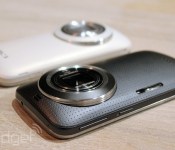
Samsung’s latest smartphone-camera hybrid launches in the UK tomorrow

Samsung appears intent on single-handedly bringing back the word “cameraphone,” if the Galaxy S4 Zoom and recently announced Galaxy K Zoom are anything to go by. The newer of the two does a much better job of hiding its hybrid bloodline, and tomorrow (May 31st) it arrives in the UK at various online and bricks-and-mortar outlets, including at Carphone Warehouse and Samsung’s own Experience stores. If the official K Zoom product page is any indication, you’ll be looking at around £400 all-in, and we doubt they’ll be a wealth of carrier-subsidised deals on offer for the niche device. The K Zoom doesn’t quite rival the Galaxy S5 in terms of raw power, but it’s the 20.7-megapixel camera with 10x optical zoom you’ll be buying it for; and, how can you resist something with a Selfie Alarm mode?
Filed under: Cellphones, Cameras, Samsung
Source: Samsung

Radio Shack offering Samsung Galaxy S5 for $79 with trade-in

RadioShack on Friday announced its lowest price to date for the Samsung Galaxy S5. For a limited time the flagship smartphone will be sold for $79.99 to those who trade in an eligible working smartphone on the Trade & Save program.Normally priced at $199.99, this is a pretty tough deal to pass up. In addition to the handset discount, customers can also save on accessories; Otterbox and Mophie are $10 off and PointMobl screen protectors are $5 off.
The post Radio Shack offering Samsung Galaxy S5 for $79 with trade-in appeared first on AndroidGuys.
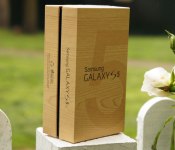
Engadget UK giveaway: win a Samsung Galaxy S5 courtesy of Pixa Prints

Samsung’s Galaxy S5 is the best in its flagship series to date (duh), but if you don’t have an upgrade loaded, it’ll set you back a pretty penny. If only you could get hold of a brand-spanking new one for absolutely nothing (you can see where we’re going with this, right?). Thanks to our friends over at Pixa Prints, that’s exactly what we have to offer one lucky UK reader. And, because Pixa Prints is in the business of creating personalized mobile and tablet accessories, as well as other gifts and prints from photos and designs, we’ve also got six phone cases made especially for the winner to keep their new GS5 cosy. If you fancy your chances, head to the Rafflecopter widget below to submit up to three entries, and give the rules a quick read while you’re at it, would ya? Good luck (Taken voice).
- Entries are handled through the Rafflecopter widget above. Comments are no longer accepted as valid methods of entry. You may enter without any obligation to social media accounts, though we may offer them as opportunities for extra entries. Your email address is required so we can get in touch with you if you win, but it will not be given to third parties.
- Contest is open to all residents of the UK, 18 or older! Sorry, we don’t make this rule (we hate excluding anyone), so direct your anger at our lawyers and contest laws if you have to be mad.
- Winners will be chosen randomly. One (1) winner will receive one (1) Samsung Galaxy S5 and six (6) cases.
- If you are chosen, you will be notified by email. Winners must respond within three days of being contacted. If you do not respond within that period, another winner will be chosen. Make sure that the account you use to enter the contest includes your real name and a contact email or Facebook login. We do not track any of this information for marketing or third-party purposes.
- This unit is purely for promotional giveaway. Samsung, Pixa Prints and Engadget / AOL are not held liable to honor warranties, exchanges or customer service.
- The full list of rules, in all its legalese glory, can be found here.
- Entries can be submitted until June 2nd at 11:59PM BST. Good luck!
Filed under: Cellphones, Samsung
Source: Pixa Prints (UK), (Ireland)
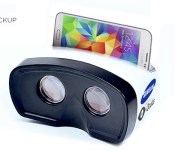
Samsung is working with Oculus on a media-focused VR headset

Last week we told you about Samsung’s unannounced virtual reality headset: a peripheral that enables VR interaction for flagship phones from the world’s largest phone manufacturer. This week we’ve got far more details. First things first, Samsung’s headset is the fruit of a collaboration with Oculus VR, the Facebook-owned virtual reality startup that both literally and figuratively kickstarted the current wave of VR products.
Oculus is handling the software-side of the product, while Samsung handles the hardware. The deal is a swap: Oculus gives Samsung early access to its mobile software development kit and helps develop user interface software, while Samsung gives Oculus early access to its next-gen OLED screens. And yes, Oculus is still making its own, gaming-focused, PC-based virtual reality headset; that’s why it needs next-gen, high-pixel density OLED screens from Samsung. Join us below for new details about the device itself, as well as more on the unlikely partnership between two tech giants.
THE PARTNERSHIP

Samsung wants to be first to market with a virtual reality headset, but it doesn’t want to invest the time and money that Oculus and Sony are. Oculus VR wants to create a high-quality virtual reality headset specifically for gaming, and it doesn’t want to rush one out. And thus, a convenient partnership is born between the two companies: Samsung makes the OLED screens that Oculus needs for its final product, Oculus makes the software that Samsung needs for its upcoming headset.
The partnership comes with both risks and rewards. On one hand, Samsung is a consumer electronics giant, and a company of that size investing in marketing and producing its own VR headset massively grows the medium. On the other hand, if it’s a bad product, it has the potential to poison the well — that is, it could be another Virtual Boy, thus making consumers even more apprehensive about VR as a medium.
We’re told by sources close to both companies that Samsung’s using an early form of Oculus’ mobile SDK — an exclusive use as part of the deal — developed in part by John Carmack. We were also told that the OLED screens that Oculus is getting as part of the deal are higher def than 1080p, and that the screens will also be used in at least some of Samsung’s next flagship phones. And this is where things get weird.
HARDWARE DIFFERENCES

Rather than having its own screen, Samsung’s VR headset uses your phone directly. It plugs in using an existing port on your phone (think: microUSB) and becomes the screen. The headset itself has built-in sensors — an accelerometer at very least — so any motion tracking functionality is offloaded from your phone’s processor.
The folks we spoke with who have dev kits are still running the headset on Galaxy S4 phones, and we’re told it’s a shockingly good experience. That said, the consumer device will run either a new version of the GS5 or potentially its successor — either way, it’ll be tweaked for optimal VR performance. The headset can be used with a paired game controller or as a standalone media device, navigated solely through motion and voice (we’ll discuss that more below).
Wait! Before you write it off forever as “one of those headsets that straps your phone to your face,” we’re told there are some pretty great benefits to using a mobile device. For one, the rear-facing camera allows for video passthrough. That’s to say, “You can see through the phone using the rear camera, which shows a video feed of the outside world to your eyes.” Pretty intense sounding, but a smart addition for making long-term use more realistic. While the latency is too great to make augmented reality applications possible, it’s a convenient way to pause whatever you’re doing and, say, have a sip of a tasty beverage.
There are also buttons on the unit itself. There are standard Android buttons — Home, Back, Recent Apps — as well as some extra stuff. It’s not clear what the other buttons are, but we’re told that none of them are used for interactivity. That could of course change by the final unit; all of this could, potentially, but this is the current state.
SOFTWARE

Pictured: Oculus Rift’s original dev kit with a Leap Motion attached
The dev kit runs a basic UI. You’re in an empty virtual 3D space, and you interact with various demos (floating objects) by nodding at them. Nod to select, basically. Don’t expect that form of interactivity to make it into the final product, though. We’re told that nodding isn’t a strong contender for the final software; voice, touch (tapping on the headset spikes the accelerometer, which can be used as a “click”), and just outright using a gamepad are all on the table.
At this stage, the UI/OS is still very early. Heck, Oculus’ mobile SDK is still very early, so the software it’s able to build isn’t close to a finished product. We were told about two different demos, neither of which involved interactivity. In one, you’re at the beach with jamming hippies. In another, you dive from a plane (which is said to be, “pretty fucking nerve-wracking”). In both instances, our sources say they were impressed with the device.
IT’S ALSO A MEDIA DEVICE
Finally, expect Samsung to tout this device as a media player as well. “But Ben,” you say, “There are very few media experiences for virtual reality headsets.” That’s a fact! Samsung’s apparently looking at its VR device as a head-mounted display as well (like Sony’s HMZ line). Gaming experiences are said to be pared down, and there’s no guarantee it’ll ship with a gamepad. This means that, while it’s a gaming device, and there are VR games in the works right now for Samsung’s headset, it’s intended for a much larger market than just the early adopters who’ll take a chance on VR. Both Samsung and Oculus are taking an interesting risk in partnering on this headset, and we’re looking forward to hearing more. Perhaps you’ve got one and want to tell us all about it? Please feel free to get in touch.
Oculus VR declined to comment for this story, and we haven’t heard back from Samsung.
Mockup artist: Daniel Cooper
Filed under: Cellphones, Displays, Gaming, Peripherals, Wearables, Software, HD, Mobile, Samsung
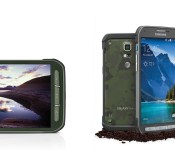
AT&T now selling rugged Samsung Galaxy S5 Active

AT&T and Samsung on Friday announced the immediate availability of the Samsung Galaxy S5 Active, a rugged take on the flagship smartphone experience. Much like the standard model, the S5 Active comes with a 5.1-inch FHD display, a 16-megapixel rear camera, and integrated heart rate monitor. Powered by Android 4.4 KitKat, the phone also boasts a 2.5GHz quad-core processor, 4G LTE, and a host of Samsung software touches.
Designed to withstand all sorts of bumps and bruises, the phone is mil-spec 810G rated and can handle extreme temperatures, humidity, drops, and shock. And, yes, it’s also waterproof.
Samsung has added a “convenience key” to the side of the Galaxy S5 Active which launches all apps related to outdoor activity on one screen.
The Samsung Galaxy S5 Active retails for $200 with a two-year service agreement or can be purchased with AT&T Next; $27.50 on Next 18, $35.75 on Next 12.
The post AT&T now selling rugged Samsung Galaxy S5 Active appeared first on AndroidGuys.
Samsung Galaxy Gear update switches it from Android to Tizen

When Samsung debuted its new line of Tizen-powered wearables, it looked like the original Galaxy Gear had been put on notice. Instead of leaving early adopters in the cold, the Korean smartphone maker has decided to make good on its promise to bring the wearable up to date — by switching it from Android over to its own OS. The update includes improvements to performance and battery life, a new standalone music player, customizable shortcuts, and voice-controlled camera commands. By installing the update, which at the moment is available as a manual download or via Samsung’s Kies software, you will lose any third-party tweaks or unsupported Android features that you’ve previously installed. However, you will gain many of the features present on the Gear 2 (except those dependent on additional sensors). Samsung hasn’t pushed an over-the-air update out yet, but that may not be a bad thing. It means some that may have accepted the update out of hand are less likely to make a decision they might regret later.
Filed under: Wearables, Software, Mobile, Samsung
Source: SamMobile
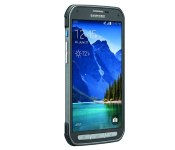
Galaxy S5 Active launches on AT&T: tougher shell, same water resistance

We knew it existed but now it’s finally crawled out of some jungle or scuba-diving vacation to go official and Samsung’s Galaxy S5 Active is available today on AT&T. While ruggedized phones typically lack.. something compared to flagship devices, this time it looks like no notable corners were cut. The Galaxy S5 Active has the same full-HD AMOLED 5.1-inch screen, while the 16-megapixel camera and fingerprint sensor are also lodged into the rugged smartphone. That said, water-resistance is now part of the original GS5′s bag of tricks, which makes it less of selling point here. Regardless, there’s the shock-resistant dust-proof shell and a burlier look: even if it’s dreamy rendered view we’re seeing here, the metallic details and finish could well win over Galaxy fans that aren’t pro-plastic — we’re certainly intrigued.
Samsung’s also added a “convenience key” on the edge that will boot up all your “outdoor apps” (presumably maps and activity trackers) on a single application screen. If active means fitness to you, you might also be tempted by the offer of a $50 discount on the Gear Fit alongside the purchase of the GS5 Active. The adventure-ready phone will come in Camo Green, Titanium Grey and the not-so-rough sounding Ruby Red colors and will cost $200 on two-year contracts.
Filed under: Cellphones, Mobile, Samsung
Source: AT&T

