Skip to content

Posts tagged ‘Samsung’

5
Jan

1 year free of Netflix, Milk Music with purchase of Samsung Galaxy S5, Note 4, Tab S, or 4k TV


product-lockup

For the few of you who held off to get a new device until after the new year, you’re in luck as Samsung is rewarding you with a year subscription to Netflix and Milk Music.  In order to qualify, you must purchase a Samsung Galaxy S5, Galaxy Note 4, Tab S, or any Samsung 4k television.  The deal is valued over 100 dollars and is limited to the first 115,000 people who register so don’t procrastinate on this promotion.  You will also need proof of purchase in order to qualify for the free Netflix deal.

Purchases only qualify if they were made between Jan. 4-17.

Claim your reward here – Samsung Promotions


http://www.androidguys.com/pubgalaxy/728×90.html


CES 2015 Coverage Sponsored By:

The post 1 year free of Netflix, Milk Music with purchase of Samsung Galaxy S5, Note 4, Tab S, or 4k TV appeared first on AndroidGuys.

4
Jan

Android Authority this week


Youtube Android Authority

The final days of 2014 were quiet, but 2015 is starting off with a bang. International CES is about to begin in fabulous Las Vegas, and companies are already drumming up their products. In the past week, we went through the finest apps of 2014, learned about the LTE version of the Moto G (2014), got a peek at Samsung’s Lollipop ROM for the Note 3, talked about a longstanding memory bug in Android,  heard rumors about upcoming devices from Samsung, HTC, and Xiaomi, and got the first CES announcements.

Welcome to Android Authority this week.

Video roundup

Here’s Jayce’s video take on the events of the week.

Inside AA HQ

The end of the year is the time to look back, draw the line, and lay the roadmap for the year to come. Android developed dramatically in 2014, extending to wearables, TVs, and cars. It’s been an amazing year for Android Authority as well. Our traffic grew steadily throughout, but really took off over the last few months. On the video side, our YouTube channel hit the one million subscribers milestone and we’re now a top 25 Science & Tech channel. We have 36,000 forum users and almost two million social followers. We added new team members, and several contributors joined full time.

All in all, we’re proud of what we achieved in 2014, and deeply humbled and grateful at the same time. We have lots of things to improve in 2015 and we want to know your opinion on where we need to work first. To give us your feedback, take a minute to fill out our yearend survey here.

As you’re reading this, the AA team is already on the ground in Vegas, attending pre-briefings, talking to manufactures, and working to bring you the best coverage around. Stay tuned for a tons of news and hands-on coverage throughout the week.

As always, check out our Sunday Giveaway: today, the excellent Nexus 9 is up for grabs – good luck everyone!

The stuff you shouldn’t miss

Here are some interesting posts for your Sunday reading:

Top news of the week

And here are the top news in the Android world this week:

Moto G 2014 LTE

new moto g first look aa (20 of 46)

Samsung Lollipop

samsung galaxy s5 aa blue logo 3

Lollipop memory leak fix

Samsung rumors

New Xiaomi devices

Redmi 2

HTC Desire tease

Alcatel

Sound off

We always want to hear your feedback. Whether it’s criticism or praise, feel free to tell us what you think about Android Authority’s content, design, and community. Comment here or get in touch with us on our social channels:

Happy Sunday!


4
Jan

Will it, won’t it: Samsung Galaxy S6 and variant will be at CES 2015, but only to select audience


We’ve been hearing a lot about the Samsung Galaxy S6 in the last few weeks and it seems we might be getting our first look at it sooner than expected. It’s been suggested that the Samsung Galaxy S6 and variant will be at CES 2015 this week, but it is also said to be viewable only […]

The post Will it, won’t it: Samsung Galaxy S6 and variant will be at CES 2015, but only to select audience appeared first on AndroidSPIN.

3
Jan

Samsung promotion to extend 1-year Netflix subscription to buyers of some devices


samsung_netflix_promotion

If you are considering buying one of Samsung’s top devices for the new year and you enjoy Netflix, you may want to check out this new promotion that is getting ready to start up according to some leaked information. The tip indicates that buyers of the Samsung Galaxy S 5, Galaxy Note 4, or the Galaxy Tab S will get one free year of Netflix, an offer that is supposed to be good for both new and existing Netflix subscribers.

Sources indicate the promotion will run from January 4th through January 17th, although only the first 115,000 customers to take advantage of the offer will get the Netflix credit. Consumers who get one of the qualifying Samsung devices can head to SamsungPromotions.com to stake their claim.

source: AndroidCentral

Come comment on this article: Samsung promotion to extend 1-year Netflix subscription to buyers of some devices

3
Jan

Samsung Promotion, 1 year Netflix with new Galaxy S5, Note 4 or Tab S


samsung galaxy logo 2

Samsung is working on a little treat for new Galaxy S5, Note 4 and Tab S buyers. Starting January 4th, Samsung is giving eligible U.S. buyers one free year of Netflix to go along with their new Samsung device.

If you are looking to buy one of these Samsung devices this weekend, you best hold off until after noon EST on Sunday. Of course, you best not procrastinate either, Samsung is only offering the promotion to the first 115,000 buyers.

With purchase in hand, head on over to SamsungPromotions.com to register. If you get in on time, and are a U.S. mainland or District of Columbia consumer that is 18 or older, Samsung will get you a credit for your new or existing Netflix account, good for 12 months of streaming service. Worth more than $100.

netflix-buffering BoxSlant

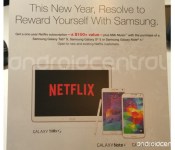
The information for this deal is not live yet, but the folks over at Android Central captured a shot of the promo flyer, see below. In addition to Netflix, the flyer is proud to announce that you’ll also get access to Samsung’s music streaming service Milk Music.

Again, those eligible devices are Samsung’s latest flagship phone, the Galaxy S5, their handy tablet the Galaxy Tab S, and the phone that lives in between those two in terms of size, the Galaxy Note 4. If you are not looking for a phone or tablet, there are also 10,000 4K streaming Netflix promos up for grabs for certain 4K Samsung TV purchases.

The Samsung promo for one year of free Netflix streaming starts this Sunday, January 4th, and runs until either January 17th or until 115,00 people claim the offer, whichever comes first.

Is a free year of Netflix worth picking up one of these Samsung devices?

Samsung Netflix Offer Jan 2015


3
Jan

Download: Leaked build of Android 5.0 for Galaxy Note 3 (N9005)


Samsung_Galaxy_Note_3_TA_Back_Bottom_Galaxy_Note_3_Logo

If you’re a Galaxy Note 3 owner who’s hankering for the official Android 5.0 Lollipop over-the-air update to start rolling out, you’re destined for a rather long wait as Samsung is currently focusing its attention on bringing the update to more recent devices first. However, if you can’t wait, your handset carries the model number N9005, and you want to get your hands on it early, you can now download and install a leaked beta build.

This ROM is designed exclusively for the International unlocked variant of the Galaxy Note 3 (SM- N9005) and can be flashed onto the handset using the ODIN tool for PC. We recommend only installing the software if you have some knowledge of sideloading otherwise you could brick your device leaving it rendered useless.

With that being said, if you have a Note 3 and want to try the firmware, you can download it from the XDA Developers forum, where you’ll also find installation instructions.

All the changes you’d expect to find in Lollipop are bundled into this upgrade, including support for multiple accounts, improved notifications, a smoother multitasking experience and the recently-announced Material Design guidelines, in addition to the latest version of Samsung’s TouchWiz user interface.

Source: XDA


Come comment on this article: Download: Leaked build of Android 5.0 for Galaxy Note 3 (N9005)

3
Jan

Galaxy S6 Rumored to Feature Curved Display, new Designs


samsung-gear-phonesAccording to a recent post on Reddit by a confirmed Samsung employee, the Galaxy S6 may be a surprise to us all.Whereas Samsung has been making modest improvements each year in its ‘S’ line for about five years, supposedly the Korean tech company will be “starting from scratch” with the design of the sixth iteration of the ‘S’ line.

Specs for the new device are standard for an upcoming phone in 2015: 3/4 GB RAM, a better smartphone, a Snapdragon 810, and other mild to moderate improvements. Design is where the real improvements will come from. Tech lovers have long lamented Samsung’s getting lost in the design doldrums and keeping the look of their devices static for the past few years. This year, to show just how ready it is to reconsider its ideas pertaining to design, the S6 project has been named “Project Zero.”

According to SamsungRep2015, the original poster in the thread, there are at least two different prototypes, one with a design like the Note Edge, and another with dual curved edges. He went on to say, “Samsung prototypes a lot and things change extremely rapidly.”

It seems that these are exciting times for Samsung and the tech world. What do you thing about some long-awaited design changes? LEave a comment below and let us know what you think!

Source: Reddit/Reddit

Via: BGR

Come comment on this article: Galaxy S6 Rumored to Feature Curved Display, new Designs

2
Jan

How to install Lollipop-based CyanogenMod 12 on the Galaxy S2 (I9100)


samsung galaxy s2

The Samsung Galaxy S2 was released on February 13th, 2011, and was the predecessor of the first Android device to truly rival the iPhone in both sales and popularity. Four years is almost an eternity in the world of tech, but that hasn’t stopped the XDA Developers community of finding a way of getting a stable Android Lollipop build up and running on the Galaxy S2.

The build was posted by XDA user Lysergic Acid, and is a pure, yet unofficial Cyanogenmod 12 build. From what I have read in the thread, the newest version of the build seems fairly stable, but still has some issues with HD video recording and for some some internal storage bugs. This is a 5.0.2 Lollipop release, so there won’t be any signs of Touchwiz here. This particular build is for the I9100 only and does require root. Make sure you are flashing this ROM on the correct device before you get started.

As with most builds on XDA, you will need to root your device. I have rooted the S2 a million times, and although very simple to do, here’s the standard disclaimer: You root at your own risk. If you brick your device, Android Authority or XDA Developers are not responsible. You are in essence voiding your warranty, meaning Samsung can deny you service should they choose to.

Now if you decide you want to try it out, you can root your device (literally in minutes by following the simple step by step instructions here via Chainfire’s CF Root method). Once you have root, you’ll need a KitKat compatible custom recovery to flash the ROM.

Once you have root, do the following:

  1. MAKE A NANDROID BACKUP!
  2. Download the ROM and the Google Apps package from the XDA thread here and put it on your sd card.
  3. Boot into recovery and wipe all data.
  4. Flash the ROM.
  5. Flash the Gaaps package.
  6. Reboot your phone, and remember the first boot can take a little longer than usual.
  7. Profit.

If you want to see it running before flashing it, XDA member @Troubadour666 put together this video that shows the ROM running on the S2:

I imagine it was no easy feat getting CM12 to run on a four year old device (and especially this well), so be sure to hit that thanks button to everyone responsible if you choose to flash the ROM. While it’s not realistic to expect Lollipop to be as fast and smooth as it is on most (but not all) newer devices, having a stable daily driver in Lollipop will most likely excite a few S2 users out there. Be sure to let us know in the comments how it’s running on your Galaxy S2.


2
Jan

Samsung now rolling out Android 5.0 update for Galaxy S5 in Russia and Malaysia


galaxy-s5-samsung-sign

If you own a Galaxy S5 and live in either Russia or Malaysia, you may want to listen up, as Samsung has just started pushing out the much-anticipated Android 5.0 Lollipop update to all unlocked variants of the handset located in these regions.

All the changes you’d expect to find in Lollipop have been bundled into this upgrade, including support for multiple accounts, improved notifications, a smoother multitasking experience and the recently-announced Material Design guidelines.

The full changelog can be seen below:

Material Design: You will quickly notice a whole new colorful look and feel to your device – from fluid animations to new application and system themes, colors and widgets.

Notifications UI & Priorities: In order to alert you to the most timely and relevant information, the format and behavior of notifications have evolved:

  • notifications will appear on the lock screen and are intelligently ranked by type and who sent them.
  • you double-tap to open one, swipe left or right to clear one, or clear all notifications from the bottom of the list.
  • you can set the priority and privacy of notifications for each application.
  • very high priority notifications will pop up briefly over other applications so that you can take action.
  • when you dismiss a notification on one device it will be dismissed on your other Android devices, if they are connected to the Internet.
  • you can further tailor how notifications behave with the new Downtime and Ambient Display settings (see below).

New Interruptions & Downtime Settings: You can tailor how interruptions behave, choosing to allow all, none, or only priority interruptions.  You can personalize what counts as a priority interruption (reminders, events, calls, messages) and even tailor them to be from only contacts you specify.  The Downtime setting will allow only priority interruptions during the times and days that you specify.  e.g. allow only priority interruptions on the weekend.

Recent Apps (Multi-tasking): The redesigned Overview space (formerly called Recents) will include both applications and separate activities within those applications.  For instance, each open tab in Chrome will also appear here along with recent applications; both your Gmail Inbox and a draft email message will appear as separate cards.  This provides a consistent way to switch amongst tasks.

Ambient Display: While your phone’s display is off, Ambient Display can show notifications without turning on the full display. This will be triggered when a notification arrives. You will see notifications similar to that shown on the lock screen.  You can turn this feature on in the Display menu in Settings, and note that it will increase the power consumption of your device.

Motorola Assist and Downtime: Motorola Assist integrates the new Downtime settings to control when you don’t want to be disturbed.  Motorola Assist also now uses the new Interruptions settings so that you can customize exceptions, such as letting only people on your starred contacts list get through.

Flashlight: Lollipop includes a new flashlight option as part of Quick settings (swipe down with two fingers from the status bar to see it).

Share your Device: You can now set up multiple user accounts on your phone.  Guest mode is enabled by default.  You can give calling and text privileges to other users of your device, or restrict them as you like in the Users menu under Settings. Note that the personalized Motorola experiences (Motorola Assist, Motorola Connect)  are for the owner account only. The Motorola Camera, Motorola Gallery, and Motorola FM Radio applications support multiple user accounts.

Pin a view/app: Screen pinning allows you to keep a specific app or screen in view. For example, you can ‘pin’ a game and your child will not be able to navigate anywhere else on your phone.

Battery: The Battery settings panel now shows an estimated projection for how much time you have left while discharging or charging.  You can also enable a new battery saver mode that will save power by reducing performance and most background data operations to extend your battery life.

Smarter Internet Connections: With Android Lollipop, your phone will not connect to a Wi-Fi access point unless there is a verified Internet connection. This feature improves hand-offs between Wi-Fi and cellular connections, helping to maintain your video chat or voice-over-IP (VoIP) call as you switch.

Performance: Your phone now uses the new Android Runtime to help optimize application performance.  After upgrading to Lollipop, your applications will undergo a one-time optimization process.  Note that the optimization for ART requires more space.

Smart Lock (Trusted Devices): Android Lollipop adds native support for allowing trusted devices to keep your phone unlocked (such as your Moto 360, a Bluetooth car kit or headset, etc.).  Smart Lock replaces the prior trusted device capability in your Motorola phone.  Note that you will need to add your trusted devices back after the transition to Lollipop in the Security settings menu under Smart Lock.

Security: Encryption can now use a stronger 256-bit key to help protect your data.  Note that the stronger key willonly be used after you perform a factory reset on Android Lollipop.  Otherwise encryption will continue to use 128-bit key.  You can turn on encryption in the Security settings menu.

As is customary with all manufacturer updates, the upgrade is being distributed in stages, but if you don’t feel like waiting for a notification to hit your handset confirming that it’s ready for your device, you can search for the update manually.

Come comment on this article: Samsung now rolling out Android 5.0 update for Galaxy S5 in Russia and Malaysia

1
Jan

Samsung is testing at least three different prototypes of the Samsung Galaxy S6


Samsung intends for the Samsung Galaxy S6 to blow our socks off – this much was obvious when we heard that Samsung had codenamed the Galaxy S6 “Project Zero” as if to imply that they are starting from scratch. Well, it seems Samsung is doing just that, and is actually currently testing with at least three […]

The post Samsung is testing at least three different prototypes of the Samsung Galaxy S6 appeared first on AndroidSPIN.