


Nintendo Switch Release Date, Price and Specs – CNET
Nintendo’s got a completely new game system coming next year, and it’s totally modular. The Nintendo Switch is a lot of things: a tablet, a console and even a portable multiplayer tabletop game system.
The Switch is a bold move, not a surprise from a company that’s made bold hardware moves its modus operandi since the ’80s. The Nintendo DS introduced crazy dual-screen touch gaming in a handheld; the Virtual Boy was a tabletop 3D game system. The Wii introduced motion gaming and a wild reinvention of the classic game controller. The 3DS has glasses-free 3D. The Wii U has its bizarre quasi-tablet GamePad controller.
Nintendo Switch: The first pictures
See full gallery


1 – 4 of 22
Next
Prev
Compared to all those wild ideas, the Switch leans on a concept that’s relatively sane. It’s a combination portable system and home console. It might bridge the gap between Nintendo’s long-lasting handheld game business and its TV-connected gaming. And, maybe, it’s pointing towards the future of Nintendo and where it’s headed as a company.
Here’s what we know so far, now that the Switch has been announced.
It’s a system that will play connected to a TV, or by itself on the go.
Nintendo demonstrated that the Switch will play its games connected to a TV like a regular games console, or as a tablet-style handheld with its own controls. It can also be played while standing up on its own kickstand, with detachable controllers.
It pops into a dock.
The “Nintendo Switch Dock” is where the Switch lives when it’s in your living room. The tablet slides into the dock, and then seems to instantly switch into a TV-connected mode. This is a bit like the Nvidia Shield tablet, which had a similar play-on-TV, play-on-the-go idea.
You can hot-switch between TV mode or handheld mode on the fly.
Nintendo’s preview video shows people playing games on the TV, then popping the tablet out and playing on the sofa. Games should instantly switch, and play in either mode.

The Switch in both of its forms.
Nintendo
Its Joy-Con controllers detach and become stand-alone wireless controllers.
The Switch has a flexible idea of controllers: two “Joy-Con” side pieces slide onto the edges of the Switch tablet, adding four buttons and an analog stick on each side, plus shoulder buttons, just like the Wii U GamePad. But when these are slid off, they can become standalone Wii remote-like controllers, held sideways to play games. The Joy-Con controllers also slide into another accessory, the Joy-Con Grip, turning them into a full controller separate from the tablet.
There’s a kickstand, too.
The Switch can stand up on a table, and games can be played with the controllers like a mini console. Local multiplayer games can be played on one or several Switch tablets. It looks like several people could play games on one together, or network several for LAN-style gaming.
There’s a cartridge slot.
Besides downloading games, the Switch will have its own little card-based cartridges. It doesn’t support any DVD or Blu-ray-style discs.
Is it backwards-compatible with old Nintendo games? We don’t know.
Nintendo did show the Switch using 3DS-like cartridges, but the safe bet is that this will use its own category of software.
What games will it play?
We don’t know about much that yet, but Nintendo’s upcoming Legend of Zelda: Breath of the Wild will be a launch title. Nintendo’s new Switch video also shows a Splatoon game, Skyrim, a Mario Kart title, a Super Mario game, and an official NBA basketball game.
Nintendo’s already announced a lot of development partners.
The list of partners unveiled by Nintendo is pretty extensive: Activision, EA, Capcom and more are onboard. Of course, they haven’t said what games they’ll release. Ubisoft’s CEO Yves Guillemot said in a statement, “With the Nintendo Switch’s unique capacities and design, Nintendo could again redefine the way we play games. The Nintendo Switch is accessible at its core and also seizes on the growing trends of sharing more experiences and playing anywhere at any time.” Of course, similar statements were made by developers during the launch of the Nintendo Wii U.

Some of the partners developing for the Switch already.
Nintendo
It’s powered by an Nvidia Tegra processor.
Nvidia says the Switch uses a custom Tegra processor. Nvidia Tegra processors have previously powered Nvidia’s Shield gaming tablets and other mobile devices, but Nvidia promises this processor is “based on the same architecture as the world’s top-performing GeForce gaming graphics cards,” adding a revamped physics engine and other tools. Nvidia’s Tegra processor might sound like it’ll be less powerful than a full “normal” console, but it’s hard to tell how advanced the Switch will truly be.
It’s arriving March 2017.
We don’t yet know the price.
Samsung HW-K950 review – CNET
The Good The Samsung HW-K950 is one of the best sound bars we’ve ever heard for both movies and music. The dedicated rear speakers deliver increased immersion compared to single-speaker designs. It’s cheaper than buying a Dolby Atmos receiver and speakers.
The Bad It’s expensive for a sound bar, and DTS support is limited. Dolby Atmos is only available on a limited number of titles compared with other surround formats.
The Bottom Line The Samsung HW-K950 combines the discreet looks and simple setup of a sound bar with truly impressive sound for both movies and music.
Visit manufacturer site for details.
For the longest time my recommendation for people shopping for sound bars was “spend no more than $500.” Sound quality doesn’t typically take a massive leap beyond this amount, because the necessity of keeping cabinets small and bar-like restricts how good they sound.
In the past year I’ve been rethinking my approach after hearing excellent-sounding models such as the $899 Sony HT-NT5, the $1,100 Definitive Technology Studio W, and now the $1,500 Samsung HW-K950. The Sony and Samsung speakers make the most of the available sound bar real estate, specifically by by angling their drivers back into the cabinet, which enables them to have larger diameters. The larger the driver, the better it can sound.
The Studio W was CNET’s favorite high-end sound bar, with great looks, wireless streaming and superb sound for movies, but the Samsung has eclipsed it in almost every way. It sounds clearer, it’s a more capable streamer thanks to the Samsung Multiroom app, and it has superior features. The Samsung HW-K950 is the best reason I could think of to spend over a grand on a sound bar. Especially if you listen to music a lot.
The HW-K950 is now available in the US for $1,499 , in the UK for £1,299 and in Australia for $1,999.
Design
 View full gallery Sarah Tew/CNET
You’ll notice how I said the Samsung is better than the DefTech in almost every way. Well, the Studio W has it over the Samsung in the design department, with its solid aluminum billets and its massive subwoofer.
The Samsung still has some design touches that elevate it above the usual “black oblong you flop in front of your telly,” however. The endpieces are thin slices of brushed aluminum that curve subtly at the edges. The front has a black steel mesh that conceals a blue LED text readout — no confusing flashing lights here. The speaker is suitable for most bigger televisions at just 3 inches tall, 48 inches wide and 5 inches deep.

View full gallery Sarah Tew/CNET
Most sound bars don’t come with rear speakers, but the ones that do, including the K950, provide a sense of immersion during movies that faux surround ‘bars can’t match. The two satellites are roughly desktop audio monitor size at 8 inches tall, and our own resident Audiophiliac Steve Guttenberg remarked that they seemed like “real speakers.” High praise, indeed, coming from Steve!

View full gallery Sarah Tew/CNET
The included subwoofer is 16 inches tall and deep, and half that across. It’s not the discreet, hide-under-the-couch size of the sub that comes with the Vizio SB4551-D5, but it’s not toweringly ugly, either.

View full gallery Sarah Tew/CNET
The remote control looks just like the ones CNET’s David Katzmaier liked so much on Samsung’s 2016 TVs, and it’s a big improvement over the dire clickers included with most sound bars. The small wand comes with a handy dedicated volume control for the subwoofer, and it feels premium when you hold it in your hand.
Features
The HW-K950 is one of the first products to be designed at Samsung’s audio facility in California, after the Radiant360 range. It is one of two Samsung sound bars that can handle Dolby Atmos. The other is the HW-K850 ($999), which is virtually identical to the K950 but doesn’t include rear speakers.

View full gallery Sarah Tew/CNET
The HW-K950 incorporates a 5.1.4 setup for Dolby Atmos: five surrounds, one subwoofer and four overheads. The Samsung HW-K950’s main speaker has dual sets of ceiling-facing drivers as well as three forward-firing driver sets that come with a dedicated tweeter in each. On my visit to the Samsung audio lab, the technicians explained that the drivers are paper-based, which they claim has better acoustic properties than other popular materials such as Kevlar.

View full gallery Sarah Tew/CNET
Connections include two HDMI ports and one output, optical digital audio, 3.5mm analog stereo audio in addition to Bluetooth and Wi-Fi. The system is compatible with the proprietary multiroom system Samsung brought into the world with the Shape system back in 2014. As such it is also compatible with the Radiant360 speakers.
The Samsung will decode Dolby Atmos from Blu-rays as well as from Vudu/Netflix streams if the source device supports it. I tested it with an Nvidia Shield (3.2 firmware) and found it was able to output Dolby Atmos test scenes from Vudu correctly. While the Samsung will decode Dolby in all its forms, unfortunately for movie fans the sound bar is unable to decode DTS:X, and further will only decode DTS streams in stereo.
The Yamaha YSP-5600 costs about the same but comes without a sub (in the US) or rear speakers. The Yamaha will decode DTS:X, however.
Multiroom app

View full gallery Screenshot by Ty Pendlebury/CNET
The competition for multiroom music is fiercer than ever, but I expect things to consolidate in the next year or two, thanks largely to the influence of Google Cast/Home.
In the meantime, Samsung’s Multiroom app is one of the best following an update earlier this year. The app now features a very straightforward layout which lists the music on your phone first and then lets you scroll horizontally through other streaming services available. The list is quite comprehensive and includes most of the big apps like Spotify (Connect), Pandora, Amazon Music and Tidal. I wasn’t surprised to learn that Samsung doesn’t support Apple Music.
Razer Blade Pro Release Date, Price and Specs – CNET

Razer
Razer doesn’t mess around when it comes to premium gaming laptops, and the totally refreshed 17-inch Razer Blade Pro is the case in point. Razer says that the new Blade Pro was designed for “enthusiasts and power users who want desktop performance but don’t want to sacrifice portability.”
So Razer put an Nvidia GTX 1080 — the new hotness when it comes to graphical overkill — in a laptop under an inch thick. Of course, you’re going to pay for all those fancy new internals. Clench up, because here it comes: The Blade Pro starts at $3,699, or £3,499 (that converts to around AU$4,815).
“It’s definitely not for everybody,” says product manager Kevin Sather. “It’s for people who need to get the most out of a PC.”
Okay. Breathing again? Here’s what you get for that princely sum:
Key Specs
- Nvidia GeForce GTX 1080 (with 8GB GDDR5X VRAM)
- 6th-gen Intel quad-core i7 processor
- 17.3-inch touchscreen, 3840×2160-pixel resolution with G-Sync
- Mechanical keyboard
- VR-ready
- 512GB, 1TB or 2TB of PCIe solid state storage in RAID-0
- 32GB of memory
- 16.7 by 0.9 by 11 inches (427 by 23 by 281mm)
- Aluminium chassis
- 7.8 pounds (3.5kg)
- 99Wh battery (the largest you can legally take on a plane)
- Ports: USB Type-C / Thunderbolt 3, 1x 3.5mm headset jack, 3xUSB

The 17.3-inch Razer Blade Pro is much bigger than its siblings.
Sean Hollister/CNET
If you compare it to the previous model of the 17-inch Razer Blade Pro, you’ll see it’s packing — no exaggeration — double the numbers in some key specs like RAM, storage and screen resolution.
Most “desktop replacements”, or at least laptops with that kind of processing power, clock in much larger than the incredibly slim Blade Pro.

Yup. It’s pretty thin.
Razer
Oh, and the touchscreen (did we mention it’s a touchscreen?) displays 100 percent of the Adobe RGB color gamut, potentially making it suitable for photo and video editing. (There’s also full-size, full-depth SD card slot, so you can quickly offload your DSLR photos). It’s a G-Sync screen, too, for smoother gameplay.
The Blade Pro is also the first laptop to use Razer’s new low-profile mechanical switches that can mimic the feel of full-sized mechanical keyboards. The keys definitely feel like they’ll take some getting used to: while they’ve got a satisfying click and a cushion-y bounce, they take a bit more pressure than we expected to push down. For a little added flair, the keyboard also runs Chroma, Razer’s dynamic multicolour backlighting that can be programmed to respond to in-game cues.
We can already tell one of our favorite features is the new programmable dial which lives right above the touchpad, It’s a slick, easy way to quickly adjust the volume, and we’re curious what else we might be able to do with it.
And while we already miss the discrete mouse buttons for the touchpad (you have to press down on the pad itself), we won’t shed many tears for the underutilized Switchblade touchscreen that used to live underneath the Blade Pro’s mouse surface. Razer says it had to get rid of the Switchblade to make room for more battery and components. (Razer says it can’t yet commit to how long the Blade Pro will last on a charge.)
One last note: everything packed into that aluminium frame means that the Blade Pro’s specs exceed the recommended requirements for the HTC Vive and Oculus Rift VR headsets. Just in case you were worried it wouldn’t be ready for virtual reality.
If you can afford it, the Razer Blade Pro will start shipping next month.
Sony MDR-1000X Review: Wireless Hi-Res Headphones Offer Next-Level Noise Canceling
The wireless headphone market has been shaken up so much recently that it’s hard to know where to begin when a new entry appears on the stage and announces itself as the next big thing.
Fortunately this latest Bluetooth offering from Sony is targeting a very specific market segment best referred to as “premium noise cancelation”, and the company seems pretty confident that with the MDR-1000X headphones ($400), it has got a hit on its hands.
Sony is claiming “industry-leading noise cancelation” with these luxury cans, which use ostensibly the same drivers as last year’s highly regarded MDR-1A headset made for listening to Hi-Res Audio, as supported by the company’s audiophilic Walkman range, not to mention its line of wireless home speakers and in-car audio systems.
Can it improve upon the finely honed features of Parrot’s Zik 3.0, Bose’s QuietComfort 35, and Sennheiser’s PXC 550 Wireless noise-canceling headphones? Let’s take a look.
Design
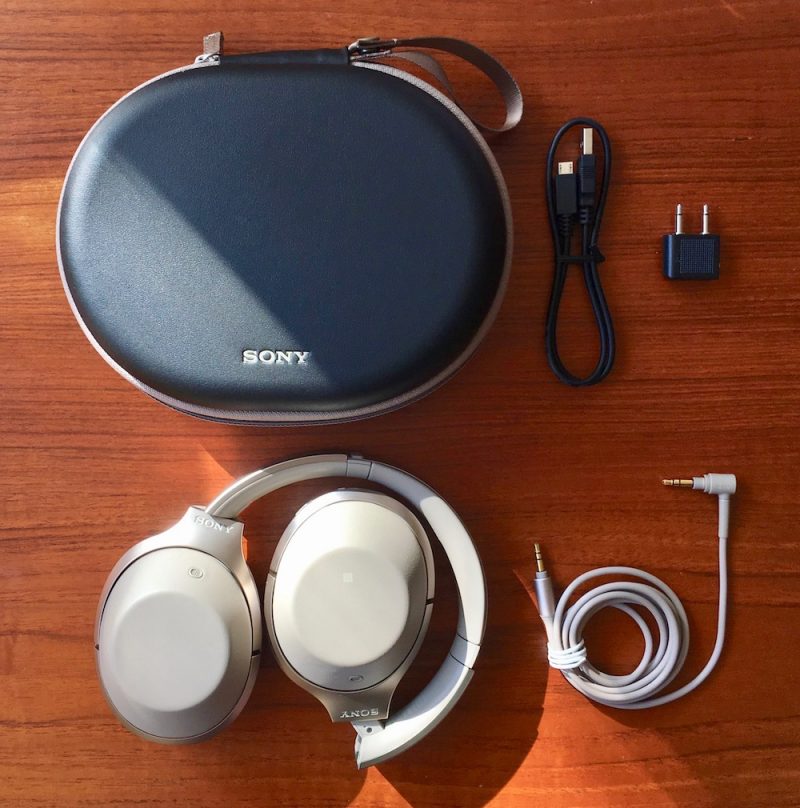
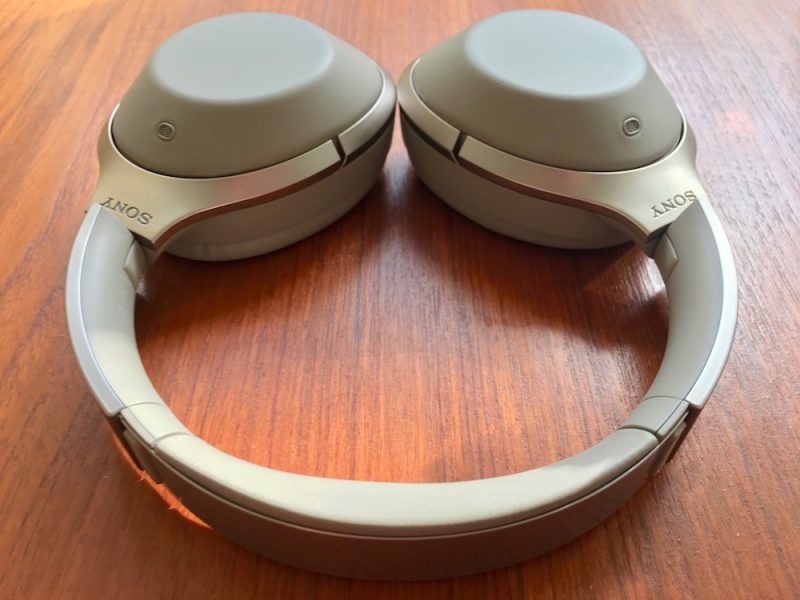
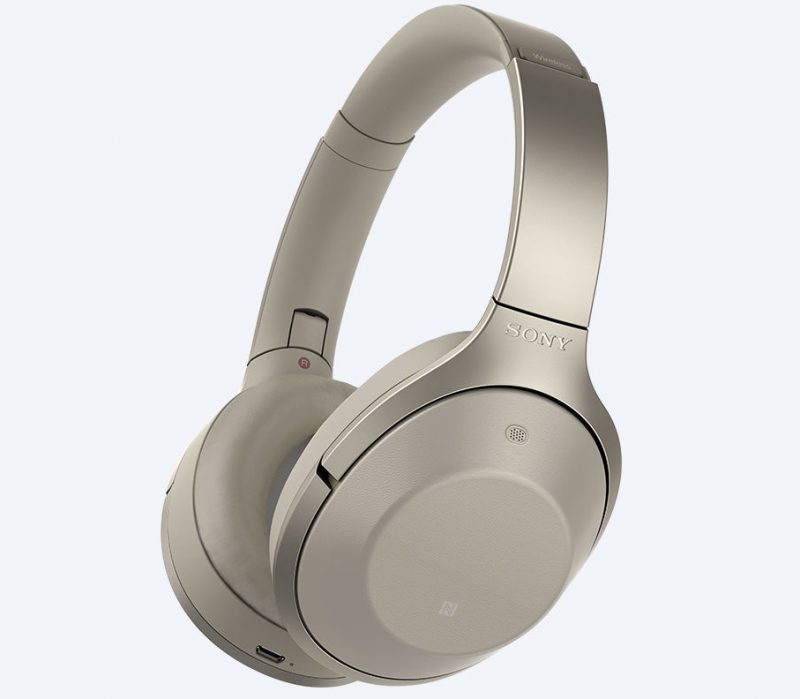
The Sony MDR-1000X’s come in a box design and hard carry case that will seem suspiciously familiar to Bose QC35 owners, but that’s where the similarities pretty much end. I received a beige pair (also available in black) that came with a nice thick matching 1.5 meter cable sporting a gold-plated mini jack, along with a black micro-USB charging lead and an airline adapter.
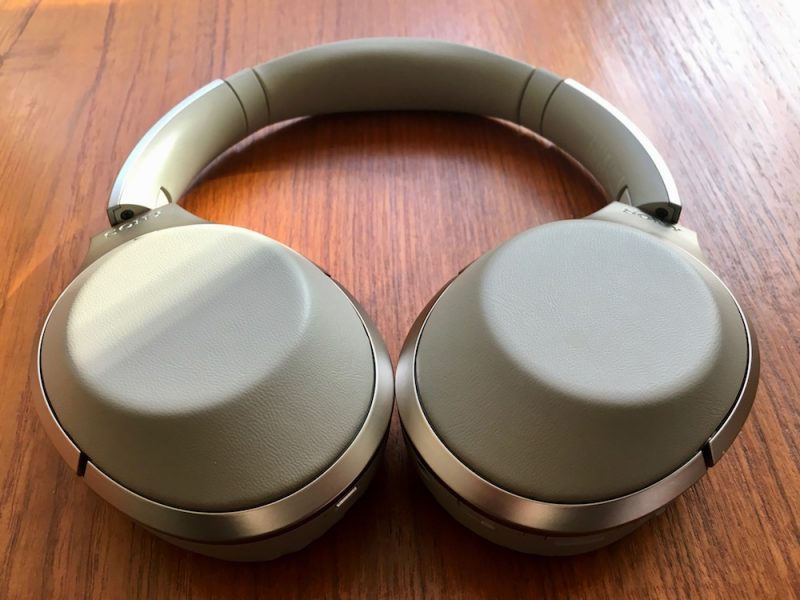
The swivel-folding earcups and pivots are made of a robust, creak-free plastic, with champagne-colored rims and squishy earpads covered in smooth synthetic leather that’s pretty convincing to the touch.
The polished steel headband packs some decent padding between the adjustable slats, and Sony has decided to let the design speak for itself by keeping the branding relatively understated. The only other distinctive mark on the outside of the cups are two small grilles where the noise-canceling microphones live. Altogether the headset weighs 275 grams, so slightly lighter than the QC35’s (309g).
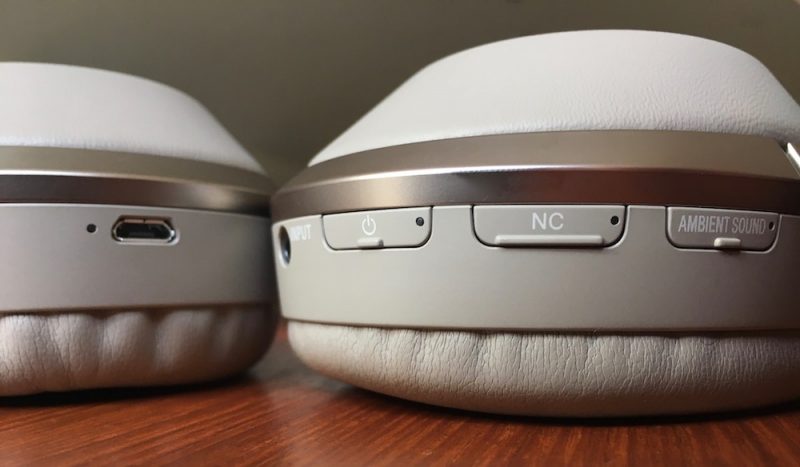
The left earcup contains an NFC chip for pairing with compatible devices and a micro-USB port for charging, while the right earcup has a touch-sensitive back that responds to taps and swipes to control music playback, skip tracks, change volume, and invoke Siri. Like most modern headphone gesture pads, it can also be used to take and end calls.
Around the rim of the right earcup are three physical buttons and an input jack. Unfortunately these controls aren’t particularly textured or distinctive, so expect some fiddling when you’re wearing the headphones before you get used to where they sit in relation to each other (although voice prompts helpfully accompany each press). The Ambient button lets you choose between different external sound filtering modes which we’ll cover below, the NC button lets you turn noise canceling on and off independently, while the power button can be pressed quickly for a battery level update and also activates the pairing sequence with a long press. All of the buttons have inset LEDs to indicate status.
Performance and Features
It’s worth stating right off the bat that Sony has taken noise cancelation to a new level with these headphones. This seems to have been achieved through a sustained period of self-reflection and extensive acoustics research in light of earlier shortcomings, combined with an exhaustive exercise in technological oneupmanship. In other words, Sony has pulled out all the stops in an attempt to beat Bose at its own game.

To begin with, Sony has chosen a headset design with a firmer grip than its NC rivals so that the earcups alone do a better job of isolating you from the outside world. There’s a slight trade-off here – Sony has used thicker urethane foam earpads than those found on Bose and Sennheiser’s NC cans to improve passive reduction, and they don’t feel quite as plush against your head as a result. It’s not a deal breaker by any means – they still feel lovely and squishy, and never bothered me after several hours of listening, but a few minutes back with the QC35’s was all it took to confirm they do lack the latter’s sumptuous cushiness.
Second of all, Sony’s patented Sense Engine boasts a “personal NC Optimizer”, a fancy-sounding piece of tech that’s supposed to determine your individual characteristics and wearing style to optimize the audio output just for you. Basically, Sony had the bright idea to build a microphone within each ear cup, which means the headset can sample ambient noise from both inside and out, effectively canceling out a wider range of sounds with corresponding inverted frequencies.

Hold down the NC button, and the headphone speakers emit a series of tones that bounce back and forth between the mics to analyze the shape of your head, work out whether you have big hair, wear glasses, and so on. It’s a unique innovation from Sony in the NC space – and it works, too. The only minor drawback for some wearers will be the ever-so-slightly more noticeable hiss when no music is playing. I found it pretty relaxing, kind of like distant lapping ocean waves. Your mileage may vary.
Otherwise, the NC easily stood up to scrutiny in a range of environments, including a busy bus and a crowded shopping mall. It didn’t detract from calls either, and effectively piped in my own voice as part of the conversation. The filtering is adaptive too, and corrected for changes in ambient levels as I moved around. These are also the first pair of noise cancelers I’ve worn that completely blot out my heavy-handed keyboard tapping and reduce my house phone in the same room to a barely audible, faraway whisper.
You don’t even need to take off the cans to realize just how effective the technology is, thanks to another feature unique to the Sense Engine called “Quick Attention”. Cupping your fingers over the touchpad instantly turns the volume down and lets in the outside world, allowing you to engage someone in conversation. Bring your hand back down and the music is re-instated to its prior volume. It’s genuinely useful for situations in which you’d usually be apt to take off the headphones – when a fight attendant offers you refreshments, for example.
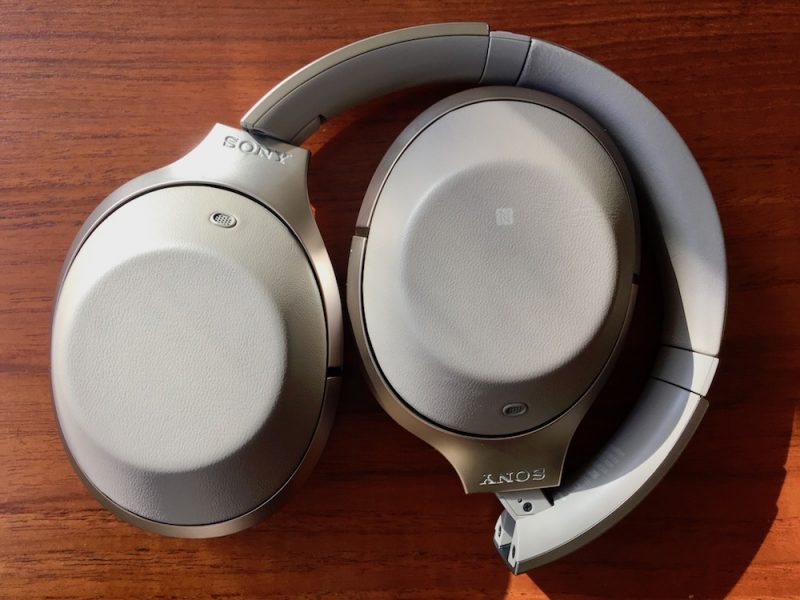
The MDR-1000X’s Ambient button performs two further NC sound tricks. One is called “Voice mode” and lets in the range of sound frequencies the human voice normally occupies. This is also meant to let you hear in on important announcements – when you’re waiting to be called to a boarding gate, say – while still allowing you to enjoy your music in relative quiet.
I found the feature a bit overly enthusiastic, sometimes failing to filter out other ambient sounds like the rustle of bags and suchlike which then became exaggerated and annoying. The “Normal” ambient mode on the other hand worked very well, and let me stay mindful of traffic sounds as I walked the street without entirely extinguishing that insulated cocoon feeling that good NC cans do so well.
Sony’s headphones certainly have a stronger Bluetooth connection than the competition – the MDR’s didn’t drop out once in areas where rival Bluetooth headsets I’ve tested regularly faltered. The link was retained around harder corners and over bigger distances – the MDR-1000X’s even passed the ‘microwave test’ and didn’t get all glitchy as I hovered around the kitchen while my dinner was being nuked.
Wireless audio connections have their limits of course, but Sony has also included a neat sound prioritization feature in the MDR-1000X that I haven’t seen in other cans. By default the headphones automatically select the highest quality Bluetooth protocol available, but hold down both power and NC buttons for a couple of seconds and you can switch them to “Priority on stable connection” mode, which falls back to the less-demanding SBC codec. Bear in mind I’ve no idea how well it works because I never had to use it.
On the subject of wireless codecs, this headset supports them all: AAC (iPhone), aptX (Mac/Android), SBC (everything), and LDAC. That last one is a Sony special which apparently transmits up to three times more data than conventional Bluetooth for superior sound, but it only works with Sony devices, such as the company’s Xperia smartphones and Walkman digital audio players. There’s some proper science behind it and I have it on good authority (an audiophile friend) that it delivers on its promise, but I didn’t have any other Sony hardware to test it with.

To be honest though, it didn’t bother me. The MDR-1000X’s sound brilliant over bog-standard Bluetooth anyway, and certainly outperform the QC35’s thanks to a wider, more expansive soundstage. The mid-range is wonderfully balanced and the highs sparkle, while a good, chunky bass serves as a warm foundation. They sound even better when the cable is used – so long as the headphones are on. Whether this is all down to Sony’s DSEE HX processing (which allegedly recreates higher frequency signals lost in low-quality compressed music files) or simply better tuned drivers, I can’t say. Whatever the reason, the MDR-1000X’s sound fantastic, especially for NC cans.
A few other points bear noting. Unlike the QC35’s and PXC 550’s, Sony’s headphones don’t seem to be able to pair with more than one device at the same time. I had to manually disconnect my iPhone to reconnect with my Mac, and vice versa, despite the fact that the cans had no trouble auto-pairing with the last known device when turned on. Also, the 1000X’s live up to their 20 hour battery life, but they take 4 hours to fully charge – twice as long as Bose – and the battery is similarly integrated, so it has to go back to Sony if/when it comes to replacing.
Bottom Line
Sony has pulled a fast one on its rivals here. For a company whose last serious attempt at noise canceling was the h.ear on Wireless NC headphones, the MDR-X1000’s are a huge step up in performance. Not only do they look smart and block out distraction, they also pack a ton of technology (not to mention compatibility), keep a strong connection, and deliver a beautiful sound.
It’s a sure sign that the premium NC market is maturing, and that translates to better consumer choice. For those who favor comfort, always-on NC and listening simplicity, Bose still wins. If a bigger sound and the ability to switch between multiple audio sources are your top considerations, Sennheiser’s PXC 550 cans are a great alternative. But if superior noise canceling and audio quality are more important to you than cushiness and dynamic pairing, then these new MDR-1000X headphones from Sony have your back.
Pros
- Unrivaled noise canceling
- Exceptional sound for wireless
- Multiple audio codec support
- Solid design and touch controls
Cons
- Comfy, but not Bose-comfy
- Lacks dynamic multiple device switching
- Longer charge time than other cans
- $50 more expensive than Bose QC35
How to Buy
The Sony MDR-1000X headphones come in beige or black, cost $400, and can be ordered via the Sony website.
Note: Sony supplied the MDR-1000X’s to MacRumors for the purposes of this review. No other compensation was received.
Tags: Sony, review
Discuss this article in our forums
UA Sport Wireless Heartrate Headphones Release Date, Price and Specs – CNET
Under Armour has partnered with JBL to create a pair of in-ear Bluetooth sports headphones with a built-in heart-rate sensor. Bose and Jabra also make in-ear sports headphones with an integrated heart-rate monitor, so this isn’t a unique product, but few sports headphones offer this feature.
Under Armour has one advantage, though: The UA Sport Wireless Heart Rate Headphones can connect to the company’s immensely popular Record platform. The app lets you track workouts and receive audio updates for things like pace, distance, heart rate and heart-rate zones.
While the Record app is free, Under Armour’s headphones are priced at $200 (which converts to about £160 or AU$260), which is higher than some better-sounding alternatives. To sweeten the deal, the company is throwing in a complimentary 12-month subscription to MapMyFitness Premium, an offer valued at $30, which converts to about £25 or AU$40.
Hands-on with Under Armour’s new heart-rate…
See full gallery


1 – 4 of 10
Next
Prev
Design and battery life
The headphones are designed primarily for working out and are rated IPX5, so although they aren’t fully waterproof they will do just fine in the rain and with sweat. The open design and loop hooks help keep the headphones in place when exercising. This also allows you to hear cars and people around you when running, but it means they aren’t very good for blocking out noise.
 Sarah Tew/CNET
I want to hear my surroundings when running, but not at the gym. Unfortunately you can’t have it both ways. These weren’t able to cancel out gym noise unless I raised the volume to an uncomfortable level.
The headphones come with a small carrying case and four different size earbuds, but they aren’t normal earbuds. They are super-sized ones with a small ear tip at the end, and they are incredibly difficult to remove and replace. While I had an OK fit, my colleague David Carnoy struggled with his and preferred the comfort of the Bose SoundSport Pulse Wireless headphones.
 Sarah Tew/CNET
Other features include an inline remote and microphone on the right wire for taking calls, changing songs, and changing the volume. Charging the headphones is done through a Micro-USB port located right on the remote. The battery will last up to 5 hours, which is the same as Bose’s heart-rate headphones, but still a bit short for my liking.
Working out
I’ve been working out with the headphones for the past few weeks. I had no connection issues with Android and iOS phones, and the audio sounded crisp and clear for the most part, although the bass was a bit lacking. These were also one of the only headphones that didn’t fall out when I was running.
 Sarah Tew/CNET
Under Armour’s Record app has been one of my favorites for quite some time. It’s easy to use and is compatible with a lot of devices, even those that aren’t made by Under Armour. The app uses the sensors in your phone (such as GPS) to track a variety of exercises, such as running, biking and weightlifting.
You can set up audio prompts to activate after a specific distance or time. These will give you real-time feedback on your pace, distance, calories burned, heart rate and heart rate zones. You can also get an on-demand audio update on your heart rate by tapping the Under Armour logo on the right earbud.
 Sarah Tew/CNET
As for the heart rate sensor, it’s located on the left earbud and is similar to what we’ve seen in the Fitbit Charge 2 and Apple Watch — a flickering green LED light used to illuminate the capillaries and measure the blood as it flows past. I was a bit skeptical at first. This was my first time using heart-rate earbuds, but they turned out to be pretty accurate for measuring both runs and gym sessions.
The heart rate feature is cool. But let’s be honest, most people probably don’t care about it, and those who do are better off getting a heart-rate running watch or using a chest strap at the gym.
There are better alternatives
The sport earphone market is extremely competitive. If I’m paying top dollar for a pair of headphones, I expect them to be as close to flawless as possible. The sound quality of Under Armour’s headphones doesn’t justify the high price. They also aren’t worth wearing when you aren’t working out, and $200 (about £160 or AU$260) is a lot of money to pay for a pair of part-time headphones.
If you’re sold on having heart-rate tracking headphones, you’re better off getting the Bose SoundSport Pulse Wireless and Jabra Sport Pulse Special Edition. Both cost the same as Under Armour’s headphones, include heart rate, offer superior sound quality and are a more comfortable fit.
Amazon Fire TV Stick With Alexa Voice Remote review – CNET
The Good The $40 Amazon Fire TV Stick with Alexa Voice Remote is one of the least expensive devices to stream video from Netflix, Amazon, Hulu, HBO, Sling TV and other online services. It’s just as responsive as other devices, meaning it’s lightning-fast, and charges less for an included voice remote.
The Bad The current user interface pushes Amazon content too aggressively. Alexa is less useful than with always-on devices. There’s no dedicated app for any other a la carte video service beyond Amazon’s.
The Bottom Line The fast, affordable new Fire TV stick is great for fans of Amazon who’ll use its voice capabilities, and an excellent value, but it’s still not as good as Roku.
Amazon’s Alexa rules the home voice-tech world while rivals Google, Apple and Microsoft race to keep up. The giant retailer doesn’t make phones (anymore), but it’s building the talking digital assistant into devices beyond its blockbuster Echo and Dot line of always-on, always-listening home speakers.
The cheapest, the Fire TV Stick with Alexa Voice Remote, costs just $40. It’s always on but not always listening. Instead, it requires your TV to be powered up and you to talk into the remote while you hold down, er, Tap, the mic button.
Once you do that, the Stick behaves just like any other Alexa device. Her sorta-robotic female voice replies to questions like “What’s the weather?” or “How much does the sun weigh?” via your TV’s speakers (unlike Siri on Apple TV, who remains silent for now) and an on-screen message. She can turn on the lights, set the thermostat or otherwise interact with any other Alexa-compatible device in your home.
Amazon Fire TV Stick with Alexa Voice Remote
See full gallery


1 – 5 of 18
Next
Prev
That’s not why you’re buying one, however. For most people, Alexa on the Fire TV Stick will be an afterthought. The Stick’s main schtick is streaming video, just like its predecessor, which cost the same and also worked with Alexa, but didn’t include that voice remote.
The new Stick is faster and remains an excellent value with plenty of content. It’s a no-brainer buy for heavy Amazon video watchers and people who prefer talking rather than pressing buttons. But compared to rival Roku, whose $50 streaming stick is our favorite such device, the new Amazon stick currently falls a bit short.
The main reason is the on-screen user interface, which still relentlessly pushes you toward Amazon’s TV shows and videos rather than provide the equal playing field for all apps (like Netflix, YouTube, Hulu, WatchESPN, Sling TV and countless others) that Roku does. The new Amazon Stick is just as quick as Roku’s stick, and its voice capabilities run circles around Roku’s, but for now it’s not as good unless you already get most of your video from Amazon anyway.
Why do I say “currently” and “for now”? Amazon will soon give all of its Fire TV devices a completely overhauled menu system and user interface (above). It will roll out first to this product by the end of the year, then make its way to older Fire TV models like the 4K-capable Fire TV box (which remains on sale at $100). For that reason I’m not going to say much about the current menu system (detailed here) in this review.
I will update this review when the new system becomes available and I can test it. In the meantime, here’s my take today.
 View full gallery
The original $40 Fire TV Stick (left) is a bit smaller than the new one, and doesn’t include the voice remote.
Sarah Tew/CNET
Same winning stick design
In my book smaller is better for pretty much any tech device (that doesn’t have a screen). The stick form factor slims streaming down to the bare minimum, allowing the device to hide discreetly behind the TV. The only real downside compared to boxes like the $100 Fire TV, Apple TV or Roku’s boxes is lack of ports like Ethernet (although Google’s Chromecast has a clever solution), MicroSD, USB and optical audio.
Unlike many of streaming boxes the new Fire TV Stick has 1080p resolution, not 4K. The only mainstream 4K stick-like streamer is the $70 Chromecast Ultra. Like the 4K-capable Fire TV box the new Stick does have HEVC decoding, so it can take advantage of that superior compression format to enable better image quality and use less bandwidth, even with 1080p streams. Amazon has re-encoded its entire video library to HEVC.
The newer version of the Fire TV stick is a bit chunkier than the original but still plenty small. If the back of your TV is too cramped to accommodate it, you can use the included “port saver,” a short female-to-male HDMI adapter included in the box (Roku’s stick doesn’t include one).

View full gallery Sarah Tew/CNET
Compared to the original, the new Fire TV Stick improves the Wi-Fi capability from 802.11n to 802.11ac, and adds the ability to connect a set of Bluetooth wireless headphones for private listening. I had no issues connecting to either 2.4GHz or 5GHz networks, and both of the headsets I tried (a Polk Hinge and a Motorola SF520) connected easily and showed good-enough lip sync. Lip sync issues can vary on different Bluetooth headphones, however.
Like other sticks Amazon’s power can come from a standard AC wall socket via the included adapter and cable, or from a USB port (typically on the TV). I recommend using the wall socket since it allows the stick to remain in standby, ready to go immediately. Using USB power from a TV means you’ll have to wait around 40 seconds for it to boot up each time. At least that beats the original stick, which took 110 seconds to boot up.

View full gallery Sarah Tew/CNET
Amazon’s speed stick
Amazon claims a 30 percent boost in speed compared to the original Fire TV Stick thanks to a new quad-core processor, and comparing the two directly the new version is certainly faster in many ways. That said, the improvement isn’t so stark that current Stick owners should feel compelled to upgrade.
The most popular apps provide the biggest differences. Netflix launched twice to three times faster, while YouTube launched about twice as fast. Browsing Netflix was about the same on both devices, although while YouTube’s browse was a bit pokier on the old one.
Kodak Ektra Release Date, Price and Specs – CNET
It would either be very brave or very foolish of Kodak to try and compete with the likes of Apple and Samsung. But with the launch of its camera-focused new Ektra phone, that’s exactly what it’s doing.
Kodak used to be one of the biggest names in traditional film photography. But the digital era hasn’t been kind to it, so the company is looking to the world of phones to help get some cash back in the bank.
True to Kodak’s heritage, the Ektra is aimed squarely at photography enthusiasts. At the camera’s core is a 21-megapixel sensor, with a bright f/2.0 aperture lens in front. Kodak claims the camera will be able to capture crisp images in low light, helped by optical image stabilisation and software tweaks.
A physical wheel on the front of the phone lets you change settings quickly — something that will no doubt appeal to photography purists who like the tactile feel of physical dials. There’s also a wide range of scene modes and a manual mode to help you get a bit more creative.
On paper, the phone’s camera has plenty to boast about, although whether it delivers on image quality remains to be seen until we take it for a proper test.
The Ektra will need to produce some stunning shots if Kodak truly hopes to make photographers take interest. Photography prowess is one of the mostly hotly contested aspects of top-end phones, with devices such as the iPhone 7, Galaxy S7 and new Google Pixel all capable of taking beautiful photos.
It’s interesting to note that Kodak hasn’t built the phone itself — the actual hardware is produced by a company called Bullitt. It’s not clear how much work Kodak has had to do on the Ektra beyond slapping its branding on it, but it’s hopefully wise enough to not lend its name to a product before checking that it’s any good first.
The Ektra will be on sale across Europe later this year and will set you back £449. At the time of launch, Kodak has no plans to launch the phone in the wider world, but that UK price converts to $552 and AU$719. We’ll update this article with more information when it’s available.
Specs and features
- Android 6.0 Marshmallow software
- MediaTek Helio X20 2.3GHz decacore processor with 3GB RAM
- 32GB storage, expandable with microSD cards
- 13-megapixel front-facing camera
- 3,000mAh battery
- USB type-C
Netgear Nighthawk X10 AD7200 Smart WiFi Router Release Date, Price and Specs – CNET
 Netgear
Have $500 lying around? Netgear has something that you might want to spend that on: the all-new Nighthawk X10 AD7200 Smart Wi-Fi router. It’s the second router on the market that supports the latest 802.11ad Wi-Fi standard, after the TP-Link Talon AD7200. (UK and Australian prices are yet to be announced, but the US price converts to roughly £400 or AU$650.)
You can read more about 802.11ad here, but in a nutshell it works on the 60GHz frequency band. This allows for extremely fast Wi-Fi, up to 4.6Gbps in the case of the X10, but it’ll only hit that speed at extremely short range — up to about 30 feet — and with a clear line of sight.
Overkill
Obviously, in order to experience 802.11ad, you need compatible devices and as far as I know there’s only one right now on the market, the Acer TravelMate laptop, which can connect at 2.3Gbps over Wi-Fi, in my trial. But even then, there’s not much you can do with that speed. This is because on the other end of the connection, currently the fastest home devices would top out at the speed of a wired Gigabit connection. And Gigabit is already much faster than anything in your home would require to work well.
But the X10 itself can do more than Gigabit. It supports link aggregation, allowing you to combine two of its six network ports into a single 2Gbps connection. It also has a 10Gbps fiber port to connect to a supported NAS server. This means if you’re a hardcore user, and willing to spend more on super-high-speed peripheral devices, you can truly enjoy 802.11ad speed. Now.
For most other home users, however, the Netgear X10 is way ahead of the curve and as good as future-proof. But for the most part, it’ll be about as useful as any other quad-stream 802.11ac router.
Full technical features:
- AD7200 Quad Stream Wave2 Wi-Fi supports wireless speeds up to 4,600Mbps (60GHz band) + 1,733Mbps (5GHz band) + 800Mbps (2.4GHz band)
- Built-in Plex Media Server
- 1.7GHz quad-core processor with high-performance active antennas
- Six Gigabit Ethernet LAN ports with dual ports that can be operated in line aggregation mode for faster file transfers (up to 2Gbps wired speeds)
- Two USB 3.0 ports
- Automatic backup to the cloud with Amazon Drive
- Netgear ReadyCloud that provides easy and secure way to access USB-connected storage
- 10Gbps fiber port for super-fast connection to a supported NAS server
- MU-MIMO for simultaneous streaming of data to multiple devices
- New Netgear Up app for Android or iOS mobile device to help with the setup process
- Netgear Genie app for a personal dashboard to monitor, control and repair your home network, now works even when you’re away from home
While extremely expensive, the X10 seems to be the most souped-up router to date. Who knows, it might just be worth every penny. Check back soon for CNET’s full review.
Samsung Gear 360 review – CNET
The Good The well-priced Samsung Gear 360 produces some of the best spherical video you can get from a consumer-grade 360-degree camera at the moment. Easy to use on its own or with its full-featured mobile app. Can be used as a single-lens wide-angle video camera. Clips can be transferred, trimmed and shared with your Galaxy phone or edited on a computer. Body is splash- and dust-resistant and battery and storage are removable.
The Bad The camera’s app currently works on only select Samsung phones. The lenses can be easily scratched and replacements aren’t available. Included editing software is Windows-only and editing without it is difficult at best. Transferring clips longer than a couple of minutes takes a long time.
The Bottom Line The Samsung Gear 360 is great for simple 360-degree video and photos. You’ll just need the right Galaxy phone and a Windows computer to get the most from it, right out of the box.
Samsung’s Gear 360 is one of the best consumer 360-degree cameras you can get at the moment, and yet for most people it’s probably not going to be “the one to get.”
Mainly that’s because the camera — available for $350 in the US and £350 and AU$500 in the UK and Australia — is currently only officially supported for use with Samsung Galaxy S6/S7, S6/S7 Edge, S6 Edge+ and Note 5 phones for use with the Samsung Gear 360 Manager app. That cuts a lot of other Android and all iOS users out.
On top of that, the bundled editing software called Gear 360 Action Director made by Cyberlink is Windows-only. This wouldn’t be so bad if there were more consumer-level editing options for 360 content available, but there aren’t. The bigger issue, though, is that you need either one of those Galaxy phones or the Cyberlink software to easily convert what the camera records from its two separate cameras into an equirectangular view (think flattened sphere) that can be edited and uploaded to YouTube and Facebook.
Basically, if you’re considering the Gear 360 because you want a simple way to capture, edit and share 360-degree video and photos, you better have at least one of the aforementioned Galaxy devices and maybe a reasonably powerful Windows PC, too. You can still use the camera on its own without connecting to its mobile app and do the stitching and editing with other software (here’s how to do it using Kolor Autopano Video software, for example), but it is much more difficult and time-consuming.
 View full gallery
A point-and-shoot with two cameras.
Josh Miller/CNET
The camera itself is pretty straightforward to use. With the three buttons on the camera and its small screen you’re able change basic settings and shooting modes, of which there are four: Video, Photo, Time-lapse Video and Looping Video. Switch to the mode you want, press the record button on top and the camera does the rest, simultaneously capturing the view from the front and rear cameras and combining them into one MP4 video or JPEG photo. (You can also shoot with just one of the cameras giving you a regular wide-angle video at resolutions up to 2,560×1,440 at 30 frames per second.)
Want more control? Wirelessly connect the camera to a Galaxy device, open the Gear 360 app and you get a preview of your shot as well as sharpness, white balance, HDR, exposure, ISO limit and wind cut settings. You can also turn on a 2-, 5- or 10-second timer.
When you’re done, you can view and transfer content straight to your Galaxy phone and as that happens it will stitch together the views from the two cameras into photos and videos that will give you the full 360-degree spherical experience. Keep in mind, though, the longer the clip, the longer the transfer takes, so it’s best to keep your videos short.
LeEco uMax85 Release Date, Price and Specs – CNET
TV makers with big names in China, like TCL and Hisense, are coming to the US market to challenge the dominance of Samsung, LG and Vizio. And the latest, LeEco, actually bought Vizio earlier this year.
Now LeEco is launching TVs under its own name and packing in some high-end technology at aggressive prices. Its first four will go on sale at the company’s own site, LeMall, in November.
The most remarkable is an 85-inch monster called the uMax85 that’ll cost a cool $5,000. That’s a huge TV and a lot of money, but for perspective, like-sized sets from Samsung and Sony cost $3,000 more, and don’t feature the kind of high-end picture enhancements used by LeEco.
LeEco has an 85-inch TV for $5000
See full gallery


1 – 4 of 8
Next
Prev
The uMax85 has a full-array local dimming (FALD) backlight with 448 zones, more than any other TV we’ve heard claim, including the Vizio Reference series and the Hisense H10 (the Sony Z9D might have more, but Sony isn’t talking). FALD generally provides superior image quality compared to other LCD technologies. LeEco claims 90 percent coverage of the DCI-P3 color space, which is decent but not as wide as some high-end sets, such as OLEDs or LCDs that use Quantum Dots.
Like LG and Vizio TVs, the uMax86 supports both high dynamic range (HDR) standards, Dolby Vision and HDR10. In our tests we haven’t found a definitive advantage for one over the other, but in general it’s nice for a TV to support both. HDR usually provides superior image quality to standard 4K or HDTV video.
LeEco also talks up the TV’s smart innards, including 4GB of memory, 64GB of RAM and a quad-core processor. Its SmartTV system is Google’s Andoid TV. That means it has access to all the apps in the Android TV store, as well as the nifty Cast system used by Chromecast.
 James Martin/CNET
In addition to the 85-inch model there’s a trio of smaller, less expensive TVs:
- Super4 X65: 65 inches, $1,400
- Super4 X55: 55 inches, $900
- Super4 X43 Pro: 65 inches, $650
All have 4K resolution, HDR10 (but not Dolby Vision) compatibility, and lack local dimming, so we don’t expect them to perform as well as Vizio’s similarly-priced M series. They have the same smart TV system as the 85-incher, albeit with 3GB of RAM and 32GB of storage (the 43-incher has 16GB of storage).
The company’s LeMall website will offer limited-time discounts ($1,000 off the 85-incher; $200 on the smaller sets) for people who sign up in time for the “flash sale” on November 2. LeEco’s representatives didn’t tell CNET when those discounts would expire.
 AIVAnet