


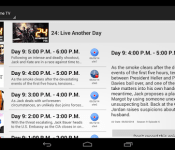
DroidTV is your own DVR in your pocket [App of the Day]

Watch what you want when you want with DroidTV. The DroidTV app by Northwest Divisional Software Inc. aims to fill your pocket with your favorite shows without draining your pocket of your hard earned money.
Use this amazing app as your own personal DVR, and record shows anytime any day of the week. Watch your shows at your leisure instead of rushing home to catch your weekly favs.
DroidTV includes Chromecast support so you can still watch your shows in HD on your television
The best part about DroidTV is that its totally legal and very inexpensive. You can have access to your shows for as little as $3.99 a month, or opt for a lifetime subscription for just $49.99. The DroidTV app even comes with a 14 day free trial. You get full feature access during the trial.
Try DroidTV today and you will be glad you did.
The post DroidTV is your own DVR in your pocket [App of the Day] appeared first on AndroidGuys.

RAVPower Element 7800mAh Portable Charger Review

Up for review today is the RAVPower Element 7800mAh Portable Charger and my first impression of the camouflage device was “meh”. I have only seen a handful of portable chargers that looked decent, but looks are really not what matter here. What really matters is the juice this puppy packs and it packs a punch!
What’s Inside
- RAVPower 7800 Power Bank/Lantern Light
- Micro USB Cord
- Locking Carabineer (Not For Climbing)
Design
When I first received the RAVPower Element, it came in a nice, clean package. After opening the box I discovered my newest (and favorite) portable charger, but camouflage, really? I mean, maybe a subdued color like olive green or black, but I was caught off guard with the camo. However, looks aren’t everything, its what’s on the inside that counts right? Well that’s what my mother keeps telling me!
The charger has two ports, micro USB for charging and a USB port to charge your device. It has a power button for the handy built in LED light at the top and four blue lights that show you how charged the charger is. The device is a decent size reigning in at almost 4 inches tall and a diameter of about 2 inches. The charger weighs about 7 ounces so it isn’t going to weigh you down when you throw it in your backpack.
It also comes with a handy carabineer to attach to the outside of a pack as well. The charger is built well and I feel that if I dropped it, I wouldn’t have much to worry about.
Performance
The first thing I did when I received the charger was to plug it in and charge it all the way up. RAVPower says you can charge the device over 500 times before it kicks the bucket, but I will definitely get my moneys worth by that time. The output of the charger is 1.2a so it charges fairly quickly.
I have been using my HTC One M8 (2600 mAh) and Nexus 7 (4350 mAh) tablet to test the performance of the device. The best I gathered from testing the portable charger was to get my HTC One M8 and tablet as dead as possible in order to see just how fast and how much it could charge.
After playing videos on my devices and keeping the screen brightness cranked all the way up, I put the charger to the test. I first started with my HTC One with it at 10%, after an hour and a half, my phone was fully charged and then I slapped the Nexus 7 on it and did the same thing, now I know you’re thinking, “That Nexus is going to drain that charger dry”, but it didn’t. After plugging in both devices and charging them to 100%, I still had a single light on the charger.
Now simple math tells me that 2600 – 10% and 4350 – 10% = 2340 + 3,915 = 6255 mAh used so far. So far so good. I figured I still had about 1500 mAh of power left in charger. So, the next day I plugged my phone in at 10% again and I only got to 47% before it wouldn’t go anymore.
The test isn’t over yet. I continued to do the same thing over the past two weeks with the same results. I also charged the charger and let it sit for a week and it still held its charge without dropping a light. I have been thoroughly impressed with the performance of charger it has exceeded all my expectations.
Value
The RAVPower Element is also very affordable, coming in at $29.99. The device is super affordable and if you’re an Amazon shopper, you can pick it up with Prime shipping (Free 2-Day) as well!
I highly recommend anyone looking for a portable charger that packs a lot of power and comes at a great price. You can also check out all the other products RAVPower has to offer as well, here!
The post RAVPower Element 7800mAh Portable Charger Review appeared first on AndroidGuys.

LG G3 review: Great hardware meets simplistic interface

The LG G3 will begin the global roll-out on June 27th, which will go first to Asian countries in Hong Kong, Indonesia, Singapore, and the Philippines. Then it’s headed to the remaining Asian markets, Europe/United Kingdom, and the Middle East with other regions in July. Although a date has not officially announced by any major carrier in North America, speculations say roll-outs will take place starting in Canada and the United States starting with shipments being sent to these carriers in early to mid July, official carrier releases by the middle of August.
This phone is going toe to toe with the top devices such as the Samsung Galaxy Note 3, Samsung Galaxy S5, HTC One M8, Sony Xperia Z2, OnePlus One, etc.
Just to give our readers a sneak peek of our thoughts on the LG G3, we’re giving you an early preview via a quick review. As we spend more time with the device, we’ll update our review.
At First Glance & Design

The G3 features a clear display with thin bezels. On the rear is a metallic back plate, with an interesting camera/flash setup. Top of the line hardware and software make this beauty something incredibly irresistible.
On the back, sadly there are no healing properties, such as on the G Flex. The same styled rear-facing buttons are drastically improved. The rear battery door is mostly plastic, but features a very thin layer somewhere inside the plate.
Great hardware is met with a simple interface, leaving the drama behind for a better User Experience.
Hardware
The Quad Core 2.5GHz Qualcomm Snapdragon 801 SoC, 3GB RAM, and Adreno 330 GPU ensure that can power through almost anything without delay. The AnTuTu X Benchmark rates this model at about 35,500 with 3rd party background processes running.
The removable battery and expandable SD storage enhance the options that users have, especially compared to the G2 and Nexus 5 among others.
Display
The LG G3 utilizes a beautiful crisp 2K/Quad HD (4x 720P) [2,560×1,440/538ppi] display. Colors are wonderful, even if not perfectly accurate and slightly over saturated. Not all content is really optimized for such a sharp display, however pixels are nearly invisible. Surprisingly, QHD doesn’t have any WOW factor like when 1080P mobile devices were released, an there is slight improvement over 1080P.
Software & UI/UX

LG has really toned down their user interface a lot. The icons are flat and somewhat minimalist, while featuring the common add-on apps such as LG Health (fitness tracker), QSlide, and QRemote that you commonly see variants of this with other flagships. The LG themed Android 4.4 layout is very clean.
The KnockOn feature is one we found to be really handy – it allows you to knock twice on your screen to wake it up. Knock code is a security feature that allows you to use up to 80,000 combinations in different quadrants.
Camera
There is a 13MP camera with laser focus and optical image stabilization on the rear, which does surprisingly well with low light scenarios. The laser auto focus is met with timing of less than a blink of an eye. Images taken have been pleasant but not perfectly crisp when zooming in.
On the front of the screen, you’ll find a 2.1MP camera. LG made a neat little feature that allows you to have “flash” for a “selfie” by shrinking your view area, and creating white boarders to brighten your environment.
Battery Life
We should note that our testing was done with the Korean F400K variant unlocked on T-Mobile USA, so that can hurt battery life, as the device is not optimized for T-Mobile, which is something you should take into consideration.
Battery life has varied quite a bit. The Quad HD/Wide 2K Display is sadly quite power hungry. The device has lasted an average of 3.5hours of heavy screen on only usage, 5-8 hours with normal moderate usage and 9-12hours with light usage. The 3000mAh removable battery is quite large, but until we get our hands on a US version, we can’t say for sure what’s causing the G3 to lose battery so much more than what was promised by LG.
There are options for LG’s battery saving mode which will turn off NFC, WiFi, Brightness, and more. All of these settings are user configurable for when your battery reaches a certain point per your settings. While not as extensive as battery saving options found in the HTC One M8 or Samsung Galaxy S5, they still help save that precious battery power. We wish LG would really learn from Samsung and HTC when it comes to power saving.
Overview
What we’ve noticed is that LG has taken the form factor of the G2, improved it, and seemingly taken cues from the best flagships yet and combined them. The best of LG G2, Samsung Galaxy S5, HTC One M8, and OPPO’s (secretly owned) OnePlus One, have been spun into the LG G3, with the only thing left to wish for is out of the box wireless Qi charging (available almost everywhere but South Korea and the United States), and an IP67 rating. The G3 pretty much has it all.
We’d like to thank our sponsor and talk a little bit about 28Mobile, a Hong Kong based consumer Mobile Retail and Wholesale outlet that ships worldwide, and only sells unlocked devices. Backed by Hong Kong Wholesale Limited, and the PayPal guarantee, you can find recently released devices and more. 28Mobile also supports Amazon and eBay resellers as a wholesale distribution company as well as individual sales. They offer a 28 Day Money Back Guarantee along with high quality care and shipping standards so your order reaches you safely.
We have been completely impressed by LG here. They have finally proven that they can compete with the tough high-end Android mobile market. You can find the unlocked international version of the amazing LG G3, jack of all trades, at the 28Mobile Phone Shop.
The post LG G3 review: Great hardware meets simplistic interface appeared first on AndroidGuys.

App of the Day: Rival Knights

Rival Knights by Gameloft is a jousting simulator that’s loads of fun. This free app is a blast with an in game competition and online tournaments. The game is very easy to learn with a basic on touch setup and a basic aiming system. The basic concept is to hit a perfect mark on your bar to increase you horses speed. At the very last second the game goes into a zoomed in view of your lance to aim at a set target spot. Game is a basic advancement platform that pays in coins for each joust won. The more coins your earn the better equipment and upgrades you can purchase.

Online tournaments are jet up by a point system with the top three getting the grand prize. Players are rated by stars and before the joust you get to see what your up against. To win the joust you must beat your opponent in two of three categories speed, defense, and strength. Defense is the only one you can’t really control in the game other than upgrading you armor. Speed has a little control with your precision and by upgrading your horse. Strength again controlled in game by precision and upgrades to your lance.
The game has a bit of a grind to it as you progress trying to win more joust and gaining more upgrades. It also as in game purchases to progress your game more quickly. The action scenes and slow motion after a hit are good for a mobile game but they get repetitive as you play more. the only limit to playing is you must have seals for online and in game play one seal for each joust. You have a maximum of six seals for both seals are replenished by time of with diamonds. This game is a great way to pass the time and has notifications when you upgrades are ready and when your seals are full. The only negative is the grinding to advance and the repetitive sounds and animations.
The post App of the Day: Rival Knights appeared first on AndroidGuys.
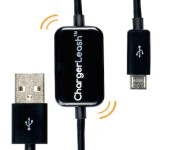
ChargerLeash Review: The charger for the forgetful

Charger/sync cables have seemingly been around forever. They have always served one of two purposes: to charge and/or sync your device. It would seem that we know everything there is to know about these types of cables. The ChargerLeash brings a new talent the game that just might make you think twice about your next charger cable purchase.

Who is it for
The ChargerLeash does the typical charging and syncing duties well, as well as one other feature that should pique the interest of frequent travelers and others who bring their chargers with them daily. This cable has the ability to sound an alarm when it is disconnected from the device it was charging. The alarm should remind the user not to leave the charger behind. I see the businessperson or frequent traveler as the ideal demographic for the ChargerLeash as i am sure they collectively leave small things behind on trips all the time.
How does it work

Green light when charging
Just plug the ChargerLeash into your laptop, computer, or wall (using a charging adapter; not included). When you connect your Android device, you will see the light on the cable turn green meaning your device is connected and charging/syncing. After your device has charged or synced to your liking, just disconnect it as you would normally. This is where the magic happens; after 5 seconds of having no devices connected while still being plugged into the wall or computer, the ChargerLeash will emit an alarming sound that is sure to get the attention of anyone in the vicinity, guaranteeing that you will never leave it behind.

Red light when charged device is detached and alarm is sounding
Who should purchase
A wise man once said, “It’s better to have it and not need it than to need it and not have it.” Anyone that has ever lost or left a charger behind before should seriously consider the ChargerLeash Charge/Sync/Alarm Cable. It is designed to take the hassle out of remembering to pack your charger. It is truly one of those things that you don’t think you need until you use it. The ChargerLeash is available on Amazon.com. More information is available here.
The post ChargerLeash Review: The charger for the forgetful appeared first on AndroidGuys.

Trove the world anew with Trover’s redesigned app

Looking for adventure? And whatever comes your way? If you were born to be wild, Trover’s newly refreshed travel app will help you find that instant adventure.
The app that lets you explore visually everywhere, has just redesigned its mobile app adding some new great features and giving it a fresh look. Unlike other social outlets that ultimately make it about you and interactions with other people (or places), Trover spins it around and makes it a place-centric app and the interactions that individuals have with a place.
Trover originally made it’s appearance on the Google Play Store back in 2012. However, the app was quickly pulled after the startup realized that they just did not have the resources to fully commit to the app. Since the removal of the app from the Play Store, the number one request received from their members has been the addition of Android once again. It appears that the timing is just right as the newly designed app has just started a new Android adventure.
“Android has been the #1 request from our members, particularly from overseas. We’re excited to see all the new photos, travel stories and tips flowing through this new app, inspiring more people to get out and experience the world.” — Jason Karas, co-founder and CEO
The app promises to fuel your passion for exploration by offering hundreds of thousands of original geo-tagged photos, place-based tipos, and shared travel stories. The goal is to make it easy to visually explore the best of everywhere, across the street or across the globe.
Besides just showing some great photos around the world, Trover also offers a vibrant social community that is alive right behind every photo, offering members the opportunity to socialize about their discoveries, and allow members to build wish lists on places they’d like to see someday.
By offering a more visual experience over sites like TripAdvisor or Yelp, Trover will help you find hidden wonders that otherwise may have gone undiscovered by you.
Trover is a free app available on the Google Play Store.
The post Trove the world anew with Trover’s redesigned app appeared first on AndroidGuys.

GOgroove Pal Bot Android Speaker review

If you’re an Android fan, which you probably are if you’re reading this, you should take a look at this speaker. It’s called the GOgroove Pal Bot Android Speaker, here to add a bit of character to your nightstand or desktop. It’s portable, loud, and pretty darn cute!
The folks that sell these are offering a price cut solely for the readers of AndroidGuys, so head to Amazon to take advantage of the deal. And while you’re at it, check out our review of the Pal Bot below.
Build

The Pal Bot is made to mimic the design of the Bugdroid, and is composed entirely of plastic. It only stands about 5″ tall and weighs a little less than 13 ounces. Around back, there is a volume knob, awake/sleep switch, 3.5mm audio cable (2-foot long), and a Micro USB port for charging. The bottom features four rubbery legs to ensure that the speaker stays in place. There are two speakers on the left and right sides of the back, and a subwoofer in the bottom-center of the device.
The speaker can play any type of audio, as long as it’s connected to a device with a 3.5mm audio jack. We haven’t had any issues connecting the speaker to phones, tablets, or laptops, but the 2-foot long audio cable can feel a bit short sometimes.
Oh, and when the speaker is off, the eyes are black. If its in “awake” mode, the eyes are blue, and turn purple when it needs a charge. This is a nice touch and adds some character to your speaker.
The battery in the Pal Bot is 850mAh, which GOgroove is quoting about 24 hours worth of audio before needing a charge. We’d say that’s pretty accurate, especially if the volume is down low. We should probably quote it at 18-20 hours, just to be safe.
In all, the build is great. It adds a bit of fun to your desktop or wherever you may keep it.
Sound
 The performance of this speaker may surprise you. For such a small device, the sound blew us away. While playing music, bass notes are always present (something we wouldn’t usually see from a speaker this size). The treble is balanced, and offers an overall great sound.
Seriously… when you turn this thing on, it will blow you away.
Should I buy?

The short answer: YES. This speaker is usually $29.99 on Amazon, but for today only (6/3/2014), it will be offered for only $19.99 BECAUSE YOU GUYS ARE SO AWESOME. No really, the deal is going on for the awesome readers of AndroidGuys. That’s one heck of a deal, if you ask me.
To be honest, I’d recommend this if it was at it’s normal price, but now that it’s $10 cheaper, it’s really a no-brainer. Head over to Amazon to pick one up before this awesome deal goes away!

The post GOgroove Pal Bot Android Speaker review appeared first on AndroidGuys.

Review: Häns Swipe-Clean screen cleaner

While phones, tablets, phablets, and other everyday devices are always updated, re-invented, and tweaked, the world of accessories remains a fairly stale landscape. Chargers, mounting systems, cases, and the like haven’t offered a new way of doing things in quite a while.
We have received an accessory product that actually does offer a different way to approach an age-old problem; that is, the one of the grubby and finger-smeared screen. A common solution we find is the disposable wipe that resemble the ones you get with your order of ribs at the local BBQ joint. You have probably seen the spray & dry wipe combo you might use for eyeglasses. One company has come up with a new portable and longer-lasting product. That product is the Häns Swipe-Clean multi-use screen cleaner and below is a review of its performance on AG-staffers’ devices.
This reusable cleaning system comes in a form factor that should immediately remind you of a short deodorant stick, but with caps at each end. Under the top cap is a non-removable cleaning block soaked in a proprietary cleaning solution. As-purchased, the cleaning solution should last up to 500 swipes. While the solution is stated to be “eco-friendly” their press release does emphasize to not let the cleaning solution remain on exposed device ports (micro-USB and the like). Refill bottles of the solution are available, and provide up to 6,000 additional swipes to be had. This cleaning end is sealed by way of the cap and rubber o-ring (pictured above-right).
Under the bottom cap is the polishing block, which consists of a long “five-layer antimicrobial-treated microfiber polishing” sheet, rolled around a block for structure. This sheet & block can be removed and re-rolled to get a cleaner portion of the sheet exposed for polishing purposes (pictured below). Both ends are infused with nano-silver ions for the antimicrobial properties.


Using the Swipe-Clean is easy enough, and pretty self-explanatory. You take a dirty device of your choosing, remove the top cap, and swipe around your screen to remove all the grease, grime, fingerprints, and peanut butter (that’s in my house; your screen debris may vary). Once done, you then cap the cleaning end, uncap the polishing (bottom) end, and then make like a window washer and effectively squeegee up and down over the screen surface. Repeat as needed. Though repeating isn’t likely, unless you simply miss a spot. We have to say that this product works extremely well. I purposely smudged my Moto X with fingerprints and smears of my morning-snack banana. Bringing the screen back to a perfect sheen took just a few swipes each of the cleaning and polishing ends of the Swipe-Clean.
I also encouraged others in my household to try it out, with the only instruction being the difference between the cleaning and polishing ends. Everyone came back rather amazed. Our usual method is the disposable screen wipes; these almost always create frustration in not ever getting that “like-new” gloss to a screen. Not so with the Swipe-Clean; we posted a 100% satisfaction rate! I personally love this thing, though being we live in a disposable society, I wonder if folks will keep up with changing the polishing pad position and refilling over time…. The Swipe-Clean’s suggested retail price will be $15, with a refill bottle going for $7. You can also pick up a Häns bundle, which includes (2) Swipe-Cleans and (1) Clean refill bottle for $32. These products are available at hans-swipe.com and amazon.com.

Before.

After.
The post Review: Häns Swipe-Clean screen cleaner appeared first on AndroidGuys.

Engadget Daily: Microsoft Surface Pro 3 review, hacking Watch Dogs and more!

We put Microsoft’s new Surface tablet through the review ringer, took a look at vaporizer technology, found out just how realistic hacking in a video game can be, and discovered that Sony’s new console’s raking in the cash. Read on for Engadget’s news highlights from the last 24 hours.

Surface Pro 3 review: Has Microsoft finally made a tablet to replace your laptop?
Microsoft surprised us with by announcing the Surface Pro 3. We got to spend some quality time with the device and shared impressions in our review. Can this laptop / tablet hybrid take on the latest and greatest tablets and computers from Apple, Lenovo and others?

The real-life hacking behind Watch Dogs’ virtual world
Ubisoft’s Watch Dogs is finally going to be released next week. How realistic is its portrayal of the world of hacking and cyber-espionage? To make it as real as possible (while keeping gameplay fun), the publisher consulted with digital security firm Kaspersky Labs.

What you need to know about vaporizers
Smoking’s a tough habit to break, but there’s a number of products available to help cope with nicotine addiction. One way that’s grown exceedingly popular in recent years is vaping. Our own Sean Cooper takes a closer look at the world of vaporizers and the questions surrounding the technology.

Sony’s PlayStation 4 is already profitable and on course to beat the PS2′s success
The PlayStation 4 is already turning a profit and the current rate of sales means that it’s on track to best even the PlayStation 2. That’s huge news for a company that has been having some financial struggles as of late.
You also might like:
Tego Power Grid review

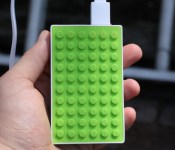
One thing we’ve seen while reviewing battery packs is the lack of beautiful design. That’s absolutely not the case for the Tego Power Grid, a 4,200mAh battery pack. It offers a very unique design and enough juice to power your device two times over, but is a little pricey for our liking.
We’ve used this battery pack for almost three weeks, and we have a pretty good idea as to whether this is right for you. Take a look at our full review below.
Design
External battery packs could certainly use some work in the design field. It’s not uncommon to see a big black or white cube with a few USB ports. This one, however, is absolutely beautiful. The top and bottom feature a Lego-like rubbery design to ensure it won’t slide off a table or something of the like. It’s encased in a plastic white shell, and generally feels sturdy. You’ll find two 2.1A USB outputs on the top and a Micro USB port on the right for charging the pack.

It comes with a thick, flat Micro USB cord that only measures about two feet long. It’s not the longest cord, but it’s super high-quality and definitely won’t get tangled. The only thing we have an issue with is the Micro USB connection side. The plastic casing around the cable is too big to fit when using a phone case. Though the cord was a bit too big on one end for our liking, it’s still a premium-feeling cord.
The top row of buttons actually light up to indicate the charge level. The LED lights in this thing are really bright and almost never stop blinking, even when the device is charging. We would have liked to see the LED lights turn off while in use to conserve energy, but it’s certainly not a deal-breaker.
Performance
The performance of this pack is great. It charges quickly due to the 2.1A outputs, and the LED lights are pretty accurate in indicating the charge level. When a device is plugged in, the Power Grid automatically recognizes it and turns on. This is a feature we wish we could see in all other battery packs.

We used this battery pack to charge a Nexus 5, Nexus 7 (2013), Nexus 7 (2012), Pebble Smartwatch, and a Galaxy S3. We’ve had no problems with the charging process, whatsoever.
Should you buy?
The Tego Power Grid is an amazing product. It looks fantastic, feels great, and charges things very quickly. However, the price is it’s major downfall. The Power Grid is offered directly from Tego for $59.00. We feel this price is way too high for a battery pack that can only charge most devices two times through.
We’ve reviewed 10,400mAh battery packs in the past that are a fraction of the price, while still keeping a solid design. Because of this, we simply can’t recommend the Tego Power Grid, solely for the price. If you do decide to invest in one, however, you won’t be disappointed in the performance or design fields at all.
If you’d like to check out a Tego Power Grid for yourself, head over to the Tego Power website.
The post Tego Power Grid review appeared first on AndroidGuys.

