


We were stealing music way before the internet and millennials
When I was 13, my babysitter showed up with a box of 12 new cassettes. I was amazed that she had been able to afford all this music. I grew up poor and even one new purchase was news; a dozen purchases was cause for celebration. Had she robbed a bank? Found a wad of twenties in a misplaced wallet? Been blessed by the benevolent lottery gods? Seeing the wonder in my eyes she grabbed the TV Guide sitting on the coffee table and opened it up to an advertisement for Columbia House, and there it was in bold letters: “12 tapes for a penny.” Thus began my life of crime.
Since the all-you-can-fit-on-your-hard-drive Napster era, it’s been generally accepted that people no longer want to pay for content. Why buy a CD or digital download when you can open a Spotify account or fire up a BitTorrent client and enjoy the same music for free? This has led to hand-wringing about how millennials (ugh, that word) have been raised to expect free stuff. They’re destroying the music industry and killing movie sales. If you spend more than 30 minutes on the internet, expect to see an article about how they are the absolute worst.
Except the expectation of getting things for free didn’t start with the Pokémon generation. It started in the 1980s when kids who embraced the ThunderCats, Depeche Mode and eventually Kurt Cobain opened TV Guide and started scamming the fine people at Columbia House.

Like so many people on Napster (also fueled by GenX), I didn’t feel like I was doing anything wrong when I basically stole from the company. I liked music, and those nice people were going to send it to me if I taped a penny to a postcard. I only remember a few titles from that first order: Bon Jovi’s Slippery When Wet (ugh), Starship’s Knee Deep in the Hoopla (double ugh), Fleetwood Mac’s Tango in the Night and Beastie Boy’s Licensed to Ill. The rest are hazy.
Columbia House expected its subscribers to purchase three, maybe four more albums at the regular price. Every four weeks a mailer would arrive with an album of the month. If you didn’t return the included postcard saying you didn’t want that album or order a different tape, that selection would arrive along with a bill.
That would happen for about three months before Columbia House would get wise and just send a bill. I was a latchkey kid so I would get home from school and toss the mailers in the trash so my parents didn’t learn about how I was conning The Man. The company never asked for a phone number (not that it would matter — our phone was shut off most of the time) and didn’t seem to realize on the second or even third time that I was just changing my last name on the account.
The company kept sending tapes, and I continued to ignore its pleas for payment. I couldn’t afford a Walkman, but I was building a pretty substantial music collection. It all came to a halt when my dad found one of the bills and made me pay off my debt. I gave him my birthday money, and he wrote a check and cancelled my account. My argument that everyone I knew was doing it fell on deaf ears as my father lectured me on debt, credit and stealing. I don’t remember the specifics. I just recall handing him my stash to settle the score with Columbia House.
Years later when I had a job and was making my own money, my music obsession cost me hundreds of miles on my car and at least $150 a month. I’d travel hours to pick up the Japanese import B-side to a Smiths song. I spent $50 on a Pearl Jam bootleg of one of their first shows in Italy. As far as I was concerned my debt to the music industry was paid in full.

Until Napster.
GenX and millennials flocked to the service that let you steal music with a few clicks. I had hard drives filled with songs from bands I wanted to check out but couldn’t bring myself to buy. If you’re over the age of 25 and under 50 and say you didn’t use Napster to pilfer music, you’re lying.
But karma got the best of me when my computer had a meltdown and all those songs were lost forever. Napster was dead and many people in my generation resigned themselves to paying for music again. And yet, we’ve skirted the blame for what’s become of the music industry. The slackers of the ’80s and ’90s mostly just want to be left alone, and because of that silence, we’ve allowed millennials to bear the burden of our music-stealing sins.
We were the original thieves of the music we love. But unlike digital files, we took it and held it in our hands. Using flashlights we stared at lyric sheets and album art under the covers in the dead of night. As adults, we giggled a little when Columbia House went bankrupt because we felt like we did that. But we have wronged you, Columbia House. And millennials, we have stood by and let you take the blame for the state of the music business. And for that, I’m sorry.
Image: Getty (Cassette tape)
Apple logs your iMessage contacts and could share them with police
Apple’s iMessage had a few security holes in March and April that potentially leaked photos and contacts, respectively. Though quickly patched, they are a reminder that the company faces a never-ending arms race to shore up its security to keep malicious hackers and government agencies out. But that doesn’t mean they will always be able to keep it private. A report from The Intercept states that iMessage conversation metadata gets logged in Apple’s servers, which the company could be compelled to turn over to law enforcement by court order. While the content of those messages remains encrypted and out of the police’s hands, these records list time, date, frequency of contact and limited location information.
When an iOS user types in a phone number to begin a text conversation, their device pings servers to determine whether the new contact uses iMessage. If not, texts are sent over SMS and appear in green bubbles, while Apple’s proprietary data messages appear in blue ones. Allegedly, they log all of these unseen network requests.
But those also include time and date stamps along with the user’s IP address, identifying your location to some degree, according to The Intercept. Like the phone logs of yore, investigators could legally request these records and Apple would be obliged to comply. While the company insisted that iMessage was end-to-end encrypted in 2013, securing user messages even if law enforcement got access, Apple said nothing about metadata.
Apple confirmed to The Intercept that it does comply with subpoenas and other legal requests for these exact logs, but maintained that message content is still kept private. Their commitment to user security isn’t really undermined by these illuminations — phone companies have been giving this information to law enforcement for decades — but it does illustrate what they can and cannot protect. While they resisted FBI requests for backdoor iPhone access earlier this year and then introduced a wholly redesigned file system with a built-in unified encryption method on every device, they can’t keep authorities from knowing when and where you text people.
Source: The Intercept
T-Mobile Extends Free Data in Europe and South America Until 2017
T-Mobile has announced it is extending its free unlimited high-speed data travel promotion throughout South America and 19 European countries until the end of 2016.
Simple Choice and T-Mobile ONE customers will be able to text and use data at the fastest available roaming speeds up to 4G LTE at no extra cost between October 1 and December 31.
European Destinations:
Armenia, Austria, Croatia, Denmark, Estonia, Germany, Iceland, Ireland, Italy, Latvia, Lithuania, Netherlands, Portugal, Russia, Serbia, Spain, Sweden, Ukraine, U.K.
South American Destinations:
Argentina, Bolivia, Brazil, Chile, Colombia, Easter Island, Ecuador, French Guiana, Guyana, Paraguay, Peru, Suriname, Uruguay, Venezuela
Tags: T-Mobile, Europe, South America
Discuss this article in our forums
Apple Music Beats Spotify, Pandora, and Others in J.D. Power Customer Satisfaction Study
Apple Music has been ranked the highest in overall customer satisfaction among seven streaming music brands that were compared in a new study by J.D. Power. Based on 4,482 individuals who have paid for a subscription music service in the last six months, J.D. Power’s inaugural music study measured six key areas in each service: performance and reliability, ease of use, cost of service, content, communication, and customer service.
Based on a 1,000 point scale, Apple Music ranked highest with a score of 834, followed by Rhapsody (826), Pandora (825), and Spotify (824), while the industry average was ranked as 822. Apple Music earned five out of five total “power circle” marks in three categories, meaning it’s “among the best” in content, performance and reliability, and ease of use. The service earned four out of five power circles in cost of service, communication, and customer service, earning it a “better than most” descriptor in these areas.
“The streaming music customer experience appears to be affected by a number of dimensions, including paid vs. free streaming, device choice and content selection,” said Kirk Parsons, senior director and technology, media & telecom practice leader at J.D. Power. “The key to success, however, is increasingly becoming how well streaming music brands create a viable music ecosystem that can not only support multiple types of devices, but also facilitate listeners’ social sharing and following of playlists with others.”
J.D. Power discovered a few key findings in its study, including a direct correlation between paid streaming services and higher customer satisfaction. These premium services earned a 19 point advantage over freemium options, specifically excelling in the customer service and communication categories. Streaming services that support peripheral devices — like smartwatches, home automation controllers, and virtual reality — also saw higher satisfaction over services that don’t offer these alternative music streaming methods.
An interesting sticking point in the music streaming conversation lately, J.D. Power found that exclusive content “improves customer advocacy.” In total, 74 percent of people who stream these exclusive tracks said they “definitely will” recommend their service, in comparison to 54 percent of people who do not listen to exclusive music but would also recommend their streaming platform to a friend.
 A detailed look at the performance of each service in the six categories can be found here
Ultimately, J.D. Power found that the “social” aspect of each service is what seems to be driving activity, with “fully engaged” listeners who share and consume the playlists of other users among the most satisfied customers. Passive listeners (who don’t share their content or listen to other users’ content) account for the largest piece of the streaming industry at 44 percent, followed by fully engaged listeners at 29 percent, followers at 22 percent (those who don’t share their music, but consume content of others), and finally sharers at 5 percent (the inverse of followers).
In the bottom spots of the study are TuneIn, Amazon Prime Music, and Google Music, with all three ranking between average and poor in the content and ease of use categories. With streaming services here to stay, more companies are planning to introduce Apple Music and Spotify-like music on demand competitors instead of focusing on free radio streaming options.
The most recent measure of Apple Music had the service topping 17 million subscribers and continuing to grow at a steady rate. Despite J.D. Power’s discovery that exclusive content is generating user advocacy for each service that supports it, Apple Music has found itself in hot water lately because of its reliance on such tactics.
Tags: Apple Music, J.D. Power
Discuss this article in our forums
Twitter’s ‘Moments’ Feature Now Available for Everyone
Starting today, Twitter is opening up access to its Moments feature to everyone, allowing all Twitter users to create their own story timelines through tweets and photos.
Launched in October of 2015, Moments is designed to help Twitter users discover stories unfolding on the social network, like conversations between world leaders or celebrities, cultural memes, sports commentary, world events, and more.
At launch, Moments could only be created by Twitter’s curation team and a select group of publishing partners, but expansion started in August of 2016 when Moments became available to influencers, partners, and brands. At the time, Twitter promised Moments would be opened up to everyone “in the coming months,” and has finally made good on that vow.
Moments can be accessed both through the Twitter app for iOS devices and on the web through dedicated tabs. Moments offer streams featuring full-width images, autoplaying videos and GIFs, and text-based tweets.
For everyone who wants to make a Moment – starting today you can! Creators everywhere can now tell stories with Tweets. pic.twitter.com/ZJtNBoTPWf
— Twitter (@twitter) September 28, 2016
Creating a new Moment can be done through the “Moments” tab available on each user’s profile page. Twitter users can create a title, set a cover image, and add tweets to tell a story.
Moments is available to everyone starting today, but the feature appears to be rolling out to users and may not be immediately accessible.
Tag: Twitter
Discuss this article in our forums
BlackBerry is officially getting out of the phone hardware business
BlackBerry’s transition to a software company is complete. During its Q2 2017 earnings today, CEO John Chen announced that the company “plans to end all internal hardware development and will outsource that function to partners.” This change was already in the works for some time, with Foxconn taking over the design responsibilities of some of the company’s future devices and TCL, owners of the Alcatel brand, building its phones under the DTEK brand, but to see it official is bittersweet for this Canadian.

“Our new Mobility Solutions strategy is showing signs of momentum,” said Chen in a press release. “Under this strategy, we are focusing on software development, including security and applications.”
BlackBerry’s hardware business has been losing money for some time, and this is just the last nail in the coffin.
BlackBerry announced revenue of just $334 million for the quarter, down 47% from a year earlier, and down sharply from its days of billion-plus quarters less than three years ago. It lost $372 million due to a hit of $147 million from its RAP, or Resource Alignment Program, and $96 million from inventory write-downs.
In other words, BlackBerry’s hardware business has been losing money for some time, and this is just the last nail in the coffin. But the company says that its transition to a software and services company, building Android-based security solutions for other OEMs, is proving successful, and revenue increases will meet the targets set in early 2016 for the end of this fiscal year. Chen is a pragmatist, and has been warning that he would get out of the hardware business should he see no future in it, and this move is the first step towards realizing that goal.
The investment needed in rebranding a TCL-built phone with BlackBerry software is minimal, especially, as we’ve seen in recent months, the company intends to distribute its security-focused Android software suite to all users running Lollipop and above. As someone who has followed BlackBerry since the early days of BlackBerry OS — I lined up to purchase a Bold 9000 in 2008 when everyone else was lusting after the iPhone 3G — I am a little saddened by this news, but certainly not surprised. Based on what we’ve seen from the burgeoning DTEK line, if there’s any money to be made in the coming years, it’s not going to be in high-margin devices like the Priv that, at $699, are critical successes and commercial failures.
The news comes on the heels of an announcement by Alcatel parent company TCL of its new TCL 950 flagship, the purported basis for BlackBerry’s upcoming DTEK60, which is expected to be announced in mid-October.
Using Google Chromecast Audio as a whole-house audio alternative to Sonos

Great-sounding music is made easy with a Chromecast Audio. And you’ll save a fistful of dollars, too.
If you’re thinking about setting up a whole-house (or even just a single-room) streaming audio solution, Sonos systems are pretty much what you’ll find recommended by folks on the Internet. They are easy to set up and the Sonos service offers a decent choice of streaming content providers. But the price tag — you’ll be spending hundreds per room for individual Sonos amps or speakers — can be tough to swallow. We’ve got a solution: Use a Chromecast Audio and a few standard components and save a whole lot of money.
Three things make the Chromecast Audio a good (or even better) alternative — the Chromecast has its own 96KHz / 24bit capable audio hardware, the 3.5 mm combination output supports optical as well as analog connections and has a high dynamic range setting for hi-res music files, and the Google Cast app lets you create groups or zones so you can stream your music to specific sources just like you can with a Sonos. There’s no hacking or messing with hardware required, either. Plug your Chromecast Audio into a set of powered speakers, or a small amp and passive speakers, or even an A/V receiver, and cast some music.
Getting started

You’ll need three things — a Chromecast Audio, something to play the music that’s streaming and something to initiate it. The Chromecast Audio is the easy part — you’ll find one on Google Play as well as plenty of other online retailers or on the shelf at Walmart or Best Buy. One will set you back about $35 unless you find it on sale.
To tell the Chromecast what to play, you’ll need an Android or iOS device or a computer running Google Chrome (a Chromebook works really well, too). Install the Google Cast app and it will walk you through finding your Chromecast(s) and setting them up. You’ll then be able to stream from popular online services like Google Play Music, Pandora, Spotify and plenty of others. You can also stream your own hi-res music from a network-attached storage device using a server like Plex or an app like BubbleUPnP for your Android phone. You can even mirror local files from your Android phone or tablet or cast audio directly from a Chrome tab across your local network. There are plenty of options when it comes to the source of your music, and more apps are adding Google Cast support all the time.
The Chromecast Audio is designed to be plug and play with other equipment.
Playing back the sound is really the only part you’ll need to think about. You need a way to get the audio from the Chromecast’s 3.5 mm jack to a pair of speakers (either powered or via an external amp). There is nothing special about how this is done. In fact, you can plug a pair of headphones into your Chromecast Audio and it plays exactly as you would expect. That means you can let your needs and your budget decide what you use here.
Adding some speakers

Probably the best solution would be to use a small Class-T bookshelf amplifier and a pair of passive speakers. The amp can cost as little as $20 and still deliver great sound because we’re not necessarily looking for bells and whistles — we just need a way to increase the power of the signal and pass it along to some speakers. Decent bookshelf speakers start at $50 or so, while great ones can be bought for about $100. You can even splurge and use a pair of studio monitors (along with an amp capable of driving them) for one or more rooms if you plan on streaming a lot of hi-res music. The folks where you buy your speakers will be able to help you if you’re not sure what to buy, Just tell them what you’re planning to do and they’ll point you towards everything you would need. Add in a few cables and you’ve just built a great audio streaming setup without breaking the bank. Here’s an example of a good setup that would compare to a pair of Sonos Play 3 speakers or a Sonos Connect amp setup:
Chromecast Audio
Topping mini-amp
Pioneer speakers
Even after adding in the cost of a few cables and things like speaker stands if you want or need them, this is a much cheaper alternative that sounds great and has support for more services than a Sonos system. The only downside is wiring things up, which should take just a few minutes because everything on this list will be plug and play. Now multiply the savings by the number of places you want to bring your music to, and you’ll have saved a lot of money.
A great sounding system is easy to build, or you can plug a Chromecast Audio into your existing setup.
A Chromecast Audio is also really easy to drop into your existing home stereo or entertainment center. If you already have a great setup and would love to use Google Play Music or listen to your music across your own network, all you need to do is plug a Chromecast Audio into an open optical input using a Toslink cable and fire up the Google Cast app. You can even use a pair of powered speakers like these Mackie 4-inch Monitors for great sound without a separate amplifier. Being versatile is a big plus, and a Chromecast Audio will fit most anywhere and connect to anything using standard cables.
Whether you’re just looking for a cheap and easy way to build a streaming stereo for your office or bedroom, or want to connect your whole house with multiple setups indoors or out, a Chromecast Audio is a great way to do it.
Digital Offers: Keep your browsing private and secure for only $39!
There’s so many reasons why you’d want to securely browse the internet anonymously in 2016; whether you don’t like how advertisers and marketers track your every search and click online, you hate dealing with geo-locked content, or you’re bothered by the idea of your ISP or government snooping on you.
The obvious solution is to get yourself a VPN subscription, but those can be a hassle to set up and can end up costing you hundreds of dollars over time. Plus, there’s typically limitations on the number of devices you can use it for.

That’s what makes this deal from Android Central Digital Offers so amazing. You can get a lifetime subscription to Windscribe VPN for just $39.99! Featuring a desktop application and a browser extension that work in conjunction with one another, Windscribe VPN not only protects your online privacy and unblocks geo-locked websites but it also removes ads and trackers from your browsing experience.
Windscribe helps you stay private online by blocking ads and trackers and changing your IP address to one that is shared by thousands of people, so your Internet activity cannot be tracked by your Internet Service Provider and other parties. It also features a top-notch firewall and can be used on all your devices simultaneously (compatible with PCs running Windows XP, Vista, 7, 8, 10, Macs running OS X 10.8 or later, and Linux as well).
A lifetime subscription to Windscribe would typically run you upwards of $900. That’s why you should act now and save 95% with this amazing deal. Keep your browsing private and safe with Windscribe VPN.
See at Android Central Offers
Best OnePlus Phone
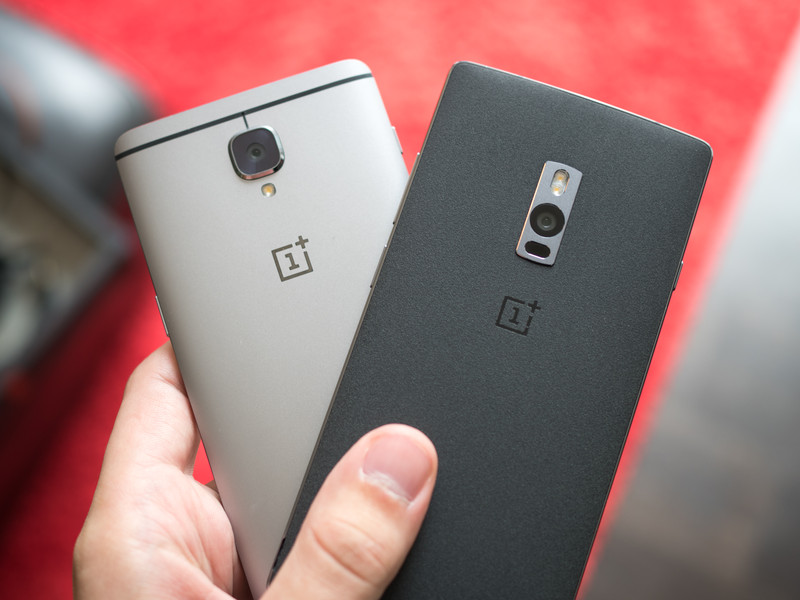
If you’re interested in getting the best OnePlus phone you can buy today, look no further than the OnePlus 3. It’s a fast and capable device all wrapped up in a beautiful chassis.
Best overall
OnePlus 3

See at OnePlus
The OnePlus 3 is the latest and greatest phone to come from OnePlus, and by far the best flagship they’ve released thus far. Featuring all the hardware specs and features you’d expect from a top-tier smartphone — a great screen, solid camera, speedy software, and long battery life — it’s one of the best Android phones of 2016.
And best of all is the price. At only $399, it costs significantly less than any other major 2016 flagship. While there are more affordable OnePlus phones available, none of them come close to matching the high quality experience you get from the OnePlus 3.
Bottom line: After years of fine-tuning, OnePlus has finally introduced a phone that’s worthy of competing in the competitive high-end smartphone market. That phone is the OnePlus 3.
One more thing: The OnePlus 3 comes in a single 64GB version, which is plenty of storage space for even the most avid of media collectors. And it’s dual-SIM too!
Why the OnePlus 3 is the best
Premium package at a mid-range price!
OnePlus has been trying to make major waves into the mainstream phone market, and they really hit their stride in a big way with the OnePlus 3. After previously dabbling with different materials, the OnePlus 3 gets a premium full aluminum build. Paired with the beautiful 5.5-inch, 1080p display protected by Gorilla Glass 4, it’s a stylish design with no compromises.
Powered by a Snapdragon 820 processor and 6GB of RAM, there’s plenty of power for running a mostly pure Android experience from OnePlus’ Oxygen OS. There a solid 16 megapixel camera on the back and an 8MP front-facing camera and in terms of storage, the OnePlus 3 comes with 64GB, but sadly no external SD slot. Other features such as a fingerprint scanner, NFC for Android Pay and two sim card slots are
On top of all that, there’s a capable 3000mAh battery which offers fantastic battery life during an average day of usage. When it’s time to top up, use the included Dash Charge wall plug to get your phone back up to 60% in just 30 minutes.
Here’s what Android Central’s Andrew Martonik had to say on it in his official review:
No longer are we looking at a phone that’s “good for the money” or downplaying shortcomings in light of the phone as a whole — the OnePlus 3 is aiming to just be a top-end phone, before you discuss the price or the company behind it.
Best for less
OnePlus 2
See at OnePlus
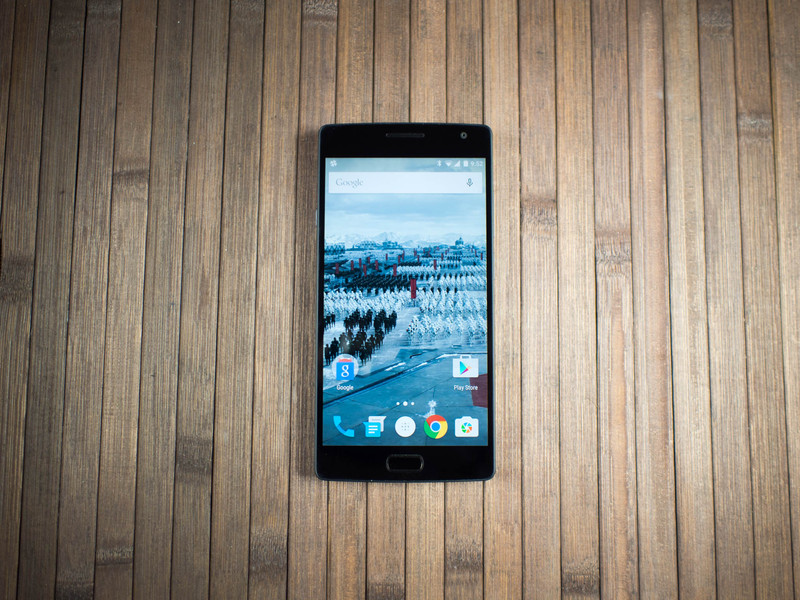
The OnePlus 2 was a somewhat interesting release in 2015. Following their “Never Settle” motto, OnePlus went with the year’s top chip: a Snapdragon 810 processor with 4GB of RAM for the 64GB model of the OnePlus 2. There is a handy notification slider opposite the power and volume buttons, allowing you to discretely silence your phone without taking it out of your pocket. However, OnePlus also left out features such as expandable memory, NFC support, and included a removable backplate but no removable battery. Depending on your usage habits, those might be deal breakers.
Even though it’s a year old, it’s a capable device that could be a decent option for folks looking for a mid-range phone with good specs. Currently running on Marshmallow, it should get an upgrade to Nougat along with the OnePlus 3 in 2017. The build quality here is quite nice as well — after the OnePlus One’s all-plastic body, the company transitioned to an aluminum-magnesium alloy frame with a swappable back cover. It’s a unique look that won’t be to everyone’s tastes, but the included sandstone cover is quite comfortable to hold.
Bottom line: If affordability is your top priority and you don’t care about lack of external storage or NFC, at $299 it will still serve the average user well.
Best budget
OnePlus X
See at OnePlus
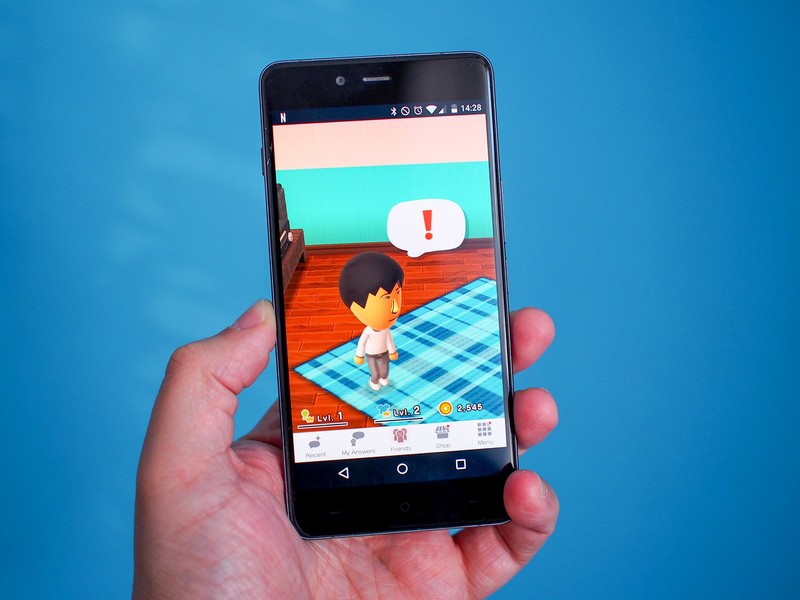
OnePlus put style first with the OnePlus X. With an engraved aluminum frame and black Onyx glass on the back, the compact OnePlus X has a polished look and feel to it that stands out among all other OnePlus phones. It’s got a brilliant 5-inch 1080p AMOLED display and performs well running the streamlined Oxygen OS.
This is a true budget phone, so it has a weaker camera than the OnePlus 2 and 3, but it does include the flexibility of either using two sim cards, or one sim card and a microSD — up to 128GB supported. Starting at only $199, it’s the most inexpensive of the three.
Bottom line: If you’re looking for an affordable, stylish phone in a compact size, the OnePlus X is a decent option.
One more thing:: The OnePlus X almost certainly won’t get Android 7.0 Nougat due to the use of an older Snapdragon 801 processor.
Best overall
OnePlus 3
See at OnePlus
The OnePlus 3 is the latest and greatest phone to come from OnePlus, and by far the best flagship they’ve released thus far. Featuring all the hardware specs and features you’d expect from a top-tier smartphone — a great screen, solid camera, speedy software, and long battery life — it’s one of the best Android phones of 2016.
And best of all is the price. At only $399, it costs significantly less than any other major 2016 flagship. While there are more affordable OnePlus phones available, none of them come close to matching the high quality experience you get from the OnePlus 3.
Bottom line: After years of fine-tuning, OnePlus has finally introduced a phone that’s worthy of competing in the competitive high-end smartphone market. That phone is the OnePlus 3.
One more thing: The OnePlus 3 comes in a single 64GB version, which is plenty of storage space for even the most avid of media collectors. And it’s dual-SIM too!
ICYMI: All aboard the world’s largest boat elevator

Today on In Case You Missed It: The Three Gorges Dam in China is home to the largest ship elevator, hauling up to 3000 tons of cargo from one lower level of water to the higher stream at the top. Meanwhile, Georgia Tech engineers believe their new fabric, which can harvest energy from both movement and the sun, will revolutionize how we keep devices charged.
The three baby parent video is here, and the crystallizing salts are here. As always, please share any interesting tech or science videos you find by using the #ICYMI hashtag on Twitter for @mskerryd.

