


Apple Releases macOS Sierra 10.12.1 With Bug Fixes, Features for Upcoming Macs
Apple today released macOS Sierra 10.12.1, the first update to the macOS Sierra operating system that first launched on September 20. macOS Sierra 10.12.1 has been in beta testing since September 21, with Apple seeding five betas before releasing the final version to the public.
macOS Sierra 10.12.1 is available for free to all customers who are running macOS Sierra. It can be downloaded from the Software Update function in the Mac App Store.
macOS Sierra 10.12.1 features few outward-facing changes, instead focusing on bug fixes and improvements to address issues that have surfaced since the release of the operating system. It does include Photos support for the new iPhone 7 Plus Portrait feature introduced with iOS 10.1, and it also includes features designed for next-generation MacBook Pro models that are set to be released later this year. Here’s a full list of changes:
This update:
– Adds an automatic smart album in Photos for Depth Effect images taken on iPhone 7 Plus
– Improves the compatibility of Microsoft Office when using iCloud Desktop and Documents
– Fixes an issue that may prevent Mail from updating when using a Microsoft Exchange account
– Fixes an issue that caused text to sometimes paste incorrectly when using Universal Clipboard
– Improves reliability of Auto Unlock with Apple Watch
– Improves security and stability in Safari
Apple has been on an accelerated timeline to get macOS Sierra 10.12.1 released, and it has likely already been sent to Apple’s supply chain partners to be installed on new machines. New MacBook Pro models could be ready to launch as soon as late October.
macOS Sierra is a major operating system update that introduces Siri support, cross device copy paste options, new storage optimization tools, auto unlocking with the Apple Watch, and more. For full details on the features that are new in macOS Sierra, make sure to check out our full macOS Sierra roundup.
Related Roundup: macOS Sierra
Discuss this article in our forums
Xiaomi Mi Robot review: Your weekends just got lazier

The Mi Robot raises the bar for robot vacuum cleaners.
Xiaomi isn’t just a phone manufacturer. The Chinese brand has ventured into the home appliances category with its Mi Ecosystem products, launching utilities like light bulbs, air purifiers, rice cookers, fitness bands, and even a smart screwdriver. Xiaomi doesn’t make the products in the lifestyle category itself. Instead, it invests in or partners with startups in this segment, and then makes its vast supply chain available to these companies.
It’s a win-win for both parties as startups get valuable funds and access to Xiaomi’s supply chain. Xiaomi, meanwhile, gets to market the hardware under its own label, like it does with the Mi Band, which is designed and manufactured by Huami. The Mi Robot also follows the same path. The device itself is made by one of Xiaomi’s ecosystem partners Rockrobo, and is now selling in China for the equivalent of $250.
Why is AC reviewing this? Xiaomi’s ecosystem model is all about providing smart home solutions that are affordable. While it isn’t an Android device, the Mi robot is a neat bit of kit, and the ability to control your vacuum with your phone is just cool.

With its white color scheme and minimalist styling, the vacuum is very Apple-esque when it comes to the design. The Mi Robot features a total of 12 sensors that allow it to effectively navigate around your house, including an ultrasonic radar sensor, a cliff sensor, a gyroscope and an accelerometer. The data from these sensors is transmitted to three on-board co-processors, which use a Simultaneous Localization and Mapping algorithm to determine the most efficient cleaning route.
The vacuum has a suction rating of 1800Pa, more than that of the $900 Roomba 980. The brushless DC motor, controllers, and fans come from Nidec. The suction inlet is located at the bottom, and there’s a side brush to the right of the vacuum that directs dust towards the inlet as it navigates around a room. The vacuum has two wheels, and can adjust its height automatically to create more suction with the surface.
Here’s how it works: the vacuum creates a virtual map of the room by going around all four corners. Once it figures out the layout, it starts cleaning the room in a grid, going back and forth to ensure that all areas are covered. It is a very efficient system, and one that differentiates the Mi Robot from others in this category.
Xiaomi sells an optional virtual wall accessory that lets you create a restricted area for the device. The virtual wall is a magnetic stripe that can be placed on the floor, effectively creating a barrier for the vacuum.

The Mi Robot comes with a 5200mAh battery, which delivers a cleaning time of around two hours, after which the unit will automatically return to its charging dock to recharge. The vacuum remembers its last location, so even if the battery runs out in the middle of a cycle, the unit will recharge itself and come back to the same spot to re-commence cleaning.

There are two buttons on the vacuum: power and home. You can start the cleaning process with a short press of the power button, while the home button initiates a return to the charging dock. You can also control the vacuum through the Mi Home app, which lets you view the virtual map created by the vacuum and its current status. You can also schedule a cleaning session from the app.
Through the Mi Home app, you can set different modes for the vacuum: Quiet, Standard, and Strong. The standard mode is enabled by default, and it gets the job done for everyday cleaning. In standard mode, the vacuum produces around 64dB of sound. The dust picked up by the robot is collected in a tiny cleaning bin, which has a sensor that notifies you when it’s full. I thought I was fairly efficient at cleaning the house with a regular vacuum, but I scheduled the Mi Robot to run after vacuuming one day and it managed to pick up a significant amount of dust.
The biggest drawback with the vacuum is that the app and manual are in Mandarin, making it harder to set it up. While the Mi Home app itself is available in other countries, the Mi Robot is listed only when you select Mainland China as the region. You can navigate the settings by using Google Translate, but it is cumbersome to get started with the vacuum at first.
Overall, the Mi Robot is well worth its $250 asking price. The vacuum did a fantastic job of cleaning the house, and it tackled carpeted areas as well as tiled surfaces with ease.
Given that the product is limited to China, the best way to get your hands on the Mi Robot outside of China is through third-party resellers like GearBest, where it’s available for $379. That’s $130 more than the sticker price, but until Xiaomi starts selling the Mi Robot officially, sites like GearBest are your best recourse to getting your hands on the vacuum. You can score a $20 discount by using XIAOMIVAC at checkout, bringing the cost down to $360.
See at GearBest
Using a Motorola Atrix Lapdock to power a portable, VR-ready PC

Alright, this is just plain clever.
Building a gaming PC, especially something you wan to be VR-ready, is a fun challenge. You can try to make your kit as small and compact as possible so it doesn’t interfere with your play space, you can go all out and mount the whole thing in individual pieces on your wall, or you can go somewhere in between. Typically, being portable isn’t something you can actually pull off unless you want to sacrifice power and jack up costs by going with a VR-ready laptop.
Here’s a clever solution from one of our forum members that uses some surprisingly old tech with some cutting edge hardware to create something unique!
Read more at VR Heads!
Digital Offers: Grab the Immersive Angular 2 bundle for just $41
Coding languages continue to evolve, and there are several new players that have been introduced over the last couple of years. Keeping up with all of them can be difficult, and switching can be even harder. Google created a new Javascript framework called Angular 2, and odds are you want to see what it is all about. Well, you don’t have to spend a ton of cash to find out if it is right for you.
Luckily, you can save 88% on the Immersive Angular 2 bundle which gives you access to 82 lectures and more than 10 hours of content. From understanding the basics to setting up a production-ready build workflow, you’ll have access to all the information 24/7.

This bundle includes:
- Access 82 lectures & 10.5 hours of content 24/7
- Understand the basic Angular 2 concepts, like Components, Form Validation, Templates, Services, Dependency Injection & more
- Choose the best language for you, between JavaScript, new JavaScript, or TypeScript
- Make HTTP requests & integrate w/ backend
- Set up a production-ready build workflow using NPM & Webpack
- Write unit tests w/ Jasmine & run them w/ Karma
- Navigate w/ the Angular Router
- Receive downloadable code samples for the Angular 2.0.0 final release
Don’t get left behind because you missed out on a sweet deal. At just $41 for the bundle, there is very little reason not to pick it up and test the waters with Angular 2.
Whether you want to try and code your first app or just learn something new, don’t miss out on the 88% savings that drops the price to just $41 for all this digital information for a limited time.
See at Android Central Offers
How to take a screenshot on the Google Pixel

How do I take a screenshot on the Google Pixel?
The Google Pixel runs Android 7.1, which is pretty special. There are a whole bunch of new features, and there are rounded icons — for better or worse. If you’re using the new phone, you’re likely going to want to show off some of its awesome looks in the form of screenshots.
It’s easy to take a screen on the google Pixel. Here’s how.
How to take and find screenshots on the Google Pixel
Take a screenshot using the hardware buttons
Hold down the power button (top button) on the right side of the phone.
Immediately afterwards, hold down on the down volume button.
Release both buttons at the same time.


If you performed the combination properly, you should see a smaller version of the screen you took and a notification
How to access the screenshot you took
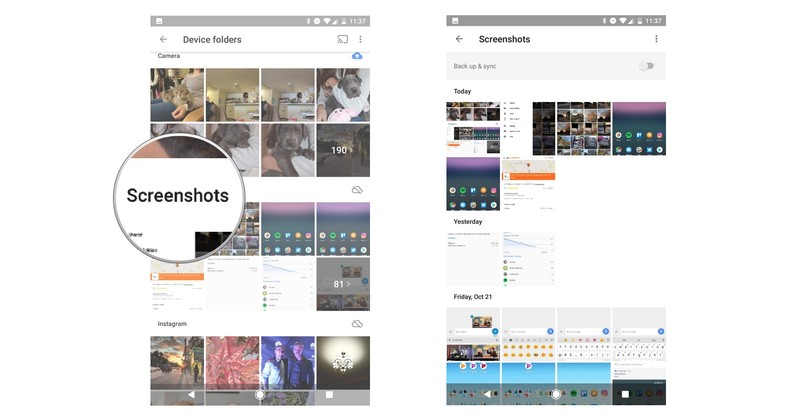
On the Google Pixel, screenshots are stored in a special folder, accessible through the Photos app.
Swipe down on the notification shade.
Tap on the screenshot to open it.
Tap on Share or Delete to action the screenshot.

How to access all of your screenshots
Open Google Photos from the home screen, folder or app drawer.
Tap the three-line menu button on the top left side of the screen.
Tap Device folders.

Tap the Screenshots folder.
Open or share the screenshot or screenshots you want.
How to take a screenshot with Google Assistant
Right now, Google Assistant doesn’t allow you to take screenshots using your voice, but the feature should be added soon, as it was available through Google Now on Tap in earlier versions of Android.
Questions?
Taking screenshots is often the easiest part of using a phone, but there are plenty of things you can do with them. We’re here to help answer any follow-up questions you may have.
Google Pixel + Pixel XL
- Google Pixel and Pixel XL review
- Google Pixel XL review: A U.S. perspective
- Google Pixel FAQ: Should you upgrade?
- Pixel + Pixel XL specs
- Understanding Android 7.1 Nougat
- Join the discussion in the forums!
Google Store
Verizon
Best Car Chargers for Google Pixel

Looking to keep your Pixel charged on the road? Here are our favorite car chargers!
We’ve all been there (some of us more than others): You hop in the car for a road trip or are on your way to work, you look at your phone, aaaand you’re at 33% — with the WHOLE day to go!
You need a car charger for your Google Pixel so that you never miss a message or a call. Here are some of the best you can buy for your Pixel.
- Tronsmart
- Pleson 3-port
- Maxboost
- Nekteck
- Vinsic
Tronsmart

Tronsmart’s car charger with a built-in USB-C cable is easily your best option for keeping your Pixel juiced on the road. This is a Benson-approved car charger — in fact, it’s the only one on the list. Benson Leung is an engineer at Google who takes it upon himself to test USB-C chargers and cables. This one passes!
The attached USB-C cable means no need to remember one every time you drive, and the USB Type A port is handy for charging another device at the same time via Quick Charge 2.0 or 3.0. Your Pixel will charge quickly and efficiently, thanks to USB 3.1 and its delivery of 5V at 3A.
If you want a car charger that has exactly what you need to keep your Pixel going, check out the Benson-approved Tronsmart 33W dual USB charger.
See at Amazon
Pleson 3-port

Pleson’s charger features two USB Type A ports and a USB-C, so you can charge up to three devices at the same time! The USB-C port is USB 3.1, so your Pixel will charge quickly, giving you a significant charge in about a half-hour.
This charger has built-in safeguards so that your Pixel doesn’t fry, with automatic shut-off in case of a power surge, overheating, or an overcurrent.
If you want to charge up your Pixel, as well as a couple other devices while you’re on the go, then check out Pleson’s 3-port charger.
See at Amazon
Maxboost

Maxboost’s 35W charger is another to feature a built-in USB-C cable, so you never have to worry about forgetting yours at home. The other USB port is great for any of your Quick Charge 2.0 devices and charges with up to 18W (12V/1.5A, 9V/2A, 5V/2A).
The handiest part of this charger is its muted light-up ring that shines when plugged in. It’s dimmed so as not to distract you while you drive.
This charger comes in black or white, each with a blue LED ring, so you can match it to any color Pixel you have!
See at Amazon
Nekteck

Nekteck is yet another charger that features a built-in USB-C charger, so you need only bring your Pixel when you hit the road — no extra cables needed!
The USB-C cable comes in a straight or curled version, which is handy if you happen to tangle your cables pretty often.
Your Pixel will be charged as quickly as possible, thanks to USB 3.1 and your other devices can be charged through the USB Type A port at up to 2.4A.
See at Amazon
Vinsic

Vinsic’s charger features both a USB-C port and a USB Type A port, so you can charge your Pixel and another device at the same time. You’ll need to bring cables along, since this charger doesn’t have anything built-in.
Your Pixel won’t be cooked, thanks to overcurrent, overcharge, and overvoltage protection, and the LED indicator lets you know when the charger is ready to juice up your devices.
See at Amazon
Your picks?
Are you using an awesome USB-C charger that we didn’t mention? Let us know in the comments below!
Google Pixel + Pixel XL
- Google Pixel and Pixel XL review
- Google Pixel XL review: A U.S. perspective
- Google Pixel FAQ: Should you upgrade?
- Pixel + Pixel XL specs
- Understanding Android 7.1 Nougat
- Join the discussion in the forums!
Google Store
Verizon
Pokemon Go’s Halloween treat will stuff you full of Candy
Pokemon Go is getting into the spirit of Halloween, with a special in-game event running from 26 October through to 1 November.
Some of the treats that Pokemon Go has in store are a little disappointing: suggesting that there will be more Zubats around to make things spooky is a bit like reaching into a treat basket and pulling out a packet of organic raisins.
Who wants raisins? Who wants more Zubat?
Fortunately, Pokemon Go will also be going crazy with the Candy, with double Candy on offer for all Pokemon you catch, evolve and transfer. That potentially means you’ll be able to ratchet up the Candy needed to evolve some of those rarer forms – if you’ve been hoarding extra Pokemon you don’t need, wait until 26 October before transferring them back to the Professor.
- Pokemon Go: How to raise your XP level, power up and evolve your Pokemon
- Pokemon Go buddy: How to use the new buddy system
Talking of rarer forms, Niantic has said that there will more of the following Pokenom to catch: Drowzee, Gastly, Gengar, Golbat, Haunter, Hypno, and Zubat.
Of these, Gengar is perhaps the most interesting as it’s the only one on the list we’ve never found in the wild – although that will be different for those living elsewhere.
You don’t have to do anything, you just have to step out the door and play as normal, and cash-in on those extra Candy from 26 October.
Blockchain gets its first test with international trade
Some financial gurus are convinced that blockchain (the underlying tech behind bitcoin) is the future of business, and they might already have some proof. The Commonwealth Bank of Australia and Wells Fargo have conducted the first international, inter-bank trade deal to use blockchain for the transaction. It was a relatively modest experiment that shipped $35,000 in cotton from Texas to China, but it demonstrated the advantages of taking humans out of the equation. The deal included smart contracts that automatically sent payments and transferred ownership as the cargo reached certain locations. The companies involved didn’t have to waste time sending documents, processing money or worrying about potential fraud.
Don’t expect blockchain to be a mainstay of trade in the near future. Wells Fargo tells the Sydney Morning Herald that there are “significant regulatory, legal and other concerns” that have to be resolved before it’s used on a regular basis. However, the advantages make it hard to ignore. Existing shipping processes can take days, especially for cross-continent trips where time zones are a major factor. Blockchain reduces the transaction time to minutes — cargo could arrive much sooner, which means less time waiting for the products you want to buy.
Via: Reuters, Sydney Morning Herald
Source: Commonwealth Bank of Australia
Vixole’s Matrix shoe puts an active LED display on your feet
Now that Nike’s Back to the Future-inspired high tops exist, and the famous self-lacing tech has arrived on a consumer product, even footwear is beginning to get smarter. With a little crowdfunding help, Vixole will be making its own contribution to the growing lineup of forward-thinking kicks, with its Matrix shoe. The startup’s Indiegogo campaign launched today and aims to put customizable LED displays for static or motion graphics on everyone’s feet. It’s not just for eye candy, however: The design includes an array of sensors that can adjust the visuals according to movement, GPS coordinates or even react to your playlist.
Vixole made its first announcement about the Matrix a few months back, providing mockups of its intelligent footwear and even surfacing its prototype on occasion. I met up with Ali Ma and Haidong Dong, two of the founders, to check it out and learn a bit more about their plans. This is the second footwear project for Ali, who previously launched Essential Marks, sneakers designed with LEDs circling a transparent sole. Haidong joined to help on the business side and this led the duo to take things one step further for their follow-up project.

With the help of its team of designers and engineers, the company has laid out the plans for the Vixole Matrix smart LED high top. The final design will wrap a 22ppi LED display around the rear of the shoe’s upper within injection molded thermoplastic polyurethane (TPU). This is a durable, flexible material, similar to what’s you’ll find on products like the Nike FuelBand SE.
Sensors including units to detect sound, light and bending, along with an accelerometer, gyroscope and magnetometer will be installed inside a specially designed insole. There will also be haptic sensors on board, so if you wanted you could get vibrating notifications and prompts for turn-by-turn directions. This set of features could be combined with LED blinkers on each shoe — a useful option, say, if you were riding a bike. There will even be a step tracker, which seems like a no-brainer for smart footwear.

Other potential uses could add some flare to a night on the dance floor; actively react to your skateboard stunts; or even connect to third-party apps to provide motion capture data. This is one of the reasons why the Vixole team is making the software open source. There will be a mobile app to help control and customize the illumination tech on Vixole’s shoes including the ability to capture and convert photos into displayable graphics. You’ll also be able to access the Vixole marketplace to download new designs or share your own creations.
Right now the team is at the proof of concept stage and the Indiegogo campaign will help take the product from prototype to the final market version. With all this tech on board, the estimated retail price of $345 seems reasonable enough (they’re smarter than Yeezy’s, after all), but if you take advantage of the crowd-funding deals you could score a pair for as low as $225.
Apple Sold 70% Fewer Apple Watches This Summer Compared to Last
The latest numbers from market research firm IDC reveal Apple Watch shipments totaled an estimated 1.1 million units in the third quarter, reflecting a three-month period between June and September, a sharp 71.6% decline compared to an estimated 3.9 million Apple Watch shipments last summer.
The decline can be at least partially attributed to the lack of an Apple Watch refresh until the final two weeks of the quarter, when the Apple Watch Series 2 and slightly updated first-generation models launched. The overall smartwatch market also declined an estimated 51.6% in the third quarter.
Apple still maintained its position as the overall leader of the worldwide smartwatch market with an estimated 41.3% market share, despite posting the second largest year-over-year decline among the leading vendors. Garmin finished in second with an estimated 20.5% market share following strong 342.2% growth.

Garmin’s growing list of ConnectIQ-enabled smartwatches and the new fenix Chronos allowed it to leapfrog Samsung, which captured only 14.4% market share based on an estimated 400,000 smartwatch shipments, according to IDC. Lenovo and Pebble rounded off the top five with an estimated 100,000 shipments respectively.
Apple does not disclose Watch sales in its quarterly earning results, instead grouping the device under its “Other Products” category alongside the likes of iPods, Apple TVs, Beats, and accessories. The focus will now shift to the more important fourth quarter, encompassing the busy holiday shopping season.
Related Roundups: Apple Watch Series 2, watchOS 3
Tag: IDC
Buyer’s Guide: Apple Watch (Buy Now)
Discuss this article in our forums

