


Review: ZENS Power Bank Will Charge Your iPhone and Apple Watch
ZENS recently debuted its latest product, an iPhone/Apple Watch Power Bank that has a built-in Apple Watch charging puck and a USB port, allowing you to charge all of your devices at once.
Priced at €69.99 (or $78.00) the 4,000 mAh ZENS Power Bank is about the size and shape of a chocolate bar, though perhaps a bit wider. Because it’s neither short nor particularly flat, it doesn’t fit well in a pocket, but it’s a good size for a backpack or bag when traveling.
The Power Bank is sturdy and well-made, constructed from a soft-finish black plastic material. At one end, there’s an Apple Watch charging puck built into the device, and at the top, there’s a USB port for plugging in an iPhone or other USB-powered device, and a micro-USB port that’s used for charging.
There’s a single button that’s used as an on/off switch, which needs to be pressed whenever the Apple Watch is placed on top of it to activate charging. The Power Bank has a single blue LED next to the micro-USB port so you can tell if it has charge left, but because there aren’t multiple LEDs, there’s no way to tell exactly how much charge is remaining.

Due to the flat, skinny shape of the ZENS Power Bank, I sometimes had trouble getting my Apple Watch situated just right so it would charge, and a knock was enough to dislodge it if I happened to hit it when reaching for something on my nightstand in the middle of the night. That said, it does work with multiple bands and it’s no less convenient than using the Apple Watch charger on its own.

I took the ZENS iPhone/Apple Watch Power Bank with me on a trip recently, and I can confirm that at 4,000 mAh, it has enough juice to keep an Apple Watch charged for a week. I used it for nine days straight to keep my 38mm Apple Watch charged, but I wasn’t draining it every single day.
As for the iPhone, the ZENS Power Bank can do just about one full iPhone 7 Plus charge and one full Apple Watch charge, but that eats up a lot of the capacity because it’s limited to 4,000 mAh, which is on the small side for portable iPhone batteries.
I was able to get it to charge my iPhone 7 Plus and my Apple Watch, but it was essentially drained after that. I don’t have an iPhone 7 to test, but you could potentially get two charges out of the Power Bank because the iPhone 7 has a lower-capacity 1,960 mAh battery inside. It’s worth noting that the Power Bank offers 2-amp charging, so the iPhone will charge at a decent speed.

Because it can only deliver a single charge to an iPhone 7 Plus and an Apple Watch simultaneously, this is only going to work for day trips when you need a little extra juice. Conferences, a long day at Disneyland, and a night camping will all work fine, but don’t buy this for a longer trip unless you only need to charge your Apple Watch.
If you just want something to power the Apple Watch, this will work for a solid week of standard Apple Watch use. A little more if you’re not using much battery, and a little less if you’re draining your watch every day.
At home, the Power Bank is nice if you want an Apple Watch charger that has no cords and only needs to be charged once a week from a computer or USB power adapter (it doesn’t come with one). It can sit on a desk without taking up too much room, and its neutral design will match most decor.
Bottom Line
The ZENS iPhone/Apple Watch Power Bank costs approximately $78, which is not a great price for a 4,000 mAh battery pack.
On Amazon, you can get a smaller 5,200 mAh battery pack for $15.99, or a 10,000 mAh battery pack for $30, but it won’t have the built-in Apple Watch charger that’s in the ZENS Power Bank.

If you don’t want to carry around an Apple Watch charger and want a built-in solution, the ZENS iPhone/Apple Watch Power Bank will deliver it, but personally, I’d rather pay much less for more power, especially if I’m seeking something that’s got enough juice to charge my iPhone. You’re going to be carrying a micro-USB charging cord and a Lightning cord to charge the iPhone if you use the ZENS Power Bank anyway, so I’m not sure how much of a convenience factor it’s adding.
If you want a cord-free desktop Apple Watch charging solution or need a way to power an Apple Watch alone for a week, however, the ZENS iPhone/Apple Watch Power Bank could be worth checking out.
Pros:
- Can keep Apple Watch charged for a week
- Built-in Apple Watch charging puck
Cons:
- Expensive
- Low capacity
- Not suitable for more than 1 iPhone 7 Plus charge
- Requires micro-USB cord for charging
- No way to determine charge level
How to Buy
The ZENS iPhone/Apple Watch Power Bank can be purchased from the ZENS website for €69.99 or about $78. It ships from the Netherlands to the United States and many other countries around the world.
Tags: review, ZENS
Discuss this article in our forums
Samsung Gear S3 review: All-in on a ‘more is more’ strategy
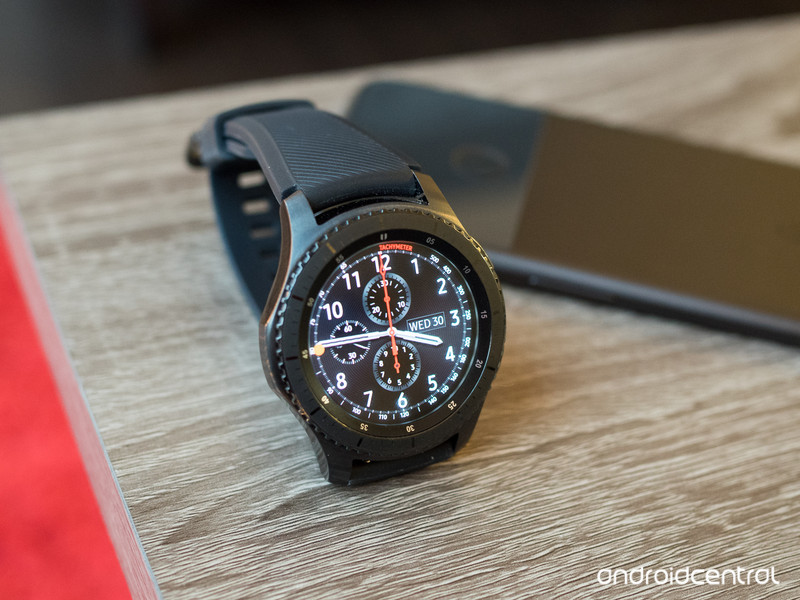
The Gear S3 does everything (and more) you could expect from a smartwatch, but lacks the restraint necessary to make it a slick cohesive product.
The quick take
Samsung has in many ways doubled down on a feature-packed strategy with its wearables, making the Gear S3 the largest and most powerful smartwatch available today. It has a bigger screen, standalone software and many more features than you can get from the competition, including the same full GPS support, heart rate and activity tracking you find in its fitness-focused Gear Fit 2. The problem is that means the Gear S3 is too big for many wrists, adding to the fact that it has a bulky and male-focused design that’s going to put off many potential buyers.
The good
- Nice design and materials
- Always-on watch faces are great
- Rotating bezel still wonderful
- Standard watch strap design
- Enables Samsung Pay for all
The bad
- Too big for many wrists
- Pile of features is daunting
- Clunky interaction with some apps
- LTE hurts battery, adds little value
More is more
Gear S3 Full review
Samsung’s Gear S2 of 2015 was a viable alternative to a pile of second-generation Android Wear offerings from a variety of companies, and offered a refreshing smartwatch experience that was thankfully accessible to those without Samsung phones. Its rotating bezel was truly innovative and gave you access to tons of software features you couldn’t find elsewhere. It also offered a more compact and lighter form factor, while also giving longer battery life, for those who were put off by the extremely large Android Wear watches.
So it was confusing to many of us when Samsung announced the Gear S3, coming in both a Classic and Frontier design, that was dramatically larger than the Gear S2. Going bigger enabled Samsung to take everything the Gear S2 did and add even more. It still has its rotating bezel, standard watch band connection, tons of software features and optional cellular connectivity, but now it packs GPS, a bigger battery, full Samsung Pay support and new software features to make it even more useful even when your phone isn’t around.
But in doing so, Samsung is walking the line of alienating a large portion of the population who just want a smaller, simpler smartwatch that gets the basics done, looks nice and fits on those with average-sized wrists. There’s no doubt that Samsung is doing the most out of any company with a single wrist-bound wearable, but is it trying to do too much? We find out in our complete Samsung Gear S3 review.
About this review
I (Andrew Martonik) am writing this review after one week using the Gear S3 Frontier LTE, with service provided by AT&T. The watch was used primarily connected to a Google Pixel during the review period. After an initial software update the day of receiving the watch, nothing else in the software changed. The Gear S3 was provided to Android Central for review by Samsung.

Go big or go home
Gear S3 Hardware
The Gear S2’s offering of your choice of either a sleek sports-style design or classic timepiece look was a somewhat-differentiating factor for the watch, but that’s all gone now with the Gear S3. I’m reviewing the Gear S3 “Frontier” model, but it isn’t far removed from the “Classic” model — they both have the same dimensions, specs, screen and capabilities (aside from the Frontier’s optional LTE), but different external case designs. For this reason, I’ll interchangeably refer to both as “Gear S3” unless there’s something specific to point out about one model.
More: Complete Gear S3 specs
To quickly point out the differences, you can see my initial hands-on with the watches; the Classic comes with a shinier chrome-like finish, a more understated bezel and classic watch-style buttons, while the Frontier is black and monolithic, with a bulkier gnarled bezel and large rubber-textured buttons. Both are interoperable with standard 22 mm bands, but ship with different styles: the Classic with a basic leather band, and the Frontier with a heftier rubber band.
Something that doesn’t come across immediately in product renders online is the overall bulk of the Gear S3. With a 46 mm case (49 mm at the lugs) and perhaps more importantly 12.9 mm thickness, it’s both wide and thick in a way that instantly reminds you this is a wrist-mounted computer and not a slick mechanical timepiece. I’m a six-foot four-inch tall guy with large wrists that feel comfortable with watches up to about 50 mm, so I obviously don’t have an issue with the Gear S3’s size, but I just don’t see how this watch will fit comfortably on most people — particularly women. The Gear S3 Frontier’s design is particularly masculine and tough, so I get that it’s larger; but then you realize that the Gear S3 Classic is the same size even though it has a more gender-neutral look. No matter how much you like the looks, I encourage everyone to go try it on in a store before buying — you may find it to be unmanageably large.
Size aside, the Gear S3 is built to fit in with the top-end smartwatches out there. The Gear S3 is particularly well sculpted out of 316L stainless steel and the two-tone brushed/shiny finish really stands out. The trademark rotating bezel requires just enough effort to spin, making it easy to move a single click for fine selections or several clicks to scroll through a long menu. Both Gear S3 models are IP68 dust- and water-resistant, meaning it can handle all reasonable amounts of contact with water; the Frontier is also MIL-STD 810G rated, meaning it can handle extra levels of shock, heat/cold, pressure and vibration.
It’s beautiful and well-made, but positively massive.
The included rubber band fits the Frontier’s look well and is capable of fitting in whether you’re dressing up or keeping casual. The Classic’s leather band is nice as well (recalling from my admittedly short time with it in August), but you can do far better buying something for $25 on Amazon.
Sadly the bottom one-third or so of the watch is a jarring bit of hard plastic that stands out from the fine metal above it and detracts from the feel of the watch on your wrist. The plastic is necessary from the standpoint of having radios in the watch, but that doesn’t mean it’s particularly gracefully integrated into the design. I really wish there was a more elegant solution implemented here that shrouded your wrist from coming in contact with the plastic and kept it from being seen when viewing the watch from the side. The plastic is somewhat hidden on the Gear S3 Frontier because it’s all black, but is particularly easy to see on the Classic, as the black plastic backing stands out strongly from the silver metal.
Samsung of course nailed the display on the Gear S3, bumping up in size to a 1.3-inch circular OLED panel — covered by Gorilla Glass SR+ — with great colors, good brightness and amazing viewing angles — the latter of which being incredibly important for a smartwatch. And because the watch is primarily set up for interaction via the rotating bezel, you spend less time covering and smudging up the display as you use it throughout the day. That’s not something you think about at first, but really enjoy when you don’t have to wipe down the display on your watch every hour.
This is the best implementation of always-on watch faces yet.
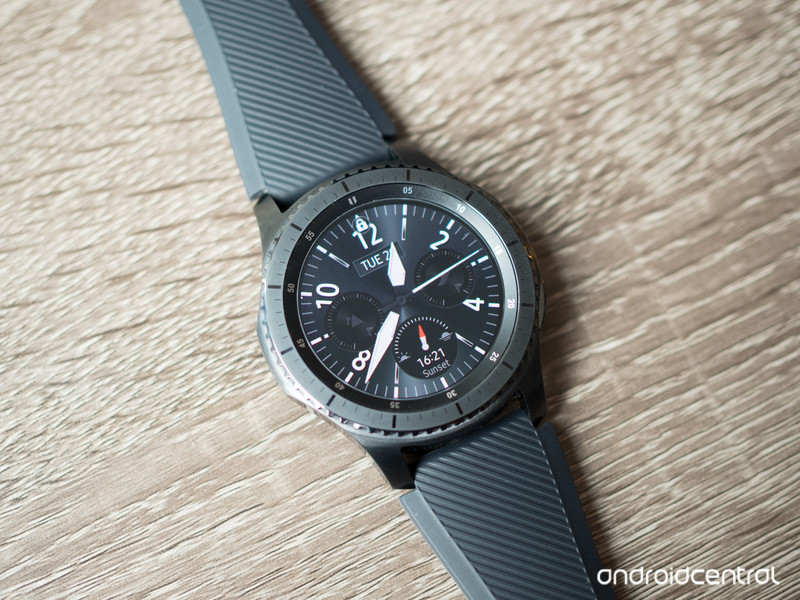
What really makes you appreciate the display is new always-on display modes for the Gear S3’s watch faces. There are 16 watch faces included and dozens more available for download, but I settled on a few of the analog-style faces that matched nicely with the Frontier’s external hardware. Adapting the same idea introduced on the Galaxy S7, the Gear S3’s watch faces dim but keep running when you’re done using the watch.
But this isn’t simply just turning down the brightness of the display — the watch faces actually shift to a simple, slightly lower resolution version of the face that drains less battery while offering full visibility of time, including a moving second hand. As soon as you raise your wrist the complete watch face comes to life without skipping a beat. This makes the Gear S3 feel more like a “real” watch than the competition, and I love the implementation. While in use the display doesn’t offer an automatic brightness setting, per se, but does offer an “auto-low” setting that dims the screen in dark situations — kind of the reverse of what we’re used to, but still useful nonetheless.
A whole lot going on
Gear S3 Software and experience
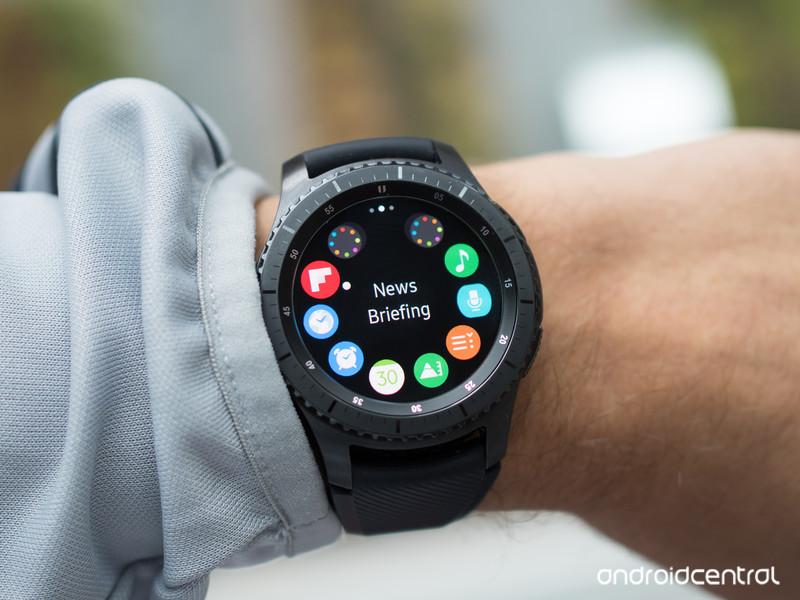
Samsung already offered considerably more features in its Gear S2 software than what we had on Android Wear, and that basic feature set hasn’t changed much a year on — scrolling through the interface and getting into the settings, you won’t notice any major visual differences. In fact, all of the non-hardware-dependent software changes will soon be running on the Gear S2 thanks to a software update.
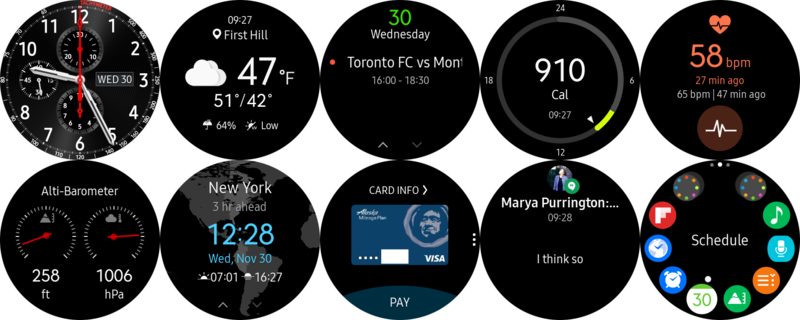
Samsung continues to push to the idea of the watch as a purely standalone device, starting with the Gear S3 Frontier’s optional LTE connection (more on that below) but also by allowing you to install and operate apps directly on the watch without communication to a phone at all. Aside from the fact that the Gear S3 can pull in notifications from your phone and let you act on many of them, everything else can work directly on the watch. There’s a standalone experience for your calendar, contacts, weather, alarms, to-do list, music player, news reader and more, plus you can install apps like Uber and ESPN that work independently on the watch.
I wasn’t interested in poking around on a tiny display to read snippets of news.
It’s still all a bit much to manage, even with the larger screen and superb rotating bezel that make navigation as easy as possible on a smartwatch. I quickly settled into a daily routine that had me spending 99% of my time on the watch face, in notifications and in the weather app. I wasn’t interested in poking around on a tiny display to read snippets of news or painfully scroll through dozens of calendar appointments. The only time I ever went into the app launcher was to go to the settings.
The best thing about the Gear S3 is that you don’t have to use any of the superfluous features — you can pick and choose the few experiences that add to your life, and trash the rest. Just configure the widgets that you want, stay away from the cluttered app drawer and skip installing unnecessary (and generally poorly made) watch apps, and you’ll be good.
Samsung Pay
The Gear S3 offers full Samsung Pay support, including Samsung’s exclusive MST technology that lets you pay at traditional swiping card readers. Just as importantly, Samsung has expanded Pay to work with non-Samsung phones as well — all you have to do is install the proper add-on to the Gear app on your Android 4.4+ phone, and you’ll be able to add your credit and debit cards. Now they won’t be able to be used anywhere but the watch, but that’s fine; it still gives people a little taste of what Samsung Pay is like, and is great to see included. Samsung could have easily kept this exclusive to its own phones.
Samsung Pay takes a few minutes to get set up, but once you have it configured things are simple. Long-press the “back” button on your watch, rotate the bezel to choose between your cards, then tap “Pay” and hold the watch near the payment terminal. The watch doesn’t have to be connected to a network or Bluetooth to make a payment, but instead has a limited number of one-time payment tokens securely stored on the watch and must sync back up to your phone periodically to refresh them. The Gear S3 also requires that you have a PIN lock in order to use Samsung Pay — as soon as the watch comes off your wrist, you’ll have to enter the PIN again.
Fitness tracking
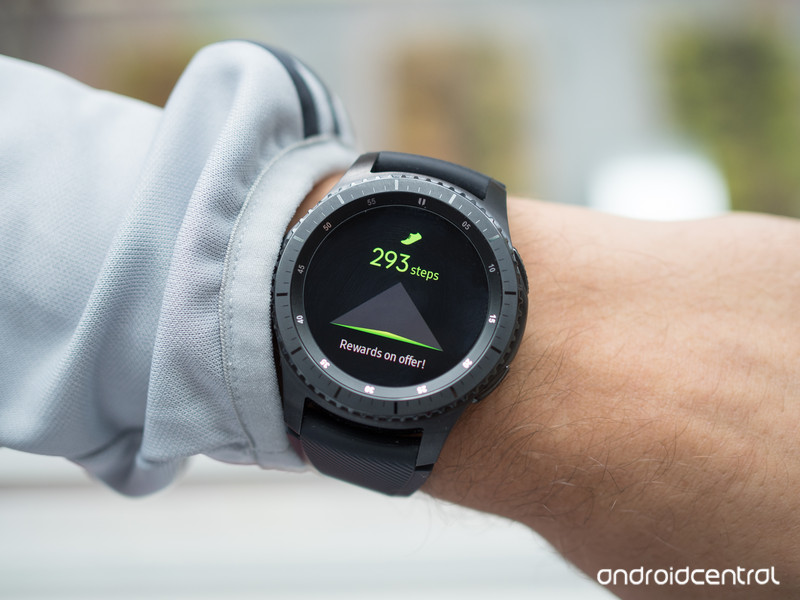
After using Samsung’s Gear Fit 2 as my daily activity tracker for the past couple of months I was already very in tune with the S Health fitness and activity tracking available on the Gear S3, which is identical aside from its slightly different display of information on the larger, circular screen. The Gear S3 can follow your daily steps, take regular heart rate readings, count the number of floors climbed throughout the day and track distance-based activities like running via GPS — it all gets rounded up into a nice 24-hour log of your activity each day.
In all respects it’s a full-blown fitness tracker … except for the fact that it’s a big watch. It’s huge by fitness band standards, but admittedly about on par in size to fitness-focused running watches (though often have more features preferred by intense runners). The size may not bother you for runs, but won’t be acceptable for gym workouts, yoga or team sports in the same way that a small and simple fitness band is. It’s also far too big to wear while sleeping, completely negating the sleep tracking functions I quite enjoy on the Gear Fit 2.
Even if you don’t use it for sleep tracking or a majority of your workouts, you’re going to have to realize that you’ll never get a full representation of your activity from a watch that you don’t wear anywhere near 24 hours per day and gets less than two full days of battery life. You’re going to miss workouts, you’ll miss many steps and floors climbed, and you won’t be tracking sleep. Get a Gear Fit 2 if you want a fitness-focused wearable — it’s a great device.
Battery life
By using its own operating system and processor, Samsung is able to get solid battery life out of a battery cell that’s a bit smaller than the competition. The Gear S3’s 13 mm thick case houses a larger 380 mAh battery, which Samsung claims is good for 3 days of “average” use. But with a watch that has so many features, apps, settings and configuration options I’m not sure what it considers to be “average.” I found the Gear S3 to consistently use 40-50% of its battery over the course of a full day, meaning two full days wasn’t out of the question but it certainly couldn’t make it to a third day, let alone complete it.
If you’re using always-on watch faces, expect two days of battery at most.
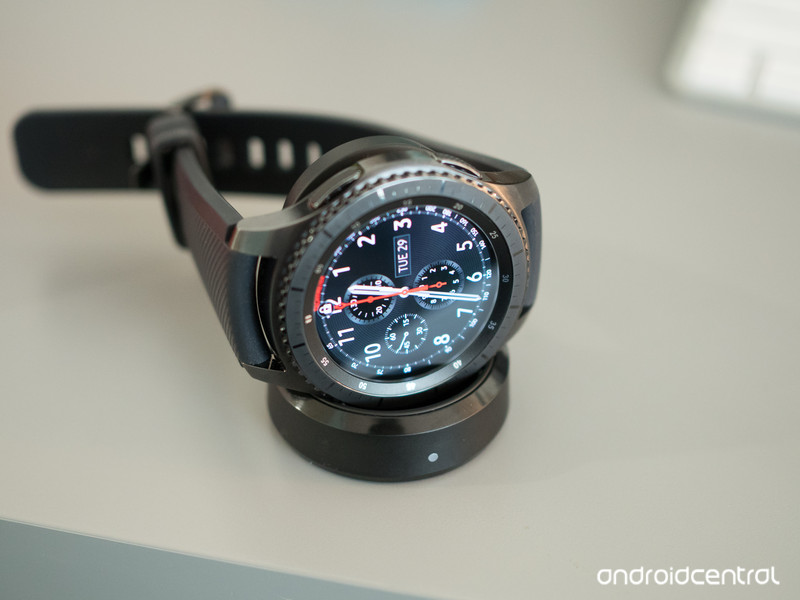
A huge factor in battery life here is the use of the always-on display mode and how you have your networks set. As noted above the always-on watch faces look great and even function with a moving second hand, giving the appearance of a real watch at a glance without having to lift your wrist a certain way to activate it. Always-on display is not turned on by default, and keeping that OLED display lit up (even though it is dim and simplified) puts a drain on the battery. But I think the always-on display is a major feature of the Gear S3, and I wouldn’t choose to use it without the feature turned on — for me, it’s worth losing almost a day of battery life over. It’s that good.
Samsung actually quotes a day less of battery life for the Frontier LTE model, but again that depends how you use it. By default the watch has its mobile network set to “auto” in order to only connect to LTE when Bluetooth is unavailable — so even if you don’t use it, just having the radio available and ready to connect takes battery. Indeed when I turned off LTE entirely — replacing it with Wi-Fi set to “auto” instead — my battery life improved by roughly 5 percentage points over the course of the day. Still not enough to reach three days of battery life, but worth considering for those times when you don’t expect to need LTE for a while.
LTE connectivity
Just like the Gear S2, you can get a Gear S3 Frontier with its own mobile network connection. This year it’s LTE, and at the time of writing you can get service for a monthly fee from both T-Mobile and AT&T, with others expected in the future. Pricing differs both up-front and monthly, but you’re looking at roughly $249-$399 for the watch itself, plus about $10 per month for the service. That includes features like automatic number syncing for seamless calling on your watch without your phone, and of course the data required to use apps and streaming services on the watch itself.
I see nothing here that justifies paying an extra $10 per month for a watch data plan.
Beyond being able to make calls and send text messages from your phone, the Gear S3 acts identically on LTE as the non-mobile versions act when connected to Wi-Fi. If you enable the proper settings the watch will keep itself in sync with your phone if both are connected to a network, feeding you notifications and keeping apps on the watch current. The notifications are a bit limited, though, as you don’t have the ability to archive email or reply to messages — an expected limitation considering the situation.
Do you need a watch with its own LTE connection? I’ll be honest, you probably don’t. Not for $10 per month, anyway. Wi-Fi is included on all Gear S3s and will handle situations in which your phone is across the house, and pre-loading media to listen to will probably be a fine substitute for Spotify streaming on the watch as well.
Doubling down on the hardcore
Gear S3 Bottom line
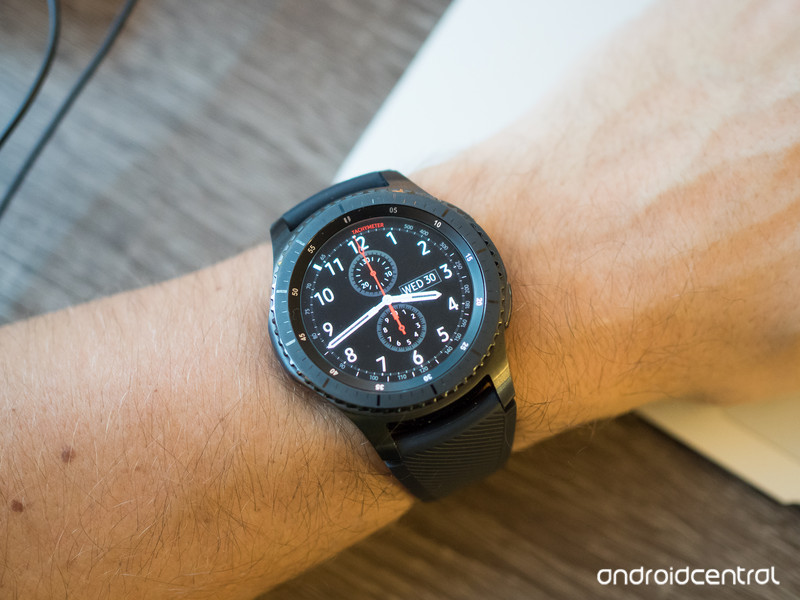
With the Gear S3 Frontier and Classic, Samsung has chosen to keep with its “more is more” strategy of simply adding as many software features and hardware capabilities as possible to its wearables. The result is once again a smartwatch that will do just about anything you ask it to, including function as a full replacement for your phone for short periods. It has its own app catalogue, can use an LTE connection to stream music and will even let you make calls on it. You can type text messages on a keyboard, watch YouTube videos and call an Uber without a phone anywhere near you.
The problem, once again, is that nobody will use anywhere near all of these features.
The problem though, once again, is that nobody will use anywhere near all of these features. When you add up all of the things the Gear S3 does it’s easy to say “wow that does a ton of stuff, it’s worth the money!” — but you have to take a step back and consider how many things you’ll actually use on a daily or even weekly basis. You’ll pick and choose a few key features for you, and then disable or ignore the rest.
The Gear S3’s hardware and design is great, so long as you can deal with the size of it. Its display and always-on watch faces are top notch. Notifications fully sync with your phone, keeping the bigger device in your pocket more often. S Health fitness tracking is good for casual observation of your activity throughout the hours you have a watch on. Samsung Pay is a fantastic technology, and is truly useful for quick purchases on the go.
Does it all add up to a smartwatch experience that’s worth $349, and potentially $10 more per month on top of that for LTE? Well right off the top, I’d say skip the LTE if you’re considering a Gear S3 — there just isn’t enough there to justify the price. But when it comes to buying the standalone watch, that’s a tougher decision. If you’ve already made the decision that $300+ is an acceptable price for a smartwatch, the Gear S3 is worth looking at for all of its redeeming qualities. For others who may not have spent much more than $349 on their phone itself, it’s a tougher sell — the Gear S3 is nice, but when you consider what you’ll actually use it for, it’ll be hard to spend the money. You may just land on buying last year’s Gear S2 or a fitness-focused Gear Fit 2 for far less money and end up being much happier.
See at Amazon
Here’s what happened when I left Android and switched to an iPhone 7
What’s it like to switch from Android to iPhone? Best thing ever, or worst thing ever? Perhaps some of you have already tried and know the experience first hand.
Whatever the case may be, join one of our first community reviewers (Eric) as he attempts the switch. Be sure to leave your comments below or hit us up on Twitter with your feedback. We’d also appreciate it if you shared some love with Eric on Twitter and YouTube.
- Follow @Blaberhead on Twitter
- Subscribe to Blaberhead on YouTube
Want to see YOUR tech videos on Android Central?
Making it happen may be easier thank you think! We’re accepting applications right now for our Community Review Program. If accepted, you’ll receive all sorts of resources including help and advice from our teams, free tech to rate and review, and massive exposure via our blogs and YouTube channels.
- Apply for the Community Review Program
The slow death of the manual transmission
I’ve never owned a car with an automatic transmission. From my 1969 Datsun 2000 roadster to the 2011 Mini Countryman S that currently sits in my garage, I’ve had a long line of vehicles that required more than just pressing on the accelerator and pointing it toward a destination. Yes, there were a few years when my wife had a Honda CR-V with an automatic transmission. But my cars have always required me to actually shift gears. I plan on continuing this tradition for as long as possible. But I know eventually I’ll be forced to drive a car with my left leg sitting idle.
By the end of the next decade, my beloved manual transmission may no longer be an option. In the United States, gas-powered vehicles have been moving away from clutches for years. The perpetually growing SUV (which are almost exclusively fitted with automatic transmissions) market is accelerating that trend.
But the real death of the stick shift will be electric vehicles. Because of the nature of electric motors, a gear box is unnecessary. These cars are capable of accessing their torque at all times. You don’t have to downshift to fourth to access the extra power needed to pass a slow-moving car; you just stomp on the accelerator, and there it is.
This is why Tesla’s Ludicrous mode is so amazing. There’s no need for the driver or an automatic transmission to shift gears. It’s just an eye-popping surge of power until you reach top speed or apply the brakes.
Of course, not every electric car will be the quarter-mile-eating Model S. Expect to see more Chevy Bolts in the future — solid, utilitarian vehicles that will get you to your destination without the stress of running out of charge. The reality is, that’s what people want, and who can blame them? If SUVs and the coming wave of EVs didn’t kill the manual transmission, gridlock surely will.
With more cars on the road, and those motorways not getting any wider anytime soon, nonstop traffic is a way of life for many Americans. If you’re stuck creeping along the highway for two hours a day, having a car with an automatic transmission is a no-brainer. And, frankly, most people just don’t want to learn how to drive a stick. Why making motoring more difficult than it already is?
But for me, the additional control that a manual transmission offers is why I love cars. The ability to precisely control the power of a vehicle as it exits a corner on a twisty mountain road is something I’ve practiced for years. The satisfaction of being able to move forward from a complete stop on one of San Francisco’s many steep inclines without stalling is a badge of honor. It’s satisfying to drive a manual. To me, it’s an important part of the experience.
So I’ll hold onto my manual-transmission vehicles for as long as I can. But in the future, I won’t be surprised when I ask a car salesman, “So what’s the range again?” and drop a wad of cash on a new electric car.
Airbnb will limit Amsterdam rentals to 60 days a year
One of the sticks that is used to beat Airbnb with is that the company cares nought for social cohesion or its effect upon communities. That’s why it’s big news to see that the home-sharing firm will comply with property rental regulations in the Netherlands. From January, homeowners in Amsterdam will only be able to sell time in their place for 60 days in a calendar year, unless they already have specific permission to offer more. The Wall Street Journal believes that the move could be the solution to the on-going war it’s fighting with cities across the globe.
Airbnb offers people the opportunity to rent out their home for periods of time, often for a tasty hunk of change. But as the trend grows more popular, communities are being broken up and local businesses suffer as a consequence. After all, your nearest bodega loses out on your weekly grocery shop, it’s not going to recoup that cash from a tourist looking to buy milk. Cities are also nervous about the safety implications around unlicensed rentals, after all Airbnb has already had issues with racial exclusion and stalking.
Cities are fighting back, and this year New York and San Francisco both tussled with the company directly. Both instances wound up being taken to the courts, with judges siding against the firm in both instances. It’s hoped that this acquiescence will mark a new era of cordial relations between Airbnb and the places where it does business.
Source: Wall Street Journal
Mercedes-AMG E63 first drive: The luxe lunatic
There are only handful of car buyers in this world that require their daily drive to develop 604bhp, pack the latest semi-autonomous driving functionality and boast enough room inside for four business associates.
It’s a dilemma that most of us normal folk will never have to deal with, but what if you have a spare £85,000 burning a hole in your pocket and want the performance without compromising on practicality?
Well, you’re in luck, because BMW is readying its potent new M5, while Mercedes has just unleashed this: the new E63 AMG. Capable of tearing up the world’s most arduous race circuits before wafting its occupants in the lap of luxury to their intended destination, it’s one serious beast.
Mercedes-AMG E63 S 4Matic+: Powerfully penned
The visual impact of the new Mercedes-AMG E63 ultimately depends on how crazy the customer goes with the spec sheet, as it’s just as happy lurking in menacing matte gunmetal grey as it is cruising the streets of Kensington in an understated metallic blue.
Pocket-lint
Regardless of personal tastes, the model features a new front end, which brings it in line with the range-topping E63 S AMG, as well as a widened track and muscular rear end, complete with boot-lip spoiler.
It’s a handsome beast, especially when admiring it from the rear, but one that won’t draw too much attention. The Audi RS6, for example, has a more intimidating road presence, but at the expense of hugely flared wheel arches and other such racy flourishes.
In the E63, Mercedes designers seem to have struck the ultimate balance of performance and opulence: a car that can travel from a Grand Prix circuit to the Grand National without causing a stir.
Mercedes-AMG E63 S 4Matic+: Thrills as standard
You may have noticed that the model nameplate has become rather long and convoluted. That’s because this new version comes in two distinct flavours: a standard variant, which sees the 4.0-litre twin-turbocharged V8 develop 563bhp, or a feisty S variant, where power increases to 604bhp.
Pocket-lint
The 4Matic+ bit refers o the fact that all new E63 models will come with the marque’s all-wheel-drive system – a fact that will horrify those who loved the unhinged, tyre-munching nature of previous, rear-wheel-drive-only models.
But don’t judge too hastily, because the engineers at AMG are never ones to disappoint the petrolhead purist. Granted, the all-wheel-drive system now cleverly distributes torque to all wheels when at maximum attack, but that doesn’t mean the Incredible Hulk has chilled out.
The addition of a Drift mode sees the system send power to the rear wheels only, which fundamentally creates an awesomely competent power-slide machine. Again, only a handful of mentalists will want to pull the sort of smoky donuts and drifts this system affords, which leaves the rest of us mere mortals to enjoy the fantastically grippy driving experience.
The thought of piloting a near two-tonne, 604bhp machine around the tight and twisting roads of southern Portugal would typically strike fear into the heart of many motorists but the E63 S makes it all so simple.
Flick the AMG Dynamic Select rocker switch to Sport Plus and the sheer drama of the exhaust kicks in, the suspension firms up, the steering becomes heavier and more precise, while the throttle response is set to its most sensitive.
But never does it feel like it’s going to hurl you into the nearest tree. Instead, the 4Matic+ system gently guides the car around corners, without mollycoddling too much.
Fear not, though, as there’s still enough traction-breaking goodness to have hairs firmly standing on end.
Mercedes-AMG E63 S 4Matic+: The luxe lunatic
It’s arguably a sentiment that’s repeated too often in today’s era of utterly capable machines – but the way the new E63 S transforms from deranged race machine to comfortable cruiser is nothing short of staggering.
Mercedes-Benz
Again, flick that AMG Dynamic Select rocker switch to Comfort and the engine suddenly becomes silent, the suspension breezes over potholes and the steering eases into in its most relaxed setting.
This is a Mercedes-Benz, so it’s arguably one of the most intelligent cars on the road. That means adaptive cruise control, lane assist functionality, semi-autonomous parking and a plethora of other drive-assist tech comes part and parcel.
The interior is beautifully appointed too, with liberal use of leather and carbon fibre trim, a punchy Burmester audio system and bags of room in the rear for three adults to sit comfortably.
Driver and front passenger are treated to low-set, deeply bolstered sports bucket seats, to ensure internal organs remain in place when the right foot gets trigger-happy.
Overall space up front appears to have increased too, thanks in part to the new dash layout, which sits further back with many of the buttons and dials cleaned up in favour of two pin-sharp TFT displays.
Mercedes-Benz
The high-res screens replace the typical analogue instrument binnacles and can be setup as the driver wishes, with performance-related read-outs on offer (circuit maps, anyone?), as well as classic fuel range and trip information.
Better still, the infotainment system syncs with a smartphone to record lap times and upload footage from a GoPro to social media accounts via a new AMG Private Lounge in-car app.
First Impressions
There’s no escaping the astronomical price tag attached to this car, but this sort of capability and quality craftsmanship doesn’t come cheap. In fact, as an everyday all-rounder, it’s very difficult to fault.
Where the E63 was once a straight-line, drag-racing bruiser, it is now a much more refined offering, with the ability to deliver the goods on a race circuit, as well as proving luxurious and comfortable on the road.
The release of BMW’s new M5 will provide very interesting competition but, for now, we’ll say the Mercedes-AMG E63 S is arguably the most sophisticated and capable super-saloon currently on sale.
Oh, and there’s very little that sounds as good as this 4.0-litre twin-turbo V8 at full throttle. Quite simply it’s dangerously addictive.
91 Launcher Pro: A new way to spice up your Android phone interface
Tired of the old, default launcher or phone interface? Consider using the 91 Launcher Pro app.
91 Launcher Pro gives you access to wallpapers, themes, 3D Touch-like enhancements, a comprehensive weather widget, and several other features, including a power-saving manager and a way to quickly optimise your phone. Here’s everything you need to know about the app.
What is 91 Launcher Pro?
91 Launcher Pro is a free Android app you can download from Google Play Store.
It offers two functions: a way to personalise your phone (with launcher themes, wallpapers, 3D Touch effects, and access to a comprehensive view of weather information) and new features to make your phone more fluid and lightweight (such as a way to clean your phone, access your weather and news at your fingertips, as well as a quick search widget, power manager, hidden folders, and even unique gestures).
How does 91 Launcher Pro work?
Download 91 Launcher Pro, and then tap your home button and give your phone permission to make 91 Launcher Pro your default launcher. From there, you can select your theme. After that, you’ll see practically a whole new interface, with different looks for icons and widgets. You can pick a different wallpaper, rearrange your apps, and choose from different shortcuts and widgets you want visible on your desktop.
What does 91 Launcher Pro feature?
Themes
91 Launcher Pro gives you a collection of free themes to download – nine, to be specific. You’ll also get access to daily updated best themes, weekly theme shows, a hot themes list and more, all of which you can choose to give your desktop a more interesting and personalised look.
Wallpapers
Similar to themes, 91 Launcher Pro gives you a collection of free “HD Wallpapers”. You can choose from 7000 textures ones, landscapes, cartoons, etc. Just click on one to set it up. You can even shuffle wallpapers. And every single one can be managed locally, applied, and deleted, making it easier than ever to switch up your wallpaper and make your phone look fresh on a daily basis or however often you want.
3D Touch
Apple’s iPhone offers 3D Touch so you can press hard on icons and get access to new options. 91 Launcher Pro offers a similar experience for Android devices. According to the app’s description, “you’ll marvel at the beautiful rollover effect and the colorful way the screen reacts to your touch while your phone remains smooth and responsive”. 3D Touch here includes four categories and different special effects.
Weather
With 91 Launcher Pro, from the home screen, you get access to a general comprehensive view of weather information, including real-time weather reports and accurate forecasts. Say goodbye to weather apps, because 91 Launcher Pro has you covered.
One-tap Cleaner
With 91 Launcher Pro, from the home screen, you can get access to a way to clean your phone and boost its speed. With one tap, you can clean your phone’s memory, stop unwanted background processes, and more.
91 Know
91 Launcher Pro lets you swipe down on your home screen in order to access a Google Now-like area, where you can see weather, news, and “everything you need” at fingertips.
Quick Search
91 Launcher Pro lets you swipe up on your home screen in order to access a quick-search field, where you can look for widgets and more.
Power Manager
If you want more power-saving options to extend your phone’s standby time, 91 Launcher offers a power manager/utility that cleans power-consuming apps and makes your entire system “more slim”, according to the app’s description.
Privacy
Want a secure private space on your phone? With 91 Launcher Pro – and just one tap – you can lock away your stuff from nosey friends and family.
Gesture Control
91 Launcher Pro supports the following unique gestures:
- Quick Search – Swipe up
- 91 know – Swipe down
- Main menu edit – Press and hold the screen
- Preview – close two fingers
Want to know more?
Watch the 91 Launcher Pro trailer above for more details. Also, check out the gallery for some screenshots.
Don’t Have Insurance? There’s still a way to repair your phone
You know how it is: you’ve put some time and effort into researching just which is the best phone for you, you’ve found where to snag the best deal and you’re signing up when the sales guy asks, “Do you want insurance with that?”
You’ve done your budget tightly and you don’t have more to spare for something you might never use. Or maybe you said no because you didn’t quite trust it, because the amount you’d have to pay in the event of a claim was too steep, say.
Cut to six months, or one month, or one hour later when you drop your prized device.
So what are your options?
Don’t beat yourself up (the way you’ve just accidentally beat up your phone). You made a good decision at the time, now you just need to make a better one to get your device repaired.
That means not making do with the damaged machine you’re gently cradling. A little scratch will still draw bigger damage to the glass front, for instance, can mean it’ll take the skin off your ear when you make a call.
A broken phone is a real pain and a true problem in our hyper-connected, but it can be sorted quickly and professionally. Smart device repair company iCracked has a solution for you. . Even though they are a repair company themselves, iCracked suggests you first chat with the people at the Apple Store to see if you are possibly still covered under warranty.You don’t have insurance, but does your iPhone have Apple Care? Even if the answer’s no, depending on how the device broke, a visit to an Apple Store could mean it’s fixed for you, sometimes free.
iCracked
Although iCracked are huge fans of Apple and the services they offer, they sometimes aren’t the most convenient. In larger markets, the average wait time for a repair with the Genius Bar is over five days. Your iPhone is the remote control of your life; holding bank info, kid’s schedules, everything. If it breaks, you’re in trouble and you don’t have five days to wait around to get it repaired.
If you do manage to book a timely appointment, remember it’s good to be honest with the guys at the Apple Store: they’ve seen it all before and if you say the phone never got wet but they find evidence of water on the liquid indicators inside the iPhone, it won’t bode well.
If the phone is in truly bad shape, it’s best to leave it to the professionals. That’s where iCracked comes in. iCracked lives to fix smartphones and they are some of the best in the business. Its team of fixers, called iTechs, are experienced and knowledgeable. Every iTech in the nationwide network has undergone extensive training and background checks, ensuring you’re getting the best of the best.
There are 5,000 over them in hundreds of cities. They are efficient, quick and effective. Best of all, they come to you to perform the fix onsite, and you can choose from home, office or even your favorite coffee shop for the repair.
Even better, they’ll come quickly so in no time your phone is back on the road again (well, not literally, that’s where the whole problem began). And a prompt fix is better than most insurance companies can boast.
So, if you’re looking for fast, friendly reliable and professional smartphone repair, look no further. iCracked has you covered.
Best geek Christmas jumpers: Star Wars, Sonic, Game of Thrones, Captain America and more
It’s that magical time of the year and the Christmas lights are a-flashing, so you can be forgiven for feeling like you’re missing out, stood there in normal non-flashing clothes.
But hey, you could always get with the spirit of things and show your wacky side with a garish Chrimbo jumper. Better still, you can even show off your geek knowledge by finding the most unique of sweaters.
To make your mission to achieve Christmas geek-chic a reality we’ve trawled the interwebs for the best geek Christmas jumpers out there. These are a fine collection of natty winter wear and no mistake.
From superheroes to Star Wars, everything geek cool has made its way onto a Christmas jumper this year. From ridiculous patterns that make you dizzy to blank canvases you can edit yourself, Christmas jumpers offer more options than ever for originality.
So whether you’ve got a work Christmas party to go to, want to have the best Christmas jumper on Christmas Jumper day, or want to buy one as a gift now’s the time to give it a go. Check out the gallery above for the best options out there right now. There’s something for everyone.*
*As long as you’re a proud geek, of course.
Caltech fires up LIGO to hunt for more gravitational waves
Nearly a year after LIGO, the Laser Interferometer Gravitational-wave Observatory, made physics history this past February, Caltech researchers have finally finished upgrading its capabilities and are ready to resume their hunt for gravitational waves. The system transitioned from experimental runs to regular operations on Wednesday morning, November 30th.
The LIGO has undergone upgrades to its lasers, electronics and optics, making the entire system 25 percent more sensitive (read: far-reaching) — especially with lower-frequency waves under 100 hertz. Engineers have also increased the power supply to the LIGO’s interferometer and improved its detector’s stability, both of which help to improve the device’s accuracy.
“With our improved sensitivity, and a longer observing period, we will likely observe even more black-hole mergers in the coming run and further enhance our knowledge of black-hole dynamics.” Caltech’s Dave Reitze, executive director of the LIGO Laboratory, said in a statement. “We are only just now, thanks to LIGO, learning about how often events like these occur.”
Future improvements will continue to boost the LIGO’s sensitivity and power. With these added capabilities, scientists around the world will begin to build a cohesive understanding of how black holes behave and how many pairs exist throughout the universe. LIGO may, one day, even be able to detect merging neutron stars, which will help round out our understanding of the stellar life cycle.
Source: Caltech
 AIVAnet