


Microsoft thinks people want ultra-portable headaches

Microsoft wants to hold on to the only thing they have left — desktop apps — in a mobile market where nobody wants them.
A while back I mentioned that having a third company make a big splash in mobile was sorely needed. Apple and Google holding all the chips isn’t good for anyone except Apple and Google. It was clear then, and still is now, that only one company can afford to keep trying — Microsoft. But their latest news about putting Windows 10 on ARM-powered tablets and convertibles, and rumored to come to phones, is just another way to spend money building things people probably won’t want to buy.
To be fair, they have to do something. Intel is done building low-power (and low-performing) chips designed for always-on mobile things. The future will move away from the desktop model we currently have (Steve jobs’ computer equals truck analogy will come true, just much later than he thought) and Microsoft’s history of trying to reinvent themselves in mobile has been less than spectacular. Windows as it exists on a phone or tablet, as well as Continuum, are ideas nobody asked for. I don’t have an answer and don’t claim to have ever had any. Luckily, guiding Microsoft’s mobile ambitions isn’t my job. Critiquing them while unable to do any better is. But I do have a pretty good idea of what the consumer buying public-at-large is spending their dollars on, and more of the same from Windows on a small touch device doesn’t fit in with it.
 This was a bad idea in 2011 and it’s a bad idea now.
If people really were jonesing to run full blown desktop Adobe photoshop on a touch screen tablet, Adobe would be making it for the iPad (and iPad sales wouldn’t be shrinking.) Adding a detachable keyboard and calling a 10-inch tablet something besides a tablet doesn’t change that. Shrinking the experience down to 6 or 7 inches and telling people they can use a keyboard, mouse and HDMI cable certainly doesn’t improve anything. Having a very expensive and very nice slim laptop with a great input pen that can run Photoshop the way it was intended makes sense and people who need Photoshop at that level surely appreciate the experience on the new Surface the same way they do on the new MacBook. The same goes for Turbo Tax and Quicken, Microsoft Access 2016, AutoCad and any of the other crazy things that have been touted as something people want to do and make the new new Windows portables the best ever. (I stopped reading comments and Tweets when someone said Visual Studio.)
The Codeweavers app lets you run Photoshop on an ASUS Zenfone if you want to — and nobody wants to.
Right about now, half of the people reading this disagree and are ready to express that in the comments. I get it, but people who visit tech blogs on weekends are hardly a representation of the average consumer. Folks still buying tablets as well as people buying phones are looking for something more simple than the computer they left at the office Friday at quitting time. Instead of Steam and Civ 6, they want Temple Run with Mario when it comes to something small they hold in their hands. The same goes for Photoshop — the experience for iOS and Android is good but it can get a little complicated. Yet it’s miles away from what you would see on Windows 10. People are buying devices that are cheap and easy to use. Apple and Google see this and are trying to make things even more simple. The things that tech-savvy folks think of as dumbing down are the very same things that let people not worry about how to do things and instead, they can just do them.
I don’t know what Microsoft should do to prepare for the end of the desktop cash cow. But I know what isn’t likely to sell.
I’m not saying this is a good thing, but it is a thing. I don’t want to see OS X turn into MacOS (for example) but Apple isn’t making products that Jerry wants to buy; they are making products that most people want to buy. Marshmallow did some things better than Nougat does for this power-user nerd. Microsoft hanging on to their legacy of desktop software to drive a new mobile strategy may be cool to some of us, but I think an iPad or Chromebook is going to be a better choice for most people because they are simple and do all the things most people want.
Paris cinema chain lets you pay to test-drive VR headsets
The tech industry is banking on VR, but most folks have never even tested a headset like the Oculus Rift, let alone plunked down $500-plus to buy one. In France, at least, it’s about to become easier to try them out, thanks to a Paris movie theater chain called MK2. It’s launched a virtual reality experience featuring the latest games and videos on the Rift, Sony’s PlayStation VR and the HTC Vive. At $25 for 40 minutes, you can play games like The Climb and Star Wars Battlefront: Mission X-Wing VR, watch VR films, or fly over Manhattan in the Birdly motion sim.
“MK2 VR is the first facility in France dedicated to the best VR experiences in films, documentaries, video games and even flying motion sims,” said GM Elisha Karmitz. The company is piloting the idea at a 3,000-square-foot space located at MK2’s flagship cinema in the southeast of Paris and granted me a visit before today’s opening.
The company is trying to balance the cutting-edge technology with accessibility and chic decor. The wood, glass and metal VR space housing the 12 VR “pods” is cozy, but appears bigger thanks to large windows and a high ceiling. While waiting your turn, you can buy drinks in a tent-covered tiki-style bar that was still under construction when I visited.
The pods are arranged around a circular station with various games and headsets hung by cables that make them easy to don and safely limit your motion. Some titles require you to stand and others are better seated, and there’s also the Birdly flying motion sim and pair of Holodia rowing trainers set up for racing.

MK2 will have plenty of staff on hand to help customers at the stations. “It’s really important that we bring the VR experience to people who don’t know VR,” Karmitz said. “So there will be approximately one employee for every three consumers, who will help them put on the headset and launch the experience.” There are also tech staff on hand to handle the headsets and MSI computers, equipped with NVIDIA GeForce 1080 cards and Intel Core i7-6700K CPUs.
For the Oculus Rift, you can try Homebound Joyride, an exclusive, faster-moving version of the standalone VR title, as well as The Climb, a rock-climbing game that uses the just-released Oculus Touch controllers. Newcomers can watch Introduction to VR, a 360-degree, 3D video for Oculus Rift produced by MK2 in collaboration with Parisian VR studio Félix & Paul.
HTC Vive fans can check out the Birdly and Holofit motion sims, Space Pirate Trainer shooting arcade, and The Walk, a title that puts you on a vertigo-inducing gangplank nearly 1,000 feet over the streets of Manhattan.
On the Playstation VR, meanwhile, you can experience a simulated dive and shark attack in Ocean Descent VR, try Star Wars Battlefront Rogue One: Mission X-Wing VR, or play Ubisoft’s Eagle Flight — another flying game, this one set appropriately in Paris. From December 9th to 31st, MK2 VR will offer an exclusive Assassin’s Creed VR experience for PS VR from the long-awaited Michael Fassbender film, set to arrive on December 21st.

The Birdly flying VR motion sim on HTC Vive at the MK2 VR grand opening (image credit: MK2/©HLenie)
While I was there, I checked out Birdly, an HTC Vive motion sim that that you can lie down on and control by tilting two paddles back and forth. It lifts, pitches and tilts to match the headset motion which creates some strong sensations, especially the first time you dive directly toward the ground. I also tried out The Climb on Oculus Rift, a rock-climbing game that takes advantage of the Touch controllers and will also test your fear of heights.
Finally, I tested Star Wars Battlefront Rogue One: X-Wing VR Mission, a brand-new Playstation VR title. With the ability to look around the highly detailed cockpit and the galaxy, it’s one of the best flight combat sims I’ve ever tried.
The experience runs €12 for 20 minutes, or €20 (around $25) for 40 minutes, and you’re free to check out any games or sims you want. While that might seem like a lot compared to a movie, my experience shows that it’s a cheap way to try out all three headsets, back to back, if you’re still trying to figure out which to buy.
Meanwhile, if you already own a headset it’s a great way to test games before spending up to $700 to buy one. MK2 has managed to score some exclusive deals with publishers, getting titles as soon as they’re released, as well as special versions that condense the action.
Karmitz also thinks the experience will make for a fun night out for a group of friends, especially with the option to loosen up with a few drinks before jumping into the games. Additionally, the company is pitching it as a corporate-bonding experience and will rent out the space for private groups.
MK2 VR is piloting the experience at one Paris theater but hopes to expand to others if it works out. Their execution looks solid, but since it’s one of the first such VR spaces out there, it’s hard to say whether it’ll succeed financially. The concept makes a lot of sense, though. Considering how expensive console and PC-based VRs are, most people are going to want to try before they buy. And, as is the way in Paris, why not do it while partying with your friends?
Inside Adidas’ new tech-infused store in New York City
Not to be outdone by Nike, Adidas has also opened up a new flagship store in New York City. And, just like its rival, the German company packed the space with loads of technology. Inside the four-story, 45,000-square-foot space, located on the corner of 5th Avenue and 46th Street, you’ll find a virtual reality experience and a wearable system designed to help you find the best running shoe. Let’s take a look at what other tech Adidas is featuring at its biggest retail store yet.
Russell’s Favorite Tech of 2016

2016 Russell’s Favorite Tech


Everyone at Android Central spends just about every waking moment with mobile tech. Our goal is simple: use as much as we can, find out what works the best, and share with you the gear that rises above the rest. This has been a weird year for mobile tech, with no shortage of stand out gadgets for everyone to enjoy.
Whether you’re looking to buy for someone else or just get the best of the best for yourself, these are my personal favorites of 2016. It starts with a phone and a tablet, but continues on to everything I connect to it throughout any given day. Read on and see what I’ve enjoyed in 2016.

Google Pixel XL
I fully expected this spot to be reserved for the Samsung Galaxy Note 7, but when that became impossible I moved on to Google’s Pixel XL. This is without a doubt the best Android phone you can buy today. The camera is exceptional, the battery life is great, and Google’s incredibly smooth and lightning fast interface is wonderful. There’s no trade-offs, no reasons to settle like we’d seen in the past with the less expensive Nexus phones, and as long as Google keeps improving on this experience it’s difficult to imagine moving away from this phone anytime soon.
From $769 Buy Now

Lenovo Yoga Book
When I use an Android tablet, I’m usually either looking up recipes and watching Netflix in the kitchen, or I’m playing a game that is more comfortable on a larger screen. I’ve tried writing on so many Android tablets with attachable keyboards in the past, and for the most part there’s been little reason to use anything but my laptop. Lenovo’s Yoga Book is not only surprisingly comfortable to type on, it’s also crazy light and ridiculously thin. I can take it anywhere, and most of the time that’s exactly what I do. It may not be the best bang for your buck especially for those who would be more comfortable with a Chromebook, but access to all of my Android apps means I’m not reaching for my phone when I’m working and that’s a big deal for me.
From $499 Buy Now

Sennheiser HD 598 Cs
Put a keyboard in front of me and headphones on my head and I’m likely to disappear for hours. Music focuses me, and good headphones make sure I’m not so easily distracted. I’m not usually super picky about headphones, but these Sennheisers let me hear parts of my favorite songs I genuinely had never heard before. The build quality is great, but just about as far from portable as you can get. These aren’t cheap headphones, but they’re going to be my recommendation to anyone that likes music in their ears while they work behind a desk.
From $119 Buy Now

Moto Surround Earbuds
When I’m mowing the lawn, out playing Pokémon Go with my family, or just in the kitchen and don’t want everyone to hear the episode of Archer I’m watching, I reach for Moto Surround earbuds. The sounds is decent for Bluetooth, the battery is fantastic, and they’re comfortable around my neck. These earbuds aren’t particularly expensive, but my set is never far from me.
From $45 Buy Now

Ricoh Theta S
The camera on my Pixel XL is awesome, but I occasionally enjoy capturing more of the work around me. I’m also a big VR nerd, so 360-degree video is something fun to play with. If you’re looking to give this kind of photography a shot, the Ricoh Theta S is the camera to buy. It’s the most straightforward, the app isn’t complicated, and there’s a lot of flexibility when it comes to taking a photo remotely. Setting the Theta up somewhere and using the app to take a shot so you aren’t in it is a lot of fun!
From $335 Buy Now

Anova Immersion Circulator
I’m a fan of playing around in the kitchen, and some of my favorite kinds of cooking usually involve low and slow techniques with fun flavors. I can’t always bust out the smoker or toss things in the crock pot, so I figured I’d give sous vide cooking a shot. Anova makes a great starter kit that is easy to use, and offers an app full of recipes and guidelines for cooking. It also lets me control the temperature and timer remotely, so I can set something to cook for hours and be able to check in on it no matter what I am doing.
From $149 Buy Now

Philips Hue bulbs
Just about every light in my house is a Hue bulb now. It has taken me a while, but I wouldn’t be happier with being able to control my lights from anywhere. It’s fun to play with the colors when the family is watching a movie in the living room, convenient to say something and have my Echo kill the lights as I climb into bed, and the bulbs themselves just plain look nice. If you’re considering smart lights, Hue is likely going to be my recommendation for a long time.
From $199 Buy Now

Amazon Echo Dot
Google is doing a lot of cool things with Home, but Amazon’s Echo Dot is my favorite right now. They’re cheap enough that I can justify having several throughout the house, and Alexa does more for me right now. Recipe steps are a voice command away, being able to connect a Dot to a more capable speaker to stream music is nice, and these little pucks disappear into the room you set them up in. It’s a more convenient solution for me, and probably will be for the next year.
From $50 Buy Now

Neato Botvac Connected
Robot Vacuums aren’t going to replace my full upright Dyson anytime soon, but having one means I need to do a full cleaning a little less frequently. Neato’s BotVac Connected sputtering around the house every other day is great, and being able to connect my phone to the robot meant when family messaged me and said they’ll be by in an hour I could remotely sent it off to make the house look a little more presentable.
From $499 Buy Now

HTC Vive
Yeah, we’re going to talk about virtual reality for a minute. Of all the VR headsets I have used over the last year, which is to say basically all of them, HTC’s Vive keeps calling me back. Being able to walk around in my office and have those steps count in VR is incredible, and there are so many apps and games available I’m unlikely to ever run out of things to do. Also, weirdly, Vive is the only VR platform that gives me notifications from my phone that I can actually do something with. Vive is the most feature complete VR system out there, and it’s ridiculously fun to share with friends.
From $799 Buy Now
Here’s how to get a little more Android Central in your life!
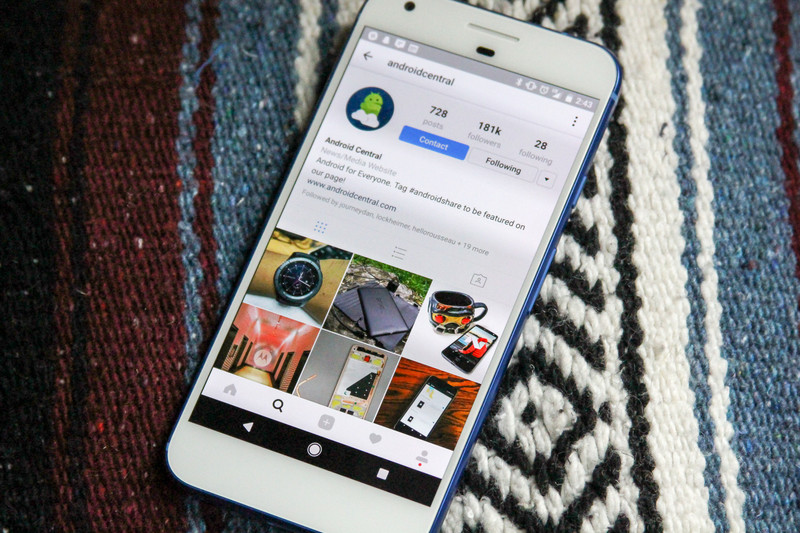
Do you like stories about Android devices? Or watching people make funny faces? Or perhaps you just find yourself a little bored constantly launching and exiting out of apps in an effort to find something worthwhile?
We feel you. We really do. If you’re looking for something to do today — perhaps you’re looking for a few new social media brands to engage with, as is standard in our times — you should add Android Central on Snapchat and Instagram.
Every Monday, Wednesday, and Friday we’ll be posting unboxings, walkthroughs, gadget showcases, and whatever else we come up with in an effort to keep you from boredom while simultaneously making you privy to what’s new in the worlds of Google and Android world.
Need help finding us? First, scan this Snapcode with the Snapchat app on your mobile device, or if you’re already on your phone, tap right here, to add us:

You can do so from the main Snap menu by selecting the Add Friends option. From there, tap to Add by Snapcode. You can also add us by manually searching for android_central. Don’t forget the underscore! Then, be sure to add us on Instagram. Here’s a sample of what we’ve been up to:
That Gear S3 😍… 📷: @huzzyzx #androidshare #samsunggears3 #samsung #gears3 @samsungmobile
A photo posted by Android Central (@androidcentral) on Dec 9, 2016 at 7:05am PST
We’re open to suggestions, too! Leave us a comment on what you’d like to see from an official Android Central Instagram and Snapchat story. And if you haven’t already, be sure to submit your #androidshare. We’ll be showcasing your kit weekly!
My Disney Experience is a whole new experience in new update

There is one thing you absolutely, positively must have at Walt Disney World.
It’s not a Dole Whip. It’s not a ride. It’s not those trademark Mickey Mouse ears. It’s an app. Walt Disney World has tied everything about your vacation to one lovely app: park tickets, dinner reservations, PhotoPass, hotel reservations and much of the resort’s maps and information. If you’re coming to the Most Magical Place on Earth, My Disney Experience is your lifeline.
And it’s a whole new app in its newest update.


The My Disney Experience app has streamlined its layout, consolidating its many pages and menus into a single map and a single menu that you can drag up from your avatar character. Gone is the hamburger menu, replaced with a single, full-page list. From that menu you can buy or link park and party tickets, make dining reservations, check out your PhotoPass pictures, and even book your hotel if you’ve somehow made your way to the park without a room already ready for you.
The map now covers almost the entire screen as the controls have been condensed to a single white bar at the top of the screen. You simply swipe left or right on that white bar to switch between attractions, dining, restrooms, and other categories on the map. The map still has issues with resolution and overlapping map pins, especially around Cinderella Castle, but at least the map is more responsive and quicker to use, especially for navigating around the park.


 The old map, the new map, and the continued bugs
Whether you need wait times to figure out which ride you hit next or directions to the nearest bathroom, the My Disney Experience app app is your guide to Walt Disney World, and you should absolutely, positively, download and acquaint yourself with it before you and your little ones head for the airport.
Now if you’ll excuse me, I need to go wish for a Dole Whip.
Six places where renewable energy is cheaper than fossil fuels
By Cat DiStasio
In the race to reduce the world’s reliance on fossil fuels, cost is a huge factor. It’s taken years, but advances in technology and increases in both efficiency and output have helped bring down the expense of renewable energy, which has in turn increased demand. Globally, fossil fuels are still cheaper than these alternative sources, but there are a few places around the world where clean energy is winning, dollar for dollar. Sometimes, too, there’s so much of it that the market price drops to zero. With the cost of renewable energy getting lower by the year, if not the month, environmental advocates are hopeful that energy sources like solar and wind power can eventually edge out fossil fuels entirely. Let’s take a look at some of the locales where renewable energy is proving that a clean world doesn’t have to be more expensive.
Free wind power in Dallas
Everything is bigger in Texas, including the wind energy output. In Dallas, Texas, one utility company had so much wind-generated electricity running through its grid that it decided to give it away at no charge. Last November, customers of TXU Energy began taking advantage of free electricity between the hours of 9pm and 6am, thanks to the excessive production. Although federal tax credits aid in bringing down the cost of wind power and wind makes up just 10 percent of electricity production statewide, TXU Energy’s move helped raise awareness for the awesome potential of this renewable energy source. The free juice helped the utility company too, by reducing energy storage and grid maintenance costs that might have been incurred by the power oversupply.
Free solar power in Chile

This year, sunny Chile experienced an oversupply of electricity produced from the country’s solar farms. Based on spot pricing, the country experienced net zero electricity prices for 113 consecutive days (through April), and passed the savings on to utility customers. Chile’s government has invested heavily in its solar industry by installing 29 solar power plants, and it’s planning to add 15 more in the future to supply electricity to its two power grids. In 2015, Chile had a grand total of 192 days of “free” electricity due to solar power production. Since the two grids are not connected and many people live in underserved rural areas, the phenomenon isn’t yet benefiting all residents. In fact, some are paying higher-than-normal prices for electricity despite the overage, but the government is working to improve the grid infrastructure to alleviate that problem as well.
World’s cheapest wind power in Denmark

Last month, a Swedish firm announced it will built an offshore wind farm in Denmark that will produce electricity cheaper than coal and natural gas. The 600-megawatt Kriegers Flak is already being heralded as the world’s first offshore electricity “supergrid,” which aims to churn out renewable energy for just $54/MW. Named after the Baltic Sea reef near which it will be located, the wind farm will include a 400MW interconnector with Germany that will enable the two countries to share electricity when needed, further reducing costs and alleviating power shortages. The supergrid is expected to be operational by the end of 2021.
Cost-competitive solar homes in Australia

In Australia, homes equipped with solar power and the Tesla Powerwall 2.0 battery system are proving that Elon Musk’s visions about renewable energy are not only possible, but practical. The serial entrepreneur has long argued that solar power can provide a sustainable, cost-effective electricity solution and help individual consumers fight back against rising utility costs. Energy consultancy CME recently reported that solar homes in Australia can do just that, based on the capacity of solar power generation and the ability to store it for later use compared to the cost of the same energy usage when purchased on-demand through the power grid. Right now, the two scenarios have approximately equal costs, meaning it won’t cost homeowners more money in the long-run to switch to solar power — a fact that just might help the rooftop solar industry in Australia big time.
US renewables take on fossil fuels

It may surprise some of our readers to learn that solar and wind energy have already reached the point of being cheaper than fossil fuels in the United States. In 2014, The New York Times evaluated industry data and reported that, in some instances, renewable sources had already undercut the price of fossil fuels. Citing developments over the five-year period prior to that point, the Times reported that — with the help of subsidies — renewable energy had become cost-competitive with conventional fossil fuels, but some industry analysts argued at the time that wind power and solar (particularly commercial PV arrays) could compete with coal and natural gas even without those subsidies. That point in 2014 simply marked a tipping point, though, and as renewable energy prices continue to fall (and investments increase), the competition will continue to heat up.
The cheapest solar power in the world

The world record for the cheapest solar power is a constant race, with a new title-holder popping up every few months. Earlier this year, in May, Dubai set a new record low with a price of just $29.90 per megawatt hour, which made history as the cost of solar dipped below coal. Just three months later, in August, Chile busted that price with an even lower one. In an energy auction, Spanish developer Solarpack Corp Tecnologica bid $29.10 per megawatt hour on a solar power project, when coal-fueled projects at the same auction fetched nearly twice that price. It surely won’t be long before another auction in another country bests that record, proving that renewable energy can not only compete with fossil fuel costs, but can actually do a lot more for the same amount of money as well.
Recommended Reading: Meet the attorney who’s fighting revenge porn
The Attorney Fighting
Revenge Porn
Margaret Talbot,
The New Yorker
Carrie Goldberg started her practice to “be the lawyer” she needed after being harassed online by an ex. Now she’s a pioneer is dealing with revenge porn cases, defending victims against hacking, leaking and other online attacks when relationships come to an end.
|
DNA Biohackers Are Giving the FDA A Headache With Glow-In-The-Dark Booze Creating glow-in-the-dark booze with a DIY DNA kit. What could go wrong? |
The Unwilling Model Faces of White Supremacy White Supremacist social media accounts are using images of models to illustrate their points. The big issue is the models don’t even know it’s happening. |
|
Live, For the Moment The rise of livestreaming is pushing extreme athletes to take bigger risks to keep their fans interested. |
Pixar’s ‘Coco’ Is a ‘Love Letter to Mexico’ in the Age of Trump The upcoming film that focuses on the Día de Muertos holiday and a 12 year-old boy’s journey to discover his heritage is coming at an interesting time. |
How to turn off screen overlay on Samsung Galaxy S7

This is one of the more confusing error messages afflicting some Galaxy phone owners. The fix is relatively simple — but a little investigation may be required.
Here’s a perplexing issue that’s been affecting Samsung Galaxy S7 owners — in addition to folks on a handful of other Android devices. It goes a bit like this: You start up an app for the first time and accept the usual permission dialogs. Then you’re hit by a message like this:
Screen overlay detected To change this permission setting, you first have to turn off the screen overlay in Settings > Apps.
A screen overlay is a part of an app that can display over the top of other apps. The most well-known example is chat heads in Facebook Messenger. But apps need your permission to use screen overlays, and sometimes this can cause problems. For example, if an app were able to display something over the top of a permission dialog, it could try and trick you into granting it permission to do stuff you might not want.
The simplest fix is to basically do what the dialog box tells you to do. The language is a little confusing, but what it’s asking you to do is:
Launch the Settings app from your home screen or app drawer.
Scroll down and tap Applications.
Tap Application Manager.

Tap More to open the menu in the top right corner.
Tap Apps that can appear on top.

From here, you’ll need to track down the app that needs permission to use a screen overlay — usually the app you were just using. When you’ve found it, tap the toggle next to it to turn it off, and you should be good to go.
Note: It’s not always clear precisely which app is trying to use screen overlays. Clean Master has been reported as one app likely to cause issues, as has alert center app Drupe, and Lux, which lets you adjust the color of your screen. If in doubt, think about any app that might change the way things appear on your screen.
Once you’re done, try starting the app you were originally using once again. With any luck, you’ll be able to grant it permissions and start using it as normal.
As this issue is a particularly tricky one, if you know of any apps likely to cause problems with display overlays, be sure to help out and let us know down in the comments!
ICYMI: Godspeed to astronaut John Glenn

Today on In Case You Missed It: Astronaut and Senator John Glenn died this week at the age of 95 and we couldn’t let the first man to orbit the Earth go without a look back at some of his greatest achievements. Meanwhile, MIT researchers were able to show that light therapy broke up Alzheimer’s causing plaque in the brains of elderly mice; such promising work.
Dinosaur fans will need to see this amber-encased dinosaur tail covered in feathers (not scales!). The tumor video is here. If you want to read up on the NSA phone call listening issue, that story is here. As always, please share any interesting tech or science videos you find by using the #ICYMI hashtag on Twitter for @mskerryd.
 AIVAnet