


Compare two generations of gaming across four platforms with Metal Gear Solid V: Ground Zeroes

Like so many games launching at the end of 2013 and throughout 2014, Metal Gear Solid V: Ground Zeroes straddles both last generation (Xbox 360/PlayStation 3) and the current one we’ve just entered (Xbox One/PlayStation 4). Given Metal Gear‘s history of gorgeous visuals, the question asked itself: what will Ground Zeroes look like on aging game consoles compared to the new shiny ones? It turns out that Kojima Products, the studio behind Ground Zeroes, has exactly the answer we were looking for in the form of a brand new comparison video.
If anything, we’re most shocked by how great it still looks on the older consoles! Of course, for those of you still fighting the console wars, there’s the (negligible) difference between Xbox One and PlayStation 4 to analyze. Head below to take a look for yourself.
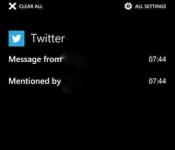
Here’s Windows Phone 8.1’s notification center in action (video)

Windows Phone users have been waiting years to have all their notifications in one convenient place, and over the past few months, there have been multiple reports that a notification center will come with WP 8.1. Today, a video showed up on Unleash the Phones that appears to confirm those earlier rumors. The feature apparently will be called Action Center, and packs many of the same capabilities that Android and iOS users have enjoyed for some time now — namely app and system notifications available via a swipe down from the top of the screen.
Additionally, users get quick access to four shortcut buttons for often toggled settings (WiFi, Bluetooth, screen brightness, etc.). The best part is, those shortcuts can be tailored to users’ preferences, unlike the set-in-stone settings toggles in Android and iOS. Oh, and speaking of WiFi settings, the folks at Windows Phone Central revealed that 8.1 will also allow users to switch it off for a set amount of time, after which WiFi will turn back on automatically. We aren’t sure exactly how such capability benefits users, but we’re sure you fine folks will figure it out, assuming it’s still around when WP 8.1 rolls out to the public.
Filed under: Cellphones, Software, Mobile, Microsoft
Via: The Verge
Source: Unleash the Phones, Windows Phone Central

Surface 2 tablet with AT&T-ready LTE passes through the FCC

Microsoft said that a Surface 2 with LTE was coming to AT&T early this year, and it now appears that this cellular-equipped Windows RT tablet is finally close to launch. The company has just received FCC approval for a “portable computing device” that sports the Surface’s familiar 10.6-inch display as well as AT&T-native LTE and HSPA data. The filing doesn’t hold any surprises, then, but it suggests that there are few obstacles left to releasing the 4G slate in the US. Given past promises, we wouldn’t be shocked if it launches within a matter of weeks.
Filed under: Tablets, Wireless, Microsoft, AT&T
Source: FCC

OneDrive from Microsoft now live in the Play Store
 Microsoft had a slight run in not to long ago about the name of its cloud storage solution. A small legal issue stemming from UK TV broadcaster BSkyB led to the need to alter its name and branding. Now what was once SkyDrive, you will now find OneDrive. The new rebranded app has been released now for Windows, iOS and Android.
The changes won’t mean a heck of a lot to previous SkyDrive users. Microsoft assures the public that all your content still remains under the new name branding. The re-released OneDrive does offer up some new goodies for the Android side of things. You can automatically upload your photos and videos to OneDrive using camera backup. Sounds like Dropbox and Google Drive. The updated app also offers improved support working with Office Mobile for Android and OneNote, larger thumbnail viewing and the usual dose of bug fixes and performance improvements.
With OneDrive you get 7GB of storage for free out the gates, but Microsoft is also taking a slight Dropbox approach to earning more. Every friend you refer to OneDrive will net you 500MBs of free storage, upto 5GBs. You can also earn another 3GB of free space for just trying out the camera backup feature.
On the downside though, it seems like many users of the Android app are pushing 1 and 2 star ratings because they can’t login to OneDrive after the branding change and slow upload speeds of photos. If you are a former SkyDrive users and wish to check out the new OneDrive just hit the Play Store below.

Source: Microsoft via AndroidCentral
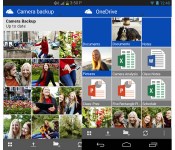
Microsoft intros monthly storage plans for OneDrive, Android app now does automatic camera backups

Nope, not SkyDrive — OneDrive. In case you haven’t heard, Microsoft’s cloud storage service is going by a new name, and it’s finally going into effect today; you should see in the upper-left corner the next time you log in. But that’s not all that’s new: the company also updated its Android app with automatic camera backups, so that any photos or video you take on your device will automatically be sent to OneDrive. If you recall, this is a feature you’ll already find on the company’s iOS app — for whatever reason, it just took a bit longer to make its way to Android. As ever, you can opt to have OneDrive upload on WiFi only, ensuring you don’t exceed your monthly data cap. You can also put limits on image sizes if you want to make the most of your 7GB of free storage space.
Additionally, the company introduced monthly storage plans, starting at $4.49 a month for 50GB and going up to $11.49 a month for 200GB. Simple math tells us that’s more expensive than buying the same amount of storage on a yearly basis, but hey, some of you might be commitment phobes, and we get that. Lastly, you’ll want to keep an eye on Microsoft’s new OneDrive Twitter account today: the company will be giving away 100GB of free storage for a year, with freebies going to the first 100,000 people who log in at a designated time. The catch: Microsoft hasn’t said yet what time folks will need to log into their accounts, so if you want a chance of winning, you’ll just need to watch OneDrive’s Twitter feed. Sneaky, but them’s the breaks.

Microsoft makes it easier to sign your Office 365 documents

It should now be much easier to sign your Office 365 documents without taking them offline or printing them out. Microsoft has reached a deal to offer DocuSign’s digital signature apps through both the Office Store and corporate deployments, letting you affix your virtual handwriting while staying in Office 365′s cloud. The two companies also promise to team up on future projects. The improved signature support isn’t likely to fulfill those dreams of a paperless workplace, but it’s certainly a step in the right direction.
[Image credit: Sebastien Wiertz, Flickr]
Filed under: Internet, Microsoft
Via: TechCrunch
Source: Office 365 Blog
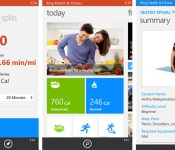
New Bing fitness app for Windows Phone tracks you after the run is over

Windows Phone owners have their choice of activity tracking apps, but few of those apps will tell you how to remain healthy after you’ve taken off your running shoes. It’s a good thing that Microsoft has released a beta of Bing Health & Fitness for Windows Phone, then. The software uses GPS to quantify your biking and running like many of its peers, but it also provides health advice; much like the Windows 8 app, you’ll find a diet tracker, exercise instructions and a symptom research tool. Your info will also sync across all your Windows-based gear. Those eager to slim down and shape up just have to swing by the Windows Phone Store to get started.
Filed under: Cellphones, Mobile, Microsoft
Via: WPCentral
Source: Windows Phone Store

Microsoft reportedly prepping Office for iPad to release in the first half of 2014

While Microsoft Office Mobile for iPhone released last summer and we’ve yet to see software release for Apple tablets. Not only is the slate-focused productivity suite alive and well, it’s apparently going to launch before July. ZDNet reports that development of Office for iPad (codenamed Miramar) could allow for its debut ahead of the touch-friendly Windows 8 version. This means that the previously reported fall 2014 timeline has been accelerated, and Microsoft may release the iPad version as soon as it’s ready — rather than keeping it under wraps until Q3. As Mary Jo Foley notes, the iOS package will likely require an Office 365 subscription and tap into OneDrive as its main storage repository. For now, we’ll just have to wait and see — but that wait could be shorter than initially expected.
Filed under: Tablets, Software
Via: The Verge
Source: ZDNet

Titanfall switches to an open beta on Xbox One today, PC will follow soon

Xbox One owners furiously refreshing their inboxes (or Respawn founder Vince Zampella’s Twitter feed) looking for Titanfall beta codes can step away from the F5 button — it’s switching to an open beta. According to Major Nelson, it will appear on your console under the new game demos section, although it may take some time before everyone sees it. PC owners aren’t entirely left out of the fun either, as Zampella indicates that version will follow “maybe tomorrow.”
The beta was originally scheduled to run until Tuesday night at 9PM ET, but that’s going to be extended at least one day after server issues kept players offline most of Friday night. The plan is to “max stress” the all-multiplayer game’s servers before it launches March 11th, but if you just want to find out if the former Call of Duty team can successfully blend a 6v6 shooter with mech action (a: seems like it) then it should work for that too.
Great news: The @Titanfallgame Beta will be opening up to all Xbox One users. Details on my blog http://t.co/Do12xhSsK6
– Larry Hryb (@majornelson) February 16, 2014
Ok, just heard from @jonshiring. His words are ‘Let’s break it’, so the plan is to make the beta fully open and have you max stress it!
– Vince Zampella (@VinceZampella) February 16, 2014
Filed under: Gaming, HD, Microsoft
Source: Major Nelson

Windows Phone, Chromecast and YouTube get together thanks to Tube Cast

The past few weeks have seen a ton of activity on the Chromecast front, and now some of that excitement is extending to Windows Phone. With the Tube Cast app, you can link your Redmond handset to Google’s HDMI dongle and search, select and play YouTube clips to your flat-screen. As WMPoweruser notes, it’s pretty simple (much like Chromecast features on Android and iOS) but it can’t pause or stop playback. While the general idea is great, hopefully the next set of apps gives just a touch more functionality. After all, not being able to pause a goat screaming like a man can be awkward if the wrong person walks in the room.
Filed under: Cellphones, Home Entertainment, Microsoft, Google
Via: WMPoweruser
Source: Windows Phone Store

