



‘Next-gen’ means gamepad updates: a guide to the first for Xbox One

The March Xbox One update is live; your friends list is now slightly more organized; and game broadcasting is mere days away. In reading through the laundry list of tweaks in last night’s refresh, perhaps you noticed a handful of gamepad notes? Something to the effect of, “firmware update to the Xbox One controller”? That’s secret code for, “You have to update your gamepad firmware.” The next generation! We are in it! Head below for a step-by-step guide on entering this brave new world.
Step 1: Connect the gamepad via micro-USB to the console

Grab your favorite Android game console-branded micro-USB wire (or, ya know, any micro-USB wire) and slap that puppy into the port atop the gamepad (next to the pairing button, as seen above). Plug the other end into any of the Xbox One’s USB ports (we opted for the front-left side). Easy!
Step 2: Navigate to the Xbox One Settings menu

If there’s a Kinect plugged in to your Xbox One, say, “Xbox, Go To Settings.” If you’re worried that the NSA’s watching you pick your nose and it’s disconnected, just push the Menu button (what used to be the Start button) and select Settings. In there, you’ll find the “System” tile. That’s what you want!
Optional: Get yourself a cool beverage.
Step 3: Downloading and Updating

Your gamepad’s plugged in via micro-USB; you’ve potentially got a cool drink to pass the one- to three-minute process. It’s time to update your controller’s firmware. Move the cursor down to “Update Controller” and let ‘er rip. On the next screen, select Continue. Feel free to sip that cool beverage. You’ve earned it.

Step 4: The Waiting Game

Annnnnnnny minute now…
Step 5: Rinse and Repeat

Maybe you bought a second controller? Maybe you got one last holiday as a present? Maybe you just picked up that snazzy Titanfall one? Anyway, if you’ve got more than one, here’s where you unplug the first, now-updated controller and plug in a second, or third, or whatever and start the process anew.
Step 6: Get Kinda Frustrated About Having to Update Gamepad Firmware

Right? Because it kinda stinks having to plug in each gamepad for an update. It’s a trade-off, absolutely — new, potentially improved functionality out of the Xbox One gamepad for the price of … hassle. Because let’s face it: This is a hassle. This how-to guide shouldn’t have to exist. Look at how upset it made the baby above? Just look at her face!
Seriously though, this is bound to be a more regular occurrence going forward. The PlayStation 4′s DualShock 4 has yet to require such an update, nor has the Wii U’s massive tablet controller, and the Steam Controller doesn’t even have a release date just yet (we’ve asked all three companies whether their controllers are even able to receive such updates and have yet to hear back). It’s a future we’ll grudgingly accept if it means cool new features in our controllers, but here’s hoping these “plug in all your gamepads” updates are few and far between.
[Image credit: Alamy]
Filed under: Gaming, Handhelds, Peripherals, Software, HD, Microsoft

Xbox One’s pre-Titanfall multiplayer update goes live today: here’s everything in it

We’ve already touched on what you could expect from the Xbox One’s next update, but now it’s here. Alongside those multiplayer improvements (easier invites, chat upgrades), Twitch TV live-streaming is here (though you won’t be able to broadcast until the app is updated), as well as a new quiet mode to temper those notification pings. There’s that 5.1 Dolby Digital support and SmartGlass improvements, while Bing and Google Map control through both gestures and controllers. We’ve listed all the updates after the break, and Microsoft’s own Major Nelson has a full video tour of what’s new, too — or you can just grab the update yourself, right now. If you’re on the Xbox One preview program, you’re already running the latest version. Please stop smirking.
Improved Multiplayer & Party chat
- Cross title party chat
- Party chat on by default
- Easier multiplayer invites
- Easier multiplayer joining
- Ability to see what the people in your party are doing
Improved Friends List + Profile
- Improved friends list utility & speed of access
- Ability to see people you recently played games with
- See when friends are broadcasting, including live broadcast thumbnails in activity feed
- Get to a friend’s profile faster using type-ahead suggestions
- Contextual app menu actions on friends list and activity feed items
- Enabled more multiplayer (join and invite) actions on user profiles
- 54 new contest-winning gamerpics
Twitch TV live streaming support
- Broadcast gameplay on Twitch.TV through Xbox LIVE (When the updated Twitch app ships next wee)
- Voice support for starting and ending broadcast
Bringing out social in home
- See favorite friends currently online
- See friends broadcasting gameplay
Miscellaneous shell improvements
- Improved notification center experiences including “quiet mode”
- View Game Clips while in snap mode
- Protect user settings with passkey
Browser improvements
- Control Bing and Google maps with gesture and controller
- Quick search when highlighting a term on a page
- When searching from Bing search on the console, direct link to Internet Explorer in order to see additional web results.
New Devices – Driver and Firmware updates
- Firmware update to the Xbox One controller to support the Xbox One stereo headset adapter
- Support for 1st and 3rd party headsets
- Driver updates for the Xbox One Media Remote
SmartGlass Improvements
- Push notification to your device for Xbox Live messages
- Quickly see what a friend is doing including presence and recent
- Enhanced viewing of personal and a friend’s game progress and clips
- Ability to close snap from SmartGlass
Live TV
- 50Hz fix – users can set the Live TV app to display at 50Hz for full or fill modes
- Volume up/down adjustments – user can tailor the number of volume increments when using “volume up” or “volume down” commands
- IR blasting of power & volume to TVs/AVRs in all regions
- AVR setup maps to include model number for most sound bars or AVRs when setting up TV
Improved Audio output support
- SPDIF (optical out) now supports 5.1 Dolby Digital – enabling devices such as sound bars with only Optical In to be able to receive 5.1 Dolby Digital from console over optical
- HDMI output now supports stereo uncompressed, 5.1 uncompressed, 7.1 uncompressed or 5.1 Dolby Digital live or 5.1 DTS
Filed under: Gaming, Microsoft
Source: Major Nelson, Xbox

Video shows off Microsoft’s Cortana virtual assistant in action

“Hi there. I’m Cortana. I can help make life a bit easier for you.” These are the first words of Microsoft’s still unannounced virtual assistant codenamed “Cortana,” according to a new video leaked by UnleashThePhones.com. If it’s true, this is the best look we’ve had of the rumored Windows Phone 8.1 service so far. The video begins by showing Cortana as a dedicated Live Tile, and then takes us through the setup process. You’ll be prompted to login with your Microsoft Account, which is required to enjoy all of the service’s features; according to the permissions page, Cortana will have access to sources like your location data, voice input, contacts, calendar, search history, emails and texts, browser history and more.
After you’re logged in, it’s time for you two to get better acquainted. To help along the process, Cortana asks a series of four questions about yourself, which the service then uses to personalize some of its suggestions and recommendations. The video also displays a new feature called quiet hours, which lets Cortana take care of your texts and calls for you while you’re sleeping. We’re expecting an official announcement and more details at next month’s Build conference, but in the meantime you can find the full video below.
Filed under: Cellphones, Wireless, Mobile, Microsoft, Nokia
Via: WMPowerUser
Source: UnleashthePhones.com

Microsoft’s got a wireless display fix in the works for Surface users

Sure, the Surface 2 supports Miracast, giving you the power to beam the contents of your screen wirelessly to some other, larger display. But not everyone has a compatible HDTV, which leaves us with that messy wired situation and that’s no good for 2014. Ah, but there is a solution on the way and it’s one Microsoft is hiding (in plain FCC sight) for the time being. That accessory, non-creatively dubbed the Surface Wireless Display Adapter, is none other than an HDMI dongle Microsoft’s crafted to enable wireless mirroring for those of you with Surface 2′s, or Pro 2′s, and out of date HDTV sets. The filing doesn’t reveal much about the adapter’s design, but we do know that it supports dual-band WiFi 802.11 a/b/g/n and could possibly see the light of day sometime this August. Or at least, that’s when the filing’s short-term confidentiality agreement is up. Regardless, at some point this year, you’ll have another surface on which to surface the contents of your Surface. You get the point.
Filed under: Home Entertainment, Tablets, Wireless, Microsoft
Source: FCC

BlackBerry 10 finally gets its own Microsoft OneDrive app

If you worship at the BlackBerry altar and are in dire need of a cloud storage service that isn’t Dropbox, Box, or Mega, today’s your lucky day. Now you can dump your files in Microsoft’s OneDrive by way of a newly released BlackBerry 10 app. Like the Android and iOS versions before it, this OneDrive app lets you automatically upload your photos and videos as well as share your files with farflung cohorts. Just be mindful of your limits: OneDrive (which went by ‘SkyDrive’ before Microsoft got hit with a lawsuit) offers up 7GB of free storage to new users. That’s still better than the 2GB that Dropbox gives away gratis, but Box and Mega offers 10GB and 50GB of free space, respectively. Choose wisely… or sign up for all of them and surrender yourself to the cloud.
Filed under: Mobile
Via: CrackBerry
Source: BlackBerry World
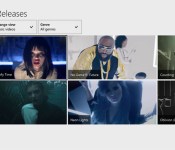
Pretend it’s 1994: music videos now available on Xbox One

The days of true music television may be long gone, but Microsoft has just introduced the next best thing. Xbox Music on the Xbox One now offers more than 92,000 music videos; if a given song has a matching video, you’ll see that instead of having to settle for plain old audio. You can also browse music videos if you demand visuals for every track. If you’re looking for something to do before the Xbox One’s big update hits — or just want to indulge in some TV nostalgia — you can check out the Xbox Music update today.
Filed under: Gaming, Home Entertainment, HD, Microsoft
Source: Xbox Wire

Batman: Arkham Knight headed to Xbox One, PlayStation 4 and PC in 2014

In a move that won’t surprise Batfanatics, a new Batman game is headed to Xbox One, PlayStation 4 and PC at some point this year. The latest caped crusader game entry is titled Batman: Arkham Knight, and it’s set to complete the trilogy that Rocksteady Games started back in 2009 (which includes Arkham Asylum and Arkham City, and doesn’t include Arkham Origins). We’ve dropped the first teaser video below the break, which heavily features both very serious sad talking and a totally sweet Batmobile. We’ll let you decide which is more exciting.
In our count, the first tease shows Penguin, Two-Face, Harley Quinn, and we can hear Scarecrow. That all makes sense given the video’s blurb:
“In the explosive finale to the Arkham series, Batman faces the ultimate threat against the city he is sworn to protect. The Scarecrow returns to unite an impressive roster of super villains, including Penguin, Two-Face and Harley Quinn, to destroy The Dark Knight forever.”
Filed under: Gaming, Software, HD, Sony, Microsoft
Source: Warner Bros.
Xbox One’s Project Spark available to everyone starting today in beta mode

Project Spark is pretty, encourages creativity, and incorporates Kinect directly. The sandbox/game creation tool became available for Windows 8.1 users back in December, and today it’s entering beta on the Xbox One as well. “Does that mean there’s a new, free thing on my Xbox One?” you might be asking. Yes, yes it does. Hot dog!
Project Spark isn’t in the XB1 store, so how do you get it? The announcement points to a still-active beta sign-up page, so it seems that interested parties still have a few hoops to jump through before getting in. (If you’re already in the Windows 8.1 beta, you’re in the XB1 version.) Interestingly, there are already several entries on the store for “Spark Tokens” in 500 token increments ($4.99 equals 500); beta or not, it looks like Microsoft’s interested in monetizing Spark from the jump. For the full FAQ on the beta, head right here.
Filed under: Gaming, Software, HD, Microsoft
Source: Microsoft

Skype’s web-based version is now available worldwide

You no longer have to live in one of a few fortunate countries to make a Skype call while checking your Outlook.com email: as of today, Skype for Outlook.com is available worldwide. All you need now is to download a browser plugin and link your Skype account. The global release comes alongside improved software support, too. PC users can now participate in HD video chats, while Mac users get a Safari plugin. If you’re heavily invested in Microsoft’s internet services, everything you need to get started is at the source link.
Filed under: Internet, Microsoft
Source: Skype
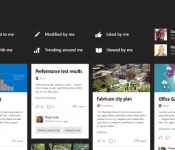
Microsoft’s new Office Graph will help you discover what’s trending around your workplace

Microsoft Office is about to get more personal with something called Office Graph. The new feature incorporates your web searches and online interactions, allowing it to highlight files and projects it thinks are important to you based on who you’re talking to. It can also let you know how you’re connected though people or projects to others at your organization. Over time, Office Graph will come into play in a number of Microsoft’s apps and services, one of the first being a standalone product codenamed Oslo — not to be confused with the previous Microsoft Oslo. (Coming up with new names is hard!) The app will display information like who attended a meeting or what conversation topics are trending at your business on digital cards like Google Now. You can also track what files are being shared — so you’ll know if everyone’s passing around a video of John breakdancing at the company party.
The Office Graph will also power a new Groups function that integrates with Yammer and allows you to share email, files and calendars across a group of coworkers. And Inline Social, a feature that will be integrated with Lync and Skype for having conversations inside documents that are stored in SharePoint Online and OneDrive for business. There are also plans to create a secure Video Portal where you can upload, stream and share company-wide videos, like your own private YouTube. Anxious to try it out? You’ll have to wait a little while. Oslo is expected to be available for Office 365 customers the second half of this year, with additional Office Graph implementations headed our way in 2015.
Filed under: Software, Microsoft
Via: ZDNet
Source: Office Blog (1), (2)
 AIVAnet