Skip to content

Posts tagged ‘Microsoft’

2
Apr

Universal Windows apps are coming to your Xbox One


Universal Windows app running on Xbox One

Many were expecting to see universal Windows apps in the Build 2014 keynote, and they have. However, Microsoft had a surprise in store — you’ll eventually see those universal apps running on the Xbox One, too. Developers will get to write apps for Windows and Windows Phone that translate to a TV screen with relatively little effort. The company hasn’t said exactly when you’ll see these multi-platform apps pop up on your game console, but we’re hoping they appear sooner than later.
Filed under: , ,

Comments

2
Apr

Microsoft teases a classic Start Menu for Windows 8.1 with built-in Live Tiles


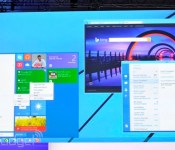
As a part of its Build 2014 announcements, Microsoft showed off an interesting twist on its classic Start Menu. Coming to Windows 8.1 in a future update, it has the look of the Start Menu Windows users have experienced for years, but adds the Live Tiles Microsoft has been pushing as a part of Windows 8 and Windows Phone. Terry Myerson made the announcement as part of an example of how universal Windows apps will be able to run in a window (and on Xbox), although users craving something familiar will probably just be happy to see their old Start Menu again. We didn’t hear any more details on exactly when to expect the update, but you can follow along with our liveblog for all of the information as it happens.
Filed under: ,

Comments

2
Apr

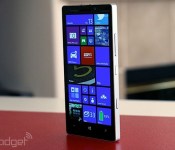
Nokia announces the Lumia 930, a 5-inch phone with a 20-megapixel PureView camera


It appears that Nokia isn’t coming to Microsoft’s developer conference empty-handed. A proposed merger between the two companies is still pending, but Nokia decided to bring in some new hardware regardless. This time, the phone maker has announced the Lumia 930. Deemed a flagship handheld by Stephen Elop, the Lumia 930 totes a 5-inch full HD display along with a 20-megapixel PureView camera with a Zeiss lens. The camera is clearly the star of the show here, as not only does it have optical image stabilization, but the phone also ships with a Creative Studio app that’ll let you add Instagram-style filters to your snapshots. There’s also a new feature called “Living Images” that can be weaved into Nokia’s Storyteller application. Photos and videos are automatically sorted by time and location, and if you want to be all fancy, you can add music to the background when viewing the images.

Other features include four high-performance digital microphones, directional stereo recording on-board and a 2.2GHz Snapdragon 800 processor. Of course, it also runs the latest Windows Phone 8.1 firmware which promises plenty of new goodies like a notification center (finally!) and Cortana, Windows’ answer to Siri and Google Now. It also has something called “SensorCore” which apparently is hooked up to Bing Health and Fitness Elop said that the Lumia 930 will launch first in Europe starting in June and will be available in Asia and other markets at a later date. It should be on more than a 100 operators for around $599 each. Unfortunately, US dates have not been announced, but fingers crossed we’ll see it come our way in the future.

Comments

Source: Nokia Lumia 930

2
Apr

Microsoft to update all WP8 Nokia Lumia devices with Windows Phone 8.1


Just before announcing “the next generation” of Nokia handsets, EVP of devices Stephen Elop dropped some update news for the freshly outed Windows Phone 8.1. Microsoft will be updating all Lumia devices that are running Windows Phone 8 to the next version. This means that many folks already sporting one of those WP8 smartphones can expect Cortana and all her vices in the days to come.

Filed under: , ,

Comments

2
Apr

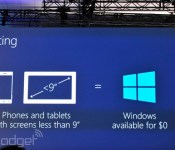
Windows will be free on phones, small tablets and the Internet of Things


Windows will be free on small devices

It turns out that those rumors of Microsoft cutting Windows prices to spur adoption were true — and then some. The company has announced that Windows will be free for hardware makers to use on phones, tablets with screens under nine inches and Internet of Things devices. Suffice it to say that this is a huge move for a tech giant whose operating system licensing is arguably its bread and butter. Microsoft is obviously willing to take a financial hit to compete against Android, Chrome OS and other freely available platforms.

Filed under: , , , ,

Comments

2
Apr

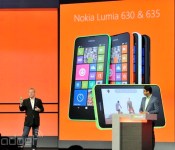
Nokia announces the budget Lumia 630 and 635 with Windows Phone 8.1


Nokia’s had a rough time with its high-end Windows Phones over the years, but it’s excelled with its cheaper handsets that cater to emerging markets and anyone interested in a budget smartphone. Announced today at Build, the Lumia 630 and 635 focus on expanding the latter category. The new devices come with Windows Phone 8.1 onboard, and while the 635 includes speedy LTE data, the 3G-only 630 will also come in a dual-SIM variant. They’ll be available in five colors with changeable shells, and even offer features like fitness tracking with an integrated low-power chip called SensorCore. They’ll arrive in May as the first Lumia devices with Windows 8.1, running on quad-core 1.2GHz Snapdragon 400 processors. As one would expect, these will ship in Asia first before spreading out worldwide, with a US release planned for July. Off-contract, the Lumia 630 will cost $159 / $169 for the single or dual-SIM versions, while the 635 will be $189. We should know more about these and get hands-on experience in a few hours when Nokia holds its own press conference, so check back then for more details.

Filed under: , , ,

Comments

Source: Nokia Conversations, Nokia

2
Apr

Microsoft’s opening-day Build keynote is happening now, get your liveblog here!


Microsoft's opening-day Build keynote is happening now, get your liveblog here!

It’s technically called “Build Windows.” But this year, the biggest news coming out of Microsoft’s annual developer conference might not have much to do with Windows at all. Sure, we’re expecting a software update, for which we’ve already seen copious leaks. But what about Windows Phone? Is version 8.1 on the way? Maybe we’ll even hear about Cortana, Microsoft’s answer to Siri. And hey, what of Nokia? Is this acquisition gonna ever close or what? Lastly, can we see some new hardware? Might we catch a glimpse of some new phones ahead of tonight’s Nokia shindig? Your guess is as good as ours, which means you’ll want to follow our liveblog as we give you the blow-by-blow.

April 2, 2014 11:30:00 AM EDT

Hi folks and good morning from sunny San Francisco!

I’ll be your liveblogger today, joined by senior mobile editor Brad Molen on photos (we are expecting some Windows Phone news, after all).

We’ll get going in a few minutes. It looks like some folks are still getting seated. As for us? Just chilling. We’re seated front and center. Pulsing dance music in the background. Purple lights. The usual for an 8:30am keynote.

In the meantime, what do you guys think we’re going to hear about today? Tweet me your thoughts at @danawollman

Obviously, it’s “Build Windows” so we can assume that rumored update is on the way. But what else could Microsoft have to talk about for two-plus hours?

Some Cortana, perhaps? A little sneak peek of whatever’s coming at tonight’s Nokia event?

That dance soundtrack? We’re now hearing that “Too Close” song. You know, the one you heard in that Internet Explorer. Over and over and over…

It’s basically “The Microsoft Song” at this point.

And here we go!

Microsoft’s Terry Myseron, EVP of the Operating Systems Group, is on stage.

“What’s the right way to kick off this conference?”

“I considered coming out chanting ‘developers, developers, developers!’”

Dude knows how to warm up a crowd of programmers.

“So who’s here with us today? This is an incredibly impressive and diverse group.”

And by diversity, of course, we mean diversity of applications. Web services. All the stuff the devs in this room have built.

“Let’s kick off Build 2014.”

Yes, let’s.

We’re seeing a video now. “The fastest-growing smartphone OS.”

Get ready for some Windows Phone news, y’all! (Toldja!)

Video’s over, lights are on, and Joe Belfiore, CVP of the Operating Systems Group, takes the stage to big, big applause.

Windows Phone 8.1 and the Windows 8.1 Update both coming today.

First up: Windows Phone 8.1.

“We set out to create an experience inspired by people. One that gets you closer to the people and things that matter most in your life.”

“We believe Windows Phone is the world’s most personal smartphone.”

New Windows Phone partners announced today: Prestigio and Micromax.

Not exactly huge names but if you look at the slide, major players like HTC, Samsung, LG, Lenovo and Huawei were already on board.

Belfiore is double-fisting, if you will: holding a phone in each hand, one by Prestigio and one by Micromax.

Shame we can’t get a closer look from where we are in this big auditorium. Maybe later today or this week?

But hey, who needs hardware when you have brand-new software? Let’s get to it.

Belfiore is starting out with ways Microsoft has made Windows Phone “more personal.”

It’s the new Action Center for notifications.

Yep, you may have seen this before in leaks and yes, it looks a little like… Android.

Just swipe your finger down from the top of the screen and you’ll see notifications for email, Facebook, et cetera, along with quick settings for airplane mode, Bluetooth and others.

It’s accessible wherever you are in the UI, as you’d expect.

Now we’re talking about personalizing the lock screen.

A new set of APIs for the lock screen allow for more interactive experiences.

Though Microsoft doesn’t appear to be releasing these APIs to devs just yet.

Here’s an example: a demo called “Diagonal.” Shows your time, etc. with — yep — a kind of diagonal animation.

It looks pretty cool, I must say.

Make sure you’re checking out the photos Brad is posting here in the liveblog — a picture says a thousand words, don’tcha know.

Now let’s talk about Live Tiles.

There’s now a high-density options where you can go three tiles across.

Also, you can choose a background for the Start Screen.

Belfiore is showing what it’s like to select a photo and crop it before making it the background.

The effect is cool: it’s the same photo spread across a grid of tiles.

And we’re really not used to seeing Windows Phone like this. Think all the tiles have to be bright solid colors? Think again.

Now it’s time for another video.

So far we’re seeing glimpses of flowers, robots, feet, scenery, a Rubik’s cube.

“Now I’m learning about you.”

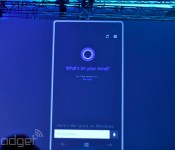
Ooh, this looks like Cortana.

“Hi. I’m Cortana.”

She’s got kind of a husky voice. Not Scarlett Johansson husky, but deeper than Siri’s voice.

“Some things I resemble: a donut, a hula hoop, a halo…”

Jokes aside, you should know this, first and foremost: Cortana is powered by Bing.

That’s where she gets her smarts.

Cortana lives in a Live Tile. That’s one way to get to her.

But she also fully replaces the search function in Windows Phone.

So if you touch the search button, there she is.

“She looks a little excited to see me here on stage.” Belfiore says.

(Oh?)

Here’s what she can do: make calls, send texts, take notes, give reminders, make appointments. Set an alarm. Do searches. Everything you’d expect, right?

Cortana can work with third-party apps too.

In fact, Microsoft’s been working with select app makers to build in Cortana.

Noticed Facebook in there, Hulu Plus…

Cortana also has a notebook.

“A transparent way of putting the user in control of their relationship with Cortana.”

So, you can log your interests there. You wanna know about traffic, you care about the NCAA tournament, traffic updates.

The more Cortana asks about you, the more she learns. So, she gets smarter over time.

Cortana can also make suggestions as to which contacts should be part of your Inner Circle.

Also, Cortana will work with your quiet hours, but can still let people from your Inner Cirlce get through to you any time of day. Your girlfriend, for instance? She should be able to reach you any time of day. (Yes, I believe that.)

So where do these suggestions show up? From the bottom of the screen.

That long list of Cortana updates is similar to Google Now. You know, just with a Windows Phone aesthetic.

Cortana asks lots of questions as a way of getting to know you? Should she track that flight she found in your email? Yes or no? That’s how you teach her.

Now we’re getting a demo of voice commands. “Wake me up at 7am tomorrow.” “Your alarm is set for 7am.”

The point being, you can speak to her using normal-person language.

Another example: “What’s on my calendar for Saturday?”

Man, Joe Belfiore’s supposed to read all the “Game of Thrones” books in one day. Ambitious, man.

Cortana just added an appointment an added “sound good?” at the end. Human-ish.

Also, she let Joe know that he was supposed to do something else at the same time, so yes, she’s very aware of double-bookings.

Now, a demo of maps and recommendations: “Show me the best Mexican restaurants in Palo Alto.” Cortana comes back with four-star restaurants.

And she has Yelp to thank for some of that data.

“Which ones take reservations?” “Here are the ones with four stars that take reservations?”

Like other voice assistants (Dragon Assistant, etc.) she remembers the last question so that everything makes sense in context.

Just got one bug, though: Joe said “call the second one” and Cortana seemed a bit confused.

Joe’s staying calm, reminding us it’s beta software. (We know.)

More demos! “How did the Seattle Mariners do yesterday?”

Took Cortana two tries, but she got it: Mariners beat the Angels.

Just so ya know.

Those bugs aside, Cortana seems to work well — and it seems to work as you’d expect.

Time for web searches. “How many calories in a banana?”

(The answers’s 105.) The bigger deal is that you can then add that to your diet tracker. Helpful if you use the Bing Health & Fitness app.

“What’s the weather in Las Vegas?”

“How about in Celsius?” “Here’s that temperature in Celsius.”

“How about in Kelvin?” Big laughs here.

But Cortana converted it to Celsius… twice.

So maybe Cortana isn’t quite as nerdy as her makers.

“What’s the story of the next Halo game?” “I’m quite certain you don’t have proper security clearance for that information.”

Confirmed: Cortana has some sassy easter eggs.

Looking forward to finding more of those later.

Now we’re getting a demo of reminders. “Remind me when I get home to cook dinner for my wife.”

“Ordinarily she would recognize when I get home.”

“Next time I speak to my sister, remind me to ask her about her new puppy.”

“Since this is a phone, I might talk to my sister on the phone or have a chat string or have an email chain.” Basically, next time you use the phone to talk to her, you’ll get a reminder to ask her about the puppy.

(As if you need a reminder to ask about puppies.)

Now we’re seeing a demo of how you can use Cortana to initiate a Skype call. Not surprising, right? Given that Microsoft owns Skype…?

Basically, it works just the way you’d expect.

What you might not expect: Hulu Plus integration (though we hinted at it before).

So, you can verbally tell Cortana to add a show to your queue, and boom, she does it. Useful.

We also hinted at Facebook integration earlier. “Facebook, what’s up with Terry Myerson?” Jumps to Terry’s profile page.

Question for the crowd: did Terry Myserson really write “LMFAO” on his Facebook page, or is that just a dummy account?

Another easter egg: “Do you like Jimmy Fallon?” “Thank you Jimmy Fallon…” She liked that recent TV plug she did.

OK, folks. Time to change gears. Belfiore is about to talk about businesses now. Ready. Set. Go.

Nick Hedderman, Senior Product Manager for Windows, is on stage.

“Windows Phone has always been the right choice for business. We’re respecting existing IT investments.”

Fake scenario: trying to recruit Joe for a new position at Microsoft. Top-secret stuff. He’s using a new Lumia. His device is enrolled into the new position. (Just go with it, OK?)

Windows Phone 8.1 supports enterprise VPN.

Seems like a fairly big thing IT managers would want, non?

Additionally, WIndows Phone 8.1 now supports s/mime encryption.

When you send a message from your phone, you can decide if you want to encrypt a message, which you might do for a confidential message, but not, say, a message to your spouse.

Back to Joe’s hypothetical new confidential role at Microsoft: if he gets a confidential attachment in an email, the option to save it is grayed out. He cannot save a local copy.

IT can go into “Workplace” and delete a relationship. Do that, all the corporate apps are suddenly removed from the device. Not just apps, but documents, the VPN. All gone, very quickly.

You can do this remotely too, but we saw a local demo because it made more sense, visually speaking, to go into the settings on the big screen.

Switching gears again. Time to look at the Windows Store on Windows Phone 8.1.

First of all, when you open the store, it now lands on a new page full of featured apps.

Pan left and you’ll see personalized suggestions, similar to the experience on Windows 8.1.

Other ways of sorting: categories and lists like top paid, top free, new + rising.

As with Windows 8.1, the idea is to showcase more apps, and get users downloading more of them.

Switching gears a lot right now — hold onto your horses. Now seeing a calendar demo.

Users asked for additional calendar views. What we’re seeing now is a week view.

Can of course go back to daily views.

Battery Saver, Data Sense and Storage Sense improved. New here: Wi-Fi Sense.

Wi-Fi Sense is meant to help users take advantage of good Wi-Fi networks. Meaning, MIcrosoft has some data on which networks are free, reliable.

Windows Phone will automatically accept the terms of use, making it easier to breeze through portal screens.

That includes automatically supplying an email address, by the way.

What about when friends come to your house and want to get on your WiFi?

There’s a way to securely share your WiFi passwords with Outlook.com contacts, Facebook friends, Skype contacts.

So they can sign in without getting access to all the resources on your network; just your internet connection. And you don’t have to verbally tell them your password.

(Presumably, this is for folks who don’t already have a guest network set up on their router.)

We’re seeing an incoming call now, by the way. And yes, there’s a reminder for Joe to ask his sister about the puppy. The notification is above the call options (speaker, mute, hold, et cetera).

But the reason we’re seeing this is to see a demo of how to move from phone calls to Skype. In other words, still on the connectivity thing.

Filed under: ,

Comments

2
Apr

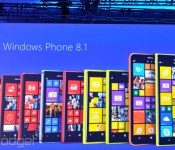
Windows Phone 8.1 and Cortana officially revealed at Build 2014


As predicted, Microsoft is using its Build developer conference to launch Windows Phone 8.1, the latest and (we hope) greatest version of its mobile OS. The company’s fed us a bunch of information about the update already, and a vast number of leaks have covered nearly all remaining features. Still, it’s about time for us to get the skinny on everything the new upgrade entails, so let’s break down exactly what you can expect from Windows Phone going forward.

Microsoft’s Joe Belfiore took the stage and talked up (among other things), new hardware partners like Prestigio and Micromax that should help the company penetrate those valuable developing markets. As multiple leaks have pointed out ahead of time, 8.1 indeed comes with a notification center (called the Action Center) that users can invoke by swiping down from the top of the screen — from there you can view and dismiss your email and social notifications as well as toggle Wi-Fi and Bluetooth connections. Pretty standard fare, if you ask us. What’s a little less standard are WP8.1′s customizable lock screens: developers can tweak them in some pretty stunning ways, though Microsoft hasn’t yet said when they’ll actually get access. Throw in the ability to set your own images as the background for your Live Tiles and you’ve got yourself a level of personality that’s been sorely lacking from Windows Phone to date.

And yes, Cortana is here too. She completely replaces the standard Bing search interface in Windows Phone… which makes sense considering she’s powered by Bing anyway. But what can she actually do? Cortana can handle the usual tasks that you’d expect of a modern digital assistant: she can make calls and send messages, as well as jot down reminders. Third-party developers can tap into Cortana as well so users can call out to them by name (think “Skype, call Michael”). Want to make her even smarter? Users can also define their interests (think sports, traffic updates) in a “notebook” so she knows what to keep tabs on in the future. On-stage demos have a history of turning sketchy quickly, but Belfiore’s repeated voice interactions with Cortana sounded surprisingly natural. No stilted computer-speak here — Microsoft may have finally crafted a digital assistant worth talking to. That said, she’s still firmly in beta for now.

Considering Windows’ prevalence in the workplace, it’s no surprise that Windows Phone 8.1 has some new IT-friendly features too. There’s support for enterprise VPNs, along with signed and encrypted messaging to keep those corporate secrets under wraps.

Developing…

Filed under:

Comments

2
Apr

Microsoft unveils Cortana, its answer to Siri and Google Now


At Microsoft’s Build 2014 developer’s conference, it has just announced Cortana, a new voice search tool for Windows Phone 8.1 powered by Bing. It fully replaces the search function in Windows Phone, and you’ll be able to access it (her?) through a special Live Tile. On top of finding thing, it can make calls, send texts, take notes, give reminders and set alarms. Microsoft said it’ll work with third part apps as well, and has been working with select developers to integrate it. So far, it’s showed Hulu Plus and Facebook operating in the app, though there’s no official word about that yet.

Microsoft also said that Cortana will get smarter over time, learning based on your search requests or other actions. It’ll even function as a pseudo-secretary, making sure you’re not disturbed during quiet times but still letting people from your inner circle get through. To do that, it’ll ask questions such as whether it should track a flight it found in your email, for instance — a decidedly Google Now-type touch. Once trained, it’ll function using using casual language questions, and respond with a casual “sounds good?” when it confirms. Another trick is Hulu Plus integration that’ll let you tell Cortana to queue up a show, for instance. You can perform similar tricks with Facebook, by asking “what’s up” with somebody, and being led straight to there profile page. It seemed to work well during the demo despite a couple of hiccups, but Microsoft’s Joe Belfiore reminded us that Cortana is still in beta at the moment.

Developing…

Filed under: ,

Comments

2
Apr

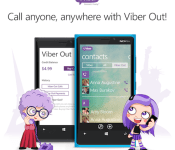
Viber’s Windows Phone 8 app now allows you to call any number you want


How does Viber celebrate being acquired for a ton of money? By bringing one of its most popular features, Viber Out, to Windows Phone 8 — that’s how. In second thought, we’re probably way off. Still, the Skype rival has indeed updated its WP8 application, celebration or not, allowing users to now make calls to any phone number thanks to Viber Out. This new version also lets you send video messages and multiple photos at a time, while added Bluetooth support should make it easier for you to enjoy some hands-free action. As usual, you can grab the update from the Windows Phone Store — and feel free to share your Viber 4.1 impressions with us in the comments below.

Filed under: , , , ,

Comments

Source: Windows Phone Store