



Microsoft says ‘shwmae’ to the Welsh language

If you’ve ever struggled to understand what Cymru am byth means, you’ll have found that few web translators are prepared to help you out. That’s changed now, thanks to a deal between Microsoft and the Welsh Assembly, which teamed up to bring the language to Office, Bing and the Windows and Windows Phone translator apps. The country’s national body passed a law back in 2012 requiring public bodies to treat both English and Welsh equally, but didn’t have the tech necessary to ensure all employees had access to translation gear. Both parties are keen to stress that, despite the official involvement, it’s just as (un)reliable as translators for other languages, but hey, at least one or two kids might avoid our childhood fate of having gau’r drws barked us by an annoyed Grandmother and not knowing what the hell it meant.
Filed under: Internet, Software, Microsoft
Source: Microsoft, Welsh Assembly
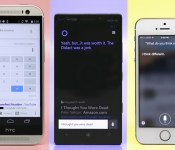
Smartphones for hire: Which personal assistant is right for you?

“Ring-ding-ding-ding-dingeringeding.”
This isn’t a standard job interview answer, but then again, “What does the fox say?” isn’t a typical question, either.
The top three smartphone platforms now feature fully functional personal assistants, and just like real-life assistants, it’s not so easy to pick one at random. Each has its own talents, weaknesses and personality quirks to consider. So, I conducted a series of “interviews” with Siri, Google Now and Cortana to get to know them better — and yes, they all know exactly what the fox says.
Siri

Apple’s Siri is a seasoned assistant with plenty of experience to back up its resumé. Now nearly 3 years old, the once-beta program has had time to squash bugs and add features. And thanks to the iOS platform, it’s integrated with social networks like Twitter and Facebook, as well as services like Yelp, Evernote, Fandango, OpenTable and WolframAlpha.
Siri has a jovial personality. No matter what you ask, just frame your question naturally — for instance, “How should I dress this weekend?” — and nine times out of 10, it’ll not only understand you, but also respond in a similar fashion. If you have follow-up questions or requests, Siri will continue the conversation with you. And if you ask something silly, expect a sassy answer.
Siri is a seasoned assistant with plenty of experience to back up its resumé.
Personality’s a nice touch, but it’s merely a party trick if your assistant lacks functionality. Fortunately, Siri’s not hurting in that area. It can dictate and send texts, emails and social network updates. It can make calls and read messages back to you. It has no problem setting (and canceling) reminders and alarms, and will display your upcoming appointments in a list. How about opening apps and changing settings? Airplane mode, WiFi, Bluetooth, you name it — Siri’s got you covered so you don’t have to dig around countless screens to find stuff.
Siri’s also good with watercooler talk. It told me when the next Giants home game was and how they’re doing this year. When I ask about a movie, the details show up in a card-like view; and I can even buy movie tickets through Fandango. Siri also can pull up music through your library or iTunes, and it’s able to pause, resume and skip songs. However, it doesn’t do a good job of pulling up concert information, opting instead for a web search.
Much like both of its competitors, it can set geofences for reminders. This means you can tell it to remind you to pay the rent as you pass by the landlord’s office, or stop and get a Mother’s Day present when you’re close to your mom’s favorite store (hint, hint). Speaking of location, it can pull up local listings, which you can then filter by distance or Yelp rating; you can also use Siri for all of your navigation needs, as long as you don’t have a strong aversion to Apple Maps. The service also remembers your home and work to help route your morning commute, but unfortunately, it doesn’t do well at determining other places you visit frequently.
Siri’s not all business though. It has a knack for finding your friends, as long as you and your entourage have the iOS app. If Steve’s late getting to your house, you can ask Siri to see where he’s at and it’ll pull up a map with his location. While you wait for him to show up, you might as well use Siri’s OpenTable integration to set up reservations for dinner.
Hire Siri if you’re looking for: Personality, dictation, social networking, music playback, sports, movies, changing settings, reading messages, finding friends.
Google Now

Of the three candidates, Google Now is the blandest. It’s the kind of assistant that takes everything a little too seriously, and on the rare occasion when it tries to be funny, it tries too hard. But it’s also very robust, knowledgeable and takes care of business when called upon — and you can call upon Google without touching the device. It works great on the home screen and in the Now screen, but you can’t activate it when you’re in an app, or even in the app tray. That’s still better than Siri and Cortana, however, which are activated by a long-press of a particular button.
It’s the kind of assistant that takes everything a little too seriously, and on the rare occasion when it tries to be funny, it tries too hard.
Sure, it comes with a few Easter eggs (me: “Make me a sandwich.” Google: “What? Get it yourself!”), but Google prefers function over friendliness. I can respect that — Siri’s and Cortana’s jokes aren’t technically all that useful anyway — but it’s disappointing that an engine like Google can’t understand questions unless they’re framed formulaically, such as “What’s the weather like today?” instead of “What should I wear this weekend?”
It’s not the most intuitive assistant, and it’s a mixed bag for basic daily tasks. Google can look through your email and remind you of upcoming flights and give you other information related to your pending trip. Of course, you can also use it to do the usual voice assistant stuff: Set reminders and alarms, visit specific websites, draft notes and make calls, as well as send texts and emails. For reminders, Google will ask you when and where you want to be pinged. And although it can set up appointments and alarms, it can’t change or cancel them. (If you ask, it doesn’t even understand your request.)
One of Google’s less job-specific strengths is its ability to name a tune. It’ll pull up information about the song you’re listening to and link you to the Google Play Store. It’s a talent Siri simply doesn’t possess, although rumors indicate that Apple’s looking into integrating Shazam. Lastly, if you’re interested in using your assistant to post on social networks, take note: You’re limited to Google+.
Hire Google if you’re looking for: Travel and flights, dictation, music discovery, hands-free voice activation and website shortcuts.
Cortana

Cortana is the only personal assistant in the trio that has a recognizable face, and the only one that has a resumé stretching 500 years into the future. Presently, the service is brand-new and technically in beta, but it’s fully functional. It’ll continue to improve over time as more people use it and Microsoft’s team adds functionality.
Like Siri, Cortana’s got the makings of a fun personality. Jen Taylor, the voice of Cortana in the Halo series, contributes to her Windows Phone namesake by providing a lot of the program’s clever quips, and you’ll hear more of her voice over time. The service doesn’t have quite as many quirky responses as Apple’s counterpart, but wit comes with experience. Currently, Cortana’s sass is limited to telling jokes, poking fun at the competition and responding to random questions about Halo and Microsoft. She’ll also keep conversations going as long as you’re making queries that are relevant to the topic at hand.
She can take care of nearly all of the essential tasks that a virtual assistant should have, many of which I’ve already discussed in earlier sections, but Cortana’s greatest strength comes with her Notebook. After all, your personal assistant would jot down information about you in his or her notebook, right?
Cortana is the only personal assistant in the trio that has a recognizable face, and the only one that has a resumé stretching 500 years into the future.
Do people even use real notebooks anymore? Well, Cortana does. She uses her Notebook to learn more about you. Sure, Siri and Google Now have shown small pieces of this feature: Both services remember your relationships and recognize where you live and work. Siri gets smarter as it gets to know you, and Google displays cards with information about your favorite sports teams, stocks, cable provider, news stories and so on. So far, however, Cortana’s implementation adds a lot more customization. Your list of reminders resides here, as well as your favorite places, music searches and preferred quiet hours.
But the most intriguing part of the Notebook is the section on your interests. This is a customized feed of information that keeps you posted on certain news stories and fills you in on things like your commute time, places to eat, upcoming flights, local weather and your favorite sports teams.
It’s also home to Windows Phone’s Do Not Disturb mode, known as Quiet Hours. A personal assistant would likely know not to bug you about things after a certain time of night, unless it’s incredibly important — but if your mother is trying to get ahold of you at midnight, it’s probably an emergency. Thus, you can set your quiet hours in the Notebook, as well as add a list of people (the Inner Circle) you don’t mind waking you up at the worst possible time in the morning.
You can rely on Cortana when you want to change settings and open apps, and it can even open up specific websites directly as long as you have a shortcut set up as a Live Tile. That’s still not quite as nice as Google, which can open sites without that caveat, but it’s a start. However, just like Google, Cortana can recognize music and offer links to buy the song you’re listening to. She can pull up whatever tunes you want, navigate through your playlist and pause songs currently playing. She’s also skilled at hooking you up with the latest weather conditions in a card-like view (which the others do just fine) and converting temperature between Fahrenheit, Celsius and even Kelvin. Conversely, I asked Siri to convert to Kelvin and it showed me how hot it was in Kelvin, Australia.
Unfortunately, the service’s beta status also means it’s not complete. Cortana doesn’t appear to have any attachments to social networking yet, though I wouldn’t be surprised to see this change down the road. She also doesn’t have hands-free activation, so you have to hold down the search button and then speak your voice commands. Finally, she also has trouble dictating punctuation, so “period” and “question mark” were transcribed as actual words instead of grammatical marks.
Hire Cortana if you’re looking for: Personality, navigation, appointments and reminders, weather, music discovery, changing settings, Do Not Disturb.
Who gets the job?
Don’t you hate it when there isn’t a clear-cut answer? Truth is, all three services do the basics quite well — appointments, reminders, dictation, making calls, sending messages and so on. But each one has its own array of talents to set it apart and its own obstacles to overcome. Between Siri’s experience, Cortana’s Notebook and Google’s hands-free functionality, you could hire any of the three and still be happy.
If you’re not looking for a specific feature or strength, however, you may need to bring them in for a follow-up interview.
Filed under: Cellphones, Software, Mobile, Apple, Microsoft, Google

California’s smartphone kill switch bill passes a second senate vote

Perseverance pays off, it seems. Just weeks after California’s senate shot down a bill that would require a remote kill switch feature on smartphones, the legislature has passed an amended version of the same would-be law. Senate critics dropped their opposition after changes were made to both give companies more time to implement the technology and explicitly left tablets out of the regulation. Apple and Microsoft are also onside after initially objecting to the measure, too. There’s still no certainty that the kill switch will become official and let you disable a stolen phone from afar, but it’s now a realistic possibility — much to the chagrin of big US carriers.
Filed under: Cellphones, Mobile, Apple, Microsoft
Source: San Jose Mercury News

FCC’s new net neutrality rules face heavy opposition (update: vote still on schedule)

Despite FCC Chairman Tom Wheeler’s insistence that he is on the side of an open internet, the controversy over proposed net neutrality rules continues to expand. Resistance to the new rules is now coming from voices within the FCC and major internet companies including Amazon, Google, Microsoft, Netflix, Yahoo and more. The plan was for the five commissioners to vote on their approval next Thursday, but today one of them, Jessica Rosenworcel, called to push back that vote by a month (update: an FCC spokesman says the vote will go forward as scheduled). Citing “real concerns” with Wheeler’s proposal and a need for time to consider the “torrent of public response” received, she wants the delay so public conversation can continue. That would mean putting the agency’s legal staff out front to explain the measures and answer questions in ways that are accessible to the public, instead of starting a Sunshine Period that would end the ability to accept public comment.
.@techMSS There were folks in front of the @FCC earlier today: pic.twitter.com/9QrWp4ZaLn
– Alina Selyukh (@alinaselyukh) May 7, 2014
Comments from the public are getting noisier than ever also, as protesters were even marching in front of the FCC today. One of the other FCC commissioners, Mignon Clayburn, blogged about the concerns she expressed back in 2010 when the original rules were implemented, including prohibiting the controversial “pay for priority arrangements” completely.
Read my new blog on #NetNeutrality http://t.co/4DBY4zt96G
– Mignon Clyburn (@MClyburnFCC) May 7, 2014
Thoughts on #libraries, #ERate, #netneutrality: http://t.co/Fup5UsNz3T
– Jessica Rosenworcel (@JRosenworcel) May 7, 2014
At the same time, Gigaom points out that a number of internet companies have signed on to a letter (PDF) calling for the FCC to “protect users and Internet companies on both fixed and mobile platforms against blocking,discrimination, and paid prioritization and…make the market for Internet services more transparent.” Names on the letter include over 100 internet companies including Amazon, Google, Microsoft, Yahoo, Facebook, Twitter, Level 3, Cogent and many others.
Update: According to FCC spokesman Neil Grace, the vote will proceed as scheduled. “Chairman Wheeler fully supports a robust public debate on how best to protect the Open Internet, which is why he intends to put forward his proposals for public comment next week. Moving forward will allow the American people to review and comment on the proposed plan without delay, and bring us one step closer to putting rules on the books to protect consumers and entrepreneurs online.”
According to recent news reports, the Commission intends to propose rules that would enable phone and cable Internet service providers to discriminate both technically and financially against Internet companies and to impose new tolls on them. If these reports are correct, this represents a grave threat to the Internet.
Instead of permitting individualized bargaining and discrimination, the Commission’s rules should protect users and Internet companies on both fixed and mobile platforms against blocking, discrimination, and paid prioritization, and should make the market for Internet services more transparent. The rules should provide certainty to all market participants and keep the costs of regulation low.
Such rules are essential for the future of the Internet. This Commission should take the necessary steps to ensure that the Internet remains an open platform for speech and commerce so that America continues to lead the world in technology markets.
Sincerely,
Amazon, Cogent, Dropbox, Ebay, Etsy, Facebook, Foursquare, Google, Kickstarter, Level 3, LinkedIn, Lyft, Microsoft, Netflix, Reddit, Tumblr, Twitter, Vonage Holdings Corp., Yahoo! Inc., Zynga
Filed under: Home Entertainment, Internet, HD, Microsoft, Amazon, Facebook
Source: New America Letter to FCC, Jessica Rosenworcel, Mignon Clyburn, Gigaom
Microsoft updates OneDrive app for Android

For those who have come to count on the cloud as a baseline file storage method, Microsoft’s OneDrive (formerly SkyDrive) is a very competitive option, offering 7GB of online storage and transparent Office integration.
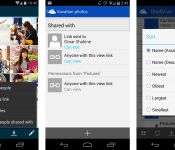
Now the Microsoft OneDrive team, by way of their blog, has provided several updates to their app lineup, including the Android version. Sticking with Android here, with version 2.5 of OneDrive app (for Android 4.0+ devices) one can now:
- Share files and/or folders with others using links or sending files to another app for sharing purposes.
- Adjust viewing and editing abilities right from your Android device.
- Select multiple files to download at once.
- Move and sort files and/or folders.
This update brings much more functionality to OneDrive on Android, especially via the file sharing aspect. While Office documents are still held tied to Office/OneDrive support only (via Office web apps), one can hope that this at least a small step in the right direction to freeing Office files to all apps.
The post Microsoft updates OneDrive app for Android appeared first on AndroidGuys.

Microsoft OneDrive adds sharing and organization features for Android

If you’re a Microsoft OneDrive user on Android, sharing and organizing files just got a bit easier while on the move. Thanks to an update to version 2.5, the cloud-storage option allows those with Google-powered mobile devices to share via invite, link or sending files to an outside app. You can also download multiple files at once, while moving and sorting individual items and folders as needed. There are some new additions on the desktop side too, including adding items to a previously shared stash, publishing video content to Facebook, custom album covers and more. The new version of the Android app is available now in Google Play and the desktop features are rolling out to users “over the coming days.”
Source: Microsoft (OneDrive Blog), Google Play

Microsoft is planning a Surface event for May 20th

It didn’t seem that long ago that Microsoft held its last Surface tablet launch in New York City, but it’s time again for yet another one. Yep, Microsoft has just sent us an invitation for a Surface-related event slated for May 20th in the Big Apple, imploring us to join them “for a small gathering.” We really don’t know much else aside from that, but we’re guessing a new tablet — possibly a mini Surface? — could be unveiled. All we do know is that we’ll be there live and in person to tell you all about it.

Xbox handheld game console isn’t in the books, says Xbox lead Phil Spencer

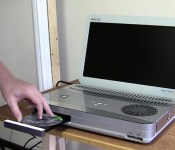
Microsoft’s new Xbox head Phil Spencer doesn’t think an Xbox gaming handheld makes sense. Spencer took to Twitter yesterday afternoon in a surprisingly candid conversation with fans, one of whom asked if Microsoft is pursuing, “a handheld Xbox One-like gaming device at E3 or in the future.” Spencer responded with a frank, “I don’t think we’ll do a dedicated handheld gaming device.” To him, Windows Phone and tablets make more sense. “Maybe with controller support someday,” he said. That should put to bed rumors of an “Xbox Surface” for now.
Spencer also offered a taste of what his team is showing at this June’s gaming trade show, though it shouldn’t be a big surprise: games, lots of games. That’s new IP, sequels to existing franchises, and, apparently, throwbacks to “neglected” franchises that Microsoft owns. Also not a huge surprise considering the recent relaunch of Killer Instinct, but we’re fascinated to see what else could get the reboot treatment. Crimson Skies, perhaps?
[Image credit: Ben Heck]
Filed under: Gaming, Handhelds, Software, HD, Microsoft
Source: Twitter
How would you change Nokia’s Lumia 620?

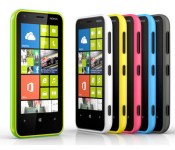
When Nokia launched the Lumia 620, it looked as if the company had perfected the formula for what an entry-level smartphone should be. The hardware and performance was great despite the slow internals, Windows Phone 8 worked well and it was priced to move. A year later and the Moto G may have supplanted this as your go-to budget device, but we want to know your feeling on what the last 12 months with the 620 has been like. What do you love, what do you hate, and what would you change?
Filed under: Cellphones, Mobile, Microsoft, Nokia
Source: Engadget Product Forums

Microsoft’s Innovation Center to school citizens on technology, help startups in Miami

Miami is going to get a whole lot geekier if Microsoft has its way. The software giant has recently announced plans to open its first US-based Microsoft Innovation Center (MIC) in the sexy city later this spring, with more stateside locations to follow. The Miami MIC will focus on four different audiences: academia, the local Latin American community, government and start-ups, and it’s said that each group will benefit in its own way. Students, for example, will have a place to net specialized training and pick up valuable tech-related job skills. Will Smith’s favorite burg will also serve as a part of Microsoft’s CityNext program, which uses locals to create “healthier, safer and more sustainable” places to live. Only time will tell if the siren song of South Beach will have an adverse effect on any of the above, though.
[Image credit: Shutterstock]
Filed under: Microsoft
Via: Microsoft News
Source: Microsoft, The Official Microsoft Blog

