


Microsoft Boosts OneDrive Cloud Storage to 1TB for Office 365 Subscribers, 15GB Free for All
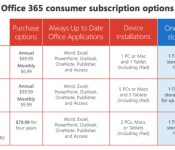
Microsoft today announced several changes to its OneDrive cloud storage services, starting with a massive increase to 1 TB of storage for all Office 365 subscription plans. This expanded storage will be will be automatically added to existing Home, Personal, University or Business subscribers starting in July. While the 1TB feature is new for Home, Personal, and University users, this upgrade previously was announced for Office 365 Business subscribers.

Today, OneDrive and Office are announcing a BIG change to that benefit for consumers, to the tune of 1 TB per user. That’s right–we’re increasing the OneDrive storage allotment included with Office 365 Home, Office 365 Personal, and Office 365 University from 20 GB to 1 TB. That’s a whopping 50 times, or 5,000 percent increase in storage–and it’s going to be here before classes are in session!
For OneDrive users who are not Office 365 subscribers, Microsoft has also sweetened the deal by boosting the free storage allotment from 7 GB to 15 GB. Prices for additional storage plans also are being slashed by 70 percent, with new monthly prices starting at $1.99 for 100 GB (previously $7.49) and $3.99 for 200 GB (previously $11.49).
This Cloud storage expansion is one of several recent initiatives that encourage consumers to use Microsoft’s Office platform. Earlier this year, Microsoft brought its Office suite to the iPad with tablet-friendly versions of Word, Excel, and PowerPoint. The Redmond company also introduced a new Personal Office 365 subscription plan for individuals and a Home plan for families that complement its multi-user business subscriptions.
Apple is of course also expanding its cloud storage services alongside iOS 8 and OS X Yosemite with the launch of iCloud Drive. Apple has yet to announce full details on iCloud Drive pricing, but at a minimum it includes options at 5 GB for free, 20 GB for $0.99/month, and 200 GB for $3.99/month, with higher tiers also available.

Microsoft giving away 15GB of OneDrive storage, 1TB for Office 365 users

More free storage? Lower prices? It’s all good news from Microsoft today: The company just announced that it will begin offering 15GB of free storage to OneDrive users, up from 7GB. For those of you keeping track, this latest move brings OneDrive in line with its biggest rival, Google Drive, which also also offers 15GB of free space (other competitors such as iCloud and Dropbox don’t offer nearly as much complimentary storage). Meanwhile, Microsoft said that within the next month, Office 365 users will get 1TB of free space, up from 20GB. This, too, is a welcome change: That generous 1TB cap was previously reserved for Office 365′s business users only.
Finally, Microsoft dropped the price of its monthly plans to $1.99 for 100GB (down from $7.49) and $3.99 for 200GB (down from $11.49). In fact, the prices are so low that the company chose to eliminate its 50GB monthly plan; the fee would have been so nominal (25 cents or so) that it may as well have been free. The good news is that whether you use OneDrive or Office 365, existing users will automatically see their storage limits go up. In other words, it’s not like you have to be a new customer to take advantage of this. Enjoy, and turn on OneDrive’s automatic photo-uploading if you haven’t already — we’re pretty sure you’ll have enough space now for all your stuff.
Filed under: Internet, Microsoft
Source: Microsoft
The Surface Pro 3 is nigh-on impossible to repair, just like its ancestors

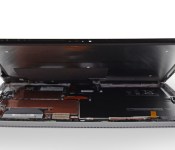
If you had dreams of upgrading your shiny new Surface Pro 3, you’d better shelve them. The crew at iFixit has torn down Microsoft’s latest slate, and it proves just as daunting to repair as both of its predecessors. About the only replaceable part is the solid-state drive, and there’s a good chance that you’ll destroy your tablet trying to reach that component — even iFixit cracked the glass while removing the display. Just about everything (including the screen) is held in place with adhesives, and unconventional connectors only add to the challenge. You may not mind the unrepairable design given that the Pro 3 is much thinner and lighter than earlier Surfaces, but this definitely isn’t the tablet for tinkerers.
Filed under: Tablets, Microsoft
Source: iFixit

Google to incorporate a “kill switch” in the next version of Android

One security feature we’ve heard rumored for Android recently is the “kill switch”, a feature that enables the smartphone owner to remotely wipe their phone if somebody tries to steal it. We’ve seen California and Minnesota both pass legislation on this recently, and we may see something coming from Google in the next big Android update. In a statement yesterday, Google announced their plans to incorporate a “factory reset protection solution” in the next major Android release.
We’ve previously seen this feature in mobile tech, namely with Apple’s iteration in last September’s iOS update. Thanks to Apple’s kill switch feature, iPhone thefts have decreased by 19% from 2013-2014, according to a recent report. So, we can obviously see that it works.
As far as Google is concerned, we don’t have any more information regarding their plans or how it will work. What’s more, is that Microsoft will also be joining the kill switch party, bringing this feature to Windows Phone devices.
It’s nice to see Google taking some extra security measures with their mobile OS. As for the details, we’ll need to wait until Google releases some more info on the topic.
Source: Bloomberg
The post Google to incorporate a “kill switch” in the next version of Android appeared first on AndroidGuys.

Quantum computing firm calls ‘bullshit’ as scientists undermine its technology

How do you evaluate a quantum computer you just bought from D-Wave for $15 million? It’s not easy, especially since no one can really understand how the machine — with its ones, zeros and superpositioned “one-and-zeros” — actually functions. Instead, all you can do is throw increasingly complex questions at it, and hope that it answers them quicker than a top-end classical computer. This quest for evidence of so-called “quantum speeedup” has been going on for a while, with little in the way of positive results. Now, a freshly-published collaborative study involving Google (owner of a D-Wave box), Microsoft (owner of some very advanced traditional tech), and a team of university scientists, has achieved new results that are equally disappointing. Science magazine describes the study as “the fairest comparison yet.” D:Wave’s founder, meanwhile, has described it as “total bullshit.”
The dispute partly arises over the choice of questions that were run through each type of machine. The latest study deliberately used questions that both computers could readily answer, and D-Wave claims that these were too simple. The company has also pointed out that it’s a “scrappy startup,” whereas the rival classical machine had the benefit of decades of research and trillions of dollars of investment, so it’s pretty remarkable that the quantum computer was even able to keep up. By contrast, the university-backed researchers say that their comparison was based on challenges that were tailored to be extremely easy for qubit-based processing, so there could and should have been evidence of speedup if quantum mechanics are truly being exploited.
It’s not clear where things will go from here. The study has a conclusive-sounding tone, as does one of its lead researchers, Matthias Troyer from the Institute of Theoretical Physics in Zurich, who simply says “we don’t see quantum speedup.” Then again, Troyer acknowledges that other sorts of tests may reveal the phenomenon “eventually.” Perhaps the onus is now on D-Wave to find some way to silence the skeptics, not just by keeping up with standard technology, but by surpassing it in a meaningful way. Whatever happens next, it sounds like relations between D-Wave and the scientific community are becoming fractured — and that sort of tension will either speed progress up, or slow it right down.
Via: Science (paywall)
Source: Microsoft Research [pdf], Wired

Watch Conan O’Brien make E3 2014 into an even bigger spectacle than it already was

As if the game industry’s annual trade show weren’t enough of a spectacle on its own, massively tall comedian/talk show host Conan O’Brien took to E3 2014‘s lavish booths and talked with swaths of attendees for a hilarious recap video. He makes the rounds: luging at Sony’s Project Morpheus, high-speed driving in Forza, and making childhood fantasies a reality with Nintendo’s gang of ladies (not quite “booth babes,” but not quite not either). Sadly, we can’t get away with asking crowds of people to applaud our rock-solid run through Hyrule Warriors, but Conan does it and makes it funny. Head below for the full video, but be prepared to set aside about 10 minutes. He’s thorough!
Filed under: Gaming, Wearables, Software, HD, Sony, Microsoft, Nintendo
Via: Joystiq
Source: Team Coco
Surface Pro 2 prices drop in the US by as much as $200

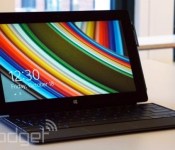
If you’ve been hoping to score a deal on the Surface Pro 2 knowing that the Pro 3 is on the way, it’s time to start spending. Much like it did in the UK, Microsoft has cut prices on its older Windows tablet, with the discount depending on the level of storage you crave. You’ll save $100 if you can make do with a the 64GB or 128GB models, which now cost a respective $799 and $899. Spring for the 256GB or 512GB editions and you’ll spend $200 less, with prices now sitting at $1,099 and $1,599. The cuts aren’t all that dramatic, but they may be enough to help you resist the temptation of a newer, shinier slate. It’s just as well — Microsoft is already seeing 10-day shipping delays on the Pro 3, so this may be your best shot at buying a high-end Surface for a little while.
Filed under: Tablets, Microsoft
Via: ZDNet
Source: Microsoft Store
Nokia Lumia 630 review: An affordable phone you can live without

The Nokia we used to know is no longer. In late April, the handset maker was finally folded into Microsoft’s Devices and Services business after more than six months of courtship. Nokia wasn’t ready to be assimilated without once last hurrah, however: It announced a trio of new devices at its new owner’s developer conference, Build. The Finnish company had always tried to cater to every demographic, so it was fitting that its last in-house handsets were the top-end Lumia 930 (a global version of the Icon) and the entry-level Lumia 630/635.
The 630 and 635, 3G and 4G variants of the same device, are joining an already-crowded lineup of affordable Lumias. They’re distinguished somewhat by launching with Windows Phone 8.1, the latest version of Microsoft’s mobile OS, but in the coming months, other WP8 handsets will catch up. That’s if curiosity hasn’t already driven you to update manually using the developer-account loophole. The 635 is yet to be released, but for now we have the almost identical Lumia 630. Other than offering the newest software, then, is the 630 Nokia’s best budget device? A worthy sendoff for the company? A save-the-best-’til-last-type deal? Spoiler’s in the headline.
Hardware
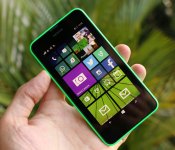
You’d be forgiven for confusing the Lumia 630 with the iPhone 5c. They’re similar in size and shape, although it might seem a crooked comparison considering Nokia’s been doing colorful plastic for much longer than Apple. Up close, the 630 is more like a mash-up of the 620 and 520 that came before it. Slightly larger than both, it combines the rounded corners of the 620 with the more sharply tapered back panel of the 520. It’s blockier than both, however, with the flat edges meeting a flat back.
Nokia really hit a sweet spot with the size and weight here: 129.5 x 66.7 x 9.2mm and 134g. Those are agreeable numbers for anyone, and with sides that angle inward from the display, it rests nicely in the hand. None of the sharp edges dig in where they shouldn’t. The build quality might not look like much given the majority of the handset is covered in plastic, with a sheet of glass covering the face as the only other material. It creaks under pressure, but given its weight and the thickness of polycarbonate that fits snugly to its back, it doesn’t feel like a toy even if it looks a little like one.

The device itself is pretty plain apart from the colorful mass of plastic, though for the moment, you only have the choice of green, orange or black. You’ll eventually be able to buy additional shells, and when the Lumia 635 launches, the dual-color covers we first saw on the 620 will be making an appearance. Since the 635 is identical in design, you’ll be able to commandeer those for the 630, too. The back of the device is home to a small Nokia logo, rear camera lens up top and tiny loudspeaker grille in the bottom right-hand corner. On the top and bottom edges are the headphone jack and micro-USB charging/data transfer port, respectively, and the right edge carries the volume rocker and power button. There’s no dedicated camera shutter key on this device; Microsoft removed that requirement in 8.1.
Another major difference from other Windows Phones can be found on the face of the device. WP 8.1 no longer demands capacitive keys on the bezel, and the Lumia 630 is the first handset to scrap these in favor of on-screen navigation buttons. Indeed, it looks plain, with the earpiece and Nokia logo up top, display in the center and a small hole for the mic on the bottom edge. The effect is a design that’s slightly unique and a little less cluttered.
Display

Like other budget Lumias, the 630 doesn’t have a whole lot of pixels to play with. Its 4.5-inch display sports the rare FWVGA resolution (854 x 480), which is essentially 800 x 480 with a little extra length to accommodate the on-screen navigation keys. I’ve never cared too much about pixel density on affordable handsets (if your’e curious, the 630 works out to 221 ppi). The Lumia 625 pushed even my tolerance boundaries, but even then, I’m more interested in the quality of the panel than the quantity of pixels. Alas, the 630 has little to offer in either respect.
Nokia incorporated its ClearBlack technology into the LCD display; not that the term really means anything here. In fact, the display has a lovely color temperature, with excellent whites, but it’s let down by the black range. They’re almost fake, like smothering a lamp with black fabric and calling it darkness. Along the same lines (but not as noticeable), the display on my device is unevenly lit along the top edge, with alternating patches of light and dark as if a row of tiny spotlights was hidden under the bezel.

Despite its failings, the display is guarded well by a sheet of Corning’s Gorilla Glass 3. Unfortunately, Nokia seemed unable to afford the final coat, as it’s very sticky and a serves as a magnet for all the oil and grime you wouldn’t believe came from your fingertips. Aside from the Xperia SP, it’s the worst I’ve seen on this front. Whatever’s not quite right with the glass, it has additional side effects, including hampering sunlight readability. Assuming you can actually see through the layer of skin on top of the glass, there’s a nice helping of glare that’ll have you squinting at the display on a bright day. Its reflectiveness significantly reduces viewing angles, too.
Luckily, the panel can kick out a lot of light, meaning the 630 isn’t completely useless when the sun’s about. Strangely, there’s no auto-brightness setting, so it’s good that Windows Phone 8.1′s new “Action Center” offers a quick way to make changes. Despite these issues, the display still works. That said, the 630 is definitely not for videophiles. The Lumia 620 came out well over a year ago, so the fact that the 630 has a worse panel is disappointing.
Software

The Lumia 630, 635 and 930 are the official Windows Phone 8.1 launch devices, not that it’s hard to install the developer preview of the new OS on older models. Several of the most important changes in the latest version have little to do with the immediate user experience (think: wider support for different hardware configurations). In the same vein, Microsoft’s also relaxed its handset design requirements. Capacitive navigation keys and a dedicated camera button are no longer mandatory, for example, and indeed, the 630 has neither.
There are plenty of pre-installed apps on the Lumia 630, but PayPal, Skype and Line are the only ones you’d call bloatware. In addition to these, you’ll find a slew of apps that aggregate news, track stocks, check the weather, recommend places to eat and drink, keep you up to date on the world of sports and so on. Luckily, all nonessential apps can be uninstalled if you want to trim the fat. Nokia and Microsoft have cooked in some of their own software, of course, like the global satnav app Here Drive+, and productivity tools like Office, OneDrive and OneNote.
I’ve always been a fan of Windows Phone’s Live Tile UI, in terms of both looks and functionality. In the latest OS release, you can now set a background image for this home screen, which is essentially invisible. Tiles for many of the stock apps, however, act as a transparent window, which is a nice visual touch that also allows for deeper personalization. Additionally, you can add another column of Live Tiles to the home screen by shrinking their footprint, but I found that bigger was better on the 630′s 4.5-inch display. The keyboard now supports swipe-based typing, and apps can be installed to SD cards for the first time — an important change for handsets without much internal storage. WP 8.1 also grants users better access to their storage with a new file manager available on the app store.

The big changes in Windows Phone 8.1 are the addition of a notification drawer and the virtual assistant, Cortana. Through the Action Center, as it’s called, you view notifications and access them within their respective apps, as you’d expect. There are also four slots to customize with quick access to settings (WiFi, etc.) and apps, like the camera. It’s certainly a welcome addition to Windows Phone, but it still feels like a poor imitation of the same feature on Android. Cortana isn’t supposed to be available in the UK until later this year, but you can access it by changing your region and language settings to trick the phone into thinking it’s American. Once Cortana was up and running, I spent a few minutes asking it silly questions and a few more testing the limits of its contextual responses. Since then, I’ve been using it just as much as I do any other voice-controlled assistant: Never.
Overall, I’m underwhelmed by Windows Phone 8.1. If anything, the new version highlights how behind other mobile platforms it still is. Some really simple things still don’t work the way they should. The screen-timeout setting, for example, will ignore most apps, leading to frustrating situations where the phone locks up and kills the current process because you weren’t paying attention for 30 seconds. Also, the automatic time setting is as broken as it’s ever been, so you’ll have to set it manually (and again every time you run out of battery). Seeing as email syncing is linked with the internal clock, you’ll stop receiving new messages if the time is set incorrectly. Even when it comes to the bigger new features, Cortana and a notification center do not a good OS make.
Camera

There’s not much to say about the front-facing camera on the Lumia 630 because, as with the 520, there isn’t one. The only camera is a modest five megapixels with no companion flash. Thankfully, Nokia knows a thing or two about imaging, and the 630′s camera is one of its redeeming features. You have two options when it comes to stock camera apps, and not much separates them. Microsoft’s offering loads up instantly, with normal camera, video and a low-resolution burst-capture mode to choose from. You can also select different Lenses straight from the viewfinder, but all the finer settings like white balance and exposure compensation are buried in the full menu.
In contrast, these settings are accessible from the viewfinder in Nokia’s camera app, albeit using a small, fiddly toolbar. Lenses, on the other hand, are found in the deeper menu, and Nokia’s app takes a few seconds to boot up, so not the best choice for opportunistic shots. The burst-capture mode of Microsoft’s app is replaced by “Smart Sequence,” which is more or less the same thing, but with the option to select your favorite shots after the fact.
On full auto, the 5MP camera does its best work in sunny conditions. No surprise there. Color temperature is spot-on and the focal range is broad. I’ve also nothing to complain about when it comes to focus and shutter speeds, although manually tapping to focus on different areas of the viewfinder was sometimes required to get the correct exposure. As lighting conditions worsened, I was impressed by how the camera held up. I did notice that pictures tended to adopt the hue of artificial lighting, so the auto-white balance setting isn’t as good as it could be. I’d say better an image look the same as it does through the human eye, however, than one that’s been crudely adjusted. Low-light performance is better than I expected, too, with snaps coming out considerably lighter than you’d think they would.
Video performance at 720p is much the same, although audio quality isn’t a highlight. The camera is my favorite thing about the Lumia 630, mainly because it’s above acceptable considering the price point. I’m only talking about the normal camera modes, as well, so there’s even more fun to be had with Nokia’s extra Lenses, such as Cinemagraph, Blink and Refocus.
Performance and battery life

Like earlier, lower-end Lumias, the 630′s spec sheet is no trump card, but at least it’s working with the current generation of Qualcomm chips. That would be a 1.2GHz quad-core Snapdragon 400, to be exact, paired with a miserly 512MB of RAM and 8GB of internal storage. Finding enough space for all your apps and media is no trouble, as the handset’s microSD slot supports cards of up to 128GB — and remember that WP 8.1 now allows apps to be installed onto expandable storage. That Snapdragon 400 SoC is by far the stand-out spec from that selection, and I’ve seen it ace performance tests on several Android smartphones of late, such as the Moto G and UK-only EE Kestrel.
I find myself questioning its place inside the Lumia 630, though. One of the pros of Windows Phone as a platform is that it’s not resource hungry, which has meant Nokia could produce phones like the Lumia 520 and 620 at such compelling price points without sacrificing much in the way of user experience. The Lumia 630, as you’d imagine, feels just as slick as either of those handsets do. Popping in and out of menus or core apps happens as fast as you’d ever need it to, but it’s the lack of improvement in performance that stands out.
The difference in app-loading speeds on the 630, compared with older Lumias, is negligible. Only when you put them side by side to test the disparity will you notice the 630 is a millisecond quicker. Asphalt 8: Airborne is one of the most graphically intensive mobile games on any platform, but the problem is that it’s scaled to be friendly to all Windows Phone hardware. On Android handsets with a quad-core Snapdragon 400, you can see how capable the chipset is by pumping up the graphics settings to max. You can’t change such settings on the Windows Phone version, but even at a low visual standard, I experienced dropped frames and jittery music. I can’t remember the last time I noticed a phone’s temperature rising, other than when using the 630. Anything you would consider hardware-intensive, from gaming to streaming video, quickly drove the thermostat up to alarming levels.

Having been impressed with the same SoC on Android devices, I imagine it’s a case of poor optimization. While the processor upgrade doesn’t seem to have made much of an impact on performance, it’s a burden on the 630′s 1,830mAh battery. With fairly moderate use, I could barely get through half a day on a charge. If you want to do something a little more processor-intensive than checking your emails, be prepared to watch the charge melt away before your eyes. When I wasn’t out or using the handset, it was permanently on charge. That’s no way to live. Annoyingly, the battery indicator is misleading, too — the icon will have you believe you have around three quarters left, but if you look in the notification tray, you’ll find it hovering just above 50 percent.
Internet Explorer is your window to the web, and it’s not the fastest mobile browser. Regardless of your connection, sites can take a good few seconds to pull up (they load completely, rather than piecemeal). After they’ve loaded, the only other curiosity is some tiling, which can be caused by rapidly zooming in and out. For connections, you’ve got WiFi, Bluetooth, GPS and HSDPA 3G (21.1 Mbps max download speeds). WiFi connects quickly, but doesn’t hold a consistently strong pairing, at least according to the signal icon. The speed and accuracy of GPS location is superb, and a nice companion to Windows Phone’s excellent mapping options.
Audio quality is also worth a mention. Through headphones, the range is better than quite a few smartphones, but that’s let down by kind of a vapid, clinical tone to the sound. Under the polycarbonate shell of the 630 sits an abnormally large loudspeaker that pumps through an abnormally small grille. Realistically, this is for making hands-free calls, not getting the party started. It’s just strange that audio quality through this speaker is actually better with the case off. Reverberations inside the cover give a greater sense of bass, but really it’s just distortion from the grille bottleneck.
The competition

Normally this section would be about comparing the smartphone to what else is out there. This time, though, it’s an exercise in proving why there is no need for the Lumia 630. Let’s start with the price. We know the 630 and 635 are expected to cost under $200 in the US, with the single-SIM 630 said to be $159, assuming it’ll even launch there — the 635 will definitely have some presence on T-Mobile, possibly in July if everything plays out as planned.
I’m not sure where the price of the 630 was lost in translation, but Nokia’s UK press release that pre-empted the device’s launch said it would be available for £90 unlocked. In reality, the cheapest you can get it for is £99 on a locked, pay-as-you-go basis. SIM-free, that rises to £109 from one retailer, and Microsoft’s even selling the handset through its online store for an insulting £129. Last year’s Lumia 620 may have a lesser processor, but it’s a better phone in every other respect. Also, given its age, it’s comparable on price at £100 on pay-as-you-go or £110 unlocked. Even the Lumia 520 is a better option at £60 on pay-as-you-go or £85 unlocked.

If you’re dead-set on Windows Phone, the Lumia 630 is not the right decision. That’s if you would even consider any of the handsets I’ve mentioned over affordable Android offerings from the likes of Motorola. The amazing Moto G is £110 on pay-as-you-go or £130 unlocked, whereas the Moto E is even cheaper at £79 on pay-as-you-go or £89 unlocked. Better handsets, better mobile platform — better forget about the Lumia 630.
The Lumia 635 will be more relevant when it launches, thanks to that LTE radio, and the only other affordable Lumia with 4G is the depressing 625. I dread to think what a 4G radio will do to the already-poor battery life, and the 635 will still have to face off against the LTE version of the Moto G (not yet released). Unless Microsoft intends to give the 635 away for free, I don’t see my opinion being any different with the addition of LTE.
Wrap-up

I can’t help but feel that the Lumia 630 was thrown together to be a Windows Phone 8.1 demo device, and then someone decided it was suitable for a retail release. I couldn’t disagree more. Forget that Microsoft still has come catching up to do before its mobile OS is considered on par with others; the hardware itself is lacking. The display is poor, and even the glass covering it is missing whatever coating most other handsets have to repel fingertip grime. There’s no noticeable performance improvement over previous budget Lumia devices despite a newer, more capable chipset, and battery life is nothing short of atrocious. It’s even missing basics like a front-facing camera or HSPA+ 3G radio.
To its credit, the 5-megapixel camera is better than you might suspect, and it has the Lumia line’s signature fun, colorful stylings. If the handset cost £50, I’d probably feel differently about its shortcomings, but the truth is there are better and comparable phones available for less. I have no choice but to issue a stern warning to avoid it, as there are several attractive and more affordable alternatives.
Daniel Orren and Edgar Alvarez contributed to this report.
Filed under: Cellphones, Mobile, Microsoft, Nokia
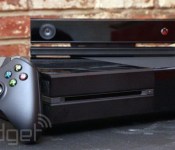
Clarification: Does Xbox One have 10% more horsepower without Kinect?

Here’s the short answer, right up front: no. The long, more explanatory answer is more complex of course.
Last week at E3 2014, GameTrailers host and well-known video game dude Geoff Keighley tweeted this:
After @xboxp3 interview I’ve been asking devs about impact of new Xbox sdk on perf. Bungie says it will get Destiny to 1080p/30fps on XB1.
– Geoff Keighley (@geoffkeighley) June 10, 2014
The “Xboxp3″ Twitter handle he referenced belongs to Phil Spencer, the head of Xbox at Microsoft (we interviewed him last week as well, right here), and the “new Xbox SDK” he referenced is part of the June update that the Xbox One received. In said update, developers received a new software development kit that — according to a statement Microsoft released at the time — “allows access to up to 10 per cent additional GPU performance.” So that solves it, right? Not quite.
Microsoft’s Ken Lobb, longtime Xbox team member (and namesake of GoldenEye 64 weapon, the Klobb), explains the situation more thoroughly in an interview with Eurogamer. “Lots of people ask, ‘so, you’re taking back the GPU reserve for Kinect. Well, does that mean I can’t say, ‘Xbox, record that?’ No. You can always say that,” Lobb says. In so many words, some folks worried that, with the new SDK, much of the Kinect functionality they’ve come to love accept will be taken away. Not so, says Lobb.
The SDK update does take advantage of the originally reserved CPU for Kinect, but it’s a variable system that allows Xbox Ones with and without Kinect to use the extra horsepower. “You have to count for that whether you’re using Kinect or not. But you get the full memory and the full bandwidth,” he explains.
So, does Xbox One get 10 percent more CPU performance without Kinect? No. The answer is still no. But the Xbox One did get an update in June which enabled developers — including Bungie, as we previously noted — to use more of the Xbox One’s horsepower reserves. Everyone wins! We think!
Filed under: Gaming, Software, HD, Microsoft
Source: Eurogamer
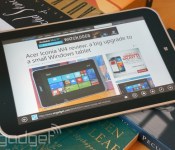
Internet Explorer test release lets you peek at the browser’s long-term future

While Chrome and Firefox have had experimental browser releases for a while, you’ve usually had to wait for betas to try new Internet Explorer features. Starting today, however, you can be as impatient as you like: Microsoft has launched an Internet Explorer Developer Channel. So long as you’re using Windows 7 or 8.1, you can try new web rendering, interfaces and other features well before they’re part of finished products. In this first release, you can use any USB game controller (including the Xbox 360 pad) for web games that would benefit from console-quality input.
As with other super-early browsers, you’ll likely have to live with some bugs and a general lack of polish. You won’t have to toss out the regular Internet Explorer to use the developer build, though, so there’s should always be a fallback if something goes wrong. As such, you have every incentive to jump in with both feet if you’re the curious type — hit the source link to get started.
Filed under: Internet, Software, Microsoft
Source: IEBlog

