



LA school officials shift from free iPads to laptops and hybrids

An iPad for every student was the plan. Then, some students were too smart for their own good, quickly enabling their for-learnin’ iPads to access to anything on the web, including Twitter, Facebook and all that other fun stuff. LA’s school district now plans to differentiate what it offers its students, authorizing purchases for one of six different devices, including laptops and hybrids such as Chromebooks, Microsoft’s Surface Pro 2 and Lenovo’s Yoga Touch. This fall, teachers and students will test these laptops to see if they fit. “The benefit of the new approach is clear,” said Los Angeles school board member Monica Ratliff, talking to the LA Times. “Why would we treat all our students – whether they are a first-grader or a high school freshman – as if they all had the same technology needs? They don’t.”
Last year’s iPad scheme rolled out to 47 schools, but alongside those aforementioned security filter woes, distribution of the tablets soon fell behind schedule. Worse still, educational materials were apparently often incomplete. (In the new scheme, materials from three different publishers are also being trialled) Given the touchscreen keyboards, iPads were apparently difficult to use while sometimes exam problems were often obscured due to the screen size. iPad distribution across LA’s school district remains on hold, although some school are still scheduled to receive them later this year.
Filed under: Laptops, Tablets, Apple, Microsoft
Source: LA Times
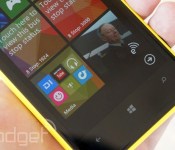
Microsoft hints that Windows Phone will soon let you put apps in folders

Windows Phone already lets you store apps in Start screen folders, but it’s a bit of a hack — you have to use Nokia App Folder to get the feature in the first place, and you’re really just opening one app to launch another. Microsoft might be near fixing that discrepancy, though. The company has posted instructions (since pulled) hinting that a future revision of Windows Phone 8.1 will include native folder support. Much like iOS and some flavors of Android, you’ll only have to drag tiles on top of each other to make folders and tidy up your home page.
The document suggests that you’ll need “Windows Phone 8.1 Update” to see this new trick, although it’s not clear whether this is a reference to the finished 8.1 release (expected to arrive this summer) or a patch that would appear sometime later. We’ve asked Microsoft whether or not it can shed more light on the subject, but it’s already safe to say that the company hasn’t shown all its upgrade cards just yet.
Filed under: Cellphones, Mobile, Microsoft
Via: The Verge
Source: Windows Phone (cached)

Windows 8.1’s Sleep Study tool tells you which activities drain your battery

If you absolutely have to make your Windows tablet battery last as long as you can, then knowing what drains its power will be very helpful. That’s what Microsoft’s new Sleep Study tool can do: generate a report of which apps and activities consume the most energy. Unfortunately, there’s a catch — it only works if your device is in InstantGo sleep mode. InstantGo, a feature for Windows 8.1, was previously called Connected Standby for Windows 8 and RT. Unlike other similar modes, it allows your system to sleep while updating apps in the background and keeps the device in a state that’s quickly ready to resume.
Take note that it’s not available on all Windows 8.1 devices, so to know if you have it, launch the command prompt and type in “powercfg /a.” If you see that “Standby <Connected>’s” available, then you can follow Microsoft’s instructions on the Windows Experience Blog to run Sleep Study. The tool will generate the report as an HTML file, where you can see the top five reasons why your tablet’s always out of battery when you need it the most.
Filed under: Tablets, Mobile, Microsoft
Source: Windows Experience Blog
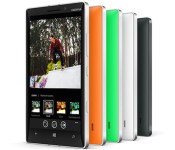
Adobe finally brings Photoshop to Windows Phone

Android, iOS and even Windows 8 users have had access to Adobe’s mobile version of Photoshop for quite some time, while Windows Phone owners were excluded from the party. That changed today after Adobe pushed the slick photo-editing app to the Windows Phone Store. As you’d expect, you can crop, straighten, rotate and flip images and apply a range of different filters and “looks,” which may require you to run the in-app purchase gauntlet. Nevertheless, Adobe’s first major Windows Phone app (if you discount Reader) won’t cost you a penny, and you can grab it using the link provided below.
Filed under: Cellphones, Software, Mobile, Microsoft, Nokia
Via: Nokia Conversations

Roku’s remote control app comes to Windows Phones and tablets

This is not a great day for developers of the various third-party Roku apps available at the Windows Store. It’s an excellent day, however, for those who’ve been waiting on a free remote control app direct from the company itself. The app is compatible with Windows Phones as well touchscreen Windows 8 and RT tablets, but it’s not designed for mouse n’ keyboard setups. Just like the iOS and Android versions, it’ll scan your network and (hopefully) find all your players and channels, at which point it’ll act just like a regular remote, although it does appear to be missing the new enhanced search function found elsewhere. One other thing you might find lacking is the ability to stream your own choice of web files (.mov, .mp3 etc.) to your Roku box — you’ll still need an unofficial app for wild stuff like that.
Filed under: Cellphones, Home Entertainment, Tablets, Mobile, Microsoft
Source: Windows Phone Store, Windows Store

Microsoft: law enforcement faces ‘bleak future’ if US doesn’t scale back its spying

It’s patently clear by now that Microsoft is no fan of the US government’s surveillance strategy, but the company’s general counsel, Brad Smith, just took the war of words to a new level. He tells those at the Brookings Institution that the US’ aggressive data collection is only going to make things worse over time. According to the legal leader, concerns about spying will be “more important, not less” as seemingly every device goes online. He contends that the government needs to scale back its efforts and follow the spirit of the law — if it can’t, law enforcement (and by extension, the public) faces a “bleak future.”
To no one’s surprise, Smith has a simple solution to avoid this dystopia. He’s asking Congress and the White House to stop large-scale collection and reform the secretive Foreign Intelligence Surveillance Act court. That may be a tall order given how much protection the court gets. Even if Smith can’t spark political changes, though, there’s talk of offering you more power over your data. He has proposed a dashboard that would let you not only see and manage information about you, but find out how it’s being used. It’s not certain whether or not Microsoft plans to introduce that kind of control panel itself, but Smith’s ardent pro-privacy stance suggests that you shouldn’t rule it out.
[Image credit: Todd Bishop, Flickr]
Filed under: Internet, Microsoft
Source: CNET
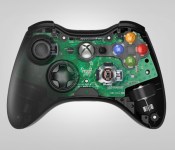
Oculus VR to buy design team behind the Xbox 360 gamepad and Kinect, Carbon Design

Just six months ago, we were talking about the money Oculus VR was raising from investors to get its virtual reality headset to consumers. Now, after being purchased by Facebook earlier this year, Oculus VR is making full-on acquisitions of its own: the company behind the design of the Xbox 360 gamepad and the original Kinect, Carbon Design, is joining Oculus VR. The price of the purchase wasn’t given, though a few specifics were. First, Carbon “will officially become a key component of the product engineering group at Oculus,” which to us sounds like the end of the name “Carbon Design.” That doesn’t mean Carbon — a Seattle group — is moving to Oculus VR’s Irvine, CA. headquarters, though — the design team is set to stay in Seattle and work with Oculus’ R&D group in Redmond (headed up by ex-Valve VR man Michael Abrash).
Though the deal is fresh, Oculus says its collaboration with Carbon isn’t. “We’ve been working with Carbon for nearly a year,” the announcement says. Working on what, though? On “multiple unannounced projects,” apparently. Thus far, Oculus VR has only announced its Rift headset and, with that, there’s no release date (or even a window) in sight.
When we asked the company about other hardware projects at E3 2014, we were told that others exist but there’s nothing to talk about just yet. See the full interview for yourself below.
Filed under: Wearables, Microsoft
Source: Oculus VR
Microsoft calls on Nokia X2 for emerging markets

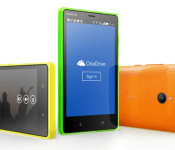
As expected, Microsoft on Tuesday announced its latest Android smartphone in the form of an entry-level Nokia X2. Slated for release in July, the handset features a 4.3-inch ClearBlack display, 1.2GHz Snapdragon 200 processor with 1GB RAM, and a 5-megapixel/1-megapixel camera duo.
The Nokia X2 will feature three home screen layouts, including one (Fastlane) that looks quite a bit like the Windows Phone experience. Users can pin select items to the home screen and quickly access apps, events, and other items. Although powered by Android, the handset comes with a number of Microsoft apps and services such as Skype, OneDrive, Outlook, Bing, and OneNote.
The Nokia X2 will be available initially as a dual-SIM device and retail for 99 euros. Color options are reported to include glossy orange, black and green; glossy yellow, white and matte dark grey will be offered later.
It’s not clear exactly where the X2 will be sold nor whether a single-SIM model is in the works.
The post Microsoft calls on Nokia X2 for emerging markets appeared first on AndroidGuys.
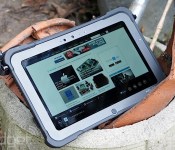
Xplore’s latest Windows tablet promises rugged design without the bulk

Xplore Technologies makes tablets that are so rugged, just picking one up will cause your palms to go all hairy. Up until now, it’s made chunky Windows tablets like the XC6, and slender, less powerful slates that are capable of running Android. The Xplore Bobcat wants to sit between the two ranges, offering the brawn of Windows 8 with the svelte looks of the company’s RangerX tablets. Of course, this isn’t just about shedding weight and size, since the Bobcat will still work in freezing conditions, withstand drops of nearly two meters onto concrete and all of the other tortures most gadget geeks could conceive.

The Bobcat’s biggest selling point is that it’s got a surprising number of inputs for something that appears to be far less capable than its elder sibling. For instance, there’s an Ethernet jack in there, as well as micro-HDMI-out, two USB 3.0 ports, a microSD reader and a micro-SIM card slot, the latter taking advantage of the optional Sierra Wireless 4G modem. If you’re rocking industrial hardware that still uses a serial port, you’ll find one of those lurking beneath a rubberized port that’s screwed down for normal operation. Oh, and there’s a 3.5mm headphone jack in there, obviously. Imaging-wise, there’s the same pairing of a 5-megapixel primary camera and 720p webcam we found on the XC6, neither of which you’d like to use unless you really had to.
Given the greatly reduced hardware, you may expect that performance would take a hit, but we couldn’t see any noticeable stress. Thanks to the quad-core 1.9GHz Bay Trail (E2845) chip and 4GB of RAM, switching between several open apps is smooth, and we certainly found it comfortable enough to hammer out (parts) of this article, so long as we connected a USB keyboard. Display-wise, the slate has a 10.1-inch, 1,366 x 768 IPS display, but there’s no pen-style digitizer like the higher-priced models, so the two attached styli have soft rubber tips and no hover mode. The display only has a 500-nit backlight, so while it’s brighter than some laptops, it struggled a little more in bright, direct sunlight. We also played some audio on the hardware, and found that the single rear-facing speaker can be muffled easily, but provides a decent volume, although it’s too hollow-sounding for any impromptu dance parties.

Naturally, it’s not going to be the go-to tablet for 90 percent of our readership, unless we all decide to become the most extreme of extreme sports fans. But if you’re interested in grabbing one of these, then the Xplore Bobcat goes on sale from today. Price-wise, bereft of build-to-order options like a 256GB SSD and the aforementioned 4G modem, it’ll set you back $2,200. But then, if you’re the sort of rich daredevil who keeps dropping their Galaxy Tabs off cliff edges, then that might be worth a slice of your cash.

Watch 168 hours of great games played live, really fast, right here

You can’t complete Super Mario 64 in under 10 minutes. Okay, it’s technically possible, but you almost assuredly cannot. That’s okay! We can’t either, but groups like Games Done Quick make it so we can watch the best of the best without any of the hard work. Of course, it’s not just Super Mario 64; as the group’s name implies, they play all types of games, and they play them quickly. Maybe you’ve heard of this practice before? It’s called “speedrunning,” and the result of said practice is, naturally, “speedruns.” We’re gonna just be straight up here: we heart speedruns. They’re the best. And twice each year, Games Done Quick has a week-long blowout where they stream live speedruns of awesome games all day, every day. But why? For charity! This summer, it’s Doctors Without Borders.
As such, we’re dropping this pin in Engadget for you to watch the stream all week. Lest you forget, we’ll remind you daily on social media that the madness is still going. Head below and see for yourself!
Wondering when your favorite game is coming? The schedule is right here, and the stream runs non-stop until June 29th. If the games don’t do it for you, the amazing commentary should. And hey, it’s for charity you monster!
Filed under: Gaming, Software, HD, Sony, Microsoft, Nintendo
Source: Games Done Quick
 AIVAnet