


Google confirms a new in-house startup incubator
Big companies have always supported startups to do the nimble and risky innovating they could not, even building their own investment arms to directly fund them. But sometimes those startups are founded by ex-employees of big companies that break out of corporate limitations. Following rumors last month, Google officially confirmed that it will launch its own in-house incubator, likely as a way of retaining entrepreneurs and keeping marketable ideas in-house.
The incubator will be called “Area 120,” a reference to the 20 percent of work time that Google employees can spend on side projects. CEO Sundar Pichai confirmed the news to Forbes; later, VP Bradley Horowitz tweeted that he will be involved in the project. That’s all the company has revealed for now, leaving some of the rumored details first reported by The Information open to speculation.
The real question is whether making a company farm system will help retain talent and innovation, since startups could leave for outside investment with potentially fewer strings than they’d have working within Google. Other big companies have recognized the value that startup thinking brings to the table, but have halfheartedly supported internal restructuring to embrace new methods. For example, Sony’s “First Flight” program and a similar one by LG have both spun out external ideas to sink or swim in their own crowdfunding campaigns, while Samsung made overtures toward embracing startup culture but few concrete decisions.
Via: Recode
Source: Forbes
Google and Qualcomm put Android Auto in charge of this Maserati
It’s not often you get to sit in a Maserati. And I never thought I’d get the chance at a developer conference, of all places. But here at I/O, Google and Qualcomm have outfitted a Maserati with an entirely unique Android Auto setup. Just like a Tesla, this vehicle has a massive 4K touchscreen in place of a typical console, and there’s another 720p display where the speedometer typically sits.
But instead of Android Auto running only when you hook up your phone to the car, everything in this vehicle is controlled by Google’s OS. For once, in other words, Android Auto doesn’t have to compete with your automaker’s terrible stock interface. While I’m not yet convinced that a touchscreen is the best option for controlling things like the car’s climate, it’s still interesting to see just how much of the vehicle can be taken over by Android.
Functionally, what makes this car notable is that it’s running Android N and is able to display information across three functional areas. The large, vertically-oriented touchscreen can be split into different panes. The lower half always shows your “current” activity, while the top half is a rotating set of cards that show your recent activity. So if you’re playing music and then go to start a phone call, the music widget will move to the top so you can easily access it again later.

The minimalist “dashboard” displays a faux-speedometer and fuel gauge on the left, while the right side is reserved for notifications and data from Android. Again, it typically shows your most recent or relevant activity; if you’re using navigation, it’ll show your next turn, for example. But if something changes in another app, you’ll get a subtle notification that slides in from the right to alert you. (It’s similar to a new notification in Android Wear 2.0, if you’re keeping track.)
If you skip to the next song in a playlist, Google Play Music will slide in with the new track info before receding into the background. If someone calls you, their contact picture and name will show up until you answer. It’s weird to imagine your car having a notification center, but it seems like a smart way of organizing all of Android Auto’s various features.
Speaking of the sort, Android Auto’s core features remain the same. You can use your voice to make phone calls, request navigation directions, play music and ask Google various questions. It integrates with a semi-limited set of third-party apps and is generally meant to let you access specific tools or info from your phone without having to take your hands off the steering wheel.

But this version of Android is also good enough to handle features that are typically left to the auto manufacturer. For instance, you can adjust the climate controls, power windows and door looks with the Android interface — something you normally can’t do in other cars. If you’ve spent time dealing with the horrible interfaces that dominate most cars, this is a tempting concept — putting aside the question of how safe it is to have a touchscreen be the only interface element in your car besides a few steering wheel buttons.
Don’t get your hopes up to see a car with this system anytime soon, though: This was strictly an exercise for Google and Qualcomm to see what they could do using the Maserati as a blank canvas. Automakers are likely going to resist letting technology companies take over their dashboards for the near future, but it’s still fun to imagine what it would be like if your entire car ran Android.
For all the latest news and updates from Google I/O 2016, follow along here.

Google’s plans for VR are even more ambitious than we thought
In 2014, Google introduced Cardboard. It was literally just a cut-out piece of cardboard outfitted with Velcro strips, a pair of lenses and magnets. Insert your smartphone and voila, you got your very own VR View-Master. Though it seemed pretty silly at the time, Cardboard was Google’s very first foray into virtual reality. Fast forward two years, and there’s a whole cottage industry of Cardboard-compatible viewers — not to mention lots of content made just for it. More than 5 million viewers have shipped and over 50 million Cardboard apps have been installed, as Google said at its keynote yesterday. Now, however, the company is ready for the next stage in its grand plan. Yesterday, Google announced Daydream, a platform that represents its most serious push yet into VR.
What we’re seeing here is a very real attempt to democratize virtual reality in a way we have not seen before. It all started with Cardboard, of course, but Daydream is so much more. Google is essentially doing for VR what Android did for smartphones: It’s offering a basic set of specifications that other companies can use. There’s no need for them to come up with their own software or spend precious resources to come up with the right hardware design; all of that is already taken care of. Hell, Google’s even making its own Daydream headset just like it did with its Nexus devices.
In contrast to Cardboard, which is just a low-cost viewer, the Daydream platform encompasses designs for an actual headset, with the build quality of a Samsung Gear VR or Oculus Rift. It has headstraps and looks like it’s made to be worn hands-free. There are even designs for a Wiimote-like motion controller. While Samsung’s Gear VR works only with Samsung’s own phones, a Daydream headset would be compatible with many more handsets. The potential here is huge.

While Cardboard could be used with pretty much any phone that could run the Cardboard app, Daydream’s hardware requirements seem to be stricter, though Google hasn’t released many details there. The company says it’s working with a variety of manufacturers to make sure their handsets include “key components” such as “specific sensors and screens” required for Daydream. Samsung, Alcatel, HTC and LG are just a few hardware makers that have already committed to building Daydream-compatible phones, and they could also be designing Daydream-ready headsets too.
This is definitely a departure from Cardboard, which wasn’t really meant for high-fidelity content or graphics-intensive games. Clay Bavor, Google’s head of VR, once told me that Cardboard was purposefully designed without any headstraps. It was to encourage quick “snackable” moments of VR, like using it for a few minutes to check out a Mars field trip or to see what a neighborhood looks like on VR Streetview. Cardboard was made to be affordable and accessible — a way to introduce VR to everyday people.

But if Cardboard is for VR snacks, Daydream is for meals. You can play serious games on Daydream and watch full-length movies. Electronic Arts, Ubisoft and Epic Games have already pledged to have games on the Daydream platform and content providers like HBO and Netflix have jumped on board as well.
Daydream, then, is designed for a world in which escaping into virtual fantasies is the norm. Seeing as 2016 is the debut year for consumer editions of all the three major VR headsets — Oculus Rift, HTC Vive and Playstation VR — it’s not too much of a leap to say that world is already upon us. Additionally, Oculus reported recently that there are now over one million monthly active users of Samsung’s Gear VR. This proves that mobile VR is a viable category in its own right. Sure, Oculus has had a few years’ head start, but Google’s vast reach could be enough to give the Gear VR some stiff competition.
Of course, we’ve yet to see if these Daydream headsets are any good. But if Cardboard’s success is any indication, I’d say Daydream has an even better shot at propagating VR to the masses.
Google will stop you hitting backspace in Chrome by mistake
Have you ever filled out a form in Chrome, only to hit the backspace key accidentally? Suddenly you’re catapulted to the previous page in your browsing history, losing everything you had just submitted. It’s not a deal-breaker, but frustrating all the same. To help, Google is experimenting with a version of Chrome that removes the ability to go “back” with the backspace key. The change was implemented a couple of weeks ago, but seems to be limited to the Canary version of Chrome. Indeed, I was able to replicate the change on Canary (Mac), but not the public channel.
On a Chrome Code Reviews page, Google explains that 0.04 percent of page views are currently triggered by going back with the backspace button. In addition, 0.005 percent of page views are from people using the backspace key after a form interaction. “Years of user complaints have been enough that we think it’s the right choice to change this given the degree of pain users feel by losing their data, and because every platform has another keyboard combination that navigates back.” Inevitably, some users aren’t happy with the change. Especially those that are careful or nimble-fingered enough to have never experienced such a backspace snafu.
One user responded in a Chromium bug tracker thread: “How is someone who grew up in terminal times expected to navigate back when using a two-button mouse? Are you suggesting that the only remaining options are Alt-Left (a two-hand key combo for that I have to move my mouse hand towards the keyboard, and then back) and the back button left of the omnibox (for which I may have to move the mouse across much of the whole display height/width, and then back)?”
Should there be a wide-scale backlash, it’s possible Google will reconsider the tweak. In its Chrome Code Review, for instance, the company has anticipated how many will react: “We’re doing this via a flag so that we can control this behavior should there be sufficient outcry.” So what do you think? Good move, or a feature that shouldn’t be removed from Chrome?
Via: The Register
Source: Chromium Code Reviews
Google patents human flypaper for self-driving car crashes
Self-driving cars are pretty smart, but it’s inevitable that one will eventually hit a pedestrian. To avoid any nasty injuries, Google has patented a simple but crazy solution: an adhesive coating that would stick humans to the hood like flypaper. There’s no guarantee that such a system will be used — Google stressed this to the San Jose Mercury News — but it does hint at the company’s crazier, off-the-wall thinking. The patent describes an “eggshell-like” coating that would protect the adhesive layer during normal driving conditions. Only the force dealt by a collision would be enough to break it, catching the pedestrian near-instantaneously.
“We hold patents on a variety of ideas. Some of those ideas later mature into real products and services, some don’t.”
Such a system would soften the initial blow, but more importantly, it would also stop pedestrians from being thrown forward by the vehicle. Secondary impacts, caused by hitting the tarmac or another object, such as a car, can often be just as dangerous, if not more so than the original collision. Google says its adhesive layer could be applied to the hood, front bumper and side panels to ensure the human is “caught” properly at different angles. It might sound silly, but we wouldn’t be surprised if Google was already testing this concept with some of its bubbly self-driving cars.

Via: San Jose Mercury News
Source: United States Patent and Trademark Office
Are you an Android N beta tester?
Sure, Google only proclaimed its newest build of Android N a “beta-quality” candidate yesterday, but that’s more than enough time to formulate a hot take. With the new method of announcing and testing releases extremely early, the folks at Mountain View have made enrolling as a beta tester incredibly easy — if you own a compatible device (Nexus 6, Nexus 9, Nexus 5X, Nexus 6P, Nexus Player, Pixel C, General Mobile 4G) then you can click a button on this website to dive in. Of course, if you haven’t already enrolled, the usual warnings still apply. This test software still has some issues to work out, and if you decide it’s not for you, then going back to Marshmallow will require a full device wipe so keep your important data backed up elsewhere.
Surely some of you have already taken the plunge, so click below and let us know how it’s going — or what’s holding you back.

a
 Are you using the Android N beta?
For all the latest news and updates from Google I/O 2016, follow along here.
Source: Android Beta Program
Google is helping MIT update its programming language for kids
MIT is teaming up with Google to create the next generation of its popular visual programming language “Scratch.” The partners are working on an open source version of the language called “Scratch Blocks” based on Blockly, Google’s own visual programming code. It will teach kids how to code by using blocks that snap together either horizontally or vertically like Lego. Scratch for older kids only used vertical blocks on the past, but MIT found that horizontal orientation suits mobile devices much better. The partners released a developer preview of the horizontal version at Google I/O this year.
Since this new project is open source, the partners plan to make Scratch Blocks available to other developers, who can use it to make their own apps, games and toys for kids. MIT itself is also creating Scratch 3.0 based on the Blocks it develops with Google, making the newest iteration more suitable for mobile devices.
For all the latest news and updates from Google I/O 2016, follow along here.
Via: CNET
Source: Scratch
Chromebooks beat Mac sales in early 2016
According to research firm IDC, more Google Chromebooks were sold in the first quarter of 2016 than all of Apple’s Mac line. The milestone marked the first time Google’s Chrome OS moved more units than OS X in the United States.
Although IDC doesn’t usually separate Chrome OS or Chromebooks from the PC category, the group did confirm the numbers to The Verge, saying “Chrome OS overtook Mac OS in the US in terms of shipments for the first time in 1Q16.” The firm noted that Macs sold about 1.76 million units in the first quarter of 2016, meaning Chromebooks sold somewhere in the neighborhood of 2 million units or more. Overall, however, PC shipments are on the decline.
IDC also pointed out a large reason for the Chromebook’s success: the low-cost devices have been a hit with K–12 schools in the United States, even though the company is still looking to break into consumer and business markets. But, in that regard, Google may have tipped its hand at this week’s I/O developers conference, where it showed off plans to make Chrome OS compatible with over a million Android apps already in the Google Play Store.
For all the latest news and updates from Google I/O 2016, follow along here.
Pepper the robot is opening up to Android
SoftBank’s Pepper robot is about to get a lot more developer-friendly. The Japanese firm announced today that it’ll be opening up Pepper’s tablet to Google’s mobile OS, in the hopes of spurring on its capabilities with new apps, Bloomberg reports. SoftBank CEO Masayoshi Son initially wanted to keep Pepper’s entire platform closed, and it took a loss on every $1,800 robot it sold to drive its cost down. Unfortunately, despite selling around 10,000 units, developers have been slow to bite.
SoftBank will still use its Naoqi operating system to control Pepper’s hardware — Android will only run on its chest-strapped tablet. The company isn’t saying what sort of business deal it’s struck, but Google typically takes a 30 percent cut from Android app revenues. We also don’t know how much the robot will be able to take advantage of Android’s features. The recently announced Google Assistant AI could actually be useful in a humanoid robot that can move on its own.
SoftBank is still trying to figure out a purpose for Pepper, hence the need for more developer interest. As an experiment, it staffed an entire phone store with several Pepper units earlier this year, but that was only temporary.

Source: Bloomberg
Android Apps and the Play Store are coming to Chrome OS this year
Google CEO Sundar Pichai was handed the reins of Android in early 2013, putting him in charge of both Chrome and the company’s mobile OS. Ever since then, rumors have swirled that Google would look to merge its two distinct operating systems into a unified whole. Those picked up steam this past fall, and indeed Google is finally unveiling some closer ties between Chrome OS and Android. But that doesn’t mean Chrome OS is going away. Quite the opposite, in fact: This year, Google’s browser-based operating system will become compatible with the million-plus Android apps available in the Google Play Store. The company accidentally revealed its plans yesterday, but a session this morning at Google I/O makes it official.
When the update rolls out later this year, Google will simultaneously tackle two of the biggest problems facing Chrome OS. “A lot of users wanted more apps and better offline capabilities,” says Google’s Kan Liu, a senior product director for Chrome. “We’ve been thinking about what is the right way to bring that to end users — and it turns out we have a great app ecosystem in the Play Store.” These apps will enable much more robust offline capabilities, something that could significantly transform how people work with Chromebooks.
“We’ve spent a lot of time and made good progress at enabling offline for Chromebooks based on the web,” Liu explains, “but the web wasn’t fundamentally designed for offline.” Even though our smartphones are online most of the time, the vast majority of apps are designed to work offline as well, in a way that web apps just can’t replicate. “When you design for Android, you have to think about offline,” Liu adds. Things like music, video, photos, games and documents all benefit from more-robust offline modes. Some worked offline before but not to the extent they will when the Play Store arrives. “We’ve been trying to get developers to prioritize it [for Chrome] because users are asking for it, but developers weren’t thinking about it,” Liu says.
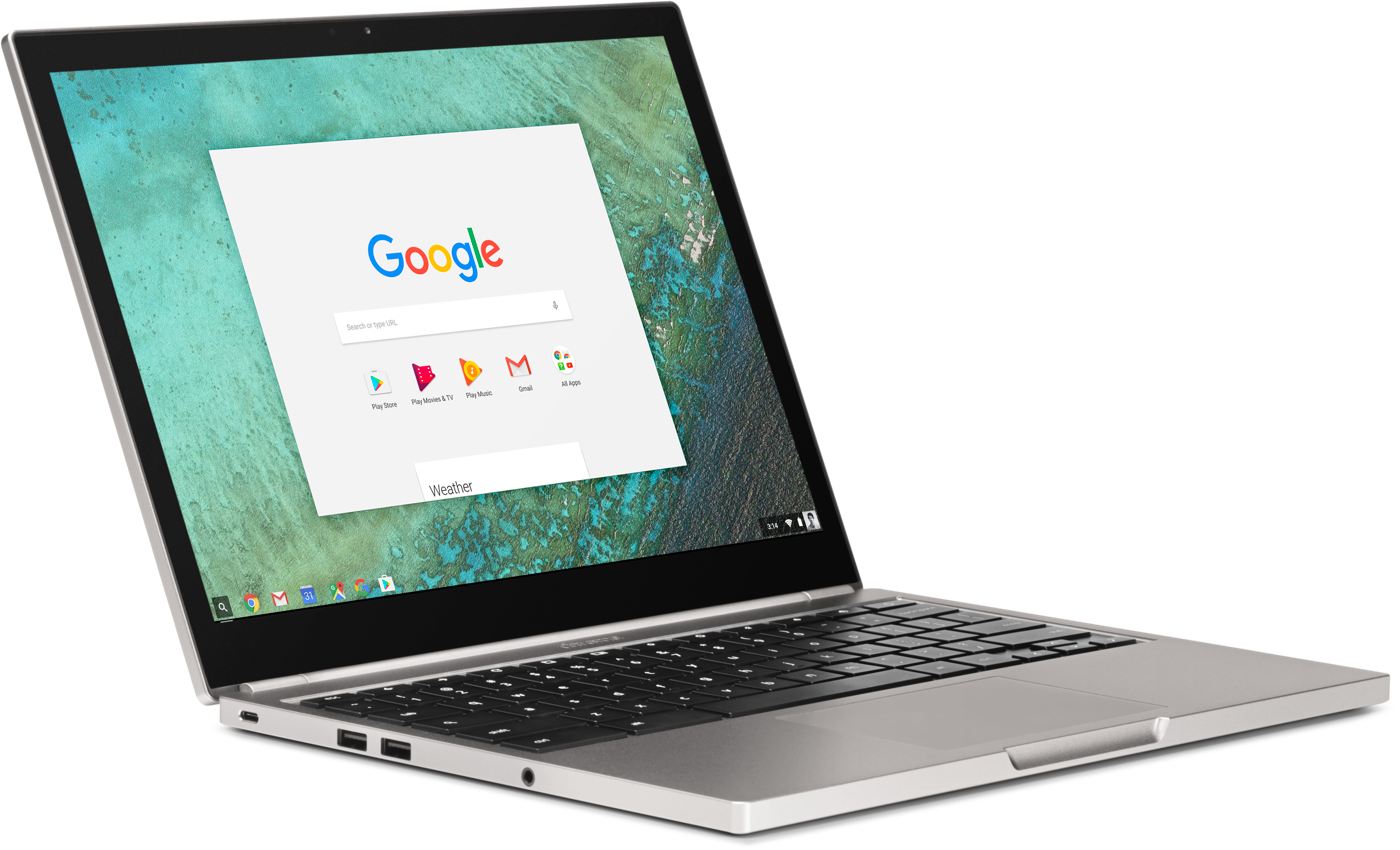
Google is doing as much as it can to make these feel like native desktop applications. It’s not quite there yet, but eventually you’ll be able to grab an Android app from the corner, stretch and resize it any way you like, with the content adjusting to fit that space. At the moment, though, you can only run them in their portrait “phone” or larger landscape “tablet” modes. Still, most of what I saw felt perfectly native: Notifications are filtered into the standard Chrome notification area, and the common design language across Google means most Android apps fit right in.
The obvious question is, why bother running Android apps on Chrome when you can just run them on native Android devices? But traditional notebooks still have a lot of productivity advantages over tablets. “The big difference between a tablet and a Chromebook is the trackpad, doing things with precision, it’s a lot easier to use a mouse editing a document,” Liu says. “And because it’s a Chromebook, we have a full desktop-class browser.” Split-screen multitasking in Android N will certainly help, but the multitasking experience still falls short of what a laptop can offer. That, combined with the stability of Chrome itself, will continue to give Chromebooks an advantage over tablets when it comes to sheer productivity.
As with most things Google, it’ll be a while yet before users get to enjoy the benefits of the Play Store on their Chromebooks. Google is announcing the initiative today so it can start getting developers to take its desktop OS into account when updating their apps. It’ll be available in the next developer channel release and will only work on a limited set of devices: last year’s Chromebook Pixel, the ASUS Chromebook Flip and a few others. A touchscreen will be a requirement at first — but that restriction will be lifted by the time the Play Store rolls out. That should happen before the end of the year.
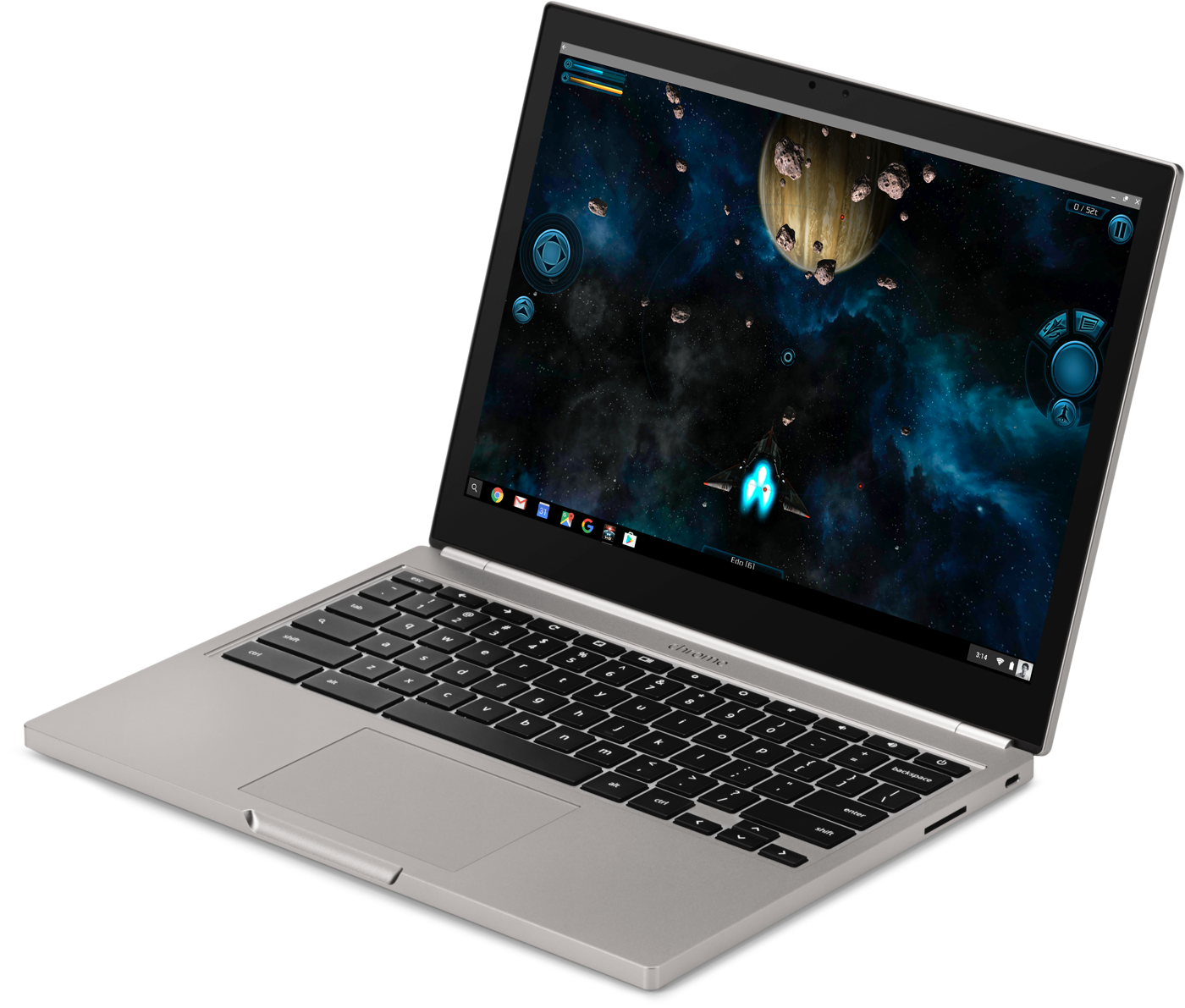
If you’re a Chrome OS fan, it’s hard not to be excited about what Google is doing here — but it’s also worth remembering that the success of Google Play on Chrome will depend on developers. The big knock against Android tablets has been less about hardware and more about the quality of apps. Developers haven’t focused on building apps for larger screens with the same gusto that iOS developers have — Android tablets have always felt like an afterthought.
For that not to happen with Chrome OS, devs will need to think about building for the form factor. History says that won’t happen at the level you’d hope for. Still, my fingers are crossed that things will go differently this time. The growing number of Chromebook users means there’s a big new market for Play apps. Hopefully developers will embrace the form factor. More users are always a good thing, and more apps are definitely good for Chromebook fans.
For all the latest news and updates from Google I/O 2016, follow along here.
 AIVAnet