



Cable companies and tech giants reportedly joining forces to push ‘WifiForward’

Time Warner, Comcast, Charter, Google, Microsoft and Motorola aren’t the most likely of allies, but it appears they’ll be teaming up to form the new WifiForward coalition. According to the Wall Street Journal, the group will be pushing to expand WiFi access, primarily by lobbying the government to free up more spectrum for unlicensed uses. Each of the companies has been pushing for such measures independently, but by joining forces they’re hoping to have more success. Increasing the available airwave space for WiFi transmissions will become increasingly important as the number of smartphones and over all data consumption in the US grows. Cisco Systems says that the average American consumed 1.4 GB of data per-month in 2013 and 57 percent of that was over WiFi. By 2018 that number could grow to 9 GB per-month.
Notably absent from the list of companies are the mobile carriers. AT&T and Verizon in particular have invested heavily in building robust LTE networks. The less traffic traveling over those wireless frequencies, the less money the companies are generating — and the percentage of mobile data sent over WiFi is only increasing. Google has invested heavily in WiFi across the country, and the major cable providers have joined forces to share their roughly 250,000 hotspots. Now these big players need to figure out how to take the next step.
Filed under: Wireless, Microsoft, Google
Source: Wall Street Journal
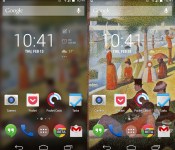
Muzei Live Wallpaper: The best live wallpaper we’ve ever used
Dashclock Widget creator Roman Nurik is back with a beautiful live wallpaper for your Android phone.
The appropriately named Muzei (or “museum” in Russian) sets a piece of art or custom photo as your phone wallpaper, rotating every night. The default setting adds a slight blur effect to the painting, blending in nicely with whatever you have on your homescreens. If you double tap an empty space on anywhere on your homescreen, it will toggle the blur, turning it back into a full-fledged piece of artwork.
The wallpaper hasn’t even been in the Play Store for more than two days, and it already has upwards of 50,000 installs. Seeing as how it is so popular already, we are going to take a look at just how great it is.
Featured Art

The big feature in this app is the “Featured Art” section. This rotates famous pieces of artwork as your wallpaper, chosen by Nurik and his fiancé. The rotations usually happen at around 9PM ET every night and so far we’ve seen work from Vincent van Gogh and Georges Seurat. There are definitely a lot more to come.
Custom photos

If classic artwork isn’t your thing, you can always choose custom photos to rotate every few hours. You can select entire galleries or just a handful of your favorites.
When I take pictures from my phone, I take a lot at one time. I tend to come back to the gallery and choose the best one, and leave all the others to be forgotten. The custom photo selector is a subtle way to remind you of pictures you once forgot about. Take a look at the original compared to the one with the blur effect.

It’s not a very good photo… at all. But with the slight blur effect that Muzei uses, it doesn’t look half bad. I almost want to go as far as saying that bad quality photos aren’t nearly as annoying to keep in your gallery anymore. Try this feature out – you’ll probably love it.
Extensions
Openness seems to be a common trend in Nurik’s app design philosophy. For anyone who hasn’t yet tried Dashclock, the app comes with a basic set of useful extensions by default. The API is open to other developers, so they can create their own extensions. So far, before hitting the two day mark in the Play Store, Muzei already has countless extensions.

Some of the notable extensions so far are Reddit, APOD, and 500px. Muzei seems to have a bright future already, and let’s hope it’s as popular as Dashclock has grown to be.
Bugs
This app is new… very new… so we are definitely going to expect some bugs. There have already been a few reported issues, but nothing that would completely turn anybody away from using it. And actually, Nurik has already addressed many of them, pushing out an update to the Play Store. We’ll have to see as time passes, but so far there haven’t been any huge issues.
You should download this.
This is usually the part where we review what we liked and didn’t like about the app. But I’m not going to do that. Muzei is too young to gripe about any substantial bugs, especially because it doesn’t have many at all. This app is gorgeous, and is filled with a huge amount of customization options. It’s still very early in the process to make any suggestions or improvements, but what I do know is this – If you want a beautiful and customizable live wallpaper for your phone, the Muzei Live Wallpaper is for you.
The post Muzei Live Wallpaper: The best live wallpaper we’ve ever used appeared first on AndroidGuys.

Biggest-ever solar thermal power plant goes online in California

Solar power just hit the big time in the US — BrightSource Energy has confirmed that the world’s largest solar thermal plant, the Ivanpah Solar Electric Generating System in California, is up and running. The array, also backed by Google and NRG Energy, produces a total 392MW of power through 173,500 multi-mirror units. That’s enough to power 140,000 nearby homes, and it represents 30 percent of all the solar thermal energy in the US. The Ivanpah harvester has its drawbacks; with roughly 5.5 square miles of solar panels, it’s creating trouble for birds and other nearby wildlife. Even so, it represents an important breakthrough for delivering clean energy on a grand scale.
Filed under: Household, Science, Google
Via: The Verge
Source: BrightSource Energy

The best alternatives to Google’s own Android apps

As Android has evolved, Google’s worked increasingly hard to keep users locked into its ecosystem. The search giant creates new apps, retains users by giving them a thoroughly decent out-of-the-box experience and then charges device makers for a license to embed them on their phones and tablets. Its constant iteration has helped it stay ahead of the pack for some of its services, but many fall short, leaving users to find something better. The official Gmail app: it’s fine, really it is, but if you want unified inbox support, productivity features or the ability to pull emails from more than one place, you’re left wanting. This sort of limitation can be found across Google’s stable of apps, from messaging to the calendar and camera interface. We’ve trawled Google Play to find software alternatives that — dare we say it — do a better job, at least with certain tasks. So please, whip out your phone and give them a go.
What we’re looking for here is an app that can deliver Google-style levels of reliability, while also being open to non-Google inboxes and offering enhanced features for power users. Luckily for us, there’s no shortage of apps that can do just that.
CloudMagic (Free)

The clue’s in the name, really. Capable of integrating Gmail, Exchange, Yahoo, Outlook, iCloud, Office 365 and IMAP accounts at once, this app uses its cloud algorithms to make your emails easier to find. Unlike Gmail, the clean interface on show here offers a unified inbox that lets you left-swipe emails to perform any one of three actions, a bit like Tinder for the office.
AquaMail (Free/$4.99)

Optimized for both smartphones and tablets, AquaMail offers multi-account support and a simple user interface. Yes, it does look like Gmail, but the team behind AquaMail has constantly refined the interface to make it as easy to use as possible. This includes a dedicated attachments tab at the top of each email, fullscreen modes and a smart inbox. Grabbing the paid version removes the two-account limit and drops the promotional signature attached to all outgoing messages.
We also like: Evomail, Solmail and MailDroid.
Messaging
With the launch of Android 4.4 KitKat, Google ditched its pre-loaded SMS app to let users choose their own. Hangouts became the de-facto starting place, but plenty dislike the app’s inability to properly unify chats and texts under one contact. So here are some solid alternatives.
Textra (Free)

In the migration away from Hangouts, some have resorted to Textra, a messaging app that offers deep customization for notifications and a time-saving quick-reply popup that lets you respond to messages without fully opening the app. Simple in design, Textra handles huge inboxes with no noticeable slowdown, something you’ll appreciate if your friends don’t use Whatsapp.
Hello SMS (Free)

Dropping the inbox for tab-based interface, Hello SMS’ minimalist design puts interactions first with contact names and photos on its left sidebar. If you find yourself in a never-ending group text, the app will intelligently combine messages from up to 15 contacts so you’re not left with a messy inbox. Hello SMS’ one-touch camera interface also lets you send selfies to your friends in double-quick time.
EvolveSMS (Free)

Like Hello SMS, EvolveSMS uses a tabbed interface to showcase your messages. It’s better looking than its rival and displays important information like names, numbers, call options and attachment options inside conversations. While group messaging, message popups, gesture support and notification customization come as standard, additional features are available via in-app purchases. If you decide to upgrade, you’ll get extra theme options, social cover photo integration, scheduled messaging and backup options.
We also like: 8sms and chomp SMS.
Calendar
Calendar apps have pushed forward on iOS in the past year, but Android users have seen little change compared to their Apple-loving counterparts. Google’s own is functional and intuitive, but lacks inspiration. If you’re looking for something that goes beyond the traditional grid-based format, check these apps out.
Cal (Free)

Any.do decided to take a different approach with Cal. Sure, it still features gCal support, but it also includes a number of social and productivity features that stand out thanks to its stylish UI. If you have a task listed in Any.do, it’ll pop up in your schedule beneath your planned events. Connect your Facebook account and you’ll be notified of everybody’s birthday, letting you send them a text, email or post on their wall in celebration.
SolCalendar (Free)

With stickers and various themed widgets, SolCalendar is certainly different than most calendar apps on the Play Store. It might not be to everyone’s taste, but it’ll let you add events with a single touch, litter them with birthday cakes and smiley emoticons and display them using any of its 40 home screen widgets. SolCalendar’s neat weather notification also checks the elements, giving you the chance to pack an umbrella before you head out the door.
Agenda ($2)

Coming to Android a little while after iOS, Agenda’s, erm, agenda, is to display all of your calendars in a single and easy-to-read feed of upcoming events. All of the traditional daily, weekly and monthly views are there, letting you create appointments with a single tap. The simple black-and-white interface might not be for some, but it’s certainly helpful if you like to mix work, play and everything else in between.
Keep an eye out for: Sunrise — expected to launch on Android in the coming months.
Camera
One of the weakest built-in Android apps is the default camera app. Google admited it isn’t as good as it should be, prompting it to improve the camera on the Nexus 5 and roll out additional photography settings on newer Android devices. If you’re stuck with an older phone or want to try something new, try these camera app replacements.
ProCapture (Free/$3.99)

Apps like ProCapture go heavy on features and skimp on glitzy UI to make your photos stand out. It offers a high-quality panorama mode, timer, burst, wide shot mode and noise reduction, keeping the focus on shooting modes instead of after-effects. The full version includes support for higher resolutions and touch-to-focus, so we’d recommend the upgrade.
Camera Awesome ($1.87)

SmugMug’s Camera Awesome looks a bit like Apple’s iOS 6 camera app and comes packed with clever features like two-finger focal adjustments. Even better, you can tweak the ISO, white balance and exposure settings all from the screen. Add in a full screen shutter button, burst shot, HDR mode, timer, panorama and social sharing and you’ve got yourself a whole lot of camera app for very little money.
Camera Zoom FX ($2.99)

If filters and after-effects are exactly what you’re looking for, Camera Zoom FX has more than you could possibly need. Without ruining your original images, the app features over 90 built-in filters, frames and effects that range from the sublime to the ridiculous. If you ever wanted to have a virtual photo taken with the Queen, look no further.
We also like: Instagram, VSCO Cam and Pixlr Express
Productivity
While Google’s Keep is a supremely fast and extensive app, self-confessed productivity nuts may feel its simple approach doesn’t deliver enough features. Although Android is overflowing with apps focusing on lists, notes and photos, many don’t hit the right notes. Here are our recommendations.
Evernote (Free)

Evernote is a heavyweight note-taking app, in terms of both features and actual size, supporting lengthy text input. It provides an easy way to add lists and save audio notes, indexing them for later searching. With apps on every major platform (including the web), you can tweak your grocery list anywhere there’s an internet connection.
Any.do (Free)

Any.do, a to-do list app from the makers of Cal, is an amazingly powerful to-do manager that offers cloud sync, time-saving gestures, missed call integration (ever wanted to turn them into reminders?) and auto-suggestion features as standard. Once you become a little more acquainted with the app, you should try its voice support: not only will it transcribe your words into text, but you can do so in a variety of languages.
We also like: Todoist, Microsoft OneNote, Springpad, Quip and Remember The Milk
Wrap-Up
Before we finish up here, we can’t resist a few more recommendations. Google’s done a great job of porting Chrome from the desktop to mobile, but Dolphin Browser and Mozilla Firefox both offer unique features not found in the search giant’s app. If you wake up one day and find you don’t like the default Clock app, we suggest you check out Timely, even if it is now owned by Google. Also be sure to take a look at QuickPic if you’re after a solid replacement for Google’s Gallery and Photos apps — just don’t ask us why Google decided it needed two apps to handle the same function.
If sampling the best Google Play has to offer isn’t for you, Android’s default apps are constantly being refreshed to deliver additional features. Apps are one of the reasons why the OS has passed one billion activations, after all. Developers focusing only on a handful of apps may be the first to innovate, but it often prompts Google to incorporate features it’s seen elsewhere. While this list won’t stay up-to-date forever, some of these apps have remained popular since Android’s early days and the newer suggestions still have plenty of life in them yet. If you think you have better app recommendations, we’d love to hear them.
Filed under: Cellphones, Tablets, Internet, Software, Mobile
Dropbox hires Motorola CEO Dennis Woodside
In an announcement which is sure to send a firm message to Dropbox competitors that it means business, Motorola CEO Dennis Woodside is set to be announced as their latest employee and first chief operating officer.
While the report suggests that Woodside focus on expanding services into businesses and schools, Dropbox will undoubtedly look to leverage the former Motorola CEOs vast knowledge and experience. It doesn’t hurt that he has been at Google since 2003.
Woodside became CEO of Motorola Mobility when Google acquired the mobile company in 2011. However, given Motorola has just been sold to Lenovo for $3 billion, Woodside’s role is naturally coming to an end.
The acquisition of Woodside’s service is huge for Dropbox and their need to reinvigorate their growth plans, especially with growing competition from the likes of Box, and even Google’s own Drive storage service. Perhaps this may spark rumours of the production of a Dropbox mobile device? It wouldn’t be the worst idea in the world…
The post Dropbox hires Motorola CEO Dennis Woodside appeared first on AndroidGuys.
Google and VMware team up to put your Windows desktop on Chromebooks

So, your bosses have replaced most of the office computers with Chromebooks, but you need those old Windows apps to keep you sane. If the IT folks aren’t on top of it already, you may want to tell them about a remote access solution developed by Google and VMware called Horizon Desktop as a Service (DaaS). According to VMware (known for its Fusion desktop clients), DaaS gives you secure access to all your Windows apps and data by storing sensitive info on remote servers instead of devices carried around by forgetful employees. The product’s only available as a subscription-based offering right now, but folks at home who can’t live without their trusty Windows applications may want to hold off on doing a protest — it’s also slated to hit the Chrome App Store sometime soon.
Via: TechCrunch
Source: Google Enterprise, VMware

Motorola CEO Dennis Woodside reportedly leaving to join Dropbox

Executive departures (voluntary and otherwise) aren’t uncommon after major acquisitions, and that may well be happening in the wake of Lenovo’s deal to acquire Motorola’s cellphone business from Google. The Wall Street Journal claims that Motorola Mobility CEO Dennis Woodside is leaving the company to become Dropbox’s first Chief Operations Officer. It’s not clear just what would be driving Woodside to take a less glamorous role; we’ve reached out to both companies for comment. If true, the move would bring an abrupt end to Woodside’s brief tenure as Moto’s leader. It wouldn’t be surprising to see him go, however — while he reinvigorated the phone pioneer and helped launch some of its best devices in recent memory, the company’s earnings didn’t follow suit.
Filed under: Cellphones, Mobile, Google, Lenovo
Source: Wall Street Journal, Amir Efrati (Twitter)
Daily Roundup: Lumia Icon headed to Verizon, the Galaxy S 5 and more!

You might say the day is never really done in consumer technology news. Your workday, however, hopefully draws to a close at some point. This is the Daily Roundup on Engadget, a quick peek back at the top headlines for the past 24 hours — all handpicked by the editors here at the site. Click on through the break, and enjoy.

HTC’s Desire 8 leaked
Looks like HTC is ready to make good on its promise to deliver more mid-range handsets. A leak suggests the Desire 8 will pack dual-SIMs, a 5.5-inch display and 13-megapixel shooter. Read on for more.

Nokia Lumia Icon headed for Verizon
Nokia’s new Lumia Icon brings the same flagship experience and specs as the Lumia 1520, just in a more pocket-friendly size. The handset will hit Verizon shelves on February 20th for $200 with a two-year contract. Click through for details.

Google’s Nest acquisition is official
The deal is done! The FTC has cleared Google’s $3.2 billion purchase of Nest and now the company’s founders Tony Fadell and Matt Rogers are free to shift their focus back to making home automation consumer friendly. Follow the link for details.

Samsung on the Galaxy S 5
Samsung’s next-gen handset, the Galaxy S 5, is just weeks away from being announced. We actually already know quite a lot about what to expect from the unveiling. Click the link for the latest on the company’s “back to basics” handset.
Filed under: Misc
Google Play Music updated, gets offline SD storage

Google has been busy lately updating it’s Android App lineup; Google Play Music is next up on the list with features which will add to the functionality of Google Now.
Google has added the ability to shuffle all songs from an artist in All Access which mimics the Shuffle Play or Radio feature found in other music streaming services such as Spotify or Rdio.
In addition, Google now allows up to ten authorized devices on your account to access your music collection, meaning no more having to de-authorize your allocated devices if you have multiple Android handsets you want to access Google Play Music.
Further functionality, and something I’ve personally been waiting for, is the ability to store offline music on a device’s SD storage card. This is currently only on KitKat and Google mentions it has included ‘experimental’ support for older devices.
The update also brings a few UI updates which makes it easier to share what you’re listening to, together with new controls for adding tracks to playlists. Of course, there’s the usual bug fixes too, but overall a minor update but some important features nonetheless.
The post Google Play Music updated, gets offline SD storage appeared first on AndroidGuys.
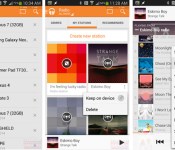
Google Play Music for Android now lets you take radio stations offline

If you thrive on Google Play Music’s radio stations but would love if they kept playing while you’re away from an internet connection, congratulations — Google has just granted your wish. An Android app update rolling out today lets you pin whole stations to your device, guaranteeing a fresh set of tunes when you’re on that WiFi-less flight. The upgrade also allows you to remotely manage the devices that can access your collection, and a “play next” command will queue up a song that you just have to hear. The new Play Music software doesn’t appear to be widely available just yet, but those who refuse to wait can download the installer from Android Police.
Filed under: Cellphones, Tablets, Internet, Mobile, Google
Via: Android Police
Source: Google Play

