


Daily Roundup: Samsung Gear 2 review, allure of the anonymous internet and more!

You might say the day is never really done in consumer technology news. Your workday, however, hopefully draws to a close at some point. This is the Daily Roundup on Engadget, a quick peek back at the top headlines for the past 24 hours — all handpicked by the editors here at the site. Click on through the break, and enjoy.

Shh, it’s a Secret: The allure of the anonymous internet
You can say almost anything you want on the internet, often without consequence. But are there advantages to being truly anonymous? Our own Nicole Lee spent some time with an app called Secret to find out.

Samsung Gear 2 review: much improved, but that doesn’t mean you should buy it
Samsung’s next gen smartwatch, the Gear 2, is indeed an improvement over its predecessor. It sports a slimmer design and a much longer battery life, though it’s $50 more than the original. Add in a skimpy app selection, and it still might not be worth investing in Samsung’s wrist-worn platform.

Google’s new camera app brings Photo Sphere and Lens Blur to Android devices
Google’s new standalone camera app is now available in the Play Store. Android-powered handsets are getitng a new “Lens Blur” feature to compliment the Photo Sphere we all know, love and never use.

Halo, Destiny composer Martin O’Donnell fired by Bungie
If you’ve been looking forward to Marin O’Donnell’s musical composition on the upcoming game Destiny, you’ll be saddened to know that he’s no longer involved in the project. According to his personal twitter account, he was “terminated without cause.”
You also might like:
Filed under: Misc
The animated GIF as art: Google puts six loopy images on display

It’s easy to sneer at the idea of artists piggybacking on the GIF craze, but Google is taking the whole thing pretty seriously, especially now that Google+ supports the animated file format. The search giant is collaborating with the Saatchi Gallery in West London to host a number of looped moving images, displayed on giant TV screens, which it feels are worthy of public recognition. There’s a hint of competitiveness, as a panel of judges (including His Artiness, Baz Luhrmann) will select a single winning GIF tonight. In the meantime, we’ve embedded the finalists from six different image categories after the break, ranked according to how much we like them and whether any of the artists are mates of ours.
1. Category: “Urban”

This GIF was crafted by the artist (and extreme nail painter) Christina Rinaldi, who — through sheer coincidence — helped us to redesign the Engadget site a few years back. It shows a window cleaner doing his thing in New York, and was created from a bunch of still images that were taken on an iPhone 5 and then edited as a stack inside Photoshop. Christina makes around three of these little videos each day, and for her it’s all about escaping the restrictions of regular storytelling:
“The GIF actually starts from the bottom, with the window cleaner starting to move from the bottom of his sweep. For me, that’s a subtle thing, but it’s the biggest difference between this and film. With film you expect a beginning and an end and some kind of climax, but with this it’s just a cycle and everything depends on where you catch it.”
2. Category: “Lifestyle”

Next up, we like this one by Kostas Agiannitis because it’s colourful and it reminds us of the Cinemagraph app on Nokia Windows Phones — an app that lets you move some parts of a picture while keeping others dead still.
3. Category: “People”

This entry, by UK artist Emma Critchley, employs the same sort of technique as the one above, with only the guy’s feet and the rays of light moving as he stands underwater. He’s held down by the weights in his hand and somehow he’s managed to avoid that thing where you jump in the water and get a huge air bubble in your shorts.
4. Category: “Night”

An all-too-familiar sight as the sun falls on the streets of London. Captured by Matthew Clarke.
5. Category: “Action”
It’s a pigeon. But at least it’s a relatively clean pigeon that isn’t crapping all over the place. Photographed and turned into a GIF by French artist Micaël Reynaud.
6. Category: “Landscape”

This one’s made by professional artist Stephanie Schneider and entitled “Instantdreamsnet.” It apparently beat 4,000 other entries to make it this far, so we’ll hush our beaks and let you decide whether it’s any good. Either way, that’s the six, and may the best GIF win. If you’re in the UK and keen to mingle with like-minded folks at the Saatchi Gallery, the exhibition opens its doors to the public tomorrow, April 16th.
[All the above images are courtesy of the Saatchi Gallery, London]

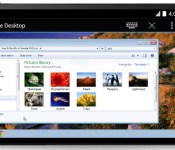
Chrome Remote Desktop for Android browses a PC or Mac from your phone

While we’d seen rumblings that it was in beta testing, Google’s Chrome Remote Desktop app for Android made its official debut today. This means that those who fancy Mountain View’s mobile OS can take a gander at files that reside on a Windows or Mac machine that’s safely docked in the office. The Remote Desktop app has been available on the desktop for quite some time, and now the same access is available through Chrome on Android smartphones and tablets. For those who prefer Apple’s devices, an iOS version of the software should be on the way soon.
Source: Google Chrome Blog, Google Play

The real impact of Google’s recent TOS update is that it reminds us what little choice we have

So, Google analyzes your email. Who knew? Well, judging by a recent wave of internet chatter regarding a two-sentence update the search giant made to its terms of service this week, not that many. The truth is, of course, that most Gmail users did know that Google scans your email, or parses it in some way so that it can place those oh so important personalized adverts along side them. Like anyone on Facebook who got dating ads after changing their relationship status can attest to. The backlash this week, however, seemed to take two basic flavors. One being paranoia that some deep change had taken place that the search giant was looking to sneak past us. The second being that this was a sign of how our rights are constantly being eroded, and that this constant “policy creep” will soon have us handing over our deepest darkest digital secrets, without any powers to negotiate. So which is it?
We asked Google directly, and it tells us that on this occasion, the additional text is merely a clarification of the existing policy. It’s spelling out what it already does. We spoke to London-based media lawyer John Haggis about this kind of amendment, who confirmed that if there were significant changes to the meaning of the policy, then Google (and others, like PayPal’s shown below) would have an obligation to communicate that to its users. Not doing so would be an incredibly risky strategy for any firm. Minor housekeeping and clarifications, however, might not warrant a (potentially alarming) email blast — though this recent Google case shows that it’s still worth considering your strategy every time.

For those that were concerned about the specific part in Google’s TOS that refers to email you receive (i.e. that sent by people whom might not have agreed to said TOS), Haggis reminds us to think along the lines of how images etc. are shared on Facebook. You might not be on Zuckerberg’s social network, but a photo you took and sent to a friend could be. Facebook might even learn it’s a picture of you via tagging, and have a moderate profile of you based on multiple such photos. But, the truth is, there’s not a lot it can do with that information if you’re not a signed up (and contractually agreed) member.
The more important issue highlighted by Google’s recent tweak is of what little choice we have either way. It serves as another reminder that some of our most precious data is locked into services and ecosystems that we can do little to control or negotiate with. If your email provider incrementally changes its terms of service, you might not even really know what you’ve agree to anymore. Worse, you could actually know all too well, and decide that you no longer are comfortable with those conditions. But what are your options then if a service goes a bullet-point too far? For the most part, you’re left with the binary choice of suck it up, or find another provider. Here lies the biggest problem facing you or I. Who wants to change their email address after double figure years of distribution? Or migrate their music collection from one corner of the cloud to another (not to mention whether you can take it with you thanks to rights restrictions). Not many we’d wager.
The good news? Google tells us that for future such amendments it will be placing an “Updated” notice on the Google.com homepage (including on mobile), which will also show on regional domains (Google.co.uk for example) when applicable. This might not solve your data hostage quandary, but it should mean fewer false alerts.
Filed under: Internet
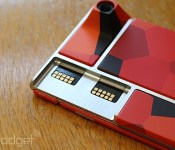
Toshiba’s vision for Project Ara extends to wearables and beyond

Project Ara is primarily focused on building a modular smartphone in the hopes of changing the industry, but is that the only type of mobile device on the drawing board? Absolutely not. An executive at Toshiba, one of Google’s partners on the project, just revealed that his company’s vision of the concept goes beyond smartphones. Shardul Kazi, Senior VP and Technology Executive at Toshiba, posited that devices like smartwatches (and beyond, he says) could also take advantage of Ara’s blocky component modules, which allow you to mix and match whatever features and components you want to have.

During his presentation at the Ara Developer Conference, Kazi showed the above slide depicting a module being removed from the Ara phone and placed into a wearable device. Indeed, just as the handset has an endoskeleton which makes it possible for blocks to attach to the phone in the first place, a future wearable could certainly be constructed the same way. Kazi’s example here relates to activity trackers with 9-axis sensors and Bluetooth LE, but it’s not limited to just that particular use case; such a thing would be wide open to the imagination of module makers and developers.
Kazi’s quick to point out that this is purely an idea at this point and isn’t actually in development. Still, it goes to show how easily adaptable this kind of platform could be to other form factors — if consumers love using modular smartphones, might they feel the same way about modular tablets, smartwatches and other wearables? Naturally, the folks behind Ara don’t want to bite off more than they can chew — just putting together a phone in less than two years is a job and a half for the team, after all — but it makes sense to see how many other ways the same tech can benefit our lives.
Filed under: Cellphones, Wearables, Wireless, Mobile, Google
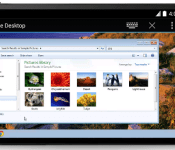
Google intros Chrome Remote Desktop for Android

Google on Wednesday announced the availability of a new Chrome Remote Desktop app for Android. As you can surmise, the tool allows for Android devices users to remotely access PC/Mac computers.
Since 2011, Chrome Remote Desktop has let you remotely access your machine from another laptop or computer in a free, easy and secure way.
In order for a user to access a remote PC they will need to first install software on the computer as well as the Android app – both of which are free. Once set up, users should be able to access files from their mobile device. Users will be able to access files from their Android device in the same manner as if they were at the desk.
An iOS version of Chrome Remote Desktop mobile app is due later this year.
The post Google intros Chrome Remote Desktop for Android appeared first on AndroidGuys.

Google+ for Android Redesign Leaks

Suspected to be announced at Google I/O, Google+ is expected to get a redesign and it seems that images of the new Android app has showed up on Google+ of all places courtesy of +Yoel Kasub.
He claims that these are images from a test build of Google+ and it seems to be mainly a design change of the user interface as opposed to any drastic functionality changes.


Most notable is the flat UI which seems to follow the same path as what Apple and Samsung are going for and it looks pretty good.
As with any leak, reservation should be exercised as this could be just an internal testing version which was never meant to reach the public domain; on the other hand it could be the new Google+ we’ll see at Google I/O. You decide.
Source: Google+
The post Google+ for Android Redesign Leaks appeared first on AndroidGuys.
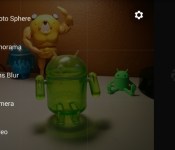
Google releases standalone camera app to the Play Store

It has been a trend for companies to put their standalone apps in the Play Store for quick updating. Google usually does this type of thing with all of their apps. One, however, has never been included in the Play Store… until today. They’ve finally added their camera app to Google Play.
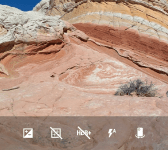
The camera comes with a much-needed interface update, as well as a few new features. It has a huge shutter button, as well as hideaway camera options. Perhaps the biggest new feature in the app is Lens Blur. It does essentially what the HTC One (M8) does, but with software.

To take a Lens Blur shot, take the picture like normal, but move the camera slightly upwards to collect a bit more depth information. It takes a little while to render, but after it’s done, you can change the focus of the photo and adjust the blur intensity. We’ve managed to get some pretty nice shots from the Lens Blur feature so far.
The camera is available for download on devices that are running Android 4.4 Kit Kat, so it’s not for everybody quite yet. If you meet the requirements, head to the Play Store for the download!
The post Google releases standalone camera app to the Play Store appeared first on AndroidGuys.
Google Releases Stock Camera App to the Play Store, KitKat+ Only Devices
Today is not only hump day, but it also the day the Google usually updates app. Some updates are minor, others are major. Then you have something totally unexpected. Not to long ago we let you all know that Google was working on releasing the stock Android camera app to the Play Store. The launch date was never mentioned, just that it was in the works. However, there is good news regarding the stock camera app today as Google has just released it.


 The release of the app also pushes an update out with it that moves the camera app to version 2.1.037. It brings along a new interface and some new features like lens blur mode, which gives you SLR-like photos with a shallow depth of field.
Google Camera snaps quick and easy photos and videos, and has creative picture modes like Photo Sphere, Lens Blur and Panorama.
Features
• Photo Spheres for immersive 360º views
• Lens Blur mode for SLR-like photos with shallow depth of field
• Panorama mode with high resolution
• 100% viewfinder for getting the maximum resolution from the sensor (no dropped pixels)
• Updated UI that gets out of your way and is centered on an extra large capture button
• Works on phones and tablets running Android 4.4+ KitKat
You will probably notice that final bullet point in the apps description.
 If you happen to be sporting a device that sports anything below Android 4.4 you won’t be allowed to install it from the Play Store. :0( We will get our hands on the apk and give it a run on a few devices anyways and see what happens.
Until then, if you sport a Nexus or another device on Android 4.4+, feel free to hit the link below and go give it a shot.

Getting the APK now by the way, will update with the links shortly.
//<![CDATA[
ord = window.ord || Math.floor(Math.random()*1E16);
document.write('’);
//]]>
Google’s new camera app brings Photo Sphere and Lens Blur to Android devices

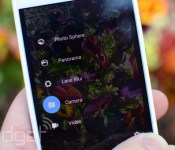
While Google has continued to toss new features into the camera app shipped on its Nexus devices, many Android phones replace it something else. But just as we revealed a few weeks ago, now it’s available in the Play Store, ready to run on any phone or tablet using Android 4.4 KitKat. Beyond bits like Photo Sphere that we’ve seen before, Google is filling in the blanks on its new “Lens Blur” option. Meant to emphasize the subject while blurring the background for an impressive depth of field effect, it uses algorithms to simulate the large camera lens and aperture your phone / tablet doesn’t actually have. Google’s Research Blog has details on how its done, including a Lytro-like ability to change which object is in focus after you take the shot.

Tired of tilt-shift effects after years of Instagramming, no matter how much math is at work? There’s more to the new camera app than that, it has all the other features we’d heard about too, like a “100% viewfinder” that makes sure you can see everything that will be in the picture on your screen before the shot is taken with no “dropped pixels” and a larger capture button. Panorama shots are better now too, with higher resolution, and Google’s 360-degree Photo Spheres can be captured at up to 50 megapixels.
Filed under: Cellphones, Tablets, Software, Mobile, Google
Source: Android (G+), Google Research Blog, Google Play

