



Google stops showing who wrote what in its search results

Google Authorship is no more. It has lived for only three short years, from the time Mountain View launched it in 2011, displaying people’s faces alongside anything they’ve written on a website tied to their Google+ accounts. Yes, it stopped showing author’s profile pics back in June, because the company wanted to unify mobile and desktop experiences, and Authorship snippets take too much space on a phone’s screen. But now it’s officially dead, dead, dead, with Google Webmaster Trends Analyst John Mueller issuing its death certificate. See, people haven’t been using it enough, and when they do, they almost always miss a step in the set-up process, like forgetting to link back to the publishing site on their Google+ profiles.
According to Search Engine Land, in a sample group of 500 authors across 150 major media websites, only 151 had set up their Authorship permissions correctly. And it’s not like they lost out by not fixing it — the tech giant didn’t even see any significant difference in click-throughs whether a search result comes with Authorship snippets or not. The feature just didn’t take off enough to meet Google’s expectations, so it was sent to the chopping block, just like Reader. Note that you might still come across some Authorship-like bits in your search results, though. Google still shows authors’ profile pics beside their G+ posts, so long as they’re in your circles, and you’re signed into your account.

Source: Search Engine Land, John Mueller (Google+)
.CPlase_panel display:none;

Google gives the axe to Google Authorship
As a Google products user we often see various projects and changes start as an idea, mature to implementation, scramble to use it and then watch it die. Over the years there have been a few that we have seen, like Google Currents, now another project is falling by the way side, Google Authorship. It is one that you may have loved and seen often in search returns. It was the little addition to an article or post that linked across to the author and their G+ account. I personally liked having it. But alas, things change.

The head shot aspect of the Google Authorship has been gone for a while and the only remaining aspect was a small tag for the author. As of today, that is no longer listed either. The announcement was made on G+ earlier today by John Muller from the Webmaster Tools team. Apparently it didn’t have a big of an impact as they thought it would. As Muller states, ” in our tests, removing authorship generally does not seem to reduce traffic to sites. Nor does it increase clicks on ads. We make these kinds of changes to improve our users’ experience.”
While Google Authorship is dead, Search will still poll G+ and return results from friends and pages that relevant to the query. So for all you blog owners out there, I suppose you can disable any Authorship plug-ins and modifications you have made to comply and participate in the Google Authorship program.
Source: John Muller G+ via 9to5Google
//<![CDATA[
ord = window.ord || Math.floor(Math.random()*1E16);
document.write('‘);
//]]>
The post Google gives the axe to Google Authorship appeared first on AndroidSPIN.
.CPlase_panel display:none;

Google shows off ‘Project Wing’ delivery drones

Amazon is selling a phone and reportedly even getting into the online ad business, so of course Google is ready to compete with its still-in-testing Prime Air drone delivery service. The Atlantic has a report on what is being called “Project Wing,” a part of the Google X labs that have worked on Project Loon, Glass, driverless cars and so much more. As shown above, the idea is for a tail sitter unmanned aircraft (shown above, described as a hybrid between a plane and a helicopter that takes off and lands vertically), where the drone flies in like a plane, then hovers and lowers a package to the ground by wire before releasing it. The “egg” at the end of the wire hits the ground and drops the package before being pulled back up into the drone. So can you expect to receive a Google Shopping Express order this way anytime soon? Probably not right away, as the test shown took place in Australia, and there’s plenty of testing and regulatory hurdles to get over before anyone is dropping off packages this way. If you’re an interested partner (hey Netflix, maybe drones aren’t a joke?) there’s a sign-up sheet available.
Update: Check after the break for a video of the project.
Filed under: Robots, Transportation, Google
Source: The Atlantic, BBC, Sydney Morning Herald
.CPlase_panel display:none;
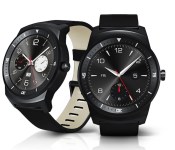
LG officially reveals circular G Watch R with improved design and familiar features

Not one to wait around for trade shows to officially begin before flaunting its new products to the world, LG is no longer teasing the G Watch R, its upcoming circular Android Wear smartwatch — it’s showing it off in all its glory. And just as the company hinted at on Sunday, it comes with a 1.3-inch Plastic OLED (P-OLED) full 360-degree display. LG says that it isn’t trying to replace the original G Watch, but rather offer another choice: The R is an elegant device that looks and feels more like a classic watch than its squarish predecessor. Good timing, too, since it’s going to be competing head-to-head (wrist-to-wrist?) against the Moto 360, a similarly shaped watch that will likely be available next week.
Admittedly, the R’s design looks like a substantial improvement over the original — the first one looks and feels much more like a reference device than a consumer watch — so we’re excited to see how it is in real life. Unfortunately, the components don’t seem to be much better than the original G Watch. The single most important factor on any smartwatch is battery life, and just like it is on LG’s and Samsung’s existing Wear devices, the outlook doesn’t look promising; the R comes with a 410mAh battery, a mere 10mAh improvement over its square counterpart. That means we shouldn’t expect to get more than a day or so on a single charge.
Nearly all of the other guts are the same, too. It comes with interchangeable 22mm straps, a 1.2GHz Qualcomm Snapdragon 400 chipset with 512MB of RAM and 4GB internal storage. It’s also rated IP67 for water resistance (up to one meter of water for thirty minutes), just like the last one was. However, there’s two notable new features: It comes with a heart rate monitor underneath and what appears to be a power button on the side.
One of the more interesting aspects of the R isn’t what it has, but what it lacks: A black bar at the bottom of the 1.3-inch, 320 x 320 display. Motorola uses this “flat tire” on the 360, so while the front of the watch is circular, the display itself is not. Reps have explained that this bar houses the ambient light sensor and some drivers for the display. We’re not sure yet if the bar’s absence means that the R simply won’t have these same features, or if they’ve been relocated elsewhere on the device. We’ve reached out to LG for more details. LG says that the R will go on sale in early Q4 of this year, which suggests that it’ll be out in October or early November. The company isn’t ready to disclose pricing, but it says that cost will vary by market.
Filed under: Cellphones, Wearables, Wireless, Mobile, Google, LG
.CPlase_panel display:none;

Pandora’s radio app for Glass lets you tune into Haim using your head

If you regularly go out wearing Google Glass, you’ve probably lamented the lack of major music app choices. There’s Play Music and… well, that’s about it. Never fear, though, as Pandora has just released a Glass app for its internet radio service. The wearable-ready software lets you control streaming without ever having to reach for your phone; you can create or choose stations solely using your voice, and the touchpad lets you both skip annoying tunes and give the thumbs-up to songs you like. It won’t cost you anything to download the app, although you can’t really call this free. Besides the $1,500 Glass itself, you’ll likely want to buy Glass-specific stereo headphones — that’s a lot of money just to get internet radio on an eyepiece.
Filed under: Wearables, Internet, Mobile, Google
Via: The Next Web
Source: Pandora Blog
.CPlase_panel display:none;

You can now import your Google+ videos to your YouTube Channel
Recently we heard that Google was working to make it possible for users to import their Google+ shared videos to their YouTube channels. The process is now officially available for those of you who want to get it started.

The whole process is pretty simple, as the little help video from YouTube below demonstrates. Simply go to your YouTube account, login, go to the uploads page and click “import”. Just like any other video you have full control over the title, description and privacy options. That means you can set all those family outings that are backed up to Google+ as private and share them independently to your friends and family without the whole world seeing.
Source: 9to5Google
//<![CDATA[
ord = window.ord || Math.floor(Math.random()*1E16);
document.write('‘);
//]]>
The post You can now import your Google+ videos to your YouTube Channel appeared first on AndroidSPIN.
.CPlase_panel display:none;

Tokyo’s Shibuya gets a big-screen Google voice search terminal

Arguably, the whole convenience of Google’s search and map skills (and by association, the voice-guided version) is the fact it’s on your smartphone — which is right in your pocket. However, In a bid to explain to Tokyo-ites that there’s more to the eminently tech-friendly Shibuya outside of That Starbucks and the scramble-crossing, Google’s erected a temporary structure right outside the station. Not only can you make voice search requests for the nearest tech store or… french patisserie, it’ll display a map and directions on a huge 138-inch screen — which you can then take a photo of, presumably, with your smartphone.

As you can see, the interface looks almost identical to voice-based interactions on Android phones. There’s a giant mic to pick up your commands over the throngs of people constantly ducking in and out of the nearby station. From our time with it, Google’s robots still found it hard to pull out simple commands from the buzz of the crowds. When it does pick it up, it’ll then parse what you’re saying and offer up suggestions just like, well, Google voice search. The collaboration with Shibuya’s tourist board and local businesses aims to offer visitors some navigational help when getting around. Given the area’s reputation for tangled back-alleys and hidden shops, you might need all the assistance you can get.
Filed under: Google
.CPlase_panel display:none;

Cyanogen and a startup made up of veterans from Google, Amazon and HTC are building ‘something really cool’

Is your Tuesday evening missing a sense of ambiguous mystery? We’ve got something for you: Cyanogen and a start-up named Nextbit are working on “something really cool” for mobile devices, but won’t say a word about what it actually is. Nextbit has been around for awhile, but its goals are nebulous at best. “The future of mobile is just getting started,” its website reads. “We’re building the groundbreaking technology that will take it to the next level.” Cyanogen’s partnership with the company was only just announced today, and it brings precious little information to the table — offering only a survey suggesting that testers for the mysterious project may need to wipe their device (preferably a Nexus 5 or Nexus 7) to participate.
Still, the partnership shows that Nextbit is finally gaining traction, and whatever it’s working on may become public soon. The company is expanding its talent base, too — remember that undetermined project HTC’s Scott Croyle left the company for? This is it. Croyle didn’t say what he’s going to be doing at Nextbit, but at HTC he was responsible for designing all of the firm’s flagship smartphones. So, what’s going on at Cyanogen and Nextbit? You tell us: the comments await.
Filed under: Cellphones, Mobile, HTC, Google, Amazon
.CPlase_panel display:none;

Hangouts in Gmail finally floats online friends to the top

Those of us who’ve been frustrated that Hangouts in Gmail has been displaying conversations in chronological order rather than who’s online are about to get some relief. Rolling out over the next few days, a new tab in the Hangouts window will allow you to toggle your contacts list there, so you can easily see who’s available at the top of the group. What’s more, you’ll also be able to pin your favorites above the rest — whether they’re online or not. Of course, you’ll need to click the “Try the new Hangouts” option in the setting pane in order to leverage the conversation method, if you haven’t already done so.
Source: Gmail (Google+)
.CPlase_panel display:none;
Chrome’s latest stable release brings 64-bit Windows support out of beta
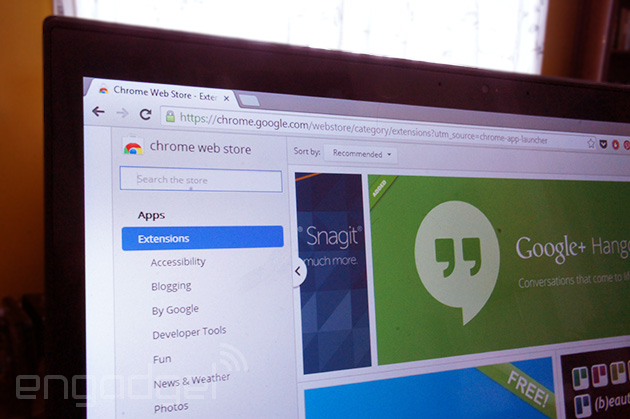
Sure, a computer with a 64-bit processor can run almost anything designed for a less robust CPU — but programs designed specifically for these chips tend to just run, well, better. Google’s been trying to drag its web browser into the modern age for a few months now, and today it finally has: Chrome officially supports 64-bit processors on Windows. A beta of the 64-bit code showed up last month, but now it’s part of the regular stable release. Why upgrade? Well, aside from gaining a more secure and stable browser, Google says the update significantly increases graphics and media performance on supported machines, and decodes HD YouTube videos 15% faster. Sound good? Check out that source link below.
Source: Google
.CPlase_panel display:none;

