


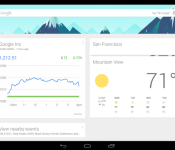
Solar eclipse and police activity cards now showing up in Google Now

Good news for heavy Google Now users; you’re getting two new types of cards in your automatic information feed. Google has added in support for police activity as well as solar eclipses. The police activity is pretty useful, as it shows nearby criminal activity which can give you a heads up on areas or roads to avoid.
The solar eclipse card is pretty weird, but it gives you information on ways you can safely view the eclipse, so that’s pretty cool. Not life changing, but a cool feature regardless.
Fortunately, these cards won’t require an update to the Google Now app (as long as you’re already on the latest version) since the info comes from Google. Keep an eye out and let us know if you see either of them on your device.
source: Reddit
via: 9 to 5 Google
Come comment on this article: Solar eclipse and police activity cards now showing up in Google Now

Firebase, a cloud database company, joins Google’s Cloud Platform team
 Google has announced that they’ve acquired a new cloud database company, Firebase. The Firebase team will join Google’s Cloud Platform developers in an effort to make development for mobile devices even easier.
Firebase exists to allow developers easy ways to keep data synced between mobile applications and web sites and apps, which can be a pretty tricky and difficult task otherwise. By bringing this technology under Google’s cloud platform fold, it should help speed up development for mobile apps as it gives developers one less thing to worry about.
For current Firebase developers, improvements should come to the service soon. For Google Cloud Platform customers, the improvements should kick in immediately.
source: Google Cloud Platform
Come comment on this article: Firebase, a cloud database company, joins Google’s Cloud Platform team

Google Earth for Android is now faster, better at 3D exploration

Heads up, Android fans: Google Earth for your phones is about to get a lot better. That’s what the folks in Mountain View are promising, anyway — they’ve released an update to the app brings with it snappier performance and improved labels for maps (you’ll never wonder where Foster City and Redwood Shores begin and end again). Perhaps the biggest change, though — a completely rebuilt 3D rendering engine — means those cityscapes and mountain ranges you pore over should show up with more crispness and clarity. Try not to lord that over your friends using Apple Maps, will you? Throw in a way to import your own custom .KML files into the app from Google Drive and you’ve got all the makings of a pretty momentous update. Itching to take it for a spin? Mosey on over to the Google Play Store to get your globetrotting fix.
Filed under: Mobile
Source: Google
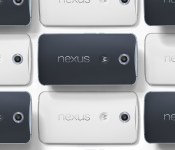
Nexus 6 not likely to hit the UK before December!

It’s bad news unfortunately if you live in the UK and are looking forward to holding that Nexus 6 in your hands, since the guy that correctly predicted the Nexus 6 release and general accurate rumour reporter says that the device won’t be hitting the UK until at least December.
Paul O’Brien tweeted out the following:
Think you're getting a Nexus 6 in the UK before December? Think again!
— Paul O'Brien (@PaulOBrien) October 22, 2014
With the Nexus 6 showing as not available in the UK Google Play Store, and no other UK retailers showing signs of even listing the device, including Amazon, you begin to think that the UK may be lucky to see the Nexus 6 in 2014 at all. The same thing happened with the Nexus 4, with it arriving several weeks after ordering only minutes after sales went live.
It is certainly bad news for those in the UK wanting a Nexus 6, so let’s hope this is one of those rumours that isn’t right.
 |
The post Nexus 6 not likely to hit the UK before December! appeared first on AndroidGuys.
Google Earth updates with an enhanced 3D experience and easier way to view KML Files [APK Download]

A new update is being pushed out to Googlers who have Google Earth for Android installed. Google Earth first made its appearance on Android way back in February of 2010. Since then is has received a number of updates with the last real big update coming in May of 2013 when street view was added in. Today Google Earth gets a substantial bump in version number from 7.1 to 8.0. The leap offers a heck of a lot too.
The file size is reduced a fair amount. Coming down from 8.5GB to just a touch over 8GBs. Besides the file size shrink, Google puts emphasis on new 3D rendering technology that gives Google Earth its first major 3D overhaul since it launched over 10 years ago. The new technology will provide you with much sharper views of the surroundings.
 Google is also pushing the same data from Google Maps to Google Earth now. That means roads and POI will be all up to date as they are on Google Maps. There is also some rework down to the Roads and labels in terms of their visual appearance. Things look a lot less slapped over the area and more integrated. You can see the before and after in the two images below.

 Google also did a little Drive integration for those of you that make your own maps in Google Earth. Now you can open up your KML files saved in Drive through Google Earth on your phone or Tablet. Might not mean much to the average person out there, but those that use the ability to build maps inside earth, this must be great news.
In true Google fashion the update is rolling out to users slowly through the Play Store. You can check now to see if the update is available. If not, then head over to Gappsearly for the updated APK and give it a look.
//<![CDATA[
ord = window.ord || Math.floor(Math.random()*1E16);
document.write('‘);
//]]>
The post Google Earth updates with an enhanced 3D experience and easier way to view KML Files [APK Download] appeared first on AndroidSPIN.

Google partners with Jane Goodall to capture Tanzania’s chimp heaven

Google has joined forces with the Jane Goodall Institute to bring Street Views of Gombe National Park and its numerous chimpanzees. Using portable Trekkers, Google’s intrepid photogs captured thousands of 360-degree images in the jungles where Goodall first started her research. Some of the Institute’s favorite highlights include a chimp called “Google” swinging on a vine (above), the slopes of Gombe, a group of chimpanzees fishing for termites and the interior of Jane’s house. To head down the trails or up into the tree canopies yourself, hit the source — there’s a monkey around every corner.
Filed under: Cameras, Science, Google
Via: TNW
Source: Google
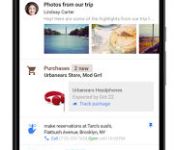
Google announces Inbox, a new way to handle email, tasks, and life

Google is just rolling out all sorts of fun announcements this month, with Lollipop and Nexus devices last week, Songza integration yesterday, and now a new feature of Gmail called Inbox.
Inbox was announced on Wednesday on the Official Google Blog, and is essentially a combination of the app Mailbox and Google Now into one, all inside your email.
What Inbox does is makes your email life easier. It does this in several ways (from the Google Blog announcement):
“Bundles: stay organized automatically
Inbox expands upon the categories we introduced in Gmail last year, making it easy to deal with similar types of mail all at once. For example, all your purchase receipts or bank statements are neatly grouped together so that you can quickly review and then swipe them out of the way. You can even teach Inbox to adapt to the way you work by choosing which emails you’d like to see grouped together.
Highlights: the important info at a glance
Inbox highlights the key information from important messages, such as flight itineraries, event information, and photos and documents emailed to you by friends and family. Inbox will even display useful information from the web that wasn’t in the original email, such as the real-time status of your flights and package deliveries. Highlights and Bundles work together to give you just the information you need at a glance.
Reminders, Assists, and Snooze: your to-do’s on your own terms
Inbox makes it easy to focus on your priorities by letting you add your own Reminders, from picking up the dry cleaning to giving your parents a call. No matter what you need to remember, your inbox becomes a centralized place to keep track of the things you need to get back to.
And speaking of to-do’s, Inbox helps you cross those off your list by providing Assists—handy pieces of information you may need to get the job done. For example, if you write a Reminder to call the hardware store, Inbox will supply the store’s phone number and tell you if it’s open. Assists work for your email, too. If you make a restaurant reservation online, Inbox adds a map to your confirmation email. Book a flight online, and Inbox gives a link to check-in.
Of course, not everything needs to be done right now. Whether you’re in an inconvenient place or simply need to focus on something else first, Inbox lets you Snooze away emails and Reminders. You can set them to come back at another time or when you get to a specific location, like your home or your office.”
Below is a video Google made to advertise Inbox. Currently this feature is being rolled out slowly, with invites being sent out, where eventually people will be able to invite more and more people. A few of us here at AndroidGuys have requested on invite, so we’ll update you when we get the chance to try it out.
What do you think? Is this something you’d like on your phone?
|
The post Google announces Inbox, a new way to handle email, tasks, and life appeared first on AndroidGuys.

Google Earth for Android gets updated 3D rendering engine

Google has announced a major update for their Google Earth for Android app. According to their announcement, the key to the update is a new 3D rendering engine, the first overhaul since Earth launched over 10 years ago. Google says the new engine will provide “faster, smoother, and crisper transitions.”
In addition to the 3D enhancements, Google says their maps will update quicker and they are making it easier to view KML files. Updates to Earth maps will now correspond to updates in their Google Maps product. Google says they have given roads and labels a fresh new look in Earth as well to make it easier for users to find what they are looking for. Users who have created their own maps and generated KML files will now be able to load them directly from Google Drive.
If you want to give Google Earth for Android a try, just hit the download link below.


source: Google Maps Blog
Come comment on this article: Google Earth for Android gets updated 3D rendering engine

Google’s ‘Inbox’ is a smarter take on email, created by the Gmail team

If you’re anything like us, Google’s Gmail has an iron grip on your life. Google’s looking to create a whole new iron grip with a new app from its Gmail team, and it’s called “Inbox.” What is it? That’s a good question — Google’s made a demo slash advertisement video that we’ve dropped below. As far as we can tell, Inbox is a combination of Google Now and your Gmail inbox — a “smart” inbox, if you will. It combines alike pieces of email (bank invoices, for example), highlights related information (like Google Now alerting you to flight changes, traffic, etc.) and keeps track of your life (it’ll give you reminders, among other heads ups). Is this the end of Gmail? We seriously doubt it, but it is Google’s latest foray into simplifying email. Head below for more!
In introducing the service, Google’s Sundar Pinchai called out the frustration of an overflowing email inbox. Inbox is Google’s attempt to make the inbox more approachable and organized without much user effort. ” For many of us, dealing with email has become a daily chore that distracts from what we really need to do-rather than helping us get those things done,” Pinchai wrote. “If this all sounds familiar, then Inbox is for you. Or more accurately, Inbox works for you.”
As seen below in GIF form, the app both shows prioritized events and emails you’ve received. Think of it as the lovechild of Cards and Gmail. Whether it’ll replace our standard Gmail app is another question altogether; trading the flexibility of Gmail for a more streamlined inbox is appealing, but also Gmail has an iron grip on our lives. In case that wasn’t clear the first time.

The app’s still in the invite stage, and Google says the first round of invites are already out in the world. Should your current Gmail (or whatever service) inbox be without an invite, Google’s set up an email address for you to ask to get in on the action. It’s only running on a Nexus 6 in the image, but Google says it runs on Android phones with Jellybean or better (4.1+) and iPhones running iOS 7 or better. There’s a web-client as well, but it’s a Chrome-exclusive.
[Image credit: Google]
Filed under: Cellphones, Tablets, Internet, Software, Mobile, Google
Source: Google

Google introduces ‘Inbox’, an alternative to Gmail that works for you

Google just unveiled “Inbox,” which sounds a lot like our earlier story on Bigtop. It’s a completely separate app from Gmail, which aims to be a better alternative for those that find they are overburdened with email. When Email started, it was a simple way to pass messages, and it made you more efficient. However, as email as grown over the years, it’s gotten so distracting that it sometimes is hard to actually get things done. One could argue that it no longer makes us efficient.
According to Google, Inbox works for you and helps you get to the important information quicker. This is all done by new features such as Bundles, Highlights, Reminders, Assists, and Snoozing.
Bundles groups similar emails together just like the categories feature that was introduced last year. So now all your purchase receipts and bank statements will be grouped together for quick review. Want certain emails grouped together? Inbox will learn from your habits.
Highlights makes it easier to spot those important emails, which could be for events or emails that include photos or documents. Inbox is also smart enough to display any other important information from the web that might not even be in the original email. That could include flight status information or even package tracking information.


Inbox also lets you set Reminders such as picking up milk on the way home or giving someone a call. Assists will add information to both reminders and emails. So for example, let’s say you set a reminder to stop at Target. Assist will provide you the phone number and even tell you if the store is even open. Let’s say you booked a reservation at a restaurant. Assist will add a map to the confirmation email. The last feature we need to mention will come in handy for those times you see an email, and say to yourself, “I will deal with that later.” You know what happens then right? You completely forget about it. Instead of leaving it in your inbox, only to move down lower and lower, you can just Snooze it. It will come back to the top when you want it to so you can take care of it and not forget about it. Of course, Snoozing works with Reminders as well.


You can check out this short video showing some of the features…..
Click here to view the embedded video.
So when can you try Inbox? Well a little bit of bad news. Right now it’s invite only, with the first round of invitations going out today. The good news is that new users will be able to invite their friends, and you can request an invite by sending an email to inbox@google.com. That should get you on their radar a little more effectively than sitting around waiting for one.
As I mentioned, Inbox is completely separate from Gmail. Those that want to continue using Gmail as it is today can continue to do so.
source: Gmail Blog
Come comment on this article: Google introduces ‘Inbox’, an alternative to Gmail that works for you

