


Download and Install Newsstand version 3.3.1 APK (Material Design)

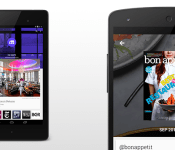
Google aren’t done when it comes to updating their app lineup with material design, and it’s Newsstand that is next in line to get the treatment bringing it to version 3.3.1.
You’ll recall that Newsstand actually got the official Material Design makeover in an earlier version, but 3.3.1 brings in a few minor UI tweaks to offer the finishing touches. This is purely a visual change for Google Newsstand and contains no added functionality. So, what’s new?
– New animation when the articles are refreshed.
– The ‘Get Started’ pane has been given a redesign with solid colours.
– Background for the search page has been switched to a thicker magnifying glass icon.
– The hamburger pull-out menu has also received a UI redesign.
The official Newsstand version 3.3.1 can be downloaded by clicking here.
Why Download?
If you’re the type of person who likes to stay on the cutting edge of software then you’ll want to get your hands on the file. And, given software updates can take days or weeks to fully roll out, this ensures you’re moving up in the line.
What’s the Risk?
We’ll only share files or links to files that we feel can be trusted. Google does a great job of signing apps, checking them for malware, and protecting users. If you’re not sure whether you want to download the app at this time, simply wait for your update to arrive. No harm, no foul.
The post Download and Install Newsstand version 3.3.1 APK (Material Design) appeared first on AndroidGuys.

Google fined $2,250 for exposing Canadian woman’s cleavage on Street View
 Unless you’re new to the internet, you’ve probably heard of some of the crazy stories surrounding photos and images on Google’s Street View services. Everything from crime scenes to urban legends have allegedly been captured on the service, if you know where to look.
This situation is more than just an internet rumor, though. A woman in Canada filed legal claims against Google for capturing a shot of her leaning forward on her porch and exposing her cleavage, showing her off to anybody that bothered to look up her address on Street View. Apparently whoever is in charge of blurring out things like license plates and addresses didn’t think this was worth censoring.
After the claims were filed, Google essentially just blurred out the entire residence. Technically, that works, but it’s a pretty sloppy solution. Google refused to pay out any money to the woman, however, arguing that she was in a public place when the photo was taken. Unfortunately for Google, the Canadian courts didn’t fully agree with that defense and ordered the company to pay out $2,250 to the woman, plus interest and court fees. She originally wanted $45,000 for emotional damages, so Google lucked out there.
The moral of the story? If you see a Google Street View car, make sure you’re dressed well enough that you won’t mind strangers on the internet looking at it.
source: Gigaom
Come comment on this article: Google fined $2,250 for exposing Canadian woman’s cleavage on Street View
Cast Screen support added to Sony Xperia Z3v, Z3 Tablet Compact, and more

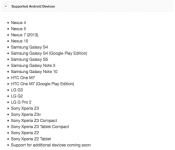
The Cast Screen for Android devices has slowly made its way to additional devices. Still, the total is quite low and there are some key devices missing. One company that is seeing many of its devices supported is Sony. Last month, its flagship Xperia Z3 and smaller Z3 Compact gained Cast Screen support. Now, the a couple more have been added in.
Here are the newest Sony devices to get Cast Screen support:
- Xperia Z3v
- Xperia Z3 Tablet Compact
- Xperia Z2
- Xperia Z2 Tablet
Source: Google Support
Via: 9to5Google
Come comment on this article: Cast Screen support added to Sony Xperia Z3v, Z3 Tablet Compact, and more

Google wants you to easily share files between Android and iOS

As handy as services like AirDrop or Android Beam may be for shuffling content between nearby devices, they’re platform-exclusive. That’s not much help if you want to share photos from your Android phone to an iPhone, or vice versa. However, Google may soon overcome that barrier. Android Police, Techaeris and GigaOM all have evidence of Copresence, a service that would let Android and iOS devices swap content over WiFi. Reportedly, it uses location data (including Bluetooth) to set up the connection; after that, you can send directions, photos and other info without having to either bump devices or rely on cloud storage options like Google Drive or Dropbox. The technique shouldn’t require a Google account, either.
It the details are accurate, Copresence should be available within a matter of weeks. Having said this, you shouldn’t expect a file sharing Utopia. The feature is most likely to be limited to Google apps at first, and it’s probably not going to be a system-wide feature on at least iOS — you may have to be satisfied with exchanging files through a handful of programs. Still, that’s better than the walled-off sharing you likely deal with today.
Filed under: Cellphones, Networking, Internet, Mobile, Google
Source: Android Police, Techaeris, GigaOM

Latest Play Services APK findings show new “Copresence” app is on the way

If a line of code hidden within Google’s latest Play Services APK and pending patents are anything to go by, it certainly looks as if the search engine giant is preparing to release a new mobile communication service, entitled “Copresence,” which should make sharing data between Android and iOS incredibly easy.
This system sounds an awful lot like Android Beam, which made its debut appearance alongside Ice Cream Sandwich (4.0) back in October, 2011 and Bump for iOS back in November, 2009. Both of these apps were developed for their own respective operating systems. Copresence, however, is believed to be a cross-platform application and completely contactless.


While Google is still yet to announce or even confirm the existence of its Copresence service, Simon Tucker recently discovered the application in a leaked patent filing and spotted several files linked to the project in the latest Play Services package.
And if that’s not enough proof, Tucker also found several Chrome code review comments referring to an in-house service called “Copresence” that will not require the use of a Google account. He explained all of his findings in an exclusive email to TechAeris — which you can see below.
Google is going to launch a service titled “Copresence” in the coming weeks. The goal of the service will be to allow cross communication between Android and iOS devices through Bluetooth, Wi-Fi and Location-based data.
I located a large quantity of files referencing the service in the latest Google Play Services APK, including banner images for setup, explanations of how the service works and XML’s defining the layouts of the setup app.
Upon investigation, I noticed that Google already has patents in the works for a service titled “Copresence”, allowing data retrieval from a device using a server and then feeding back relevant data.
There is also numerous Chrome code review comments referring to a service called “Copresence” stating that it will not require a Google account to use, and confirming that it will be in fact multi-platform.
We don’t know for certain if Copresence will come to fruition; only time will tell, but it definitely looks like it’s on its way.
Source: TechAeris
Come comment on this article: Latest Play Services APK findings show new “Copresence” app is on the way

Gmail 5.0 with Material Design and Exchange support now available to download

We’ve known for some time that Google has been working on a rather hefty update for its official Gmail mobile application and today, thanks to Android Police, it’s finally available to download by way of a production-signed APK.
At first glance, it’s obvious that Gmail for Android has faced a major design overhaul as it now features a brand new user interface that’s based on Google’s recently-published Material Design guidelines. Included is a colored Action Bar, threaded chats, seamless animations and much, much more.
This upgrade also brings a plethora of new functionality to the application, as well as adding support for corporate/exchange accounts, a unified inbox and auto-updating of email threads — which means when you’re reading a thread, instead of a notification appearing to alert you of a reply, the message will just simply appear.
You can download the APK for Gmail 5.0 here and if you wish to link your Exchange account, you will need to install this second APK, too.
Via: AndroidPolice
Come comment on this article: Gmail 5.0 with Material Design and Exchange support now available to download

Gmail for Android is ready to handle all your email accounts

The new version of Gmail for Android is slated to make its way to Google Play in the near future, but if you cannot wait to use it, you can download the APK right now and load it up. You’ll notice some major changes the moment you launch it, since it’ll ask what kind of email addresses you’d like to add: version 5 works not only with Gmail addresses, but also with Outlook, Yahoo and any IMAP- or Exchange-based email accounts. To choose the inbox you want to check, simply tap one of your accounts on the left-hand menu. Also, it comes with a Material Design interface makeover (there’s a lot more red now) and a thread email system similar to what you get through Inbox. We can’t say which Android flavors it’s compatible with exactly, but we’ve installed it on an Ice Cream Sandwich tablet, so it’ll likely work with all newer platforms. To find out for yourself, or to take a break from Google’s busy Inbox app, head over to Android Police to download the file.

Filed under: Misc, Internet, Software, Mobile, Google
Source: Android Police

Download and Install Gmail 5.0 APK

Google have been busy updating their apps recently to reflect its gorgeous new material design that Lollipop is going to bring but good old Gmail has been last in turn to get its refresh, until now that is.
The official Gmail 5.0 APK has just been released and is doesn’t disappoint. Gmail’s new design is definitely fitting in with the whole material design thing Google has going on and mirrors the beautiful layout we are seeing in Google’s other new app that is “Inbox“.
Along with the facelift there are many other cool features that have been thrown into Gmail.5.0 but one of the biggest changes, and one that has been no secret, is support for exchange/corporate email and other personal accounts like Yahoo and Outlook.com.
So what ya waiting for, go grab it and install it then let us know what other neat changes you find or like.
The official Gmail 5.0 APK can be downloaded by clicking here.
The post Download and Install Gmail 5.0 APK appeared first on AndroidGuys.
Google Play Store version 5.0.37 makes an appearance with only small fixes [APK Download]
 It appears that Google is still working hard even with Halloween around, updating several apps today including the Google Play Store. Google Play Store version 5.0.37 made its appearance today and apparently includes some small fixes. What exactly those fixes are, we have no idea – what we do know is that the file size has increased from 9.02MB to 9.05MB, so don’t expect any radical changes, but do let us know if you spot something different or better.
For those who love the latest and greatest as soon as its out, we have the APK for Google Play Store version 5.0.37 available to download below:
Google Play Store version 5.0.37 APK download
Be sure to let us know in the comments if you spot anything new.
//<![CDATA[
ord = window.ord || Math.floor(Math.random()*1E16);
document.write('‘);
//]]>
The post Google Play Store version 5.0.37 makes an appearance with only small fixes [APK Download] appeared first on AndroidSPIN.
Google now lets you use your Play balance to pay for subscriptions

Google customers can now use their Play Store balance to purchase subscriptions for Play Music All Access and Play Newsstand. According to Google’s Support page, the ability to use credit to purchase memberships is being restricted to just those two platforms for now, but compatibility will be added for other services in the not-too-distant future.
If you are one of the few that took advantage of the Google Play Music All Access’ special introductory rate of $8, don’t worry. You should be able to cancel your current payment method and reinstate the membership using your Play Store balance for the same, reduced rate, but you will need to renew your membership within thirty days of cancelling your old one — otherwise the price will bump up to $9.99.
It’s possible that both these services may not be available in your country, so be sure to head on over to the Google Play Support page to see exactly what you can access in you area.
Source: Google Play Support
Come comment on this article: Google now lets you use your Play balance to pay for subscriptions

