


10 best Android tools and utility apps

One of the first immediately noticeable uses for an Android device is as a tool. Before all the games, keyboards, and productivity apps, people were finding ways to use their Android devices as a tool to make every day life easier and it’s still among the best reasons to own a smartphone. In this roundup, we’ll look at the best Android tools and utility apps.
 AppLock
[Price: Free with in app purchases]
First on our list is AppLock. This nifty security app helps you lock up the various parts of your device so that snoops, thieves, or curious kids can’t get to them. With it you can lock up content like SMS, contacts, Facebook, photo gallery, Google Play Store, settings, and calls. As the name implies, you can also lock up pretty much any app as well. There are several options available to lock up everything and it’s a great way to keep your phone private without having to relay on a lock screen lock.


 Clean Master
[Price: Free]
Clean Master is an intensely popular application that is actually really useful. Whenever you install an Android app, it creates its own folder and leaves its data laying around. When you uninstall it, that data doesn’t necessarily go with it. Clean Master can help by finding and deleting that extra crap left behind by other apps. There’s also a built in app manager, task manager, and bare bones antivirus for those who would like to get all of those features in one place.
 DashLight
[Price: Free / $1.59]
There are plenty of flashlight apps out there but all pretty much do the same thing which is either light up your screen white so you can use it as a flashlight or activate your LED flash so you can use that as a flashlight. DashLight has an app, a widget for your homescreen, and DashClock Widget support so you can access your camera on your lock screen if you have that set up. It’s permission friendly and it’s a solid option.

 GasBuddy
[Price: Free]
GasBuddy is a helpful application that keeps you appraised of the gas prices in your area. This is incredibly helpful when you’re looking for the cheapest gas in your area. It’s also great for people taking road trips and need to find gas stations on their route. The interface is simple and the information is crowd sourced so if you find a gas station with the wrong price listed, you can change it to make it right for the next group of people. It’s also totally free.
 Google Goggles
[Price: Free]
Google Goggles is an underrated tool that pretty much everyone could use. Some very basic uses include reading barcodes and QR codes which we’ve seen increase in number over the years. You can also use it to look at things like landmarks, artwork, and other media and products to help you figure out what it is. It’s not an everyday use kind of thing but it’s definitely something worth keeping in the app drawer for emergencies.
 Google Translate
[Price: Free]
Google Translate is the best translation app hands down. With it you can type in words and have them translated on the fly. You can also have it set to voice mode and it will translate spoken word in real time which can be very helpful for travelers on the go. The latest feature to get baked into Google Translate is the ability to point your camera at foreign text and have it translated. This is great for travelers and it’s good for local events like going out to eat at that fancy foreign restaurant with the menus you can’t read. It’s worth having in the app drawer all the time.

 Guitar Tuner Free
[Price: Free with in app purchases]
One of the more creative uses for your Android device is using it to tune instruments. Despite its name, Guitar Tuner Free tunes more than just guitars. It includes support for bass, ukulele, and many, many others. It also has alternative tunings such as drop d, open, and even custom tuning. There is also a built in metronome for practice, noise cancellation so you can tune in a crowded room, and there are even games to learn guitar chords. It’s a complete package for many musicians.
 Helium
[Price: Free / $4.99]
Helium is a great app because it’s the only really good non-root solution for backing up your applications. It’s a more work than if you’ve got something like Titanium Backup but Titanium Backup requires root and this does not. The free version lets you backup your apps to your SD card (where applicable) and computer while the paid version lets you upload backups to Google Drive, Dropbox, and Box.com. Everyone should have backups of their apps ready just in case and that makes this a must have application.
 Smart Tools
[Price: $2.99]
Smart Tools is an older app but has been updated over the years and still remains a great tool to have. Within the app you’ll find methods to measure things like length, angle, slope, distance, height, and width. You’ll also have a compass, level meter, flashlight, mirror, and unit converter. It’s a great all in one package that includes 16 different tools in all. You can also download any tool individually for free by checking out the developer page.
 Valet
Valet
[Price: Free]
Valet is a free app that helps you find where you parked your car. It uses Google Play Services Location API and keeps everything very simple to help you find your car. It can be used for a number of cases including getting lost in the mall parking lot, setting a parking timer (built in) to avoid getting a ticket, and you can even set street sweeping reminders to get your car out of the way. It’s free and it’s solid.

Wrap up
If we missed any great Android tools and utility apps, let us know in the comments below! There are also plenty of tools we didn’t cover, such as file browsers, flashlights, and more. To see individual lists for those, click the complete list link below to see all of our app lists!
To see our complete list of Android apps and games lists, click here!

Google I/O 2015 set for May 28-29 in San Francisco

It seems like every year Google alternates between May and June with Google I/O. Last year it was June so this year it must be May right? You got it. Google has scheduled their biggest event of this year for May 28 and 29 in San Francisco.
Registration begins March 17 at 9:00am PT and ends March 19 at 5:00pm PT. They will be doing the same system as last year in which you will need to fill out an application in order to be eligible to buy a ticket. Then Google will randomly select from all applicants, thus eliminating the crazy rush.
It isn’t too soon to speculate what we will see this year is it? Will we see an updated Google Glass? A new version of Android? Let us know your predictions.
source: Google
Come comment on this article: Google I/O 2015 set for May 28-29 in San Francisco

Paramedics use Google Translate to communicate with Congolese woman while delivering baby

When you think of Google Translate, you might thinking that it’s great for finding the nearest restroom or where you can grab a cup of coffee, but that’s just the tip of the iceberg.
Paramedics Gerry McCann and Shane Mulcahy were on route with a Congolese woman to Cork University Maternity Hospital in Ireland when there was a sudden change in plans. The baby wasn’t waiting any longer, but she spoke Swahili, and very limited English.
Well quick thinking Gerry fired up Google Translate on his phone (hopefully an Android) and was able to communicate with her. The woman told him that she felt that she needed to push, and five minutes later she said she definitely needed to push. A few minutes later a very healthy baby girl was born in the back of the ambulance at 6:23 am on February 2nd.
Gerry asked the Mother if she had picked out a name for her new child, but she said she hadn’t. He told her that since it was St Brigid’s Day, she should name her Brigitte. She seemed keen on it, but we don’t know for sure. However, we do know that the Mom and her new baby girl are home and doing well.
sources: joe.ie / The Corkman
Come comment on this article: Paramedics use Google Translate to communicate with Congolese woman while delivering baby

Google is testing Hangouts-based customer service
Google plans to use the Hangouts infrastructure as a means of customer service.
Its purpose is to provide a live video chat service for potential buyers of Google products, including smartphones, tablets, and Chromebooks (but not Nest devices) who can talk to Google Device Experts before purchasing. This will be a free service unlike Helpouts.
OnBRM reported that TechCrunch got information from people working directly on the project. Google, meanwhile, has confirmed a few of those details.
The Hangouts service was started quietly in November and is still being run as a test through the Devices channel of Google Play. The company is thinking of using in other places, whether virtual or physical. A source told OnBRM that it’s like a virtual version of Apple’s Genius Bar.
FEATURED POSTS


(function() var script = document.createElement(‘script’);script.src = ‘https://stacksocial.com/widget.js?publisher=androidguys&type=editorial_post_widget_preferences’;script.async = true;var entry = document.getElementsByTagName(‘script’)[0];entry.parentNode.insertBefore(script, entry);)();
http://www.androidguys.com/pubgalaxy/728×90.html
The post Google is testing Hangouts-based customer service appeared first on AndroidGuys.

Google’s MVNO with Sprint and T-Mobile: Project Nova may be tablet focused

It’s rumored that Project Nova began in the fall of last year, but it was only last month that the public became aware of Google’s entry into the mobile virtual network operator (MVNO) game.
We know Google is wanting to partner with T-Mobile and Sprint, but beyond that everything has been speculation.
Talk Android’s Robert Nazarian reported on the leak of Project Nova last month, which you can view here, but details at the time were scant. Unfortunately, they still are, but Dean Bubley of Disruptive Analysis has still decided to step up to the plate and give his thoughts on the project.
You can read his blog post in full by clicking the source link below, but to summarize, Bubley feels that Project Nova may be more tablet focused, bringing better data access to our large smart devices. Alternatively, or in conjunction with the aforementioned focus on tablets, the analyst ponders if Google might be wanting to try its hand at providing a freemium method to mobile service.
Overall, just as with Apple, I don’t think this is going to be a Big Bang by Google in mobile. It will likely have one or two tactical near-term wins, but will be part of a cautious, long-term experiment and fishing-trip. While Google might have a “big strategy” in mind, with an eventual vision towards 5G, WiFi / satellite / drone overlays and so on, it cannot be certain of any given scenario at the moment. It also seems highly unlikely that Google just wants to be “another carrier” – although it might try to exert some pricing leverage. I’d say there’s also a 70%+ chance that this will be mostly/totally aimed away from conventional smartphones and plans.
Source: Disruptive Analysis
Come comment on this article: Google’s MVNO with Sprint and T-Mobile: Project Nova may be tablet focused

5 of the best camera apps for the Nexus 6
Today, many people only own one camera and they always keep it in their pocket. It is their smartphone. This has caused phone manufacturers to constantly improve the cameras and camera software on their phones with each new generation, and developers focus on making camera apps that improve photo quality and add features to make smartphone cameras as useful as possible. Motorola put a great 13 megapixel camera in the Nexus 6, and today we are looking at the 5 best camera apps you can get on the Nexus 6.
A Better Camera

A Better Camera brings several great features to the Nexus 6 that other apps do not. It also takes advantage of Lollipop’s Camera2 API, but you do not have to be running Lollipop to download this app. A Better Camera offers both HDR photos and HDR video; however, the latter is not working on the Nexus 6 but is coming with the next update. Multishot allows you to take a group picture and choose the best face for each person, take a sequence shot, and remove unwanted objects from a picture. Preshot takes pictures before you press the shutter button to ensure you will not miss the shot. Best shot takes several pictures and automatically chooses the best one and deletes the rest. A Better Camera also includes a Burst mode and Night mode plus many other modes and options to fine tune your photo. For more experienced photographers, it also includes exposure bracketing, a live histogram, and the option to shoot in RAW. Of course, A Better Camera is not without its flaws. You cannot shoot video in 4K resolution, the time-lapse feature is not available in the Nexus 6, and the interface is not as appealing as other apps on this list. A Better Camera is free in the Play Store, but there are in app purchases that unlock other feature that some might find useful which can be purchased these individually or buy them all for $7.99.
Camera FV-5

Camera FV-5 is an app that gives you almost full manual control over your phone’s camera, but it also has some other goodies baked in. You have the option to adjust shutter speed, ISO, focus distace, and white balance. For those looking for a more professional experience will be glad to see the inclusion of light metering, exposure bracketing, and a live RGB histogram. One of the coolest features in Camera FV-5 is the ability to assign a camera function to the volume keys. In other apps, you can use the volume keys to take a picture, but in this app you can use them to control different setting in the camera. You can assign you most used setting, such as shutter speed, to the volume keys to that you can raise or lower it by simply pressing the buttons. Another feature that some will find appealing is the option to do a time-lapse. While Camera FV-5 has some great features, it also has its downsides. While there is a video camera icon in the app, video recording is not available. Touching the icon will simlpy give you the option to install a separate video app. Also, the Lite version will only take pictures up to 640×480 resolution. To unlock higher resolutions, you have to buy the Pro version. Camera FV-5 has the ability to shoot in RAW, but the Pro version is also required for that. It is also not the most visually appealing camera app out there. However, if you want a plethora of options and are up for shelling out a few bucks, you can pick up Camera FV-5 Lite free and Camera FV-5 Pro for $3.95 in the Play Store.
Google Camera

Google Camera is the stock camera app that comes preloaded on the Nexus 6, but that does not mean that it is bad. Google Camera has several cool features that you simply will not find on the other apps in our list. One is Lens Blur which allows you to blur the background around an object in the center of the photo. Photo Sphere is another feature that allows you to take a full 360-degree photo in the shape of a sphere. Google Camera also has one of the best panorama modes out there. It gives you the option to shoot video in 4K resolution and take HDR pictures. The shutter is extremely fast with almost no time between touching the shutter button and taking a picture. While Google Camera has several great features, it is also missing many features that other camera apps include such as control over white balance, shutter speed, ISO, burst mode, scene modes, and full camera control. If you are looking for an easy to use, beautiful camera app that just works, you do not need to look further than Google Camera which you can get free in the Play Store.
L Camera

L Camera is different from the other camera apps on this list because it is not available on the Play Store. You have to download the APK from their website and install it from there. Also, L Camera is an experimental app that demonstrates and tests the new features in Lollipop’s Camera 2 API which means you have to be running Lollipop to use it. With L Camera, you are given the option for manual control over focus distance, shutter speed, and ISO. You can take pictures in RAW format and record in 4K which are both useful options. You also have the option to record video at 60fps in 1080p. One of the most appealing features of L Camera is its use of Material Design. The app looks amazing and takes Google’s new design language into account with every detail. Since this app is experimental, there are several functions that are simply not there. You do not have the option to control white balance, there is no photo review, there is no flash control, and no portrait orientation. Since the developers are constantly working to sort out every bug and bring new features to the app, it will definitely be updated to include more options. Unfortunately since it is not on the Play Store, you will have to go check their website periodically to check for new updates. All that being said, L Camera is still a fantastic looking and operating camera app that takes full advantage of the Camera2 API even though it may be lacking some features. You can get L Camera free from their website.
Manual Camera

Manual Camera is currently my favorite camera app out there. This app takes advantage of Android Lollipop’s new Camera2 API which causes photos to look even better. The best part about Manual Camera is that it give you full manual control over your camera’s settings. You can control exposure, shutter speed, ISO, focus distance, and white balance. White balance is not working on the Nexus 6, but that should be fixed in a later update. You are also given the ability to capture pictures in RAW format which many will find extremely useful. On of the best features of this application is the selection wheel. When you choose a setting you want to change such as shutter speed or focus distance, you can change them by rotating a wheel in the bottom right. This is extremely well implemented and makes the app fun and easy to use. Overall, the app looks and functions very well, but there are some downfalls. As I mentioned, white balance is not working yet on the Nexus 6. Also, there is no video mode so you will need a separate video app if you want to record any. The app also requires Lollipop and, according to the description, only the Nexus 5 and Nexus 6 work well with this app. That being said, if you are using the Nexus 6 and want full control over your camera and a great looking camera app, you should pick up Manual Camera for $2.99 in the Play Store.
These 5 camera apps give you the best control of your new Nexus 6’s camera and several take advantage of the new Camera2 API that was introduced with Lollipop. Give one or all of them a try and leave a comment telling us your favorite one. If we missed your favorite camera app, tell us down below in the comments, too!
(function() var script = document.createElement(‘script’);script.src = ‘https://stacksocial.com/widget.js?publisher=androidguys&type=editorial_post_widget_preferences’;script.async = true;var entry = document.getElementsByTagName(‘script’)[0];entry.parentNode.insertBefore(script, entry);)();
http://www.androidguys.com/pubgalaxy/728×90.html
The post 5 of the best camera apps for the Nexus 6 appeared first on AndroidGuys.
No brainer: Google’s giving you 2GB of free storage to secure your account

Today is Safer Internet Day, so Google is giving everyone 2 GB of extra Drive storage to do something that everyone should be doing anyway: secure their Google accounts.
As Target, Sony Pictures, and a bunch of Hollywood A-listers can attest, online security is not something you want to take lightly. Last year, we’ve seen hacking incidents on an epic scale, and 2015 will probably be no different. And, while it’s corporate hacks that usually make the headlines, regular users need to be just as careful about how they secure their digital lives.
Google has a bevy of security measures in place, including two-factor authentication, app authorization, and various ways to regain access to your account. But not all users know about these features or care enough to set them up. So Google is bribing users with 2 GB of free storage space for Drive.
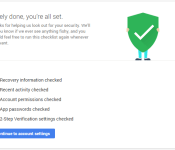
All you need to do to get the free storage is go through this simple Security Checkup to see if the following security features are properly set up:
- Recovery information
- Recent activity
- Account permissions
- App passwords
- 2-step verification
Once you go through everything and you see the green checkmarks, you automatically qualify for the 2GB of free storage. Google will allocate the extra space around February 28 and let you know through an email.
Again, there’s no reason not to set up these simple security measures. Two-step verification in particular will shield you from any unwanted access to your Google account. Go through the Security Checkup here.
Is there a doctor in the house? Google Search now highlights relevant medical information

Admit it! We have all felt certain symptoms and went straight to Google to find out what it could be. You’re not alone because one in 20 Google searches are for health related information.
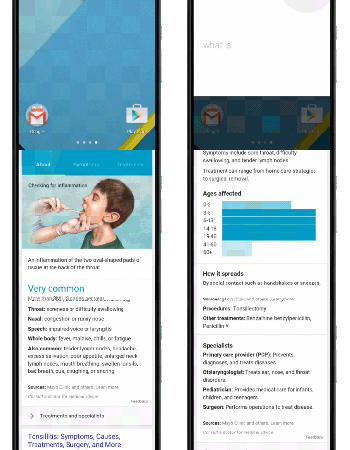
Now Google is making it easier to find that info you’re looking for by showing you typical symptoms and treatments in the Knowledge Graph. You will also get details about how common the condition is and even if it’s critical or contagious. You might even get an illustration.
So how does Google know the information is relevant? They worked with a team of medial doctors, which was led by their own Dr. Kapil Parakh, M.D., MPH, Ph.D. They have curated and reviewed all the results to ensure you receive the right information.
Of course no search result can replace a doctor, but Google might just help you figure out if you need to see one.
source: Google
Come comment on this article: Is there a doctor in the house? Google Search now highlights relevant medical information
[Deal] Spend 2 minutes completing Google’s Security Checkup and receive 2 GB of Google Drive storage

Did you know that today is Safer Internet Day? To celebrate, Google is giving you a chance to grab 2 GB of extra Google Drive storage, and it will only cost you 2 minutes of your time. More importantly, you will secure your account in the process
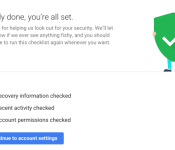
All you have to do is complete Google’s Security Checkup, which basically confirms your recovery information, apps and devices that have access to your account information, and lets you check your most recent sign-in activity.
What could be easier than that? After completing the Checkup, don’t expect the extra storage to show automatically. Google will add the 2 GB of extra storage to everyone around February 28, and you will get an email when completed. Unfortunately this deal won’t work for Google Apps customers, but they recommend going through the Safety Check anyway.
Hit the source link to get started.
source: Google / Google Security Checkup
Come comment on this article: [Deal] Spend 2 minutes completing Google’s Security Checkup and receive 2 GB of Google Drive storage

LG announces a Cardboard-like virtual reality headset for the G3

As the virtual reality space is making headway from companies like Google and Samsung, we have yet to see any VR hardware from many other manufacturers. With that said, LG has just announced their new virtual reality headset made specifically for the G3, called VR for G3. Think of VR for G3 as a higher-end version of Google’s Cardboard. It’s plastic frame is powered by the G3, and has cut outs on the front for the rear-mounted volume keys and camera. LG is leveraging Google’s VR platform rather than building their own, allowing users to download different VR experiences directly from the Play Store.

Just like Cardboard, VR for G3 features a neodymium ring magnet on the side that works with the magnetic gyroscope sensor in the G3 which allows the user to switch applications and scroll through menus without the need for a touchscreen display. What’s more, the headset doesn’t require any assembly process other than sliding the phone in the viewer.
VR for G3 doesn’t have a specific availability date yet, but it will roll out sometime this month in select markets. The headset will be free with the purchase of an LG G3. Moreover, VR for G3 owners can download a free VR game called Robobliteration, once they get the headset.
What do you think? Are you interested in VR for G3? Let us know your thoughts!

