


On The Gadget Table: the products that defined 2013

The snow is falling, the trees are all lit up and servers everywhere are beginning to groan under the strain of last-minute shopping sprees. It’s beginning to look a lot like Gadget Table time. To celebrate the season — and put one last ribbon on the year that was — we’re bringing back an old Engadget Show favorite. We’ve dusted off the table and filled it full of some of the best and most memorable gadgets of 2013. Tablets, smartphones, video game consoles, tablets, wearables and even the occasional dongle — all are fair game. Join Brian and Dana after the break, as they take you through the year in gadgets.
On The Gadget Table:
Google Chromecast: At $35, the Chromecast is the gadget deal of the year. This little dongle and its ever-growing arsenal of compatible streaming services can turn your old HDMI-enabled set into a smart TV you control with your mobile device.
Moto X: Motorola has a knack for focusing on elements other smartphone manufacturers largely ignore. Recent models have brought ruggedness and battery life to the forefront, as other companies have raced toward ever enlarging displays. The Moto X is all about customization, thanks to Moto Maker — and thanks to a new US factory, the Google-owned phone maker can proudly display the words “assembled in the USA.”
Google Glass: If the Gadget Table is any indication, 2013 was a banner year for hardware from a company largely known for its software offerings. Google Glass wasn’t the most popular or best-received product of 2013, but in a year that saw an explosion in the popularity of wearables, the headset seemingly gave us a small glimpse into the future. Google’s still got a ways to go as far as convincing the public, but Glass’ limited exposure has managed to capture the public’s imagination.
iPad Air: 2013 likely won’t go down as one of the more innovative years in Apple’s history, but the company did prove that it can still wow us with some super-sleek hardware. The latest iPad is as thin and light as its name implies, while still packing in great battery life and snappy performance, thanks to the A7 chip. The real star of the show, however, is iOS 7, a completely revamped version of Apple’s mobile OS.
PlayStation 4: It’s still far, far too early to crown a winner in the console wars, of course, but Sony’s certainly got a bit of a head start, thanks in no small part to its $400 price point (coming in at $100 cheaper than the new Xbox). That price tag will get you a fast, powerful machine with a lovingly revamped gamepad. As for games, however, well, we’ll have to wait for 2014…
Filed under: Cellphones, Gaming, Home Entertainment, Tablets, Wearables, Sony

Now you can search Steam by games with virtual reality headset support

Assuredly tired of trawling news sites and forums to find games with virtual reality headset support, the fine folks of Valve recently added a search filter to the widely used Steam game store for games with VR headset support. Think of it like the grown-up version of Oculus Rift’s own Share developer portal: the same principle, but for full games.
The filter is called “VR Support” (as seen above), though the Oculus Rift is the only VR headset we know anyone using. Of course, Valve is working on its own VR tech — though it remains unclear if that’s intended for anything beyond R&D — and we suspect several other companies are as well (Sony, perhaps?). Nine games currently show up as supported, from Valve’s first-party software to Surgeon Simulator 2013. With more games on the way, that list will assuredly grow as we move comfortably past the 2013 holiday release lull into 2014′s very busy first quarter.
Filed under: Gaming, Internet, Software, HD
Via: Road to VR
Source: Steam

Xbox One cuts out the middle man, gets live TV directly with Verizon’s FiOS app

The Xbox One is built to blend with its owner’s existing TV-watching setup thanks to the HDMI-in, but customers with Verizon FiOS TV can sidestep that entirely. FiOS has launched a version of its app — already available on the Xbox 360 and mobile devices — for the Xbox One that promises 74 live channels streamed over the internet. Already announced as part of the first wave of entertainment apps for the Xbox One, Verizon’s app makes it the first TV provider to stream live TV directly to the box. TV viewing with the Xbox One is unusually seamless with the passthrough, but with FiOS, it’s just another app like Netflix or Hulu Plus, complete with built-in Kinect support for voice and gesture controls.
If your FiOS cable box is already plugged into the Xbox One, it means the two can be used together for picture-alongside-picture with the snap feature, or that you can use the Xbox somewhere in the house without the cable box at all. Features we’d like to see are access to video on-demand, and integrated control/awareness for DVR recordings so we can ditch the remote entirely, and the ability to pin shows directly to the OneGuide, but so far, it’s just live TV. The app is live in the Xbox One store but — at least for now — it’s only useful if you live in a FiOS area and have the service.
Filed under: Gaming, Home Entertainment, HD, Microsoft, Verizon

The original Tomb Raider is now available on iOS for $1

Perhaps you saw the lush TressFX in the latest Tomb Raider game and thought, “Man, I’d sure like to go back to the way things were, back when Lara Croft’s hair was little more than a brown object affixed to her polygonal face!” Well you’re in luck, as Square Enix today re-released the original 1996 version of Tomb Raider, rough edges and all, on the iOS App Store. Better still? It’s just $1 — about the maximum we could see ourselves paying for a near 20 year old game.
As for how easy you’ll find guiding Lara through the tombs she’s known to raid, that’s another question altogether: screenshots show a mess of contextual on-screen virtual buttons as the means of control (or perhaps as an attempt at control). Even if it’s unplayable, the most money you could waste is a single bank note — not exactly what we’d call a risky proposition.
Filed under: Gaming, Handhelds, Software, Mobile
Via: Joystiq
Source: iTunes

Samsung’s Galaxy GamePad brings precision Android controls to Europe first

Well, that took awhile. Remember the first-party gamepad Samsung trotted out at the Galaxy S4 unveiling? It’s finally ready for release — in Europe. The months of extra development don’t seem wasted, at least: The revised pad sports a new facade that thankfully discards the odd Xbox 360/Wii hybrid look that the prototype flaunted, and there’s a rechargeable battery pack too. What’s more, the outfit says that the controller can handle devices from 4-inches to 6.3-inches running Jellybean and up. The controller’s “play” button will also launch the company’s new Mobile Console app on certain Samsung devices; a sort of virtual game shelf, if you will. At launch, that button promises to foster a list of some 35 compatible titles, with Need for Speed: Most Wanted and Prince of Persia: The Shadow and the Flame leading the pack. We’ve reached out to Samsung for pricing and North American availability and will update this post if we hear back.
Filed under: Cellphones, Gaming, Mobile, Samsung
Source: Samsung

$10,000 and a bout of madness nets you this gold-plated Xbox One

What does one get for the eccentric billionaire who has it all? A gold-plated Xbox One from famed retailer Harrods of London is a start, and it turns out that Harrods is selling just that in its London store right now. Of course, that kind of bespoke game console experience comes with a hefty price tag: £6,000 (around $9,800), or about £5,600 more than a standard Xbox One in the UK. But then, if you’re already spending nearly $10K on your favorite eccentric billionaire, why not buy them this luxurious African safari hunting package? Or how about a trip to this underwater hotel? The world really is your play thing when money is no object, eh?
[Image credit: Reddit user ‘SirSyhn’]
Filed under: Gaming, HD, Microsoft
Via: Joystiq

Minecraft creeps to PlayStation 3 on December 17th

The extensive console exclusivity period Microsoft enjoyed with Minecaft on Xbox 360 is coming to a close, as the first-person world-building game digs in on PlayStation 3 tomorrow. Like its 360 brethren, Minecraft on PS3 is limited by the console’s minuscule RAM — the procedurally-generated worlds you’ll explore are just a wee bit smaller than what’s possible on a computer.
Of course, PlayStation 3 isn’t the last stop for the Minecraft train: Vita, PlayStation 4, and Xbox One versions are all expected at some point in 2014. It’s unclear whether the PlayStation version of Minecraft will experience the same flood of add-on, PlayStation-specific content as DLC post-launch, but developer Mojang says that, “would be cool!” We can’t help but agree. As far as price is concerned, Mojang and Sony aren’t saying; we’re gonna take a wild guess that it’ll be about the same as on 360, where it’s $20.
Filed under: Gaming, Software, HD, Sony
Source: US PlayStation Blog
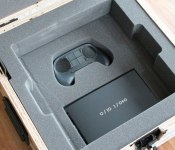
Steam Machines beta testers start receiving hardware, teasing the less fortunate

Unless you’re part of a select group of beta testers (or happen to be handy with Linux), you’re probably reading this in a home without access to a Steam Machine. Wondering what you’re missing out on? A handful of Valve’s 300 beta testers are happy to rub their good fortune in your face and clue you in. The aptly named “SteamMachineBetaTester” Tumblr and Reddit user Colbehr have kindly documented their Steam Machine unboxings, revealing the same form factor we saw last month packed into a well padded wooden crate. Well, there is one change: Valve has drilled out a hole in each of the test units ventilation grates, marking the test device with a representative blemish on one of the vent’s 300 perforations.
The complete kit comes with the beta hardware itself, a prototype Steam controller, HDMI, USB and power power cables, a USB Steam OS recovery thumbstick and a removable WiFi antenna module. True to Valve’s promise, the beta rig is serviceable too, with disassembly instructions helpfully spelled out in the device’s instruction manual. It’s hard not to be a little jealous, but at least you’ve got options: check out the tester’s galleries at the source links below or, you know, build your own.
Filed under: Gaming

Razer Comms For Android Available Now, Keeps You Connected Whether You’re Gaming Or Not
 Razer is a household name in the world of PC gaming accessories, and while they have had precious little to do with mobile devices in general, they’ve just released an Android app that’s going to make a lot of gamers happy. Razer Comms for Android is an app that allows you to remain connected to your Razer Comms friends wherever you are or they are, whether you’re playing games or not. Whether that’s through the free VOIP service the app provides or just instant messaging, the Razer Comm app makes it a snap to communicate from mobile to PC and vice versa.
 This also means you can receive SMS alerts on your PC, and accept or receive incoming VOIP calls. Needless to say, you will probably be rejecting most calls with “Can’t talk, busy gaming”. In case you were wondering how this all fits together, check out the video Razer posted to explain how to works:
Features of Razer Comms for Android:
- Connecting Gamers – Connect with your friends or find new gamers on the world’s largest multi-platform gaming messenger.
- Instant Messaging – Chat away with your friends 1on1 or in groups.
- Free Voice Chat – Make your voice heard with friends on mobile and PC alike.
- No Interruptions – The in-app overlay allows you to handle messages and calls without interrupting what you’re currently doing.
- Stay in the game – SMS-Forwarding and Call Notifications on the PC allow you to stay connected even while you’re in-game.
- Multi-Platform (PC, Tablet or Phone) – No matter your preference. Comms is there.
- Always On – Never miss a message and instantly receive them with push notifications.
- Completely Free – Razer Comms doesn’t have any hidden costs. Works over your phone’s existing data plan or any WiFi connection
Razer Comms is out now on the Google Play Store for free and is compatible with both Android smartphones and tablets. I’d also like to claim a small victory as Razer Comms is out on Android devices first, with an iOS to come early next year; you can tell Razer knows gamers well. Play Store links are below, and if you try the app, let us know how you find it.
Application: Razer Comms – Gaming Messenger
Price: Free
Press Release
RAZER COMMS GOES MOBILE WITH ANDROID
World’s first VoIP solution to allow gamers to make VoIP calls and messages from in-game to Android phones and tablets and vice versa
For Immediate Release:
CARLSBAD, Calif. – Dec. 12, 2013 – Razer™, the world leader in high-performance gaming hardware, software and systems, today announced the launch of the Android version of Razer Comms, its all-in-one communications solution for gamers.
The all-new Razer Comms Android app will allow gamers to take their Razer Comms experience mobile by allowing calls and messages to be made from in-game to Android phones and from Android phones to users who are in-game on the Razer Comms PC client.
“Staying connected in today’s world has become increasingly important and gamers are no exception to that,” says Min-Liang Tan, Razer co-founder, CEO and creative director. “Razer Comms solves that by being the world’s first VoIP solution to allow gamers to make VoIP calls or instant message with their friends on the road from in-game and vice versa.”
- In-game to Android/Android to in-game phone messaging and calls: PC gamers can now call or message their friends from within the game (no alt-tabbing required) and the other way round.
- Stay in the Game: The new update to the Razer Comms PC client allows gamers to reply to text messages or reject calls from their Android phones within the PC client, effectively eliminating the need for gamers to check their smartphones occasionally or to leave a game while in play.
- Compatible with Android phones and tablets. An iOS version of Razer Comms is tentatively scheduled for early 2014.
About Razer Comms:
Razer Comms is a free all-in-one communications solution for gamers, offering crystal-clear VoIP and versatile instant messaging with group chat capabilities. Built with advanced in-game overlay functionality and cross-game chat support, Razer Comms allows you to get in touch with your friends without compromising your gameplay. This is how gamers were meant to communicate.

Valve’s SteamOS is ready to download — only Linux vets are encouraged to apply

Just as promised, Valve has made its first release of SteamOS available for downloads at the same time it ships out prototype Steam Machines to 300 beta testers. Based on the Debian 7.1 flavor of Linux, SteamOS is a platform purpose built for playing PC games on the TV. Cutting out the cruft of desktop operating systems that aren’t well suited for the lean-back experience, one of its main features is the ability to stream games running on a computer elsewhere in the house, so they can be played on the TV, as well as play native SteamOS games.
It’s currently in beta, so Valve is recommending those without experience with Linux wait for a more polished version next year, around the time Steam Machine gaming PCs arrive at retail. Still, if you know your apt-get from your su and want to show those Xbox One and PS4 owners what an open next-gen platform is like, feel free to start the 960MB download here (good luck, some report downloads are already choking under the strain) to check it out early. Need more information on how it’s done? All the information you’ll need to get up and running, from hardware requirements to installation instructions can be found in this freshly-posted FAQ.
Filed under: Gaming, Home Entertainment, HD
Source: SteamDB, SteamOS FAQ, SteamOS

