



Music Inc. is anti-piracy propaganda posing as a casual game

UK Music and Britain’s Intellectual Property Office don’t believe that most music games tell the whole story — while they show the tunes, they omit labels struggling to find good artists and deal with piracy. To help widen the public’s perspective, they’ve just launched Music Inc. for Android and iOS. The label management game challenges you to foster talent while keeping your company profitable in a market that doesn’t always pay for your songs. The free title underscores a real problem for labels, and it may have you thinking twice about swiping that new album. However, it’s also very one-sided. The game sees every pirated copy as a lost sale, and it doesn’t question the copyright model or the need for labels in the first place. As long as you’re aware of the broader issues, though, it won’t hurt to try the game today.
Filed under: Cellphones, Gaming, Internet, Mobile
Source: App Store, Google Play
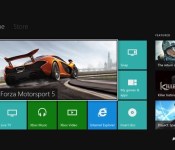
Xbox One’s first major update split in two, launching in February and March

When the first component of Xbox One’s spring update arrives on February 11th, it’ll be a few weeks ahead of the first spring flowers sprouting. Like those flowers, much of what’s contained in the February update is under the surface: Kinect voice recognition improvement, tools for developers and “stability and product updates to improve the customer experience” to name a few non-specific bulletpoints. What you’ll actually care about is the stuff you’ll see, which in this case is a battery meter for gamepads (visible on the dashboard) and a reorganized My Games & Apps section.
That first component is self-explanatory, but the latter piece requires some detail. First, you can actually see how much space you’ve got left on that 500GB HDD — helpful! Second, the applications are being broken out from games, and can be more incrementally managed. “Now you can pick the order in which you want your content to load and we’ve added a boot progress indicator so you can better track updates while they load,” Xbox chief product officer Marc Whitten says in a blog post detailing the update. Additionally, February’s update adds USB keyboard support. Sure, why not? There should also be some other bells and whistles in there, which Microsoft says we’ll find out more about soon (er, uh, before next Tuesday).
Head below for more on the second half of the update, due in March.
The second piece of seasonal update arrives on March 4th, and it’s got a fully revamped party system just in time for the launch of blockbuster game Titanfall (a multiplayer-focused experience). What exactly does that mean? We’ll have to wait to find out, as Whitten’s only offering “a new party and multiplayer system” as detail. And what of promised Twitch.tv streaming ahead of E3 this year? Microsoft’s staying mum for now, but we’d be shocked if it didn’t show up in the first major system update to Xbox One.
Regardless of the spring update, small and continuous updates to the Xbox One will still occur as time goes on. Whitten also says we’ll hear “many” more announcements regarding the upcoming update — here’s hoping next time we find out HBO Go and Spotify are part of the big spring refresh.
Filed under: Gaming, Software, HD, Microsoft
Source: Xbox
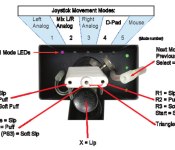
QuadStick controller opens up PS3, PC and Android titles to quadriplegic gamers (video)

Playing PS3 games could soon get a little more inclusive. QuadStick, a suitably complex mouth-based controller that offers quadriplegics the ability to play console games, has launched its fundraising campaign on Kickstarter. The controller is composed of a single joystick, four sip-and-puff sensors, a lip position sensor and a push switch, all hooked into a 32-bit ARM processor that outputs to both USB and Bluetooth, and then to gaming hardware. And it’s not just for PCs: it’ll work with Android devices and PS3s too. (If you have the right adapter, it’ll also hook-up to both Xbox Ones and 360s.) Which input is assigned to which in-game button is configurable, although there’s several prearranged setups built into the Kickstarter controller, too. The user can use the straws to shift between different control methods, deciding whether to control the left analog stick, the d-pad or navigate using a mouse cursor.
Gamers would also be able to use third-party voice recognition suites (like Dragon Naturally Speaking), to add in voice commands too. These could calibrated to pick up word commands and convert them into game-specific actions — just because triangle is ‘jump’ in one game, it typically isn’t in another. The roots of the project came from Ken Yankelevitz’s Quad Control Joystick, with Davison then tweaking and adding to the base design while getting consistent feedback from quadriplegic gamers. Ensuring the mouthpiece fitted correctly was apparently one of the biggest challenges, but it’s already working with the likes of Call of Duty — there’s a video of exactly that after the break. At the moment, there’s five working prototypes, and if the product reaches its funding goal of $10,000, it aims to make at least 25 units, with plans to scale up depending on how much is raised: the project’s already reached over $3,000.
Filed under: Gaming
Via: Eurogamer
Source: QuadStick (Kickstarter)

John Carmack quit id Software because it wouldn’t support VR games

We know the basic reason why John Carmack left id Software: he wanted to concentrate on his work at Oculus VR. However, we now know that it was more complicated — it was the result of a dream denied. The game developer explains to USA Today that he had proposed a deal between ZeniMax (id’s parent company) and Oculus VR that would have games like Doom 4 and Wolfenstein: The New Order support the Oculus Rift. He was heartbroken when the pact didn’t come to be. “When it became clear that I wasn’t going to have the opportunity to do any work on VR while at id Software, I decided to not renew my contract,” Carmack says. The departure is ultimately “bittersweet,” but it reflects his sincere belief that wearable displays represent the next big thing.
Filed under: Gaming, Wearables
Source: USA Today

SteamOS gets a native music player in Steam Music

SteamOS still isn’t really in wide use, and it’s very firmly still in beta. Heck, the latest version still carries the disclaimer, “don’t install it on any machine you are not prepared to lose.” With Steam Music, though, SteamOS is one step closer to being a multifunctional operating system: it takes your locally-stored music and makes it playable directly in the Steam UI. There’s a version for Steam’s Big Picture Mode as well, if you’d like to give it a shot on your non-Steam Machine gaming rig.
Valve says that random beta participants (culled from group members here) will get access soon, and a desktop version of the player is on the way as well. There’s no ability to purchase music, nor can you pipe in music subscriptions/Google Play accounts — we’ve asked if (and when) that’s coming — but it’s a pretty major step toward offering multimedia functionality on the upcoming Steam Machines. Like every Valve initiative, Steam Music is an evolving one. The intro page says it all: “Our next steps for the feature will be influenced by your beta feedback.”
Source: Valve

Grand Theft Auto 5 is the best-selling game of 2013

Between a $1 billion debut and rave reviews, it’s probably not a huge shock to you that Grand Theft Auto 5 was the best-selling game of 2013. Regardless, Rockstar Games’ parent company Take-Two Interactive confirmed suspicions today in the company’s financial earnings release. “Grand Theft Auto V finished as the best-selling video game of 2013,” the release states, attributing that claim to NPD. “To date, Grand Theft Auto V has sold-in more than 32.5 million units.”
Even with the game’s mass popularity and somewhat staid approach to world-building, we can’t help but commend Rockstar Games on the achievement — we loved our time in GTA5‘s single-player and (occasionally troubled) online worlds. Now all we can do is hope for an even prettier version on these new game consoles (or PC, for that matter) in 2014, though we don’t expect a repeat performance in the “best-selling game” category. Let’s not get too crazy.

Microsoft squashes rumors of a cheaper, all-digital Xbox One

Microsoft has no plans to build an Xbox One sans Blu-ray disc for $100 less than the current model, according to a tweet by Xbox chief Aaron Greenberg. Rumors about a cheaper, all-digital version with a 1TB drive floated up recently from the NeoGAF forums, with speculation that it might hit retail by October of this year. When asked to confirm over Twitter, Greenberg replied “No, you cannot believe everything you read on the internet.” We’re not sure if he’s shooting down the entire idea of the model or just the time frame, but sources suggest that Redmond was at least testing such a version. Considering how excited folks were about a possible retail version of the white, employee-only Xbox One, we’re not expecting the rumors to die down anytime soon.
Filed under: Gaming, Microsoft
Via: The Escapist
Source: Twitter

Battlefield 4 gets even prettier with new AMD drivers

If you caught our recent coverage of the huge Star Swarm demo, you’ll know that AMD’s Mantle programming tool has already proven itself capable of radically transforming a real-time strategy game. But the console-inspired API has been claimed to deliver performance benefits in FPS games too, starting with Battlefield 4, and the first independent evidence of this is now starting to trickle out. AnandTech and HotHardware have used almost-final Mantle drivers to achieve frame-rate gains of at least 7-10 percent in BF4, rising to 30 percent with some configurations, by doing away with the need for Microsoft’s relatively inefficient DirectX drivers.
In general, it looks like systems with weaker CPUs stand to benefit the most, because Mantle uses the graphics processor in such a way as to reduce CPU bottlenecks. We’ll get a better idea of the size of the improvement once Mantle is released to the public and tested on a wider variety of systems, including laptops and desktops with low-end or integrated AMD GPUs, but nevertheless, these early results bode well for those who are trying to eke better frame rates out of older, cheaper or smaller gaming rigs.
Source: AnandTech, HotHardware
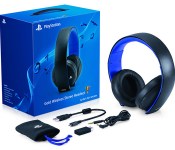
PlayStation 4 update supports Sony’s pricey headsets, including a new model

PlayStation 3 owners who quickly moved to the PS4 couldn’t take their expensive Pulse headsets with them, but that won’t be a problem for long. A version 1.6 update reaching the newer console late this evening will bring full support for both the regular Pulse and its Elite Edition, giving players 7.1-channel virtual surround sound and voice chat through Sony’s official hardware. Elite Edition owners will also get to use a Headset Companion App (due later this month) that sets custom audio profiles. To mark the occasion, Sony is launching some new audio gear: the Gold Wireless Headset offers 7.1-channel audio, voice and game profiles in a travel-ready, foldable design. It should sell for $100 when it hits store shelves early this month.
Filed under: Gaming, Peripherals, Sony
Source: PlayStation Blog
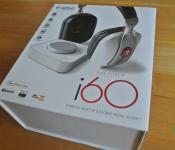
Turtle Beach Ear Force i60 Wireless Desktop Media Headset Review: a very complete package, even for the PC/Android user
 The world of premium gaming headsets is a very slippery slope; when you start paying north of $300 USD for a headset, you expect it to do quite a lot and sound absolutely orgasmic. Turtle Beach has of course been part of this world for some time now with its plethora of premium gaming headsets, though with a definite focus on gaming console solutions for some time now. Thankfully, Turtle Beach has started gravitating towards premium mobile solutions too, and the latest result of that endeavour is the Ear Force i60 Wireless Desktop Media Headset. On the surface, a thing beauty and sleekness; let’s dive in and check it all out.

The headphones
 The i60 is actually, first and foremost, a headset optimized for Mac and iOS use with several additional features (and an app) available to you if you use this headset with either one of those platforms. Being a humble Android and PC user then, I didn’t get to use some of the additional features, but as we’ll find out, there’s still a lot of headset to go around.
When I get a premium set of gaming headphones, I want the unboxing to be an experience, and thankfully, Turtle Beach has gotten that part of the deal down pat. Check out some of the photos as I dismantled all the gear in the wonderfully packed box:


The official list of items in the box include:
- Power Cable: Transmitter USB Cable(Micro)
- Charging Cable: Headset Charging Cable(USB Micro)
- Guide: Quick Start Guide
- Sticker: Turtle Beach Sticker
- Headset: i60 Headset
- Transmitter: i60 Transmitter
- Manual: Product Brochure
- Mobile Device Cable: 3.5mm Male to Male 4 pole
- Case: Carrying Pouch
So you’ll see there is quite a hefty amount of gear included with the i60, and ironically enough, given that this is a headset optimized for Mac and iOS, there is an overwhelming presence of micro-USB cables; do I sense a closet Android headset? The pouch is a nice touch, particularly as it’s quite a heavy, thick bag, which also has a small pouch on the inside which will allow you to take your transmitter with you whether you go.
 The i60 also comes with a lot of the little things that aren’t on the official list which make the i60 really convenient in multiple situations including a 6.3mm adapter which can be used with the mobile adapter cable for recording purposes, or my personal favourite, the airline adapter plug which turns the i60 into a plane-friendly headset.
 The first thing you’ll notice about the i60 headset is that it’s quite the looker; white earcups and brushed aluminium arms highlighted by black and red. It’s definitely not an inconspicuous headset; somehow I feel Turtle Beach headsets are never designed with that in mind, and perhaps rightly so. The colours of the i60 seem to scream for attention, but in a very subtle way, commanding your respect, and after spending a few minutes listening to them, you’ll understand why.
As was said at the beginning, the i60 is usable with both desktop computers and mobile; in desktop mode, the i60 uses the included transmitter to pair with the headset, whereas on mobile, you can use the standard method of pairing with Bluetooth. In wireless modes, the headset’s battery will last over 10 hours, which in my experience can last well over 15 hours if you’re using it on and off. You can, of course, also use the headset wired with the included mobile adapter cable, however, the i60 still requires battery power to operate in this wired mode. I think this is a bit of an oversight which restricts the i60 a little as an option for long-distance travellers.
 Charging is achieved via a micro-USB port on the bottom of the right cup, and the input audio jack is located on the left cup. You can operate the i60 while it is charging, but the standard 1m cable could be a bit short in some desktop configurations.


The interface buttons for the i60 can be found on the rear of the earcups. This can be a little weird to get used to at first, but it’s actually quite a lot easier to manipulate the controls on the back with your thumbs than it would have been fiddling around the front with your fingers. The buttons are comprised of a power button, EQ preset toggle up + down, and voice distortion button on the left side, and Bluetooth on/off, Bluetooth volume up + down and mic on/off button on the right side.
 And now moving onto the transmitter: the i60 transmitter, pictured above, is only used when you want to connect your headset to either a PC or a Mac. I think it’s a really sleek package, particularly with its brushed plastic and perspex face-plate. The dial in the middle controls two things: the outer dial controls the main volume of what you’re listening to, while the inside dial exclusively adjusts the chat volume that you’re hearing. It’s actually incredibly handy to be able to dynamically adjust volumes on the fly with this transmitter, and for some added pizazz, the ring around it lights up to show you either the main or chat volume, switching between the two when you start adjusting the dials.

The comfort
 The over-the-ear earcups of the i60 are incredibly comfortable; the memory foam fits to your head perfectly, and although the swivel on the earcups can be a bit stiff, once you find the right angle for the earcups to face and sit on your head, you’ll be in heaven. Likewise, the headband of the i60 uses a soft foam, though not quite as much as the earcups. If anything, the headband cushion might be a bit too narrow, potentially causing a single pressure point when wearing the headset for longer sessions.
 I have to say that my own experience with the comfort of the i60 has only been mediocre. Don’t get me wrong though; it is still an incredibly comfortable headset, and I have had multiple expressions of adulation from colleagues who have also tried the i60 (or its little brother, the i30) and absolutely loved how comfortable they were to wear. And I think I would mostly agree, but there is one limiting factor on the i60 which may make it less enjoyable for some people.
 The i60, like every other headset on the market, is adjustable in length, achieved by the earcups moving along a track in the headset arm, as pictured above. Unfortunately, even in most extended position, this was still just a tiny bit too short for my head. What this caused was my head to be rammed up against the cushion at the top of the headset and the narrow headband caused quite a lot of soreness after wearing it for long periods of time. While many other headsets on the market have far more extension on the earcups, it looks like the overall aesthetics of the headset might have influenced the way this was designed.
 The i60 was designed with some weight saving techniques in mind, like the lightweight cast metal headband and the aluminium headset arms. Unfortunately, this is all undone as the sheer amount of technology in the earcups makes the entire headset quite heavy, which in turn causes addition stress to occur at the headband. I also feel that the fit of the i60 is a bit too tight, causing some discomfort about the ears, though again, my colleagues who have also tried the headset have expressed no such discomfort; it increasingly seems that the i60 is an absolute dream for people with small-to-normal sized heads and for people with taller or larger heads, it could be a bit of a tighter fit. I’d definitely suggest trying one on if possible if you are considering it because for those who do fit it, you definitely will not be disappointed.
The sound
On a PC
 Unfortunately (or fortunately, depending on your platform), as the i60 is technically designed as a Mac headset, the included instructions are only directed to Mac users. Veterans of PC gaming headsets may know what to do already, but thankfully, Turtle Beach does have very straightforward instructions to set up the i60 on your PC which can be located on their support website. Once I had those, it was incredibly simple to set up the 7.1 surround sound and be listening to the fantastic DTS enhanced audio that the i60 provides.
 The i60 headset uses dual-band Wi-Fi to communicate with the transmitter so that loss is less likely and I’ve got to say that I did not once encounter any audio loss while testing it while gaming or listening to music. The i60 transmitter is quoted for a range of 30 feet, though I found that to be closer to about 15-20 feet, particularly if you’re going to be walking somewhere a few walls away.
 While using the i60, you’ll have access to some really nice inbuilt features such as preset EQ settings which you can vary using the up and down bumpers on the back of the headset. You are also able to morph your voice chat to one of 3 preset settings if you fancy being a bit sneaky on game-chat.
 The 50mm drivers in the i60 give it an incredibly full and rich sound. There really isn’t much to fault in the sound of the i60, and if you really turn in up, you’re in for something special. From pop to rock, rap to classical, I was nothing less but amazed at the sound that came from the i60; it’s clear, bassy, and all the articulated sounds are very sharp. If there’s one thing I need to point out, the high end of pitch scale did appear to get a bit dulled out which became extremely obvious when listening to violins in classical pieces; apart from that, the sound was faultless. And married with the preset EQ settings, which provides options for bass booster, treble booster or whatever else you could possibly dream up, you have a headset that can cater to pretty much any listener in one package.
 You might have been wondering, since the i60 is a headset, where’s the mic? Turtle Beach has been smart about the mic in the i60, particularly for mobile users who don’t appreciate multi-platform gaming headsets that have a large mic boom jutting out all the time. The mic is located on the left earcup as shown in the image above, and despite not looking like much provides fantastic quality voice audio for the receiver on the other end. One weird thing that does happen, though, when the mic is on and you touch the mic orifice, you will get some feedback in the headset; an easy fix for this is to mute the mic most of the time, which is a simple button press on the right earcup.
On an Android device, via Bluetooth
 As we mentioned earlier, the i60 is intended to be a iOS optimized headset. With an iOS device, you are able to answer calls or use Siri with a simple touch control and additionally, there is an iOS app which can be downloaded to manage the EQ presets as well as customize the headset controls. Unfortunately, Android has not been afforded this luxury; while it’s very clear that the i60 is targeted at and designed for Mac and iOS users, as an Android purist, I still can’t help but feel a bit disappointed that there is no Android app.
 It’s obviously not all bad; you still get the benefits of the fantastic i60 sound, the mic to be used in calls and naturally the fantastic looks and design of the headset itself. All Android users are missing out on are the customization options, which while nice to have, aren’t all that necessary (and for the audio savvy, this isn’t a downside at all). Connecting to the i60 via Bluetooth is very easy with the dual-pairing Bluetooth 4.0, and Turtle Beach claim that the headset is capable of simultaneously being connected to 8 different devices at once. While I wasn’t able to test this claim myself, I did have the i60 hooked up to my PC, my Note 2 as well as my Nexus 7 at the same time; this is definitely handy if you want to game on your PC without needing to check your Android device for notifications or taking calls when a battle is raging in-game.
 As with the sound with the i60 connected to the PC, the i60 had no troubles with lossy audio when connected to my Android device via Bluetooth, which I was incredibly impressed with. The lack of a answer call button (iOS only) is a slight downside, but the call audio was as good as you can expect from something just transmitting the audio from your phone to your headset.
The practicality
The battery power of the i60 is a pretty impressive affair; we’ve tested the i60 on full volume with Bluetooth on and found that it actually exceeds the quoted 10 hours on the box. It partially achieves this by mainly just being awesome, but also because it has some really intelligent power-saving measures programmed in; the i60 has an auto-off function which switches your headset off if there is silence for 5 minutes or does not detect movement for 5 minutes, but only if Bluetooth is off.
 This is pretty handy as you can run off to do some errands and be sure that your battery hasn’t been wasted away. Unfortunately, this can sometimes also be a detriment as sometimes you can be sitting very still listening to music and the headset will turn itself off. I can’t exactly fault the feature as it does conserve a lot of battery, however it can be annoying for your headset to randomly turn off if you’re a particularly statuesque person. This of course only occurs when you’re using it with the PC, so mobile users won’t have this issue.
 One thing I really like about the i60 is that it utilizes pre-recorded voice prompts when you use the buttons; this is particularly important seeing as the buttons are located on the back of the earcups and there is no visual indicator for when you are fiddling with your EQ settings. This makes switching between the EQ presets and toggling various features a breeze as the prompts simply dictate the current setting you are on in a pleasant lady’s voice, however, the voice can be occasionally jarring as its volume appears to be at an independent default level and cannot be changed; I jumped out of my skin quite a few times when sitting in silence for 5 minutes when out of the blue, a decently loud voice in my head exclaims “powering off”.
 I also particularly like the inclusion of a carry pouch which even has a dedicated pouch for the transmitter, and makes the i60 a prime candidate for all the gamers out there who are always on the move and need their premium sound with them all the time.
The verdict
Rating: 4.5/5
I really wanted to give the i60 full marks: it looks fantastic, sounds fantastic and is jam-packed full of technology that is cutting edge in the premium gaming industry. However, on a personal level, the i60 lost some marks on comfort as a result of its lack of size accommodation. Please let me restate though that this is not an issue if you have a smaller or normal-sized head.
For a headset that is optimized for Mac and iOS, the i60 offers a surprising amount to PC and Android users; you get full use of the i60′s features, bar only a handful, most of which aren’t essential anyway. It obviously would have been nice to also have an Android app to control the EQ presets, but it’s clear the i60′s main target is Mac and iOS users. Regardless, PC and Android users will be more than satisfied should they get the i60.
And then there’s the price: $399.95 USD. That is a lot of money but when you think about it, the i60 is essentially a set of premium audio headphones with extra technology built in that allows it to not only be used wirelessly in multiple scenarios with multiple platforms, but also able to dynamically change its audio quality on the fly, and sounds fantastic doing it. Veterans of Turtle Beach products will understand: the i60 costs what it does because it does what it says it does and it does it exceptionally well.
We hope this review has given you a better idea of what to expect with the Ear Force i60 headset; to check out the Turtle Beach Ear Force i60 Wireless Desktop Media Headset, you can visit its product page here, or for more information about Turtle Beach’s other products, you can visit their website here.
Full gallery of photos


