


Walmart starts selling used games on November 3rd
 Remember when Walmart announced it was going to start taking video-game trade-ins? Well, now the retail giant’s ready to sell them back to you. Starting November 3rd, some 1,700 of Walmart’s stores will begin selling pre-owned games. And to take another swipe at GameStop, Walmart’s also announced that it’ll be selling this year’s Call of Duty, Advanced Warfare, at 12.01 a.m. on “day zero” without needing to pre-order it. What’s more, any trade-ins made on November 3rd and 4th (Advanced Warfare‘s launch days) will net you 50 percent more credit when you purchase CoD. Need a console to play it on? Well, anything you trade in toward a PlayStation 4 will net you double the in-store credit — tough luck if you wanted a matching Xbox One.
Filed under: Gaming, Home Entertainment, HD

You can finally play the best-ever Star Wars games on a modern PC (updated)

Forget that upcoming Battlefront game for now — the Star Wars titles that hardcore fans have really been looking for are finally here. Good Old Games has announced official re-releases of X-Wing and TIE Fighter that let you play these legendary space combat games (arguably, the best Star Wars games ever) on a modern PC without resorting to bootleg copies or hacks. They’ll cost $10 each when they arrive on October 28th, and they’re Special Editions that include both the CD-ROM content (SVGA graphics! Voiceovers!) as well as all the expansion packs. If you’ve been waiting two decades to once more recreate the Death Star trench run or blow up a Rebel frigate, your moment has come.
Update: As you may have suspected, GOG posted those game links prematurely — they disappeared shortly after we posted our story. Come back on the 28th and they should work properly.
Via: Sir_Crocodile (NeoGAF), Kotaku
Source: GOG (X-Wing), (TIE Fighter)
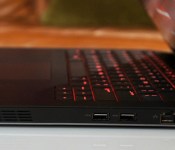
Alienware puts its new gaming desktop and 13-inch laptop up for sale

If you liked the looks of Alienware’s new thin-and-light 13-inch laptop or its bigass, futuristic-looking Area-51 desktop, then listen up: Both are on sale beginning tomorrow, with shipments starting in November, and we finally know the full specs. Starting with the Alienware 13, it goes from $999 (£949 in the UK) with a dual-core Core i5-4210U processor, 8GB of RAM, a 2GB NVIDIA GeForce 860M GPU, 1TB 5,400RPM disk and a fairly low-res 1,366 x 768, non-touch matte display. If you like, you can step up to 16GB of RAM, either a hybrid hard drive or up to a 512GB SSD, and either a 1080p non-touch display or a 2,560 x 1,440 touchscreen. It would seem, though, that despite those various upgrade options, there’s only one choice for the CPU and graphics card. Regardless of the configuration you get, the whole thing comes wrapped in a slimmed-down package that weighs about four and a half pounds and measures an inch thick.

Meanwhile, the Area-51 starts at $1,699 (£1,299 in the UK) with a six-core Intel Core i7-5820K processor, a 2GB AMD RadeonTM R9 270 GPU, 8GB of RAM, a 2TB 7,200RPM hard drive and a slot-loading DVD burner. From there, you’ve got lots of upgrade options — way more than on the Alienware 13 laptop. On the CPU side, there’s a slightly faster six-core Intel Core i7-5930K processor (clocked at 3.5GHz instead of 3.3GHz), as well as an eight-core Intel Core i7-5960X chip. In total, there are four memory slots; Dell will ship the machine with eight, 16 or 32GB. When it comes to storage, you can step up to a 128GB SSD plus a 2TB 7,200RPM drive; a 256GB SSD with a 4TB HDD; or a 512GB solid-state drive, also with a 4TB disk.
As for graphics, well, this might take a few sentences: The Area-51 is available in single-, double- and triple-GPU configs. If all you can afford is one graphics card, your upgrade options include a 2GB NVIDIA GTX 770, a 3GB GTX 780, a 4GB GTX 980 or the GTX Titan Z with 12GB of GDDR5 VRAM. Ready to hear the dual-card options? You can get the GTX 770 with 4GB (2 x 2GB), the GTX 780 with 6GB (2 x 3GB), the GTX 980 with 8GB (2 x 4GB) or the Titan Z with 24GB (2 x 12GB). Across the board, NVIDIA’s SLI technology is enabled. Finally, the three-GPU options include a mix of both NVIDIA and AMD cards (but mostly NVIDIA). There’s the GTX 770 with 6GB (3 x 2GB), the GTX 780 with 9GB (3 x 3GB) and the GTX 980 with 12GB (3 x 4GB). If you’re an AMD fan, meanwhile, you an score the Radeon R9 290X with 12 gigs (again, 3 x 4GB). Depending on which brand of graphics card you choose, you’ll get either NVIDIA’s SLI technology or AMD Crossfire. Lastly, there’s a Blu-ray drive option, in case you haven’t quite ditched physical media.
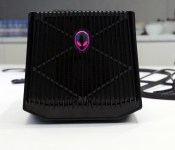
Alienware’s got a massive $300 dock for your new graphics card

We know what you’re thinking: What the hell is a “graphics amplifier”? (Some of you smartasses are probably also wondering if it goes to eleven.) In fact, it is what it sounds like: The Amplifier, a new accessory from Alienware, is a big ol’ shell that lives on your desk, with room for nearly any desktop-grade GPU (anything up to 375 watts). Once you get that set up, you plug the thing into your gaming laptop via a cable and boom, your notebook is suddenly running off a desktop-grade GPU, not the mobile one that came built inside the chassis. As a bonus, the Amplifier also has four powered USB ports, so you can also use this as a docking station for your keyboard, mouse, monitor, et cetera. And yes, that glowing Alienware head on the front has customizable lighting. Of course it does.
Sounds kinda rad, right? Right. Well, except for one teeny detail: This requires a proprietary, PCI-Express-based cable, one that only works on the new Alienware 13. According to a Dell spokesperson, future models will use the same connection port but for now, even if you have an older Alienware machine you’re outta luck. Of course, too, if you own a notebook from another brand, like Razer or ASUS, this will be of absolutely no use to you. Which makes sense: Dell wants to give people an incentive to buy Alienware laptops. This is, at the end of the day, just an Alienware add-on and little more. But come on, imagine how many of these Dell would sell if it could make the thing work using a common standard.
Assuming we haven’t taken the winds out of your sails, this is up for preorder today for $299 in the US and £199 in the UK (GPU not included), and is expected to ship sometime in November. As for the rest of you, well, we’ll always have Spinal Tap, right?
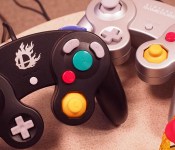
The hardware of Super Smash Bros. for Wii U (hands-on)

When Nintendo announced the re-release of years old game controllers from the Nintendo GameCube home console, it was more than a little surprising. What’s Nintendo doing re-releasing gamepads from 2001 for its still new-ish game console? And more importantly, why? It’s because of crazy people like me. In case it weren’t already clear, I’m a longtime fan of Nintendo’s Smash Bros. franchise — a 2D fighting game featuring a massive cross-section of Nintendo’s biggest gaming franchises. Mario fights Zelda, for instance; I wrote a piece breaking down how it works and why it’s such a wonderful franchise right here. So, what do GameCube controllers have to do with any of this?
Simple: The GameCube version of Smash Bros. (Melee) is considered by many fans, including myself, to be the series’ best work to date. Beyond the game itself, the GameCube controller was heralded as a perfect fit for the series. And that’s why Nintendo’s re-releasing a gamepad from over 10 years ago, as well as an adapter: so the controllers will work with the upcoming Wii U version, dubbed “Super Smash Bros. for Wii U”. Still weird, but a bit more logical now, eh?
I spent a few hours this morning both using the re-issued controllers and seeing how the NFC-based Amiibo figurines work on the Wii U version of Smash Bros. Let’s get crazy.
First up: the re-released GameCube gamepad. When Nintendo says it’s re-releasing the GameCube controller, the company means that literally. The single difference between new and old (we brought our own for comparison) is the logo in the middle: where the old controller says “Nintendo GameCube,” the new ones have a Smash Bros. symbol with flames surrounding it. That’s it! The buttons feel the same, and the controller’s bizarre shape remains. It’s not an approximation. It’s not similar. It’s the same controller.
Of note, you’ll need the four-port GameCube controller adapter to make these puppies run on the Wii U (and yes, wireless Wavebird controllers also work in the adapter hub). Should your Wii U’s USB ports be occupied, that’s going to cause an issue: the GameCube controller adapter takes up two USB ports. If you’ve got any external storage sticking out of your Wii U (like I do), now’s a good time to move it to the rear of the console — GameCube controller wires are only so long and you’ll want the adapter sticking out of the front of your Wii U. Gotta maximize that space, folks!
Amiibo

If you dreamed of Nintendo’s Amiibo figurines ferrying your favorite Smash Bros. character and all of his/her stats from Wii U to Wii U, this might hurt: Nintendo’s Amiibo figurines each contain a single, unplayable character’s data. This isn’t your data, but the data of a character you play with in eight-player Smash (among other modes). The character gains “levels” as it plays, as well as learning new moves and fighting styles. You can customize that character as you wish, but you can’t actually play as the character housed in the Amiibo. Should you get a Pikachu Amiibo, you’ll have a Pikachu to customize (and the same goes for the rest — Mario houses Mario, etc.).
Given the latest Smash Bros‘. proclivity for character customization, you might think that a single Amiibo could house multiple customized versions of its character. You’d be wrong! A Nintendo rep clarified to me this morning that each Amiibo houses one version of one character; you couldn’t build a speedy Pikachu and a bruiser Pikachu, for instance, and put them both on a single Pikachu Amiibo. You’re choosing one version or the other, which kinda stinks (especially considering that Amiibo figures cost $12.99 apiece).
Setting up and saving data on Amiibo is as easy as you’d think: simply tap and briefly hold the figurine on the Wii U gamepad’s NFC spot (on the left side, just underneath the d-pad). If you’re using Amiibos in battle, the game prompts you to tap any corresponding figurines to the gamepad after battle (to save out any data from the match).
The first twelve Amiibo launching with the game on November 21st are as follows: Mario, Peach, Link, Samus, Yoshi, Donkey Kong, Pikachu, Kirby, Fox, Marth, Villager and Wii Fit Trainer. There’s another batch set to arrive later this year. As for the GameCube adapter hub and controllers, they’ll also be available alongside the Wii U game in November; the hub costs $19.99 and each gamepad costs $29.99. If you went all the way crazy and tossed out all your GameCube controllers from back in the day, Nintendo’s putting together a Wii U Smash Bros. bundle with the hub and one GameCube controller (as well as the game itself) for $99.99.

Oh, and in case you’re wondering: yes, Super Smash Bros. for Wii U was tremendously fun to play and looks as sharp or better than Nintendo’s best efforts thus far on Wii U. Eight-player is positively insane and seemingly exists solely for using Amiibo characters. I can’t possibly judge whether or not the game is worth your time based on the hour (or so) I spent with it this morning, but as a longtime Smash Bros. fan I’ve thoroughly enjoyed the Wii U version every time I’ve played it.
Filed under: Gaming, Peripherals, Software, HD, Nintendo

Tell us how you really feel about the Xbox One and the PlayStation 4

It’s been almost a year since the Xbox One and PlayStation 4 were released in North America, with sales reaching over 15 million units combined worldwide. While we reviewed both consoles, giving the Xbox One an Engadget score of 81 and the PS4 a score of 83, what we reviewed were the systems as they existed at launch, with some great features and a few kinks, but still lots of potential. Since then, plenty has happened for both machines — like Xbox One shedding its mandatory Kinect unit and the release of a few marquee titles like Titanfall and Destiny. To find out where each system stands today, we turn to you, our readers, to let us know about your own experiences with the two consoles. How many games have you bought? Which do you play every day? Do you still make use of options like voice control? Write a detailed review of the Xbox One or PlayStation 4 on their product pages to let us know, and we’ll feature a few of the most insightful comments in our roundup posts next month.
Image credit: Javier Domínguez Ferreiro/Flickr
Filed under: Announcements, Gaming, Sony, Microsoft
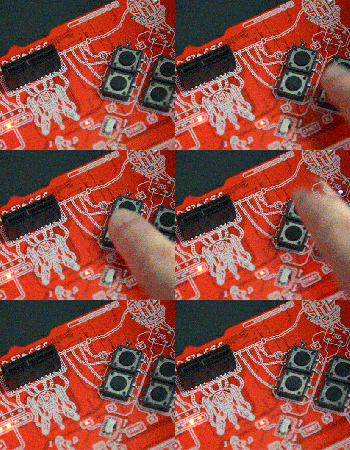
Making chiptune music is as easy as gaming with this player

Chiptune music is one the many phenomena that ’80s era gaming nostalgia spawned — but to get into it you need to mod a working 30-year-old NES into an instrument. Now, a company called Assorted Wires has launched a hackable 8-bit chiptunes instrument on Kickstarter to make it way easier. The pitch is pretty simple: if you’re good at video games, you can make music with no practice. That’s why they’re calling it the Lo-Fi SES, for Sound Entertainment System. It’s shaped exactly like a game controller, with the control buttons used to trigger samples, change tempo, and play, record or delete tracks, to name a few functions.

The Lo-Fi SES is designed around the Arduino platform with an Atmega processor. As a result, you can replace the samples with actual sounds from an NES or other console. You can remap the buttons, do sophisticated open-source signal processing and even use it as a… game controller. The team says that no coding experience is needed, but if you like hacking, “it’s the perfect platform for audio projects, budding bands or skilled instrumentalists.” Finally there’s a slot to add three cartridges: a second sound pack, a USB cartridge for custom tweaking and a “Smasher” cartridge that lets you dirty up the music.
So how much does this chiptune fun cost? For $50, you can get an early bird cartridge only, while $110 will grab you the early bird Lo-Fi SES with all three cartridges. Early bird backers should receive their devices by the end of the year, while other buyers will have to wait until April 2015. The campaign has just kicked off with a $5,000 goal.
Source: Kickstarter
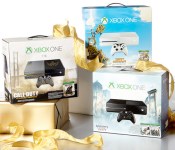
Xbox One price slashed to $349 for the holidays

Good things come to those who wait, and Microsoft’s now in the business of richly rewarding those capable of delaying their gratification. If you’ve yet to pick up an Xbox One, then holding off until November 2nd will see the company apply a $50 price drop across the range. That means that a Kinect-free Assassins Creed or Sunset Overdrive bundle will be available for just $349, while the limited edition Call of Duty: Advanced Warfare package with a custom console and controller will be priced at $449. The offer runs all the way through until January 3rd, although we’d imagine that price sticking around if it helps to make a dent in Sony’s reasonably healthier console business.
Filed under: Gaming, Sony, Microsoft
Source: Major Nelson, Xbox Wire

Someone made a parody of ‘P.T.’ in Xbox One’s ‘Project Spark’

The absolutely terrifying playable teaser for the next Silent Hill game might only be available on PlayStation 4, but if you have an Xbox One you might be able to play something close to it. Someone has gone ahead and recreated P.T. in Redmond’s game creating game, Project Spark. The familiar sights are all there: a never-ending hallway filled with horrors, a ghoul waiting just around the corner, Nic Cage screaming in terror. Wait, what? Well, the trailer is intercut with clips of Nic Cage’s performance from the 1999 film about snuff movies, 8mm. Because watching him watch… well we aren’t going to describe what he’s watching, but let’s just say it fits the theme of P.T. pretty spectacularly. Need to see the horror for yourself? Jump past the break and prepare for a descent into madness — don’t say we didn’t warn you.
Filed under: Gaming, Home Entertainment, HD
Source: KavinskeeZ (YouTube)

Sony wants to show you how PS4’s online game-sharing works

When next Tuesday’s 2.0 update hits for the PlayStation 4, Sony will finally turn one of the most ambitious promises it made when the console was first announced a reality. We’re talking about Share Play, of course. We know: the ability to virtually hand a controller off to a pal via the internet and have them work through a game’s tricky section for you sounds kinda like magic — the type that only Disney is capable of. But, in theory it sounds pretty simple, and the catch-up king has recently released a video that walks through the process step by step. From the looks of it, the new feature is added as an option from the DualShock 4’s Share button. Naturally. How well it all works in the wild, however, remains to be seen.
The rub of it is that every function other than screen sharing (meaning, controller passing and a virtual second player controller hand-off) requires a PlayStation Plus subscription. What’s more, these virtual sharing sessions are limited to an hour apiece. After all, Sony’s in the business of selling games — letting you stream a pal’s indefinitely probably isn’t good for the bottom line.
Filed under: Gaming, Home Entertainment, HD, Sony
Source: PlayStation Blog

