


Oppo N3 image processing updated, we compare it, gauge reactions
brightcove.createExperiences();
Oppo’s current flagship, the N3, brings with it some great specifications and features on both the hardware and software side. What makes this device unique though is its one of a kind rotating camera setup, with the same 16 MP unit being used for regular shots as well as self portraits.
Granted, the camera setup means nothing if it doesn’t deliver in the quality department, and fortunately, we were already quite impressed by the camera prowess of the Oppo N3 during our in-depth review. That said, a major update to the digital image processing engine was one of the key features of the latest software update of Color OS, bringing with it enhancements to modes and general image quality that Oppo hopes puts its device at par with the other flagships of today.
Read more: Oppo N3 full review
In fact, Oppo was so confident that its software update has significantly enhanced their camera experience that they challenged Android Authority to take to the streets of Los Angeles, where we showed off the device to everyday people to see how they felt both about the camera experience and the phone itself.
People’s reactions to the Oppo N3

During our time in L.A. we encountered numerous people that were willing to try out the Oppo N3, and even pit the phone against their own devices in a quick camera shootout. One recurring reaction we saw from almost everyone we talked to was excitement and intrigue over the device’s unique rotating camera. Apart from being impressed by the fact that this unique design would allow for some high quality self portraits, users were also appreciative of how easy this camera setup made it to take panorama images, with the rotating camera taking care of all the hard work that usually goes into these shots.
Because it’s the same camera as the rear, just turned around, you have the high resolution still.
As far as photo comparisons go, we’ll be taking a much more in-depth look at how the Oppo N3 and its updated camera experience fares when compared to other modern flagship devices in a follow up feature next week, but we do want to talk a little about some of the reactions people had to the image quality on the N3.


Everyone who took a selfie with the Oppo N3 seemed happy with the result, and as you can see, the images really did turn out very nicely. Beyond selfies, one common sentiment was that the Oppo’s N3 did a great job of getting in close while still retaining a lot of detail. This was evidenced in many of the phones we encountered, including the iPhone 6 and several Android devices.
Turning to the reactions on the phone itself, the build quality in particular received some positive shoutouts, with users mentioning how light it was, and that it felt more substantial and durable when compared to the plastic build of some older Android devices, like previous Samsung flagships.
I would buy it if the company (Oppo) brought it here
It’s also worth noting that there were quite a few iPhone users that played around with the Oppo N3, and yet none of them called out the phone as too big,and one person even said “it’s just like an iPhone 6″ referring to how it felt in their pocket. With Apple moving into the big screen segment with the iPhone 6 and 6 Plus, Apple users are clearly a lot more comfortable with the larger sizes of Android smartphones than they might have been in the past.
Breaking down the features
So what are the biggest features offered by Oppo N3’s camera software? There’s quite a few standouts, though Ultra HD and Super Macro modes certainly got the most attention when we showed the device off to the general public.
Ultra HD

The way the Ultra HD mode works is that it takes 10 shots of scenery and superimposes the best 4, allowing for a lot more detail in the picture. It’s not exactly noticeable in the shot at first glance, but becomes more obvious as you zoom in, removing a lot of the noise that is otherwise usually seen. If you’re looking for more detail in your shots, this mode is certainly going to prove to be very useful, but of course, keep in mind that this does result in significantly larger file sizes as well.

During a iPhone 6 vs N3 shootout, I illustrated to the iPhone 6’s owner how the Ultra HD mode on the N3 could make a 64MP image that allowed much clearer detail than you’d see from a typical smartphone’s images. While taking the same shot of the iconic Via Rodeo resulted in image quality that wasn’t too far apart between these two phones, the difference was noticeable when zooming in further into an image, with the Ultra HD mode on the Oppo N3 allowing for an impressive amount of detail and lack of noise.

The difference becomes obvious when zoomed in further.
Super Macro

The second mode that we want to highlight is Super Macro, which essentially gives the camera a digital zoom to get a really close up shot of the intended target that you want to shoot. As you can see in the images here, the amount of detail and focus is great, and a close up shot of a burger and fries, or coffee, in this fashion will get anyone’s mouth watering. Using this mode allowed for some fantastic zoomed in shots with a lot of detail, resulting in some professional looking photos that will certainly help enhance the smartphone photography experience.

Other Shooting Modes

While the two camera modes above received a special mention in the video, there is no shortage of other features that the Oppo N3 camera application packs. While panorama pictures are possible with any smartphone nowadays, with the Auto Panorama mode, the device takes care of all the work otherwise required by you having to move around yourself while holding the phone in exactly the right position.

Colorful Night mode increases your shutter speed to capture in more light, and enhances the contrast and saturation of the image to let the image pop, and allows for, as the name suggests, some great scenic shots at night. HDR mode also gives your images that extra saturation for some bright photos. Finally, an expert mode is also available, that allows for complete manual control of the camera, with you able to adjust white balance, ISO values, and manually focus the shot.
Wrap up


As you can see, the Oppo N3 seemed to, at the very least, hold its own against many of the phones we ran into in L.A. Oppo might not be a familiar brand here, but most of the people we talked to seemed open to the idea of a phone that brings an experience that is a little different, thanks to the rotating camera. Stay tuned for the second part in this series, in which the Oppo N3 is pitted against the best of the best in the smartphone world when it comes to the camera experience, and take a closer look at how it fares.
Based on the shootouts you saw in the video above, and your own initial reaction to the Oppo N3, what are your thoughts on the device? Let us know in the comments.
.rvs_wrapper
width: 335px;
.rvs_wrapper.align_left
float: left;
.rvs_wrapper.align_right
float: right;
.rvs_wrapper.align_center,
.rvs_wrapper.align_none
width: 100%;
.rvs_wrapper.align_center
text-align: center;
.rvs_wrapper.align_center.cbc-latest-videos ul li
float: none;
display: inline-block;
vertical-align: top;
.rvs_wrapper.cbc-latest-videos:not(.align_none) ul li:nth-child(2n+1)
clear: both;
.rvs_title
font-weight: 600 !important;
margin: 0 !important;
.rvs_wrapper.align_right .rvs_title
padding-left: 20px;
.rvs_title a
font-family: ‘Roboto Condensed’;
color: #3a3a3a;
.rvs_wrapper.cbc-latest-videos ul
padding-top: 10px;
.rvs_wrapper.align_left.cbc-latest-videos ul li,
.rvs_wrapper.align_none.cbc-latest-videos ul li
padding: 0 15px 0 0;
.rvs_wrapper.align_right.cbc-latest-videos ul li
padding: 0 0 0 15px;
float: right;
.rvs_wrapper.align_center.cbc-latest-videos ul li
padding: 0 7px;
.rvs_wrapper.cbc-latest-videos ul li > a
font-weight: 400;
.rvs_wrapper.cbc-latest-videos ul li > a .yt-thumbnail
margin-bottom: 0;
@media only screen and (max-width : 480px)
.rvs_wrapper
width: 100%;
text-align: center;
#page .rvs_wrapper.cbc-latest-videos ul li
padding: 0 7px;
display: inline-block;
float: none;
vertical-align: top;

HTC One M9 camera app getting update to match hardware improvements

As the HTC One M9 starts to hit consumers’ hands tomorrow, we can expect to see lots of examples of how the camera works. One of the knocks that HTC has been subjected to from reviewers who got early access to the HTC One M9 is that the performance of the camera was underwhelming. This criticism had to sting HTC given the change in hardware from their old 4 MP Ultrapixel configuration to the new 20 MP standard camera. HTC hopes to address that via an update to their camera app that will start rolling out over the next week depending on which carrier is involved.
According to Jason Mackenzie, President of HTC America, the software update will hit anytime between April 10th and April 17th. Reports indicate Verizon units will come with the update preloaded when units are delivered starting tomorrow. Sprint’s HTC Ony M9 units should also receive the update tomorrow, though it may not be preloaded initially. AT&T buyers will have to wait as the update is currently scheduled to start rolling out on April 17th. Meanwhile, although no official date has been mentioned, some T-Mobile users are reporting the update has already started to hit their devices.
@Monica_Renata @Crofty_71 @HTCUSA camera to see improvement w/ sw update coming tomorrow or 17th (next Fri) depending on carrier version
— Jason Mackenzie (@JasonMacHTC) April 9, 2015
Come comment on this article: HTC One M9 camera app getting update to match hardware improvements
Intel unveils smaller 3D depth camera for smartphones

Intel CEO Brian Krzanich, speaking at IDF in Shenzhen today, announced a new, smaller, thinner model of its RealSense camera technology, which is designed for use in smartphones
If you’re unfamiliar with RealSense, it is essentially a 3D depth sensing camera. The technology can be used to add depth information to photos, allowing for refocusing at a later date, and to control devices with various gesture controls, such as moving a hand or even winking.
Previous versions of the technology have already shipped in a number of PCs and tablets. Intel has also put the technology to work as a distance sensor in flying drones, face detection for video calls, Kinect-esque gaming experiences, motion tracking for virtual reality, and even for 3D scanning objects.

The new camera module is now slim enough to fit inside a 6-inch smartphone and has a lower thermal output than previous models, making it practical for smaller form factors. The new model also claims to have a longer range detection than before.
Intel also announced a partnership with Chinese online retailer JD and demonstrated how a tablet equipped with RealSense could be used to quickly measure box sizes and calculate the space needed for storage. A Windows 10 tablet using RealSense was also demoed, which used the camera to log in using face recognition.
Intel did not announce any specifications or a release date for its new RealSense camera, but it could end up in devices later in the year.
Intel’s made a tinier, longer-range depth camera for phones

Intel’s been a huge backer of gesture control plus 3D scanning, and so far it’s managed to integrate its RealSense technology into select desktops, laptops, tablets and even drones. The missing piece of the puzzle? Smartphones. But that’s no longer the case with Intel’s latest RealSense camera, as showed off by Intel CEO Brian Krzanich at IDF in Shenzhen today. The new module is significantly smaller and slimmer than the previous version, and the lower thermal output helps, too. As such, Intel’s able to fit it into a 6-inch smartphone prototype, though Krzanich, an exec known for taking risks with live demos, didn’t turn on said device on stage.

On a related note, Intel also took the opportunity to announce its partnership with Chinese online retail giant JD to help improve the latter’s warehouse management. Using a tablet with integrated RealSense depth camera, Intel showed off how the system can quickly measure the required box sizes for products of all shapes, and consequently summing up the space needed for shipment or storage. In another demo, Krzanich unveiled a Skylake-based development kit in the form of a Windows 10 tablet, which used a RealSense camera to quickly scan his face to log him in.
There’s no word on availability nor detailed specs of the new RealSense camera just yet, but we can safely assume that it’ll be just as capable of performing the aforementioned tasks on smartphones.
Filed under: Cellphones, Misc, Mobile, Intel
LG’s upcoming G4 lets you take better photos in the dark

LG’s flagship smartphone has improved every year, other than the custom UX apps that we’ve found to be “unnecessary” and “redundant.” A new tease of the G4 and its UX 4.0 software shows more of the same on both fronts. The company has improved its camera with a low-light f/1.8 lens that one-ups Samsung’s flagship by a tick, though the G4 will be hard-pressed to better the Galaxy S6’s image quality. There’s also a new “Quick Shot” capability that lets you snap a photo with the screen locked by double-tapping the back button, along with a manual mode for finer shooting control.
On the other hand, LG also trumpeted several superfluous-looking features in its new UX 4.0 Android flavor, even while Samsung is de-emphasizing such apps. Smart Notice, for instance, “analyses a user’s daily routine and… combines this information with (his) lifestyle habits” — exactly like Google Now does. Other features include photo album organization by location, custom contact ringtones and photos, and a revised Smart Bulletin that collects and displays info from your schedule, music, weather and other apps. Some of these may be useful, but hopefully, LG will make it easy to deactivate any UX 4.0 apps you don’t want.
The G4 is rumored to pack a 5.5-inch QuadHD display like the G3, and you can probably expect top-of-the line specs across the board. It may also have a leather or faux-leather back, à la recent Samsung models like the Galaxy Note 4. Until it arrives on April 28th, you can read the tea leaves with the videos below.
Filed under: Cellphones, Mobile, LG
Caltech sensor could turn your phone into a 3D scanner

3D printing technology is gradually becoming slightly more affordable, but we’re not all CAD experts and a cheap 3D scanner to help produce our own objects remains elusive. Fortunately, CalTech researchers, working under electrical engineer Ali Hajimiri, are working on a new “nanophotonic coherent imager” (NCI) that may one day allow users to scan 3D images with just their smartphone.
The tiny NCI chip measures less than a square millimetre and is based on Light Detection and Ranging (LIDAR) technology, which beams a laser onto a subject and analyses the light waves reflected back. From this data, the sensor can provide accurate height, width and depth information for each pixel in the shot. Typically, image sensors are only interested in the light intensity of each pixel, which doesn’t offer any distance information.
Each “pixel” within the sensor is a LIDAR, allowing for multiple data points to analyse the phase, frequency and intensity of the reflected waves. Combining all the data together forms a detailed 3D image, which is apparently accurate to within microns of the original scene. Here’s the explanation of how it works:
If two light waves are coherent, the waves have the same frequency, and the peaks and troughs of light waves are exactly aligned with one another. In the NCI, the object is illuminated with this coherent light. The light that is reflected off of the object is then picked up by on-chip detectors, called grating couplers, that serve as “pixels,” as the light detected from each coupler represents one pixel on the 3-D image. On the NCI chip, the phase, frequency, and intensity of the reflected light from different points on the object is detected and used to determine the exact distance of the target point.
As promising as the technology is, the first proof of concept chip produced in the lab only has 16 LIDAR pixels in the sensor and is therefore only capable of capturing small image segments. The 3D coin image, picture above, required movement of the camera in between shots, but the development team is working on scaling up the technology into a larger sensor. In the future, Hajimiri says, that the current array of 16 pixels could also be easily scaled up to hundreds of thousands of pixels, enough for a low resolution camera.
This 3D scanner technology is already found in self-driving cars and robots, and, thanks to this research, will perhaps one day make its way into our smartphones too.
Toshiba begins production of 240fps, fullHD video image sensor

Today, Toshiba announced that it has begun commercial production of its new T4K82 CMOS image sensor for smartphones and tablets. The sensor packs in high-end features which could give a boost to next-generation products.
The T4K82 is a 13 megapixel BSI (back-illuminated) CMOS image sensor, which is a match for most modern high-end smartphones. However, the big talking point is that Toshiba’s new chip is capable of 240fps interlaced slow-motion video capture with a full 1080p resolution, which, on paper, is the highest frame rate available in the industry. It can also scale down its resolution to QVGA (320×240) for 900fps equivalent video capture.
To accomplish this, Toshiba makes use of its own “Bright Mode” technology to boost frame brightness by up to four times. This is achieved through “charge binning”, which adds the charges of two pixels and outputs the sum as one pixel with double brightness. Typically, high speed frame capture suffers from underexposure due to the shortness of time available to capture light. Toshiba provides an interlaced video output when using Bright Mode, effectively doubling the perceived frame rate of the video.

However, you won’t be able to view interlaced playback on a typical smartphone display. Instead, Toshiba provides its own interlacing-progressive conversion program to output high-speed capture to a progressive format. Depending on the quality of the conversion and how well charge binning works, the motion may or may not be quite as polished as a normal progressive capture could be at this frame rate and resolution. Even so, this technology should still offer additional smoothness and clarity over existing slow-motion implementations in the mobile space.

Slow motion video capture has become an increasingly popular feature in high-end smartphones. The new Galaxy S6, HTC One M9, Xperia Z3, and OnePlus One, among others, all support 120fps slow-motion video capture at resolutions of 720p. Toshiba’s sensor will double the equivalent frame rate and increase image clarity over current smartphones capable of slow-motion recordings.
While no products fitted with the T4K82 sensor have been announced yet, entering mass production means that we could well see 240fps, full HD video capable smartphones available later in the year.
Samsung Galaxy S6 Edge camera put to test against Apple iPhone 6 Plus

With the ever expanding capabilities of camera sensors on our favorite smartphones, sample photos and comparisons are becoming more and more relevant to your purchasing decisions. Players like Apple with their line of iPhones and Android players like Samsung and Sony have been making waves, bringing the general casual smartphone photography to the next level.
We’ve got a few photo shootouts coming for you, but for now, let’s take a look at of few sample photos from the Apple iPhone 6 Plus vs the Samsung Galaxy S6 Edge out of Denmark. In the below sets, the top image is the iPhone, the bottom image belongs to Samsung.

For those familiar with Apple vs Android phone shootouts, I hope you are pleased with the results you see here. Usually Apple comes out the victor, but we’re not so sure that is true today. Apple’s iPhone 6 Plus clocks in with 8MP, 18mm squared sensor shooting at a 4:3 aspect ratio, f/2.2 with image stabilization. HD video recording is complemented by 240fps slow-motion capture at 720p.
Samsung’s equipped sensor on the Galaxy S6 Edge looks slightly better on paper, 16MP, 19.9mm squared sensor shoots at 16:9 aspect ratio, f/1.9 with image stabilization. 4K video recording is on board, but only 120fps slow motion at 720p.

If the devil is in the details, you just witnessed all the evil there is to see in the camera samples. 100% zoom reveals all the grain, or lack thereof.
OK, these phones perform quite well in the bright of day. Perhaps there is a touch of yellow in the iPhone photos. Now, how do they handle night images? Our cameraman didn’t wait for night, instead headed into an enclosed parking garage.

What is this you see, yes, it is strengths and weaknesses from both camps. To my untrained eye, the iPhone 6 Plus loses a ton of clarity vs the Galaxy S6 Edge. There is also a huge discrepancy in the white balance of the photos, perhaps your translation of the original site can identify which phone managed to capture the coloring more accurately.
Last, what you all may have been waiting for, video capture. Here is the Apple iPhone 6 Plus shooting those cars in the dark of the parking garage at its best 1080p resolution.
http://video.mobilsiden.dk/v.ihtml/player.html?source=share&photo%5Fid=11158847
Last, but certainly not least, is the 4K video capture from the Samsung Galaxy S6 Edge, taken in the same dimly lit parking garage.
http://video.mobilsiden.dk/v.ihtml/player.html?source=share&photo%5Fid=11158853
Once again, the videos give off that huge difference in white balance, but the resulting imagery may leave you debating realistic colors against almost HDR-like image brightness balancing.
As mentioned, don’t let this be the end of your research if you are comparing these two devices for purchase. We have our own Samsung Galaxy S6 (Edge) vs Apple iPhone 6 (Plus) camera shootouts in the works. Stay tuned.
In the end, the choice is yours, obviously – from what you see so far, do you think the Samsung Galaxy S6 Edge has overthrown the Apple iPhone 6 Plus in this camera comparison?

Olympus’ new compact camera uses retro looks to lure you in

Due to the popularity of smartphones, camera manufacturers have had to scramble trying to find ways to keep their products relevant. And Olympus is no stranger to this. Now, the company has announced its Stylus SH-2, a point-and-shoot camera that’s using retro looks to, hopefully, appeal to the masses. Like they say, however, looks aren’t everything. As such, Olympus is making this compact cam beautiful on the inside too, featuring a RAW capture mode, 5-axis image stabilization, WiFi and the ability to shoot 1080p video at 60 fps. Just as important, the Stylus SH-2 comes with a 16-megapixel sensor and 24x optical zoom lens (24-600mm wide-angle equivalent) — similar to what we saw on the Stylus SH-1, which was introduced last March. It’ll be available in black and silver next month for $400, while the companion carrying cases will be sold separately.
Filed under: Cameras
ASUS will soon let you add a xenon flash to its phones

Remember the good old days when phones came with a powerful xenon flash instead of just LEDs? Well, thanks to ASUS, you’ll soon have the option to add one to an Android phone — or at least to an ASUS one, anyway. The ZenFlash came to us as a surprise announcement at today’s ZenFone 2 launch in Taiwan: It’s a xenon flash dongle that connects via USB OTG, and you can stick it onto the back of your phone for that “400 times” stronger flash. Alas, it’s still early days so there’s no further detail on this device. No price, no date and no confirmation on whether the ZenFlash will work on non-ASUS Android phones.
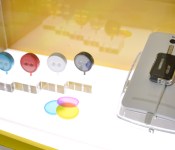
The second surprise of the day was the circular LolliFlash, which is essentially a basic dual-tone LED torch (with its own battery) that can be secured onto the headphone jack of any phone. Unlike Lenovo’s version, there’s no communication between the LolliFlash and its host; you simply leave the light or lights on before you take a shot — especially a selfie. It’ll even come with a set of three color filters — red, yellow and blue — that double as protective covers, but we imagine most users will just leave them at home. Again, ASUS has yet to announce commercial availability, but we can’t imagine this simple device can cause much damage to one’s wallet.
Filed under: Cellphones, Mobile, ASUS
 AIVAnet

