



Apple Files Formal Appeal in E-Books Antitrust Case [iOS Blog]
 Apple filed a formal appeal on Tuesday asking the U.S. Circuit Court of Appeals to overturn the ruling of its e-books antitrust case or to be awarded a new trial on the matter, reports the Associated Press.
In its filing, Apple stated that U.S. District Judge Denise Cote’s original decision to find the company guilty of conspiring to fix e-book prices was a “radical departure” compared to modern antitrust law, adding that the decision would harm consumers and negate competition if not overturned.
Apple’s papers filed Tuesday refuted the antitrust finding, and said its entrance into the e-book market “kick-started competition in a highly concentrated market, delivering higher output, lower price levels, and accelerated innovation.”
Apple also requested that the appeals court suspend the work of external antitrust compliance monitor Michael Bromwich until it makes a decision as to whether he was correctly appointed. Apple filed a formal complaint against Bromwich in November claiming that the monitor was overcharging them for his services, and requested that he be removed from his position in January.
While Apple managed to win a brief emergency reprieve from monitoring, the Appeals court ruled earlier this month that Bromwich could continue his work with new boundaries, as he is no longer able to demand access to any document or interview Apple executives with respect to any subject.
     |
FCC Launches ‘FCC Speed Test’ App for iPhone [iOS Blog]
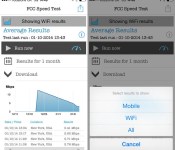
The FCC today launched a new ad-free FCC Speed Test app for iOS devices, designed to measure mobile broadband performance. The app is an expansion of the Measuring Broadband America program, which aims to measure both fixed and mobile broadband to “bring greater clarity and competition to the broadband service marketplace.”
Like other mobile speed testing apps, the FCC’s app analyzes mobile broadband performance (both Wi-Fi and cellular) and displays a breakdown of download and upload speed, latency, and packet loss. It also keeps a historical record of mobile speeds for comparison of performance over time.

The FCC is using data collected from the app to build an aggregated map of mobile broadband performance across the country, but it does not collect personally identifying information aside from carrier, country code, and GPS location.
Privacy is paramount. The FCC has taken significant measures to ensure the privacy and confidentiality of volunteers for this program. Using privacy measures developed and reviewed by a diverse team of privacy experts, any data that could potentially identify specific smartphones is analyzed and processed to ensure privacy protection.
The FCC previously launched an FCC Speed Test app for Android back in November and has published multiple reports on broadband performance as part of Measuring Broadband America.
FCC Speed Test can be downloaded from the App Store for free. [Direct Link]
| |

MLB At Bat Updated for 2014 Baseball Season With Full iOS 7 Redesign [iOS Blog]
In what has become a yearly tradition for late February, Major League Baseball today updated its MLB At Bat app for the 2014 baseball season. The app, perennially one of the most popular — and highest grossing — on the App Store, received a top-to-bottom redesign to match iOS 7 and to improve the user experience.
Photos and video are more prevalent in At Bat, running edge-to-edge and inline with other content. For example, video embedded in a news article displays within the article itself, with users able to tap a full-screen button if they wish. The redesign emphasizes MLB’s aim to improve the fan experience and help technology augment the game and otherwise get out of the way.
Showing how the design team has embraced subtlety, text and selection highlights in the app change depending on which team a user selects as their “favorite”. For example, a Red Sox fan will see red highlights throughout the app, while a Yankees fan would see navy blue. A MLB spokesperson told MacRumors that the app is the mobile focus point for millions of baseball fans and the design teams strive to make the app seem like home, no matter which team they’re a fan of.

Long hailed as the standard bearer for introducing features that matter to fans, At Bat this year will report for live Spring Training games with a full app re-design for iOS 7 on iPhone and iPad, among other new enhancements. Fans again will have access to the core functionality At Bat has pioneered over its first five years, including: personalized team experiences to deliver a linear feed of content for a designated favorite team; searchable libraries of tens of thousands of video-on-demand highlight clips; and customizable original news reporting and fantasy baseball analysis from MLB.com club beat reporters and national columnists.
Like last year, there are two main subscription packages for the iPhone and iPad — a $130/season MLB.tv Premium offering that includes live home-and-away television broadcasts for out-of-market games, as well as live home-and-away radio broadcasts. It also includes the ability to watch on any device regardless of how the viewer purchases the package — users can buy MLB.tv Premium via a $130 in-app purchase can watch live games within the app, as well as on the Apple TV, Xbox, PlayStation or any number of other connected devices.
The cheaper At Bat 2014 product, available as a $20/season in-app purchase, offers home-and-away radio broadcasts with no blackout restrictions. Both the Premium and At Bat services are also available as month-to-month subscriptions, though the whole-season package is quite a bit cheaper than buying month-to-month.

MLB Advanced Media told MacRumors that the company is aware that customers would very much like to stream local games without blackout restrictions, but that the content deals to allow that are extremely complex and difficult to negotiate. It also is well into its iBeacon rollout and expects to have twenty ballparks outfitted with the devices by Opening Day. The At The Ballpark app will see an update before then to support the new iBeacons.
MLB At Bat is a free download from the App Store for iPhone and iPad. [Direct Link]
| |

Square Testing ‘Pickup’ App to Speed Up Ordering of Takeout [iOS Blog]
Square is testing a new app called Square Pickup that allows users to order and pay for takeout food. The app is currently in beta testing with select San Francisco restaurants, according to Priceonomics.
Instead of calling a restaurant to place a pickup order, users can just make the purchase with the Square Pickup App. The app is loaded with the restaurant’s menu. Just choose what you want, pay with Square, and then pick up your food when it’s ready. The app is currently in beta testing for both iOS and Android.

Square is not the only big company innovating with restaurants and in-app purchasing — earlier this month, OpenTable began testing a feature that would have guests paying for restaurant checks in the OpenTable app.
Square is processing billions of dollars worth of credit card transactions annually and has an extensive point-of-sale system aimed at restaurants and other small businesses.
| |

Oral-B Shows Off iPhone-Compatible Smart Toothbrush at Mobile World Congress [iOS Blog]
Proctor and Gamble first introduced its smartphone-connected Oral-B toothbrush earlier this month, but the company is on hand at the Mobile World Congress conference in Spain to give attendees a look at the upcoming device.

The Oral-B SmartSeries 7000 connects to the Oral Blue iPhone app using Bluetooth 4.0, allowing the app to provide real-time guidance on brushing habits. It records brushing activity on a chart that can be shared with dental professionals to create personalized brushing routines and because the Bluetooth connectivity works both ways, the app can also be used to program the toothbrush.
Engadget went hands-on with the Oral-B SmartSeries 7000 to show off how the app interacts with the brush itself. While brushing, the iPhone app runs a timer in real-time to keep track of how long a user has brushed and it also includes a stream of news articles to keep users entertained while brushing.
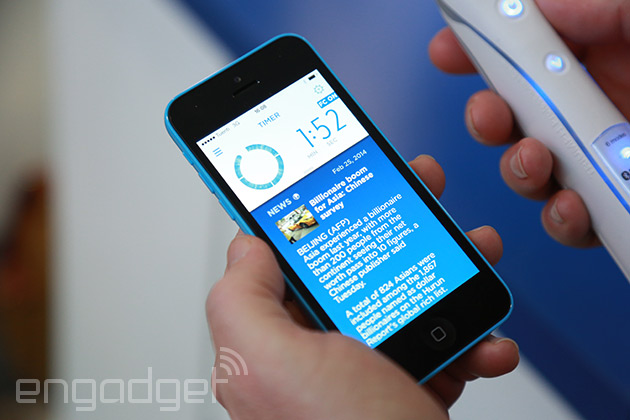
In case the sheer boredom of brushing your teeth for that long is too much to bear, you can also thumb through a stream of news articles or local weather reports (no, really) to help you hang in there. Turns out, just furiously mashing those bristles into your teeth isn’t great either, so the timer will blink red if you’re pressing too hard.
In addition to Bluetooth connectivity, the SmartSeries 7000 features oscillating-rotating-pulsating technology, six different cleaning modes (Daily Cleaning, Deep Clean, Whitening, Gum Care, Sensitive, and Tongue Cleaning), a pressure sensor to prevent users from brushing too hard, and several different travel accessories.
Oral B’s Bluetooth 4.0 smart toothbrush technology will be available in several of its toothbrushes, beginning with the Oral B SmartSeries 7000, which is expected to launch later this year for $220.
| |

‘The Bureau: XCOM Declassified’ for Mac Gains Three New DLC Packs [Mac Blog]
Three new downloadable content packs are now available for the Mac version of The Bureau: XCOM Declassified, including Hangar 6 R&D, CodeBreakers, and Light Plasma Pistol.
First released for Mac in November by Transgaming, The Bureau: XCOM Declassified is a third-person tactical shooter set in late 1962, at the height of the Cold War between the United States and the Soviet Union. Players take control of special agent William Carter and his two squad members to defend humanity, with a focus on shooting and squad-based tactics. Each downloadable content pack includes new missions, weapons, and more.
The Bureau: XCOM Declassified – Hangar 6 R&D
In the days leading up to the events of The Bureau: XCOM Declassified, Agent Nico DaSilva volunteers for a series of secret psycho-medical experiments to identify and treat a terrifying new pathogen. Maximize your combat skills and push your team to its limits to protect them from terrifying hallucinations as the experiments turn dangerous.The Bureau: XCOM Declassified – CodeBreakers
A top secret government communications facility responsible for intercepting and decoding enemy transmissions has gone radio-silent. In a desperate attempt to turn the tides of the secret war, Special Agent Carter and his squad must investigate the incident, eliminate any threats, and make contact with personnel in order to bring the facility back online and crack the mysterious code.The Bureau: XCOM Declassified – Light Plasma Pistol
Early research into the Outsiders’ weapon technology has yielded promising results in the form of a prototype light plasma pistol. Not as bulky as its predecessor, this compact weapon fires condensed bolts of plasma and boasts a vastly improved rate-of-fire, giving players an early edge in the secret war for humanity’s survival.
The Bureau: XCOM Declassified can be purchased from the Mac App Store for $19.99. DLC is available at an additional cost within the app. [Direct Link]
| |

Apple formalizes iBeacon Bluetooth spec in the hopes of wider adoption

Several companies and organizations have already come forward to test out iOS7′s Bluetooth-based iBeacon technology for tasks like shopping and navigation, but it could become a lot more commonplace in the near future. That’s because the Cupertino company has quietly released the iBeacon specification for its Made for iPhone program, signifying a stronger push to make the technology more widespread. In essence, it ensures that any future product that bears the iBeacon logo will be fully compliant with Apple’s standards.
What does this mean for you? Well, as a brief reminder, iBeacon is a location-based technology that allows iOS products to talk to each other using low-power Bluetooth signals. This means that whenever you see something with that iBeacon logo, you know it should work seamlessly with your iDevice. If we dare speculate, this could pave the way for a potential iWatch — it makes obvious sense for it to communicate with the iPhone using iBeacon. Indeed, now that Apple is showing signs it’s pushing the standard forward, we wonder if this is a not-so-subtle hint to developers to start incorporating iBeacon into their apps. As rumors of an Apple wearable heats up, we think that’s certainly more likely than not.

Apple’s iBeacon Gains ‘Made For iPhone’ Specification
Apple has implemented a new iBeacon specification and has begun certifying Bluetooth LE devices that utilize its iBeacon API under its Made For iPhone (MFi) program, according to a new report from Beekn.
iBeacons are physical Bluetooth low-energy transmitters that use Apple’s iBeacon API to provide micro-location information to nearby apps and devices, with an accuracy range of a few feet. iBeacons are compatible with Apple’s iPhones and iPads, as well as other devices that use Bluetooth LE, and have thus far been used primarily by retailers and other venues to provide location-specific information.
 An Estimote Bluetooth LE Beacon
In order to use the iBeacon name, manufacturers now need to have their devices approved by Apple as part of the MFi program, similar to accessories and hardware for iOS devices. Using the term iBeacon requires manufacturers to meet specific criteria, which are only available after a non-disclosure agreement has been signed.
The new specification gives Apple more control over the iBeacon trademark, which has previously been used by several different manufacturers for various Bluetooth LE devices since iBeacons were introduced in June of 2013. It is no longer possible to use the iBeacon brand without consent from Apple.
As we’ve noted elsewhere, beacons that carry the iBeacon name are conforming to two things:
– They broadcast Bluetooth LE ‘signals’ in a way that conforms to the Apple standard for what those signals should contain
– They have use of the iBeacon trademark
Since being introduced last year, iBeacons have been used by multiple retailers and venues in order to enhance visitor experiences in retail outlets, sports arenas, and other locations. Apple has rolled out iBeacons to its own stores as well, providing location-based product information to customers.
| |

AT&T Adds Unlimited International Messaging to Mobile Share Plans [iOS Blog]
 AT&T today announced plans to add unlimited international messaging to all of its Mobile Share and Mobile Share Value plans, allowing customers in the United States to send international messages as part of their existing plans, with no additional cost. Text, picture, and video messages are all included.
On Friday, February 28, all AT&T Mobile Share and Mobile Share Value plans will now include unlimited international messaging from the U.S. to the world. AT&T consumer and business Mobile Share customers can send unlimited text, picture and video messages. Current Mobile Share and Mobile Share Value customers will automatically benefit from this offer.
AT&T is also deploying a new World Connect Value international calling package, which offers one cent per minute calls from the United States to more than 35 countries including Canada, Mexico, and several other locations in Latin America and the Caribbean. The add-on, which is available to all AT&T wireless postpaid customers, costs $5 per month.
AT&T’s new unlimited international messaging follows Verizon’s recent introduction of new More Everything plans that also include unlimited international messaging.
Both the World Connect Value plan and the unlimited international messaging will be available beginning on Friday, February 28.
| |
OS X update closes networking security hole, brings more FaceTime features

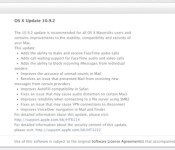
Just days ago, Apple released an update for iOS that closed up a web networking security hole, and today Macs running OS X Mavericks have gotten similar treatment. The update to 10.9.2 doesn’t explicitly list the SSL vulnerability patch among its updates in the download notification, but we’ve confirmed its presence with Apple. The update also brings along a slew of other security fixes as well. And, if you aren’t running Mavericks just yet, Apple tells us not to fret, for separate security updates tailored to other affected versions of OS X will be coming along shortly.
Along with the peace of mind knowing your laptop is more secure than it was yesterday, the update also delivers FaceTime audio calling and call waiting to desktop voice chats, plus iMessage is getting the power to block folks from sending you messages. Naturally, 10.9.2 also brings various audio, Safari and email bug fixes, too. The update’s available now, so don’t let us keep you from it. Stay safe, folks.
Filed under: Software

