


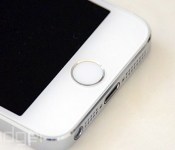
Apple explains how the iPhone’s fingerprint sensor keeps your info secure

If you’ve ever wanted to know how the iPhone 5s’ Touch ID fingerprint security works beyond a basic overview, you’ll be glad to hear Apple has just delivered a motherlode of new details. An updated version of its iOS Security white paper (PDF) explains much of what happens to your finger data after you touch the sensor. In short, your information may be more hack-resistant than it seems at first glance. Each A7 chip has a unique secure space that neither the A7 nor Apple can read, and every authentication session is encrypted end-to-end. The company is also offering a deeper explanation of what it does with your fingerprint image, noting that the print only lasts in memory until it’s turned into a decryption key. As we’ve known for a while, there are safeguards that wipe out that key after 48 hours of inactivity, a reboot or five failed login attempts. While the new insights will only have so much usefulness when developers can’t use Touch ID for their own apps, they suggest that there’s little to no chance of fingerprint theft or a large-scale data breach.
Filed under: Cellphones, Mobile, Apple
Via: TechCrunch
Source: Apple (PDF)

NimbleBit and Milkbag Games’ Collaboration ‘Disco Zoo’ Now Available for Download [iOS Blog]
NimbleBit, the developer behind freemium hits like Pocket Trains, Tiny Tower, and Pocket Planes, has teamed up with Milkbag Games‘ Matt Rix, creator of Trainyard and Owen Goss, who did Landformer and Finger Tied, for an all new animal-based game called Disco Zoo, which is now available for download from the App Store.
In Disco Zoo, players will take on the management of a zoo filled with creatures from the mundane to the fanciful, collecting animals ranging from pigs and sheep to unicorns and gryphons.

Animals are collected via simple matching puzzles, where tiles on a board are flipped to reveal coins, Discobux, or animals. Earning an animal requires matching up between two and five animal tiles and each animal has a different tile configuration on the board that players must discern.
When an animal is successfully uncovered on the board, it can then be added to the zoo, where it earns coins for the player for a set number of minutes before it falls asleep and must be woken up with a tap. The mechanic is similar to the restocking of shops within NimbleBit’s Tiny Tower, and each additional animal of the same type added to the zoo will increase earning potential by lengthening the amount of time an animal type is awake.

Coins are then used on expeditions to obtain more animals, and the goal of the game is to continue earning ever more exotic and difficult-to-catch creatures while maintaining the zoo’s coin income. Every expedition gives players 10 attempts to recover one or more animals, but players can earn more attempts using Discobux (the premium currency) or by watching a short video.
Discobux are also used to initiate the disco parties that give the game its name, and during this period, animals generate twice as many coins and stay awake. Discobux can be purchased with real money, but are also earned through gameplay and are not essential to complete the game, making in-app purchases entirely optional.
As with other NimbleBit games, Disco Zoo has a simple pixelated art style and offers other in-game quirks like funny animal phrases, quips from zoo guests, collectible statues, awards to earn, and more.
Disco Zoo can be downloaded from the App Store for free. [Direct Link]
     |
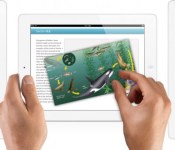
Apple Updates Enterprise Tools for Large iOS Device Deployments [iOS Blog]
Apple has updated the software used by large companies and educational institutions to deploy thousands of iPads and iPhones to employees and students. The changes to Apple’s Device Enrollment Program, its Volume Purchase Program, and the Apple ID for Students services are detailed in a report at TechCrunch and in an overview document [PDF] posted to Apple’s IT Deployment site.
Among other changes, Apple now allows IT administrators to set up devices without physically plugging each one into a computer to install a profile, potentially saving significant amounts of time when setting up thousands of devices. Also, profiles can be locked to devices, preventing employees or students from removing any restrictions simply by revoking an IT department profile — something that derailed the Los Angeles Unified School District’s rollout of iPads to thousands of students.

I’ve had conversations with IT pros and people who roll out large iPad installs in the past and they’ve mentioned that one of the things that has continued to cause Windows devices to hold some appeal is their better remote installation and configuration support. To that end, Apple has made some updates to improve that situation.
Both the enterprise and education programs now have support for Mobile Device Management hands free configuration. This ‘zero touch’ setup has been a long-requested feature for many pros, as it eliminates the need to cable up every deployed device and install a profile via Apple’s Configurator utility.
Apple has expanded the Volume Purchase Program to more countries and now allows VPP purchases to be made via purchase order, important to large companies. Finally, Apple has also set up a new type of COPPA-compliant Apple ID for students under the age of 13.
Apple executives routinely tout adoption numbers of iOS devices by large companies in its quarterly earnings calls, and these updates should help assuage concerns in IT departments about rolling out large iOS device deployments. Much more information about deploying iOS devices is available on Apple’s website.
| |
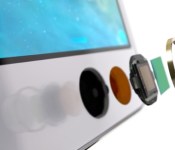
Touch ID and A7 Secure Enclave Detailed in Updated Apple Security Document
Apple today posted an updated security document [PDF] on its iPhone in Business site, offering details on the inner workings of both Touch ID and the “Secure Enclave” built into Apple’s A7 processor (via TechCrunch).
Since its 2013 release, Touch ID has faced scrutiny over privacy concerns from both users and government officials, and while Apple has previously offered few details on how Secure Enclave works, it has assured users that the system stores only fingerprint data rather than images.

According to the updated security document, Secure Enclave is a coprocessor within the A7 chip that uses a secure boot process to ensure that its separate software is both verified and signed by Apple. All Secure Enclaves can function independently even if a kernel is compromised and each one contains a unique ID inaccessible to other parts of the system and unknown to Apple, preventing the company or any other third parties from accessing data contained within.
Each Secure Enclave is provisioned during fabrication with its own UID (Unique ID) that is not accessible to other parts of the system and is not known to Apple. When the device starts up, an ephemeral key is created, tangled with its UID, and used to encrypt the Secure Enclave’s portion of the device’s memory space.
Additionally, data that is saved to the file system by the Secure Enclave is encrypted with a key tangled with the UID and an anti-replay counter.
Fingerprint data collected from Touch ID is stored within the Secure Enclave, which is used to determine a match and then enable a purchase. While the A7 processor collects data from the Touch ID sensor, it is unable to read it because it is encrypted and authenticated with a session key built into Touch ID and the Secure Enclave.
It’s encrypted and authenticated with a session key that is negotiated using the device’s shared key that is built into the Touch ID sensor and the Secure Enclave. The session key exchange uses AES key wrap- ping with both sides providing a random key that establishes the session key and uses AES-CCM transport encryption.
Along with details on the function and security of the Secure Enclave, the document contains details on Touch ID, most of which have been previously published by Apple in other documents and literature on the feature. It also offers some specifics on the security of fingerprint capturing and a reminder that fingerprint data is accessible only to the Secure Enclave and never sent to Apple or backed up to iTunes or iCloud.
The document’s section on Touch ID and the Secure Enclave ends with a detailed description of how both Secure Enclave and Touch ID work together to unlock an iPhone 5s, which is well worth a read for users interested in how the technology functions.
Apple’s updated security document has been added as part of a larger redesign of the IT section of its iPhone in Business site, which now features a cleaner design with navigation icons at the top of the page.
| |
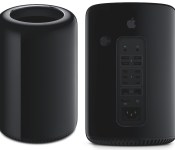
Apple Releases Firmware Update for 2013 Mac Pro to Fix Power Nap Issues [Mac Blog]
Apple today released Mac Pro SMC Update 2.0 enabling a Mac Pro to enter Power Nap mode without running the fan for Power Nap activities. The update also includes a fix for an issue that caused a low-speed USB device not to be detected at startup.

This update is recommended for all Mac Pro (Late 2013) models. This update enables Mac Pro to enter Power Nap without running the fan for most Power Nap activities, and addresses a rare issue where a low-speed USB device may not be detected at boot.
The Mac Pro update is recommended for all Mac Pro models from late 2013 and can be downloaded from Apple’s support site or via the Software Update tool in the Mac App Store.
| |
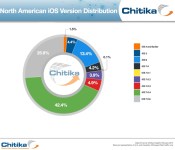
iOS 7.0.6 Usage Tops 25% Four Days After Emergency Fix for SSL Issue
Apple on Friday released iOS 7.0.6, fixing a then unknown SSL verification bug that turned out to be a glaring security issue that also affected OS X 10.9.
Following the extensive amount of media coverage on the SSL vulnerability that left users open to having sensitive information like login credentials and passwords stolen, iOS users exposed to the news rushed to upgrade their devices.
On Sunday, iOS 7.0.6 adoption was at 13.3 percent, according to analytics firm Chitika. Yesterday, four days after iOS 7.0.6′s release and following a slew of stories that were released over the past few days, iOS 7.0.6 adoption rates have climbed to a total of 25.9 percent, based on ad impressions from tens of millions of iOS-based devices in the U.S. and Canada.

The security update for iOS 7.0.6 appears to be propagating to iOS 7 users much more quickly than a similar 2012 iOS 5.1.1 update that also included a notable security fix. iOS 5.1.1 was installed on just 12 percent of devices after the first week, indicating iOS 7.0.6 adoption is roughly twice as fast.
MacRumors readers have been particularly quick to upgrade to iOS 7.0.6 in order to patch the SSL vulnerability. According to our data, 61.1 percent of iOS visitors to the main site were running iOS 7.0.6 as of yesterday, while 43.6 percent of forum users had updated to iOS 7.0.6.
iOS 7 users who have not yet upgraded should do so immediately in order to keep their devices and data secure. Apple yesterday released a 10.9.2 update for OS X Mavericks that patches the vulnerability on desktops, which Mavericks users should also download as soon as possible.
| |

Apple Releases iTunes 11.1.5 With Bug Fixes, Compatibility Improvements [Mac Blog]
 Apple today released a minor update to its iTunes software, fixing an issue that could cause iTunes to quit unexpectedly when a device is connected. The update also improves compatibility with iBooks for Mac on OS X Mavericks.
This update fixes a problem that may cause iTunes to quit unexpectedly when a device is connected and improves compatibility with iBooks for Mac on OS X Mavericks.
iTunes 11.1.5 can be downloaded via the Mac App Store or through Apple’s iTunes download site. The update comes in at 81.4MB.
| |

Glucose Sensing Likely Too Challenging to Include in First-Generation iWatch
Apple’s iWatch has been rumored to include a glucose monitoring feature, but how that feature would be implemented is still unknown. One report from earlier this month indicated that a “Healthbook” app under development for iOS 8 will be able “to read glucose-related data,” while another report has warned not to expect glucose sensing built directly into the initial iWatch. The two reports are not necessarily conflicting given the possibility of Healthbook interfacing somehow with third-party glucose-monitoring devices, but a new report from Network World argues that the technology is indeed too early in its development to be incorporated into a mainstream consumer device such as the iWatch.
Heisler points to C8 Mediasensors and its non-invasive continuous glucose monitoring (CGM) device, the HG1-c, as an example of how this technology is still in its infancy. It’s a relevant example as Apple has hired several research scientists and engineers from the now defunct company and is presumably using their knowledge to explore bringing CGM to the iWatch.
The HG1-c device relied on Raman spectroscopy to indirectly measure a person’s blood glucose level. This technique shines light through the skin in order to excite blood glucose molecules and cause them to vibrate. An optic sensor then analyzes the amount of light reflected off these vibrating molecules and returns a reading that is used to calculate an approximate glucose level.

Though innovative, the technology has flaws that make it impractical for a wrist-worn device. The sensor unit was attached to a belt that was worn around the waist and required a large battery pack to operate. It also needed a gel to accurately measure light levels, which were influenced by ambient sunlight. This sunlight sensitivity was highlighted by former C8 employee Charles Martin, who spoke to Network World.
Yes, the camera sensor had to be shrouded in darkness to function. You have to understand that Raman Spectroscopy is looking for a very faint signal emitted by the glucose molecules. A rough analogy: try to pick out someone’s voice in a noisy room. The sunlight was this kind of noise that the camera sensor was not calibrated against. They did try to implement algorithms to discount measurements against sunlight anomalies, but some of the anomaly criteria these algorithms were supposed to detect, overlapped. This made things hard to verify and test on the device.
Apple likely can overcome many of these limitations, but it will take time to transform the technology to the point where it is reliable enough to be used as a diagnostic or monitoring device. Once Apple improves the technology, it will need to receive FDA approval, which is a painstaking process with extensive clinical trials and documentation.
If Apple goes down this route, it could take up to 18 months just to receive approval necessary to sell the device. Given this lengthy approval process and the fact that evidence of Apple earnestly assembling its iWatch biometric research team only started surfacing around early 2013, Heisler believes “the notion that this feature will appear in the first iteration of the device is highly improbable.”
Instead of measuring glucose levels, the iWatch may allow users to monitor glucose levels by importing them from a glucose monitoring device or by manually entering them into the accompanying Healthbook app for iOS. Apple is rumored to be working on the health and fitness app, which uses a card-based interface to track vital health statistics such as heart rate, weight and step count.
| |

‘Social Network’ Director David Fincher in Talks to Helm Sony’s ‘Steve Jobs’ Biopic
 Director David Fincher is in talks to direct the Aaron Sorkin-scripted Steve Jobs biopic based on Walter Isaacson’s biography, claims The Hollywood Reporter. Sorkin last month completed the script for the film, which is said to take place across three 30-minute scenes at three Jobs-led product launches.
Fincher has experience with broad-appeal Silicon Valley films after his Oscar-winning turn with the The Social Network — also written by Sorkin — which won three Academy Awards and was nominated for five more, including Best Picture and Best Director.
Like Zuckerberg, Jobs was a complicated visionary who became a polarizing figure. Under Jobs’ watch, Apple revolutionized several business, including personal computers, music, computer-generated animation and mobile phones. In the process, he became known as one of the greatest innovators of his generation. At the same time, he was unapologetic about his difficult personality, was at one point ousted at Apple and was criticized for the harsh treatment of workers in China who assembled Apple products.
Among Fincher’s other directing credits include Fight Club, Panic Room, the American version of The Girl With the Dragon Tattoo, and several others.
With Sorkin wrapping the screenplay, Sony’s next step will be to sign on a director and then move forward on casting, as no actors are known to be in talks for any roles. Apple co-founder Steve Wozniak is working as a consultant on the film, which has no potential release date yet.
| |

Soundgarden Added to SXSW iTunes Festival Lineup [Mac Blog]
Apple today announced that it has added Soundgarden to the concert lineup for its new iTunes Festival at SXSW in Austin, Texas next month [iTunes Store]. Soundgarden will headline the March 13 concert, with supporting acts yet to be announced.

As noted by The Loop, Soundgarden will play its landmark Superunknown album in its entirety, celebrating 20 years since the album’s release.
An expansion of the long-running iTunes Festival held in the UK each year, the SXSW concert series was announced by Apple last week, but at the time performers were announced for three only of the five dates. Other performers announced so far include Coldplay, Imagine Dragons, London Grammar, Pitbull, ZEDD, G.R.L, Keith Urban, Willie Nelson, and Mickey Guyton.
Tickets to the shows are available to SXSW attendees free of charge on a lottery basis, and live and on-demand streams of the shows will be available through the iTunes Store on iOS devices and computers, the iTunes Festival app on iOS devices, and Apple TV.
| |

