



Automatic and Jawbone Team Up to Integrate Automatic Data Into Jawbone UP App [iOS Blog]
Automatic and Jawbone today announced a new partnership that will see Automatic’s car-tracking data integrated with the UP by Jawbone iOS app that connects to Jawbone’s fitness band. By incorporating data from Automatic, a connected driving assistant system that measures car information like miles traveled and gas used, Jawbone will be able to give users an idea of how their car usage impacts their overall fitness.
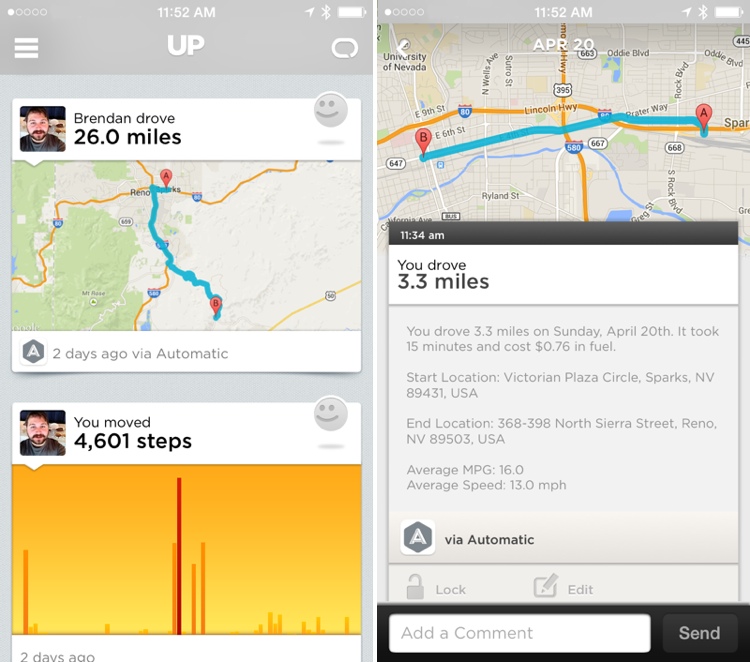
Physical activity and driving are related to each other, but its not always easy to see exactly how. When you are driving, you are not generally physically active. More time driving leaves less time for walking and exercise. Automatic and Jawbone have teamed up to provide drivers insights on how their physical fitness and wellness is connected to their driving behavior.
Automatic data will be imported into the UP by Jawbone app automatically, which will provide insights on the relationship between driving and walking. It allows users to compare movement collected by the Jawbone UP band with driving times from Automatic on the same timeline, with the overall goal of encouraging more walking and physical activity.
In addition to Automatic integration, the Jawbone UP app is able to incorporate data from a wide range of popular apps, though most are notably more fitness related. For example, the app connects to MyFitnessPal, RunKeeper, Strava, Withings, Lose It, and more.
– Automatic is automatic — Drive data from Automatic is synced automatically with the Jawbone Up app.
– Integrated travel — See your walking and driving compiled in one place. Discover the impact that walking to work once a week has on your fitness.
– Share with friends — Automatic trip summaries can be shared with other Jawbone Up users.
– Prevent road rage — Jawbone Up tracks your mood and diet. Compare this to the time spent in the car each day and routes traveled to see what makes you happiest.
– iPhone or Android — The Automatic Jawbone integration works on both iOS and Android
Using the Automatic with the Jawbone UP will require both pieces of hardware. The Automatic can be purchased from the Automatic website for $99.95, while the Jawbone UP is available from the Jawbone website starting at $129.99. The UP by Jawbone app can be downloaded from the App Store for free. [Direct Link]
Transition to ‘3x’ iPhone 6 at 1704 x 960 Likely Smoother Than Move to Retina
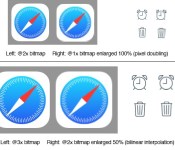
With an expected transition to a larger screen on the iPhone 6, MacRumors forum member pgiguere1 has taken a look at how non-optimized apps would appear on a rumored 1704 x 960 display that would move from the current “2x” pixel doubling technique to achieve Retina quality to a “3x” technique.
In Apple’s earlier transition to 2x Retina displays, it was relatively simple for non-Retina assets to be scaled up using automatic pixel doubling techniques to represent a single non-Retina pixel as a 2×2 grid of Retina pixels until developers could get up to speed. But with a potential move to 3x (or 1.5 times current Retina), many have wondered if that transition would be awkward.
As pgiguere1 shows, while developers will undoubtedly want to optimize their apps with new 3x graphical assets, automatic scaling of current 2x assets will look considerably better on this new iPhone display than non-Retina assets did during the transition to 2x.

Keep in mind however that unlike with the @1x -> @2x transition we had in 2010, this time we’d only have a 50% enlargement rather than 100%.
The thing is, a 50% enlargement with interpolation doesn’t look worse than a 100% enlargement with pixel-doubling, despite the loss of details due to the interpolation. […]
As you can see, older non-@3x-optimized apps would actually look better on an @3x iPhone than non-@2x-opitmized apps did on an @2x iPhone. Add to this the fact that the screen’s pixel density would be higher this time around, and the perceived image quality difference would be even smaller.

While Apple is unlikely to announce a new resolution for the iPhone 6 at next month’s Worldwide Developers Conference, the company is likely to begin providing more tools and encouraging developers to speed a push toward resolution-independent vector graphics and other changes that will facilitate a smooth transition to denser displays. But for those developers who are not ready by iPhone 6 launch day, their users are likely to still have a decent experience with unoptimized apps.
5.5-inch iPhone 6 Mockup Compared to iPhone 5s in New Photos
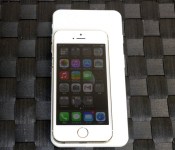
Following the leak of a simple case for the rumored 5.5-inch iPhone 6, Nowhereelse.fr today pointed to [Google Translate] a pair of posts on Rocket News 24 sharing photos of a physical mockup of the larger iPhone 6 model alongside an iPhone 5s. While there have been numerous renderings, cases, and physical mockups of the rumored 4.7-inch iPhone 6 in recent weeks, this is one of the first comparison shots of the 5.5-inch version.

The resin-based mockup was printed on a MakerBot Replicator 2 3D Printer using design drawings published earlier this year by MacFan. The comparisons show just how much larger the 5.5-inch device is than the iPhone 5s, with the mockup measuring 157 mm in length, 77 mm in width and just 6.7 mm in thickness. It is longer and wider than the iPhone 5s (123.8 x 58.6 x 7.6 mm), but has a thinner profile that matches more closely to the iPod touch fifth generation (123.4 x 58.6 x 6.1 mm).

The mockup adopts the iPod touch-style curved edges, which are markedly different from the hard corners of the iPhone 5s, and elongated volume buttons. Unlike previous high-quality mockups of the 4.7-inch iPhone 6 model, this mockup is relatively crude, providing few details beyond the basic form factor.
Apple is rumored to be preparing a 4.7-inch version of the iPhone 6 for release in the fall, while the 5.5-inch version may debut several months later due to production issues that may have delayed its release.
‘GBA4iOS’ Game Boy Emulator Shut Down After Nintendo Files DMCA Notice
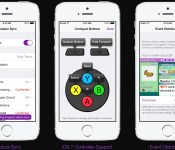
GBA4iOS, the popular Game Boy emulator for iOS, has been removed by its creator Riley Testut on GitHub after Nintendo filed a Digital Millennium Copyright Act (DMCA) takedown request, reports The Next Web. First sharing the news through his Twitter, Testut stated that the emulator will continue to function normally on iOS devices, as in-app ROM downloads will be “temporarily suspended.”

GBA4iOS saw its last major update in February, which added iPad support, controller skins, iOS 7 controller support, Dropbox integration, and an in-app web browser that could used to download Game Boy games from any ROM website. The emulator was also notable for bypassing Apple’s App Store restrictions as it could be installed directly on an iOS device by visiting the project’s official website and tapping a download link.
Traditionally, Apple has taken a strict stance on emulators in the App Store, which has caused apps like GBA4iOS to seek alternative methods for user downloads. For instance, open emulators such as iMAME and iDOS have made their way onto the App Store only to be pulled a short time later likely because of potential legal issues.
Despite the removal of GBA4iOS, the ‘NDS4iOS‘ Nintendo DS emulator for iOS devices released last month remains available on its respective web page. However, it is unknown if Nintendo will file a similar takedown notice in efforts to prevent potential piracy.

Apple Looking to Restrict Vacation Time for Retail Employees in September Ahead of New Product Launches
Apple will look to restrict vacation days for its German retail employees this September ahead of a likely launch for the 4.7-inch iPhone 6 and other products, reports German site iFun.de (Google Translate). The move will likely also be enacted at the company’s other stores across the globe, and follows a similar move last year in which Apple restricted vacation time for AppleCare employees from September 15 to 28 for the launches of the iPhone 5s, iPhone 5c, and iOS 7 in that time period.
 The Apple Store Kurfürstendamm in Berlin, Germany
The majority of rumors throughout the past few months have indicated a September release for the 4.7-inch iPhone 6, with the larger 5.5-inch version of the device to launch towards the end of the year or in early 2015 due to production issues. However, this latest report contrasts a rumor from earlier this month that stated Apple will launch the 4.7-inch iPhone 6 in August and the larger 5.5-inch version in September, which would be a different strategy compared to past iPhone launches that have traditionally come in the fall for the past three years.
In addition to a larger display, Apple’s next-generation iPhone will feature a thinner profile, a faster A8 processor, and an upgraded rear-facing camera in the form of either optical or electronic image stabilization.
The report also gives an update on the progress of Apple’s upcoming retail store in Hanover, Germany, which is now on track to open sometime this fall. A previous report in March estimated that the store would open sometime in April, however multiple structural problems and mold have resulted in a delay for Apple’s move into the location. When the store eventually opens, the location will mark Apple’s 14th in the country, following stores in Düsseldorf, Berlin, and Frankfurt.

Apple’s Smartphone Market Share in Japan Rises Above 36% in Q1 2014 [iOS Blog]
Apple saw its share of the Japanese mobile phone market rise to 36.6% in the first quarter of 2014 amid surging sales on the country’s largest carrier, NTT DoCoMo, reports Bloomberg. The company shipped 14.43 million phones in Japan in the past fiscal year and saw its market share climb 11.1% from 25.5% in the year-ago quarter.

Apple’s market share in the country was followed by Sharp and Sony, which accounted for 13% and 12.3% of the market, respectively. Rival Samsung owned the sixth-biggest market share with 5.7%.
The debut of the iPhone 5s and iPhone 5c on NTT DoCoMo last Fall marked the first time that Apple’s phones were offered on the carrier. Citing the absence of the iPhone, a report last July pointed to a loss of 3.2 million users for NTT DoCoMo over the last four and a half years. DoCoMo’s troubles continued in September with a record loss of 66,800 subscribers, which was attributed to a lack of iPhone 5s stock.
Since then however, DoCoMo has enjoyed surging sales of the iPhone, as Apple’s device now accounts for more than 40% of phone sales on the network. Last October, the iPhone 5s and iPhone 5c also accounted for 76% of smartphone sales in Japan, marking a record high.
All three major Japanese carriers including DoCoMo, SoftBank, and KDDI have been offering the iPhone 5s free on contract through special offers since its launch in September.
The Important Differences Between Real and Counterfeit iPad Chargers [iOS Blog]
One of the side effects of the tremendous popularity of iPhones and iPads has been the counterfeit Apple product market, which looks to lure in consumers who want to purchase items like chargers for less money than Apple’s official offerings.
However, those counterfeit chargers can be fairly dangerous, as highlighted by the tragic story of a Chinese woman who was electrocuted by a counterfeit charger while charging her iPhone last year. Following up his look at the difference between real and counterfeit iPhone chargers, Ken Shirriff has taken to his blog (via Daring Fireball) to explore the differences between the real and fake iPad chargers.
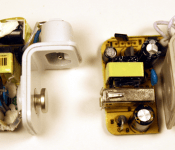
 Apple’s official iPad charger (left) vs counterfeit (right).
He compared the differences between Apple’s real $19 iPad charger and a $3 he found on eBay. While they look exactly the same on the outside, he found major differences on the inside. Apple’s charger is crammed full of bigger, higher quality components while the counterfeit has low-quality components and more space. Another difference was a safety measure:
One safety difference is obvious: the Apple charger has much more insulation. The upper (high-voltage) half is wrapped in yellow insulating tape. Some components are encased in shrink tubing, there are plastic insulators between some components, and some wires have extra insulation. The counterfeit charger only has minimal insulation.
Flipping the boards over reveals another obvious safety difference: Apple’s charger includes red insulating tape while the counterfeit does not. One not-so-obvious difference is the space between high and low voltage currents running through the boards. While Apple’s charger includes a safe 4mm separation between the two, the counterfeit only features a 0.6mm separation. Shirriff notes this means a simple drop of condensation could cause the charger to zap the user.
Another key difference is the power output. Apple’s charger outputs 10W at a steady rate while the counterfeit outputs 5.9W with frequent spikes, which means that Apple’s charger charges the iPad quicker with a higher quality of energy.
Shirriff goes into far greater detail with extensive images and graphs detailing the specific differences between Apple’s real iPad charger and the counterfeit. The full comparison is available on his blog. Users who believe they have a counterfeit charger may take part in Apple’s third-party charger takeback program and turn in their suspect chargers to receive an official charger for $10.
Apple Publishes Its ‘iOS Human Interface Guidelines’ on iBooks [iOS Blog]
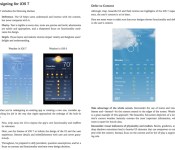
Apple has published its iOS Human Interface Guidelines to iBooks. The guidelines are Apple’s recommendations and suggestions to developers for designing cohesive and usable apps that follow similar user interface principles to other iOS applications.
The company has long offered user interface guidelines, dating back to the original Macintosh, but has recently only offered on the Developer Portal. By making them available to anyone via iBooks, the company appears to be looking to inform and inspire more designers.

An excerpt from the book:
Designing for iOS 7
iOS 7 embodies the following themes:
– Deference. The UI helps users understand and interact with the content, but never competes with it.
– Clarity. Text is legible at every size, icons are precise and lucid, adornments are subtle and appropriate, and a sharpened focus on functionality motivates the design.
– Depth. Visual layers and realistic motion impart vitality and heighten users’ delight and understanding.Whether you’re redesigning an existing app or creating a new one, consider approaching the job in the way that Apple approached the redesign of the built-in apps:
– First, strip away the UI to expose the app’s core functionality and reaffirm its relevance.
– Next, use the themes of iOS 7 to inform the design of the UI and the user experience. Restore details and embellishments with care and never gratuitously.
– Throughout, be prepared to defy precedent, question assumptions, and let a focus on content and functionality motivate every design decision.
The iOS Human Interface Guidelines are a free download from iBooks.

Logic Pro X Updated With Improved 12-Core Mac Pro Support, App Enhancements and Fixes [Mac Blog]
Apple today updated its professional audio software Logic Pro X to version 10.0.7, adding support for 24 processing threads on 12-core Mac Pro models along with several new features to enhance the functionality of the app and an array of bug fixes.

What’s new
– Now supports 24 processing threads on 12-core Mac Pro models
– The current volume, pan, and send values for all selected tracks can now be inserted at the playhead position
– Enabling Low Latency Mode no longer creates sync issues for Drummer, Ultrabeat, Native Instruments Machine and other plug-ins with integrated step sequencers
– Automation can now be copied and pasted to any location using the Marquee tool
– Adds an option for MIDI volume and pan data to control the instrument plug-in instead of the channel strip
– Resolves several snap and alignment guide issues
– Various fixes that improve XML import and export with Final Cut Pro X
– Contains multiple enhancements to Accessibility
Logic Pro X 10.0.7 can be downloaded from the Mac App Store for $199.99. [Direct Link]

Tim Cook Charity Lunch Action Ends, Earning $330,001 for RFK Center
Tim Cook’s second CharityBuzz auction, for a one hour lunch meeting with Cook at Apple’s Cupertino headquarters, ended today at $330,001. Bids for this year’s auction were quite a bit more reserved than the coffee charity meeting Cook auctioned last year, which brought in $610,000.

The money earned from the auction will benefit the RFK Center for Justice & Human Rights, a charity that aims to achieve “a just and peaceful world by partnering with human rights leaders, teaching social justice and advancing corporate responsibility.”
The winner of the auction will be able to meet with Tim Cook for approximately one hour at Apple’s Cupertino campus, on a “mutually agreed upon date.” The cost of the meal is included, but travel to Cupertino must be paid by the auction winner.
On May 10, Tim Cook added an additional benefit for the auction winner — a VIP guest spot at an upcoming Apple event, announced on Twitter.
Join me for lunch and advance human rights @rfkcenter.You can also be my VIP guest at an Apple event. https://t.co/02aONVPQM9 #RFKauction— Tim Cook (@tim_cook) May 10, 2014
Following multiple shill bids last year, CharityBuzz implemented a credit card authorization requirement for all bidding customers, a policy that may explain why this year’s auction was ultimately less popular with bidders.

