



Intel Preparing to Launch New Xeon Processors for Potential Mac Pro Upgrade
After nearly three and a half years with only a minor processor bump, Apple late last year launched its redesigned Mac Pro, moving to a compact cylindrical design relying on a slew of Thunderbolt 2 ports for expandability. While the new machine began shipping in the last few days of 2013, extreme shortages of the machine persisted for months and it wasn’t until two months ago that shipping estimates reached the “within 24 hours” level and Apple’s own retail stores began stocking the Mac Pro for immediate purchase.

Potential Mac Pro customers may now, however, be starting to look forward to the first update for the redesigned Mac Pro, as Intel appears set to launch new processors appropriate for the Mac Pro next month. As highlighted by Macworld UK, Intel’s “Grantley” Xeon E5 v3 chips are nearly ready to ship as successors to the current “Romley” Xeon E5 v2 chips used in the Mac Pro.
Intel announced last month that it had begun shipping at least some versions of the new Xeon E5 v3 chips to server makers, and widespread availability is reportedly set for September. ChipLoco outlined a significant set of E5-2600 v3 series chips, including several that recently became available for pre-order and could be used as an upgrade to the current top-of-the-line 2.7 GHz 12-core E5-2697 v2 chip found in the Mac Pro.
The direct successor to the current chip is the 2.6 GHz 14-core E5-2697 v3 chip, although the new chip does come with a higher thermal rating and it is unclear whether that change would have any impact on Apple’s willingness to use the chip in the Mac Pro. Other variants in the new high-end E5-269x v3 series range from 12 to 18 cores.
Below the top end, Apple currently uses E5-1600 v2 series processors, and Intel is reportedly preparing a full set of successor v3 chips for launch next month.
– 4-core: 3.7 GHz E5-1620 v2 moves to 3.5 GHz E5-1620 v3 or 3.7 GHz E5-1630 v3
– 6-core: 3.5 GHz E5-1650 v2 moves to 3.5 GHz E5-1650 v3
– 8-core: 3.0 GHz E5-1680 v2 moves to 3.2 GHz E5-1680 v3
As with the E5-2600 v3 series chips, these E5-1600 v3 series chips come with higher thermal ratings than their predecessors. All of the new chips in both series also support faster DDR4-2133 memory, which will also contribute to improved performance.
On the graphics side, Apple uses customized versions of AMD’s FirePro series of high-end graphics cards, although Apple’s D300, D500, and D700 options can be roughly equated with AMD’s W7000, W8000, and W9000 on the PC side. Over the last several months, AMD has been updating its FirePro cards, culminating with this week’s introduction of four new cards, including the W7100 successor to the W7000 card. Alex4D summarizes how the W9100/W8100/W7100 cards introduced in recent months compare to their predecessors and collates a handy comparison chart showing how these new and old cards compare to Apple’s D-series cards.
At each level AMD have at least doubled the VRAM, added 40% more stream processors. The W8100 and W9100 have wider memory buses (so more information can be transferred for each command) and many more transistors.
Although Apple can specify any number of stream processors, clock speeds or VRAM, these more recent cards show what AMD considers is the low-, medium- and high-end when it comes to PCs. For Mac owners perspective, they show how much card for a similar amount of money AMD can now make compared with the cards in the Mac Pro and 2012.
As for when updated Mac Pro models might arrive, that remains unclear, but the good news is that the pieces supporting a potential upgrade are starting to fall into place. While Intel’s new processors are reportedly scheduled to arrive next month, it is unlikely a Mac Pro upgrade is that close given Apple’s usual iPhone focus for that month. But it seems possible an upgrade could be in the works by late this year or early next year depending on how Apple decides to space out its product launches and at what point it views the Mac Pro as in need of a boost.
.CPlase_panel display:none;

Higher-End 4.7 and 5.5-Inch iPhone 6 to Get Sapphire Displays, Higher Price Tags
 Apple has plans to use a sapphire crystal display in the higher-end models of the two versions of the iPhone 6 that it plans to debut this fall, reports The Wall Street Journal. Because of the higher cost of sapphire, Apple may also charge more for the high-end versions of the devices.
Apple is considering using sapphire screens in more-expensive models of the two new, larger iPhones it plans to debut this fall, if it can get enough of the material, people familiar with the matter say. Some analysts expect Apple to charge more for the phones than previous new models, because of increased component costs.
Multiple iPhone 6 rumors have speculated that sapphire could be constrained to either the larger 5.5-inch iPhone 6 or the higher-end models due to cost and production issues, but The Wall Street Journal is the first mainstream publication to confirm those rumors.
If Apple is only planning to use sapphire in the higher-end models of the 4.7 and 5.5-inch iPhone 6, that could explain why a sandpaper test on a leaked iPhone 6 front panel revealed that it was not made of pure sapphire.
Apple is investing a considerable amount of money into partner GT Advanced’s sapphire plant, shelling out more than $500 million to outfit the factory with high-output furnaces for sapphire production. Rumors have suggested GT Advanced has the capability to eventually produce enough sapphire to outfit 100 to 200 million iPhones, but other rumors have pointed towards high costs and production problems as limiting factors. Apple is also expected to use sapphire for the upcoming iWatch.
Sapphire is seen as a desirable material due to its extreme durability and scratch resistance, but many smartphone manufacturers have suggested Apple’s plan to use the material is just a marketing gimmick due to its prohibitive cost.
While Apple may not be able to produce the entire lineup of iPhone 6 displays in sapphire, rumors have suggested that when the factory is fully functional, it will give the company a way to produce massive quantities of sapphire at a low cost, which means a full sapphire lineup could be more feasible for future devices.
.CPlase_panel display:none;

StackSocial Offers 8 Mac Apps in ‘MacLovin’ Bundle for $39.99 [Mac Blog]

StackSocial is currently offering a bundle of 8 Mac apps, featuring several that have won awards from Apple and Macworld. All buyers receive the following apps for just $39.99, a significant discount compared to the total retail value of $362:
– Cinemagraph Pro ($40)
– djay ($20)
– NetSpot Pro ($149)
– Keyboard Maestro ($36)
– Hype 2 ($30)
– Dropzone 3 ($10)
– Moom ($10)
– Boom ($70)
Notably, djay was included in Apple’s “Best of Mac App Store” list in 2011 and was updated earlier this year to include full Spotify integration. Cinemagraph Pro was selected as an Apple Design Award winner at WWDC in June.
The first 5,000 buyers of the MacLovin’ bundle also receive the OS X App Masterclass, a Mac app development e-learning course that has a retail value of $499, which bumps the total retail value of the bundle to $861.
The MacLovin’ bundle is available through August 19.
MacRumors is an affiliate partner of StackSocial. 
.CPlase_panel display:none;

How a keyboard case can turn your 8-inch tablet into a productivity machine

What’s up with 8-inch tablets? Microsoft reportedly canceled the Surface Mini at the last minute. Samsung’s Galaxy Note 8.0 is long overdue for a refresh. Even the current class leader, the iPad mini, only came about after years of procrastination at Apple. Perhaps it’s just a little harder to convince people of the merits of this category of device, compared to the greater pocketability of a phablet, the affordability of a 7-inch Android slate or the extra productivity offered by a full-sized tablet, hybrid or laptop. However, I’m happy to report that with a bit of smart accessorizing — namely, the addition of a high-quality keyboard case that allows for proper touch-typing — an 8-inch tablet has plenty of scope to operate as a serious productivity tool, if not an outright laptop replacement.

Due to the sheer size of Apple’s following, the iPad mini offers the greatest choice of tailored keyboard cases of any 8-inch tablet. Demand for iPad mini keyboards has evidently persisted since launch, because new products from reputable companies have continued to hit the market in the past six months. This includes a miniature version of the ClamCase Pro, which was the winner of my full-size iPad keyboard roundup last year and which can bend backwards to work as a stand. There’s also now an intriguing rugged keyboard from ZAGG, which has a magnetic hinge allowing you to quickly detach the tablet section from the keyboard. I’ve spent a few weeks with both of these, as well as with a more lightweight ZAGG keyboard for the Samsung Galaxy Note 8.0, in an effort to acclimatize to what are inevitably more-cramped conditions.
These accessories may be small, but none of them are half-hearted add-ons — something that is reflected in both their designs and their price tags. Crucially, all three keyboards have backlit, chiclet-style keys, and they also have proper hinges to replicate a laptop-style experience. In other words, if fast, comfortable typing is ever going to be possible on this sort of accessory, these examples probably stand the best chance of making it happen. What’s more, with all these cases, the combined size, weight and cost of the tablet-plus-keyboard combo is significantly less than a MacBook Air or Microsoft Surface Pro 3 — which is a key reason to be interested in this sort of solution in the first place.
(Incidentally, I haven’t been able to find any similar hinged cases for 8-inch Windows 8 tablets like the Lenovo ThinkPad 8 or Dell Venue 8 Pro. For now, it seems, those tablets are stuck with more casual folding cases that prop the tablet up at an angle.)
| Price | Weight (with tablet) | Thickness | |
|---|---|---|---|
| ClamCase Pro for Apple iPad mini | $100 | 391g (699g) | 17.5mm (0.69 inch) |
| ZAGG Rugged Folio for Apple iPad mini | $140 | 529g (837g) |
24mm (0.94 inch) |
| ZAGG Folio for Samsung Galaxy Note 8 | $100 | 367g (707g) | 18mm (0.71 inch) |
Typing speed

Let’s start with the most important statistic: words per minute. I define “touch-typing” as typing without looking at the keyboard, rather than following any sort of specific method taught at a secretarial school (do those things even exist anymore?). So all the numbers in the table below reflect typing while mostly staring at the screen, and with all errors corrected on the fly in order to produce a clean passage of relatively complicated text (which included some large numbers, special characters and people’s names, so that autocorrect couldn’t fix everything).
|
Words per minute |
|
|---|---|
| 15-inch MacBook Pro (benchmark) | 69 |
| iPad mini Retina onscreen keyboard | 31 |
| ZAGG Rugged Folio for iPad mini | 56 |
| ClamCase Pro for iPad mini | 53 |
| ZAGG Folio for Galaxy Note 8 | 45 |
As you can see, I wasn’t able to match my natural typing speed (69 wpm, as achieved on a 15-inch MacBook Pro) on any of the 8-inch accessories. The closest I came was with the ZAGG Rugged Folio, which yielded 56 words per minute, with the ClamCase Pro not far behind at 53 wpm. These latter two products honestly felt about equal to me in terms of typing comfort, and their sensible layouts actually allowed me to type just as fast as on a 10-inch iPad keyboard case — in other words, trading down from a full-size iPad to a mini didn’t seem to come with a huge sacrifice in potential typing speed. That was quite a revelation.
Bear in mind, many of the simpler errors I made during these tests were fixed by iOS’ autocorrect before they had a chance to slow me down. This actually explains why the ZAGG for Galaxy Note 8.0 got such a low score — it wasn’t the keyboard’s fault so much as Samsung’s, because the autocorrect function in TouchWiz let many more errors slip through, forcing me to go back and fix them manually. For some reason, in order to use a Bluetooth keyboard with the Note 8.0, you have to use Samsung’s default keyboard, which means the user can’t benefit from the superior autocorrect offered by SwiftKey or Google Keyboard. That’s a major nuisance.
Design and usability

There’s more bad news for ZAGG on the Galaxy Note 8.0: The Bluetooth connection sometimes took a while and often failed unless I messed around in the settings menu, which seems like another TouchWiz issue. I also encountered repeat presses, where I’d hit a key once and see the letter repeated five times in succession on the screen. Worryingly, this was even worse with the Backspace key — I’d try to delete a word and it’d go haywire and delete a whole sentence or paragraph. This ZAGG also doesn’t allow any of the flipping or detaching contortions that are possible with the two iPad mini models — it’s stuck in a traditional laptop mode. Suffice to say, my Galaxy Note 8.0 has come out of the case and gone back to dressing in its birthday suit.
By contrast, the iPad mini’s Bluetooth connection and processing was absolutely flawless, and both the ZAGG Rugged and ClamCase Pro were effortless to use. It was easy to turn the keyboards off to break the wireless connection and re-enable the onscreen keyboard. And it was just as easy to turn them back on to re-establish the connection and start typing again. During the course of testing the accessories, I made two big trips without my MBP, just relying on the keyboard-equipped iPad mini as my primary work laptop, plus a Wacom stylus for note-taking. Overall, I think I could cope with this as a permanent laptop replacement, if it wasn’t for an occasional need to batch-process images and cut video.
Wrap-up

Overall, it’s safe to conclude that touch-typing is possible on an 8-inch tablet keyboard, so long as you make an effort to get used to it, and so long as your particular keyboard is nicely designed. I’d forget about the ZAGG keyboard for the Galaxy Note 8.0, mostly due to the software issues, but both the iPad accessories covered here are solid purchases. If I had to choose one, it’d probably be the ZAGG Rugged — not because of its slight advantage in typing speed, but because of its Toughbook-style tactility and the ease with which it lets you pull the iPad section away from the keyboard section. Both of these features came in handy on cramped flights, or when passing the iPad to someone across a desk during a meeting. Of course, many people will be put off by the ZAGG’s extra bulk, in which case they can default to the ClamCase Pro instead. But ultimately, I’ve arrived at the same conclusion that I did in my last roundup a year ago: I think a great keyboard accessory is one that is bold enough to totally transform a device’s function for as long as it is attached, rather than just trying to be as small and inconspicuous as possible.
Filed under: Peripherals, Tablets, Mobile, Apple, Samsung
.CPlase_panel display:none;
Apple Meets With Thai Officials to Discuss ‘iPhone 6’ Approval Disclosure
According to a report from Thailand’s Thai Rath newspaper [Google Translate], Apple has already met with officials at the country’s National Broadcasting and Telecommunications Commission (NBTC) to discuss the recent disclosure that two iPhone 6 models have been approved by the government agency for import into the Asian country.
NBTC secretary Takorn Tantasith earlier this week released the approval information on two “iPhone 6″ models A1586 and A1524, reportedly in accordance with guidelines that require the public announcement of approved hardware. The declaration, which he also broadcast on Twitter, contained only the product name and model numbers, but no other details about the iPhone 6 handsets. As noted by several observers, the iPhone 6 approval was the first time a specific device was named in a Tweet by the NBTC secretary, making it an obvious deviation from usual practice.
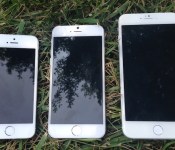
 4.7 and 5.5-inch iPhone 6 mockups compared to iPhone 5s
Apple is unsurprisingly upset with this public notification, claiming the disclosure released confidential information about its upcoming handset. The NBTC secretary countered Apple’s assertion, arguing that that these announcements do not reveal confidential product details and are meant to protect consumers. He said Apple would be within its rights to penalize Thailand for this leak by canceling its plans to release the iPhone in Thailand later this year, but he stands by his decision to disclose the approval. Translation by a MacRumors reader:
The Secretary General said that everything is done according to the protocol and on August 8 the NTBC has approved the two phone models. He insisted that all that was disclosed is not considered a trade secret and Apple only requested for the specification to remain a secret. As for the specs, the NBTC did not disclose anything.
Apple requested a meeting with NBTC officials to discuss the situation, with Apple emphasizing that the new device may not necessarily be called “iPhone 6″ but otherwise resolving the matter.
Mr. Takorn said that representatives from Apple South Asia from the Singapore HQ arrived to “have a chat” with him and clarified that the 2 phone models may not use the name “iPhone 6” to market and the company want to make sure that the NBTC understands this fact. Apple in Singapore will also explain the situation to Apple in the US about this matter. Apple also reassured the NBTC that this “leak” has no effect in Apple’s plan to launch and sell the iPhone in Thailand.
Rumors suggest Apple is working on two iPhone models for release in the upcoming months. The next generation handset is expected to be unveiled during a September 9 press event with a 4.7-inch model slated to go on sale shortly after the announcement. A larger 5.5-inch model may debut alongside the smaller model or up to a few months later.
.CPlase_panel display:none;

Humin adds context to your contacts for a smarter smartphone

Our phones have changed so much since the early days of the smartphone. We can now take amazing photos with them, play video games on them, track our health and fitness on them and of course use them to surf the internet. But the humble contacts app — you know, the thing that stores all those phone numbers — hasn’t changed much, if at all. For one thing, it still lists all those contacts alphabetically. That works if you’ve got a great memory, but what if you want to find that person you met at a party last week and can’t quite recall their name? A normal contacts list would be useless. Launched on the App Store today, Humin plans to change all that, not only by replacing your contacts app but by replacing your phone app as well.
Humin aims to do so by adding one key ingredient to contacts: context. Instead of just looking up your contacts by name, for example, Humin lets you look them up by relationship or employer or the time and place you met them. So if I wanted to find that person I met last week, I’d enter in “met last week” in the search field and voila, I’d be able to find him or her much easier. And if that party was on my calendar, I could say something like “met at last week’s party,” and it’d narrow the search down even further.
“The problem we needed to solve wasn’t the contacts problem,” says Ankur Jain, Humin’s co-founder and CEO. “It was the search problem.” He recalled the internet of the late 90s, where sites like Yahoo and Lycos tried to alphabetize the web in lists and categories. Then search engines like Google came along and you could finally search for things the way our brains actually think. “We’re taking that concept and applying it to people.”

Here’s how it works. When you first launch the app, it’ll ask to hook up to your phone’s contacts and your calendar. You can stop there, but in order for Humin to really flex its contextual muscle, you’re encouraged to connect Humin to Facebook and your email account as well (either your Gmail or your Exchange account will do). It’ll also ask for your LinkedIn info if you have it, which is especially useful if you use your phone for doing business. This is how it gathers data like the people you know in common, their occupations and how frequently they contact you.
And if you really want Humin to replace your phone app entirely, you can. If you go through a few activation steps, you can have it so that all of your missed calls and voicemails will go to Humin. Jain tells us they’ve actually worked with all the major US carriers to develop this technology. “In order for Humin to really have an impact on your everyday life, it has to be one of the core services that you use on an everyday basis,” says Jain as a reason behind the integration.
To be honest, it all feels rather invasive, but Jain assures us that privacy is of the utmost importance. “We keep all of that data on your phone locally … your email never goes to our servers.” As an experiment, Jain encouraged us to use Humin with Airplane mode on, and indeed, it still managed to do those contextual searches without any connectivity (Of course, this was after we had already fleshed out our all contacts with info gained from Facebook, LinkedIn etc.). Further, the app won’t contact anyone unless you want it to. Which, by the way, you might actually want if you’d like your contacts to have the most updated info. To do so, you can send a verification request to a contact via the app itself.

After you’ve incorporated all that information, Humin really comes into its own. The main Contacts tab, for example, will show all of the contacts who are in the same city you are, as well as the folks who are in your upcoming calendar meeting. This is potentially useful if you’re travelling — if I fly to New York, it’ll immediately show all the people I know who are in the New York area so that I can instantly send off a quick text to them to let them I know I’m in town. Also, whenever I add a new contact to Humin from now on, it’ll remember when and where I met them, and it’ll automatically add in the person’s name if it’s associated elsewhere. For example, when I entered Jain’s phone number into Humin, it automatically added his name and the ten people we know in common.
The app also automatically surfaces the people you’re most likely to add to your Favorites list by seeing how frequently you interact and their relationship to you. For me, my co-workers and friends were at the top of the pile, followed closely by family members, which makes sense because most of my communications with family are offline rather than online. In order to quickly call or text one of your Favorites, you hold down on their image and either swipe left or right.
Still, if Humin sounds intriguing to you, iPhone users can go ahead and download the app right now. It’s US-only for now but it should arrive in UK stores shortly. Android users will have to wait a few more weeks, and we even hear that Google Glass might get it at some point.
“One of our goals is to put technology into the background of your life,” says Jain. “The phone app is the most background app that you have … we want you to keep that existing user behavior but bring it to the 21st century.”
Source: App Store
.CPlase_panel display:none;
Assembled iPhone 6 Logic Board Revealed in New Photo
With under four weeks to go until the expected introduction of the iPhone 6, increasingly complex parts are continuing to leak. Just weeks ago, photos showing two bare logic boards similar to but distinct from corresponding parts from existing iPhones surfaced, lending credence to rumors of two larger iPhone 6 models.
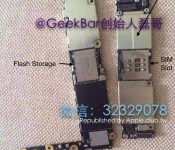
One of those logic boards has now been revealed in what appears to be a fully assembled state in a photo reposted by Apple.club.tw [Google Translate]. While several physical features such as the nano-SIM slot, a number of connectors for flex cable components, and a flash storage chip that appears to be from Toshiba are visible in the somewhat blurry photo, the most interesting components of the board unfortunately remain hidden under electromagnetic shielding. A silver component at the bottom of the board on the left is almost certainly the Wi-Fi module, although no identifiable markings can be seen.
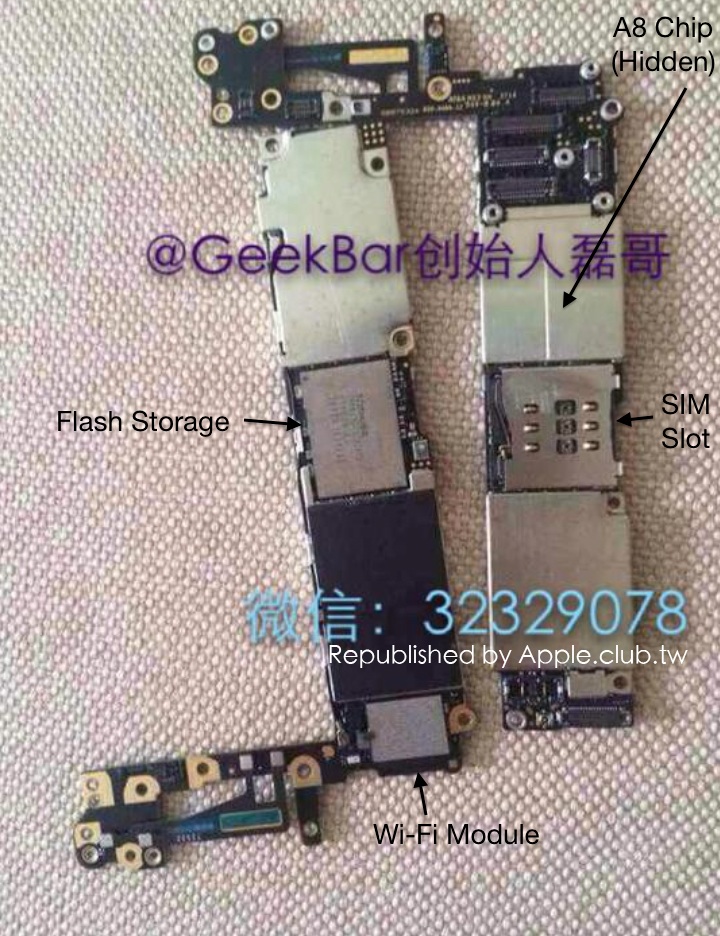 Annotated photo of iPhone 6 logic boards
A second photo [Google Translate] shared by Apple.club.tw today shows a pair of flex cables also said to be from the iPhone 6. The cables appear to be the same as seen in a detailed photo of the front panel display assembly yesterday.
.CPlase_panel display:none;

Shazam restores Spotify sharing and tests Beats Music for good measure

After unexpectedly dropping the ability to listen to tagged tracks on Spotify in the UK and other countries, Shazam has re-added the service to its free app in most locales. The original issue came about thanks to a deal with Deezer, which replaced Spotify in in Germany, Mexico, the UK and Brazil (the premium paid app always worked). On top of adding Spotify back to the latest iOS and Android apps, Shazam is also reportedly testing Beats Music integration on iOS, giving users the ability to stream entire tagged tracks. The iOS Shazam app already works with iTunes for previews, and Shazam will soon power Siri tune recognition in iOS 8 — so Beats could be a tit-for-tat. As for Spotify, we’re still not sure why it’s back, but we wouldn’t be surprised if metrics dropped or money was involved at some point. Meanwhile, we’ve reached out for more information.
Filed under: Home Entertainment, Software
Via: 9 to 5 Mac
.CPlase_panel display:none;

Pegatron Reportedly Lands 50% of 4.7-Inch iPhone 6 Orders for This Year
 Apple supply partner Pegatron has won a contract that will see it produce 25 million of the estimated 50 million 4.7-inch iPhone 6 units to be shipped this year, reports DigiTimes. It was reported in January that the company would be awarded 50% of the orders, however a report in May pegged that number at 15%.
The report also notes that the rest of the orders for the iPhone 6 are expected to go to Foxconn, who has helped produce iPhone 5s and other Apple devices. Pegatron’s relationship with Apple is said to also have grown tighter recently, as the supplier has managed assembly for the iPad mini and the iPhone 5c throughout the past year. It is currently unknown which supplier will take care of orders for the 5.5-inch iPhone 6, although the larger device could see constrained supply this year due to production challenges.
Apple will publicly unveil the iPhone 6 for the first time at an event on September 9, with a launch for the 4.7-inch version likely coming a week later as with prior years. In addition to a larger display, the phone is expected to feature a thinner, curved bezel and incorporate a faster A8 chip, an advanced camera, and iOS 8.
.CPlase_panel display:none;

Apple Bans Two Hazardous Chemicals From Final iPhone Assembly Process
Apple announced today that it is banning the use of benzene and n-hexande, two potentially hazardous chemicals, during final assembly for both iPhone and iPad, according to the Associated Press. Benzene is a carcinogen that has been linked to leukemia when not handled properly and n-hexane has been linked to nerve damage.

The decision announced Wednesday comes five months after the activist groups China Labor Watch and Green America launched a petition drive calling on Apple Inc. to abandon the use of benzene and n-hexane in the production of iPhones.
The Cupertino company conducted a four-month investigation at 22 factories and found no evidence that either benzene or n-hexane endangered the 500,000 workers at those factories. Four of the factories had traces of the two chemicals at “acceptable safety levels” while the other 18 contained no trace of either.
Still, Apple decided to order its suppliers to stop using the two chemicals for final assembly for iPhones, iPads, Macs, iPods and accessories. The factories will also be required to test all substances to make sure the chemicals aren’t present, even if they’re not listed in the ingredients. The two chemicals are often found in cleaner used on machinery and electronics.
However, Apple will still allow benzene and n-hexane at plants responsible for the early production phase of its devices, which are, for the most part, different from the final assembly plants. Apple is lowering the maximum amount of the two chemicals that can be used during early processes.
Lisa Jackson, Apple’s VP of environmental initiatives, told the AP that the company wanted to be “responsive to concerns” and “crack down on chemical exposures”.
“We think it’s really important that we show some leadership and really look toward the future by trying to use greener chemistries.”
The two chemicals aren’t exclusively used by Apple’s manufacturing processes, as other large tech companies have faced the same criticisms. Small traces of benzene can also be found in gasoline, cigarettes, paints, glues and more.
.CPlase_panel display:none;

