


Apple Releases OS X Bash Update to Fix ‘Shellshock’ Security Flaw in Mavericks, Mountain Lion, and Lion
Apple today released OS X bash update 1.0 for OS X Mavericks to fix a vulnerability in the bash UNIX shell.
The security flaw, known in the media as “Shellshock,” was discovered last week. Uncovered by security researchers, the exploit in the bash command shell in OS X and Linux could be used to deploy malicious code.

According to an Apple spokesperson, most OS X users were not at risk form the bash vulnerabilities, but the company promised to work quickly to provide an update.
Bash, a UNIX command shell and language included in OS X, has a weakness that could allow unauthorized users to remotely gain control of vulnerable systems. With OS X, systems are safe by default and not exposed to remote exploits of bash unless users configure advanced UNIX services. We are working to quickly provide a software update for our advanced UNIX users.
Along with the fix for OS X Mavericks, Apple has released updates for both OS X Lion and OS X Mountain Lion. There is no Yosemite download available as of yet, but Apple may be planning to issue a fix in the near future. The three updates are available via Apple’s support pages and should be available via the Software Update tool soon.
.CPlase_panel display:none;
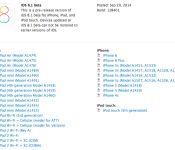
Apple Seeds First iOS 8.1 Beta to Developers
Apple today released the first beta of iOS 8.1 to registered developers for testing purposes, just a few days after the release of iOS 8.0.2, which fixed a bug introduced with iOS 8.0.1. The beta arrives as build number 12B401.
Apple has also released a new Apple TV beta and Xcode 6.1 beta 3.

iOS 8.1 likely includes several bug fixes for issues in iOS 8, and it also likely includes support for Apple Pay, Apple’s mobile payments service that is launching in October.
.CPlase_panel display:none;

Apple updates OS X to protect ‘advanced UNIX users’ from Shellshock exploits

Although OS X is among the systems listed as vulnerable to the recently-uncovered Shellshock / Bash security flaw (still not sure what that is? Let us explain.), Apple has said it isn’t a problem for most users. For those potentially vulnerable due to enabling certain UNIX services, 9to5Mac reveals the company has just pushed patches for the Mavericks, Lion and Mountain Lion versions of its desktop operating system. You can download the updates from Apple’s website now, and it should be available via software update soon.
[Image credit: Robert Graham, Twitter]
Filed under: Desktops, Internet, Apple
Via: 9to5Mac
Source: Mavericks, Mountain Lion, Lion
.CPlase_panel display:none;

Bug in iOS 8’s ‘Reset All Settings’ Option Also Erases iCloud Drive Documents
It appears that there may be a serious bug with the “Reset All Settings” option in iOS 8, causing users who activate the feature to lose all of their iWork documents stored in iCloud Drive. According to multiple posters on the MacRumors forums, using the “Reset All Settings” option under General –> Reset has caused documents to be permanently deleted from iCloud Drive.

Because iOS 8 was so sluggish on my iPad 3 I reset all settings (No data or media will be deleted) and sped it up BUT deleted my iWork data! Then promptly synced and deleted it in iCloud.I have public beta of Yosemite so can’t roll back via time machine. I have no pre iOS 8 backups in iTunes or iCloud to revert to (well iCloud device backups don’t contain cloud documents and I should have iOS 7 backups in iTunes but can’t find any. iCloud has no trash like dropbox. They seem gone forever.
The “Reset All Settings” option explicitly says that “No data or media will be deleted,” and it is meant to reset all user preferences to the default out-of-the-box settings. That the option is deleting iCloud Drive documents appears to be a serious bug, though it may be limited to Apple’s own iWork apps like Pages, Keynote, and Numbers. One user had all of his iWork documents wiped by using “Reset All Settings,” while other app information remained in iCloud.
In our own testing, using “Reset All Settings” deleted all iWork documents stored in iCloud Drive on the iPhone and on iCloud.com. After allowing time for syncing to a Mac running OS X Yosemite, all of the documents disappeared from that machine as well. Preview and TextEdit documents, which cannot be accessed on the iPhone, remained untouched on the Mac.
There appears to be no simple way to recover iCloud Drive documents that have been erased by “Reset All Settings,” in Yosemite and several people who have been affected by the bug are now in contact with Apple support in an effort to retrieve their documents. A Mavericks user was, however, able to recover his files from a backup folder.
One user said that Apple was waiting on engineers to investigate the issue, while another said his account had been placed in troubleshooting mode to attempt to recover the data.
Introduced with iOS 8 and OS X Yosemite, iCloud Drive is Apple’s answer to cloud-based storage services like Dropbox. iCloud Drive allows users to store a variety of documents like spreadsheets, PDFs, images, and more, accessing them on any device. Currently OS X Mavericks users can access iCloud Drive documents via iCloud.com, but iCloud Drive will be fully functional in October, after OS X Yosemite is released.
Users who have iCloud Drive enabled may want to refrain from using the “Reset All Settings” option on their devices for the time being, in order to avoid accidentally erasing important documents stored in iCloud Drive.
.CPlase_panel display:none;

Apple Watch May Headline Fashion Boutique Colette’s ‘One Day Only Experience’ Tomorrow [Updated]
Apple and Parisian fashion boutique Colette are preparing a “one day only experience” on September 30, reports French blog Macplus [Google Translate]. Showcased on Colette’s website, the event will be held from 11:00 AM to 7:00 PM local time at the retailer’s gallery on rue Saint-Honoré in Paris.
Information on what will be shown during the one-day event has not been revealed, but hints from the invitation and Colette’s own fashion focus suggest the Apple Watch will be the highlight. The pattern of dots on the promotional image appears very similar to the zoomed-out home screen of the Apple Watch, with each dot representing an app icon.

Apple unveiled the Apple Watch earlier this month alongside the iPhone 6 and 6 Plus. The smartwatch will be available in a variety of configurations, including a high-fashion Edition collection that features an 18-karat gold casing and sapphire crystal display and a Sport collection for fitness enthusiasts. Apple is targeting an early 2015 launch, but the company will reportedly be hard-pressed to make the device available to the public in time for February’s Valentine’s Day holiday.
Update 8:55 AM: As noted by forum member Rogifan, Apple industrial design team member Mikael Silvanto has posted several photos on his Instagram account yesterday documenting his trip to Paris for Paris Fashion Week. In one photo, a member of the team is shown wearing Apple Watch at a meal, while another photo taken onboard the plane en route to Paris may show Jony Ive and Marc Newson in the background.


.CPlase_panel display:none;
Apple Testing Three Significant iOS 8 Updates Simultaneously Ahead of Major Product Launches
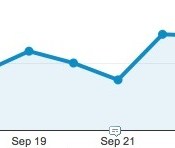
Based on web traffic data, it appears Apple may be hastening its iOS updates as it prepares to launch several major products in the coming months. As noted by 9to5Mac, the Cupertino company is simultaneously testing three major iOS 8 iterations that may be released according to an expedited schedule.
Web server analytics indicate Apple is currently actively testing iOS 8.1, 8.2 and 8.3. The development is an unusual one, as Apple typically only publicly tests one of each iOS version (full, major update, minor update) at a time, releasing major updates months apart after the initial September rollout. An example is iOS 7, which debuted in September 2013 and was not updated to iOS 7.1 until March 2014.
 Visits to MacRumors from devices running iOS 8.2 now numbering in the dozens per day
The most likely explanation for this change in pattern involves major product launches over the coming months. The company is preparing to roll out Apple Pay in October, with the new NFC-based payment system almost certainly falling into the major software update category. Other products on the horizon include the upcoming Apple Watch and a rumored 12.9-inch “iPad Pro”, both of which appear set to launch early next year and which would also require significant iOS updates to support them.
Apple released iOS 8 earlier this month with a handful of new features including support for extensions, widget notifications, and third-party keyboards. iOS 8 has had a rocky start, with the company temporarily removing HealthKit-enabled apps at launch due to an unspecified issue. Apple also released and quickly removed iOS 8.0.1 after the update disabled cellular connectivity and Touch ID on iPhone 6 and 6 Plus devices.
.CPlase_panel display:none;

Apple May Launch 27-Inch Retina iMac With AMD Graphics as Soon as Next Month
 Following several recent reports on Apple’s long-rumored ultra-thin 12-inch notebook, Jack March is now reporting that Apple is indeed working on a 27-inch “5K” Retina iMac with a resolution of 5120 x 2880. According to the report, which MacRumors has reason to believe is based on legitimate information, the machine could launch as soon as next month.
A source familiar with Apple’s plans tells me that Apple is indeed planning to launch a Retina iMac at their next press event, however the 27″ Model will be the only model that gets this feature. The source says the new 27″ iMac will use a 5120 x 2880 panel as leaked in the OSX Yosemite code a few months ago. This resolution is double the current resolution of the 27″ iMac which is 2560×1440.
This new 27-inch Retina iMac would continue to use Haswell processors, topping out at the 4.0 GHz Core i7-4790K, as Intel’s next-generation Broadwell processors will not be ready until possibly the middle of next year. The report also claims Apple will be switching to AMD graphics for this new iMac, while the overall design and port configuration would remain the same as the current model.
The report’s sources suggest the move to Retina will be limited to the larger 27-inch iMac at this time, with the 21.5-inch model continuing to use the current 1920 x 1080 display.
Rumors of a 27-inch Retina display or iMac from Apple have been circulating for some time, but have picked up steam in recent weeks with a specific claim of a 5K Apple display launching before the end of the year, as well as Dell’s own announcement of such a display. With finalization of the DisplayPort 1.3 specification, connectivity will also become easier as that standard rolls out, allowing for single-cable uncompressed video at 5K resolutions.
Update 6:46 AM: 9to5Mac is hearing similar information about Retina iMacs being in “late testing stages” at Apple.
.CPlase_panel display:none;

Humana’s Healthy Lifestyle Rewards Program Adds HealthKit Support
Last month, it was reported that Apple was in talks with health insurers about its HealthKit tools that officially launched to the public with iOS 8 earlier this month. The report suggested Apple may have been looking to partner with insurers on programs to reward users for maintaining healthy lifestyles and reaching fitness goals as tracked by HealthKit.
One of the insurers mentioned in the report was Humana, which today officially announced integration between its HumanaVitality rewards program and HealthKit. Under the program, members can receive wellness points redeemable for a variety of rewards including fitness equipment, electronics, and movie tickets.
Recent updates to the HumanaVitality app have added HealthKit support to pull in data from wearable devices and Apple’s own fitness-oriented tracking features, making it easy for users to document their progress.
The HumanaVitality App, designed to make it easy and simple for consumers to engage with their health, enables users to create and measure specific, personal wellness goals (get active, eat better, lose weight or reduce stress). HumanaVitality rewards members for meeting these goals and for other healthy behaviors, from getting a biometrics screening to taking 10,000 physician-recommended steps a day.
HumanaVitality members who use the HumanaVitality App can upload fitness data from their favorite wearables into Apple Health and earn Vitality Points for hitting their health and fitness milestones.
HumanaVitality [Direct Link] is a free download from the App Store.
.CPlase_panel display:none;

Jawbone’s trackerless Up app syncs with Apple Health and other fitness services

As it promised mere weeks ago, Jawbone has launched a new version of Up for iOS that syncs data from numerous health services and doesn’t require its own tracker. Confusingly, the Jawbone app which does require an Up or Up24 tracker is also called ‘Up’ and is still available. However, the new version is more of a fitness catchall app that works with Apple’s Health and over a hundred other apps (and their trackers), like RunKeeper and IFTTT. Interestingly, it even works with Nest’s thermostat to “create an ideal sleep environment.” In fact, the new Up wants to manage all aspects of your health by tracking your sleep, nutrition and workouts. Once it learns your habits, the “Insight Engine” will then give you personalized health tips and other info. There are also social functions, including team tracking and the ability to boast about fitness milestones. Apple had pulled HealthKit apps a few days ago due to bugs, but after some scrambling they’re now back — you can grab Jawbone’s UP for iOS here.
Filed under: Wearables, Software
Via: MacRumors
Source: Jawbone
.CPlase_panel display:none;

Property Mogul Recalls Apple Store Fifth Avenue Planning, Says Steve Jobs Wanted 40-Foot Cube [Mac Blog]
Since it opened in 2006, Apple’s iconic glass cube retail store Fifth Avenue retail store in New York has been praised for its design and its ability to attract a large amount of customers daily. Now, author Vicky Ward (via ifoAppleStore) has shared new details about the store’s beginnings on the plaza of the General Motors Building in her book The Liar’s Ball: The Extraordinary Saga of How One Building Broke the World’s Toughest Tycoons.

Ideas for a store on Fifth Avenue originally began in November 2003 when former Apple CEO Steve Jobs met with property mogul Harry Macklowe after being connected through Apple’s former Vice President of Real Estate George Blankenship. Jobs initially wanted a store that “would be open 24/7″, and worked with architects from architectural firm Bohlin Cywinski Jackson who designed Apple’s store in SoHo, Manhattan.
It was at that point where Jobs, Macklowe, and the designers thought of placing a square glass cube in an unused basement within the GM Building’s Plaza:
What happened next has long been the subject of speculation and some dispute: Who came up the idea of placing a 30‐foot square glass cube — the world’s “smallest skyscraper” — in the middle of the GM Building plaza? In that lightbulb moment, an unused basement that had caused headaches for its owners for more than 40 years morphed into what is arguably the most famous retail space in the world.
Said Macklowe: “[Jobs] presented to me and I presented to him. He had this cube, which was quite different from what you see there today, and I had a cube that was quite different from what we see today as well. It took us half an hour to make a deal.”
Jobs initially wanted a 40-foot cube, leading the designers to set up a scaffolding mockup of the building. However, once Jobs and other Apple executives went to go see the mockup, all agreed that it was too big and obscured the vision for the store. However, Macklowe also showed off a 30-foot cube built secretly underneath, which caused Jobs and the Apple executives to agree to the size.
From there, Macklowe convinced retailers and a CBS studio residing in the area to move, as construction began while Jobs waited. The store eventually opened on May 19, 2006 to much public attention, and went on to become one of Apple’s most iconic and busiest stores.
Macklowe’s real estate attorney also later regretted not negotiating a higher “percentage rent” with Apple, which saw his client receiving a portion of the store’s profits. Macklowe called the negotiations “horrendously low,” and claims that Apple had no idea just how well the store was going to do in business per year.
.CPlase_panel display:none;

