


New Apple Pay Setup Screens Unearthed in iOS 8.1 Beta 2
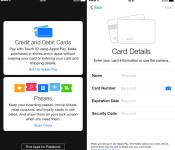
Hours after Apple seeded the second iOS 8.1 beta to developers, developer Hamza Sood has located the Apple Pay setup screen in the Passbook app, the Apple Pay setup screen in the initial iOS 8.1 setup and Apple Pay setup on the iPad. Previously, Sood had found the Apple Pay setup screen within the Settings app.

The setup prompt within Passbook is similar to the setup prompt to add passes, educating potential users on what the service is before providing a link to where users can input and scan their credit cards for use. Potential users have the choice to either input their credit card numbers via the keyboard or to take a photo of their card and have it inputted automatically.
The iPad gets the same setup screen as the iPhone version, but does not mention the ability to use Apple Pay in a retail store as no current iPads contain the NFC technology required to use the feature and it is uncertain whether it could be included in future iPads.
iOS 8.1 is likely to be the update to include Apple Pay, although Apple has not yet flipped the switch within the betas seeded to developers. Instead, the company seems to have been preparing the features behind-the-scenes. Alongside Apple Pay, iOS 8.1 is expected to include a host of bug fixes for issues in iOS 8, including a fix for Bluetooth connectivity problems.
.CPlase_panel display:none;

GT Advanced Bankruptcy Unlikely to Affect Apple Watch, But Sapphire for Future iPhones in Doubt
A new report from KGI Securities’ Ming-Chi Kuo suggests that Apple’s sapphire partner GT Advanced Technologies’ recent filing for Chapter 11 bankruptcy protection will not affect its upcoming Apple Watch. However, he cautions that it does raise concerns about the possibility of future iPhones using sapphire displays.

Bankruptcy has no impact on Apple Watch. As the Apple Watch sapphire cover lens uses an ingot of less than 6-inches, and as drop-test requirements aren’t so stringent as those of iPhone, general ingot manufacturing processes such as KY suffice for Apple Watch. This is why there are abundant sapphire ingot suppliers to choose from for Apple Watch. According to our survey, aside from GTAT, other Apple Watch sapphire ingot suppliers are Hansol (KR) and Harbin Aurora Optoelectronics (CN). We therefore don’t think GTAT’s bankruptcy will affect sapphire ingot supply to Apple Watch.
… but it raises uncertainties on iPhone touch panel use of sapphire cover lens.
Kuo suggests that GT Advanced’s ASF sapphire ingot isn’t the only one it’s considering to use for iPhone displays, though it is the company’s preference due to the superior drop-test performance of GT Advanced’s sapphire. And while Kuo believes that Apple still wants to use sapphire displays for iPhones, the bankruptcy of GT Advanced will likely result in bottlenecks in ASF sapphire production. Other sapphire ingot suppliers are unlikely to benefit, as they do not measure up to Apple’s higher drop-test standards.
Apple had been widely expected to include sapphire display covers on some iPhone 6 models, but that development did not arrive. As Kuo notes, Apple still plans to use sapphire displays for Apple Watch, as it uses an ingot less than 6-inches and Apple’s standards for drop-tests on the Watch are not as stringent as those for iPhone.
.CPlase_panel display:none;

Engadget Daily: Facebook tackles anonymity, Vaio post-Sony, and more!

Zuckerberg and Co. are in hot water regarding the social giant’s real-name policy, but it looks like all the outcry may have paid off. Well, sort of. Read on for Engadget’s news highlights from the last 24 hours, including Facebook’s purported anonymity app, Vaio’s new hybrid tablet, a magical product called Carrot, and more!
Filed under: Misc
.CPlase_panel display:none;
iPhone and iPad Remain Popular With Teens, Interest in Apple Watch Tepid Ahead of Unveiling
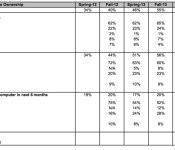
Apple’s iPhone continues grow in popularity with U.S. teenagers, according to Piper Jaffray analyst Gene Munster’s latest semiannual teen survey, which asked approximately 7,200 teens with an average age of 16 years about their device usage habits and future buying plans.
67 percent of surveyed teens owned an iPhone, compared to 61 percent in the Spring survey, and 73 percent of teens expect their next phone to be an iPhone. Much of Apple’s gains in ownership came from Android, which lost five percentage points over the last several months. iPhone usage among teens may jump significantly in the next few months, as the survey was conducted just before the introduction of the larger-screened iPhone 6 and 6 Plus.

While iPad ownership remained high at 66 percent, there was no growth compared to the Spring survey. Android tablets also saw ownership numbers drop, and of customers planning to buy a tablet in the next six months, 60 percent plan to choose an iPad Air or iPad mini.
As for the upcoming Apple Watch, interest among teenagers remains relatively low. Only 16 percent of teens said they would be interested in purchasing an Apple Watch for $350, down slightly from the Spring survey where 17 percent expressed interest. Munster’s survey was, however, conducted before the Apple Watch was announced, so interest numbers may shift in the next Spring survey.
Younger customers have always been important to Apple as it gives the company a chance to create lifelong customers. Apple’s recent acquisition of Beats Electronics, for example, may have partially taken place as an effort to remain relevant among teenage users. In a survey of 10,000 students, a quarter believed the deal would make Apple more “cool,” while 50 percent believed the acquisition would increase Apple’s popularity among students.
.CPlase_panel display:none;
Google’s News and Weather app is now available on iOS

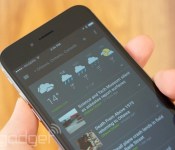
Dig Google’s card-based interfaces, but still in love with iOS? Don’t worry — the company has just ported another one of its Android apps to Apple’s platform: Google News and Weather is now available for iOS users. Like the Android version, this app curates headlines and weather from 65,000 sources and can be set to track weather conditions in multiple locations. It has the same swipe-able card system too, though the iOS version seems to distinguish itself with a darker color scheme. The app is available for all iOS devices running 7.0 or later, and it’s already optimized for both the iPhone 5 and 6. Check it out at the source link below.
Filed under: Software, Mobile, Apple, Google
Via: 9to5Mac
Source: App Store
.CPlase_panel display:none;

Apple Withheld $139 Million Payment from GT Advanced Ahead of Bankruptcy Filing [iOS Blog]
 Apple withheld a final $139 million payment that it was due to make to GT Advanced, reports The Wall Street Journal, which may have contributed to the company’s decision to file for Chapter 11 bankruptcy. GT also reportedly burned through cash, spending $248 million in one quarter.
That may have led to the company’s filing, since its cash, at $85 million, was below a $125 million trigger point that would allow Apple to demand repayment of about $440 million in loans it had advanced. Apple had agreed to lend GT a total of $578 million to help get a large sapphire factory in Arizona up and running. The tech giant reportedly withheld the last $139 million payment it was due to make, although it isn’t clear why.
What is obvious is that GT effectively bet the house on a new technology with a new business model and made itself dependent on a single customer–Apple.
Though it is not known why Apple withheld the final $139 million payment, Apple’s $578 million loan to GT Advanced was subjected to certain capacity requirements that the sapphire company may not have been able to meet. According to GT Advanced’s own filings, it may have had issues with poor sapphire yield rates.
Apple and GT Advanced first struck a deal in late 2013, and along with a $578 million loan for purchasing equipment, Apple also constructed a 700-employee manufacturing facility in Mesa, Arizona, which is run by GT Advanced.
While Apple was widely expected to include sapphire display covers from GT Advanced on some iPhone 6 models, that did not end up happening. Despite purchasing a facility for GT and lending it money to buy equipment, Apple was under no obligation to purchase GT’s sapphire. GT was, however, subjected to “exclusivity provisions” that limited what it could sell to other companies.
Though GT Advanced has filed for Chapter 11 bankruptcy, GT Advanced’s CEO promised the company would continue operations as it went though a transitional phase to reorganize its business.
GT Advanced will have its first Chapter 11 bankruptcy court hearing on Thursday, October 9 in New Hampshire, where it is expected to explain what caused its bankruptcy filing.
(Image: GT sapphire furnace)
.CPlase_panel display:none;
GT Advanced CEO Sold Off Stock Ahead of iPhone 6 Announcement
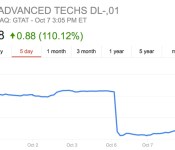
GT Advanced CEO Thomas Gutierrez sold over 9,000 shares of GT Advanced stock just a day before Apple announced the iPhone 6, reports The Wall Street Journal. The September 8 sale netted him approximately $160,000 at an average price of $17.38, before the company’s stock dropped 13 percent to $14.94 on September 9 after it became clear the iPhone 6 and iPhone 6 Plus did not include sapphire screens.
Along with the $160,000 he earned on September 8, Gutierrez sold shares on several other occasions throughout 2014, earning him more than 10 million dollars as GT stock rose on rumors that Apple would use its sapphire for the new iPhones.
In a filing, GT said Gutierrez’s share sale was part of a pre-arranged plan put in place on March 14, 2014. But there was no obvious pattern to his sales.
In May, June and July, Gutierrez sold shares within the first three days of the month. But then he didn’t sell additional shares until Sept. 8, two days after he received 15,902 previously restricted shares. (Gutierrez forfeited the remaining 6,670 shares to cover tax obligations.)
GT Advanced filed for Chapter 11 bankruptcy protection on Monday, promising to continue operations as it goes through a transitional phase to reorganize its business. “Today’s filing does not mean we are going out of business,” said Gutierrez. “Rather, it provides us with the opportunity to continue to execute our business plan on stronger footing, maintain operations of our diversified business, and improve our balance sheet.”

Apple and GT Advanced first partnered in late 2013, with Apple building a 700-employee manufacturing facility in Mesa, Arizona that’s run by GT Advanced. The deal also saw Apple funding GT’s purchase of furnaces and other sapphire-making equipment through a $578 million loan, doled out over several months and subjected to certain capacity requirements.
Under the terms of the agreement between Apple and GT Advanced, GT Advanced is required to pay back the $578 million loan over the course of five years. If the loan is not paid back, Apple is entitled to the equipment that GT Advanced purchased. When a deal was struck between the two companies, GT Advanced noted that sapphire production for Apple would result in substantially lower gross margins, but was confident that a recurring revenue stream would be beneficial for growth in the long run.
Apple was widely expected to include sapphire display covers from GT Advanced on some iPhone 6 models, and it is unclear why sapphire was not used at all. GT filings did, however, suggest that the company saw poor sapphire yield rates, which may have impacted Apple’s decision to stick with alternate materials. Apple is not subjected to any type of commitment to purchase sapphire from GT Advanced, and though the Apple Watch does indeed include a sapphire cover, it is unclear whether the sapphire being used is sourced from GT.
GT’s stock dropped approximately 90 percent after the company’s bankruptcy announcement and has seen little gain since then.
.CPlase_panel display:none;

Apple Releases Second OS X Yosemite Golden Master Candidate to Developers
Apple today released a second golden master candidate of OS X Yosemite to developers, a week after releasing the first candidate golden master and the fourth public beta.
The latest Yosemite update can be downloaded from the Mac App Store and through Apple’s Mac Dev Center.

OS X Yosemite brings a flatter, more modern look to OS X, with an emphasis on translucency and redesigned dock, windows, and more. It also includes a multitude of new features, such as improved integration with iOS 8 through Continuity, a new “Today” view in Notification Center that offers integration with third-party apps, a retooled Spotlight search with new data sources, and several new features for apps like Mail, Safari, and Messages.
Over the course of the beta testing period, each Developer Preview has added new features and refined the look and performance of OS X Yosemite, although changes have become less obvious in more recent builds as Apple begins finalizing Yosemite ahead of its public release, which is expected in late October.
.CPlase_panel display:none;

Hands-Free Siri Interactions Result in Highest Levels of Mental Distraction While Driving
Used as an in-car hands-free system, Siri causes a high level of mental distraction while driving, according to research conducted by the AAA Foundation for Traffic Safety. In a thorough study [PDF] that measured the cognitive workload of 45 drivers completing in-car tasks using various voice-based technologies, Siri’s high complexity and low intuitiveness resulted in some of the highest levels of mental distraction.
Using a five-category rating system, researchers measured Siri-based interactions like sending and receiving text messages and emails, updating Facebook or Twitter, and modifying calendar appointments. Various measurements to record distraction were taken during three separate experiments, in-car on residential streets, without driving, and in a driving simulator.

Researchers tested Siri on an iPhone 5 with iOS 7, using a microphone and voice commands to make the setup both hands-free and eyes-free, with drivers unable to look at or make contact with the phone.
Siri was found to produce the highest mental workload on the researchers’ scale, and use of Siri in a car even resulted in two crashes during the simulator study. It was also given the lowest rating of intuitiveness along with the highest rating of complexity, due to its lack of consistency and its inflexibility when it came to voice commands.

Common issues involved inconsistencies in which Siri would produce different responses to seemingly identical commands. In other circumstances, Siri required exact phrases to accomplish specific tasks, and subtle deviations from that phrasing would result in a failure.
When there was a failure to properly dictate a message, it required starting over since there was no way to modify/edit a message or command. Siri also made mistakes such as calling someone other than the desired person from the phone contact list. Some participants also reported frustration with Siri’s occasional sarcasm and wit.
According to the researchers, interactions with Siri may improve over time as the voice assistant is able to learn accents and other characteristics of a user’s voice, but many commands resulted in overly complex interactions that could be fixed via “improvements to the software design.”
Though the AAA study looked at the distraction level when using Siri directly on an iPhone, it did not look at CarPlay, Apple’s new in-dash system that the company says is a “smarter, safer way to use your iPhone in the car.” Other similar in-dash systems did, however, result in high levels of cognitive workload in a companion study, but cognitive demand varied highly based on the number of comprehension errors and the number of steps required to complete an action.
Early CarPlay reviews have suggested that the system’s Siri integration is improved compared to Siri on the iPhone, as it was judged to be easy to use with simple menus and navigation.
The study comes ahead of a set of voluntary guidelines the AAA is planning to create, encouraging users to minimize their cognitive distraction by cutting back on the use of voice-based technologies while driving. According to the AAA, voice-based interactions within a vehicle result in “significant impairments” to driving that may “adversely affect traffic safety.”
.CPlase_panel display:none;

‘Ledge’ Protects Wrists From Sharp MacBook Edges [Mac Blog]
The Ledge MacBook accessory, currently available through Kickstarter, is designed to attach to the edge of a MacBook to turn the sharp front edge into a more comfortable, rounded edge, alleviating the irritation that some users feel when using a MacBook.
Complaints about the sharp edges of the MacBook have been around for years, and a number of solutions have surfaced, but few are as elegant as the Ledge, which blends in perfectly with the aluminum of newer laptops like the Retina MacBook Pro and the MacBook Air.
https://www.kickstarter.com/projects/appliedinc/ledge-for-macbook-made-in-usa/widget/video.html
We have been MacBook users for many years, owning different models along the way. They have all shared one design trait. Sharp edges. No matter which MacBook model we have used, the sharp edges where we rested our wrists and forearms was uncomfortable and irritating.
Searching for a solution, we found nothing acceptable. Nothing existed that was made for MacBook. We decided to create our own solution. Ledge began with several sketches, and led to a staggering amount of prototypes, but the end results were better than we ever expected. It becomes an extension of your MacBook.
Ledge, which comes in two left/right pieces, is designed to install on any MacBook in just a few seconds, attaching onto the edge of the chassis via 3M adhesive. Ledge adds little extra bulk, and because it is made from the same aluminum as the MacBook, it is unobtrusive and blends in well. Ledge is fully portable and can remain attached to a MacBook at all times.

Ledge is available via Kickstarter starting at $29 for a single set for the first backers, with pricing going up to $39 after the first 20 purchases. Colored Ledge sets, in pink, gold, or black, are also available for $49, and a Silver finish double pack can be purchased for $85.
Ledge is compatible with MacBook and MacBook Pros from 2008 and later, the Retina MacBook Pro, and the MacBook Air from 2010 and later.
.CPlase_panel display:none;

