


Apple removes Bose products from stores following Beats settlement

Bose might have settled its noise-cancellation lawsuit against Beats out of court, but the two are clearly far from putting the past behind them. Apple (Beats’ new owner) has pulled all Bose headphones and speakers from its online store and several brick-and-mortar ones, according to 9to5mac, despite continuing to carry other audio brands like Urbanears, Bang & Olufsen and Sennheiser. Both companies have declined to comment about the issue when asked by Recode, but rumors about Cupertino dropping Bose have been going around since the settlement last week.
For the sake of those who haven’t been following the case closely: Bose filed the lawsuit against Dre’s company right after Apple snapped it up, accusing it of stealing its noise-canceling technology. One could even think their rivalry cost a 49ers quarterback 10 grand for wearing Beats headphones during a press conference, after the NFL signed an exclusivity deal with Bose. But to be fair, that deal prohibits players from wearing any other brand before, during and after games. Since both parties refuse to address the issue, it’s unclear whether Apple will ever sell Bose products again, but we’ll keep an eye out and let you know if we hear anything.
[Image credit: Jimmy Thomas/Flickr]
Filed under: Peripherals, Apple
Via: Recode
Source: 9to5mac

Flickr chooses a great time to launch its iPad app

Apple has chosen to focus on the iPad’s camera abilities with the upcoming Air 2 (we wish they wouldn’t) and apparently, finally snagged Flickr’s attention. Yahoo’s photo sharing service somehow managed to beat Instagram to the punch so perhaps the introduction of its first iPad-ready app (four years after Apple’s slate arrived) isn’t that late. So what’s in the (now universal) Flickr iOS app? iPad-optimized layouts for members to browse pictures whether their own or others that “cascade in a lovely waterfall format.” If you must take a picture with your tablet, the app can record photos or videos with live filters and a full suite of editing tools. It requires iOS 8 to work, and some of the upgrades that stretch across devices include support for the new sharing extensions, photo detail editing and a new unified search. The update is live in the app store now, and of course there’s no time like 3AM ET on a Saturday to give it a try.
We’ve heard you loud and clear! Flickr for #iPad is here: http://t.co/E3ZnrfDrXq
– Flickr (@Flickr) October 18, 2014
Filed under: Internet, Mobile, Apple
Source: iTunes, Flickr Blog
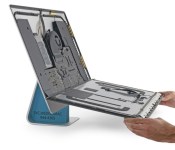
iFixit Tears Down New Retina iMac, Internal Layout Largely the Same as Prior Generation
Though the new iMac with 5K Retina display was just released yesterday, iFixit has already acquired and disassembled one of the new machines, giving us a look at what’s underneath the iMac’s ultra thin display.
Apple’s newest iMac continues to use many of the same design elements from previous iMacs, including an easily accessible RAM upgrade slot on the back of the device. With the RAM slot, users will be able to install their own RAM modules with little trouble.

The 5K display, which has a resolution of 5120 x 2880, was manufactured by LG Display, the same supply partner that has manufactured iMac displays for Apple in the past. Aside from the display, iFixit found that the Retina iMac internals look much like the internals of the 2013 iMac, with the sole difference being a wider display data cable.
Along with an AMD Radeon M290X GPU and i5-4690 processor from Intel, the iMac contains SK Hynix 256 MB GDDR5 SGRAM. It uses the same SanDisk PCIe SSD as the late 2013 Retina MacBook Pro, with Marvell Controller, and it uses the same AirPort/Bluetooth card that was used in the 2013 27-inch iMac.

The 27-inch iMac with Retina 5K display earned a repairability score of 5 out of 10, the same score earned by the 2013 27-inch iMac. iFixit pointed out that the RAM, hard drive, and CPU are user replaceable with some adhesive cutting, but removing the glass and LCD panel from the machine remains a difficult task for all those but the most dedicated do-it-yourselfers.

New 2014 Mac Mini Has Soldered RAM, Not User Replaceable
 After going more than two years without an update, Apple’s Mac mini was refreshed yesterday, adding Haswell processors, Intel HD 5000/Iris graphics, 802.11ac Wi-Fi, and PCI-based flash storage options for the higher-end models.
Unfortunately, the upgrade was disappointing to some Mac mini fans as Apple stopped offering a build-to-order quad-core processor upgrade and dual-drive storage options that exceed 1TB.
Many have speculated that the Mac mini also includes soldered RAM, which has now been confirmed by Macminicolo’s Brian Stucki. According to Stucki, the RAM in the Mac mini is “not user accessible,” which means those who purchase Mac minis are limited to 16GB of RAM that must upgraded when purchasing the machine from Apple.
All three Mac mini models can be upgraded to a maximum of 16GB of RAM, with the upgrade priced at $300 for the base model and $200 for the mid and high-end models.
While the RAM is not upgradeable, Stucki says that it is possible to replace or upgrade the hard drive, but doing so may void the warranty.
Apple’s new Mac mini starts at $499 and comes in three separate base configurations. On the low end, the Mac mini ships with a 1.4Ghz dual-core Core i5 processor, 4GB of RAM, a 500GB hard drive, and Intel HD Graphics 5000. At the middle tier, the Mac mini comes with a 2.6Ghz dual-core Core i5 processor, 8GB of RAM, and a 1TB hard drive, and Intel Iris Graphics. At the high end, the Mac mini ships with a 2.8Ghz dual-core Core i5, 8GB of RAM, a 1TB Fusion Drive, and Intel Iris Graphics.
Base configurations of the Mac mini are currently available for purchase from the online Apple Store and will ship in one to three days. Custom configurations ship within three to five days.
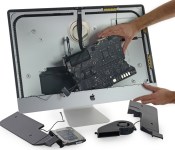
iFixit takes a peek inside Apple’s new ‘5K’ iMac

Sure, we were only just introduced to Apple’s 27-inch iMac with Retina 5K Display, but the folks at iFixit are already tearing one apart. Inside they found a screen made by LG Display, and a setup similar to previous iMacs, including easily-accessed RAM slots for memory upgrades. Overall, the layout is almost exactly like last year’s 27-inch iMac, plus that new display controller Apple bragged about and a slightly wider display data cable, enhanced to feed all those pixels. Repairing things might be tricky given its design, but you should check out the teardown for more details and a look at the carnage.
iMac Intel 27″ Retina 5K Display Teardown
Source: iFixit
OS X Yosemite: An In-Depth Look at Markup and Mail Drop in the Mail App
OS X Yosemite has brought some major changes to Apple’s Mail app, and those changes aren’t limited to a simple visual overhaul. Mail may have a new look, but it also has several new features like Mail Drop and Markup.
With Markup, you can annotate images and PDFs from directly within the Mail app. For example, when composing an email message and attaching a PDF, it’s possible to use various tools to add signatures, emphasis, and more. The same is possible with an image — simply attach a file in a message that’s being composed and right click on it, selecting Markup.
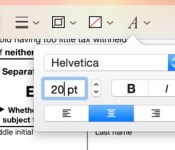
Markup has a set of tools at the top that allow users to create shapes, write text words, and insert signatures. There are different brushes that can be used, along with a color palette and various font options.

Users can enter various shapes, such as stars, circles, squares, speech bubbles and more, and there’s a magnifying glass that will magnify sections of text or photos. A crop tool also allows for simple image edits, and there’s a pen tool for free-handed writing or drawing.
Markup’s neatest feature is a signature tool that lets users insert a signature using the trackpad of a MacBook or a camera. With the trackpad, clicking begin and then signing a name with a finger on the trackpad will create a signature that’s automatically entered into a document.

There’s also an option that allows users to write a signature on a white piece of paper and use a Mac’s FaceTime camera to import it into the document. It’s a little bit finicky getting the camera to recognize the signature, but once it’s lined up properly, the feature works well.

Along with Markup, Mail has a new feature called Mail Drop that lets users send large file attachments of up to 5GB using iCloud. Composing an email message and attaching a file that would normally be too large to send will prompt Mail to ask a user if they would like to use Mail Drop to deliver the message.

When the Mail Drop option is selected, the person receiving the email will receive the file attachment as normal if they’re using Mail, while non-Mail users will receive a message with a download link that allows them to download the file directly from iCloud. Files are stored in iCloud for several days before being deleted.

MacRumors did not experience any issues getting Mail Drop to function with files ranging in size from 10MB to over 1GB, but some users on the Apple Support forums have been having trouble with the feature. Because Mail Drop works based on a sender’s file size limits rather than a receiver’s, users have run into an issue where they can send a file that is below their own maximum file size threshold, but above a receiver’s file size limits.
For example, sending a 10MB message from an email account that has a 30MB file size limit to an email account that has a 6MB file size limit will not activate Mail Drop and turn the file into a clickable link that can be downloaded from iCloud. Therefore, the person sending the message will get a bounce back reply that the user can’t accept a message of that size, even if the receiver also has Mail Drop.
According to Apple, Mail Drop can only be used to send files that “exceed the maximum size allowed by the provider of your email account,” which means there is no way for a user to select a custom file size threshold to activate Mail Drop to avoid the above situation. It is not clear if Apple has plans to implement manual size controls for Mail Drop, but for the time being, it appears that Mail Drop may not be useful for all users in certain situations.
Released to the public yesterday, OS X Yosemite can be downloaded from the Mac App Store at no cost. It runs on all machines that were capable of running OS X Mountain Lion and OS X Mavericks, and it requires 8GB of storage space and 2GB of RAM. [Direct Link]
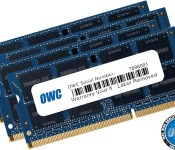
OWC Announces RAM Upgrade Kits for New Retina iMac, Up to 32GB for $399 [Mac Blog]
Following yesterday’s launch of the new iMac with Retina 5K display, Other World Computing has announced new RAM upgrade kits for the machines.
OWC is offering three separate 1600MHz DDR3L kits to upgrade the Retina iMac’s memory to up to 32GB at prices lower than Apple offers. The 8GB kit, priced at $101.99, will increase the RAM of a base Retina iMac configuration from 8GB to 16GB.

The 16GB kit, priced at $197.99, will increase the RAM of a base Retina iMac configuration from 8GB to 24GB, and the 32GB kit, priced at $395 kit will allow users to replace all memory for a total of 32GB of RAM.
When purchased from Apple, upgrading to 16GB of RAM total costs $200, while upgrading to 32GB of RAM costs $600. OWC’s 32GB kit is $200 less than Apple’s price, and while the 16GB OWC kit is priced the same at $200, it ultimately lets users install 24GB of RAM rather than 16GB of RAM.
OWC is also offering a trade-in rebate for original factory memory, giving customers a credit towards the purchase of a memory kit. OWC’s memory kits come with a limited lifetime warranty along with a lifetime advanced replacement program.
Released yesterday, Apple’s iMac with 5K Retina display can be purchased from the Apple Store for $2,499. Current orders ship out in three to five business days.
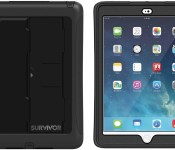
List of Cases Available for Apple’s New iPad Air 2 [iOS Blog]
Though the second-generation iPad Air was just announced yesterday, several prominent case manufacturers have already begun releasing cases for the new ultra thin tablets.
Many cases for the original iPad Air won’t fit the new version of the iPad Air because it is 18 percent thinner at 6.1 mm instead of 7.5 mm, even though it has the same 9.4-inch height and 6.6-inch width. For that reason, prospective iPad Air 2 buyers who want to keep their tablets protected in a case will need to buy a case specifically created with the new design in mind.
We’ve gathered up a list of the iPad Air 2 cases that are available now or that will be available in the very near future below.
Griffin – Griffin has already come out with several different cases for the iPad Air 2, which have estimated shipping dates of one to two weeks. There’s a Survivor All-Terrain Case and a Survivor Slim, both of which are priced at $79.99 and are designed to protect the iPad from drops and weather elements.

Griffin also has a simple TurnFolio case available for the iPad Air 2, which functions as a four-position workstand in landscape or portrait mode. The case, which ships in one to two weeks, is available for $49.99.
Apple – Apple has created its own Smart Cover and Smart Case for the iPad Air 2, which can be purchased from its online store. The iPad Air 2 polyurethane Smart Cover is designed to protect just the front of the iPad and is available in Black, White, Pink, Yellow, Blue, Green, and (PRODUCT) Red colors for $39. It appears that older iPad Air Smart Covers will fit the new tablet as new Smart Covers fit the original iPad Air.

Apple’s leather Smart Case offers more protection and is designed to protect both the cover and the rear shell of the device. It’s available in Black, Midnight Blue, Olive Brown, Soft Pink, and (PRODUCT) RED colors for $79.
Belkin – Belkin has announced several new cases designed for the iPad Air 2, including the QODE Pro Keyboard case for$149.99, the QODE Ultimate Keyboard case for $129.99 and the QODE Slim Style Keyboard for $99.99.

Belkin also has simple folio-style cases for the iPad Air 2, including the Slim Style Cover for $49.99 and the Chambray Cover for $39.99.
Incipio – Incipio has four separate iPad Air 2 cases that will be available to purchase in the near future, including the $40 Octane Folio, designed to be impact resistant; the $35 Clarion, with a clear backing; the $40 Faraday, with a magnetic fold over closure; and the $50 Tuxen, a Snap-On Folio with a magnetic closure.

Poetic – Poetic has several inexpensive iPad Air 2 cases available on Amazon, like the SlimBook Vegan Leather case that’s priced at $9.95, or the GraphGrip Silicone Case priced at $9.95. Poetic also has the DuraBook iPad Air 2 case for $9.95, and the Slimline Leather Trifold cover for the same price. All of Poetic’s cases cost $4.95 to ship, come in a range of colors, and will be available on October 29.

A limited number of existing iPad Air cases may fit the new iPad Air 2, and all sleeves and bags designed for the iPad Air will, of course, also be compatible with the new iPad Air 2. Additional Apple accessory makers will be coming out with iPad Air 2 cases in the coming weeks as well, now that the new tablets are shipping to customers in just a few days.

Retina 5K iMac Will Not Act as External Display, Standalone Apple 5K Display Unlikely Soon
At Apple’s introduction of the new 27-inch iMac with Retina 5K Display, Phil Schiller noted that the machine’s $2499 starting price compares favorably with some of the higher-end 4K displays on the market today for closer to $3000, leading some to wonder whether it would be feasible to use the iMac as an external display for something like a Mac Pro.
For a number of years, iMacs have supported a feature known as target display mode, which allows them to serve as external displays for other computers, but as pointed out by TechCrunch‘s Matthew Panzarino yesterday, the new Retina 5K iMac does not support this mode.

The probable reason for this is also likely the reason why Apple did not announce a standalone Retina Thunderbolt Display yesterday: bandwidth limitations. The current DisplayPort 1.2 specification used over Thunderbolt 2 on Apple’s latest Macs simply isn’t capable of handling the bandwidth necessary for 5K video over a single cable.
As a result, no current Mac, including the Mac Pro and Retina MacBook Pro models that do support 4K displays, can currently drive a 5K external display. Technically, Apple could allow another Mac to output video at a lower resolution and have the Retina iMac scale the content up to fit its display, but this would not be ideal and Apple has apparently elected not to support it as an option.
As noted by Marco Arment, simple plug-and-play support for 5K external displays over a single cable will need the new DisplayPort 1.3 standard, but that won’t be an option until Intel’s Skylake platform, the successor to the upcoming Broadwell family, is launched.
Doing it right will require waiting until DisplayPort 1.3 in Thunderbolt 3 on Broadwell’s successor, Skylake, which isn’t supposed to come out for at least another year — and Intel is even worse at estimating ship dates than I am, so it’s likely to be longer. […]
I’d estimate — granted, I’m wrong a lot — that Apple won’t ship a standalone 5K display until at least 2016, and it won’t work with any of today’s Macs, including the 2013 Mac Pro.
Arment points out that Dell’s upcoming 5K display uses dual DisplayPort 1.2 cables for connectivity but that no current Macs appear to support the setup and even if they did performance would likely not be ideal.
Another potential product on the horizon is a Retina 21.5-inch iMac likely at 3840 x 2160 pixels, although it is unclear when Apple plans to launch such a machine. KGI Securities analyst Ming-Chi Kuo predicts a second half of 2015 launch for the machine in a similar pattern to that seen with the MacBook Pro, where the larger 15-inch model received a Retina display option a number of months before the 13-inch model followed suit.
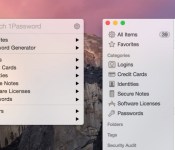
A List of OS X Yosemite Apps With Notification Center Widgets, Share Support, and More
Yesterday, Apple launched OS X Yosemite which brought a complete redesign to the OS and a number of features like Continuity, an enhanced Notification Center with widget support, iCloud Drive, and more. A number of developers have updated their apps to take advantage of those new features, and we’ve rounded up some of the most notable apps for Yosemite below.
1Password ($34.99 for a limited time, usually $49.99) [Direct Link]
Popular password manager 1Password has received a number of new features that integrate with OS X Yosemite including support for Dark Mode, iCloud Drive compatibility for enhanced syncing between devices, and Wi-Fi sync which now works with attachments. The 1Password mini menubar attachment has also been refined, bringing faster access and new shortcuts.

Coinverter (Free public beta) [Direct Link]
Daft Logic Studio brings its iOS currency converter to the Mac with a flat look that is in line with the rest of OS X Yosemite and a Notification Center widget that can display multiple conversions at once. The full version of Coinverter for Mac will launch soon, and interested users can participate in a free public beta.
Wunderlist (Free) [Direct Link]
To-do app Wunderlist for Mac has received an update to 3.1.0 and brings a number of new features for OS Yosemite, including a custom Today widget in the Notification Center, a custom Share extension that works in Safari, and full Handoff support which allows users to edit lists between devices. The app has also received a redesign that allows for quicker access to list elements.
Read more 

