



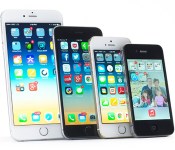
Chinese store makes sure that iPhone 6 Plus fits in your pocket

Let’s face it: When it comes to the iPhone 6 Plus, size really does matter.
Filed under: Cellphones, Misc, Internet, Mobile, Apple
Via: Techinasia
Source: Sina Weibo (Amakura)
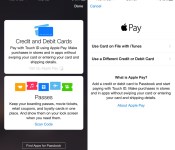
How to Set Up Apple Pay and Add Credit Cards
Now that iOS 8.1 has been released to the public, we’re getting our first look at what Apple Pay looks like on the iPhone 6 and the iPhone 6 Plus. Apple Pay isn’t immediately obvious when iOS 8.1 is installed — users will need to open up Settings or Passbook to see various Apple Pay features.
The initial setup for Apple Pay can be done through Passbook. Tapping the “+” icon in Passbook will allow users to add a card. If a card is already associated with an iTunes account, users can tap choose to use that card, or enter another one using the camera.

The camera roll will capture a card number, expiration date, and user’s name, requiring the security code on the card to verify the number with the bank.
The verification process takes just a few seconds for most cards that are currently working with Apple Pay, after which the card can immediately be used for purchases. Some cards require additional verification steps, such as phone calls and emails. All cards stored in Passbook will be stacked on top of each other in Passbook’s traditional style, with tap pulling a specific card to the forefront of the app.

Apple Pay’s neatest features are buried in the Settings menu, located under the new “Passbook and Apple Pay” section. Each credit card listed added to Passbook is listed here, along with Transaction Defaults like billing address, shipping address, email, and phone number.

Tapping on one of the cards provides specific information about the card, allowing users to see the last digits of the card number, the last digits of the Device Account Number that replaces the card number in transactions, and it also provides contact information for the bank behind the card, as well as an app download.
Each card also includes a list of recent transactions that have been made, and with some cards, transactions made in stores that don’t support Apple Pay will be listed right alongside Apple Pay transactions. This settings area is also where a card can be removed from Apple Pay.

After being set up, Apple Pay can be used within stores and within participating apps to make purchases with a single touch. When in a store, making a purchase is as simple as holding an iPhone 6 or 6 Plus near a contactless payment terminal with a finger on Touch ID, can be seen in the demo video below from The Verge.
According to Apple, Apple Pay will work with more than 200,000 stores that support contactless payments, and it has partnered with several retailers like Walgreens, Macy’s, and Whole Foods to ensure support in those locations. Apple Pay also works for purchases made in participating apps like Uber, Starbucks, and Apple’s own Apple Store app.

List of Stores and Apps That Accept Apple Pay Payments
While Apple Pay will work in any store that accepts contactless payments, Apple has partnered up with several retailers for the launch of Apple Pay, to ensure the mobile payment service will work smoothly in those locations. In retail stores, only iPhone 6 and 6 Plus users can take advantage of Apple Pay, as payments require NFC.
Retail partners that will begin accepting Apple Pay payments today or in the immediate future include Aeropostale, Babies R Us, BJ’s Wholesale Club, Bloomingdales, Champs, Chevron, DuaneReade, Foot Locker (including Lady Footlocker, Run by Footlocker, Kids Footlocker, and House of Hoops), FootAction, Macy’s Nike, Office Depot, Petco (and Unleashed), Radioshack, Six:02, Sports Authority, Texaco, Toys R Us, Walgreens, and of course, Apple’s own retail stores.

Fast food locations now accepting Apple Pay include McDonald’s, Subway, and Panera Bread, while grocery stores accepting the payments service include Wegmans and Whole Foods Market.
Apple Pay can also be used within apps on devices that support Touch ID, which includes the iPhone 6, the iPhone 6 Plus, and Apple’s upcoming iPad mini 3 and iPad Air 2. Apple’s iPhone 5s does not appear to be compatible according to the Apple Pay website, even though it has Touch ID. Over the weekend, Apple’s iTunes chief Eddy Cue said that he expects most initial Apple Pay transactions to take place within apps.
Apple’s app launch partners, which will begin accepting Apple Pay payments through app updates going out today, include AirBnB, Chairish, Disney Store, Fancy, Groupon, Hotel Tonight, Houzz, Instacart, Lyft, MLB.com, OpenTable, Panera Bread, Spring, Staples, Target, Tickets.com, and Uber. Apple’s own Apple Store app now accepts Apple Pay payments as well.
Apple Pay updates for the above listed apps should be trickling out beginning today now that Apple Pay is live. Bank apps are also being updated with Apple Pay support, and Capital One and Navy Federal Credit Union have already launched apps with Apple Pay updates.

Apple to Continue Offering Public Beta Versions of OS X Software
With the release of Yosemite, Apple introduced a public beta test for the first time, allowing more than a million consumers to sign up for and participate in the Yosemite beta. In past years, beta testing new Mac software has been left up to developers and a select number of Apple Seed members.
It appears that Apple found Yosemite’s public beta testing to be successful, as the company today sent out an email that suggests it will continue to offer public beta tests for OS X software in the future. In an email that thanks Yosemite testers, Apple says that members of the OS X Beta Program will continue to be offered beta versions of OS X software updates.

Thanks for participating in the OS X Yosemite Beta Program. As you know, OS X Yosemite brings an elegant redesign, continuity features for using your Mac, iPhone, and iPad together, and major enhancements to the apps you use every day. And it’s now available for free from the Mac App Store.
Please install the release version of OS X Yosemite. As a member of the OS X Beta Program, you will continue to be offered beta versions of OS X software updates on any Mac that you installed the beta on. However, if you prefer to stop receiving beta updates, please click here.
Over the course of the beta testing period, Apple seeded six separate public betas to beta testers. While public beta testers received fewer updates than developers early on, towards the end of the beta testing period, updates became more frequent and the final beta that was sent out mirrored the third golden master sent to developers.
It is unclear if Apple will seed minor OS X updates to the beta testing public, or if the next major public beta test will come in 2015 with the release of the next-generation OS X 10.11 Mac operating system.
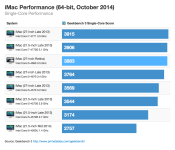
Apple’s New Retina iMacs Offer Slight Performance Boost Over Non-Retina iMacs
Apple’s new Retina iMacs, released last Thursday, have been showing up in Geekbench benchmarks, giving us a look at how the new machine’s performance compares to the non-Retina iMacs released in 2013 and still being sold.
A Geekbench 3 result for the base 3.5GHz Core i5 Retina iMac has been shared by John Poole of Primate Labs, displaying just slight performance increases over the 3.4GHz Core i5 model used in the late 2013 iMac. The 4.0GHz Core i7 Retina iMac has yet to be benchmarked, but should see performance that exceeds that of existing Core i7 iMacs due to its faster processor.
 In both single-core and multi-core performance, the new Retina iMac offered moderately faster speeds, which is unsurprising as the machines continue to use Haswell processors that have been clocked slightly higher. More significant performance boosts in the iMac won’t be seen until 2015, when Intel’s Broadwell chips become available.

Compared to the 2013 Mac Pro lineup, the Retina iMac offers faster single-core performance, but all 2013 Mac Pro models beat out the iMac when it comes to multi-core performance. Results for the Core i7 iMacs are expected to be similar, but according to Poole, the higher-end Retina iMac may be faster than the 4-core Mac Pro.

Though the new iMac continues to use Haswell processors, its claim to fame is its Retina 5K display, which has an impressive resolution of 5120 x 2880, and its reasonable price, which starts at just $2,499. Apple’s new Retina iMacs are available for purchase from the online Apple Store, with new orders shipping out in 5 to 7 days.
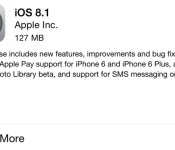
Apple Releases iOS 8.1 With Apple Pay Support, SMS Relay, Camera Roll, and More
Apple today released iOS 8.1, its first major update to iOS 8. First seeded to developers at the end of September, iOS 8.1 brings quite a few significant features to the operating system. The update activates Apple Pay, enables Yosemite users to access Continuity features like SMS relay and Instant Hotspot, offers all iOS 8 users access to iCloud Photo Library, fixes several bugs, and more.
iOS 8.1, build 12B410, is available immediately as an over-the-air download and after updating, it will allow iPhone 6 and 6 Plus owners to access Apple Pay, Apple’s new payment service. With Apple Pay, the iPhone 6 and 6 Plus can be used to make payments in both retail stores that support NFC and participating apps. Apple has also released Apple TV software 7.0.1.

Apple Pay support for iPhone 6 and iPhone 6 Plus (U.S. only)
Photos include new features, improvements, and fixes
-Adds iCloud Photo Library as a beta service
– Adds Camera Roll album in Photos app and My Photo Stream album when iCloud Photo Library is not enabled
– Provides alerts when running low on space before capturing Time Lapse videosMessages includes new features, improvements and fixes
– Adds the ability for iPhone users to send and receive SMS and MMS text messages on from their iPad and Mac
– Resolves an issue where search would sometimes not display results
– Fixes a bug that caused read messages not to be marked as read
– Fixes issues with group messagingResolves issues with Wi-Fi performance that could occur when connected to some base stations
Fixes an issue that could prevent connections to Bluetooth hands-free devices
Fixes bugs that could cause screen rotation to stop working
Fixes an issue in Safari where videos would sometimes not play
Adds an option to select between 2G, 3G, or LTE networks for cellular data
Fixes an issue in Safari where videos would sometimes not play
Adds AirDrop support for Passbook passes
Adds an option to enable Dictation in Settings for Keyboards, Separate from Siri
Enables HealthKit apps to access data in the backgroundAccessibility improvements and fixes
– Fixes an issue that prevented Guided Access from working properly
– Fixes a bug where VoiceOver would not work with 3rd party keyboards
– Improves stability and audio quality when using MFi Hearing Aids with iPhone 6 and 6 Plus
– Fixes an issue with VoiceOver where tone dialing would get stuck on tone until dialing another number
– Improves reliability when using handwriting, Bluetooth keyboards, and Braille displays with VoiceOverFixes an issue that was preventing the use of OS X Caching Server for iOS updates
Also included in iOS 8.1 is support for SMS relay, a Continuity feature designed to allow Macs (running Yosemite) and iOS devices like iPads to receive SMS messages routed through a user’s iPhone. Instant Hotspot is also enabled through the iOS 8.1 update, letting Mac users remotely activate the Personal Hotspot capabilities of an iPhone when two devices are near each other.
Along with those major features, iOS 8.1 reinstates the Camera Roll, which was removed with iOS 8, and it gives all iOS 8 users access to iCloud Photo Library, Apple’s new cloud-based photo storage solution. The removal of the Camera Roll turned out to be a controversial decision, with Apple opting to re-add it after iOS users asked for the feature to be returned.
iOS 8 has not been Apple’s smoothest software release, with users encountering quite a few bugs in the operating system. While multiple issues were fixed with iOS 8.0.2, released in late September, iOS 8.1 fixes several other bugs, including a problem that caused some iOS 8 users to have trouble pairing their phones with their Bluetooth devices. According to release notes, iOS 8.1 also fixes several other complaints users have had about iOS 8, including problems connecting to Wi-Fi and issues with screen rotation.

Apple Updates ‘Apple Store’ iOS App With Apple Pay Support [iOS Blog]
 Apple today updated its Apple Store app, adding support for Apple Pay, which was enabled with the recently released iOS 8.1 update. Following the update, users will be able to use their iPhones to make purchases in the Apple Store app that are verified with a simple finger on Touch ID.
In-app Apple Pay purchases are available for iPhone 5s, iPhone 6, and iPhone 6 Plus users. When the iPad mini 3 and iPad Air 2 are available, those devices will also be able to use Apple Pay within apps thanks to the addition of Touch ID. While all devices with Touch ID can app purchases for physical goods using Apple Pay, retail purchases will be limited to iPhone 6 and 6 Plus users, as those devices support NFC.
Along with the Apple Store app, several other apps should be receiving updates in the very near future to allow them to work with Apple Pay. Apple has several app launch partners including Starbucks, Uber, Grupon, Target, and more.
The Apple Store app can be downloaded from the App Store for free. [Direct Link]

Dropbox’s iOS 8 app adds support for Touch ID

Not to be outdone by Microsoft’s recent refresh of OneDrive, Dropbox has now made its iOS app compatible with Apple’s fingerprint-scanning technology, Touch ID, as well. You’ll need iOS 8 in order for the feature to work, but chances are you’re already running the latest and greatest software from Apple anyway. Aside from adding the ability to unlock the application by way of Touch ID, Dropbox also updated it to support the bigger screens of the iPhone 6 and iPhone 6 Plus — something that owners of Apple’s newest smartphones will definitely appreciate. Now someone tell Google to hurry and do the same for Drive.
Filed under: Cellphones, Storage, Software, Mobile, Apple
Via: The Next Web
Source: Dropbox
China allegedly using iCloud to secretly collect user data

Notorious for the constant surveilling and censorship of its people, the Chinese government appears to be at it again — this time with Apple iOS users. According to a report from GreatFire.org, a website that focuses on privacy matters, China has secretly started collecting iCloud data through what’s known as a “man-in-the-middle” intrusion; basically, the attacker eavesdrops by independently connecting to the user and making it seem as if it’s a private connection, when, in fact, it isn’t. Chinese Security expert Zhou Shuguang suggests that the network service providers are likely being told by the authorities to use fake trust certificates, making it rather easy for them to conduct these attacks.
The purported SSL attack on iCloud by China officials comes as Apple’s iPhone 6 and iPhone 6 Plus have just been released in that country, where there’s estimated to be upwards of 100 million people using an iPhone. At the same time, this issue is hot on the heels of Apple announcing it would begin storing personal data in servers in China, as it looked to improve cloud features like iMessage and others. Back then, Apple said all info would be encrypted, adding that data center providers were not going to “have access to the content.” Still, it’s unclear at the moment if that’s related in any way.
We’ve reached out to Apple for comment on the matter and will update this story if we hear back.
Photos by Will Lipman.
Filed under: Cellphones, Tablets, Software, Mobile, Apple
Via: Quartz
Source: GreatFire.org, Zhou Shuguang (Chinese)

Apple’s iOS 8.1 update is waiting for you to download it

Well, it’s Monday, and that can only mean one thing: Apple’s iOS 8.1 update has finally gone live for your installing pleasure. To recap, the new software – which is debuting just over a month since iOS 8 first hit – brings back once-trashed favorites like the Camera Roll, and strengthens the connection between your iPhone and Yosemite-powered Mac with features like SMS handoff and the uber-impressive Instant Hotspot. Perhaps most importantly, Apple Pay’s launching today too: once you’ve installed 8.1 and set everything up, you’ll be able to trudge down to your local Walgreen’s (along with a horde of other participating retailers) to pay for your contact solution and Haribo gummies with your phone. If that sounds like a good time, all you need to do is pop into your iPhone’s settings and jump into the Software Update menu – the 126MB file should be ready and waiting for you.
Filed under: Mobile

