


Apple Debuts Music-Themed iPad Air 2 Ad Ahead of Grammy Awards
Ahead of tonight’s telecast of the 57th annual Grammy Awards, Apple has debuted a new music-themed iPad commercial titled “Change” featuring Swedish singer Elliphant, Los Angeles-based producer Gaslamp Killer, and English DJ Riton.
The ad shows the three musicians composing a remix to Elliphant’s “All Or Nothing” entirely on an iPad, from initial songwriting, production, recording, and more. Apps shown throughout the add include Apple’s GarageBand for songwriting, iMPC Pro for production, Serato Remote for live performances and Manual Camera for filming video.
Billboard also reports that Apple CEO Tim Cook and SVP of Internet Software and Services were the focus of much attention at a pre-Grammy party held by record producer Clive Davis. Apple is estimated to have paid upwards of $2 million for its Grammy ad.
The new iPad ad follows rumors of a revamped Beats Music subscription service, with a report last week noting that Apple would be charging $7.99 per month for access on OS X , iOS, Apple TV, and Android. Apple is expected to relaunch Beats Music later this year, possibly at June during the company’s annual Worldwide Developer’s Conference.
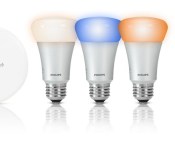
Philips Pulls Defective 1.7.1 Hue App Update After Crashing Reports [iOS Blog]
Philips released an update to its Philips Hue app for iOS yesterday afternoon and users quickly found that the new version of the app continually crashed, making it impossible for them to control their Hue lights.
As of this morning, Philips has removed the app from the App Store to prevent it from being downloaded, but thousands of Hue customers have already updated their iOS devices and have taken to the Philips Hue Facebook page to register their complaints.

Philips is aware of the issue and has said in a Facebook message posted six hours ago that the company is “taking immediate action to fix it” with an upcoming 1.7.3 app that will be available “shortly.”
We are aware of an issue with the latest Philips hue app update when used with iOS 8.0 software. We’re very sorry if you’re having problems and are taking immediate action to fix it.
In the meantime, please do not update the Philips Hue app to 1.7.1., nor re-install the Hue app, or reset the Hue bridge.
Users who have installed the faulty 1.7.1 update can continue to control their Hue lights from wall switches, the Hue Tap, and from third-party apps. It’s also possible to control lights from the MeetHue.com website. At this time, Philips has not given a new estimate for the launch of a fixed version of the app.
Hands-On Review of Oral-B’s iPhone-Connected Bluetooth Smart Toothbrush [iOS Blog]
Bluetooth-enabled appliances and electronics that connect everyday household items to smartphones and tablets are becoming increasingly popular, giving us a whole range of connected things — thermostats, coffee makers and mixing bowls, cars, and even connected toothbrushes, like the Oral-B SmartSeries toothbrush lineup, which features Bluetooth toothbrushes that are compatible with an iPhone app.
Oral-B showed off its first smart toothbrush in early 2014, and began shipping the $125 Oral-B Pro 5000 SmartSeries with Bluetooth later in the year. We caught up with Oral-B at CES in 2015 and got our hands on an Oral-B Pro 5000 so we could share the connected toothbrush experience with MacRumors readers.
Connected toothbrushes are set to take off in 2015, so this is a good time to explore available options and see what they can do for you. Oral-B has a second higher-end model coming out this year, and the Kolibree toothbrush, which gamifies brushing, is finally launching in a few months.
What’s in the Box
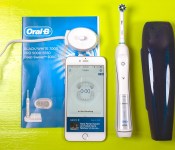
The Oral-B Pro 5000 SmartSeries with Bluetooth ships with the toothbrush itself, a brush head, a stand for charging, a travel case, and a guide that walks you through how to pair the toothbrush to an iPhone. There’s also a stand to hold multiple brush heads, but as you’ll see later in this review, the brush and its accompanying app isn’t really suited for more than one user.
 Box contents, along with iPhone
The Toothbrush
The Oral-B Pro 5000 SmartSeries with Bluetooth is essentially the company’s standard Oral-B Pro 5000 toothbrush with a Bluetooth upgrade. This brush has been around for quite some time and has racked up thousands of reviews on Amazon.
For that reason, we won’t go into a great amount of detail on the brush itself, but we’ll hit a few major points that are worth knowing. First of all, the Oral-B Pro 5000 is a rechargeable electric toothbrush that that oscillates and rotates to keep your teeth cleaner than a manual brush.
Read more 
OS X 10.10.3 Beta Adds Support for Google 2-Step Verification on Internet Accounts
In addition to a new Photos app and emoji improvements, yesterday’s developer release of the first OS X 10.10.3 beta also includes new direct support for Google’s 2-Step Verification when setting up Google services in the Internet Accounts section of System Preferences.
2-Step Verification is an optional security setting that requires users to enter not only their account password but also a unique code sent by Google via phone app, text message, or voice call to a previously registered device or phone number, greatly enhancing account security.
Not all devices and apps support Google’s 2-Step Verification, however, and as a backup Google also allows users to generate app-specific passwords to register a unique password for that device or app. The app-specific password can be revoked at any time by logging into the user’s Google account for another time, making it easy to disable access on a device that has been lost or stolen.
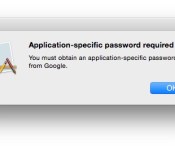
On OS X 10.10.2 and earlier, users setting up their machines to access Google accounts with 2-Step Verification enabled have had to use this app-specific password option. Users trying to log in with their standard Google account passwords are met with error messages informing them they need to use this option.
 OS X 10.10.2 requiring an app-specific password for a Google account protected with 2-Step Verification
But as noticed by developer Jonathan Wight, the new OS X 10.10.3 beta now fully supports 2-Step Verification, allowing users to log in with their standard passwords and unique verification codes.
 OS X 10.10.3 requesting verification code after logging in with standard password
The change makes logging in with 2-Step protected accounts much simpler and increases security by making sure the user attempting to log in has a secondary trusted device to provide the verification code.
(Thanks, Sean!)
Corning Unveils ‘Project Phire’ Super Scratch-Resistant Glass
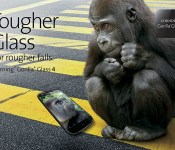
Corning today unveiled a new material that it’s been working on, which combines the strength of its existing Gorilla Glass with ultra scratch-resistance like that of sapphire, reports CNET. The material, which goes by the name “Project Phire,” was shown off during an investor meeting by Corning Glass president James Clappin.
“We told you last year that sapphire was great for scratch performance but didn’t fare well when dropped,” Clappin, president of Corning Glass Technologies, told the crowd at the event. “So, we created a product that offers the same superior damage resistance and drop performance of Gorilla Glass 4 with scratch resistance that approaches sapphire.”
Corning’s existing Gorilla Glass product is used in a range of smartphone and tablet displays, from Samsung’s Galaxy line to Apple’s own iOS lineup. Apple planned to move away from Corning’s Gorilla Glass with the iPhone 6 and 6 Plus, switching instead to sapphire produced by GT Advanced, but was unable to use the material due to production issues that later saw the dissolution of the partnership between the two companies.

According to Corning, Gorilla Glass is superior to sapphire due to sapphire’s brittleness and tendency to shatter when dropped. Corning has on several occasions pitted Gorilla Glass against sapphire to highlight the former’s benefits — lighter weight, greater strength, and lower pricing.
Gorilla Glass 4, Corning’s most recent product, is even more resistant to shattering when it falls onto hard, rough surfaces than previous versions of Gorilla Glass, but it is unable to match the scratch resistant properties of sapphire crystal. Sapphire is second only to diamond when it comes to hardness, and Apple already uses the material to protect the iPhone’s rear camera and Touch ID fingerprint sensor from scratches.
Apple’s desire to produce iPhone displays with greater scratch resistance may make Corning’s “Project Phire” material highly appealing to the company for use in next-generation devices, as it could potentially serve as a suitable replacement for sapphire.
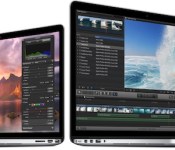
Buyer’s Guide: Deals on Retina MacBook Pro, iPad Mini 2, Apps, and Apple Accessories [Mac Blog]
Deals continue to be a bit hard to find as we head into February, but there are still some discounts to be had on the Retina MacBook Pro, older now-discontinued higher-capacity versions of the iPad Air, some current iPad mini 2 tablets, and the MacBook Air.
We’ve also got deals on several apps and bunch of Apple accessories ranging from Mophie battery packs to the Jawbone UP fitness tracker. Several sites are also offering some pretty hefty site wide discounts in honor of Valentine’s Day.
Retina MacBook Pro
– 13-inch 2.6GHz/8GB/128GB (Adorama) – $1,189, $100 off
– 13-inch 2.6GHz/8GB/256GB (MacMall) (B&H Photo) – $1,399, $100 off
– 13-inch 2.8GHz/8GB/512GB (Adorama) – $1,599, $200 off
– 15-inch 2.2GHz/16GB/256GB (B&H Photo) (Adorama) – $1,869.99, $130 off
– 15-inch 2.5GHz/16GB/512GB – (Amazon) (B&H Photo) – $2,299, $200 off

MacBook Air
– 11-inch 1.4GHz/4GB/128GB (B&H Photo) – $854, $45 off
– 11-inch 1.4GHz/4GB/256GB (B&H Photo) – $999, $100 off
– 13-inch 1.4GHz/4GB/128GB (B&H Photo – $919, $80 off
– 13-inch 1.4GHz/4GB/256GB (B&H Photo) – $1,099, $100 off

Non-Retina iMac
– 21.5-inch 2.7GHz/8GB/1TB (Best Buy) (B&H Photo)- $1,199, $100 off
– 21.5-inch 2.9GHz/8GB/1TB (Best Buy) (B&H Photo) – $1,399, $100 off
– 27-inch 3.2GHz/8GB/1TB (Best Buy) (B&H Photo) – $1,659.99, $139 off
– 27-inch 3.4GHz/8GB/1TB (Amazon) (B&H Photo) – $1,899, $100 off

iPads
Best Buy and Amazon are continuing to offer now-discontinued higher-capacity Cellular versions of the original iPad Air and the iPad mini 2 at $50 to $130 off.
– iPad Air Cellular Silver 64GB (AT&T) – $499.99
– iPad Air Cellular Space Gray 64GB (AT&T) – $499.95
– iPad Air Cellular Silver 128GB (AT&T) – $599.99
– iPad Air Cellular Space Gray 128GB (AT&T) – $599.99

– iPad mini Wi-Fi 16GB Space Gray – $249.99
– iPad mini Wi-Fi 32GB Silver – $299.99
– iPad mini Wi-Fi 32GB Space Gray – $299.99
– iPad mini 2 Cellular AT&T Silver 16GB – $379.99
– iPad mini 2 Cellular AT&T Space Gray 16GB – $379.99
– iPad mini 2 Cellular AT&T Silver 32GB – $429.99
– iPad mini 2 Cellular AT&T Space Gray 32GB – $429.99
– iPad mini 2 Cellular Verizon Silver 16GB – $379.99
– iPad mini 2 Cellular Verizon Space Gray 16GB – $329.99
– iPad mini 2 Cellular Verizon Silver 32GB – $429.99
– iPad mini 2 Cellular Verizon Space Gray 32GB – $429.99
– iPad mini 2 Cellular AT&T Silver 64GB – $399.99
– iPad mini 2 Cellular AT&T Space Gray 64GB – $399.99
– iPad mini 2 Cellular AT&T Space Gray 128GB – $499.99
– iPad mini 2 Cellular AT&T Silver 128GB – $499.99
Apps
Our sister site AppShopper has a list of all the apps that have seen price drops this week. Some notable temporary discounts include Shark Eaters: Rise of the Dolphins (Free), Bloons TD 5 (Free), Baldur’s Gate ($4.99, down from $9.99), Toontastic (Free), and Magnifico (Free).
Angry Birds Seasons has been named Apple’s App of the Week and will be free to download for the next seven days.
Apple Accessories
A Refurbished Mophie Juice Pack Powerstation Mini can be purchased from Groupon for $24.99, down from $59.95. Groupon is selling the Press Play Fuse Trio Car Charger for $14.99, down from $29.99.

Incase is offering a 40% coupon code for signing up for the Incase newsletter. Speck is offering 20% off site wide for Valentine’s Day with the promo code SWEETHEART. CableJive is offering 20% off site wide with the coupon code LOVE. Scosche is offering 20% off site wide with the coupon code Valentines2015 until 2/8.
Woot has the Mophie Juice Pack Helium battery case for the iPhone 5/5s for $29.99, down from $79.99. Tanga is selling the Apple leather iPhone case for the iPhone 5 and 5s for $19.99, a discount of $20 off the normal price. Best Buy is selling the Jawbone UP fitness tracker for $29.99, down from $79.99.

A refurbished LaCie Rugged 1TB hard drive is available from MacMall for $84.99, down from $170. The Promise Pegasus2 R4 8TB RAID System with Thunderbolt 2 is also available from MacMall for $1,299, $200 off the regular price.
MacRumors is an affiliate partner with some of these vendors.

Apple Forces Users to Upgrade to Newest Adobe Flash Player to Patch Vulnerabilities [Mac Blog]
Apple yesterday posted a new support document and sent an email to its security mailing list noting that it is now requiring all OS X users to upgrade to the latest version of the Adobe Flash Player plug-in for Safari to address potential security vulnerabilities.
The company is blocking all older versions Adobe Flash Player prior to 16.0.0.305, and users with an out-of-date version of the plug-in will see messages like “Blocked plug-in” or “Flash out-of-date” when attempting to view Flash content within Safari before updating to the newest version.

For users who are on systems that are not able to run Flash Player 16, there is an update to Flash Player 13 (13.0.0.269) that addresses the latest vulnerabilities.
APPLE-SA-2015-02-05-1 OS X: Flash Player plug-in blocked
Due to security issues in older versions, Apple has updated the web plug-in blocking mechanism to disable all versions prior to Flash Player 16.0.0.305 and 13.0.0.269.
The 16.0.0.305 and 13.0.0.269 updates were released by Adobe on February 5 to fix a zero-day vulnerability that was being exploited by hackers against Windows machines.
OS X 10.10.3 Puts More Focus on Emoji, Lays Groundwork for Skin Tone Modifiers
While the featured addition in yesterday’s OS X 10.10.3 developer seed was the new Photos app, Apple is addressing other issues with the forthcoming update, and one of these focus areas is emoji, which is seeing several changes and improvements.
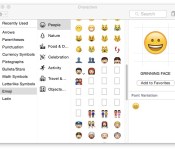
One immediately evident change is the menu option used to bring up the character palette where emoji and other symbols can be browsed and selected. The Character palette a is systemwide option generally accessed through the “Edit” menu in most Mac apps. On OS X 10.10.2 and earlier, the menu item is called “Special Characters,” while on OS X 10.10.3, it is labeled “Emoji & Symbols”. The change offers a clearer description of what can be accessed through the menu item while specifically giving a strong visibility boost to emoji.
Another significant change for emoji in OS X 10.10.3 is the apparent laying of groundwork to support skin tone modifiers proposed for the Unicode 8.0 standard. Apple noted almost a year ago that it was working with the Unicode Consortium to bring more diversity to emoji, and the proposed skin tone modifiers are a significant step in that direction. OS X 10.10.3 also appears to include a number of placeholders for new emoji in the character palette, but no images or descriptions have yet been added for these entries.
 Character palette showing placeholders for new emoji and an arrow on the “Man” emoji to provide access to skin tone options
The skin tone modifier proposal would apply to certain skin-colored emoji, allowing users to select from a range of skin tones to best represent the message they wish to send via emoji. As can be seen in OS X 10.10.3, many of these skin-colored emoji now display an arrow that when clicked brings up a menu of options.
 Apparent incomplete implementation of skin tone modifier options for the “Man” emoji
While the menu is currently non-functional, it does show the selected emoji followed by five instances of the emoji paired with a number one inside a black box. These are presumably incomplete implementations of skin tone modifiers, waiting for the Unicode Consortium to finalize its standards for Unicode 8.0. Just yesterday, the Unicode Technical Committee officially moved the technical report covering skin tone modifiers and other emoji changes for Unicode 8.0 to draft status, and Unicode 8.0 itself has been approved for beta release.
In one other change for emoji in OS X 10.10.3, the pop-up emoji picker available in many apps has been transitioned from a paginated layout to a single larger vertical-scrolling page. Under OS X 10.10.2 and earlier, the various emoji categories are contained on separate pages within the picker, with users needing to click on a toolbar along the bottom to change pages.
 Emoji picker in OS X 10.10.2 (left) with paginated categories vs. OS X 10.10.3 (right) with single scrollable page and category jumps
In OS X 10.10.3, all emoji are displayed on a single page, and while they are still organized by category and users can still click toolbar buttons to quickly jump between categories, users can now also simply scroll the entire list if they wish.
All of these changes come as emoji have exploded in popularity, spreading beyond their origin in Japan to be embraced worldwide as a quick, fun, and easy way to share a variety of emotions and thoughts, most commonly within messaging apps. As a result, Apple has been working to increase support for emoji across iOS and OS X, and this first OS X 10.10.3 developer build is a clear sign of that continued interest.

‘ControlAir’ App Brings Finger Gesture Controls to Mac [Mac Blog]
Earlier this week, gesture recognition technology company eyeSight introduced ControlAir, an app that uses a Mac’s camera to read finger-based movements, allowing users to control various media applications without needing to physically interact with their computers.
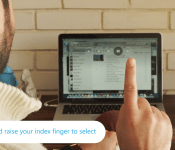
The app, which is free to download, works with many popular Mac-based entertainment apps like iTunes, Spotify, Rdio, Netflix, QuickTime, VLC and Vox. The main control scheme is a user’s index finger, which, when raised, calls up ControlAir‘s user interface banner.

Users drag their fingers left and right to highlight the volume rockers, previous/next and play/pause buttons, lowering their index fingers in an “air-click” motion to select and raising their fingers to their lips to mute. Once the designated app is open, ControlAir‘s touch-free functions will still be able to be called up even if the ControlAir app sits in the background of another.
“ControlAir offers a simple way to control your music and video applications,” said Gideon Shmuel, CEO of eyeSight. “Media apps are often running in the background and ControlAir keeps the control of those apps always accessible by simply raising a finger.”
ControlAir‘s responsiveness is impressive, and the app is compatible with any iMac, MacBook Pro, and MacBook Air with OS X 10.9 or later, but its constant requirement of access to a computer’s camera functionality may hinder its usability for some. As long as a compatible app is open, the green camera-indicating light will remain on until the app is closed. ControlAir can recognize gestures up to five feet away, according to eyeSight, but still picked up and smoothly recognized inputs from up to seven feet in MacRumors‘ testing.
The limits to the app’s current functionality are hoped to be addressed incrementally in the future, with eyeSight specifically promising more entertainment app support will be “coming soon.”
ControlAir can be downloaded from the Mac App Store for free. [Direct Link]

Apple, Tesla Fighting Over Top Employees
Apple and Tesla have been battling to recruit top talent from each other, according to a new report from Bloomberg Business. Tesla has hired at least 150 former Apple employees, more than they have from any other company.

The company has hired at least 150 former Apple employees, more than from any other company, even carmakers. The former Apple staffers work in many areas of the 6,000-employee automaker, including engineering and law. “From a design philosophy, [Apple] is relatively closely aligned,” says Musk, Tesla’s co-founder and chief executive officer. Apple declined to comment for this story.
Former Apple employees say their decision to join Tesla was based on the company’s electric cars and CEO Elon Musk, who is a similar figure to Jobs. Like Jobs, Musk pays a great deal of attention to the details of his products and is a strong, visionary leader. Musk reportedly has a soft spot for Apple and enjoys comparisons to Steve Jobs as well, one former Tesla employee tells Bloomberg.
Apple’s influence can be felt in the 17-inch touchscreen installed in Tesla’s cars as well as its retail stores, both of which had former Apple employees in key roles. High profile former Apple employees at Tesla include Doug Field, Apple’s former VP of Mac Hardware Engineering, who leads new vehicle development at the car company. Using top Silicon Valley talent, like former employees at Apple, allows Tesla to get a leg-up on competitors in the automobile industry.
While Tesla has had success recruiting talent from Apple, Musk says that Apple has hired “very few people” from the car company despite offering $250,000 signing bonuses and 60 percent salary increases to its employees.
Apple and Tesla have interacted in the past, with a report emerging in February 2014 that Apple had considered purchasing Tesla. Musk also revealed the two companies have had “conversations”, though it isn’t known whether those were about a potential acquisition, iOS integration in Tesla cars or battery technology.
The report also provides an interesting look into other ways Apple has influenced one of the most talked about companies in Silicon Valley and is worth reading at Bloomberg Business.

