


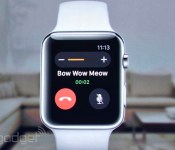
Want some apps for that Apple Watch? You’ll need iOS 8.2

We already got the big Apple Watch reveal last fall. But today, Tim Cook took the stage at the Yerba Buena Center in San Francisco to let us all know what wonders that very Apple smartwatch can perform, like make and receive calls! Oh yes, and there’s also a host of apps to take advantage of Apple Watch, but to get them, first you’ll need to download the new iOS 8.2 software update for your iPhone. Good thing it’s available today.
iOS 8.2 adds the Apple Watch app to your iPhone, so you can pair it to your Watch. A crucial thing you’ll need to unlock the pricey power of the multi-tasking watch on your wrist. It also adds a specific section to the App Store dedicated to the Apple Watch where users will find tailored versions of apps from the likes of Uber, Instagram, MLB and Shazam to name a few. You’ll have to wait until Apple Watch goes on sale in April to see them action. So for now, content yourselves with the demo shots below.

Uber


SPG/W Hotel

Filed under: Cellphones, Tablets, Software, Mobile, Apple
Apple to Release iOS 8.2 Today With Support for Upcoming Apple Watch [iOS Blog]
 During its big “Spring Forward” Apple Watch event, Apple announced that it will release iOS 8.2 to the public today, with support for the upcoming Apple Watch and a range of bug fixes. iOS 8.2 was first seeded to developers along with the WatchKit SDK back in November, allowing them to begin preparing apps for the device.
iOS 8.2 is available today as an over-the-air download.
Apple is already working on the next update to iOS, iOS 8.3, and iOS 8.4 is also said to be in the works.

Apple TV gets a new price: $69

It’s been a long three years since Apple refreshed its streaming box, the Apple TV. And it looks like that won’t be changing anytime soon. That’s not to say the company has forgotten about the platform; in fact, since the last hardware update, Apple has made its set-top ecosystem more robust by adding a myriad of third-party entertainment apps, making the tiny box a must-have for most any living room. Today, at its highly anticipated “Spring forward” event, Apple announced that Apple TV will now start at $69, $30 less than its previous retail price.
Developing…
Filed under: Misc, Home Entertainment, Peripherals, HD, Apple
Live Coverage of Apple’s March 2015 ‘Spring Forward’ Event
 Six months after the Apple Watch’s unveiling, Apple’s “Spring Forward” media event in San Francisco today will give us final details on the device ahead of its launch next month. We could see a few other announcements as well, but given the tagline and timing of the event, the Apple Watch will undoubtedly be the focus of today’s proceedings.
The event is being held at the Yerba Buena Center for the Arts in San Francisco and begins at 10:00 AM Pacific Time / 1:00 PM Eastern Time. Apple will be providing a live video stream on its website for Mac and iOS users and via Apple TV.
Live Video Stream of Apple’s March 2015 “Spring Forward” Media Event
In addition, we will be updating this article with summary coverage and issuing Twitter updates through our @MacRumorsLive account as the event unfolds. Highlights and separate news stories regarding the event announcements will go out through our @MacRumors account.
Got some extra rest for today’s event. Slept in ’til 4:30.
— Tim Cook (@tim_cook) March 9, 2015
Apple’s online stores around the world are currently down in advance of the event.
Apple’s March 2015 Media Event: Spoiler-Free Video Stream [Mac Blog]
Apple’s “Spring Forward” media event will be kicking off in just a few hours, and as usual some MacRumors readers are interested in avoiding all of the announcements and waiting until Apple posts the recorded video of the event so as to experience it without already knowing the outcome.

For those individuals, we’ve posted this news story, which will be updated with a link to the presentation once it becomes available from Apple. No other news stories or announcements will be displayed alongside this story.
Users waiting for the video to be posted are welcome to gather in the thread associated with this news story, and we ask that those who follow the events refrain from making any posts in the thread about today’s announcements.

Apple Online Store Goes Down Ahead of ‘Spring Forward’ Media Event
The online Apple Store has been taken offline this morning less than five hours prior to Apple’s highly-anticipated “Spring Forward” media event in San Francisco, where the company is expected to unveil further details about the Apple Watch alongside other potential announcements. If history repeats itself, the storefront should remain down until shortly after the conclusion of Apple’s keynote.


Apple Watch Roundup Updated
There are less than 24 hours to go until Apple’s big “Spring Forward” Apple Watch event, where we’re likely going to find out about Apple Watch pricing and get a solid launch date on the device.
Leaks and details on the Apple Watch have been coming out at a rapid pace as we lead up to the event, so make sure to check out our Apple Watch Roundup for everything we currently know.


What to Expect at Apple’s ‘Spring Forward’ Media Event
With just one day to go until Apple’s “Spring Forward” media event in San Francisco, there are still plenty of unknowns about what the company will be showing off beyond a focus on the Apple Watch. As a result, we’ve put together this summary of what we expect to see, what we might see, and what we probably won’t see at the event.
Apple Watch
Given the time-related tagline of “Spring Forward” and today’s start of Daylight Saving Time in the United States, it’s clear the Apple Watch is the focus of tomorrow’s event. We got a first look at the device last September, but now with just a month to go until launch, it’s time for Apple to provide final details and shape the marketing message. Expect more details on launch dates and pricing of course, as well as some updates on performance aspects such as battery life.
Also expect apps to play a significant role in the event, with Apple allowing a few developers to show off what they’ve been able to accomplish over the past few months since guidelines and developers tools for the device were made available.
Pricing will undoubtedly be one of the most interesting topics to be covered, with the company so far refusing to disclose any information beyond a $349 starting price. Daring Fireball‘s John Gruber has made his final predictions, arguing the stainless steel Apple Watch collection will be more expensive than people think.
[T]he steel Apple Watch, that’s something that most people still look at as for them. And so they expect the starting price to be around $500, and the various leather and metal band options to cost $100-300 more.
But if the starting price for the steel Apple Watch is $500, I don’t see why Apple Watch Sport exists at $350. $150 difference does not justify the difference. If they were that close in price, there’d only be one of them. […] With Sport and steel Apple Watches, everything you can see or touch is different. Different metal (aluminum vs. steel), different finishes (matte vs. highly-polished), different displays (glass vs. sapphire), different case backs (plastic vs. ceramic and sapphire).
With that in mind, Gruber predicts the steel Apple Watch collection will start at $749 while the gold Apple Watch Edition collection starts at $7500. He expects Apple will charge a small premium for the 42mm size compared to the 38mm casing, and various band options will quickly drive up the cost of the steel and gold models.
Gruber is of course only one voice among many who are speculating about pricing, but he offers a clear and thorough argument for his pricing predictions, serving as a solid basis for debate and discussion.
Read more 
Apple is making it easier for schools to put iPads in classrooms

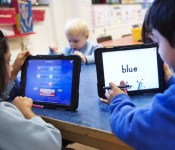
Apple’s dreams of putting iPads in classrooms have run into a number of roadblocks, but one of the biggest is simply the amount of work involved — each slate needs its own account, making it a nightmare if you want to outfit an entire school. That won’t be a problem for much longer, however. Both MacRumors and 9to5Mac have discovered that Apple is ditching the requirement for individual IDs on school-supplied iPads as of this fall. Staff will just have to decide which devices get apps or books, letting teachers focus on the actual education instead of getting things running. They’ll still have plenty of control, so kids can’t load up on games and other distractions unless they get the green light. It’s too soon to know if this will lead to more kids taking home tablets instead of textbooks, but there will at least be fewer barriers to making that happen.
[Image credit: Jonathan Nackstrand/AFP/Getty Images]
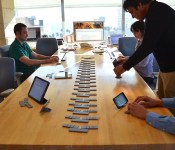
Hands-On With the Collapsible Magnetic ‘TextBlade’ Keyboard for iOS Devices
Back in January, WayTools, a company known for its high-quality NextEngine 3D laser scanner, surprised the world with a collapsible, magnetic keyboard unlike anything we had seen before. Called the TextBlade, the keyboard garnered a significant amount of attention from the media and from prospective buyers who were intrigued with its unique design.
Commenters here on MacRumors and across the Internet were immediately curious about the TextBlade, and had several questions. How does it work? How easy is it to use? What’s the learning curve? How does it feel?
Today we’re going to answer all of those questions and more. Yesterday, WayTools invited MacRumors to visit its headquarters in Santa Monica to get an exclusive hands-on first look at the TextBlade. We met with WayTools CEO Mark Knighton, and a group of engineers who helped develop the product to get details on how it works and to try it out for ourselves.

Design
The first thing that’s important to know about the TextBlade is that its design, which is the culmination of years of work and experimentation, has been engineered to be completely different from any keyboard that’s on the market today.
According to Knighton, the company did not set out to develop a keyboard for the iPhone or the iPad, they set out to develop a keyboard that’s a better experience, overall, than any available keyboard, mobile or desktop.
Portability is one of the key qualities that dictated the design of the TextBlade. The team at WayTools firmly believes that an accessory designed for the iPad or the iPhone should be smaller than the device itself. The TextBlade is approximately 1/3 of the size of an iPhone and it weighs an ounce and a half, so it’s barely noticeable in a shirt or pants pocket.
Read more

