


See the Face Palm and ‘Harambe’ emojis on iOS for the first time
Apple’s developer preview of iOS 10.2 offers the first look at a handful of fresh emojis, including Shrug, Avocado, Face Palm, Duck, Fox, Fingers Crossed and Gorilla (AKA Harambe), as spotted by Emojipedia. The preview is available today for registered developers and it also includes the lineup for Emoji 4.0, the overhaul that adds male and female versions of most jobs to the official Unicode rulebook, plus expands skin tone options across the board. The update means male dancers wearing bunny ears and female police officers, for example.

Hello, Harambe (Image credit: Apple)
The developer preview also shows off the final batch of updated emojis, which covers food and transportation icons. The new designs are less flat, with more emphasis on detail and lifelike colors. Basically, the burrito might actually make you hungry now.

Mmm. (Image credit: Emojipedia)
There’s no official public release scheduled for iOS 10.2, but Emojipedia expects it to land this month.
Via: The Daily Dot
Source: Emojipedia
ROLI’s ‘BLOCKS’ Lego-Style Music Creation System Now Available at Apple Stores Worldwide
ROLI today introduced a fun new music creation system called BLOCKS, which is scalable, modular, and designed to give people a simple, visual way to create music. Each square-shaped Block has a different function, and multiple blocks can snap together so users can build the music system that’s best for them in terms of skill, price, and musical style.
ROLI is announcing three Blocks today, all of which will be available for purchase at Apple retail stores around the world. The Lightpad Block, a 5×5 grid that lights up, supports pressure-based multi-touch gestures, allowing people to use the colored surface for creating music through presses, glides, and other simple hand movements.

Varying pressure on the block changes the intensity of the sound, multiple fingers can be used at once, and multiple Lightpads can be linked together for a bigger surface to work with.
The Live Block and Loop Block both work alongside the Lightpad Block, which is the main block, offering controls to make it easier to perform and produce music in real time with physical playback and record buttons. All three of the Blocks are controlled via Bluetooth through NOISE, a new app that’s available from Apple’s App Store.

Roland Lamb, founder and CEO of ROLI, and inventor of BLOCKS, said, “Many areas of life have been transformed by the digital. Music, though, remains a universal language that everyone understands, but only a few can speak. BLOCKS will change that, and enable people around the world to experience the joy of music-making for the first time.”
ROLI Lightpad Blocks are priced at $179.95 each, while the Live and the Loop are priced at $79.95. BLOCKS are available at Roli.com starting today and should soon be available from Apple’s online store and in Apple retail locations.
Discuss this article in our forums
iOS update fixes your iPhone’s missing Health data
The iOS 10.1 update addressed a lot of initial gripes with Apple’s latest mobile operating system. However, it also introduced a glaring bug for some users: the Health app might not show your data, which is more than a little troublesome if you’re a fitness maven or need those stats for medical reasons. Don’t fret, though. Apple has released an iOS 10.1.1 update for the iPad, iPhone and iPod touch that makes sure you can see Health info. This is a relatively tiny update (the over-the-air fix is well under 100MB for many iPhone users), but it’ll matter a lot if you’re tracking step counts or calories with your Apple gear.
Via: 9to5Mac
Source: Apple
iPad regains share in a shrinking mobile tablet market
Apple’s share of the tablet market has been sliding for a while, but it’s making a comeback… if not for the reasons the company might prefer. Strategy Analytics estimates that the iPad climbed from 19.1 percent of the market in the third quarter of 2015 to 19.9 percent a year later. However, that’s mainly because the market as a whole shrank 10 percent. The analysts believe that many tablet manufacturers’ shipments dropped year-to-year, and that Apple simply experienced a smaller decline than most. The one major exception is Amazon, whose $49 Fire tablet helped its shipments more than double.
This doesn’t necessarily mean that Apple is on the wrong track. Strategy Analytics argues that the iPad Pro line puts Apple “on the path to recovery” by giving the company a laptop-like tablet that wasn’t an option before. However, it does show that Apple is consciously veering away from the strategies of its peers. Many of its Android rivals are shifting attention to 2-in-1 Windows tablets, like Lenovo’s Yoga series or Samsung’s TabPro S. Researchers say that Windows hybrid and tablet shipments jumped 25 percent year-over-year in the third quarter — some of those are bound to be from companies no longer convinced they can sell Android tablets as full-on computer substitutes.
The data suggests that the tablet market isn’t so much dying as maturing. Basic mobile tablets will still have an audience among those who just want to read books or watch video, but higher-end slates are taking hold. People want “everyday computing devices” that really can fill in for a conventional PC, according to analysts, and they’re willing to pay more for these devices.

Source: Strategy Analytics
Apple drops its iconic startup chime from the new MacBook Pros
Aside from the ports that didn’t make the cut, there’s something else that Apple’s taken away from its new MacBook Pro family: the startup chime. Yep, it’s taken out the F-sharp chord that accompanies the boot-up whirr of previous MacBooks, and that’s at least partially because the late-2016 MBPs (all three of them), will turn themselves on and boot up when you open them. So while the power button still turns the machine off, there’s no need to use it to turn it on.
This means your new MacBook won’t blare out said startup chimes when it’s opened up in public places or mid-meeting. According to Apple, the automatic start-up (as in, not from sleep mode), kicks in when you start up your MacBook Pro by opening it or plugging it in, when connecting it to power while the lid is open, and even when it’s closed if you’ve connected the machine to an external display.
Pingie, which discovered the change in Apple’s support notes, added it brings (at least part of) the MacBook series in line with the rest of the Apple product family: there’s not startup noise on iPhones, iPads or the Apple Watch. And here’s all those startup chimes, all in a row:
Via: Pingie, 9to5Mac
Source: Apple Support
The Morning After Weekend Edition: Happy Halloween!
Letter from the Editor

Change is life. It’s what keeps things interesting. It’s also what keeps the cauldron of commerce at a full boil. And in the technology industry, change is constant. This week, Apple and Microsoft revealed new computers that’ll tempt many — particularly folks working in the creative arts — even if they come with eye-watering price tags.
Change can also be cause for consternation. Apple decided to eliminate the headphone jack from its phones a month ago, and yesterday it banished everything without a USB-C or Thunderbolt connector from its laptops. This is the pain of progress. Given enough time, the benefits received will, we hope, be a good bargain. It often is.
In other instances, change comes slowly. Jess Conditt wrote about how powerful video games have become as a medium for cultural and social commentary. Yet respect and investment for such projects trail more “traditional” arts, despite games’ arguably wider potential impact. And finally, Edgar Alvarez explained Amazon’s difficulties in becoming a purveyor of luxury fashion items. It seems that scale and quality can’t mix — at least in the minds of those running haute couture.

Hey, artists use Windows too!They’re used to paying Apple prices, right?

Microsoft wants to be the company for creative types. Like in the worst way possible. The company’s big Surface event this week was all about creating, building and drawing. There was even a little 3D printing thrown in for good measure. Of course, the biggest news was the launch of the Surface Studio all-in-one PC, but we’d be lying if we said MS Paint 3D didn’t kinda steal the show.
Apple wants your fingers to caress its new laptopAll in the name of stimulating your artistic sensibilities

Apple couldn’t let Microsoft hog the spotlight, though. The Cupertino crew held their own big event this week, and the focus was all on the MacBook Pro. The most exciting news was the addition of the Touch Bar on the high-end models — an OLED touchscreen strip in place of those anachronistic function keys. The less exciting news was that Apple ditched basically all the ports except for USB-C. At least they didn’t ax the headphone jack.
Shhh … you hear something?That’s the sound of sick video game sound effects, y’all
Microsoft went all out for the sound on “Gears of War 4.” Most games treat the audio like a second-class citizen, but developer the Coalition fired up some elaborate software that simulates how sound reacts in different environments and how it interacts with different materials to make “Gears 4” seem ultra-realistic. Or as realistic as a game set in the future on an alien world can seem.
R.I.P. VineWe (most of us) hardly knew ye
Twitter announced that it was going to be laying off more than 350 people, and now, it seems, we know where at least some of those cuts are coming from. Vine is coming to an end, and with it the art of six-second video loops. Some Engadget editors will miss it more than others.
What are pro designers saying about Microsoft’s Surface Dial?No thanks, mostly.

We talked to a host of illustrators, designers and other creative types to see what they think of Microsoft’s newest devices. The Surface Studio seems to have piqued their interest. The Dial, on the other hand…
Please don’t do this. Seriously.11 super-sexy Hallow-meme costumes

Look, sexy nurse and policeman are passé. If you’re really looking to leave an impression, you need to blend your love of popular internet culture with your normal raw sexual energy.
Bokeh everywhereiOS 10.1 brings a new photo feature to the iPhone 7 Plus
If you have an iPhone 7 Plus, you don’t need beta software to try out its new “portrait mode” shots. Environments where the background is a similar color to your subject can confuse the camera, but in most situations it did the job of making phone pictures look like they came from a high-end SLR camera.
But wait, there’s more…
- The FBI isn’t done with Hillary’s emails yet?
- I have the power! … of two first-gen Tesla battery packs
- Sony is working on new PS4 controllers for pro gamers (just don’t call them Elite)
Apple’s MacBook Pro isn’t the touchscreen laptop it ought to be
Ever since Phil Schiller brought up the issue while introducing the second-generation MacBook Air, Apple has made a point of publicly resisting the pressure to introduce touchscreen Macs. Computers need a fundamentally different interface than your smartphone or tablet, Apple argues, and it’s cumbersome to keep raising your hand to the display. However, the new MacBook Pro’s Touch Bar really amounts to a confession — it’s an acknowledgment that touch input can improve your computing experience, and that Apple has been missing out on technology that some PC users take for granted. As big a step forward as the Pro may be, it’s not necessarily the giant stride that you might like.
You only have to look at the Pro’s Touch Bar’s features to imagine what could have been. Some of these elements wouldn’t be practical with a touchscreen (you can only fit so many editing buttons on-screen at a time), but many of them are. Why should you scrub through a video timeline on your keyboard when you could manipulate it directly on the display? Many everyday activities, such as choosing emoji in Messages or playing music in iTunes, practically beg for direct finger input. This isn’t to say that Apple’s Touch Bar implementation is clunky. So far, it appears to be very thoughtful. It’s just a perpetual reminder that there’s a more direct way to meld touch with conventional computing, and Apple is passing up the opportunity.
It’s understandable why the company would implement a navigation strip instead of redesigning macOS for touchscreen support. The Touch Bar is no doubt a challenge (including for developers who want to support it), but reworking an entire operating system is a massive undertaking that can easily run into trouble. Ask Microsoft how hard it was to design a touch-native platform that still appeals to non-touch users — Windows 8’s touch-first interface spooked some PC buyers, and even Windows 10’s more balanced strategy has its problems. Dive deep into Windows’ settings using only a touchscreen and you’ll quickly grow frustrated.
However, Windows also shows that you don’t have to redo an entire operating system for touchscreens to be useful. There’s a good reason why the Surface line and other hybrid laptop/tablet PCs are thriving in an otherwise shrinking market: more often than not, you can use whatever interface makes sense at a given moment. Want to play a touch-oriented game, or navigate a spreadsheet with a trackpad? You can do both. The MacBook Pro’s input will likely be very effective in most cases, but it comes across as inflexible. Apple’s rejection of finger input in macOS may prevent incidents where touch works poorly, but it also denies you situations where touch would work beautifully.

Lately, Apple has had a simple answer to those calls for a proper touchscreen interface: buy an iPad Pro. And for certain users, it has a point. The iPad has one of the better big-screen touch interfaces you can find, and it’s refreshingly easy to use compared to a traditional PC. But it just isn’t going to fit the needs of many Mac buyers, especially customers who can justify premium machines like the MacBook Pro. It doesn’t have many of the things pros need, whether it’s raw performance, an accessible file system or sophisticated multi-app windowing. If anything, the iPad Pro rubs some salt in the wound. It’s a reminder that Apple’s touchscreen experiences stop where the Mac lineup begins, and that other PC makers aren’t asking you to give up touch just because you want to run AutoCAD or Photoshop.
This isn’t to dismiss the MacBook Pro by any means. Based on our initial hands-on time, it’s an impressive system that could satisfy many owners (at least, those that don’t want a built-in SD card reader). You may well enjoy the Pro for years without once wishing that you had a touchscreen. But it’s also a tantalizing glimpse of what could have been, or possibly where Apple will go. And when a large chunk of the industry is welcoming touchscreens with open arms, it’s hard not to wonder whether or not Apple is heading in the right direction. The Touch Bar is a safe choice for now, but it wouldn’t be shocking if Apple had to change course and embrace touch in a bigger way.
Click here to catch all the news from Apple’s “Hello Again” event.
Developers Now Able to Offer Promo Codes for In-App Purchases
Apple today announced that it is now letting developers create promo codes for in-app purchases, giving developers a way to allow early testers, reviewers, and press to unlock content that would normally only be available through a purchase.
Developers have long been able to offer promo codes to download a paid app, but until today, there was no simple way to offer access to in-app purchases.
Developers are able to give away up to 100 promo codes for each in-app purchase item, up to a maximum of 1,000 codes per app every six months.
Discuss this article in our forums
Hacker behind ‘celebgate’ jailed for 18 months
The individual behind the 2014 iCloud image leaks — more commonly known as the Fappenning — has been sentenced. Ryan Collins, 36, will serve an 18 month jail term for one count of violating the Computer Fraud and Misuse Act and another of illegally obtaining access to a computer. Officials at the Department of Justice believe that Collins was able to access over 600 accounts, including those of several famous women. Collins was also found to have run a fake modeling agency in which he mislead people into sending him their naked images.
Collins pleaded guilty to the charges back in March and, while the case was brought in LA, he was sentenced in Pennsylvania, close to where he resides. In a statement, California’s DA noted that investigators couldn’t establish a link between Collins obtaining the images and their public leaking. Despite this, the pictures — which included compromising shots of Jennifer Lawrence and Gabrielle Union — did filter out. The FBI’s Deirdre Fike believes that the sentence handed down is “proof that hacking into the accounts of others and stealing private information or images is a crime with serious consequences.”
Via: THR
Source: Department of Justice, (2)
First look at the new MacBook Pro (the one without the Touch Bar)
This is the new MacBook Pro. But it’s probably not the one you were hoping to read about. What I have here today is the new entry-level 13-inch model — the one without the multi-touch Touch Bar you’ve surely heard about by now. No, this is for all intents and purposes the Pro that replaces the MacBook Air. (The Air is still on sale — for now — but unless you have an inflexible budget, you should buy the new Pro instead.)
As a refresher, the new Pro weighs the same as the Air, at approximately three pounds, but has a noticeably smaller footprint. It also has the Retina display you always wished you had on the Air. There are some other differences too, including a much larger touchpad, a redesigned keyboard and a new selection of ports: just two Thunderbolt connections and a headphone jack. Oh, and it has a new price: The 13-inch Pro starts at $1,499, a bit more than you would have hoped to pay for a refreshed Air.
The laptop is shipping now and on display in Apple Stores, so there’s nothing stopping you from getting hands-on today. For my part, I received my test unit yesterday evening, which means I am in no way ready to publish a full review. But I am ready to give you a first look. Join me.
First impressions
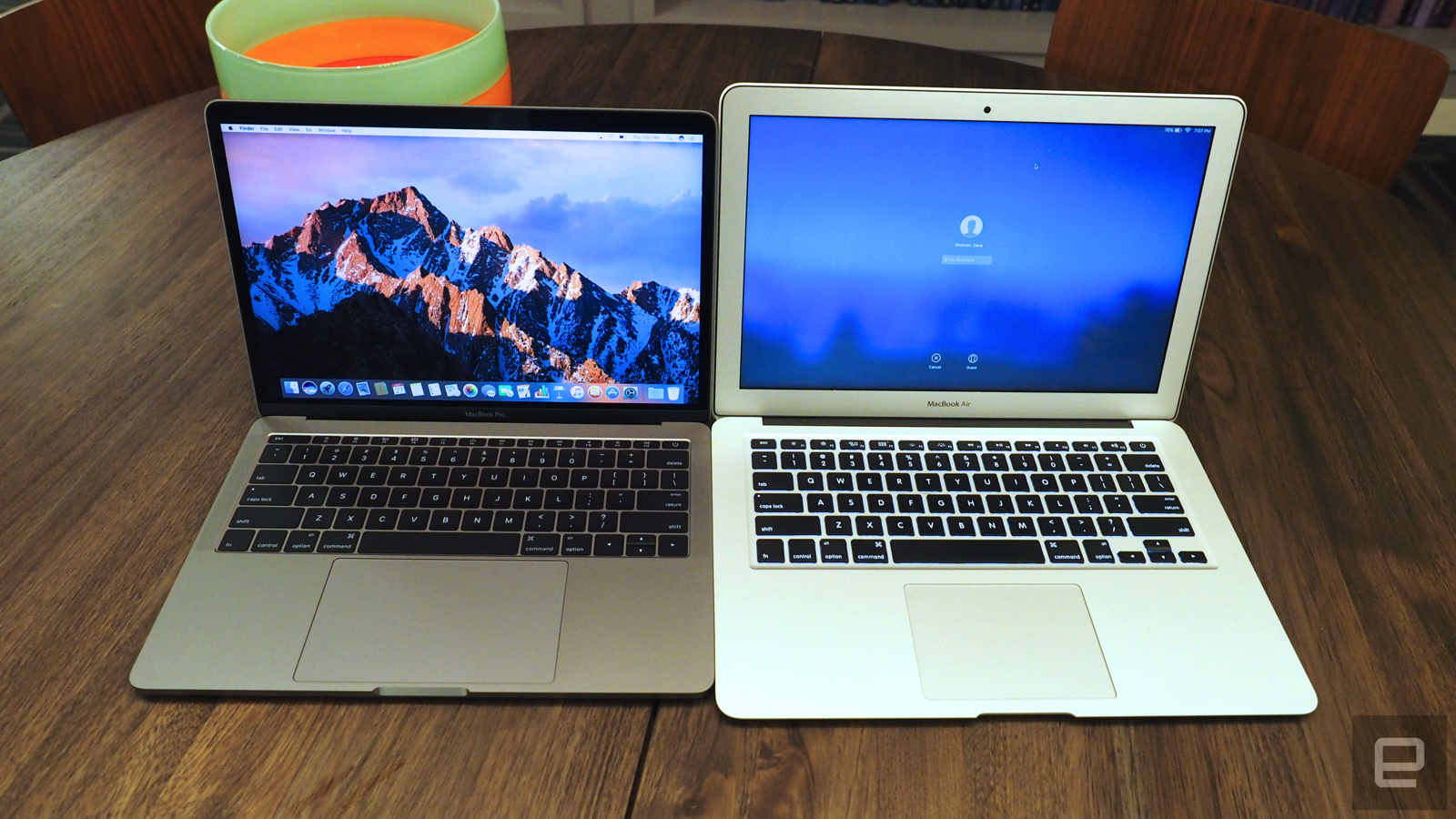
Let’s start with the design: Holy moly, is this thing small. I noticed it right away, just because my normal work laptop is a MacBook Air, which means I’m used to something much larger than this. The difference is especially obvious if you stack one machine on top of the other. Though both have 13.3-inch screens, the new MacBook Pro has a much smaller footprint — it’s shorter and less wide. Truly, trimming down that humongous bezel from the Air makes a world of difference. Just ask Dell, whose compact, 2.6-pound XPS 13 paved the way for laptops that take up shockingly little space. Basically, if you can achieve a nearly bezel-less screen, you can then squeeze it into a much smaller chassis than you would otherwise.
The MacBook Pro also weighs about the same as the Air: 3.02 pounds versus 2.96. And that underscores another reason the Air should probably be given the axe. It was once a featherweight feat of engineering; now it’s heavier than competing Windows machines (the XPS 13 being just one example), and it weighs the same as Apple’s once-heavier Pro line. All that said, three pounds is still plenty portable, especially if you’ve bought MacBook Pros in the past and are used to toting around something heavier. For those of you who are upgrading, this will feel like an improvement.

At 14.9mm thick, the Pro is also 12 percent thinner than the Air, though that’s not quite as obvious, just because the Air has a wedge-shaped design that gets narrower at the end. Thinner is generally good, so long as the battery life doesn’t suffer. In this case, it also means thinner ports. (Though let’s face it, Apple likes to get rid of legacy ports, so it would have done that even on a thicker machine — and did, on the 15-inch Pro.) Where there used to be several full-sized USB connections and an HDMI socket you’ll now find two Thunderbolt 3 ports, along with a headphone jack. If you choose one of the higher-end MacBook Pros, you’ll get four Thunderbolt ports.
Either way, be prepared to un-learn some old habits. Gone is the MagSafe power adapter, though you can at least charge out of any Thunderbolt port now. You’ll also need a dongle for any accessories requiring a full-sized USB connection. Out of the box, you cannot charge your iPhone off this.

In many other ways, the MacBook Pro looks and feels similar to the previous generation. It’s made of unibody aluminum, available in silver and Space Gray. Though the 500-nit display is 67 percent brighter than the previous-gen Retina panel, with 67 percent higher contrast and 25 percent more colors, the resolution is the same, at 2,560 x 1,600 (a pixel density of 227 ppi). It’s lovely, especially with those tiny bezels and skinny metal frame around the screen. Particularly for those of you who have only ever owned the Air or an ancient MacBook Pro, you’re in for a treat.
The keyboard is both the same as before, and also not the same. As I said, this is the version of the MacBook Pro that does not have the OLED touchscreen stretching above the keyboard. That means the physical Escape key has lived to see another day — as have all the other Function keys, including brightness and volume controls.
So the keyboard looks the same. But then you touch it. Under the keycaps, Apple went with the same “butterfly” mechanism that it first introduced on the 12-inch MacBook. That means these buttons are shallower and less pillowy than on the last-gen MBPs, but still manage to be a lot springier than they look. I felt a little sour at first, giving up my old keyboard design (I don’t love change), but so far I’m typing away at this very story, and I’m not making many typos either.

As for the Force Touch trackpad, it’s 46 percent larger than before, making it nearly as big as Apple’s Magic Trackpad accessory. It’s more than enough space for the basics — stuff like scrolling and pinching to zoom. I’ll be curious, too, to see how it fares in more professional-grade use cases, like video and photo editing. More on that some other day.
All the stuff we’ll save for our review
There’s a reason I’m not calling this a review. There’s so much I haven’t had time to test! Apple says the battery life on both the 13- and 15-inch MacBook Pros can reach 10 hours. I’ll be sure to investigate that claim. Apple also stepped up to sixth-gen Intel Core processors across its lineup, with faster solid-state drives promising read speeds of up to 3.1 gigabytes per second. Oh, and I specifically didn’t mention the speakers earlier either. I’d like to listen to my very large, and very eclectic, Spotify collection before weighing in on the audio quality.
Given that the Pro has always been aimed at power users — and has a starting price to match — I don’t want to give the performance short shrift. And benchmarks are just the beginning too; real-world use matters as well. So give me a few days to live with this thing and I’ll be back soon with a full review. In the meantime, what’s the over/under on how long Apple waits before killing off the 13-inch Air?
Photos by Edgar Alvarez
 AIVAnet