



GeForce Experience update brings Twitch game streaming

NVIDIA’s GeForce Experience may not be tremendously popular with PC gamers, but it’s about to get more traction now that its Twitch streaming is finally available in beta. An updated app lets any player with a Kepler-based GeForce card both livestream their sessions and record clips through ShadowPlay. If you’re worried about missing special moments, there’s a PlayStation 4-like Shadow Mode to automatically capture the last 20 minutes of game time; performance shouldn’t be an issue, since dedicated hardware handles all the video encoding. NVIDIA can’t promise that everything will be smooth in the beta, but it’s already planning to add both a desktop capture mode and new microphone controls. Head to the source links if you’re eager to share your virtual escapades with the world.
Filed under: Gaming, Software, NVIDIA
Via: Tech Digest
Source: NVIDIA (1), (2)

Xbox One cuts out the middle man, gets live TV directly with Verizon’s FiOS app

The Xbox One is built to blend with its owner’s existing TV-watching setup thanks to the HDMI-in, but customers with Verizon FiOS TV can sidestep that entirely. FiOS has launched a version of its app — already available on the Xbox 360 and mobile devices — for the Xbox One that promises 74 live channels streamed over the internet. Already announced as part of the first wave of entertainment apps for the Xbox One, Verizon’s app makes it the first TV provider to stream live TV directly to the box. TV viewing with the Xbox One is unusually seamless with the passthrough, but with FiOS, it’s just another app like Netflix or Hulu Plus, complete with built-in Kinect support for voice and gesture controls.
If your FiOS cable box is already plugged into the Xbox One, it means the two can be used together for picture-alongside-picture with the snap feature, or that you can use the Xbox somewhere in the house without the cable box at all. Features we’d like to see are access to video on-demand, and integrated control/awareness for DVR recordings so we can ditch the remote entirely, and the ability to pin shows directly to the OneGuide, but so far, it’s just live TV. The app is live in the Xbox One store but — at least for now — it’s only useful if you live in a FiOS area and have the service.
Filed under: Gaming, Home Entertainment, HD, Microsoft, Verizon
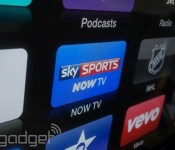
Now TV app brings Sky Sports to Apple TV in the UK

UK Apple TV owners can now access live sport following the launch of a Sky Sports app from Now TV. Already available on smartphones, tablets, consoles and its own set-top box, Now TV’s Sky Sports Day Pass lets owners of Apple’s set-top box access 24 hours of coverage from Sky’s six sports channels for £9.99. Although Netflix and Apple’s own iTunes Movies channels are live on Apple TV, Sky has not yet brought its own film and entertainment offerings to the platform. We’ve contacted Sky for comment on its future plans and will update you in due course.
Filed under: Home Entertainment, Internet, Software, HD, Apple

LG finally joins the Spotify Smart TV party

Spotify has been available on a number of LG’s home theater products since March, but only now are Smart TV owners getting the chance to enjoy it on their flatscreens. The company announced today that the new app is coming to all of its 2013 model Smart TVs, but it will only be available to Premium account holders. While Spotify now offers free streaming to mobile and tablet users, the LG app requires a monthly subscription, but a month’s free trial may soften the blow if you’ve yet to sign up. With LG in the bag, the music service now supports three major TV makers, having already launched apps for Samsung and Philips sets. It gives the company a considerable advantage over its streaming rivals, which include Rdio, Google and Apple, by letting users access over 20 million tracks from an ever-expanding range of devices. LG says the new Smart TV app will go live in over 30 countries over the coming days, giving you the perfect opportunity to load up your playlists in time for Christmas.
Filed under: Home Entertainment, Internet, Software, HD, LG
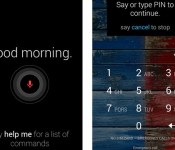
Moto X Touchless Control update lets you speak your unlock code

You no longer have to give up some of the Moto X’s voice commands if you want to rely on security codes. An update to the smartphone’s Touchless Control app lets you speak a PIN code to unlock the device; as long you’re not worried about eavesdroppers, you can check private messages without poking at the screen. You won’t even have to unlock the phone as often as before, since the upgrade expands the range of Google Now voice instructions that work while the handset is sleeping. You’ll need to be running Android 4.4 KitKat on your Moto X to use the improved Touchless Control, but it’s otherwise ready to download through Google Play.
Filed under: Cellphones, Mobile, Google
Via: Droid-Life
Source: Google Play

Skitch for Mac adds resolution controls for Retina display captures

Looking to save some space with those high-res screenshots you took on your Retina machine? Skitch for Mac now allows users to chose between 144 DPI and the regular 72 DPI screenshots on those more pixel-dense displays. The new feature can be toggled via the file type menu at the bottom left of the app’s window and doesn’t affect the size of files sent to Evernote. Those larger screen captures are labeled “Hi-Res” the moment they’re snapped and the software remembers your settings preferences as well. You can start slimming down your image library now, as the update is currently available via iTunes.
Filed under: Software
Source: Evernote Blog, iTunes

Cover exits closed beta for Google Play Store
In the last year, there have been many launcher and lockscreen replacements for Android popping up and one of the most recent and popular is Cover.
Cover, which for the last few months has an invite-only beta, is now out of closed beta and available for free in the Play Store.
It’s an interesting app since it lets you set different locations whether you’re at home, work, in the car or out on the town and different apps shortcuts will be displayed on your lockscreen. For each setting, you have a different wallpaper as well. Cover learns what apps you use most and displays them on your lockscreen so you can access them quickly.
All that being said, the only downside to using this replacement is that if you use lockscreen widgets, you can’t use them anymore and you technically can’t set the apps yourself that appear on the lockscreen.
WIth Cover now in the Play Store, the company announced some changes to the app. Apparently over the last six weeks, they’ve “made 100+ improvements” that include optimized battery usage, improved car detection, compatibility with Android 4.4 KitKat, the Nexus 5 and new ART runtime for Android, when peeking and switching between apps, Cover now maintains the state within each app, tutorials on fast app-switching, how to set custom wallpapers/ring volume and how to use it with either a PIN/Pattern security code, more customization options such as those to configure the size and location of app tray target and the ability to share your Cover setup on Facebook, Twitter or Google+.
via Cover
The post Cover exits closed beta for Google Play Store appeared first on AndroidGuys.
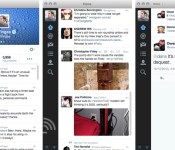
Twitter 3.0 for Mac brings in-line photo previews and detailed tweets

Twitter brought in-line media previews to its mobile apps a few weeks ago; today, it’s the Mac’s turn. The new Twitter 3.0 app for Mac now shows a quick glimpse of photos from supported services, so you’ll know right away whether pictures are worth clicking. A few older features are also making their long-expected debuts, including more detailed tweets (complete with conversations) and full profiles. The new additions aren’t likely to give Tweetbot users any regrets, but OS X fans who prefer Twitter’s official software will definitely want to swing by the Mac App Store for an upgrade.
Filed under: Internet, Software
Via: Twitter Blog, 9to5 Mac
Source: Mac App Store

Stephen Hawking’s first official app teaches the basics of the universe

Stephen Hawking has gone to great lengths to promote science through books and videos, but he has been conspicuously absent in the software world — until now, that is. The astrophysicist has just teamed up with Random House on Snapshots of the Universe, his first official app. The $5 iPad title teaches the fundamentals of space through mini games: players learn about G-force with Einstein, put planets into orbit and come to grips with the theory of relativity. Particularly curious users can go deeper with both video explanations from Hawking as well as old-fashioned text. Snapshots is no substitute for reading A Brief History of Time, but it may inspire young scientists to learn more.
Filed under: Tablets, Science, Mobile
Source: App Store
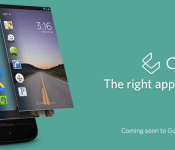
‘Cover’ the Innovative New Lockscreen App Lands in the Play Store

The innovative lockscreen app, Cover, has now made its way into the Play Store in beta form. If you guys haven’t heard of Cover yet, then I would suggest checking out my review about it that I did for app of the week. Cover was actually developed by some former Google employees, so you know they know the Android system pretty well.
Cover will throughout the day change depending on the time of day, or depending on your location you are currently at. Like some other apps out there, Cover will figure out which apps you use the most while in these certain locations, and will display them on the lockscreen for quick access. The peak view feature is almost reminiscent of Blackberry’s layered UI, but it is still pretty cool to utilize. So if you want give the lockscreen a try, head into the Play Store and download it. It is free, so try it out and let us know what you think about it.
 AIVAnet