



Spotify’s Android and Mac apps get a fresh coat of paint and new artist pages

If you’ve just noticed that Spotify on your Mac or Android device looks different, you’re not seeing things: there are new updates for both platforms. On Android, the tweaks are quite small, with a new look for the login and signup pages, along with image galleries and play counts in the artist section, as shown above. Meanwhile The Verge spotted a new version for Mac computers that seems to be rolling out gradually, with visual changes like a darker theme and a circular artist avatar (see a screen grab after the break). There doesn’t seem to be any new features or other revisions, though, and you may not be able to get the Mac app in your region yet. If you’re keen to switch on Android though, you can check Google Play on your device or at the source.

Filed under: Internet, Software
Via: The Verge
Source: Spotify (Google Play)
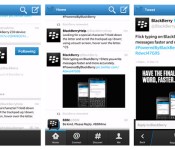
Twitter for BlackBerry 10 scores BBM integration and timeline photo previews

It’s no secret that Twitter for BB10 still needs a lot of polishing, and the latest attempt to make it shine brings BBM integration and other new features. Now, you can automatically update your status on the platform’s famous messaging service simply by tweeting through the refreshed app. The latest version also brings thumbnail previews that show attached images right on your timeline. Other than that, it comes with a built-in reply box and a fresh option to report spam or abuse that show up when you tap on a tweet. Unfortunately, if you read the app’s reviews on BlackBerry World, you’ll see a lot of users complaining that their apps have stopped working after they downloaded the update. So, no matter how sweet these changes are, it might be wise to proceed with caution or just wait until the developers issue a fix.
Filed under: Mobile
Via: Inside BlackBerry
Source: BlackBerry World

Evernote for Android graced with refined note editing, external keyboard support

Sure, the year might be winding down, but the folks at Evernote have still managed to sneak in another update for their Android app. By wielding the upgraded application, users can edit notes without fear of losing text styling they’ve applied in the program on other platforms, and view attachments in-line with their digital scrawlings. External keyboard support has been baked in as well, alongside recognition for key shortcuts for creating notes, bullets, numbered lists and to-do entries. With the refreshed software, enterprise users can even access their business notes from the home screen and select a preferred notebook for new jottings they create. To grab ahold of the app, head to the bordering source link.
Via: Evernote Blog
Source: Google Play

Real Racing 3 finally gives players a taste of live competition on iOS

Real Racing 3′s time-shift multiplayer mode was a great addition to the game, but the latest update for iOS makes playing with friends even better. Now, aside from being able to face the car ghosts of your friends’ pasts to beat their records, four players can hit the virtual tracks for some real-time racing. As a nice plus, both the refreshed Android and the iOS apps now include playable digital counterparts of the McLaren P1 plug-in hybrid and the next-gen Lamborghini Veneno, though they cost a pretty (in-game) penny. If you’re hankering to digitally drive certain BMW and Ford models, it may be best to look elsewhere — otherwise, head over to iTunes where the game remains free to download and play.
Via: iMore
Source: iTunes, Firemonkeys (1), (2)
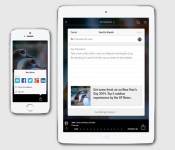
Flipboard launches direct sharing on iOS, makes magazines from your friends’ suggestions

If you’ve ever stumbled across a Flipboard article that you just had to share with the world, you’ll want to grab the iOS app’s latest update. The new version lets you share articles directly from the app, delivering notifications to friends if they’re already Flipboard readers. All shared articles now show up in a central area, and you can turn this list into a magazine if your friends have impeccable taste. Flipboard hasn’t said when Android and Windows users will get to spread the literary wealth, but we’d expect a corresponding app upgrade before long.
Filed under: Cellphones, Tablets, Internet, Mobile
Via: Inside Flipboard
Source: App Store

Xbox 360 Time Warner Cable app finally gets video-on-demand

It’s been a long wait for Xbox 360-faithful wanting Time Warner Cable video-on-demand through their console, but the feature has finally arrived with some 5,000 promised titles (there’s good news for Roku users too, where TWC TV has added VOD to go along with that new YouTube app). If you somehow still aren’t entertained, well maybe chatting with other TWC customers via the app’s messaging feature will do the trick. This seems a tad redundant when the 360′s native messaging client is a few button presses away, but we dig having another way to spoil the latest New Girl for our pals.
Filed under: Gaming, Home Entertainment, HD, Microsoft
Source: Xbox Wire

Soundrop’s social music listening comes to Android

Soundrop’s communal listening experience is at last available on Android. As with the iOS app, music lovers can sign into a paid Deezer or Spotify account and join rooms with themed playlists; from there, they can both vote for songs in the play queue and discuss tracks with fellow fans. You’ll need at least Android 4.0 and one of the associated streaming services to get started, but the Soundrop app itself is free to download from Google Play.
Filed under: Cellphones, Internet, Mobile
Source: Google Play
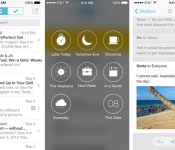
Mailbox for iOS now handles your iCloud or Yahoo email account

Mailbox has only handled Gmail since launch, but compulsive email checkers finally have a few more account options thanks to an update. The iOS app now supports both iCloud addresses (including me.com and mac.com) as well as Yahoo, with prioritization and push notifications intact. The upgrade also introduces background syncing, which should save iOS 7 users the trouble of downloading all their new mail at once. Those who’ve been waiting for expanded support to try Mailbox can give it a spin today at the source link.
Filed under: Cellphones, Mobile
Via: Mailbox Blog, The Next Web
Source: App Store

Dropbox for Android now lets you share folders with friends

Dropbox members no longer have to wait until they’re at a desktop to share a whole folder. An updated Dropbox for Android lets users both invite others to shared folders and manage the relevant permissions. There aren’t many other interface additions, although anyone eager to upgrade to Pro service can now subscribe through Google Play instead of the web. And don’t worry, iOS fans — Dropbox is bringing invitation support to your app in early 2014.
Filed under: Cellphones, Storage, Internet, Mobile
Via: Dropbox Blog, Android Police
Source: Google Play

Thoughts on the new Twitter UI
Last week, Twitter updated its official Android app with more functionality and UI problems than we’ve ever seen.
It’s no secret that the official Twitter app for Android has been… neglected. Not in the sense that it doesn’t receive notable updates, because it does. However, the way the app looks and feels is its biggest downfall. Compared to some 3rd party Twitter clients, there should be no reason to use the official app. But Twitter has something else up its sleeve…
Why is this a big deal?
With Twitter’s API limits introduced in late 2012, it’s getting harder and harder for 3rd part developers to keep their apps in the Play Store. If you haven’t heard, if a new Twitter app enters the Play Store, it only has 100,000 tokens available. If an app already has more than 100,000 users, they get to double their tokens, then get shut down.
Since the most recent update, I have never seen so many disappointed users. You would think that if they’re putting a cap on users to 3rd party apps, they would focus a little more on the app that they are (essentially) forcing people to use. We’ll talk more about that later.

The UI isn’t the main problem. Though it’s bright and a little bulky, it’s usable. You should begin to see the differences when it starts holding you back from doing things more quickly, and more efficiently.
Functionality
When I use Twitter, I read my feed, tweet, and find new people to follow. While you may use it for something more intensive, I usually stick to just that. The features of it that I use the least are Discover and Activity. Actually, I haven’t met anyone who uses them frequently, at all. The reason why I bring this up, is because perhaps the easiest way to navigate somewhere in an app, is by sliding tab to tab, from left to right. But, in the official Twitter app, they did this:

These tabs are accessed by swiping from left to right. In my opinion, these should not be placed here. The most used features are only accessed by tapping on them on the top of the screen.

While using this logic, shouldn’t they be switched around? Yes. They need to be. Take a look at some other apps that are doing it correctly, including Falcon Pro, Plume, and Tweedle:
Falcon Pro

(If you’re planning on downloading Falcon Pro, you can’t from the Play Store. This app is the first that has been removed due to Twitters limits. You can, however, download it from its official website, found in the above link.)
Plume

Tweedle

Widgets
The benefit to having an application on Android is the ability to use widgets. Especially with Twitter, most of the time you don’t even need to open the app if you have one on your home screen. Try not to laugh when you look at the comparison between the official and 3rd party widgets.

As you can see, the official Twitter widget resembles the UI from something that came out of the Gingerbread days, while the Plume widget blends in with just about anything that it sits next to. Why have they been neglecting this feature so much? No idea. But, here’s to hoping they update it sometime soon.
Final thoughts…
Not many official social network apps have a smorgasbord of customization options, but that isn’t the point. Don’t make a bad app/widget in the first place, and people won’t be resorting to other options. Also, if you’re going to have rules banning other apps from getting more users, you better be sure that yours is on-point. I think that’s the main thing that bugs me. Odds are, writing about this won’t change API limits or get Twitter to change their minds about anything. All we can really do is make suggestions, rate it on the Play Store, and hope for the best.
How do you feel about all of this? Are you using a different Twitter app? If so, we’d love to hear your thoughts in the comments!
The post Thoughts on the new Twitter UI appeared first on AndroidGuys.
 AIVAnet