



Why did Facebook spend $19 billion on a messaging app? (video)

WhatsApp is a voice and text instant messaging platform with apps for most every smartphone OS. It provides free service for the first year and costs a dollar annually after that. Why then, did Facebook just buy WhatsApp — aside from the obvious cachet and free advertising that comes with its omnipresence in Katy Perry’s Roar video — for $19 billion (with a ‘b’), when it already has Facebook Messenger?
In a word: users. 450 million of them to be precise, and 315 million of those are active on a given day. In fact, WhatsApp’s users are so prolific, its messaging volume is roughly equal to that of the entire world’s SMS traffic. And, WhatsApp is huge overseas and in emerging markets. According to a report from mobile marketing and research firm Jana, the app is far and away the most used messaging service in India, Brazil, Mexico, Nigeria and South Africa. The Information, which got a more in depth look at Jana’s research, shows that Facebook Messenger usage is far, far lower in those same countries.
Now, is that massive international user base worth $19 billion? It’s hard for us to understand how it possibly could be. WhatsApp’s founders have pledged to keep the app ad- and gimmick-free, so there aren’t any indications that new revenue streams are coming. And, while the acquisition fits in perfectly with Facebook’s plan to expand its app offerings, the social network has promised to use the same hands-off approach it did with Instagram — leveraging its “expertise, resources and scale” to grow the platform, while keeping WhatsApp operationally independent. So, we’ll have to wait and see how WhatsApp plans to prove its worth. Maybe some more music video synergy like the kind found after the break?
Filed under: Cellphones, Software, Mobile
Source: WhatsApp blog, Jana, Facebook

Facebook to buy WhatsApp for $16 billion

The balance of power in the mobile messaging space is about to shift in a big way — Facebook has just announced plans to acquire WhatsApp for the equivalent of $16 billion in cash and stock. The deal will see WhatsApp run semi-independently, much like Instagram. The chat service will maintain its brand and existing offices, but it will take advantage of Facebook’s “expertise, resources and scale.” It’s safe to say that the combined entity will have a lot of clout should the deal close later this year. WhatsApp already has over 450 million active users every month; combine that with Facebook Messenger and competitors like Line suddenly appear tiny by comparison.
Filed under: Cellphones, Internet, Mobile, Facebook
Source: SEC, Facebook Newsroom, WhatsApp Blog

BitTorrent’s revamped Android apps let you download just the files you want

If your Android smartphone regularly doubles as a peer-to-peer download machine, you’ll want to check out BitTorrent’s newly overhauled Torrent App and its µTorrent counterpart. Both apps have far sleeker interfaces that offer more control over transfers; you can now choose to grab only the files you want from a torrent, and you can specify where those files will go on your device. It’s also easier for newcomers to get started. Prefer to do all your downloading from a PC? You’re still getting a treat today. There’s new µTorrent desktop software (a BitTorrent equivalent is due next week) that integrates BitTorrent Bundles, letting you easily unlock music and other content from within the app. You’ll find all of the updated clients through the source links.
Filed under: Cellphones, Internet, Software, Mobile
Via: BitTorrent Blog
Source: Google Play (1), (2), BitTorrent
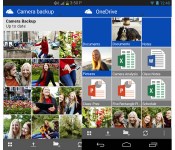
Microsoft intros monthly storage plans for OneDrive, Android app now does automatic camera backups

Nope, not SkyDrive — OneDrive. In case you haven’t heard, Microsoft’s cloud storage service is going by a new name, and it’s finally going into effect today; you should see in the upper-left corner the next time you log in. But that’s not all that’s new: the company also updated its Android app with automatic camera backups, so that any photos or video you take on your device will automatically be sent to OneDrive. If you recall, this is a feature you’ll already find on the company’s iOS app — for whatever reason, it just took a bit longer to make its way to Android. As ever, you can opt to have OneDrive upload on WiFi only, ensuring you don’t exceed your monthly data cap. You can also put limits on image sizes if you want to make the most of your 7GB of free storage space.
Additionally, the company introduced monthly storage plans, starting at $4.49 a month for 50GB and going up to $11.49 a month for 200GB. Simple math tells us that’s more expensive than buying the same amount of storage on a yearly basis, but hey, some of you might be commitment phobes, and we get that. Lastly, you’ll want to keep an eye on Microsoft’s new OneDrive Twitter account today: the company will be giving away 100GB of free storage for a year, with freebies going to the first 100,000 people who log in at a designated time. The catch: Microsoft hasn’t said yet what time folks will need to log into their accounts, so if you want a chance of winning, you’ll just need to watch OneDrive’s Twitter feed. Sneaky, but them’s the breaks.

Cyber Security for the Internet of Things
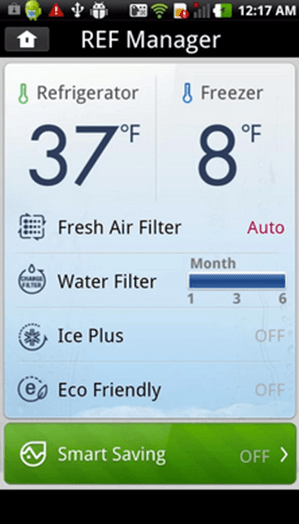 Every day, most people utilize Internet-connected devices like smartphones and mobile tablets. They may also use smart devices in their homes including Internet-connected televisions, thermostats and home security systems. In fact, connected devices can be as small as a mobile glucose monitor and as large as an Internet-connected automobile. Over the past few years, even home appliances like refrigerators have started to develop Internet functionality. For example, a homeowner can control the temperature inside of an Internet-connected smart refrigerator from any location by using a mobile app.
As a connected ecosystem, experts refer to these devices as the “Internet of Things” (IoT). Although the IoT offer many benefits, it also presents new and worrisome security risks. Between Dec. 23, 2013, and Jan. 6, 2014, the security firm Proofpoint discovered that attackers had used over 100,000 connected devices, from multi-media centers to TVs, from routers to refrigerators, to send around 750,000 malicious e-mails. Many security experts had theorized that IoT devices could be hacked, but Proofpoint’s analysis proved that the worst could actually happen. For this reason, security firms, device manufacturers, business owners and homeowners need to make sure that their current comprehensive cyber security and threat detection solutions providers have plans to protect their connected devices.
What Are Smart Appliances?
Electricity costs more at peak usage times of day. For example, running a dryer at 1 p.m. costs more than running a dryer at 9 p.m. because fewer people use electricity at night. With the smart grid, a utility company could control a connected appliance. For example, the utility company could delay a refrigerator’s defrost cycle until an off-peak time so that the electricity costs less. Alternatively, if a homeowner wanted to run a dryer during peak hours, a smart dryer could reduce the amount of wattage that its heating coils used to conserve power.
Smart appliances would also have the ability to learn. For instance, a break room refrigerator could track the typical times of day that an employee opens the door. After finding a pattern, the refrigerator could adjust its cooling periods to maximize energy efficiency. An oven could sense when a roast is done and could send a text message to the cook. By communicating with each other, home appliances could optimize their performance to minimize electricity costs. The possibilities for convenience and energy savings are tremendous, but smart appliances also provide a new front in cyber warfare.
Why Security Is a Problem
Smart devices are connected to the Internet. In many cases, they’re either set up incorrectly, or they utilize default passwords that attackers can easily find on public networks. In 2009, the global population was using about 2.5 billion connected devices. By 2020, Gartner predicts that the world’s population will use as many as 30 billion smart devices.
After compromising a device, attackers can set up the device to act as a botnet. A botnet is a zombie computer controlled by a hacker that can attack other computers. For example, a zombie device can bombard a website with traffic requests. Alternatively, botnets can, as they did in the Proofpoint case, send out hundreds of thousands of spam e-mails. When combined with huge numbers of zombie machines, botnets can disable major websites and critical infrastructure, like the electrical grid. Experts worry that attackers will move beyond laptops and desktop computers and focus their efforts on compromising connected devices.
Protecting the Internet of Things
Smart devices aren’t going anywhere. Just a few weeks ago, Google shelled out $3.2 billion to buy Nest, an obscure company that makes smart thermostats and smoke alarms. With big companies eyeing the IoT for big profits, security needs to make big strides to catch up with convenience.
IoT security solutions include limiting the communication ranges of smart devices. For example, smart devices within a building could communicate with each other, but they couldn’t communicate with the Internet at large. Some manufacturers encrypt the data that travels from a smart device to a smartphone app, and some stakeholders are developing software that will control access to smart devices according to job authority or other factors.
At the very least, a home or business with smart appliances needs a network security solution. Without cyber security, no one may notice the smart coffeemaker doing double duty as both an automated barista and a botnet.
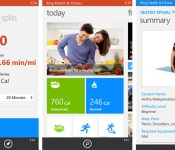
New Bing fitness app for Windows Phone tracks you after the run is over

Windows Phone owners have their choice of activity tracking apps, but few of those apps will tell you how to remain healthy after you’ve taken off your running shoes. It’s a good thing that Microsoft has released a beta of Bing Health & Fitness for Windows Phone, then. The software uses GPS to quantify your biking and running like many of its peers, but it also provides health advice; much like the Windows 8 app, you’ll find a diet tracker, exercise instructions and a symptom research tool. Your info will also sync across all your Windows-based gear. Those eager to slim down and shape up just have to swing by the Windows Phone Store to get started.
Filed under: Cellphones, Mobile, Microsoft
Via: WPCentral
Source: Windows Phone Store
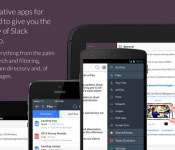
Flickr co-founder’s Slack collaboration tool leaves beta, goes freemium for all

Back in August, Flickr creator Stewart Butterfield’s Tiny Speck started the digital signup sheet for Slack, its collaborative productivity software. Today, the project exits beta and goes freemium for businesses anxious to opt in. In case you’re in need of a refresher, the goal of Slack is to free the daily workflow from what Butterfield calls “email bankruptcy.” With this software, internal messages are all in one spot with access to files stored elsewhere and items like bug trackers baked in. In addition to the free Lite tier, there are also Standard and Plus options with increased functionality for $8 and $15 for each user per month, respectively. A more robust and customizable Enterprise subscription will range from $49 on up to $99 a month, but it isn’t set to arrive until 2015.
Let’s go back to that no-cost option for a minute, shall we? Here, users get access to a searchable archive of 10,000 messages, 5GB of storage, five of those external integrations and native apps for iOS, Android and Mac. New features have already been teased for later this year, with items like email integration, guest accounts and detailed analytics mentioned for the paid tiers.
Filed under: Software
Source: Slack

VSCO Cam app for iOS adds more ‘community’ features in a bid to take on Instagram

The VSCO Cam app has developed a pretty dedicated following of serious mobile photographers. Over the summer Visual Supply Co. even unveiled a minimalist publishing platform called VSCO Grid. But ties between the two were… let’s say, weak. An update for the iOS version finally rectifies the situation, by fully integrating VSCO Grid. Most notably it adds the ability to follow people and browse a feed of your friends’ most recent photos, taking the first tentative steps into social network territory. You can obviously search out friends on your own, but VSCO also serves up a collection of curated artists it thinks are worth tracking.
The update to 3.0 isn’t all about the “community” though; the camera and editor themselves have received a few nice tweaks. There’s a new Tilt & Level tool that makes sure your pics are perfectly aligned, both vertically and horizontally. The crop tool has been updated for a “smoother, more accurate experience,” and the details view for photos has added pinch-to-zoom support, for really digging into the nitty-gritty of your compositions. You can also now set the app to automatically save images to the iPhone’s Camera Roll and turn off location tagging if you’re paranoid about your privacy. For now the update is iOS only, but Visual Supply Co. promises the new features are coming to Android in the near future.
Source: Visual Supply Co., VSCO Cam (iTunes)

With an Android search update, you can tell your phone to ‘call Mom’

One of Siri’s cleverer tricks is its support for terms of endearment — you can tell an iPhone to “call Mom” rather than saying your mother’s name every time. Today, that handy shortcut is reaching Android through a Google search update. You can now rely on shorthand when using the search app to call or text family members. If you haven’t already established the appropriate relationship in your contacts, Android will ask you to clear things up. The feature is already live, so you can test it out right away — we’re sure your folks would be glad to hear from you.
Filed under: Cellphones, Internet, Mobile, Google
Source: Google (Google+)
Bolt offers free voice calls and replaces your Android dialer

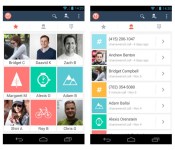
When it comes to making free VoIP calls using your Android phone, you have a bunch of options. Services like Skype or Fring let you call other users for free, but you’ve got to remember to fire them up before you start dialing. Instead of using one app for regular calls and another for VoIP, newcomer Bolt replaces your phone’s dialer with a one-stop solution for both. Unlike other services that require you to buy credits to make regular calls, the app connects to traditional phones the old-fashioned way — over your wireless carrier’s network. Calls made to other Bolt users are routed over the web for free, and sip a meager 60KB per minute. That means even with FreedomPop’s free deal (which includes a paltry 500MB of data), you’d be able to chat with mom for more than 142 hours before getting hammered with overages.
The company hopes to ultimately become a fully formed communication platform, and offer messaging services as well. Long-term that could mean users could pare down on mobile minutes and messaging packages, and instead spring for a slightly larger data package on their mobile bill. Android users can snag the app now from Google Play, and an iOS version is already in the works.
Filed under: Cellphones, Wireless, Mobile
Via: The Verge
Source: Bolt
 AIVAnet