



Daily Roundup: Engadget’s 10th birthday, Apple announces CarPlay, and more!

You might say the day is never really done in consumer technology news. Your workday, however, hopefully draws to a close at some point. This is the Daily Roundup on Engadget, a quick peek back at the top headlines for the past 24 hours — all handpicked by the editors here at the site. Click on through the break, and enjoy.

10 Years In: The birth of Engadget
Since March 2, 2004, Engadget has been keeping people from all four corners of the globe in touch with the latest and greatest gadget news. And wow… what a ride it’s been. Whether you’re a casual techie or hardcore early adopter, we hope you’ll join us in celebrating Engadget’s 10th anniversary!

Apple announces CarPlay
Apple announced its new in-car interface called CarPlay, which offers touch- and Siri-based navigation of services and apps available on Lightning-enabled iPhones — including the likes of iHeartRadio and Spotify. Only a select few automakers are currently on board, but Apple says we can expect that to list to grow in the near future.

Galaxy S5 comes with premium app subscriptions
Looking to buy Samsung’s new Galaxy S5? If so, you’ll be happy to know the handset comes with a great selection of free, premium app subscriptions. Most of the limited-time services only extend a few months, but hey… who doesn’t enjoy free stuff?

Samsung Chromebook 2 hands-on
Samsung’s new Chromebook 2 comes in 11- and 13-inch flavors, starting at $320. Both models incorporate 2GB of RAM, Bluetooth 4.0 and a year’s worth of free AirDroid service. What’s more, the 13-incher packs a lid covered in faux-leather similar to that of the Galaxy Note III.
You also might like:
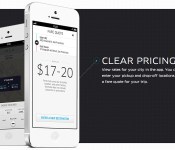
Uber adds surge pricing push notifications to its iOS app

A week after Uber CEO Travis Kalanick promised push notifications were on the way to help riders cope with surge pricing, the outfit has added the feature to its iOS app. With the latest update, those handset-based pop-ups alert you when the dreaded surge pricing window has passed and replace SMS messages for updates. For customers in the UK, PayPal integration has also been tacked on as an alternate payment option. No word on when Android users can expect the new alerts, but we’d surmise it’s not too far out as add-ons have been quick to grace both OSes in the past.
Filed under: Transportation, Software, Mobile
Via: The Next Web
Source: Uber (iTunes)
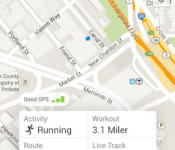
RunKeeper adds training plan feature to its Android app

RunKeeper has a solid track record when it comes to giving users new ways to interact with the application. It’s no surprise, then, that the fitness-focused app is getting some fresh tidbits on Android. Most notably, you’ll now see a training plan feature which is set to coincide with the goals you’ve set up within the app. This version also brings a redesigned “Me” tab, an option to keep a close eye on training schedules and the ability to view your workout history. It’s a very nice update, to say the least — and given that it’s Monday, it couldn’t have come at a better time to inspire your next run.
Filed under: Misc, Software, Mobile
Via: Android Community
Source: Google Play
Buy a Samsung Galaxy S5 and Samsung will throw in $575 worth of app Goodies
 For a lot of people, getting the new Samsung Galaxy S5 is pretty much a done deal. In case you were on the fence or needed a bit more incentive to take the plunge and get a Galaxy S5, Samsung says it’s going to be offering $575 worth of app subscriptions to make the deal even sweeter. And they’re not all sub-standard subscriptions either; the goodies include:
- Run Keeper – 1 year free premium service ($20)
- Lark – 1 year premium service ($36)
- Skimble – 6 months free premium service ($42)
- Map My Fitness – 6 months free premium service ($36)
- Wall Street Journal – Free 6 month subscription to Wall Street Journal ($160)
- Bloomberg Businessweek + – Free Subscription: 12 Months ($30)
- PayPal – special offers in select countries
- LinkedIn – Free LinkedIn Premium account for 3 months ($75)
- EasilyDo Pro – Free app purchase ($5)
- Blurb – Free $5 Coupon ($5)
- Flick Dat – Free download of $2 paid app
- Cut the Rope 2 – $10 in-game credits
- Bitcasa – Free Premium Service: 1TB storage for 3 months ($30)
- Box – Free 50 GB for 6 months and $60 value
- Evernote – Free Premium Service for 3 months ($15)
It’s a pretty exhaustive list, and while most of these subscriptions run out after a short while, the chance to try out these premium services as well as the fact you get these free with your new handset is a pretty good bonus.
Are there any subscriptions that catch anyone’s eye? And are you more likely to get the Samsung Galaxy S5 now that you know these goodies are being offered? Let us know what you think about all these extras.
Source: Samsung Galaxy Gifts via Phone Arena
Samsung Galaxy S5 comes with premium app subscriptions worth over $500

After powering the world’s most retweeted tweet, Samsung has also revealed a suite of app-based upgrades that future GS5 owners will receive, free, alongside their new smartphone. While Evernote and Linkedin’s premium services only extend to three months, we have no complaints about six free months of the Wall Street Journal and year-long access to Bloomberg’s Businessweek. The Galaxy S5 will also include a year of Run Keeper Premium, as well as limited-time premium services for Map My Fitness and Skimple. There’s no Dropbox this time, but there is 50GB of free cloud storage — for six months — from Box. Also, in case you forgot about the Galaxy S5′s heart-rate sensor, you’ll also pick up a year’s subscription to Lark’s personal wellness app, which will plug into (and monitor) all your health metrics… until you’re ready to pay another 36 bucks to extend the service. But then, who can put a price on good health?
Filed under: Cellphones, Software, Mobile, Samsung
Source: Samsung

Game Insight’s Cloud Raiders Game Review
Being a massive fan of strategy games, when Game Insight recently released their Cloud Raiders game for Android, I had to play it.
You are required to battle armies of sky pirates to defend your base, as well as other players in the game in the PvP mode. You’re able to form clans in Cloud Raiders to cooperate attacks in raids for devastating effect.

Cloud Raiders very much follows the same layout and progression as the popular Clash of Clans, but it’s different enough to stand out on its own. The graphics are brilliant, and it is very responsive, with the gameplay being addictive to want to come back and keep playing.
Cloud Raiders includes bosses and pirate overloads which will test the strength of your base defences and army which can be made up of cannons, troops, and special powers. The game also features an upgrade path, so you can develop your units and builder larger armies for increased attack and defence.

The Aoo is available for free from the Google Play Store for Android, and will soon be released on other mobile and social platforms.
The post Game Insight’s Cloud Raiders Game Review appeared first on AndroidGuys.

App lets you attach digital messages to real-world objects… for fun?

For those who don’t know, Project Tango is a Google-built prototype smartphone jam packed with Kinect-like 3D sensors and components. One of Mountain View’s software partners involved in the project, FlyBy Media, has built what it’s calling the first consumer app capable of utilizing Tango’s image recognition skills to… chat with friends. Dubbed FlyBy, the app allows users to share text and videos messages by attaching them to a real-world object; like a menu at your favorite restaurant or collectible from your honeymoon. Recipients are notified once they’re in close proximity, then they need only to scan said object and voila, message received. While the concept isn’t new — or popular… yet — the company believes that this time people will catch on. Just think of it as geocaching your conversations. That could be fun, right?
Filed under: Cellphones, Software, Google
Via: TechCrunch
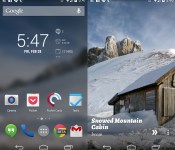
Muzei HD Landscapes sets beautiful landscapes as your wallpaper through Muzei [App of the Day]
In case you missed our initial coverage of the Muzei Live Wallpaper, it is a live wallpaper that sets pieces of art as your wallpaper, rotating every day. Created by the developer of the popular Dashclock Widget, Muzei allows you to download extensions to replace the featured art with wallpapers of your choosing. One of the best extensions we’ve found is called Muzei HD Landscapes.

The app is simple – download it, set it as your Muzei extension of choice, and that’s it. The reason we liked this app so much is for the customization options. This extension allows you to update via WiFi only, change the hours it takes to rotate pictures, and it even allows you to change the image resolution.
It is a relatively new app, with less than 500 Google Play downloads at the time of writing this. If you’re a fan of Muzei, you’ll probably be a fan of Muzei HD Landscapes.
The post Muzei HD Landscapes sets beautiful landscapes as your wallpaper through Muzei [App of the Day] appeared first on AndroidGuys.

FIFA 14 is now available for Windows Phone footie fans

Windows Phone owners no longer have to watch from the sidelines as their friends battle for supremacy in FIFA 14. EA has released a native version of the free-to-play soccer (aka football) title for Microsoft’s platform with the same on-the-pitch action that you’d expect on Android and iOS, including options to buy both team points and special game modes like Manager or Kick Off. There’s nothing specifically taking advantage of Windows Phone here, but Lumia owners wanting to dominate a virtual Premier League should be very happy.
Filed under: Cellphones, Gaming, Mobile
Via: Windows Phone Blog
Source: Windows Phone Store
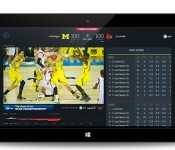
March Madness Live app dribbles its way to Windows Phone 8 this year

This year, Windows Phone 8 users can watch all 67 NCAA men’s basketball games too, now that the March Madness Live app has arrived (there’s also a new app for Windows 8, if the browser doesn’t cut it). The streaming app was previously available on iOS and Android only, and long ago, it even cost $10 a pop to download. Now the app is free, but any game aired on TNT, TBS or TruTV still requires a cable TV subscription for viewing. There is a brief preview period before users need to log in, and anyone can stream games aired on CBS.
As a bonus for cable subscribers, each semifinal round will have three different feeds that viewers can choose from: the game coverage itself and team-specific presentations. Other than these new features, the apps also got a new interface that make them more suitable for phone and tablet screens. The March Madness Live apps aren’t exactly available yet, but as the name implies, they’re slated to hit the App Store, Google Play and Windows Marketplaces sometime this March.
Filed under: Cellphones, Tablets, Mobile
Source: NCAA, Turner Sports
 AIVAnet