


Google Play Games for Android now shows you who wants to play

Google Play Games just became much, much more useful for avid Android gamers. A newly released update to Google’s entertainment hub lets you see all your invitations; it’s now much clearer that someone wants to play. The upgrade also shows you a not-quite-live view of who’s playing, and a new Find Games area (shown here) suggests titles you can try. Play Games still won’t compare with advanced gaming frameworks like PlayStation Network or Xbox Live, but it’s likely worth a download if your smartphone regularly doubles as a handheld console.
Filed under: Cellphones, Gaming, Tablets, Mobile, Google
Via: Android Central
Source: Google Play
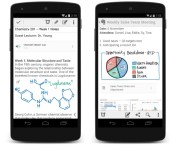
Evernote for Android now supports handwritten notes

No matter how great your Android keyboard is, sometimes good old handwriting is the best way to take notes in a meeting or jot down your next big idea. If carrying a notebook with you everywhere isn’t your style, starting today you can create digital handwritten notebooks using Evernote’s Android app. To use the feature, just tap the pen icon at the top right of any new note. A spotted canvas will appear, and you’re free to write with your finger or stylus to your heart’s content. There are four color and three thickness options if you’re feeling creative, and audio and text files can be added to the same page to spice things up. Like everything else in Evernote, your handwritten notes are searchable, so you’ll be able to find what you’re looking for later on. In addition to handwriting, Evernote dropped a few other updates for Android users: an improved note editor and a faster camera. You can get everything now by downloading the latest version of the app by heading over to Google Play.
Filed under: Cellphones, Tablets, Mobile
Via: The Next Web
Source: Evernote
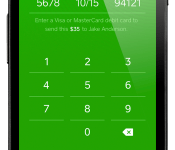
Easily send and receive money with Square Cash [App of the Day]

Today in our “App of the Day” feature, we bring you an application known as Square Cash. This one lets users send and receive money at no cost. All you have to do is to link your debit card with it, and then you can send money to anyone by just using their debit card information. No need to have sign up for an account or anything else. Send your money via email by CC’ing cash@square.com and putting the dollar amount in the subject line.
Everything is safe and secure; users can confirm or reject any transfers and even require security code verification. Money deposited into your account can take 1-2 business days to process and is automatically done!
Users can request money from up to 25 people at once; collecting money for a graduation gift or birthday present can be done all at once. Unlike services like PayPal, where after receiving the payment, you have to withdraw it to your bank account, Square Cash puts the money directly to your existing bank account.
We really liked this application the reviews thus far a quite positive.
The post Easily send and receive money with Square Cash [App of the Day] appeared first on AndroidGuys.

Wake up and smell the bacon with Oscar Mayer’s new iOS app

There’s nothing quite like the smell of freshly cooked bacon to help you get out of bed in the morning. Unless of course, that smell is a clever r(o)use by an iPhone app and there is no bacon. A new alarm app by Oscar Mayer deceives you out of bed every morning to not only the sweet sound of frying bacon, but to the smell as well. A small gadget attached to your iPhone’s headphone jack sends a bacon fragrance your way as the alarm sizzles. But, there is no bacon. It’s similar to what we saw last year with Scentee, except this bacon device isn’t being sold – you’ll have to win it through a sweepstakes on Oscar Mayer’s website. The bacon alarm clock also isn’t for everyone – Android and Windows Phone users will have to opt for a more vegan, but perhaps slightly less heartbreaking, wake up call. Did we mention there’s no bacon?
Filed under: Cellphones, Wireless, Mobile
Via: TUAW
Source: Oscar Mayer

CNN’s Flipboard rival now belongs to… Flipboard

CNN bought the news aggregation service Zite to get a fast track in the mobile space, but it never gained much ground versus Zite’s arch-rival, Flipboard. Accordingly, the TV broadcaster is throwing in the towel — it just sold Zite to Flipboard for $60 million. The deal brings a raft of previously unavailable CNN content to Flipboard’s news curation platform, ranging from articles to video feeds for shows like Anderson Cooper 360 and Inside Politics. The network has also agreed to produce custom magazines (shown here) that go beyond what you’d normally find online. CNN’s content is available today, and it’s launching alongside a big Android app update that lets readers sign in with Google, control article density, curb their data use and attach photos to custom magazines.
Filed under: Home Entertainment, Internet, HD
Source: CNNMoney, Inside Flipboard (1), (2)

Adobe’s all-in-one photo app Revel arrives on Android

If one of the many, many photo apps on Android isn’t doing it for you, Adobe’s just added Revel to the fray. Though it’s touting features like ease-of-use, automatic syncing, sharing and privacy for the app (which has been on iOS for quite a while), we actually found the built-in Photoshop Express-like features to be the best part. Those include scaling, rotation, brightness, contrast, filters and other handy adjustments, with a much simpler interface than Photoshop Express (thank goodness). If interested, you can upload all the photos and video you want for the first 30 days, then add 50 videos or photos a month for free after that. For unlimited storage, you’ll pay $6 per month or $60 per year. A notable oversight is that Creative Cloud subscribers don’t get free access, as it would let pros share their portfolios more easily. As for as the privacy, it’ll probably take us quite a bit more time to get over some deep trust issues.
Filed under: Cellphones, Software, Mobile
Via: CNET
Source: Adobe (Google Play)
Pebble 2.0 Beta App updated to version 11
The Android Beta App for the latest Pebble 2.0 has just been updated to version 11 and it seems a lot of the teething issues that users were originally experiencing have been ironed out.
Changelog:
- PebbleKit JS localStorage is now sandboxed for each app
- Many improvements to onboarding and FW installation
- Issues with sideloading apps in some circumstances have been fixed
- Some issues with loading JS configuration views after the app has been quit have been addressed
- JavaScript app logs printed via ADB are cleaner
- MyPebble now loads faster
Pebble are saying there is still one known outstanding issue which is yet to be fixed:
- Pairing a Pebble during onboarding may not succeed. If you run into problems, exit the Pebble app. Remove the pairing entry from Android BT settings & your Pebble. Then pair manually using BT settings.
Pebble are advising that you’ll need to uninstall version 10 of the App before you install this one, and also any javascript-based Apps will need to be manually reinstalled after upgrading.
You can download the latest version 11 of the Android Beta App here.
[via Pebble]
The post Pebble 2.0 Beta App updated to version 11 appeared first on AndroidGuys.

Facebook Messenger arrives for Windows Phone sans voice features

Microsoft was clearly being cautious when it said Facebook Messenger would be available for Windows Phone within a few weeks of Mobile World Congress — it’s already here, just over a week later. The app offers much of Facebook’s familiar chat experience, including group conversations, photo sharing and (of course) stickers. However, are a few missing features in this first revision. There aren’t any voice messaging options, and chat heads aren’t around to let you quickly jump between active discussions. If those absences aren’t make-or-break for you, though, Messenger is ready and waiting at the Windows Phone Store.
Filed under: Cellphones, Internet, Mobile, Facebook
Via: Facebook (Twitter), Windows Phone Blog
Source: Windows Phone Store

Evernote for Windows gets Skitch-like annotation tools

If you use Evernote religiously, chances are you’ve got more than a few snapshots and screen captures saved. To make it easier to edit and annotate those photos, Evernote has fully absorbed Skitch’s features into its Windows app. We’re not talking about being able to open an image on Skitch from Evernote like on the Mac version — we’re talking about being able to crop, resize, add arrows, shapes and text on photos from within the note-taking app. You simply need to hover your mouse over a pic and click the Annotate button that pops up on top to access those features. Other than that (and stability fixes), you should also be enjoying much, much faster syncing if you’re a business user, assuming you didn’t get that upgrade when it launched.

Filed under: Misc
Source: Evernote

Google Play celebrating its second birthday with special deals, but you might not be able to see them yet
According to a tipster on Reddit from Australia, Google Play is celebrating its second birthday and is offering many apps and other content for either free or at a discount.
I’m based in the U.S. and couldn’t see the deals yet by going to the link below, but when I used the “Hola Better Internet” Chrome extension and changed my region to Australia, I could see the deals without any issues.

The limited-time deals include a “24-hour music deal, Movies to Buy from $3.50, Books Under $5, 30% off magazine subscriptions” and more.
According to the tipster and from what I could see from the page:
- “FIFA 14″ by EA – Free
- “MOVIE: Disaster Movie: – AU$0.99
- GQ Australia Magazine Subscription – 30% off
- “Theme Park” By EA – Free
- “BOOK: I Came To Say Goodbye” by Caroline Overington – AU$4.99
- “Heroes of Dragon Age” By EA – Free
- “Tiny City” by Chillingo International – Free
- “BOOK: Outback Dreams” by Rachael Johns – AU$4.99
- “The Sims Free to Play” by EA – Free
- “MAGAZINE: Taste.com.au” – AU$2.99
- “Need for Speed” by EA – AU$5.49
- “MOVIE: Vanity Fair” – AU$0.99
- “Bejeweled Blitz” by EA – Free
- “BOOK: The Luminaries” by Eleanor Catton – AU$4.99
- “MOVIE: Thirteen” – AU$0.99
- “BOOK: Burning Lies” by Helene Young – AU$4.99
- “Dungeon Keeper” by EA – Free
- “MAGAZINE: Super Food Ideas” – AU$1.99
- “Dead Ahead Game” by Chillingo International – Free
- “NBA Jam” by EA – AU$5.49
Note that you may see the sale pop-up in your region eventually and it may or may not have the same apps, movies, books, magazines and prices. The promotion for Google Play’s first birthday began March 5 last year, which at the time of writing this, it is already in that part of the world. Also, some of these apps were free to begin with, so it may not be the best promotion we’ve seen.
Google Play via Reddit
The post Google Play celebrating its second birthday with special deals, but you might not be able to see them yet appeared first on AndroidGuys.
 AIVAnet