


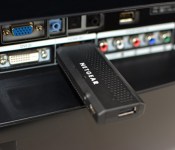
Netgear’s NeoMediacast is an Android-powered TV set-top on a stick

Most of the equipment we get from our telecom providers is nothing to get excited about, but we might make an exception for Netgear’s NeoMediacast. The Android-based HDMI dongle lets providers both offer their own services and support third-party apps without having to build their own set-top boxes or go the traditional TV route. Your cable company could let you stream your favorite shows on a bedroom TV, for instance, while making it easy to check social networks or play your local media library. The NeoMediacast is also relatively futureproof with 802.11ac WiFi, Miracast media sharing and support for both microSD and USB storage. Carriers and service operators can start using Netgear’s device in the first half of this year, although they’ll likely need to customize its software before it reaches your home.
Filed under: HD
Source: Netgear (1), (2)
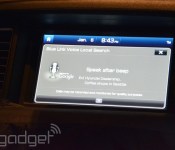
Hyundai’s second generation Blue Link tech runs custom Android, keeps you connected with Verizon

When Hyundai’s latest Genesis sedan launches later this Spring, it’ll have the latest version of Hyundai’s Blue Link tech: voice navigation, media management and remote tech. That means unlocking your car remotely, navigating to both specific locations and general search terms (think: flowers, sushi, etc.), and a whole mess of other “smart” functionality. Unlike the first-gen Blue Link currently available, all of that functionality is being brought to your new Genesis with a cell signal provided by Verizon.
Hyundai was part of the big Google news earlier today, and Blue Link’s second-gen is another piece in that puzzle. Consider it the latest in a series of cross-company explorations into how best to implement Android in cars — a Hyundai rep told us it’s also exploring iOS for cars, but won’t have more to share until some point “later this year.”
In the brief time we spent with Blue Link 2, we were impressed! It picked up on voice commands without a hitch, and was able to wirelessly connect to Google Places from within the confines of a Las Vegas hotel conference room. Sadly, navigation costs $100 annually, and it’s another $100 annually for remote services. Head past the break for a look at Blue Link 2 in action, and find out if it’s the Android you’re looking for.
Filed under: Misc, Transportation

RCA will launch budget Android Ultra HD TVs, Roku Ready 1080p versions and even curved LCDs

As predicted, CES 2014 is featuring a flood of Ultra HD televisions, and they’re not all from the big names. RCA is at Digital Experience showing off a 65-inch version of its new series with 3,840 x 2,160 res screens. Manufactured by On Corporation, they’re also smart TVs, including the Android TV platform (formerly known as Google TV), complete with Search, Chrome and the PrimeTime guide, plus Miracast for screen mirroring. The LED-lit TVs will ship in 55-, 65- and 84-inch variants later this year and while they don’t have pricetags yet, we’re expecting these to come in at a lower price, similar to previous TVs from the brand. Not ready to make the 4K jump? RCA will also have Roku Ready TVs that ship with the Streaming Stick packed-in available in a multitude of sizes, Android-packing 1080p TVs, and even promises two curved LCDs in 46- and 55-inch sizes.
Filed under: Displays, Home Entertainment, HD
Source: RCA

Android and Windows 8.1 play nice on ASUS’ Transformer Book Duet TD300 convertible
There were lots of great products unveiled Monday at CES 2014, but ASUS announced a real game-changer with the world’s first quad-core, dual operating system tablet/notebook convertible, the Transformer Book Duet TD300.
What makes this device so interesting is that it can be either an Android tablet or laptop, or a Windows tablet or laptop, so you essentially get four devices in one.
Now you may remember a discontinued device that came out a few years ago that also ran both Android and Windows 7, the Viewsonic ViewPad 10, but this device is different. With that tablet, you had to restart the device to get to your desired OS. On the Transformer Book Duet, all you have to do is press a button and you can instantly change to the other OS. It also saves your state, so if you want to switch back, you can pick up right where you left off.
ASUS’ new device starts at $599 and packs Windows 8.1 Standard, Android 4.2.2 Jelly Bean, a 13.3-inch 1366 x 768 display and an Intel Core i3 processor, but you can get an upgraded version for $100 more with a 1080p display and an Intel Core i7 processor.

Other specs include 4GB DDR3L 1600 RAM, up to 128 GB SSD in tablet and up to 1 TB HDD in dock, 38WHr battery that has an estimated battery life around 5 hours in Windows 8.1 and 6 hours in Android 4.2.2, 802.11ac Wi-Fi, Bluetooth 4.0 + EDR, MicroSD card slot, headphone jack, DC jack and the keyboard dock includes a USB 3.0 port, two USB 2.0 ports, 10/100Mbit/s LAN, HDMI 1.4, audio combo jack and DC jack.
An update to Android 4.4 KitKat would make this device an even better deal, but hopefully it sees an update to at least Android 4.3. If ASUS’ newest monster of a device has you excited, look for it in Europe and Asia this quarter and in the U.S. in Q2.
The post Android and Windows 8.1 play nice on ASUS’ Transformer Book Duet TD300 convertible appeared first on AndroidGuys.

AMD brings full-on Android to Windows through BlueStacks

BlueStacks has helped Windows users run Android apps on their PCs for a few years, but now the AMD-backed company is going a step further. The graphics titan has just announced that a new version of BlueStacks will be able to run full-on Android, right on your desktop, tablet or notebook loaded with Microsoft’s operating system. Rather than leaning on the BlueStacks App Player for virtualization, the coming version of the software will run the entire OS, giving folks access to a veritable Android interface, settings, configuration and more. What’s more, apps running through Google’s OS will have access to files that reside on the host desktop. Still, BlueStacks retains the ability to run applications in windows or in full screen. The firm says optimizations courtesy of its 4th-gen APUs help make this possible, but it’s not clear if the software will only work on machines using their silicon. There’s no word on when this refreshed software will drop or what version of Android it supports, but expect more news to trickle out as CES continues.
Filed under: AMD
Source: AMD
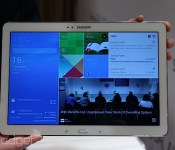
Samsung’s Galaxy Note Pro 12.2 is a gigantic tablet that promises extensive productivity (hands-on)

In much the same way that smartphones are trending towards larger screens, it appears that manufacturers like Samsung are experimenting with the same concept in the tablet realm. The company has just introduced its latest (and largest) Android-running Galaxy Note device called the Note Pro 12.2. Announced alongside the Tab Pro 12.2 at CES, the Note Pro offers the same S Pen functionality we’ve enjoyed on previous devices like the Note 3 and Note 10.1 2014 edition, and as usual, you’re going to see some refinements in Samsung’s firmware and user experience as well. The device will be available in LTE, 3G and WiFi flavors and is expected to launch sometime this quarter in various parts of the world.
As soon as we tried out the new Note Pro, we immediately noticed the size and weight difference compared to Samsung’s 10.1-inch offerings. Regardless of how much you trim its bezel, a 12.2-inch tablet simply isn’t designed for optimal portability, which means we’re more likely to use it as a coffee table device, special projects or conferences in the office. It’s just a little too awkward to hold for long periods of time. Aside from that and a glaring weight difference — 753g (1.66 lbs) on the 12.2, versus 547g (1.21 lbs) on the 10.1 — we were hard-pressed to find any variation between the 12.2-incher and the Note 10.1 2014 edition; it features the same design, button layout, “leather-like” back and display resolution (2560×1600, for a pixel density of 247 ppi). Other than that, what stands out on the 12.2, which runs Android 4.4 KitKat, is a few key new firmware features like Remote PC and Magazine UX. Continue reading below the gallery and our hands-on video to get more of our impressions.
First, let’s discuss the key specs. With a larger Note comes an even larger 9,500mAh battery, an 8MP rear camera paired with a 2MP front camera, “super clear” WQXGA LCD panel, IR support, dual-band WiFi 802.11 a/b/g/n/ac MIMO, USB 3.0 and Bluetooth 4.0. The LTE model promises support for 800/900/1800/2100/2600+850, while you’ll get quad-band HSPA+ (with a max of 21Mbps).
The Note Pro 12.2 runs Android 4.4 KitKat, but the user experience is drastically different than any Note we’ve played with before. Instead of being graced with a standard Android/TouchWiz home screen panel when pressing the home hardware button, you get whisked away to a new interface lovingly called Magazine UX. This experience consists of three separate customizeable screen panels: one for your office/workspace, another for personal use and a last one that handles your social networks and media. It’s much like My Magazine on the Note 10.1 2014 edition, but Samsung has streamlined the number of screens and assigned one of them as the default screen that pops up when you press the home button. So far, we haven’t found a way to opt out of that default, and Samsung confirmed to us that it is, in fact, stuck. You can still access the notification menu and status bar on the top, as well as the app tray in the lower right corner, but if you want the standard home screen, you’ll need to swipe to the right to bring it up.

The Multi-Window feature is also here, and Samsung is making good use of the extra screen space. Instead of two windows to manage simultaneous tasks, you can have up to four — and that’s not counting the ability to add pop-up windows on top of that. There are now two ways to access the menu, too: there’s the standard method of long-pressing the back button, but you can also swipe in from the right bezel to pull up the list of compatible apps. Tapping on those apps will make them float above the screen as a pop-up window, and minimalizing each one turns them into small circular icons a la Facebook’s Chat Heads. If you want the four-screen setup, you’ll need to drag-and-drop the app into its rightful place.
The last major firmware enhancement Samsung boasts is its Remote PC setup. We weren’t able to demo these features in our hands-on, but they certainly sound promising enough. Granted, the idea of accessing your PC or Mac remotely isn’t anything new by a long shot, but we can’t complain about having the feature baked into the device without needing third-party assistance. In fact, Samsung has built in a UI that allows you to drag and drop files between your PC and Note Pro, which would be a huge asset to our productivity when we’re away from our computer. The ability to edit and save files is also included, as well as support for Cisco WebEx Meetings.

In terms of performance, we didn’t see much of a difference between this and the Note 10.1 2014, which is likely because Samsung opted to use the same silicon inside: the LTE version of the Note Pro comes with a 2.3GHz quad-core Snapdragon 800, while the 3G and WiFi-only options are fitted with the same Exynos octa-core processor as the Note 10.1 unit we reviewed a few months ago; each version comes with 3GB RAM. As luck would have it, the models on-hand were Exynos-powered, and unfortunately we saw all-too-familiar signs of stutter and lag in even the most basic of tasks. Since we didn’t get a chance to see final production firmware or hardware (although we suspect it’s pretty close to final at this point), we don’t want to come to final conclusions on the tablet’s performance until we get a chance to put it through the paces in our full review when it officially launches.
And for those of you wondering: no, we didn’t try to put it up to our ears like a phone.
Ben Harrison and Mat Smith contributed to this behemoth post.

ASUS’ Transformer Book Duet can switch between Android and Windows as a laptop or tablet

If you’re looking for a dual-booting convertible but find ASUS’ Transformer Book Trio a little too clever, you’ll want to check out the company’s just-unveiled Transformer Book Duet TD300. The 13.3-inch PC is really a dual-OS tablet that bundles a keyboard dock with its own hard drive and ports — whether you’re in laptop or tablet mode, you can switch between Android 4.1 or Windows 8.1 on the fly. The slate includes up to a 1080p display, a Core i7 processor and 128GB of solid-state storage; attach the dock and you’ll get up to 1TB in disk space alongside USB, Ethernet and HDMI. ASUS plans to ship the Duet to Asia and Europe late in the first quarter of the year, and to the US by late in the second quarter. When it does ship stateside, the system will start at $599 for a Core i3 model with an “HD” (read: 1,366 x 768) screen, and $699 for a 1080p unit.
Filed under: Laptops, Tablets, ASUS
Source: ASUS

ASUS unveils ZenFone line packing Android, Intel chips and a simple interface

It’s been a while since we’ve seen an ASUS smartphone that wasn’t meant to be used with (or as) a tablet, but the company is making up for that absence by launching the ZenFone line. The ZenFone 4, 5 and 6 all sport dual-core Intel Atom processors and a range of exotic color options. They also tout a new interface layer on top of Android 4.3, ZenUI, that promises both simplicity and a What’s Next feature for tracking your daily schedule. Differences between models largely boil down to screen size and performance. The ZenFone 4 starts things off with its namesake 4-inch 800 x 480 LCD, a 1.2GHz Atom chip, a 5-megapixel rear camera and a front VGA shooter. Move to the ZenFone 5 and you’ll get a larger 720p display with pen and glove support, a 2GHz Atom, an 8MP back camera and 2MP at the front. The ZenFone 6 builds on this with an even bigger (though still 720p) screen and a 13MP rear camera. ASUS hasn’t said when the ZenFone series hits shops, although the absence of LTE suggests that the handsets won’t reach 4G-obsessed US carriers in an official capacity. They’ll definitely be cheap to buy off-contract, however — the ZenFone 4 starts things off at $99, while its 5- and 6-inch counterparts will cost $149 and $199.
Filed under: Cellphones, Mobile, ASUS
Source: ASUS

ASUS PadFone Mini coming to the US for $249

ASUS is giving American tablet fans more than the PadFone X — it just revealed at its CES event that the PadFone Mini will also be coming to the US for $249. The 4-inch smartphone and 7-inch tablet combo that will reach the US isn’t quite the same as what surfaced in Taiwan, though. This version touts a phone with 1.6GHz dual-core Atom Z2560 chip, 8GB of storage and an 800 x 480 display rather than the Snapdragon, 16GB of space and 960 x 540 display from before. ASUS hasn’t said exactly when we’ll see this new Intel-powered PadFone, but we’ll keep you updated.
Filed under: Cellphones, Tablets, Mobile, ASUS
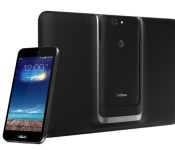
AT&T scores exclusive Asus Padfone X
ASUS Padfone series is really famous among Android fans – as it is first of its kind tablet and smartphone hybrid. Well, the Padfone’s are around from a long time, but they never made it to the US, and if someone wanted to buy one, the only solution was to import it from overseas, but now there’s a solution. AT&T has decided to release the ASUS Padfone X in the US, and it will come with AT&T’s blazing fast 4G LTE network.
 However, not much is known about the Padfone X, but it will have a 5-inch smartphone and a 9-inch tablet station with full HD display. Price and release date is unknown at the moment, but it is rumored that the smartphone will come with a Qualcomm Snapdragon 800 quad-core processor, Adreno 300 graphics, 2GB of RAM, 16GB of storage, and Android 4.4 KitKat software, so we can take all this with a grain of salt.
Are you planning to grab one? Tell us in the comment box below.
The post AT&T scores exclusive Asus Padfone X appeared first on AndroidGuys.
 AIVAnet