


pickWEB: an new way to search, App Review
So we all know how hard it can be to search the web for a specific category of items, especially when there are thousands of fake sites trying to hustle you. Well, you can now lay those fears to rest with the new app, pickWEB.
What pickWEB allows you to do is select categories that you are interested in and it will display websites with the top hits in that category. For example, if your a man and you want to search weapons, just select Men -> Weapons and you have 8 websites with top hits of weapons.
There are over 18 main categories with many subcategories to help define what you are looking for. Now does this sound all good to be true? Well, the app is in its infancy and the UI (User Interface) is simple to navigate, but it is old and outdated.
pickWEB also allows you to create accounts to save links and it has an installer for Windows desktop, OS X coming soon, so you can sync and browse with ease. Follow the link below and let us know what you think!
The post pickWEB: an new way to search, App Review appeared first on AndroidGuys.
Picment: Photos with sound, App Review
Picment is a very interesting app that puts a spin on what pictures can be. With Picment, you can actually record the sound going on in the background with the picture itself.
It’s like a video without the video, so when you just need those unique moments and would like 30 seconds or less with sound, this is a viable option. You can share your photos on all major social networks or on the private network for Picment users only.
This could allow you to send picture messages to your friends such as birthday, vacation, or private times to those you want.
The app is very well laid out and easy to use! However, it would be cool to take photos already taken and put your own words to them, just in case you didn’t have time initially!
Overall the app is very easy and reminds me of the best options from Snapchat and Instagram with a twist. Check out the direct link to the Play Store and let us know what you think!
The post Picment: Photos with sound, App Review appeared first on AndroidGuys.
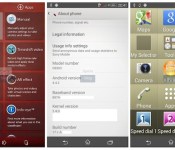
Leaked software suggests Sony’s next flagship phone will record 4K video

With shots of a new Sony smartphone surfacing ahead of a possible reveal at next month’s Mobile World Congress, we guessed it wouldn’t be long until we laid eyes on the software powering it. XperiaBlog got its hands on an Android 4.4.2 KitKat build for the Xperia D6503 (rumored codename Sirius), providing us with an overview of the new UI and a list of possible features coming to Sony’s next Android flagship. The most headline-grabbing tweaks include options to record 4K and high frame-rate video, utilize Smart backlight controls (similar to Samsung’s Smart stay feature), two home launchers for better accessibility, advanced call handling options and a new built-in answering machine. Head over to XperiaBlog for the complete lowdown on the KitKat-centric features expected to make their debut in Sony’s Z1 successor and possibly other high-end handsets in the Xperia range.
Filed under: Cellphones, Software, Mobile, Sony
Source: XperiaBlog

LG G Flex to launch in over 20 European countries this February

The G Flex’s world tour continues: following news of launches in the US, LG has announced that its bendy smartphone will reach more than 20 European countries this February. The continent-wide release involves larger countries like Austria, France, Germany, Italy and the UK. LG hasn’t named carriers just yet, although we already know that both EE in the UK and Orange in France will carry the 6-inch Android flagship. Given the pricing we’ve seen so far, it’s safe to say that European G Flex variants won’t be cheap.
Filed under: Cellphones, Mobile, LG
Source: LG Newsroom

Beats Music builds a unique, if messy, listening experience around emotion

The Beats empire has officially expanded beyond its humble headphone roots. In just a few hours Beats Music will officially launch, and become the latest contestant for your streaming music dollar. Of course, the market for such services is already pretty crowded. Between Spotify, Google Play and Rdio (just to name a few) one might wonder “why bother?” Well, the company thinks there’s plenty of fish in the sea who haven’t jumped aboard the music subscription bandwagon just yet. While we’re sure execs are hoping to convert a few listeners along the way, they’re more concerned with broadening the pool of customers. After two years of plugging away, with a little help from Trent Reznor and its MOG acquisition, Beats feels it has something unique to offer; something built around curation, emotion and a personalized user experience. It all sounds good in theory, but the real question is whether or not the reality lives up to the promise. As usual, the answer is complicated and it awaits you after the break.
The initial setup experience, which we’ve already given you a rundown of, is quite different from most services. The app spends a good amount of time getting to know you and your tastes. You’ll tap (like), double tap (love) and long press (hate) your way through bubbles bearing genres and artists. It doesn’t take long, and Beats Music immediately starts serving up musical suggestions based those choices. The first tab you see in the app, Just for You, is populated based on your listening habits. So, on first launch it’s primarily built around your professed preferences from the “on-boarding” process. But over time, thanks to algorithms created with the help of both behavior and data scientists, it should grow smarter. Granted, in our limited time with the app it was hard to spot a difference. A few days didn’t exactly give Beats a chance to figure out the finer details of our tastes (liking Vampire Weekend does not equal liking Fleet Foxes). That said, it quickly learned this editor had an obsession with Bruce Springsteen, and served up a new album from the Boss’ catalog every time it launched.
Swipe to the right of the Just for You tab, and you come face to face with The Sentence. This is one of the interesting and bizarre features of the app. The Sentence is just that, a Madlibs-style fill in the blank statement. Tell it that “I’m at my computer & feel like partying with my inner child to hair metal” and you’ll get an automatically generated playlist of retro rock tunes with big guitars and simplistic lyrics (think girls and partying). Go with “I’m at the gym & feel like running with my pets to vintage soul & funk” and you’ll get a selection of treadmill-worthy gems from Funkadelic, Kool & the Gang and the The Gap Band. Of course, odd things occasionally slip in, like the late-era Marvin Gaye cut Third World Girl, but for the most part it does a decent job of matching up with your mood. Besides, just like its competitors, you can fine tune its selections by taping love it (a heart icon) or hate it (a heart with an X through it). You can even share your sentences on Facebook or Twitter and invite others to give the tailored listening experience a try. All told, Beats claims there are a 1,000,000 possible sentences and we’re sure that will grow over time.

From there, Beats Music turns into a more traditional listening experience. The Highlights tab serves up a curated selection of playlists and albums chosen by taste-makers like former Pitchfork and XXL writers. But there is no personalization to be seen here — Highlights serves up the same exact content to every listener, such as a themed collection of songs dedicated to Martin Luther King Jr. The same is true of Find It, the next and final tab, which allows you to browse playlists, albums and artists based on genre, activities and curators. If you’re planning a summer cook out, the BBQing section under activities has a host of playlists conducive to grilling up some burgers. Wondering what Pitchfork thought the best tracks of 2013 are? You’ll find a playlist dedicated to just that under Curators. If you swipe to the left from most screens you’ll reveal a pop out menu with a search option that lets you pull up a specific artist, album or song. There’s also options here to browse your playlists or your library, the latter of which are songs and albums that you’ve pinned for easy access. (That’s right, no saving albums as playlists here, huzzah!) So long as you’re a paying subscriber, you can download any of this content for listening offline and it will never expire and force you to re-download.
On the whole Beats has succeeded at building a mobile-first service that offers something its competitors don’t. The human-curated playlists are top notch and features like The Sentence allow users to create a more unique listening experience than simply starting a radio station based on a song or artist on Pandora. But there’s still a lot of work to be done. For one, there are some glaring holes in its 20 million song catalog. And those holes go beyond expected omissions like Led Zeppelin. Pull up Black Sabbath and you’ll discover none of their pre-1980 albums are available. Oddly, they’re listed in the artist’s library, but grayed out and tapping play does nothing. We encountered the same phenomena with the Velvet Underground’s White Light/White Heat, a song sitting smack in the middle of one of those much-touted curated playlists.

The other major short-coming (other than some stability issues, which we’re willing to forgive in the beta version of the app we used) is the app’s design. The company says its guiding principle was to focus on function, and build something simple and accessible for those that don’t consider themselves early adopters. But there are plenty of questionable interface decisions. For one, the left-hand slide out menu doesn’t work when viewing a playlist or currently playing track. And, while it will function when you’re browsing around other parts of the app, the visual indicator of its existence disappears the moment you leave the home screen. It’s also far too easy to accidentally open up the right-hand social menu (which is also inconsistently available) when trying to swipe between tabs. If you tap on the track name or album art in a playlist, instead of directly on the play button sitting between those two, you’re taken off to the artist’s profile rather than treated to a tune. And, if you’re already on the artist page, tapping a track title does absolutely nothing. Many of our issues might seem less onerous after getting more familiar with the app, but our initial impression is that the interface is simply too busy and inconsistent.
Despite its problems, Beats Music is still a pretty compelling product. If you’re not yet hooked on Play Music’s ability to plug holes by uploading your own files, or on Spotify’s robust social features it’s certainly worth giving this new comer a look. It has all the basics down pat and at least partially succeeds in its quest to build unique features around the inherently emotional experience of listening to music. Sure, playlists curated by major music publications aren’t quite the same as getting a personal recommendation from a clerk at Other Music, but its a heck of a lot closer than letting Pandora serve up a random series of tracks based on a song’s “musical genome.”
Beats Music will be available on January 21st with subscriptions starting at $10 a month. Those still clinging to their MOG accounts will be migrated to the new service over the next 90 days.
Billy Steele contributed to this report.
Filed under: Home Entertainment, Software, HD, Mobile

HTC M8 to feature a 1080p screen instead of QHD?
It seems that HTC is planning to skip the QHD (2560×1440) display for the M8 or the upcoming successor of the HTC One, and launch it with a 1080p display instead. HTC published a UA Prof file for the HTC M8, and these files describe the model, screen size and other features of the device before it is officially launched. The information in it is mostly true, because it is made by the company it self.
 HTC One’s display has the same resolution, but the screen size is smaller as compared to the M8. Also, most users don’t need/see the ‘QHD’ stuff anyway, so for a smartphone, a 1080p display is better than anything. What’s actually interesting about the M8 is its twin lens camera. Although the design will be a lot like the One (and we don’t mind that) but HTC will make noticeable improvements under the hood.
So what do you prefer? QHD or 1080p? Tell us in the comment box below.
The post HTC M8 to feature a 1080p screen instead of QHD? appeared first on AndroidGuys.

Android 4.4 for LG Optimus G and Optimus G Pro spotted in Testing
 After HTC announced that its HTC One X and One X+ would not be moving past Android 4.2.2, many phone owners could be forgiven for thinking that their manufacturer would also be leaving them high and dry without a software update past Jelly Bean. Not so for some LG owners as Android 4.4 for LG Optimus G and LG Optimus G Pro has been spotted in the wild being tested.
The User Agent profiles, first seen on Phone Arena, appear to list quite a few models of both the LG Optimus G and LG Optimus G Pro suggesting that Android 4.4 is being tested for these devices. This is great news for Optimus G owners in particular as many of them have been wondering what’s been taking so long seeing as it is basically the same device as the Nexus 4. All the same, it’s great to know that LG is still support at least some of its devices, even if Android 4.4 for its flagship LG G2 is still no where to be seen. No word on when the update will become available, but we’ll let you know when we do.
 Any owners of an Optimus G or Optimus G Pro excited to hear that Android 4.4 exists for your device and is being tested right now? Let us know how you feel in the comments.
Source: Phone Arena

[Review] myCharge Hub 6000 mAh Power Bank
One of the gems I received at CES while visiting the great folks at myCharge was their Hub 6000 mAh Power Bank. Note that this has also been listed simply as the 6000 Power Bank, as it’s called in the instruction manual. No matter what you call it though, the myCharge Hub 6000 mAh Power Bank is an external battery unlike any other.
What You Get
The myCharge Hub 6000 mAh Power Bank has a clean look. Everything is contained in a small rubber-accented, smooth plastic, and lightweight package without any ports or cables exposed. Its dimensions (per Amazon) are 2.5 x 1.1 x 4.5 inches and it weighs 9.3 oz. Mine came with pull-string bag, an instruction manual and a quick start guide (retail versions may be slightly different).


It Transforms
As mentioned earlier, there’s no ports or cables exposed. Quickly though, you’ll notice that you can start pry away the rubber port protectors and cables to reveal what makes this external battery unique. You’ll find a fold-out outlet prong for wall charging, a micro USB Cable (0.5-1A output depending on load), a Lightning Cable (1A output), and a USB port (2.1A output). This can charge on all three ports simultaneously giving a combined 27 extra hours of talk time at a maximum output of 3.6 amps. You can click the power indicator button to see how much power is left in the battery: Green is 71-100%, Yellow is 41-70%, Red is 11-40%, and Flashing red is 0-10%. Note that the cables are short, but are very flexible, so you can charge a single devices and hold the battery right underneath it all in one hand easily.


Performance
The myCharge Hub 6000 mAh Power Bank had an output while charging my One near 1A constantly. It actually charges faster than the wall does; in a charge vs time graph, the myCharge has a steeper slope (meaning it’s charging more in a shorter time) than plugging into a wall charger. This can been shown below, highlighted by my crude blue effects:

First slope is myCharge, second is wall charger
Final Thoughts
Pros:
- $78
- 6,000 mAh capacity, high grade Lithium ion battery (no cheaposshere)
- Fast charging
- No cables required (unless you have a tablet) for charging devices or the unit itself
- Very light
Cons:
- Wider shape doesn’t fit so well in a pocket as other external batteries do
- $78 may be more than anyone is willing to spend on an external battery
The myCharge Hub 6000 mAh Power Bank is my go-to external battery at the moment. I bring it with me wherever I go (or it’s always in my car). I’ve used countless external batteries in the past and I must say that this is probably one of, if not the favorite of mine. If you’re interested in getting a myCharge Hub 6000 mAh Power Bank, check it out below:

Huawei tweaks Ascend P6 chipset, tacks on an ‘S’ for good measure

We had some issues with Huawei’s Ascend P6 when we reviewed it last year — despite a sleek thin design, a gorgeous display and a solid camera, it simply lacked oomph. Now the company has given the handset a slight revision, bumping its original 1.5GHz quad-core processor up to 1.6GHz. Unfortunately, the phone’s new silicon still doesn’t support LTE, and not much else has changed: the phone still has 2GB of RAM, a 4.7-inch display and a 2,000mAh battery. All in all, it doesn’t sound too different from the original model, but it Huawei did tweak its moniker; it’s now the Ascend P6 S. Well, that’s something. Folks looking for the revision will find it at Huawei’s Vmall store at the source link below.
Filed under: Cellphones
Via: GSMArena
Source: Vmall

Intel’s Bay Trail CPU will usher Android into the 64-bit era this spring

Sure, 64-bit support is all the rage nowadays in the mobile space, what with Apple setting off a trend with the introduction of the iPhone 5s. Now, according to Intel’s CEO, tablets running Google’s operating system are next and will soon be available with 64-bit compatibility. During an earnings call yesterday, Intel chief Brian Krzanich said that Android tablets using the company’s new Atom-based Bay Trail processor are set to hit the market as early as this spring, bringing along a technology which so far has been limited to Windows 8.1 devices. It’s also worth noting that while 64-bit slates may be arriving soon, the number of Android applications optimized to take advantage of the feature will be very low at first. Still, chances are developers will quickly take care of this as more and more 64-bit-ready phones and tablets start to become available.
Filed under: Tablets
Source: Ars Technica

