


Official CyanogenMod Nightlies come to Samsung Galaxy Tab Pro 8.4

If you have grabbed yourself a Samsung Galaxy Tab Pro 8.4 but wanted to enjoy the device with a stock Android experience then you’ll be pleased to learn that the Tab has gotten CyanogenMod Nightly build support.
The device has been branded as ‘mondrianwifi‘ on the CyanogenMod website and the download comes in at just over 200MB.
As with any Nightly builds, expect there to be bugs, things that don’t work, and things that work pretty well, but with stock Android on a Samsung Galaxy Tab Pro 8.4, are you going to complain?
The post Official CyanogenMod Nightlies come to Samsung Galaxy Tab Pro 8.4 appeared first on AndroidGuys.
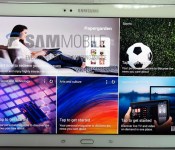
Samsung’s next Android tablet looks like a supersized Galaxy S5

Samsung has already launched a cavalcade of new Android tablets this year, but it looks like the company isn’t quite done yet. SamMobile claims to have the first photos of the Galaxy Tab S 10.5, a recently rumored Android design that would mark Samsung’s return to slates with OLED displays. As the name suggests, it would have a 10.5-inch, 2,560 x 1,600 AMOLED panel that promises higher contrast and bolder colors than an LCD; there’s reportedly an 8.4-inch equivalent in the works, too.
However, the hardware surrounding that display may be as much of an attention-getter. Where the Tab Pro range aped the Galaxy Note 3, the Tab S looks like a Galaxy S5 writ large — you’d get the same dimpled plastic back and, apparently, the same fingerprint sensor. Connectors on the back also hint at a possible smart screen cover. About the only disappointment may be the performance, since there’s talk of the Tab S carrying the same 1.9GHz Exynos 5 Octa processor that we saw in the Tab Pro early this year. Assuming the leak is accurate, the biggest mystery may be when this (mostly) upgraded device hits store shelves.
Via: Liliputing
Source: SamMobile

Oracle gets another shot at making Google pay for using its code in Android

Oh, you thought Oracle and Google’s heated legal battle was over? Not quite: the US Court of Appeals for the Federal Circuit (CAFC) overturned a lower court’s decision that Oracle’s Java APIs weren’t copyrightable. This means that Oracle gets another shot at making Mountain View pay for its alleged transgressions, assuming Google can’t prove that its use of the APIs in Android falls under the fair use doctrine of US copyright law.
To fully understand what’s going on, we need to flash back to 2010. Oracle sued Google for billions because it believed (among other things) that the search giant infringed the “structure, sequence, and organization” of 37 Java application programming interfaces (APIs) while it was first building Android. Two years and lots of legal jostling later, a jury decided that Google did in fact infringe on Oracle’s copyrights (but not its patents). Seems like an open and shut case, no? Judge William Alsup eventually shot down the copyright claims their verdict was based on, though, basically nullifying the jury’s decision.
The court ultimately decided that those APIs aren’t copyrightable, prompting Oracle to accept a whopping $0 in damages from the folks in Mountain View. Today, that’s no longer the case. In short, the appeals court took issue with Alsup’s original conclusion (and some of the intellectual leaps that lead to it) and overturned the ruling. APIs can indeed be copyrighted now, which itself is quite a can of worms to open because of the potential pitfalls for software creators trying to craft apps and services that interact with others. Last time around the jury found itself deadlocked on whether Google’s actions fell under fair use — expect another trial and still more legal intrigue to come.
Via: FOSS Patents

Best apps for mom on Mother’s Day

So you got your mom an Android phone or tablet for Mother’s Day. First of all, congratulations on officially becoming the favorite child. Secondly, you are gonna have to fill that device with great apps for your mother to enjoy (you’re gonna be setting it up for her anyway, so why not). Without further ado, we bring you the best apps for mom on Mother’s Day.
Life360

Life360 aims to be your all-in-one of sorts when it comes to keeping up with the family. Give your mother peace of mind by giving her access to the family’s happenings at the push of a button.
Life360 uses the phone’s GPS to track family members and allows them to check-in when they reach their destination. Users can even track each other to see if anyone’s running late for a family event.
In the event of an emergency, Life360 acts as a lifeline for family. If someone needs help, the app can send messages to others in your circles to alert them to your whereabouts so help can be sent your way.
Life360 also has a find-my-phone feature that will track and locate your phone in the event that it is lost. Users can find their lost phone via the Web or by using another member’s phone.
Glympse

Glympse is another location sharing app, but it is different in that you don’t have to sign up to use the service or create a selected group to send location information. You can send your location to others that have the app, and you can also send your location and ETA via SMS, email, Facebook or Twitter. This app would be great for when mom is away from home and you want to know when she’ll be back to cook dinner.
ShopSavvy Barcode Scanner

Mom will love this app. Shop Savvy is designed to aid in finding the best deal on any product. While shopping, the user can scan the bar code of items to find out if there is a better price locally or on the Web. You can even keep a history of items that you have scanned for viewing later.
justWink

justWink is designed with mothers in mind. A greeting card store in your pocket. I know moms that have greeting card stationary readily available for those times when they forget a birthday, graduation or other holiday. Now, when the occasion presents itself, mom can whip out her phone and create a personalized card to send via email, Facebook, sms or Twitter. Mom can even pay to have it physically delivered in the mail.
Cozi Family Calendar & Lists

Cozi makes managing the hectic family lifestyle easy. The app works cross-platform to brings one cohesive calendar to the whole family. The calendar entries can be color-coded for each member. Everyone can be in sync and know each other’s schedule so no one misses important events. Cozi also has shared shopping and to-do list features that also sync so everyone knows what their designated tasks and/or chores are. Show mom how to add a Cozi widget to her home screen so she never misses your quiz bowl football game again.
Retailmenot

Retailmenot is designed to save you money, period. Get coupons for local stores and online sales. Bookmark favorite stores for easier access to the stores you shop most. Mom can get coupons for the stores she loves and get notifications when a store nearby has a sale going on. Just show the coupon on your phone at the checkout counter to cash in on the deal.
There are way more apps out there that I’m sure mothers would enjoy, so use this post as a starting point for turning your mother into a tech-savvy super mom.
Bonus: 1-800-Flowers

And for those not-so-favorite kids that waited until the last minute to get something for mom, use the 1-800-Flowers app to surprise mom with a beautiful bouquet of last-minute love. Happy Mother’s Day!
The post Best apps for mom on Mother’s Day appeared first on AndroidGuys.
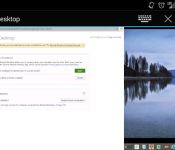
Chrome Remote Desktop: An answer to your desktop access needs

Google has released an innovative new app that allows you to access your PC or Mac from your mobile device. This app is absolutely free and is accessible over WiFi, LTE, and 3G. It runs buttery smooth on a solid connection so 3G is not suggested unless you desperately need to send that important file you forgot to yourself.
Google has made it very simple to set up. If you already have Google Chrome for desktop all you need is to download the app for Chrome and then download the app for Android or iPhone.
Google has also hit all areas with this handy app making it available on Windows, Mac, Android, and iOS. When you have finished the required downloads the app on your PC or MAC will ask some basic questions so that you can allow access to your mobile devices. Once you have gone through the set up and created your pin your PC will show up on the mobile app.
Google has really covered almost all bases with this app the only back draw to it is there is no way to disable the keyboard and mouse while you access. This is inconvenient in a work environment allowing other users to access your machine while you’re away and or seeing what you’re seeing. It is suggested to use a tablet and a mobile keyboard with trackpad. All in all though I give this is a very good app, allowing you to access any set up computer for free and fluidly, and we suggest you check it out.
The post Chrome Remote Desktop: An answer to your desktop access needs appeared first on AndroidGuys.

Google’s camera app once again lets you snap photos while recording video

Google’s redesigned Android camera app wasn’t a full step forward. While you got a much improved interface, you also lost the ability to snap photos while recording video — not so hot if you want more than just movies from a friend’s wedding dance. Well, it’s back. A low-key update to Google Camera once again lets you capture stills in mid-video, making sure that you’ll have album-worthy images alongside your YouTube clips. If you’ve been holding off on upgrading the camera app because of that earlier omission, it’s now safe to jump in.
Filed under: Cellphones, Mobile, Google
Via: Phone Arena
Source: Google Play
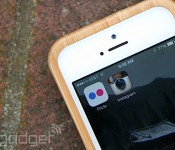
Flickr struggles to capture the selfie generation

Flickr’s latest app is its best yet, but even that might not be enough to save it.
I posted my first-ever selfie on Flickr on July 11, 2004. Taken with the rear camera of a Sony Ericsson T616, the photo was horrendously grainy at a resolution of 288 x 352. But at the time, taking a picture with my phone and uploading it to a website (via MMS, no less) was a strange and wonderful thing. I would soon grow to use Flickr for photos taken with a regular camera as well, but it was that initial brush with mobile technology that drew me into its fold.
Ten years later, and the landscape of mobile photography has changed dramatically. Not only can smartphones snap pics that rival the ones from point-and-shoot cameras, but also uploading those images to the web is as easy as using an app. Unfortunately, the rise of smartphones, and the subsequent fall of dedicated cameras, led to a decline in Flickr’s utility. Heeding the siren call of the iTunes App Store, the site released an iPhone app in 2009, but early versions were clunky, slow and woefully insufficient. Uploads took forever even though image quality was downsized to 600 x 450, and users were forced to log in via Safari.
As Flickr struggled to get its mobile act together, a serious competitor emerged in 2010: Instagram. It wasn’t perfect — you could only upload square pics and you couldn’t group them by album. But unlike Flickr, Instagram didn’t have to worry about integrating a photo behemoth into its mobile offerings — it could just be lightweight and nimble, as a mobile app should be. Under Marissa Mayer’s new leadership, Flickr attempted an app revamp in 2012. It introduced a whole slew of editing features and photo filters along with new sharing capabilities that put it more in line with the competition. But even that felt like an attempt to shoehorn the site’s sprawling web presence into a tiny screen. Pictures in the main welcome area looked small on mobile, and if you wanted to view them in full resolution, you had to tap them twice.

Which is why the Flickr 3.0 redesign that rolled in a couple of weeks ago struck me as so important. At last, it seemed, Flickr had finally gotten a clue and made its app more mobile-friendly. The main viewing area, for example, is similar to Instagram’s, with square images and the ability to seamlessly fave, comment and share a photo without ever leaving the river. Lest you think that all your Flickr photos are now forced into squares, don’t fret — they just appear that way in the feed. To view an image in its full resolution, you just tap the photo and it’s there in all its glory, in portrait or landscape. This, I felt, is what made it so much better than Instagram. No longer was I limited to square-shaped photos — they could be in any orientation or size I wanted, and the app could handle it just fine.
At last, it seemed, Flickr had finally gotten a clue and made its app more mobile-friendly.
Bernardo Hernandez, who currently heads up Flickr at Yahoo, said that it didn’t intentionally mimic Instagram’s layout. “We chose the square format because it was the most balanced way to display different aspect ratios for different pictures,” he said. He pointed out that you can even zoom in on photos, which you can’t do on Instagram. Further, with the new Flickr app, someone could upload a whole swath of photos without the images dominating your feed. Instead, a triptych or split images are used to indicate multiple pics, with a link inviting you to “View all” photos underneath. Fittingly, you can also upload several photos at once and add them to albums or groups.
At long last, Flickr 3.0 also adds video to the mix, allowing you to record and upload clips of up to 30 seconds, which handily beats the 15-second limit on Instagram. Another big differentiator is the choice to limit the audience of select photos. With Instagram, your entire stream has to be either private or public — you can’t mix and match different privacy settings within the same account. Last, but not least, you can also automatically upload every picture you ever take to Flickr. As the service offers one terabyte for free, that’s not an entirely bad idea.

On the whole, this is the best app Flickr has ever released, and in terms of design and features, it beats Instagram handily. With over 5,000 photos on the service, I was thrilled to be back on Flickr after a years-long affair with Instagram.
At first. After just two weeks delving deep into the Flickr app, I found myself going back to Instagram. As wonderful as the new app was, it was missing one key ingredient: my friends.
Back in the day, Flickr was not just one of the best options for storing your photos online. It was also a bustling community filled with amateur photography enthusiasts and early web adopters, many of whom were my friends. In many ways, Flickr was the reason my affinity for photography blossomed. I learned tips and tricks at Flickr meetups and photowalks. I wasn’t on Flickr just for the pretty pictures. I also wanted to see where my friends went on vacation and what they did over the weekend, and I’m pretty sure the feeling was mutual. Sure, it was a place for professional photogs to show their work, but the real appeal, for me anyway, was in a social network with photography as an entry point.
As wonderful as the new app was, it was missing one key ingredient: my friends.
Somewhere along the line, however, the community just dissipated. You could blame Yahoo for forcing its login system and not working harder to keep the community happy, or say that everyone just moved on to Facebook as their social network of choice. In any case, my friends who once used Flickr as their primary photo-sharing site are now sharing them elsewhere. Even those who still post to Flickr are cross-posting from Instagram.
Not everyone has given up. Longtime Flickr user and professional photographer Thomas Hawk still remains enthusiastic about the site. “My favorite place to store photos online is Flickr,” Hawk said. “As a grandfathered Pro account on Flickr, I can post an unlimited number of full high-res photos on the site.”

However, he too admits that he has a much larger audience on Google+ and Facebook, adding that while Flickr is good for online storage, it’s not so great for community. Scott Beale, a founder of Laughing Squid who was once dubbed the “official photographer for Web 2.0,” agrees. He said there’s not much community there these days. Another popular photographer, Trey Ratcliff, hardly uses Flickr at all, preferring instead to share his photos on Google+.
Hernandez said Yahoo wants Flickr to be a destination for photography enthusiasts of all levels. “Ten years ago, only professional photographers could take really beautiful pictures. Now, everyone’s a photographer with the high-res cameras on phones,” he said. Flickr was built as a platform for photography, he continued, stating that the site has a community full of people who are passionate about the art form.
Flickr is a site for people who want to take great photos. Instagram, on the other hand, is a place for people who want to share goofy pictures of their everyday lives.
“We’ve made a really conscious effort in bringing the community back,” Hernandez said. “We have tremendous engagement — we have the largest photography community product on the web.” There’s a tremendous need to learn how to take a picture, he said, and Flickr’s community of photographers fulfills that need. While that may be true, the rise of mobile photography is proof that most people don’t really care about how good their photos look. Instagram is still the most popular mobile photo app after all these years. (It’s currently number two in the Photo & Video category in the iTunes App Store, second only to Snapchat.)
A random glance at Instagram’s Explore tab shows a blurry photo of someone playing the saxophone, a fuzzy white cat and a selfie of a teenager. Flickr’s Explore page, on the other hand, shows jaw-dropping vistas of beaches in Hawaii, a beautiful image of a farm in Tuscany and an artistic shot of streaks of light at a London bus stop. At a glance, Flickr is a site for people who want to take great photos. Instagram, on the other hand, is a place for people who want to share goofy pictures of their everyday lives. And when it comes down to it, most of us are the latter.

Yahoo brings its personalised Sports app for iOS and Android to the UK

There’s no shortage of sport-related apps available on iOS and Android, but when a major online player outs one for the UK, it’s certainly worth a look. Having served US audiences for a little while now, Yahoo Sports today came to the App Store and Google Play on this side of the Atlantic, launching alongside a new Android version of Yahoo’s News Digest app. Sports offers personalised news, scores, goal alerts, results, team updates and, for some, the ability to capture cheeky own goals in animated GIF form. Football, rugby, cricket, tennis, golf, F1 and all major US sports are represented, giving the BBC’s updated sport apps a bit of healthy competition.
Filed under: Cellphones, Internet, Software, Mobile
Via: Yahoo UK
Source: Yahoo Sports (Google Play), (App Store)
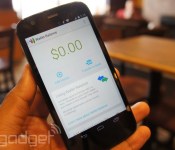
Google Wallet on Android now juggles all your internet accounts

As good as Google Wallet might be for payments, you’ve so far been locked into one Google account; that’s not so hot if family member need to borrow your phone to send some cash. That won’t be an issue after today, since Google has updated Wallet’s Android app with a tweaked interface that lets you use multiple Google accounts. You’ll also get shipment updates for orders from distant retailers.
There’s also an under-the-hood upgrade that should affect other apps you use. A Google Play Services refresh makes it easier for developers to put Google Wallet Instant Buy buttons in their titles; when they do, it’ll be trivial to buy something on a whim. That’s not great news if you’re an impulsive shopper, but we suspect that those with a good handle on their finances will be happy with the improvements.
Filed under: Cellphones, Internet, Mobile, Google
Source: Google Play, Android Developers
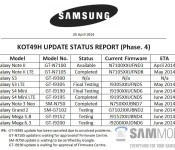
KitKat details leaked for multiple Samsung smartphones

Samsung expects to deliver Android 4.4 KitKat updates to around eight smartphones before June is out, says SamMobile. According to the blog’s sources, a number of devices have already been cleared to roll with a handful of others still in “testing”. Between May and June we should see models such as the Galaxy Mega 5.8, Galaxy Note 3 Neo, and Galaxy S4 Mini picking up the update. Keep in mind this is for very specific model numbers and variants could be a few more weeks off.
One model not getting KitKat, according to SamMobile, is the international Galaxy S3. As to why, the site suggests it’s related to having 1GB RAM while everything else has 2GB. For what it’s worth, the LTE and U.S. versions have 2GB.
On the horizon, reportedly, is an Android 4.4.3 update for the Galaxy S5. It sounds as if Samsung may skip the 4.4.2 stuff and go right for the latest and greatest.
The post KitKat details leaked for multiple Samsung smartphones appeared first on AndroidGuys.

