


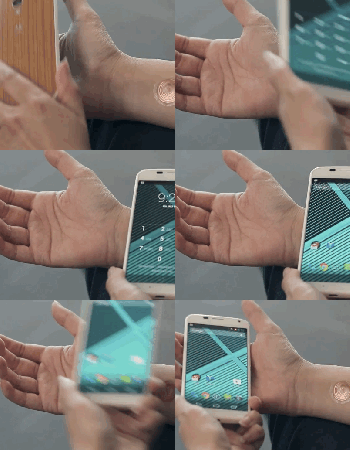
You can now unlock your Motorola phone with a ‘digital tattoo’

Hate unlocking your Android smartphone so much that even Face Unlock or Skip feels like too much of a hassle? Motorola just came to your rescue. The company has partnered with VivaLnk to launch the previously teased Digital Tattoo, an NFC-based skin tag that unlocks your phone (currently limited to the Moto X) with a quick tap. The tattoo can stay on your body for up to five days, and it should survive abuses like showers and sweat-laden runs. It’s a clever approach that might be appealing if you’re fed up with PIN codes and patterns, although the back-of-a-napkin math suggests that you’re paying a lot just to save a couple of seconds when checking your email. VivaLnk is asking $10 for packs of 10 tattoos, or enough to last 50 days — you’ll have to spend $80 to get through a whole year. It could be useful for those busy days when you’re constantly waking up your handset, but you might be better off rolling that money into a Moto 360 or your next big phone upgrade.
Filed under: Cellphones, Wearables, Mobile, Google, Lenovo
Source: Official Motorola Blog
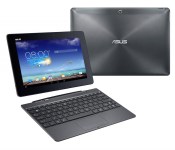
Android 4.4.2 update heading to the Asus Transformer Pad TF701T
I can remember a time when we all talked about and wanted an Asus Transformer Pad. It was an Android tablet, with a detachable keyboard, that made its self into a laptop. It was pretty amazing when Asus first put them out. Now the line has come down a notch and other OEM’s have started to do even bigger things. Nvidia and the newly announced Shield Tablet comes to mind. Asus was always fairly good about keeping the Transformer line updated and squashing bugs though. The higher-end Transformer Pad, the TF701T, is picking up an update that owners will be happy to see.

In a typical staged roll-out owners should all start to see a pop up to let them update the wonder tab to Android 4.4.2. You can head into the device settings and hit that software update button if you want to. If you happen to be impatient, you can also visit the Asus website and look for your devices SKU and side load it. Although they don’t offer any documentation on how to install it. AndroidPolice recollects that you tossed the file on an external SD card and popped it into the tablet to trigger the update process. You may want to do some research on the matter before hand and be sure you get the right file as well.
Any Transformer TF701T owners out there seeing the update on their devices today?
Source: Android Police
//<![CDATA[
ord = window.ord || Math.floor(Math.random()*1E16);
document.write('’);
//]]>
The post Android 4.4.2 update heading to the Asus Transformer Pad TF701T appeared first on AndroidSPIN.
Watch This App: Strava Running and Cycling GPS

Biking, jogging, and running gets even better now that Strava offers support for Android Wear. Users can now start and stop activities using their voice, keeping smartphones tucked away neatly and securely. No more worrying about dropping your handset as you pull it out to check your stats. A wonderful app for those who spend… Read more »
The post Watch This App: Strava Running and Cycling GPS appeared first on SmarterWatching.
Read the rest at SmarterWatching.com!
The post Watch This App: Strava Running and Cycling GPS appeared first on AndroidGuys.
Watch This App: Strava Running and Cycling GPS

Biking, jogging, and running gets even better now that Strava offers support for Android Wear. Users can now start and stop activities using their voice, keeping smartphones tucked away neatly and securely. No more worrying about dropping your handset as you pull it out to check your stats. A wonderful app for those who spend… Read more »
The post Watch This App: Strava Running and Cycling GPS appeared first on SmarterWatching.
Read the rest at SmarterWatching.com!
The post Watch This App: Strava Running and Cycling GPS appeared first on AndroidGuys.

Yo and the app hype machine

Yo is a notifications app where all it does is send the word “Yo” to your friends. That’s it. Just “Yo.” Of course, silly single-purpose apps like these are a dime a dozen — remember those fart apps of old? — but the thing that sets Yo apart is that it’s actually attracted a whole lot of attention. More than a million dollars worth, in fact. Yep, this seemingly frivolous app has recently raised around $1.5 million in funding, giving it a valuation close to $10 million. It’s also apparently been downloaded more than 2 million times since its tongue-in-cheek April Fool’s Day debut.
Crazy? Well, yes, perhaps. But it’s not entirely unusual. In case you need a refresher (and probably a laugh or two), here’s a look at some of the more overhyped apps in the past few years. Have any other ideas? Leave a comment and let us know of any apps we’ve missed.

Wacom’s sketching app finally arrives on Android, Kindle Fire and Windows 8

Wacom loves doodlers almost as much as serious artists, but its Paper-esque sketching app was limited to iOS devices only. That changes from today, now that the company has launched Windows, Android and Kindle Fire versions of Bamboo Paper. Thanks to Wacom’s Ink Layer Language, your notes will seamlessly be shared between your devices — enabling you to sketch out a plan on your leisure tablet before passing it to your work one. The free app is available to download at the links below, and you’ll also be able to try out the various premium brushes for a limited time before you’re asked to open your wallet to keep them.
Filed under: Tablets, Software, Microsoft, Google, Amazon
Source: MarketWatch, Google Play, Windows Store, Amazon Store
Christmas in July: This power user’s Android wishlist

Do you wish stock Android would do a little bit more? Tired of relying on third party developers or manufacturers to add the features you feel should be standard in Android? I could not agree more. As great as Android is, there are some shortcomings in the system. Do not take me the wrong way, I feel it is the greatest mobile operating system in the world, but I think Google should add some of these “no-brainer” features that many manufacturers or developers have added in some way or form into their Android ecosystem.
My first experience with Android was a Samsung Moment, migrating off of a HTC Touch Pro and Windows Mobile. Android 1.5 was rough, but still refreshing and new all at the same time compared to what I was used to. Since that moment four years ago Android has changed enormously. The 2.1/2.2/2.3 updates were the game changing upgrad needed in order to set the device up for world domination under the the 4.x versions of Ice Cream Sandwich, Jelly Bean, and Kit Kat, which now make up an astonishing of 84% of all Android devices. So much for the fragmentation fears everybody was talking about in the early days of Android.
So here we are with the pending release of Android “L” and a slew of new looks and features coming out. As are most avid Android users, I am foaming at the mouth waiting for this new release. While appreciative of the new version coming out, I still hold a resentment with Google over holding out some key features that have not been baked into the Android stock operating system as of yet.
This list is a list of the top five items as compiled by myself and contributors here at AndroidGuys. I would like to think that having these items built into stock Android would give users of all levels a better Android experience.
- Active Listening (Moto X style): It would be pretty nice to not have to turn the screen on to do a Google Search but to just skip right ahead and do it from the standby screen (meaning the screen is off). Is it that hard to turn the phone screen on? No it is not, but again, if we don’t have to do that extra step, why do it? Simplify the process and allow “Ok Google” at any point, even in standby.
- Visual Voicemail: Can you believe that Android does not have it’s own Visual Voicemail app? If you own a Nexus device you know what i am talking about. Instead of having the messages download automatically to your phone so you can listen to whenever you want, you are stuck with that annoying voicemail logo in the notification bar. Yes, I’m pretty sure that Voicemail has to be done by every carrier and is unique for each user, but there has to be someway that it can be worked out. Optimally having this built into the Google Hangouts would be pretty nice. That way you can check your voicemail across systems, kind of how voicemail access works in Google Voice.
- “Knock On” (as used by LG): This is a newer feature, but still it is pretty neat and a very useful feature. Simply by knocking on your cell phone you can shortcut right to your desktop screen. This again is one of those features that just make getting where you want easier instead of going through a couple of steps.
- Extensions: Chrome and Gmail on the desktop have the awesome ability to add extensions to make the browser or your email more functional without having to open up another separate program. Here is a perfect example, I am an avid Yesware user with Gmail. I cannot send an email from my mobile device because it isn’t tracked, rendering my cell and tablet both useless at points and therefore making me run back to my desktop to send the email. This is just one example out of many. Here is another example: Instead of using a Google Analytics App, would it not be easier to just click on the extension in the Chrome Browser? Now yes, Chrome and Gmail are not Android operating system per se, but they are part of the core apps for the Android ecosystem. By allowing extensions Google would only be promoting productivity and making lives easier while using their devices. There would be much less switching apps and much more getting instant information saving users time, energy, and frustration.
- True Multitasking (Samsung Multi Window; Phandroid like multitasking): The king of all features missing is multitasking. Yes, you can have multiple apps open at the same time, but typically, unless you have a rooted device or have a device by a manufacturer like Samsung, you are not going to be able to display two items on the screen at once. Not having this feature built in Android is mind-boggling to me. Yes, it may not make a lot of sense on smaller devices, but the Android game has changed over the past two years as devices are getting larger. 99 percent of all devices now have over four inch screen sizes to where even limited multitasking would be useful (like a calendar view and an email). Once you get into the phablet and tablet world, this feature is a must if you are going to use the tablet for either school or business. I find myself needing sometimes three or four screens to do my job and being locked with one single view on Android does not cut it for me. That is one of the reasons I purchased the Galaxy Note 12.2 because of the size of the screen and the Multi Window support. I can now almost fully replace my desktop computer, unless I need to send a tracked email.
All in all, as I stated, Android is the greatest operating system out there for mobile devices. This post is not set up as a rant against Google, but more to point out some shortcomings in areas that I think most of us will agree would make our mobile experience better.
So now that you have seen my top five wishlist, tell me, what’s yours?
The post Christmas in July: This power user’s Android wishlist appeared first on AndroidGuys.

Xiaomi’s latest phone gets a steel frame, IR blaster and top specs for just $320

Having sold 26.11 million phones in the first half of this year, the beast from the East that is Xiaomi is back again with a new flagship Android phone: the MI4. For the first time ever, the company is adding a touch of metal — the common SAE 304 stainless steel, to be exact — to the phone’s frame, which is sandwiched between a flat 5-inch 1080p screen and a swappable, slightly curved plastic back cover. The internal specs are as you’d expect: 2.5GHz quad-core Snapdragon 801 SoC, 3GB of RAM, 16GB/64GB of internal storage, 13MP f/1.8 main camera, 8MP selfie camera, LTE radio (at last), 802.11ac WiFi plus a 3,080mAh battery. As a bonus, you also get an infrared transmitter to play with the TV (which Xiaomi also sells). As usual, the MI4 will be very affordable: Just CN¥1,999 or about $320 for the 16GB version, and CN¥2,499 or about $400 for the 64GB version (both off-contract, of course).
Admittedly, from afar, the black MI4 does remind us of the iPhone 5 or 5s, but you have to give credit to Xiaomi and its partners — Foxconn and HiP — for the extra work gone into crafting the metal parts. The shiny chamfer alone takes more than six hours to finish, apparently, and they’ve also added a nano-coating to the sides to deter fingerprints and liquids. The result is a 67.5mm-wide body — beating the Smartisan T1′s 67.74mm — that sits comfortably in your hand, and the phone only weighs 149g.
The MI4 will be available for pre-ordering in China on July 29th, and you’ll also be able to pick up one of the many back covers to suit your taste — be it bamboo, wood, leather, cloth or even stone textures. On top of that, you can add CN¥99 or about $16 for an annual insurance for broken screen plus accidental liquid damage.

The boost in Xiaomi’s sales figure is helped by the company’s expansion into other parts of Asia, including Singapore, Malaysia, Philippines and, very recently, India. You can thank ex-Googler Hugo Barra for that, who has been very hands-on with this project. On a related note, there are now 65 million activated MIUI users, who will be able to upgrade to version 6 as of August 16th. After 26.11 million phones — which translates to 33 billion yuan or about $5.32 billion — so far this year, Xiaomi CEO Lei Jun expects to sell a grand total of 60 million phones in 2014, which would be more than twice of that from 2013. With that price point and Lei’s promise to keep a tighter grip on the supply chain, this will no doubt be a walk in the park for Xiaomi.
Filed under: Cellphones, Mobile
Twitch for Android now puts the biggest game streams front and center

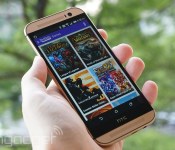
If you regularly catch up on eSports or “let’s play” sessions while on the move, today’s your lucky day. Twitch has revamped its Android app with a fresh interface that lets you get to the biggest game streams as quickly as possible, with impossible-to-miss links to the hottest titles. It’s also much better suited to tablets, and you can now check out both user profiles and offline channels; that’s handy if you missed a big event or want to follow someone with similar tastes. It’s much easier to sift through search results, too. The remake isn’t well-timed — it’s arriving right as Valve’s The International tournament is winding to a close — but it’s still a big deal if you like to spectate games as often as you play them.
Filed under: Cellphones, Gaming, Tablets, Mobile
Source: Google Play, Twitch
Watch This App: Chrono Watch Face

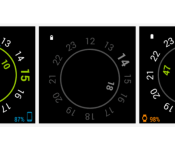
So you’ve got an Android Wear device and now you’re looking for some Android apps to go along with it. We’ve got you covered. Our Watch This App column is designed to help educate readers in the various apps available for the platform and highlight the best of the bunch. Watch This App: Chrono Watch Face A great blend of… Read more »
The post Watch This App: Chrono Watch Face appeared first on SmarterWatching.
Read the rest at SmarterWatching.com!
The post Watch This App: Chrono Watch Face appeared first on AndroidGuys.

