



Backup and restore your Android apps via Chrome with Helium

Koushik Dutta is known quite well around the Android community. From the ClockworkMod ROM Manager, to AllCast (which is making it’s way to iOS), and Helium. Formerly known as Carbon, Helium is an application that is designed to help you back up and restore all of your Android apps without needing to root your device. There are some “complicated” steps, such as plugging your device into your computer, but that’s about the extent of it.
Well, Koush has released an accompanying Chrome web app by the same name, Helium, and this is to help those ChromeOS users with backing their apps and information up on the go. Now you will still need to have the Android application installed on your device of choice, in order for Helium to work properly. From there, all you will need to do is plug your device into your computer and things should be working.
Helium will work on any desktop running Chrome, including ChromeOS and Linux. Now you will need to enable ADB before you can use Helium with Linux computers, but after that is finished, everything should be smooth sailing. We must note that if you are planning to update your devices to Lollipop, that Helium MAY not work completely. It’s a little too early to tell, but if you rely on Helium a lot, then it’s probably better to hold off until compatibility can be thoroughly checked.
There are two versions of the Helium app available. There is a lite version, which only allows you to backup and restore to your SD card or to your PC is available for free. The premium version of Helium is $4.99, but has the following features:
- No ads
- Automatic Backup schedules
- Android to Android sync
- Cloud backup and restore via DropBox, Box, and Google Drive
Personally, when it comes backups, I don’t like to play around with that, and happily paid for the $4.99 premium version. What do you use to backup all of your Android apps and data? Helium could definitely make a run at being the perfect replacement, especially with this new app for Chrome.
Chrome Web Store For Helium

The post Backup and restore your Android apps via Chrome with Helium appeared first on AndroidGuys.

Android TV apps will be screened by Google before being available in the Play Store

It seems that Google is changing things a bit with its new Android TV platform compared to Android in other places. According to Google’s app distribution page, under Android TV it says the following:
Before distributing apps to the Play Store on Android TV devices, our team reviews apps for usability with a DPAD (apps) and Gamepad (games only) and other quality guidelines.
Now before everyone gets all huffy and puffy about how Android is supposed to be open and that Android Wear doesn’t have these types of guidelines, think about this: Android TV is much different in terms of functionality and interaction. While Android phones and Android Wear you interact with directly with a touchscreen, Android TV is all by remote. Not only does this require a different type of interaction, but it can cause issues if not implemented properly. Also, Users are not going to want to swim through as many small-time developer apps as they would for phones and Wear. In my opinion, I applaud Google for taking the extra step to check the apps heading to their new platform to ensure a good experience. If you remember Google TV, many apps were buggy and didn’t work well, and they ended up putting that platform down. So they want to do things different this time around.
It’ll be interesting to see how developers react to this and how the experience on Android TV differs from that of Google TV.
via Android Police
The post Android TV apps will be screened by Google before being available in the Play Store appeared first on AndroidGuys.

Get in the spirit with these winter wallpapers for your Android

It’s the time of year to feel jolly and what better way to get into the spirit than with the hottest festive winter wallpapers for your Android device.
Here you’ll find the best wallpapers that will have you feeling the Christmas spirit and embracing that winter weather outside.
All you have to do is click on the wallpaper you want, download to your device and set it as your wallpaper.
The post Get in the spirit with these winter wallpapers for your Android appeared first on AndroidGuys.

Artificial intelligence is now creating its own magic tricks

You might not have to be a professional magician to come up with clever tricks in the near future. Researchers at Queen Mary University of London have developed artificial intelligence that can create magic tricks (specifically, those based on math) all on its own. Once their program learns the basics of creating magic jigsaws and “mind reading” stunts, it can generate many variants of these tricks by itself. This could be particularly handy if you like to impress your friends on a regular basis — you could show them a new card trick every time without having to do much work.
The best part? You can try some of these computer-generated tricks yourself. The 12 Magicians of Osiris magic jigsaw is available as a web pack, and you can download the Android component for one card trick, Phoney, from Google Play. Neither will give you as much satisfaction as developing tricks from scratch, but they’re proof that computers can do more with math than solve equations.
Filed under: Science
Via: Phys.org
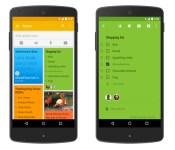
Google Keep adds list and note sharing for increased productivity

Google Keep has become a modest alternative to Evernote for those looking to keep their entire workflow within the confines of Mountain View’s app arsenal. With today’s update, the productivity software will allow you to share those idea boards and to-do lists amongst your cohorts so that everyone who’s privy to the info knows exactly what needs to be done. The new version also offers improved search that filters notes by color, sharing, images and more. Now that you can find and distribute items easily, there’s really no excuse for someone forgetting the milk. In addition to outfitting Android devices, the sharing feature is available for use on the web and via the Chrome Web Store.
Filed under: Internet, Software, Mobile, Google
Source: Official Android Blog

Could Scout be the solution to “Generation Tardy”?

Telenav, developers of the app Scout that aims to streamline event creation by making it easier to manage and keep in contact with your invitees, have recently unveiled the results of a recent consumer survey targeted towards revealing the “common pain points of get-togethers” that the recently updated Scout app will aim to alleviate.
Perhaps unsurprisingly given the short-attention span of the young adult generation (thanks to new information/games, and therefore potential distractions, being available at any and all times (I too unfortunately fall into this category, hard)), it is the “millenials” who struggle most of all to arrive on time to events. According to the survey, 1/3 of this age group said that as many as half of their friends tend to arrive late to events and meet-ups. As much as 30% of the general population, and nearly 50% of what Telenav dub “Generation Tardy” admit to telling their friends they’re mere minutes from the destination when they are in fact much further out.
The survey also backs up what many will likely hear from their parents on a frequently recurring basis, that they sleep too much, with 70% of the young adults having been late to a social gathering due to over sleeping (I once was meant to meet friends at a station an hour away at 2pm, and woke up at 3pm) compared to only 40% of the general population. The second most common cause of tardiness is eating, something 40% of the millenials have given as their reason, while only 22% of the general population admit to being late for this reason. The survey also proves that sex has become a higher priority for this generation of young adults than ever before, as 30% of respondents admitted to being late to a social event for this reason, twice as many as the general population.
Telenav, knowing that this generation spends most of their time glued to their smartphone (if you’re reading this on one I think I’ve proved my point), developed the app “Scout” to help prevent these problems from happening by allowing the creation of an event page that contains all the relevant information (much like Facebook’s Events page) as well as producing a group message thread to help keep everyone in contact. The app also features turn-by-turn directions and, what will appeal most of all to nervous hosts, uses location services to display each attendees’ ETA so your friends can never lie to you about how far away they truly are ever again.
Unfortunately one of the coolest features, from a party-goer’s standpoint, is only available on iOS at the current time. This features predictive traffic reports which will inform them of potential travel problems and offer an alternate route. However if you use Google Now, never fear! Simply input the event date and location in Google’s Calendar application, and the handy assistant will notify you when you need to leave, and inform you of the fastest way to get there using latest traffic reports.
If you want to give Scout a shot, and can convince all your friends to do the same, click the widget below to find it on the Play Store
The post Could Scout be the solution to “Generation Tardy”? appeared first on AndroidGuys.

WhatsApp read alerts can be disabled

There was a recent explosion about people complaining that WhatsApp was sending read to the sender after a message had been viewed by the receiver.
Panic broke out as people worried about getting in trouble for not replying to a message after reading it. Fear for the dreaded “You are ignoring my messages, why don’t you care about me” argument raged around the internet.
Okay, not really, but the read alerts or read receipts as WhatsApp calls them became a concern to a few users.

WhatsApp apparently heard their users concerns and added an option into the settings menu to disable “Read receipts”. While disabling this option, you won’t be able to see if someone else reads your messages, but you can’t have your cake and eat it too.
This option is available in version 2.11.44 which is currently only up for download from WhatsApp website or here, but it should be hitting the PlayStore soon. The update also adds HeadUp notifications to WhatsApp with a rectangular icon versus a circle icon.
The post WhatsApp read alerts can be disabled appeared first on AndroidGuys.

Sony’s Music Unlimited streaming service review

Streaming music is something I do on a daily basis for hours on end, so when Sony contacted me about trying out their Music Unlimited service I was extremely excited to see what the biggest name in music had to offer.
You’ll probably have heard about Music Unlimited as it is heavily integrated into Sony’s PS4, but they also offer a very feature-rich mobile app and web experience. In this review I will share my experience with using the Music Unlimited service across a range of devices and analyse different aspects from the selection of music Sony offers, to how they deal with organising your collection, all of which makes up the overall experience.
To pretence the review, the many music streaming services currently available all offer pretty much the same selection of music when it comes to the big players, so whilst I will touch on the selection of music available on Music Unlimited and how easy it was to find, this review will mainly focus on the value-added features that differentiate this service from the others. A further note must mention that Music Unlimited is available in two forms on the mobile platform through the Music Unlimited app (available to all Android devices) or if you own a Sony device through the Walkman app, both of which offer different experiences and I will highlight this throughout the review.
Music Selection
I could find every artist I searched for on Music Unlimited: Armin Van Buuren, Tiesto, Andrew Rayel, Martin Garrix, Professor Green, to name a few. Now these are fairly mainstream names that I would expect any music service to offer, but since I listen to these artists these are the ones that, for me at least, matter in music selection. For others, indie bands also turned up on Music Unlimited such as The Unicorns.

Music Unlimited certainly didn’t disappoint when it came to finding an artist or a song as their catalogue facilitated all my requests with no issues, but, as I mentioned before, it’s how that catalogue is presented to the user and how the stored music is orgranised that really differentiates services apart from each other.
Music Discovery
For me, this is the most important part of any music streaming service. It’s all great if I know what I want to listen to, but I want a service that knows what I want to listen to, even if I don’t. By using my listening history, skipping habits, and library, I want a service to deliver an endless stream of similar songs or alternatives to discover artists and albums I never knew existed, but love.
Sony’s Music Unlimited attempts to do this to an extent, and the experience differs depending on which app you’re accessing the service through. With the standalone Sony Music Unlimited app, you’re able to see ‘Related Artists’ from a search but most significant is the ‘You Might Like’ section on the Home screen. This section does all the things I mentioned, but it isn’t customisable, meaning that if I don’t agree with a recommendation I cannot correct it and tell the app it is wrong. It would some effort to figure out what song in my library is causing this recommendation and then remove it. Whilst not significant, what this means is that if I use this section to continually play music (like I usually do), until I remove that offending song from my library that is causing the incorrect recommendation, that recommendation will remain and I’ll have to listen to it or manually skip ip, every time. Compare that to Spotify’s radio feature that will learn when you ‘thumb down’ a track and it won’t appear again.
The Walkman app has no such feature and your music discovery will be limited to the top charts or the integrated ‘Channels’ that group songs based on genre, mood, or era. Both apps have the ‘Channels’ and ‘Chart’ feature but is very much a manual method of finding new songs as opposed to the seamless recommendations other services may offer. I did find myself sticking with what I knew when it came to using Music Unlimited, searching for songs I knew I wanted in my library and very rarely ventured into the music discovery realm.

Music Arrangement
Once you’ve found music that you like, the second most important aspect is how it is arranged. What’s the point of liking a song, saving it, to then never be able to find it again? Music Unlimited utilises playlists and libraries to organise your music. What’s great specifically here about the Walkman app is that if you have music stored on your local device it will pick it up and display it seamlessly with your online library – similar to that of Google Play Music, without the upload part.
 |
 |
Music can be added either to a playlist that can be dedicated to a specific purpose and will display the songs in a long list, or as songs/albums/artists. Songs can be added by simply tapping on the 3-dot menu and selecting the action for it. What’s good here about Music Unlimited is that if you add a song to a playlist it is automatically added to your library, allowing it to be broken out into that album/artist separation. Other music services don’t do that just yet, with those two organisation mechanisms remaining completely independent of each other, often making the user chose between which method they prefer or else resulting in double adding of songs to both playlist and library.
Mobile App
As previously mentioned, there are two experiences when it comes to accessing Music Unlimited and they are in the form of a standalone dedicated app, or baked in through the Walkman app if you have a Sony device.
The two apps achieve pretty much the same thing, aside from the aforementioned music organisational difference, but the Walkman app looks a lot nicer and seems much more polished. Using the Music Unlimited Service through the Walkman app was a much nicer experience and felt better, but then you are restricted to using a Sony device.

As nice as the Walkman app is, however, it would look even better if it adopted the new material design in Android 5.0 Lollipop. Granted, the concept of material design is still making it’s way around developers in it’s infancy, but would be great to see the Walkman app updated in the near future.
As for the Music Unlimited standalone app that is available for all Android devices, it could desperately do with a touch of material design, or a lick of paint for that matter. The design seems very dated and basic and although utilised the hamburger slide-out menu just didn’t appeal to me in the way the Walkman app did, or many competitors apps. Some of the colours of the music controls clashed with the album art, sometimes the album art would blend into the background and in the ‘Browse’ section it’s just a list of text.

Design aside, both apps are extremely easy to use and navigate and new users won’t have any trouble picking up the ropes. There’s even a useful tutorial upon initial launch of the Music Unlimited app to demonstrate how to download songs for offline playback.
 |
 |
Web Experience
This unfortunately echoes my comments above with the Music Unlimited mobile app; the interface will get you into Sony’s music streaming service and it works, but it’s not winning any awards for design. I would really like to see this updated to mimic the Walkman app at a minimum.

The appearance will look very familiar to the Music Unlimited app, which is good for consistency, and you’ll find all the similar features as with the mobile app.
Value
At $4.99 a month for the ‘Access’ plan that will get you Music Unlimited on your PS3/PS4 and PC/Mac, or $9.99 a month to add in your smartphone, tablet, and TV, Music Unlimited is on par with other music streaming services when it comes to pricing.
For your money you’ll get access to the best music around the world right at your fingertips, with excellent music organisation, chart music discovery, and recommended music based on your listening habits. Music Unlimited certainly is up there as one of the top music streaming services, but the methods in which you access the service could definitely do with improvement when it comes to design. Whilst the Music Unlimited app will certainly get the job done, Music Unlimited is most definitely best enjoyed from a Sony device, and with a touch of material design for the Walkman app could see Music Unlimited winning the music streaming competition.
The post Sony’s Music Unlimited streaming service review appeared first on AndroidGuys.

Bee Brilliant game review

Wondering what all the buzz has been about lately? Well, let’s stick our hand straight into a bee hive and wake these sleeping Babees in todays review of Bee Brilliant.
Beelieve me when I say, Tactile Entertainment really hit the nail on the head with its latest match-3 puzzler, Bee Brilliant. OK, no more puns for the rest of this beeview, ahhh I mean review. Bee Brilliant incorporates everything an addictive puzzler needs, from its pun-sational humor to its lovable characters, in-game combos, catchy tunes, and an endless number of levels to leave you wanting more.
The game begins with in-level tutorials showing you how to create combos and collect mass amounts of points. From there, you will begin your journey through Beeland learning additional combos and meeting some crazy bees along the way. You will be hooked from level 1, and addicted by level 5, Only 155 levels to go! The game becomes increasingly challenging and just as addictive as you try and connect the colorful Babees in all the different game modes Bee Brilliant has to offer.
What We Liked
- Addictive gameplay
- Pun-filled humor
- Lovable characters
- Endless number of levels
Room for Improvement
- Occasional crashing
The post Bee Brilliant game review appeared first on AndroidGuys.

10 of the hottest new Android apps this week (November 15)

Welcome back to the regular series aimed at helping Android users get more from their devices. If you’re looking for some new Android apps or games check out we have a handful of popular new titles to get you started. What you’ll find below are some of the hottest trending apps of the last seven days. We’re certain you will find something fun to play with this weekend. Let’s get to it!
NOTE: THIS ARTICLE IS SPLIT INTO TO PAGES.
 Messenger (by Google)

Play Store Description: “Stay in touch with friends and family. Messenger from Google is a communications app that helps you send and receive SMS and MMS messages to any phone. You can also send group texts as well as your favorite pictures, videos and even audio messages to your contacts.”
We say: Google has had a lot going on these past few weeks, between the release of Android Lollipop, updating all their apps to Material Design, and even some new apps uploaded on the Play Store. This week, it’s the new Messenger app on Lollipop, and it is available for download on the Play Store. Mostly a bare-bones SMS app, it brings basic SMS features in a simplistic format. It is also filled with Material Design. If that’s your thing, check it out with the widget below.
 Appdicted – Apps tracker

Play Store Description: “••Are you a smartphone addict?••
Appdicted track how many time you spend with your smartphone each day, and how many times you check it.
Facebook, Twitter, Instagram, Google +, Appdicted lets you know how much time you spend on social networks or the like instant messaging apps like Whatsapp,Messenger, Viber or Telegram.”
We say: This is a new app that doesn’t really do anything productive, but is a fun way to see how you use you’re phone. It tells you how often you check your phone, what apps you use the most, and more. Have your friends download it and it’s likely a fun thing to compare how everyone uses their phones.
 HTC Camera

Play Store Description: “Easily switch between main and front cameras with a simple swipe, and capture photos and videos with ease.”
We say: HTC looks to be following the trend set by Google and Motorola of uploading system apps onto the Play Store making it easier to update them without the need of a new firmware update. While the requirements only list Android 4.4 and up, I had no luck downloading the app on my non-HTC device, so it seems you need Sense (a HTC device) in order to use the app. Still, for those phones that don’t come with Eye Experience can download this to gain that feature.
 TwoDots

Play Store Description: “Join two brave dots as they traverse the arctic tundra, navigate fiery jungles, and plunge the ocean depths in the #1 hit game in over 70 countries.”
We say: This is an app that has been on iOS for a few weeks, and is the successor to the popular Dots game. This has an actual storyline however, so if you prefer a storyline this is for you. It’s free but be warned, it has quite a few in-app purchases. Check it out with the widget below.
 Speed Booster – Phone Cleaner

Play Store Description: “Speed up your Phone by up to 60% with the simple touch of a button!”
We say: These sorts of apps are always questionable, and by no means are we suggesting it will work for everyone, however it is new, and is doing fairly well with 4.6 stars and over 100,000 downloads, so try it out.
The post 10 of the hottest new Android apps this week (November 15) appeared first on AndroidGuys.

