


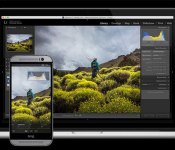
Adobe Lightroom mobile comes to Android, but it’s only for phones

Last spring, Adobe brought a version of its Lightroom photo-editing software to the iPad making for some convenient editing on the go. Months later, a version of the app is ready for Android devices and it brings all of the key features from the iOS version to those handsets running Google’s mobile OS. You’ll notice that I said “handsets” there, and that’s an important caveat. The app is designed for use on phones, and not tablets. Adobe says a version that’s optimized for tablets is on the way, but for now, the app is meant to be used on phones. If you’ll recall, the iPad version preceded the iPhone app, which, you know, makes sense. While this new Lightroom mobile equips devices running Android 4.1 (Jelly Bean) and later with its toolbox of tweaks (more on that in a minute), the creative software company recommends that you have at least 8GB of free space on your device to keep things running smoothly.
Just like the iOS version, the Android app is a free download, but you’ll need a Creative Cloud subscription to use it. You don’t need the full membership though, as the photography-specific plan is now a permanent fixture at $10 a month. Lightroom mobile syncs edits, metadata and collections with Lightroom 5.4 (or higher) on both Windows and Mac. It also automatically imports shots from your phone and allows you to access Creative Cloud-stored files for editing while your away from that work machine. Don’t expect the full set of tools, as the mobile software is limited to much of what’s in the Basic Panel and cropping tools. Options like color temperature, exposure, highlights and contrast are available, but those handy presets that you’ve created, or purchased from the likes of VSCO, won’t be accessible. Adobe says that expanded preset support is something it’s working on, but there’s no timeline for when they’ll be added to the mobile apps.

Just like the iPad app, Lightroom mobile uses the RAW file to create a compressed preview version that’s only about 5 percent of the original size (around one to two megabytes). The original is maintained, and a 2,560-pixel wide image ensures that the collection you edit during your evening commute doesn’t take forever to download or take up all of your storage space. As we’ve already mentioned, Adobe says you’ll need 8GB of internal storage (not extra space you’ve added on a microSD card) to move the files back and forth, along with a minimum 1.7GHz quad-core CPU.
Remember when I said most of the key features from iOS made it over to Android? Well, the one difference is Lightroom’s commenting system is absent on this version, but Adobe says it will be part of a future update. You can, however, still like, flag and reject images as needed. My biggest gripe here is the lack of tablet support. I’ve used Lightroom mobile on an iPad, and the app seems much better served with the larger display of a slate. Here’s to hoping Adobe’s plan to outfit Android tablets is just around the corner, but until then, those who prefer Google’s software will have to settle for using smaller screens.
Source: Adobe, Google Play

Google details Ara Manager app for wrangling all your modules

We’ve known that there’ll be an Ara Manager app to help Android users grok their shiny, new modular toys, but we’ve just gotten a better sense of how it’ll actually work when Ara devices trickle into the wild later this year. At its most basic, the app — which should come pre-loaded on Ara phones — allows users to lock and unlock the modules currently slotted into the phone by using a bit of current to disengage the electro-permanent magnets holding them in place. We knew that already, though: What’s new?
Well, what about when you’ve got multiple, similar modules slotted into a phone’s endo, like a regular camera and a thermal camera? You’ll be able to use the app to determine which one you want to use at any given time, though it’s not exactly clear how the interface will let you do that. Oh, and seeing as how there’s firmware specific to each module, the app will also let you manage the updates and “support packages” that’ll assuredly become available as developers refine their modules. Beyond the mechanics of managing an Ara phone, the app will provide users will status information (think battery levels, vendor details and the like), but maybe the app’s most important role is a sherpa of sorts, a guide to help people figure out their devices by flagging potential issues and offering suggestions for optimal module spots. Linaro CEO George Grey hinted that slipping hardware into certain slots would lead to less-than-ideal performance, but sadly, he didn’t dive into what exactly that meant.
Filed under: Mobile

Check out this Android 6.0 Muffin concept

With us all revelling in the beauty of Material Design and Android 5.0 Lollipop, why not take a look at what Android 6.0 could hold for us?
Potentially codenamed Muffin, the below concept video comes courtesy of AndroidHackz who created a video showing off some new features that Android 6.0 could bring, including a new opening and closing animation, as well as a multi-window feature.
What do you guys think? Drop us a comment below.
The post Check out this Android 6.0 Muffin concept appeared first on AndroidGuys.

Download the best icon packs of 2015

We’re well into 2015 so now it’s time to check out the hottest new icon packs of the year. Icon packs are theme packages that can be applied to a variety of launchers to change the stock icon for apps. The Google Play Store is littered with thousands of icon packs, so trying to find good ones is often quite a task; luckily we’ve pulled out the best ones for you.
We’ll be updating this throughout the year, so be sure to check back regularly to download the best icon packs of 2015.
Illus

Opals

Dekk

Balx

Elun

Have we missed off your favourite icon pack? Be sure to drop us a comment below to have it added to the best icon packs of 2015.
The post Download the best icon packs of 2015 appeared first on AndroidGuys.

Google moves one step closer to becoming a universal translator

Even with the assistance of modern technology, holding a conversation in two different languages can be difficult. Google Translate allows you to speak with someone and have each utterance translated as text and audio, but until now you had to manually toggle every time the other person talked. As expected, Google is speeding up the process with smarter language recognition and speaker switching, which comes as part of a new update. So when you boot up the app and press the microphone icon, it’ll recognise which of the two languages is being spoken, offer a translation and then automatically alternate whenever the conversation flips over. No more tapping on the screen again and again.
In addition, Google has revamped its camera mode to quickly translate words and phrases directly on your screen. So if an important sign on the Paris Metro has you stumped, you should be able to just grab your smartphone, tap the camera icon and wait for a translation to appear augmented reality-style. The feature currently works for English, French, German, Italian, Russian, Portuguese and Spanish words, and Google says it’ll be adding support for additional languages over time. Of course, this is hardly a new idea — Word Lens had a similar proposition, and ever since Google acquired its developer Quest Visual we’ve been waiting patiently for its inevitable debut.

Filed under: Cellphones, Google
Source: Google

Motorola promises to push Lollipop OTA soon

Luciano Carvalho, one of the software engineers at Motorola, announced a quick update on his Google+ wall as to when Motorola devices from 2013 and 2014 will be getting the Lollipop OTA. People are getting really impatient still stuck on KitKat.
This is no news that some people across the world are getting Lollipop based OTA pushes on their Moto devices. Luciano revealed that is just a limited soak test roll out to check if there are any unwarranted bugs that might slip in the final release and promises that this update will be pushed to a wider audience once they get a green signal.
Users of the 1st generation of Moto devices need to update their Motorola Update services to receive the update. If it’s not showing on your list of compatible apps or does not show any kind of update, be assured that it will be soon.
According to Luciano, they are currently working to crush most of the bugs since 5.0 was way too buggy and porting an entire update to other devices gives birth to even more bugs since the way things interact are different for different devices and Google only validates stuff for Nexus Devices.
Anyhow, Moto chaps can expect the update soon enough.
The post Motorola promises to push Lollipop OTA soon appeared first on AndroidGuys.
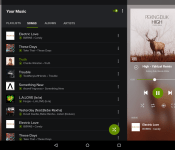
Concept shows what tablet-optimised Spotify version could look like

Spotify announced that they have 60 million active users, of which 15 million are paid subscribers, yet there remains no tablet-optimised version for Android.
A member over at XDA decided to take it into their own hands to show off just how good a tablet-optimised version of Spotify could look to take advantage of the added screen real estate.
Let us know in the comments below though if not having an specific tablet version of Spotify for Android bothers you.

The post Concept shows what tablet-optimised Spotify version could look like appeared first on AndroidGuys.

LG G Flex 2 vs Nexus 6

The battle of two of the biggest Android smartphones currently on the market, so let’s see how they stack up against each other.
Nexus 6 vs LG G Flex 2 | FindTheBest!function(d,s,id)var js,fjs=d.getElementsByTagName(s)[0],p=/^https:/.test(d.location)?’https’:’http’;if(!d.getElementById(id))js=d.createElement(s);js.id=id;js.src=p+”://cdn1.findthebest.com/rx/widgets.js”;fjs.parentNode.insertBefore(js,fjs);(document,”script”,”ftb-widgetjs”);
Drop us a comment below, who wins the battle between the LG G Flex 2 and the Nexus 6?
The post LG G Flex 2 vs Nexus 6 appeared first on AndroidGuys.

Google Now code hints at spoken notifications and third-party services

As convenient as Google Now may be, it has its limits: you’re limited to Google’s official services, and it’s not very useful when you’re driving or otherwise can’t stare at your phone. A recent Android Police teardown of Android’s search app has revealed that Google is exploring a handful of new features that would let you use Now in more situations. To begin with, there’s preliminary code for spoken notifications. If you’re on the road, you could get your phone to read traffic warnings aloud instead of distracting yourself by looking at the screen. There have been hints of a hands-free mode in Android for a while, but the new code hints that you might not even need to look in many cases.
There are also early signs of Google opening the floodgates to third-party apps and services. The leak reveals icons for sharing info through non-Google social networks such as Facebook, Pinterest and Twitter, and a cryptically titled “third_party_welcome” view suggests that non-standard apps may eventually post their own Now cards. However, “may” is the operative word for many of these discoveries. Google frequently includes pre-release code in its search software, but you can never be completely sure that this work will see the light of day. If nothing else, though, it’s apparent that Google still has plenty of upgrades in mind for its most important mobile app.
Filed under: Cellphones, Internet, Mobile, Google
Source: Android Police
The original iPhone was announced eight years ago today, something everyone should be thankful for
History was made when the original iPhone was announced eight years ago. When Steve Jobs took the stage in his patented garb that fateful day in 2007 to announce the iPhone, he couldn’t have known the effect it would have on the smartphone market, spawning a battle between iOS and Android that has yet to see […]
The post The original iPhone was announced eight years ago today, something everyone should be thankful for appeared first on AndroidSPIN.

