


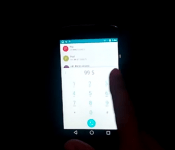
[VIDEO] Android L has been ported to the Nexus 4
 The question on many people’s lips, particular the ones who don’t own a Nexus 5 or Nexus 7, is when they will be able to try the Android L preview on their device. The question is even more pertinent for Nexus device owners who have had part of the preview uploaded to AOSP, but it may or may not be enough to go on to make complete ROMs. Still, that hasn’t stopped some geniuses out there as Android L has been ported to the Nexus 4. You can check out a video of their feat below:
As you can see, it looks to be working pretty with all the functions and apps for Android L working in this port, though there are some outstanding bugs that remain including NFC, Bluetooth, Camera and a few other niggling issues. There also appears to be an unfortunate one-off side effect of the ROM installation as the first time boot after flashing can take up to 15-20 minutes; as any flasher will know, the time taken for the first boot can seem like an eternity so make sure you stay extra patient for this one. If you’re interested in trying out the ROM, you can download it from the site below, or you can check out the original XDA forum post in the source links.
Let us know if you try out Android L on the Nexus 4, and how you find it.
Source: Galaxy Fit Update, XDA via Phone Arena
//<![CDATA[
ord = window.ord || Math.floor(Math.random()*1E16);
document.write('’);
//]]>
The post [VIDEO] Android L has been ported to the Nexus 4 appeared first on AndroidSPIN.
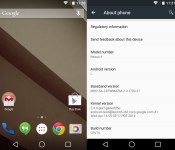
Install Android L “Lemon Cake” Developer Preview on Nexus 4

Nexus 4 owners jealous of those with a Nexus 5 or 7 (2013) running the Android L Developer Preview can get a taste of the next version of Android thanks to developers at XDA Developers forum who ported the rom over to the device.
Since Google only pushed part of the source code to the Android Open Source Project (AOSP) for the Nexus 4, the ROM is based on the Nexus 5 and 7′s (2013) Preview System Images and comes thanks to @sykopompos, @defconoi and @ben1066.
It should be noted that while it’s not fully functional yet, most things are working and it “can be used as a daily driver for the majority of Android users.” Although that’s the case, remember that some apps may not work as developers haven’t updated them yet for the Android L release and since it’s a preview, some things may not work until the official release in the coming months.
Currently noted to not be working is:
- Camera
- Bluetooth
- Swipe-to-Phone-Application not showing on lockscreen
- SELinux and Knox
- SuperSU/Root
To install the ROM, follow these instructions after downloading:
- Put the file onto your Internal Storage
- Reboot into Recovery (CWM/TWRP]
- “wipe data/factory reset”
- “mounts and storage” -> “format system”
- “advanced” -> “wipe dalvik cache”
- “install zip” -> “install zip from sdcard” -> choose the mako-bla-bla-zip and confirm flashing procedure
- “wipe cache”
- “advanced” -> “wipe dalvik cache”
- “reboot into system”
- first boot may take up to 10 minutes – be patient
At this time, it may be best to just install MultiROM and install the ROM that way, so that you can keep your daily driver. I found that the easiest way to install it is to download “MultiROM Manager” from Google Play and through the app, install MultiROM, recovery and kernel. When you boot into recovery, to install a ROM with MultiROM, you select “Advanced” >> “MultiROM” >> “Add ROM.” The settings I used were “Android” for ROM type, “Don’t share: kernel with Internal ROM and install to “Internal Memory,” then selected the ZIP file and flashed it. You can always delete the ROM then flash this ZIP in recovery to uninstall MultiROM. I included a video at the bottom of the post to show you a little bit more about installing a ROM with MultiROM.
For the latest version of the ported Android L Developer Preview for the Nexus 4, hit up the source link below.
VIA: XDA Developers
The post Install Android L “Lemon Cake” Developer Preview on Nexus 4 appeared first on AndroidGuys.

Download and try out the new (slightly laggy) Android L Calculator
 The novelty of Android L has somewhat waned over the last week (probably due to Independence Day swinging by), but that doesn’t mean that people have stopped working on ways for other people to try parts of the new previewed operating system. We’ve seen the “Heaps Up” notifications ported to devices, as well as the Android L keyboard as a standalone app for all devices (rooted or not), and today we get to take a look at the Android L calculator thanks to XDA member, virjog. According to virjog, the calculator was converted from demo code on the Polymer Project site into an apk which you can download below:
It’s not a perfect port; the calculator seems to lag quite a bit (at least, it does on my Note 2 with Android 4.4.2) and the scientific functions seems to be broken or inoperable. That said, standard arithmetic seems to be working and it’s enough to get an idea of how the new Material Design aspects have been incorporated into Android L. If you download it and manage to get it working well on your device, let us know what device you tried it on and what version of Android you have.
What do you think of Material Design so far? Do you think this is a good direction for Android to be going in? Let us know what your thoughts are.
Source: XDA
//<![CDATA[
ord = window.ord || Math.floor(Math.random()*1E16);
document.write('’);
//]]>
The post Download and try out the new (slightly laggy) Android L Calculator appeared first on AndroidSPIN.
HTC Makes a Nice Profit! Android Almost Overtaking iOS Globally! – The ManDroid Show

Hello Android friends. Time the ManDroid Show that should have been up yesterday. Hopefully you America type people had a great 4th of July yesterday. Looks like HTC is finally rising from the money pit they were sinking in. Android is almost overtaking iOS in global users, and I have a feeling after Android L gets released officially, we will overtake that OS. Enjoy the show?
Android News
HTC back in black
Android overtaking iOS
Google Now everywhere
Sony Xperia Z3 Compact: http://androidspin.com/2014/07/03/sony-xperia-z3-compact-snapdragon-801-android-4-4-2/
//<![CDATA[
ord = window.ord || Math.floor(Math.random()*1E16);
document.write('’);
//]]>
The post HTC Makes a Nice Profit! Android Almost Overtaking iOS Globally! – The ManDroid Show appeared first on AndroidSPIN.

Is Google teasing an alternative on-screen buttons for Android “L”?

As you all know by now, Google announced a new version of Android, called Android “L” (for the time being at least). Along with that they announced a new design approach to Android, called “Material Design” in which they, amongst other things, introduced a new set of on-screen buttons.
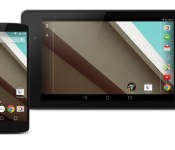
Our current vanilla on-screen buttons are going to be replaced with a simple geometric forms which will trigger back, home and multitasking actions (for those who get the “L” update eventually of course). Those buttons at least in our opinion look nice and everything, but it seems there’s more to it than we thought. Google seemingly teased another set of buttons that may appear in “L”. While explaining transitions and animations on their official webpage they used on-screen buttons we haven’t seen before (featured in the middle on the image above). These buttons look basically like the ones we use now with some subtle changes. The most noticeable of which is on the multitasking button, instead of showing screen behind a screen at an angle, second screen is now centered behind the first one. This button actually fits nicely with the carousel multitasking design on Android “L”.
What do you think, will Google give us an option to use these buttons as a second choice? Does this mean developers will be able to create their own offering and we’ll be able to use those as well?
The post Is Google teasing an alternative on-screen buttons for Android “L”? appeared first on AndroidGuys.
How to clear all notifications using Android L (preview)

Are you like me, and many others, who just HAD to download and play with the Android L developer preview? Did you run into the issue of having to clear all of your notifications one by one, because Google had not implemented a Clear All function? Well Koushik Dutta, the well known developer for apps such as AllCast, and the popular ClockWorkMod Recovery system for Android devices, has something for everyone.

Koush has released a downloadable tweak for those Android L users, that allows you to clear all your notifications, with ease. While playing around with Android L, I would get annoyed at the fact that I needed to constantly clear my notifications one by one. It’s not known if this was just something that wasn’t baked into Android L yet. Nonetheless Koush has saved the day.
While it’s not the convenient three lines at the bottom of your screen, and there isn’t just a clear all button. However, the tweak just appears as another notification, and all you need to do is tap the notification and everything disappears from your notification bar. Koush kept in mind to not just throw anything together when designing this tweak. He was able to keep the look and feel of the Material design found throughout the Android L developer preview. If you’re worried about being able to clear notifications from your lock screen, don’t be. This small tweak allows you to clear those lock screen notifications as well.
In order to get this tweak onto your phone, so that you can start clearing your notifications on Android L, simply download, install the APK file, and you’re ready to go. You can download this useful tweak from Koush, by downloading the APK found here.
The post How to clear all notifications using Android L (preview) appeared first on AndroidGuys.
Android L Hits Nova Launcher Beta Update [Download]

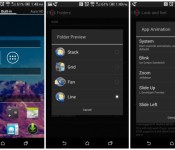
Android L has been out for over a week, and developers are having fun with the Developer Preview, aas well as trying to get the apps we use to get that Android L Material Design. Nova Launcher Beta sees a nice update today, bringing in some of that Android L feeling to your device.
- ”L” Folder Preview (Nova Settings – Folder – Folder Preview – Line)
- -L” App Drawer Icon (Long-press app drawer – Edit – Tap Icon – All white icon under “Built-in”)
- ”L” App Animation (Nova Settings – Look and Feel – App Animation – Slide Up)
- Minor tuning for running on Android L Dev Preview
- Optimizations and bug fixes
So if you want to give the new Nova Launcher update a try, check the beta update within the launcher, or hit the link below for a direct download. Let us know how you like it.
//<![CDATA[
ord = window.ord || Math.floor(Math.random()*1E16);
document.write('’);
//]]>
The post Android L Hits Nova Launcher Beta Update [Download] appeared first on AndroidSPIN.
Nova Launcher Beta updates with Android L interface

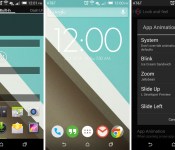
There’s been a lot of Android L love going around the past few days since being announced at Google I/O, and we’ve had our fair share of ports from the newest version of Android, including keyboards, wallpapers, and even the updated apps. But, if that’s not enough or you don’t fancy installing them, then Nova Launcher just updated their Beta version to include Android L visuals.
New options for Android L within the Nova Launcher Beta update include new folder previews, app animations, and much more, which will have you thinking you’re running the actual preview build.
Here’s a full list of what’s new in the Nova Launcher Beta update:
- “L” Folder Preview (Nova Settings – Folder – Folder Preview – Line)
- “L” App Drawer Icon (Long-press app drawer – Edit – Tap Icon – All white icon under “Built-in”)
- “L” App Animation (Nova Settings – Look and Feel – App Animation – Slide Up)
- Minor tuning for running on Android L Dev Preview
- Optimizations and bug fixes
To get the Beta, you’ll need to be part of the Google+ community page for Nova launcher here, and then it’ll appear in the Google Play Store using this link.
VIA: Droid-Life
The post Nova Launcher Beta updates with Android L interface appeared first on AndroidGuys.

Android L Preview Source Code Released! Moto X+1 Specs Leak Out! – ManDroid Quickie

It is Tuesday, time to get some Android news in a hurry. It is a short work week, and I am sure you guys are aching for it to be Thursday already. The Android L source code has been released, so hopefully the developers out there will start whipping up some tasty goodies. The GPE Galaxy S5 is rumored again, and apparently the Moto X+ 1 specs have leaked out. Enjoy the video.
Android News
Android L Preview source code
GPE Galaxy S5 still making the rounds
Moto X+1 supposed specs
Xperia Z3 spotted
//<![CDATA[
ord = window.ord || Math.floor(Math.random()*1E16);
document.write('’);
//]]>
The post Android L Preview Source Code Released! Moto X+1 Specs Leak Out! – ManDroid Quickie appeared first on AndroidSPIN.
Source code for Android “L” preview is now available in AOSP, Nexus 4 and 7 (2012) included

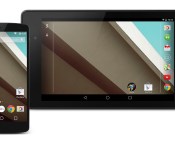
Android L preview is hot at the moment. Everyone is talking about it and we can’t wait for Google to release it when it’s done, hopefully this Fall. Google released Android “L” preview for Nexus 5 and Nexus 7 (2013) only, but there seems to be hope for Nexus 4, first-gen Nexus 7 and a Nexus 10.
Thanks to Android Police we managed to find out that Google released a source code for Android “L” preview. We were surprised to find out that they did it for both Nexus 4 and Nexus 7 (2012), even the Nexus 10, considering people feared Google might not push the “L” update to those device, me included.
Here are the links:
- LG Nexus 4
- LG Nexus 5
- Asus Nexus 7 2012 ( Wi-Fi)
- Asus Nexus 7 2012 (LTE)
- Asus Nexus 7 2013 (Wi-Fi)
- Asus Nexus 7 2013 (LTE)
- Samsung Nexus 10
Finally some indication we might se “L” pushed to some older Nexus devices, way to go Google!
Source: AOSP
Via: Android Police
The post Source code for Android “L” preview is now available in AOSP, Nexus 4 and 7 (2012) included appeared first on AndroidGuys.
 AIVAnet