


The KERO Smart Annex is an extremely thin, adhesive, portable battery Pack [Kickstarter]
 Some companies are just addicted to Kickstarter – Chicago-based company, KERO, is launching its 4th Kickstarter campaign for the KERO Smart Annex, an adhesive battery pack who’s aim is to be as thin as possible for maximum portability. You may have heard of KERO before from their first successful Kickstarter for the Nomad Cable, and this campaign is no less centred around unique design. Check out their pledge video below:
It looks like a very interesting product, particularly being no bigger than a small remote and being able to adhere to your phone while charging with minimal footprint. Pledges for the campaign range from $19, which will net you one Power Annex, right up to $190, which will shower you with 6 Annex’s and a few other KERO products. The Power Annex is planned to have a capacity of 1,800 mAh, which can be a lifesaver when you’re out and run out of battery.
If you’re interested in contributing to the KERO Power Annex, be sure to visit the campaign page linked below.
Source: Kickstarter
Press Release
KERO Products Launches MicroSuction Portable Battery
Portable Battery with MicroSuction Technology to debut on Kickstarter
Chicago (August 11, 2014) – KERO, the Chicago-based company that specializes in the design and manufacturing of Apple-certified accessories is launching their fourth Kickstarter campaign to fund production of the Power Annex, a compact portable battery with MicroSuction Technology. Inspired by gecko’s feet, MicroSuction Technology is a soft sheet of material that provides the ultimate removable sticking power with lifetime adhesive capabilities. The Power Annex has one full side of MicroSuction Technology applied to the device allowing the external battery to stick directly to the device needing charging freeing the user from bulky external batteries, wires and wall mount chargers.
The Power Annex has a slim profile. At a mere 0.35 inches tall and half the width of an iPhone, the design is compact enough to fit in a pocket or affix to the surface of your device without adding weight or bulk. Capable of adding extra life to any device with a USB charging cord, the Power Annex can quickly charge one iPhone 5 up to 75% power. LED flashing lights offer the user an easy-to-read indication of the amount of power available in the Power Annex and the Power Annex automatically turns off once the device is fully powered.
“The Power Annex is unlike anything in the current portable battery space,” says Roberto Meza, Co-Founder of KERO Products. “It is the only charger on the market utilizing the adhesive power of MicroSuction Technology,” he continues. Kegan McDaniel, Co-Founder of KERO Products adds “We were tired of being constrained by cords, heavy battery cases and bulky portable chargers, so we created a product that fit an unfulfilled need.”
KERO Power Annex is available in black, will retail for $29.99 and be available for purchase December, 2014 just in time for the holiday shopping season. The Kickstarter campaign will begin on Monday, August 11 at 8AM CET and will be active through September 9 with the goal of raising at least $40,000. Backers will receive special promotions including the Power Annex and Micro USB and Lightning versions of the brand’s original product, the Nomad Cable at discounts of up to 40%.
KERO Products Power Annex Kickstarter campaign can be found here:https://www.kickstarter.com/projects/keroproducts/power-annex-adhesive-slim-profile-external-battery
About KERO
KERO is a Chicago-based company that specializes in the design and manufacturing of Apple MFI certified accessories. KERO began with the successful funding of the Nomad Cable in December, 2012 – the first Apple-certified key ring charging cable. Three successful Kickstarters later, the company continues to develop quality products that lead the marketplace in innovation and design.
For more information: www.keroproducts.com. You can also connect with the brand on Facebook, Twitter and Instagram at facebook.com/keroproducts,twitter.com/keroproducts and instagram.com/keroproducts
//<![CDATA[
ord = window.ord || Math.floor(Math.random()*1E16);
document.write('’);
//]]>
The post The KERO Smart Annex is an extremely thin, adhesive, portable battery Pack [Kickstarter] appeared first on AndroidSPIN.
.CPlase_panel display:none;
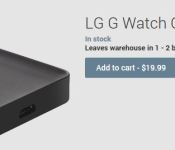
LG G Watch charging cradles now on the Play Store for $20
I am one of those people who has to have a way to charge my devices in as many places as possible. This is pretty simple to achieve when it is a phone or tablet, but with the more recent Android Wear devices a special cradle is needed. The LG G Watch is one of those devices that has a specific charging dock to power up your watch. If you are looking for a spare, replacement, or just need one for the office as well as at home, you will be happy to know that they have just become available in the Play Store.

The charging cradle will set you back $19.99 plus tax and other fees based on your state and such. At the time of posting they state it will eave the warehouse in 1 – 2 business days. Let’s see if Samsung follows LG’s lead and gets one on the Play Store as well.
Head to the Play Store to get the LG G Watch Charging Cradle ordered.
Via 9to5Google
//<![CDATA[
ord = window.ord || Math.floor(Math.random()*1E16);
document.write('’);
//]]>
The post LG G Watch charging cradles now on the Play Store for $20 appeared first on AndroidSPIN.
.CPlase_panel display:none;
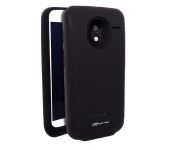
More power, Protection and SD support for your Moto X with new Mugen Power Case
I see a lot of odd, fun, cool, interesting and crazy things roll through my email. Cases and extended batteries are plentiful. Along with a myriad of ways to utilize a micro SD card on devices either wirelessly or through a OTG style plug-in support. However, I can’t recall a time when I have seen all of the above rolled into one product for one device. Mugen Power has apparently made it all possible though with a 2800 mAh extended battery case with SD card slot for the Moto X.

The whole thing looks a little bulky, but you are gaining quite a bit from the added size. Mugen Power goes over a few various things on their page regarding the case, like what you will need on various version of Android to utilize the SD card.

They also mention that you should switch the case off for 1 second before switching to the card.
“Motorola Moto X owners are often reported to complain about short battery life of the device. We worked hard on this project and managed to fit exceptional battery life, additional protection and SD card slot which naturally works with Android into this case. Our solution gives customers added battery life to stay connected longer without recharges and make more with the smartphone than ever before,” says Nikolai Lebedovsky, CEO at Mugen Power.
If battery life and storage space are some of the downfalls of your Moto X, this could be your all-in-one solution. The beefy case will set back your bank account a cool $89.50 + tax and is now available on Amazon. Just hit the link below to check it out.
Via the Mugen power press release
//<![CDATA[
ord = window.ord || Math.floor(Math.random()*1E16);
document.write('’);
//]]>
The post More power, Protection and SD support for your Moto X with new Mugen Power Case appeared first on AndroidSPIN.
.CPlase_panel display:none;
‘Google Workshop’ may be Google’s Moto Maker for Nexus Devices
 When Motorola launched its Moto Maker site, it received a generally good reception; as it turns out, people do like customizing their devices. Other manufacturers have slowly started to roll out services that partially resemble Motorola’s effort to give their customers that little bit more customization, and it looks like everybody’s favourite company, Google, might just be looking to do the same for its Nexus devices with something called ‘Google Workshop‘.
Android Police dropped the exclusive, saying that Workshop in its current state only caters for the Nexus 5, as an experiment, and offers customization options for custom cases and live wallpapers. And apparently, it looks like this:


There appear to be two main options to customize your Nexus 5: MapMe and Moments. MapMe gives you the ability to adorn your custom case and live wallpaper with a chosen location, and can be further customized to incorporate some sentimental info, like your hometown. The colour of the case and wallpaper can be set as well, with the live wallpaper getting further customization options, like receiving weather and social media info for the chosen location. Similarly, Moments allows you to customize your custom case and live wallpaper with uploaded photos and edit them as appropriate (read: filters).
It’s definitely something different from Google, and with their pre-existing colour choices, Nexus 5 owners would have quite a few customization options available to them. The jury’s still out whether this service would extend to Google’s other Nexus devices, and there are no further details on pricing or availability yet.
What do you think about Google Workshop? Is this something you would like to make use of? Let us know your thoughts in the comments.
Source: Android Police
//<![CDATA[
ord = window.ord || Math.floor(Math.random()*1E16);
document.write('’);
//]]>
The post ‘Google Workshop’ may be Google’s Moto Maker for Nexus Devices appeared first on AndroidSPIN.
.CPlase_panel display:none;
Blacksmith-Labs Bruno Belt Clip Holster for Samsung Galaxy S5 Review: Leather just raised the Bar
 I’m not much of a leather guy. I’m not much of a belt clip holster type of guy either. However, all that changed when I saw the Blacksmith-Labs Bruno Belt Clip Holster. Blacksmith-Labs is a company born from a Kickstarter and still appears to be going strong. Their philosophy is “based on the concept of modern minimalist, focusing on the fundamentals of the design without unnecessary elements” and you’ll definitely get a sense of that once we take a close look at the holster. The case we’re looking at today is for the Samsung Galaxy S5, but Blacksmith-Labs also has the case available for Nexus 5, Samsung Galaxy Note 3, and Samsung Galaxy S4.
What’s in the box
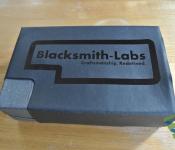
 Opening the box of the Bruno holster, you immediately get the sense you’re about to experience something unlike most other phone accessories. The box is lined with velvet, which you unfold to reveal the Bruno holster.

Blacksmith-Labs calls the Bruno Collection the “ultimate expression of our design philosophy”. The body of the holster is created from a single piece of leather and hand-stitched where required. As you might expect from a holster/pouch accessory, where the phone is always completely shielded, there isn’t anything extra included in the box besides the holster itself; no screen protector, no screen cleaner. As you can probably tell, even just from the photos, the Bruno holster is absolutely made from real leather, which gives it both a very distinct look and distinct smell.
 On the rear of the holder, there is a 360-degree rotatable belt clip, which you can use to hook the holster onto yourself. We have the Gunmetal Grey variant of the belt clip here, but you can also choose to have the clip in Brushed Gold. Speaking of finishes, the Bruno holster that we have here is the Chestnut Brown, but you can also get it in Black, Burgundy, Blue, Dark Cognac and Natural Leather. The holster we have here will set you back $79.95 USD, while some of the other leather finishes, depending on the leather used, will cost up to $119.95 USD.
How does it perform
 The function of the Bruno holster is as simple as you would expect; after you insert your Galaxy S5, you secure it inside the pouch by pulling down a leather strap and fixing it to the metal stud that adorns the front of the holster. It’s not the most secure mechanism you have ever seen, but it does do the job. For everything else that isn’t your phone, there is also a front pocket which can hold a whole number of things as it is quite wide including your credit and business cards, cash or even a charging cable.
 The fit of the pouch is actually pretty loose so you can stick your fingers right into it to to fish your Galaxy S5 out. As for whether you can fit in your Galaxy S5 and a case: you might be able to get away with a very thin case, but anything thicker won’t cut it. But not to worry as Blacksmith-Labs also offers a version of the holster specifically for a Galaxy S5 and case (this appears to only be available for the Galaxy S5 so far) which will give you that extra leeway to fit in your device with protection.
 While the Bruno holster is handcrafted, the workmanship is of a very high standard. I initially had concerns about how strong the stitching was, particularly the stitching around the belt clip, but it looks to be of good quality and should last quite a while (assuming you don’t start getting into extreme sports). And the great thing about a handcrafted accessory is that you know that it is unique, which is pretty special. As you might expect from a full body pouch, the Bruno holster is reasonably protective, and if you’ve chosen to get a holster made of real leather, chances are it’s going to be enough for your purposes.
 You might be questioning the use of a stud to keep down the only strap that is keeping your Galaxy S5 from jumping out of the holster, but it employs a very simple locking system where you just pull the strap further down and the stud gets locked in a smaller notch that will keep the strap from coming loose. Simplicity is the key after all.
What I like about the Blacksmith-Labs Bruno Belt Clip Holster
 There’s definitely something refreshing about seeing a case made from leather and made so elegantly. Sure, it’s not everybody’s cup of tea, but if it is, you’re unlikely to be unhappy. I’m a big fan of how simple it is and how it looks so unassuming, which really highlights Blacksmith-Labs’ mantra of “less is more”.
 Leather pouch aside, I really like the construction of the belt clip. It’s meaty, touch and goes well with the overall theme of the Bruno holster. Furthermore, I really like how Blacksmith-Labs have secured the belt clip, making sure that it won’t fall out, even after time and stretching of the leather.
What I don’t like about the Blacksmith-Labs Bruno Belt Clip Holster
 I never like saying that price is something I don’t like about a product, particularly when I think it is worth it, and in this case, I do. However, the prices of the Bruno holsters (either $79.95 or $119.95), particularly the higher grade leather ones, are expensive, so unless this is definitely something you have been looking for, it’s not likely to be your first choice. Having said that, this is what real leather costs, which fans of the material will definitely associate with.
Final Thoughts
 The Blacksmith-Labs Bruno Belt Clip Holster for Samsung Galaxy S5 is a testament to simplicity and function. It uses leather to great effect, which is a welcome contrast given the world of compounds and plastics we live in. If you’ve been looking for a leather holster, or something elegant to store your Galaxy S5 in, the Blacksmith-Labs Bruno Belt Clip Holster is definitely one accessory you should consider.
If you are interested in picking up the Blacksmith-Labs Bruno Belt Clip Holster for Samsung Galaxy S5, you can find the product page here, or if you want to see what else Blacksmith-Labs has on offer, you can visit their homepage here.
Gallery of photos


//<![CDATA[
ord = window.ord || Math.floor(Math.random()*1E16);
document.write('’);
//]]>
The post Blacksmith-Labs Bruno Belt Clip Holster for Samsung Galaxy S5 Review: Leather just raised the Bar appeared first on AndroidSPIN.
.CPlase_panel display:none;

SanDisk 128GB Micro SDXC cards on sale for $99

Back in February SanDisk announced their new 128GB Micro SDXC card. When it launched it started out at a hefty $199.99 and has since seen a variety of sale price tags and is now at the lowest sale price I have personally seen, $99.99. We had a chance to review the card and it performed as expected. Since the review it has safely resided in my Xperia Z and has never failed me once. There is something very rewarding knowing that I have more storage in my phone than I really need.
We know for certain that the Galaxy S5, HTC One M8 and the LG G3 all have supported listed for 128GB cards. I know for a fact that it works just fine in the Sony Xperia Z, Z1s and the Lenovo Yoga tablets. If storage on your mobile device is a concern, especially with these hi-res camera and 4K video recording ability, it is hard to not take a good hard look at picking one of these up if you have the chance. Heck, it even comes with the typical adapter to take it from a micro SD to a full size SD card giving you more options to use it. Hit the link below to get one ordered as soon as you get a chance.
Order your SanDisk Ultra 128GB MicroSDXC

//<![CDATA[
ord = window.ord || Math.floor(Math.random()*1E16);
document.write('’);
//]]>
The post SanDisk 128GB Micro SDXC cards on sale for $99 appeared first on AndroidSPIN.
.CPlase_panel display:none;

Google Workshop will reportedly wrap your Nexus with custom cases

Let’s face it: options for outfitting the Nexus line with covers and cases have been rather limited (and pricey) coming directly from Mountain View. That could be about to change though, as Android Police reports that a new option could offer a major boost in custom accessories. The so-called Google Workshop will allow you to create your own case for the Nexus 5 based on either a location map or an uploaded photo of your choice. A live wallpaper is said to accompany that latter option too, so you can keep a consistent theme for every customizable spot on that handset. Right now, it appears that the fifth Nexus phone is the only device privy to the treatment, so we’ll have to wait and see if that popular 7-inch tablet gets its own new digs.
Filed under: Cellphones, Mobile, Google
Source: Android Police
.CPlase_panel display:none;

Learning the hard way: The downsides of Google Cardboard
 If you followed what was going on at Google I/O 2014 last month, you would have heard about a really nifty contraption that Google announced called Google Cardboard. The easily assembled, cardboard accessory would essentially turn anyone’s phone into a virtual reality device and initially use Google’s own apps to virtually explore the internet and the world. The beauty of such a design is that it’s quite cheap and really doesn’t need any expertise to get going: just assemble the cardboard frame, launch the Google Cardboard app, profit (???).
 With that in mind, I very excitedly got my hands on a Google Cardboard kit from www.googlecardboard.com. The kit I purchased cost $24.99 and included an NFC tag for easy linking. As it ships from Hong Kong, I eagerly waited for about two weeks before it arrived, and today I assembled the virtual reality glasses today.
 For anyone who’s hoping to purchase a kit, they are extremely easy to assemble, though it took me a few minutes of stressing to realize that some bits of cardboard need to be torn off. It was a bit unusual that instructions weren’t included with this kit, but if you ever get lost, just boot up the Google Cardboard app which has a launch animation which should give you a good idea of how it’s supposed to go together. Once assembled, though, is when it all went downhill for me.
 The first big issue I encountered had a lot to do with the size of my device. I had assumed that because there were gaps at the ends of the frame that my Samsung Galaxy Note 2 would fit inside perfectly. Turns out, when lying in landscape position, the Note 2 is actually too tall as well, meaning I couldn’t close the flap that holds the phone in place. No matter, as this was just a trial run, I just held the phone in place and left the flap open. Easy, right?
 Wrong. I actually wear glasses, and had again assumed there would be enough space for my glasses to jam into the virtual reality headset. Again, my hypothesis was wildly wrong and I had to take my glasses off to even fit my head in. Naturally, this meant that I could barely see what was going on after I launched the Google Cardboard app, making the experience moot.
While I’m a bit frustrated, I’m not particularly surprised as it would have been difficult to cater for devices of all sizes and heads of all sizes too. That said, I did want to caution anybody out there that if you are looking at getting a Google Cardboard kit to carefully think about it first, particularly if you have a phablet or glasses. There is light at the end of the tunnel, though, as Google did provide us with the design files for Google Cardboard meaning it would be theoretically possible to scale up the design and make the whole thing a little bigger.
Are you planning to get Google Cardboard? Let us know your thoughts on it.
Gallery of Construction Photos


//<![CDATA[
ord = window.ord || Math.floor(Math.random()*1E16);
document.write('’);
//]]>
The post Learning the hard way: The downsides of Google Cardboard appeared first on AndroidSPIN.

Digital Tattoos to unlock your Moto X? Yeah, it is Real

At Google I/O they announced the upcoming Android L update. Inside L there were some cool new unlock abilities that would let your device bypass any pins or patterns, they called it Personal Unlocking. The device will use locations that you designate, Bluetooth devices that you connect that are authorized and even your unique voice print. There is another way to unlock your device that will by-pass those pesky pins and patterns, at least if you have a Moto X, and it is called a Digital Tattoo.
A partnership between Motorola and VivaLnk has produced a small, round RF module that can be adhered to your skin and is synced to your device. In turn, when your screen is on, you can tap it with the back of your phone and unlock the device. The little stick on is easy to stick to yourself and lasts for 5 days. It is also water-proof so you don’t have to worry about covering it up for showers, working out or swimming. The Digital Tattoos are available for purchase in a 10 pack for $9.99. Makes them just about a buck a piece.

While interesting, unique and innovative, I can’t say that I find it all that practical. Not when each one lasts about 5 days before it needs to be replaced. I certainly won’t be spending $10 every 45 days or so I can unlock my device from a sticker on my skin. I am sure there are some people out there though that might find it useful in the right situations in life, maybe while traveling or attending conferences or something where keeping your device secured is extremely important.
What are your thoughts on this little oddball piece of gadgetry?
Via Droid-Life
VIVALINK website for more details and purchase.
//<![CDATA[
ord = window.ord || Math.floor(Math.random()*1E16);
document.write('’);
//]]>
The post Digital Tattoos to unlock your Moto X? Yeah, it is Real appeared first on AndroidSPIN.
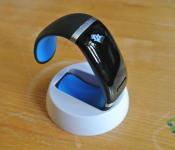
[Review] L12S OLED Bluetooth Bracelet Watch from GearBest: What do you get from a $30 wearable device?
 The wearable device market is currently booming, and there’s no shortage of options depending on what you want from your wearable. Smartwatches are a particularly hard fought battleground with the essential formula of smartwatches still up for interpretation. If you want a smartwatch right now, your options range from the wildly popular Pebble watch at around $150, to the brand-new Android Wear watches which will set you back around $250; obviously there are watches in and around these price points, but these are the most popular. With that range of prices in mind, what could the $30 (or $31.43 USD, to be exact) L12S OLED Bluetooth Bracelet Watch from GearBest hope to achieve in such a competitive climate? Well, that’s what we’re here to find out.
What’s in the box
 The bracelet watch comes accompanied by a charging cable and a stand should you want to show off your latest acquisition. The bracelet watch is charged using a micro-USB cable, so for us Android users, it’s nice to know that we can charge it wherever we are.
 The bracelet watch itself looks quite sleek. That shiny, plastic exterior definitely gives a futuristic first impression and it’s definitely something that gets noticed more often than it doesn’t; like most wearable devices, it’s a great conversation starter. There’s only one visible button on the bracelet watch and just the one port for charging, making it a very homogeneous exterior. On the underside of the bracelet watch is what is supposed to be a heart rate sensor and inside the device is a fairly robust vibration motor.
 The bracelet watch also comes in other colours. We have the blue one here, but you can also get it in orange, red, yellow, white, purple, green and black.
How does it perform
 This is where the review gets interesting. I’m sure many people who come across this review will dismiss the bracelet watch before even learning about what it can do. To be honest, before reviewing this bracelet watch, I might have done the same; however, I was determined to give it a chance.
 First of all, I’d like to talk about the interface. While the curved glass panel takes up about 40% of the outside surface of the device, the actual screen of the device makes up a very small portion of it. In fact, it’s positively tiny, which means you have to scroll through menu items one at a time. It must be said, though, that the same has to be done on the Samsung Galaxy Gear, which made spectacularly bad use of its screen real estate.
Despite the small screen, quite a large area of the glass top case can be used as a touch interface. Yes, a touch interface on a $30 device. It’s not perfect, but it does register up, down and long press commands, and it appears to be of a capacitive nature, making it quite responsive. It takes a bit of getting used to exactly which areas are for which function, but overall it is quite a nice control scheme.
 The bracelet watch connects to your smartphone via Bluetooth and as easy to connect as any Bluetooth device. Unfortunately though, the Bluetooth radio in the bracelet watch doesn’t appear to automatically reconnect (despite the Bluetooth indicator on the screen sometimes staying on).
The features that are said to be available on the bracelet watch include:
- Mobile sync music player
- Call remind, answer and ID display
- SMS remind and read
- Pedometer
 Of all the functions that are available to the bracelet watch, being able to answer your phone on the smartwatch is kind of neat, though I don’t think I would do it in public. The microphone is very clear from a reasonable distance away from your face, though the speaker is very quiet and wouldn’t be usable in a moderately crowded place. Not that you would. In the car, depending on how noisy your car is, the road noise may slightly drown out the diminutive speaker. This speaker is also supposed to be used as a music speaker, but I would again say that it lacks the power to truly do this effectively.
Of the other features, none of them really strike me as particularly well implemented; the pedometer feature is a bit rough and the SMS push notifications only work for SMS, and in an age where most people use third party messaging apps, that’s a bit inconvenient. That said, there are digital watches that cost $30 and don’t do half the things this bracelet watch is able to.
What I like about the L12S OLED Bluetooth Bracelet Watch
 I like the touch screen on the bracelet watch. Perhaps it’s just my amazement that a $30 has a functioning capacitive touchscreen and my $150 Pebble watch doesn’t, but it really was quite convenient and nice to use throughout the time I reviewed this device. Sure, it could have had swipe and other functionality as well, but for what it is, I was impressed.
I also do like being able to answer calls on the bracelet watch as a Bluetooth headset. Yes, it’s kind of gimmicky and perhaps isn’t that practical, but I haven’t had enough experience with answering calls on my arm to to say otherwise.
What I don’t like about the L12S OLED Bluetooth Bracelet Watch
I don’t like that there isn’t a mute, or volume function at all, for the key tone that happens when you interact with the device. This makes it particularly conspicuous in office situations, especially when the tone that is made sounds like the key pad tones from a Nokia 5110.
 I also don’t like how tight the mouth of the bracelet watch is; while it’s not uncomfortable to wear, it is quite difficult to put on and take off. My wrists are quite skinny already, so people with thicker wrists might struggle as the band is not adjustable; sure there’s a little give in the band, but it’s not the most comfortable device to be removing regularly.
Final Thoughts
 The review of this L12S OLED Bluetooth Bracelet Watch has been very interesting for me; I’ve often wondered how there are always dirt-cheap versions of devices that exist and how they can possibly offer even part of what the more expensive devices do. The bracelet watch we reviewed here is not going to blow your mind; it says it can do quite a few things, and while it can, it doesn’t quite do it to the same level we might expect from other, more expensive devices. But then you remember the price.
I’m not saying the device’s shortcomings are made legitimate by the price, as there’s quite a lot that could be improved, but if you’re wondering if the wearable craze is right for you, there are worse ways to spend $30 and get a taste of what that world is like.
If you’re interested in trying the L12S OLED Bluetooth Bracelet Watch out, you can visit the product page on GearBest here and pick up the bracelet watch today for $31.43 USD.
Gallery of Photos


//<![CDATA[
ord = window.ord || Math.floor(Math.random()*1E16);
document.write('’);
//]]>
The post [Review] L12S OLED Bluetooth Bracelet Watch from GearBest: What do you get from a $30 wearable device? appeared first on AndroidSPIN.
 AIVAnet